How to Generate Screenshots in Bulk with an API
Learn how to capture many URLs with a screenshot API, handle queued jobs and partial failures, and save each image reliably.

To generate screenshots in bulk, collect and validate your URLs, send them to a provider’s batch endpoint with shared capture settings, save the returned job ID, then poll or listen for completion and retrieve each result. Treat every URL as separate rendering work even when one API request submits the whole list. Track status per URL so a few failed pages do not invalidate a large batch.
The exact request and result workflow depends on the API. Some providers return image URLs directly; others queue a job and later provide an archive or individual artifacts. This guide covers the provider-neutral workflow, working examples for three documented batch APIs, and the operational details that keep a bulk run manageable.
1. Prepare the URL list and capture settings
Start by making the input list explicit and deterministic. Keep the original URL with every result so you can tell which page produced which image, even if the provider returns artifacts in a different order.
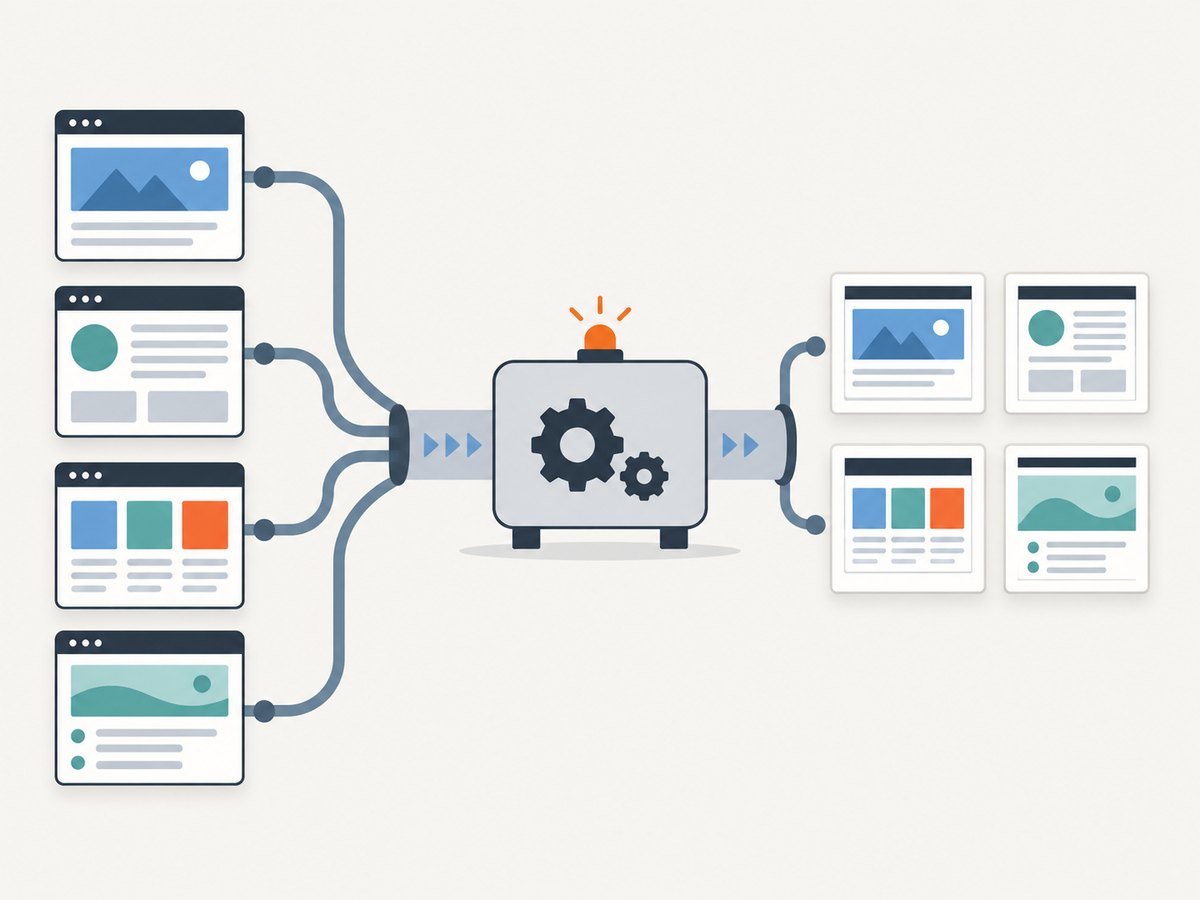
- Normalize URLs and reject malformed entries before submission. Decide how to handle duplicate URLs: capture them twice only if distinct output settings or a fresh render are required.
- Group pages that need the same viewport, output format, full-page behavior, authentication, or custom headers. Separate requests when those settings differ.
- Choose shared settings first, then use per-URL overrides only where needed. This makes the batch easier to reason about and reduces accidental configuration drift.
- Estimate the number of screenshots, not just the number of batch requests. Providers can count each URL against a quota or request bucket.
- Persist a run identifier and the submitted URL list before dispatch. That gives you a recovery point if your process stops after the provider accepts the work.
Do not place API keys in a URL that might be logged or exposed to a browser. Follow the provider’s documented credential method, and keep credentials out of request logs and generated reports.
2. Understand the batch patterns
Batch APIs commonly use one of three result patterns: immediate per-URL results, a queued job with polling, or a queued job with an event stream or webhook. Check the API contract before writing your worker. A batch request is an orchestration convenience; it does not guarantee parallel rendering, a single quota charge, or a single downloadable file.
| Provider | Submission and result pattern | Documented constraints to check |
|---|---|---|
| ScreenshotOne | POST to /bulk; shared options can be overridden per request. Results can include screenshot URLs and per-request status summaries when execution is requested. |
Its documentation says bulk requests still use the regular one-minute request bucket. |
| url2image | POST to /api/v1/batch, receive a batch ID, poll the job, then download a ZIP archive. |
Documentation lists up to 500 URLs per batch, a 2 MB uploaded-list limit, and 14-day result and image retention. Verify current terms. |
| Screenshot API | POST to /api/v1/screenshot/batch, then follow the batch with a status endpoint or SSE stream. |
Documentation lists PNG, JPEG, WebP, and PDF options and describes free-plan limits. Verify current limits. |
These are provider-published details, not a shared API standard or independent comparison. Endpoints and limits can change; use each provider’s current documentation as the source of truth.
3. Submit and retrieve a batch
The code below shows the general shape of a queued batch flow using url2image’s documented pattern. The endpoint expects a provider-specific payload; confirm its current authentication and request schema before running. The example deliberately separates submission, polling, and archive retrieval so each stage can be retried safely.
curl -X POST "https://url2image.com/api/v1/batch" \
  -H "Authorization: Bearer YOUR_API_KEY" \
  -H "Content-Type: application/json" \
  -d '{
    "urls": ["https://example.com/", "https://example.org/"],
    "options": {
      "width": 1440,
      "height": 900,
      "format": "webp",
      "full_page": true
    }
  }'
Save the returned batch ID in durable storage. Poll the provider’s documented status route at a measured interval and stop when it reports completion or a terminal failure. Once complete, retrieve the archive using the documented download URL and unpack it while maintaining a mapping from each artifact to its input URL. The endpoint and exact field names above illustrate the documented workflow; use the current API schema for executable provider-specific integration.
Choose polling or events
- Polling: simplest to operate. Use a delay that respects provider rate limits and avoid tight loops. Increase the delay during long jobs, and cap total wait time according to your application’s needs.
- Server-sent events (SSE): useful when the service documents a live status stream. Reconnect on network interruption and fetch final status after reconnecting; an event stream should not be your only record of job state.
- Webhook: convenient for long-running work if offered. Verify signatures, make handlers idempotent, and acknowledge promptly before doing expensive downloads.
Use a durable state machine such as submitted, running, complete, and failed. Record artifact references and per-URL errors as they arrive. A worker restart should resume from the last recorded state rather than submitting the entire batch again.
4. Handle partial failures and retries
Bulk runs often produce mixed outcomes: most pages render, while a few time out, reject automation, or fail due to a transient network issue. Store a result row for every URL with at least the input URL, capture settings, status, output reference, and failure reason. Do not mark the whole batch successful just because an archive exists.
| Outcome | Recommended handling |
|---|---|
| Successful capture | Save the output under a stable name and retain its URL-to-file mapping. |
| Transient timeout or network error | Retry only the failed URL, with bounded exponential backoff and jitter. |
| Rate limit | Pause according to the provider’s retry guidance; reduce submission or polling rate. |
| Invalid URL or unsupported input | Correct or exclude it; repeating the same request will not fix the input. |
| Authentication or quota error | Fix credentials or capacity before resubmitting. Avoid retry storms on permanent errors. |
Use an idempotency key if the provider documents one. Otherwise, keep your own run ID and compare submitted inputs before retrying submission; a lost response after acceptance can otherwise create duplicate work. Retry transient failures only, and respect documented limits for retry count and delay.
5. Capture options that matter at scale
The useful options vary by provider, but these are the settings to decide before a large run:
- Viewport: width and height determine responsive layout. Use a consistent viewport for comparisons, and avoid grouping mobile and desktop pages under one shared configuration.
- Output format: PNG preserves crisp edges, JPEG is useful for photographic content, and WebP can reduce file size when the destination supports it. PDF is appropriate for document-like output rather than a simple image preview.
- Full-page capture: captures beyond the initial viewport where supported. Long pages can take longer and produce larger artifacts; lazy-loaded images may need explicit handling.
- Per-item overrides: useful when a few URLs need a different wait condition or viewport, but keep the number of exceptional configurations understandable.
- Authentication: private pages may require cookies or headers. Treat those as secrets and ensure output storage has appropriate access controls.
- Wait behavior: pages that render content asynchronously may need a selector wait or delay. A fixed long delay for every URL wastes time on fast pages.
Before scaling, run a small representative sample covering short and long pages, responsive layouts, pages behind authentication, and pages with dynamic content. This is a configuration check, not a performance benchmark. Adjust settings based on the intended output and provider documentation.
6. Orchestrate throughput, performance, and cost
Concurrency, quotas, render duration, artifact size, and retention all affect a bulk job. Ask the provider how it counts requests, whether batch items share a rate limit, whether failed renders consume quota, and how long results remain downloadable. ScreenshotOne documents that bulk requests use its regular one-minute request bucket; url2image documents a batch-size and uploaded-list limit. Those examples show why “one API call” does not tell you the actual capacity or price of a run.
- Calculate expected image count and approximate storage from a sample output, then compare that with your retention plan.
- Set a concurrency ceiling based on published limits. Increase it gradually while observing timeouts and rate-limit responses.
- Keep submission workers separate from status polling and downloads, so a slow archive transfer cannot block new work.
- Store artifacts in your own storage if they must outlive the provider’s documented retention period.
- Review quota and billing behavior before a large run. Budget by screenshot count and expected retries, not by batch-call count alone.
For reliability, record timestamps and response status for submissions, polling, and retrieval. Alert on batches stuck beyond an expected duration, but make the threshold operational rather than claiming a provider guarantee. Keep raw provider errors for diagnosis while avoiding secrets in logs.
7. Troubleshooting common problems
| Symptom | Likely cause | Fix |
|---|---|---|
| Batch submission returns a validation error | Malformed URL, wrong JSON shape, unsupported option, or oversized request body. | Validate inputs locally, check the current schema, and split the list to fit published limits. |
| Job remains queued or running | Queue delay, slow pages, or polling the wrong job reference. | Confirm the saved batch ID, use a sensible poll interval, and inspect provider status details. |
| Some files are missing from the archive | Per-URL failures or incomplete job state. | Compare artifact count with submitted URLs and retry only failed entries. |
| Repeated 429 or rate-limit errors | Submission or status checks exceed the documented request bucket. | Back off, reduce concurrency, and avoid polling every job too frequently. |
| Images show loading placeholders | Capture occurred before client-side content or lazy images finished loading. | Use a supported selector wait, delay, or full-page option and test on representative pages. |
| Duplicate batches appear | Client retried after a lost submission response without idempotency protection. | Use a documented idempotency key or reconcile against your own run ledger before resubmitting. |
| Download link has expired | Provider retention window elapsed. | Download completed artifacts promptly and copy durable outputs to your own storage. |

8. Or skip the browser setup
If you do not need to manage browser workers, queues, and artifact retrieval yourself, ScreenshotNeo accepts screenshot requests through one API call and also provides bulk capture for up to 100 URLs per call. Its API includes capture controls for viewport, format, full page, caching, authentication, and more. See the ScreenshotNeo API documentation for request parameters and current integration details.
curl -G "https://api.screenshotneo.com/v1/shot" -d access_key=YOUR_API_KEY --data-urlencode url=https://stripe.com -o shot.webpFor a single URL, that GET request returns an image or PDF. For batch jobs, send up to 100 URLs per call and associate each result with its input. Cookie and consent banners, newsletter popups, and chat widgets are removed before the shot; each cleanup step can be turned off. Bot checks, blank pages, timeouts, failed loads, and cache hits cost nothing, with the outcome reflected in response headers. ScreenshotNeo also has an MCP server so AI agents using Claude, Cursor, or another MCP client can take screenshots.
The free plan includes 1,000 screenshots a month with no card. Paid plans start at $5 for 3,000 screenshots; every feature is on every plan. Sign up free for 1,000 screenshots a month, with no card.
9. FAQ
Does sending 100 URLs mean one screenshot credit?
Not necessarily. A provider may count each rendered URL, even when one request submits a whole list. Check the provider’s quota rules before estimating cost.
Should every URL go into the same batch?
Only when the pages can share the relevant capture settings and credentials. Split pages into groups when viewport, authentication, or wait behavior differs.
How often should I poll a batch?
Use the provider’s guidance and rate limits. Start with a moderate delay, avoid concurrent tight loops, and prefer documented event notifications for long-running jobs.
Can I make the results deterministic?
You can make inputs and capture settings consistent, but dynamic page content may still change between renders. Record capture time and settings alongside each artifact.
10. Bulk capture checklist
- Validate and group URLs by shared settings.
- Know the provider’s batch size, rate limits, quota accounting, and result retention.
- Persist the run ID and URL mapping before submitting.
- Track status and errors per URL, not only per batch.
- Retry transient failures with bounded backoff; do not retry permanent input or credential errors.
- Download and store artifacts before provider retention expires.
- Estimate spend and storage using screenshot count, not API call count.


