How to Handle HTTP Client Errors in PHP
Distinguish HTTP responses from transport failures in PHP, inspect error bodies safely, and handle cURL, Guzzle, Symfony, and streams.
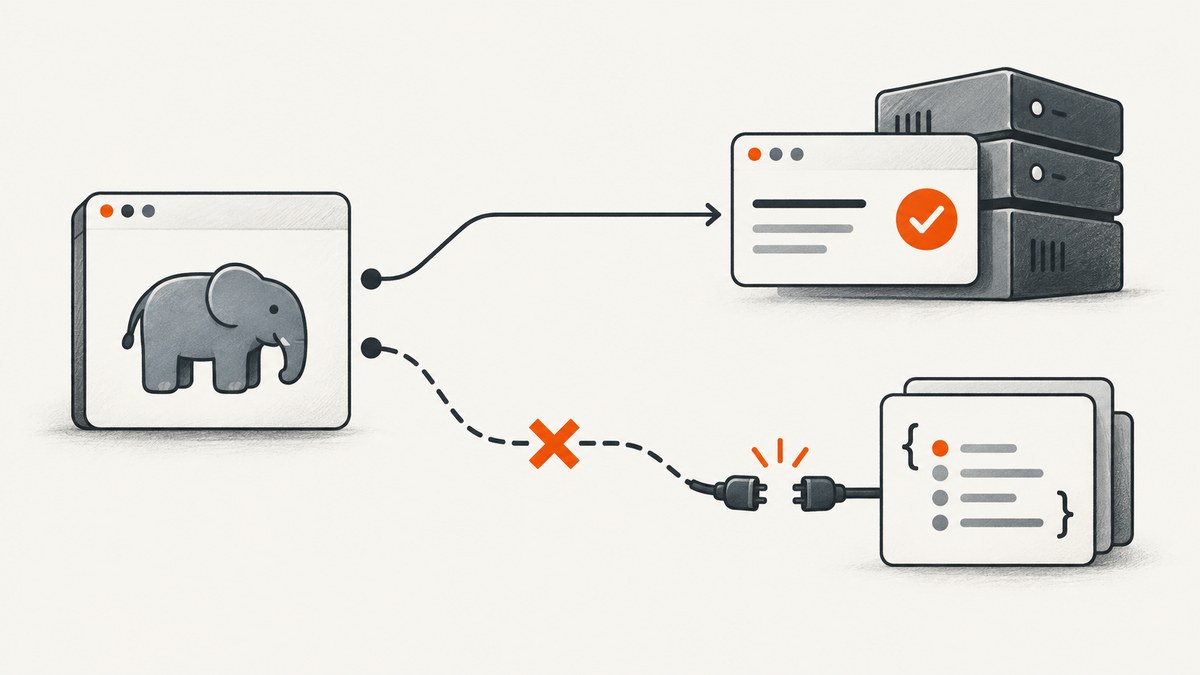
HTTP client errors in PHP fall into different categories, and each needs a different response. A 404 or 500 is an HTTP response that reached your program. A DNS failure, refused connection, or timeout may happen before any response exists. A third problem occurs when the response arrives but its body cannot be decoded. Preserve the status, headers, and body whenever they are useful, and configure your HTTP library deliberately instead of catching every exception as if it meant the same thing.
This guide shows complete patterns for PHP streams, cURL, Guzzle, and Symfony HttpClient. It also covers retries, response parsing, observability, performance, and common failure modes.
1. Identify which kind of failure occurred
| Failure | What happened | What you can inspect | Typical action |
|---|---|---|---|
| HTTP error response | The server returned a 3xx, 4xx, or 5xx response. | Status, headers, and body. | Apply API-specific handling; do not automatically retry. |
| Transport failure | DNS, connection, TLS, timeout, or socket failure prevented a usable response. | Exception or client error message; usually no response body. | Check connectivity and retry only when safe. |
| Decoding failure | A response body cannot be represented as JSON or another requested format. | Status and raw body may still be available. | Log bounded raw content and handle the schema problem. |
A 404 proves that an HTTP response was received; it does not prove that your application operation succeeded. Conversely, a transport exception does not provide a status code to inspect. Your catch blocks and return values should retain that distinction.

2. Native PHP HTTP streams
The HTTP stream wrapper normally does not return the body for an error status. Set ignore_errors to true when you need to read an error response, then inspect the status line and headers. PHP exposes response metadata through $http_response_header in the scope where the request was made; redirects can produce multiple header blocks, so select the final response.
<?php
$url = 'https://api.example.test/items';
$context = stream_context_create([
    'http' => [
        'method' => 'GET',
        'ignore_errors' => true,
        'timeout' => 10,
        'header' => [
            'Accept: application/json',
            'User-Agent: my-php-client/1.0',
        ],
    ],
]);

$body = file_get_contents($url, false, $context);
$headers = $http_response_header ?? [];

$status = null;
foreach ($headers as $line) {
    if (preg_match('~^HTTP/\\S+\\s+(\\d{3})~', $line, $m)) {
        $status = (int) $m[1];
    }
}

if ($body === false) {
    throw new RuntimeException('The stream request failed before a usable response was read.');
}

if ($status !== null && $status >= 400) {
    error_log(sprintf('HTTP %d: %s', $status, substr($body, 0, 2000)));
    // Convert the API-specific error into your application's error type.
}

$data = json_decode($body, true);
if ($status !== null && $status < 400 && json_last_error() !== JSON_ERROR_NONE) {
    throw new RuntimeException('Successful response was not valid JSON: '.json_last_error_msg());
}
The wrapper’s ignore_errors option allows content to be fetched for failure statuses; it does not make the request successful. See the PHP HTTP context options and HTTP wrapper documentation for redirect and header details.
Stream edge cases
- DNS or connection failure:
file_get_contents()returnsfalseand emits a warning. Convert warnings to exceptions with a temporary error handler if your application needs structured handling. - Redirects: multiple status lines may be present. Use the last status line unless you intentionally disabled redirects.
- Empty body: test explicitly for
false; an empty string is a valid response body. - Large responses: prefer a streaming client or a bounded read strategy instead of loading an untrusted body into memory.
3. PHP cURL: separate transfer errors from HTTP status
cURL considers a transfer successful when it receives the response, even when the status is 404 or 500. The PHP manual states: “response status codes which indicate errors (such as 404 Not found) are not regarded as failure.” Check curl_exec() === false for a transfer failure and inspect CURLINFO_HTTP_CODE separately.
<?php
$ch = curl_init('https://api.example.test/items');
curl_setopt_array($ch, [
    CURLOPT_RETURNTRANSFER => true,
    CURLOPT_HEADER => false,
    CURLOPT_CONNECTTIMEOUT => 5,
    CURLOPT_TIMEOUT => 20,
    CURLOPT_HTTPHEADER => ['Accept: application/json'],
]);

$body = curl_exec($ch);
if ($body === false) {
    $message = curl_error($ch);
    $number = curl_errno($ch);
    curl_close($ch);
    throw new RuntimeException("Transport error ($number): $message");
}

$status = curl_getinfo($ch, CURLINFO_HTTP_CODE);
$contentType = curl_getinfo($ch, CURLINFO_CONTENT_TYPE);
curl_close($ch);

if ($status >= 400) {
    $error = json_decode($body, true);
    throw new RuntimeException(sprintf(
        'HTTP %d (%s): %s',
        $status,
        $contentType ?: 'unknown content type',
        substr($body, 0, 2000)
    ));
}

$data = json_decode($body, true, 512, JSON_THROW_ON_ERROR);
Do not use if (!$body): a valid response can be an empty string. If you need response headers, set CURLOPT_HEADER and split them carefully, or use CURLINFO_HEADER_SIZE; redirects can create several header sections. The curl_exec manual documents these return semantics.
4. Guzzle: choose exception or status handling
Guzzle’s http_errors option controls whether 4xx and 5xx responses become exceptions. With the default behavior in common Guzzle versions, a 4xx produces a ClientException, a 5xx produces a ServerException, and network failures produce a ConnectException. Verify the documentation for your installed major version because defaults and class details are version-sensitive.
Let Guzzle throw, while preserving the response
<?php
use GuzzleHttp\Client;
use GuzzleHttp\Exception\ClientException;
use GuzzleHttp\Exception\ConnectException;
use GuzzleHttp\Exception\ServerException;

$client = new Client(['timeout' => 20, 'connect_timeout' => 5]);
try {
    $response = $client->request('GET', 'https://api.example.test/items', [
        'headers' => ['Accept' => 'application/json'],
        'http_errors' => true,
    ]);
    $data = json_decode((string) $response->getBody(), true, 512, JSON_THROW_ON_ERROR);
} catch (ClientException|ServerException $e) {
    $response = $e->getResponse();
    $status = $response ? $response->getStatusCode() : null;
    $body = $response ? (string) $response->getBody() : '';
    error_log(sprintf('HTTP error %s: %s', $status ?? 'unknown', substr($body, 0, 2000)));
} catch (ConnectException $e) {
    error_log('No usable HTTP response: '.$e->getMessage());
}
Inspect every status yourself
<?php
$response = $client->request('GET', 'https://api.example.test/items', [
    'http_errors' => false,
]);
$status = $response->getStatusCode();
$body = (string) $response->getBody();

if ($status >= 400) {
    $payload = json_decode($body, true);
    // Map $status and $payload to a domain error.
} else {
    $payload = json_decode($body, true, 512, JSON_THROW_ON_ERROR);
}
This mode is useful when an API uses structured error bodies or when 404 is a normal business result. Do not catch only a broad base exception if your application needs to tell HTTP failures from connection failures.
5. Symfony HttpClient: lazy responses and explicit status checks
Symfony defines separate HttpExceptionInterface, TransportExceptionInterface, and DecodingExceptionInterface categories. On 300–599 responses, getHeaders(), getContent(), and toArray() throw unless you pass false. Response evaluation is lazy, so transport errors can occur when a response method is called, not only when request() returns.
<?php
use Symfony\Component\HttpClient\HttpClient;
use Symfony\Contracts\HttpClient\Exception\DecodingExceptionInterface;
use Symfony\Contracts\HttpClient\Exception\HttpExceptionInterface;
use Symfony\Contracts\HttpClient\Exception\TransportExceptionInterface;

$client = HttpClient::create([
    'timeout' => 20,
    'max_duration' => 30,
]);

try {
    $response = $client->request('GET', 'https://api.example.test/items', [
        'headers' => ['Accept' => 'application/json'],
    ]);

    $status = $response->getStatusCode();
    $headers = $response->getHeaders(false);
    $raw = $response->getContent(false);

    if ($status >= 400) {
        $error = json_decode($raw, true);
        // Handle the status and error payload explicitly.
    } else {
        $data = $response->toArray();
    }
} catch (TransportExceptionInterface $e) {
    error_log('Transport failure: '.$e->getMessage());
} catch (DecodingExceptionInterface $e) {
    error_log('Response could not be decoded: '.$e->getMessage());
} catch (HttpExceptionInterface $e) {
    // Applies when a response method was called without allowing errors.
    error_log('Unhandled HTTP response: '.$e->getMessage());
}
Symfony’s current documentation describes a built-in retry mechanism with up to three retries and exponential delay for selected statuses. The exact statuses and method rules are version-sensitive; read the documentation for your Symfony version before relying on defaults. An explicit status check with false gives your code ownership of the policy.
6. Retry policy: when repeating a request is safe
- Classify the cause. DNS failures, connection resets, timeouts, 502, 503, and 504 can be transient; 400, 401, 403, and validation errors generally require a corrected request.
- Confirm idempotency. Repeating GET, HEAD, and usually PUT or DELETE is safer than repeating a payment or order-creation POST. Use an idempotency key when the API supports one.
- Limit attempts and total elapsed time. Use exponential backoff with jitter so many workers do not retry simultaneously.
- Honor server guidance such as
Retry-After, and record each attempt. - Never retry malformed JSON, authentication failures, or a deterministic schema error without changing the request.
7. Preserve useful diagnostics safely
Log the request method, host, path, status, elapsed time, retry count, correlation ID, and a bounded, redacted error body. Never log authorization headers, cookies, API keys, or complete personal data. Keep the raw body available to the code that maps provider errors, but return a stable domain error to callers so internal details do not leak.
8. Performance and reliability considerations
- Reuse a configured Guzzle or Symfony client so connection pooling can reduce handshake overhead.
- Set both connect and overall timeouts. A connect timeout alone does not prevent a server that continually sends bytes from holding a worker.
- Stream large downloads rather than casting the complete body to a string.
- Use concurrency only for independent, idempotent requests, with a bounded worker count.
- Validate content type and size before decoding untrusted JSON.
- Measure status classes, transport exceptions, latency, retries, and response size separately; a 500 and a timeout are different operational signals.
9. Troubleshooting checklist
| Symptom | Cause | Fix |
|---|---|---|
curl_exec() returns a body for 404 |
HTTP status is not a cURL transfer failure. | Check curl_getinfo($ch, CURLINFO_HTTP_CODE). |
| Guzzle catch block has no response | A connection exception occurred before an HTTP response. | Handle ConnectException separately. |
| Guzzle throws unexpectedly on 400 | http_errors is enabled. |
Set http_errors => false and inspect status, or catch the HTTP exception and read its response. |
| Symfony throws while reading content | getContent() or toArray() rejects a 3xx–5xx response. |
Call the method with false, then handle the status explicitly. |
| Stream body is empty on 500 | ignore_errors remained false. |
Set it to true and inspect response headers. |
| JSON parsing fails on a successful status | The server returned HTML, an empty body, or malformed JSON. | Check content type, retain a bounded raw body, and use JSON_THROW_ON_ERROR where appropriate. |
| Retries create duplicate records | A non-idempotent request was repeated. | Use an idempotency key or disable automatic retries for that operation. |
10. Or skip the browser setup
If your PHP application needs screenshots rather than a browser automation stack, ScreenshotNeo provides a single GET request that returns PNG, JPEG, WebP, or PDF. It accepts cookie and consent banners as a visitor and removes more than 60 known consent platforms, newsletter popups, and chat widgets before capture. Bot checks, blank pages, timeouts, failed loads, and cache hits are not billed, and response headers identify the page verdict and billing result. See the ScreenshotNeo API documentation for all options.

<?php
$url = 'https://api.screenshotneo.com/v1/shot?'.http_build_query([
    'access_key' => 'YOUR_API_KEY',
    'url' => 'https://stripe.com',
]);
$ch = curl_init($url);
curl_setopt_array($ch, [CURLOPT_RETURNTRANSFER => true, CURLOPT_TIMEOUT => 90]);
$image = curl_exec($ch);
if ($image === false) {
    throw new RuntimeException(curl_error($ch));
}
$status = curl_getinfo($ch, CURLINFO_HTTP_CODE);
curl_close($ch);
if ($status >= 400) {
    throw new RuntimeException('ScreenshotNeo returned HTTP '.$status);
}
file_put_contents('shot.webp', $image);
ScreenshotNeo also supports full-page and element captures, dark mode, device presets, retina scale, custom CSS and JavaScript, click and wait actions, request blocking, headers, cookies, user agents, timezone and geolocation, transparent backgrounds, resizing, TTL caching, signed image links, asynchronous webhooks, bulk capture, PDF options, HTML-to-image, usage reporting, and an MCP server with take_screenshot, get_page_info, and capture_pdf for AI agents.
Free accounts include 1,000 screenshots each month with no card. Paid plans start at $5 for 3,000 shots, and every feature is available on every plan. Create a free ScreenshotNeo account.
11. FAQ
Should every 4xx or 5xx be an exception?
No. If an API uses 404 or 409 as a normal business outcome, disable automatic exceptions and map the status deliberately.
Can I read an error body after an exception?
Usually yes when the client received an HTTP response. Guzzle exceptions expose the response; Symfony lets you call content methods with false. A transport exception has no response body.
Why did my timeout have no status code?
The connection or response timed out before a complete usable response existed. Treat it as a transport failure and apply an idempotency-aware retry policy.
Which client should I choose?
Use streams for small, dependency-free requests, cURL for low-level control, Guzzle for a widely used object-oriented client, and Symfony HttpClient when its lazy responses and retry features fit your Symfony application.


