How to Handle Infinite Scroll Pages in Python
Build reliable Python infinite-scroll automation with Playwright or Selenium: target the right container, wait for changes, deduplicate, and stop safely.

Short answer: infinite scroll works when your Python script scrolls the element that actually owns the scroll position, waits for a measurable page-state change, collects stable items, and stops on evidence such as an end marker or repeated lack of progress. Scrolling the browser window once and sleeping for two seconds is not a reliable strategy.
This guide shows a complete Playwright implementation, a Selenium equivalent, nested scroll-container techniques, deduplication, bounded stopping rules, troubleshooting, and operational guidance. The selectors and end conditions are site-specific: no universal selector can load every infinite list.
1. Understand what infinite scroll is doing
An infinite-scroll page usually renders an initial batch, watches a trigger, then requests and inserts another batch. The trigger may be:
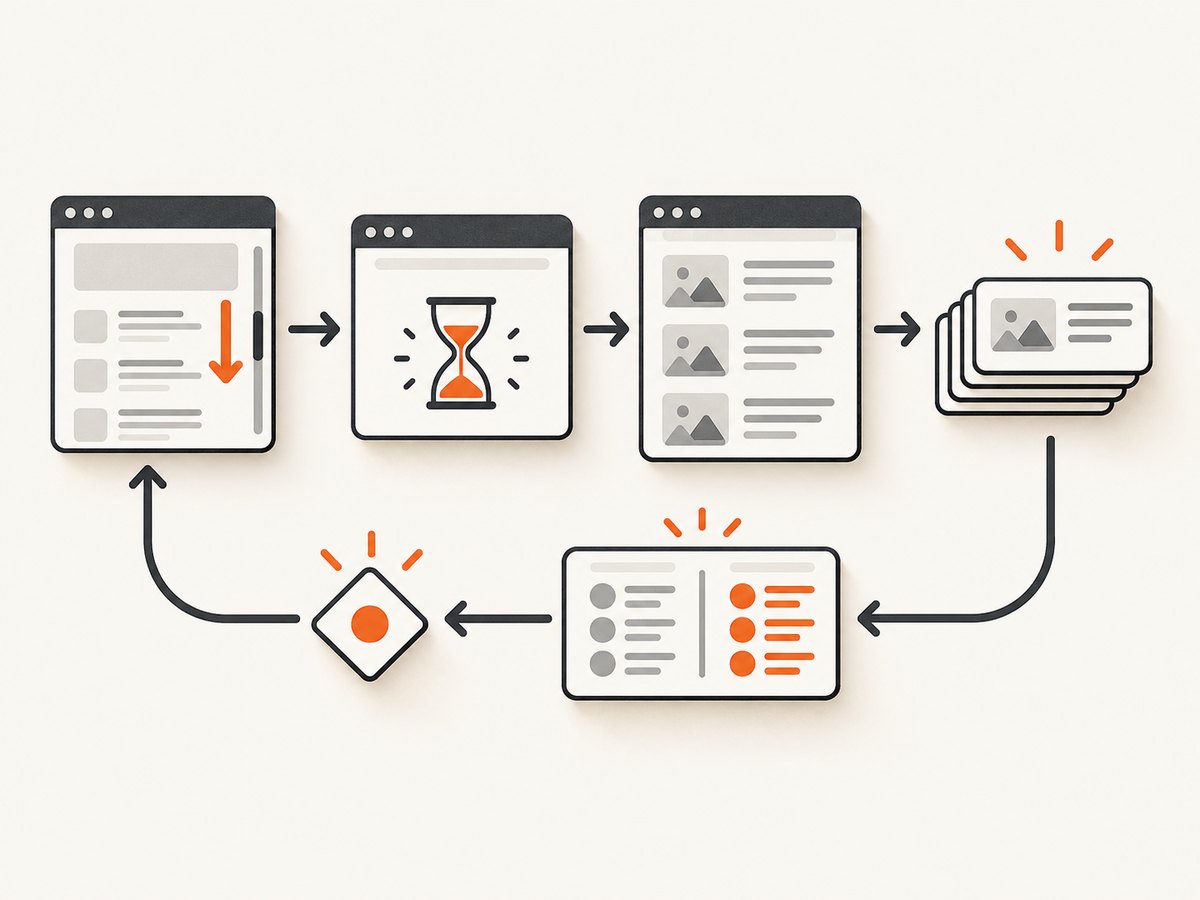
- A footer or sentinel element entering the viewport.
- The document window approaching its bottom.
- A nested list with its own scrollbar.
- A “Load more” button that is clicked instead of scrolled.
- A framework observer that needs a particular element to become visible.
Playwright documents scrolling a target into view to trigger an infinite list, mouse-wheel scrolling, and direct changes to a selected container’s scrollTop value. Its locator API also provides auto-waiting and retry behavior. See the Playwright input actions and Playwright locator documentation.
Before writing a loop, inspect the page in developer tools:
- Find the repeated item selector, such as
article[data-id]or.product-card. - Find the element that moves when you scroll. Check whether it is
document.scrollingElementor a nested element withoverflow: auto. - Look for a sentinel, end-of-results message, disabled button, or request that signals completion.
- Identify a stable key for each item: a data attribute, URL, or canonical ID.
2. Install Python and Playwright
python -m pip install playwright
python -m playwright install chromium
The following script is a complete pattern. Replace the URL, selectors, and the site-specific readiness condition. It scrolls a sentinel, waits for the item count to increase, stores only unseen records, and exits after bounded stalled rounds.
from __future__ import annotations

import json
from pathlib import Path
from typing import Any

from playwright.sync_api import Page, TimeoutError as PlaywrightTimeoutError, sync_playwright

URL = "https://example.com/infinite-list"
ITEM_SELECTOR = "article[data-id]"
SENTINEL_SELECTOR = "#infinite-scroll-sentinel"
END_SELECTOR = "text=No more results"
MAX_STALLED_ROUNDS = 3
ITEM_WAIT_MS = 10_000


def read_items(page: Page) -> list[dict[str, Any]]:
    """Read currently rendered items and return JSON-safe records."""
    records = []
    for item in page.locator(ITEM_SELECTOR).all():
        key = item.get_attribute("data-id")
        link = item.locator("a").first.get_attribute("href")
        text = item.inner_text().strip()
        if key is None:
            key = link or text
        records.append({"id": key, "url": link, "text": text})
    return records


def end_marker_visible(page: Page) -> bool:
    marker = page.locator(END_SELECTOR)
    return marker.count() > 0 and marker.first.is_visible()


with sync_playwright() as p:
    browser = p.chromium.launch(headless=True)
    page = browser.new_page(viewport={"width": 1440, "height": 900})
    page.goto(URL, wait_until="domcontentloaded", timeout=60_000)

    # Wait for the first batch using a locator state, not a fixed sleep.
    page.locator(ITEM_SELECTOR).first.wait_for(state="visible", timeout=ITEM_WAIT_MS)

    collected: dict[str, dict[str, Any]] = {}
    stalled_rounds = 0
    previous_count = 0

    while stalled_rounds < MAX_STALLED_ROUNDS:
        if end_marker_visible(page):
            break

        # Bringing the sentinel into view is often the actual trigger.
        sentinel = page.locator(SENTINEL_SELECTOR)
        if sentinel.count():
            sentinel.last.scroll_into_view_if_needed()
        else:
            page.mouse.wheel(0, 1200)

        try:
            # Wait until the list changes. If it does not, the timeout is handled below.
            page.wait_for_function(
                "([selector, oldCount]) => document.querySelectorAll(selector).length > oldCount",
                [ITEM_SELECTOR, previous_count],
                timeout=ITEM_WAIT_MS,
            )
        except PlaywrightTimeoutError:
            pass

        current = read_items(page)
        for record in current:
            collected[str(record["id"])] = record

        current_count = len(current)
        if current_count > previous_count:
            stalled_rounds = 0
        else:
            stalled_rounds += 1
        previous_count = current_count

    Path("items.json").write_text(
        json.dumps(list(collected.values()), indent=2, ensure_ascii=False),
        encoding="utf-8",
    )
    print(f"Collected {len(collected)} unique items")
    browser.close()
The script deliberately does not call locator.all() until each collection pass. Playwright warns that locator.all() does not wait for matching elements and can be unpredictable while a list is changing. Let the list reach a meaningful state first, then read it. The Page API reference also recommends locator-based operations over older selector-wait patterns.
3. Wait for the right condition
A navigation event only proves that the initial document loaded. Later batches arrive asynchronously. Prefer one of these conditions:
- Count increase: wait until the number of item nodes is greater than the previous count.
- New key: wait for a known item ID or URL that appeared after the request.
- Sentinel state: wait for a loading indicator to disappear or a sentinel to become visible.
- Network response: when the endpoint is stable and documented, wait for a matching response.
- End marker: treat a visible “end” message as completion.
A fixed delay can be a fallback for a site with no observable signal, but it should be combined with a progress check. A delay alone cannot prove that content arrived. Selenium’s Python documentation explains the same underlying issue: elements may load at different times, so explicit waits are needed. See Selenium waits.
4. Scroll a nested container instead of the window
If the page has a chat-like or table-like panel with its own scrollbar, scrolling window will not load its records. Use a locator and set its scroll position:

container = page.locator(".results-panel")
container.wait_for(state="visible")

last_height = 0
for _ in range(100):
    height = container.evaluate("el => el.scrollHeight")
    if height == last_height:
        break
    last_height = height
    container.evaluate("el => el.scrollTop = el.scrollHeight")
    page.wait_for_timeout(300)  # fallback only; still check item progress
For a sentinel inside that panel, prefer:
page.locator(".results-panel .sentinel").scroll_into_view_if_needed()If a script changes the DOM but keeps the same item count by virtualizing rows, count-based progress will fail. In that case, collect stable IDs on every pass and stop after several passes with no new IDs.
5. Selenium version
Install Selenium and a matching browser driver:
python -m pip install seleniumThis example uses an explicit wait for a larger item count and scrolls a sentinel into view:
from selenium import webdriver
from selenium.webdriver.common.by import By
from selenium.webdriver.support.ui import WebDriverWait
from selenium.common.exceptions import TimeoutException

URL = "https://example.com/infinite-list"
ITEMS = (By.CSS_SELECTOR, "article[data-id]")
SENTINEL = (By.CSS_SELECTOR, "#infinite-scroll-sentinel")

options = webdriver.ChromeOptions()
options.add_argument("--headless=new")
driver = webdriver.Chrome(options=options)
wait = WebDriverWait(driver, 15)

def count_items(_driver):
    return len(_driver.find_elements(*ITEMS))

try:
    driver.get(URL)
    wait.until(lambda d: count_items(d) > 0)
    previous = count_items(driver)
    stalled = 0

    while stalled < 3:
        sentinel = driver.find_elements(*SENTINEL)
        if sentinel:
            driver.execute_script(
                "arguments[0].scrollIntoView({block: 'center'});", sentinel[-1]
            )
        else:
            driver.execute_script("window.scrollTo(0, document.body.scrollHeight);")

        try:
            wait.until(lambda d: count_items(d) > previous)
        except TimeoutException:
            pass

        current = count_items(driver)
        stalled = 0 if current > previous else stalled + 1
        previous = current
finally:
    driver.quit()
Choose the framework already used by your project. The research sources document Playwright’s locator and scrolling patterns and Selenium’s explicit-wait concept, but they do not establish a universal winner.
6. Collect, deduplicate, and preserve progress
Infinite lists can re-render existing nodes, insert sponsored cards, or recycle a small set of DOM rows. Store records by a stable key rather than appending every visible node on every pass.
seen = {}
for node in page.locator("article[data-id]").all():
    key = node.get_attribute("data-id")
    if key:
        seen[key] = {
            "id": key,
            "title": node.locator("h2").inner_text(),
        }
Write checkpoints after each successful round for long jobs. A checkpoint lets you resume or diagnose the exact round where progress stopped. Record the URL, timestamp, item count, newest key, and any visible loading or end marker. Do not assume DOM order is permanent; sort later using a source-provided date or ID when required.
7. Stop safely
Use more than one stopping rule:
- Stop immediately when the site’s end marker is visible.
- Stop when a “Load more” control is absent or disabled.
- Stop when no new stable IDs appear for a bounded number of rounds.
- Stop at a business limit, such as 10,000 records or a deadline.
- Abort on repeated navigation, browser, or server errors and save the checkpoint.
Never claim that reaching the absolute bottom guarantees completion. Some sites paginate behind an API, require a click, throttle requests, or load only when a particular sentinel is observed.
8. Common failures and fixes
| Symptom | Likely cause | Fix |
|---|---|---|
| Only the first batch is returned | The wrong element was scrolled, or the trigger is a sentinel | Inspect scrollable ancestors and call scroll_into_view_if_needed() on the trigger. |
| The loop never ends | No end marker and no progress bound | Track stable IDs, cap stalled rounds, and add a maximum item or time limit. |
| Timeout waiting for more items | Slow request, blocked request, or selector mismatch | Verify the selector in DevTools, inspect network errors, increase the condition timeout, and capture a screenshot for diagnosis. |
| Duplicate records | Existing nodes are collected on every pass | Deduplicate by a stable ID or canonical URL. |
locator.all() returns inconsistent data |
The list is still changing | Wait for a count, loading state, or specific item before collecting. |
| Scrolling changes nothing | A virtualized list recycles nodes, or a nested container owns scrolling | Track IDs instead of node count and set the nested element’s scrollTop. |
| Headless mode differs from headed mode | Responsive layout, overlays, or viewport-dependent behavior | Set an explicit viewport, use the same user agent where appropriate, and inspect a headed run. |
| Bot check or CAPTCHA appears | The site has challenged automation | Respect the site’s access controls; do not attempt to bypass a challenge. Save the partial result and stop. |
9. Performance, reliability, and cost
- Use the smallest useful viewport and browser context: a consistent viewport makes selectors and trigger positions predictable.
- Wait on state, not arbitrary long sleeps: this reduces idle time on fast responses while still allowing slow batches.
- Limit retained HTML: extract fields and IDs, then discard page fragments if the list is very large.
- Throttle responsibly: follow the site’s terms, robots guidance where applicable, and rate limits. Parallel browser pages can increase load and trigger defenses.
- Persist checkpoints: save after each progress round so a crash does not restart the entire crawl.
- Capture evidence on failure: save the current URL, console errors, a screenshot, and the last item key.
Browser automation has a real cost in startup time and memory. If your goal is only a static visual of a page after its initial load, a screenshot API may be simpler. If you need every record, filtering, authentication flows, or interaction with the list, keep a browser and implement the site-specific loop.
Or skip the browser setup
ScreenshotNeo is useful when the deliverable is a clean screenshot or PDF rather than extracted records. It accepts one GET request and can wait for a selector, delay, or network idle; load lazy images for full-page captures; capture one CSS-selected element; run custom JavaScript; click an element; hide selectors; set cookies, headers, user agents, timezone, and geolocation; block ads, trackers, requests, or resource types; and use caching with a chosen TTL.
Cookie banners, newsletter popups, and chat widgets are removed before the shot. Bot checks, blank pages, timeouts, failed loads, and cache hits are not billed, and response headers identify the page verdict and billing status. An MCP server provides take_screenshot, get_page_info, and capture_pdf tools to Claude, Cursor, and other MCP clients.
See the ScreenshotNeo documentation for all options. The same request in common clients is:
curl -G "https://api.screenshotneo.com/v1/shot" -d access_key=YOUR_API_KEY --data-urlencode url=https://stripe.com -o shot.webpimport requests
r = requests.get("https://api.screenshotneo.com/v1/shot", params={"access_key": "YOUR_API_KEY", "url": "https://stripe.com"}, timeout=90)
open("shot.webp", "wb").write(r.content)const q = new URLSearchParams({ access_key: 'YOUR_API_KEY', url: 'https://stripe.com' });
const res = await fetch(`https://api.screenshotneo.com/v1/shot?${q}`);The Free plan includes 1,000 screenshots each month with no card. Paid plans start at $5 for 3,000 shots, and every feature is available on every plan. Create a free ScreenshotNeo account.
FAQ
How do I scroll to the bottom with Python?
Scroll the actual owner of the scroll position, usually a sentinel or nested container, then wait for a page-state change. A single window.scrollTo call is insufficient for asynchronous lists.
Should I use a fixed sleep?
Use it only as a fallback. A locator state, count increase, loading-state transition, or matching response is stronger evidence that a batch arrived.
Why does scrolling fail to load results?
You may be scrolling the window while a nested element owns the scrollbar, missing a sentinel trigger, using an incorrect item selector, or encountering a bot check or failed request.
Can I extract an infinite list without a browser?
Only when the site exposes a documented or discoverable data endpoint that you are allowed to use. Otherwise, the browser is what executes the page’s JavaScript and interaction logic.
How many stalled rounds should I allow?
There is no universal number. Start with a small bounded value such as three, then adjust after observing the site’s request latency and rendering behavior. Always keep a total item or time limit too.


