How API Links Work in Web Applications
Learn how API endpoint URLs and response links connect web apps to data and actions, with runnable Fetch, cURL, Python, and Node.js examples.

1. The short answer
An API link is a URL involved in a web application’s request to a server. The application sends an HTTP request to an endpoint URL, such as https://api.example.com/users/123, with a method like GET and any required headers or body. The server checks the request and returns a response, often JSON. The app reads that response and updates its interface or performs another step.
There are two related meanings of “API link”:
- Endpoint URL: the address the client sends a request to.
- Response link: a URL included in an API response that points to a related resource or action.
They are not interchangeable. An endpoint is where a request goes; a response link is information the server gives the client about where it could go next. Some APIs provide navigational links, and some return data without them.
A URL alone does not specify the whole call. The HTTP method, authentication, headers, query parameters, and sometimes a request body also matter. An OpenAPI document can describe these parts for an API, but it is a machine-readable description, not the live endpoint itself. OpenAPI Specification 3.0.4 describes how API interfaces can support documentation, code generation, and testing.
2. What happens when a web app follows an API link
- Start with the server and path. The app knows an API base URL and an endpoint path, either from configuration, documentation, or a link returned by an earlier response.
- Build the request. Client code chooses an HTTP method and adds query parameters, headers, authentication, or a body as required.
- The server checks it. The server may validate the request, authenticate the caller, and check whether that caller has permission for the operation.
- Read the response. The server returns a status code and usually a representation such as JSON. A response may also include links to related resources or actions.
- Update the application. The client displays returned data or follows a relevant link if the workflow requires another request.
Here is a generic, illustrative example. It is not a tested service response:

GET https://api.example.com/users/123

{
  "id": 123,
  "name": "Ari",
  "links": [
    { "rel": "self", "href": "/users/123" },
    { "rel": "orders", "href": "/users/123/orders" }
  ]
}
The rel value describes the link’s relationship, while href supplies its target. Link formats differ between APIs. The OGC API – Common standard describes a links structure with an href URI and a relationship label, but applications should follow the format documented by their particular API.
3. Endpoint URLs, base URLs, and response links
Endpoint and base URL
A base URL identifies the API server or a server prefix. An endpoint path identifies a resource or operation under it. For example, a documentation page might define https://api.example.com as the server and /users/{userId} as a path. Combining them with userId=123 produces https://api.example.com/users/123.
OpenAPI allows server URLs and paths to be described separately. Relative server references are resolved using the applicable server base URL, so read the API description instead of assuming every path is rooted at the domain you happen to see.
Response links
A response link can point to the current resource, a related collection, or an available action. It can help a client discover the next request without hard-coding every path. But not all APIs use hypermedia, and there is no single JSON shape that every API must use. An API might put links in a JSON field, use an HTTP Link header, or omit navigational links entirely.
OpenAPI also has a Link description object for relating operations in the API description. That description construct does not mean the live response must contain a link. Check the API’s response documentation to learn what clients actually receive.
Links do not grant permission
A URL is an address, not an authorization token. A server can require authentication and can allow different actions for different users. For example, OpenProject documents responses where an update link depends on the authenticated user’s permission, and requests requiring authentication can receive HTTP 401 when credentials are missing or invalid. Treat returned links as instructions to try a request under the documented security rules, not as a way around them.
4. Call an API from browser JavaScript
The browser’s fetch function sends HTTP requests and returns a promise for a response. This runnable example requests a public JSON endpoint; replace the URL with an endpoint whose documentation permits browser access.
async function loadUser() {
  const response = await fetch('https://api.example.com/users/123', {
    method: 'GET',
    headers: {
      Accept: 'application/json'
    }
  });

  if (!response.ok) {
    throw new Error(`API request failed: ${response.status} ${response.statusText}`);
  }

  const user = await response.json();
  document.querySelector('#user-name').textContent = user.name;
  return user;
}

loadUser().catch((error) => {
  console.error('Could not load user:', error);
});
In HTML, provide a target element such as <div id="user-name"></div>. The response’s Content-Type should match the representation you expect; calling response.json() is appropriate for JSON, not for every possible response body.
For a JSON write operation, serialize the body and set its content type as the API requires:
async function createUser() {
  const response = await fetch('https://api.example.com/users', {
    method: 'POST',
    headers: {
      Accept: 'application/json',
      'Content-Type': 'application/json'
    },
    body: JSON.stringify({ name: 'Ari' })
  });

  if (!response.ok) {
    throw new Error(`Create failed: ${response.status}`);
  }

  return response.json();
}
Do not place a long-lived secret API key in browser code: visitors can inspect client-side code and requests. Use the provider’s intended public-token flow where available, or have your own server make authenticated calls. The exact authentication scheme is API-specific.
5. Call the same endpoint from a server or terminal
These examples show a GET request to an illustrative endpoint. The endpoint and fields are placeholders. Use the actual URL, credentials, parameters, and response format documented by the service.
cURL
curl --fail-with-body \
  --header 'Accept: application/json' \
  'https://api.example.com/users/123'
For an API that requires a bearer token, add the documented authorization header and keep the token out of committed scripts:
curl --fail-with-body \
  --header 'Accept: application/json' \
  --header "Authorization: Bearer $API_TOKEN" \
  'https://api.example.com/users/123'
Python
import os
import requests

url = "https://api.example.com/users/123"
headers = {"Accept": "application/json"}

# Add this only if the API uses bearer-token authentication.
if os.environ.get("API_TOKEN"):
    headers["Authorization"] = f"Bearer {os.environ['API_TOKEN']}"

response = requests.get(url, headers=headers, timeout=20)
response.raise_for_status()
user = response.json()
print(user)
Install the dependency with python -m pip install requests. A timeout prevents the client from waiting indefinitely for a response. For production code, handle request exceptions and validate the fields the application relies on.
Node.js
const url = 'https://api.example.com/users/123';
const headers = { Accept: 'application/json' };

// Add this only if the API uses bearer-token authentication.
if (process.env.API_TOKEN) {
  headers.Authorization = `Bearer ${process.env.API_TOKEN}`;
}

const response = await fetch(url, { method: 'GET', headers });
if (!response.ok) {
  throw new Error(`API request failed: ${response.status} ${response.statusText}`);
}
const user = await response.json();
console.log(user);
Use a Node.js version that provides the global fetch API, or use the HTTP client approved for your project. Like the Python example, this code expects JSON; inspect status and content type before parsing when the endpoint may return other formats.
6. Query parameters, headers, and request bodies
API documentation defines which inputs an operation accepts. Common pieces include:
| Request part | What it does | Example |
|---|---|---|
| Path | Identifies a resource or operation | /users/123 |
| Query | Filters, paginates, or changes representation | ?limit=20&cursor=abc |
| Method | Communicates the operation type | GET, POST |
| Headers | Carry metadata, negotiation, or credentials | Accept: application/json |
| Body | Provides input data for methods that accept one | JSON object for a documented create operation |
Build query strings with URL utilities rather than concatenating arbitrary text. This encodes reserved characters correctly:
const url = new URL('https://api.example.com/users');
url.searchParams.set('limit', '20');
url.searchParams.set('query', 'Ari & Lee');
console.log(url.toString());
In Python, use a client’s parameter support (for example, requests.get(url, params={"limit": 20})). In cURL, use --get and --data-urlencode for query values that may contain spaces or reserved characters. Avoid putting secrets in query strings unless the provider explicitly requires it: URLs are often recorded in logs and browser history.
7. CORS: why browser calls can fail while cURL works
Cross-origin resource sharing (CORS) is a browser-enforced rule for JavaScript requests to a different origin. A command-line request can reach an API while a browser refuses to expose the response because the server did not return the CORS headers needed for the page’s origin. This does not necessarily mean the endpoint is down.
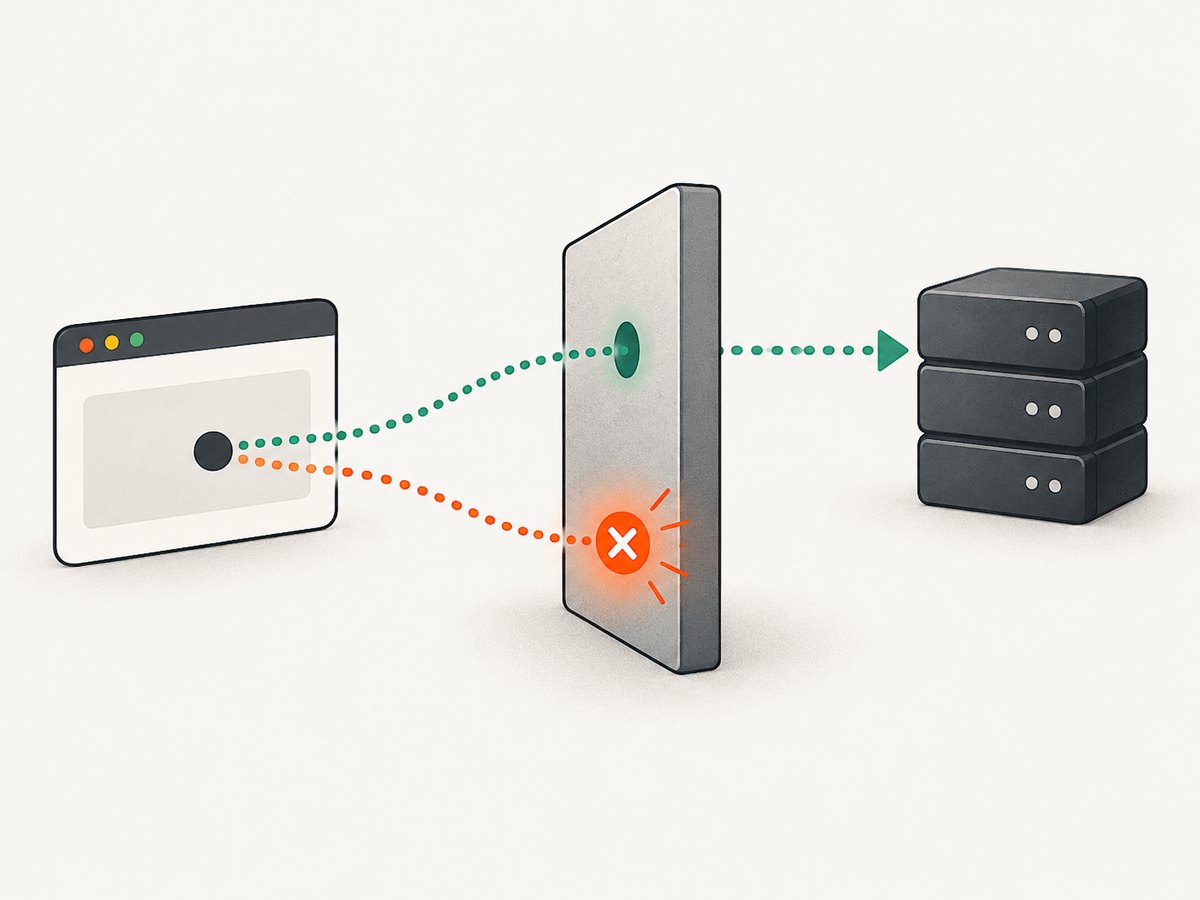
The API provider controls whether browser origins are allowed. WordPress.com’s browser API guide, for example, documents origin whitelisting for its browser use case. For an API you operate, configure the allowed origins and methods deliberately. For a third-party API, use its documented browser flow or make the request through your backend if direct browser access is not supported. Do not try to “fix” CORS by disabling browser protections for users.
Requests with certain methods or headers may cause the browser to send an OPTIONS preflight request before the actual call. The server must handle that preflight consistently with its CORS policy. Authentication and CORS are separate checks: a request can be allowed by CORS and still receive an authorization error.
8. Handle response links safely
If the API returns links and its documentation says clients should follow them, treat their values as data from the server. Resolve relative references against the response URL or the base specified by the API, and use a standards-aware URL parser. Do not assume a relative link is rooted at the website’s home page.
Before following a link, consider whether its host is expected, whether credentials should be sent to that host, and whether the link represents a safe read or a state-changing action. Follow the provider’s documented authentication rules. A link may be absent because an action is unavailable, a collection may be paginated, or the API may not expose hypermedia navigation at all.
For resilient clients, check that expected fields exist before rendering them. Handle empty collections, missing optional links, unexpected content types, non-success statuses, and malformed JSON. Avoid assuming that a link will always be present or that an action remains authorized between displaying it and making the request.
9. Use OpenAPI to understand an API
When a service publishes an OpenAPI description, use it to identify server URLs, paths, supported methods, parameters, request bodies, response schemas, and security requirements. Documentation tools can render the description, and code generation or testing tools can use it as structured input. Still, confirm that the document corresponds to the API version your app calls.
OpenAPI can describe how one operation relates to another, but a description is not a live guarantee that every response includes navigable links. The running service’s response format and behavior remain the source of truth for what a client receives. When debugging, compare the documented operation with the actual method, URL, headers, and body your client sent.
10. Common errors and fixes
| Symptom | Likely cause | What to check |
|---|---|---|
| Browser reports a CORS error | The API does not allow the page’s origin or preflight request | Provider’s browser-access instructions, allowed origin, methods, and headers |
| HTTP 401 | Credentials are missing, expired, or invalid | Authentication scheme, token audience, expiry, and whether the header is sent |
| HTTP 403 | The caller is authenticated but lacks permission, or access is otherwise forbidden | Account role, resource access, and operation permissions |
| HTTP 404 | Wrong base URL, path, resource ID, or API version | Join server and path as documented; encode path values and check version |
| HTTP 405 | Method is not supported by that endpoint | Use the documented method; do not infer it from the URL |
| HTTP 415 | Request body media type is unsupported | Set the documented Content-Type and send the expected format |
| HTTP 429 | Rate limit or quota reached | Provider’s limit policy and any retry guidance; back off before retrying |
| JSON parsing fails | Response is empty, HTML, an error payload, or another format | Status and Content-Type before parsing; inspect a safe response sample |
| cURL works, browser fails | Often CORS, browser credentials policy, or mixed-content restrictions | Browser console and network panel; compare origin and request headers |
| Returned action link is missing | API omits links or the user is not permitted to perform that action | Response schema, permissions, and API-specific link conventions |
Log the method, host, path, status, and a request identifier if the provider supplies one. Redact authorization headers, cookies, and sensitive response fields. For a failing request, compare a known-good example from the API docs with the actual outgoing request one field at a time.
11. Performance, reliability, and cost
Every API call adds network time and another dependency to the user flow. Request only the fields and records needed, use pagination for large collections, and avoid serial calls when independent requests can safely run concurrently. Respect provider rate limits. If a response can be cached under the API’s rules, caching may reduce repeated work; do not cache private or rapidly changing data without considering freshness and access controls.
Reliability requires more than checking whether a promise resolved. Set reasonable timeouts where the client supports them, distinguish transport failures from HTTP error responses, and retry only when appropriate. A retry of a read request is often simpler than retrying a state-changing request: for writes, understand idempotency and the provider’s guidance so a lost response does not cause duplicate actions.
Costs and quotas depend on the API provider and plan. Check the service’s current pricing, request limits, and overage behavior before designing a polling loop or high-volume integration. Browser calls also consume the user’s connection and can expose latency directly in the interface; loading states and clear failure handling help users understand what happened.
12. Or skip the browser setup
If your goal is to inspect a web page as an image or PDF, that is a different task from calling a data API. You can set up a browser automation stack yourself, or use ScreenshotNeo, a website screenshot API and MCP server. Its one-call API returns a PNG, JPEG, WebP, or PDF from a URL. See the ScreenshotNeo API documentation.
curl -G "https://api.screenshotneo.com/v1/shot" -d access_key=YOUR_API_KEY --data-urlencode url=https://stripe.com -o shot.webpPython:
import requests

r = requests.get(
    "https://api.screenshotneo.com/v1/shot",
    params={"access_key": "YOUR_API_KEY", "url": "https://stripe.com"},
    timeout=90,
)
open("shot.webp", "wb").write(r.content)
Node.js:
const q = new URLSearchParams({ access_key: 'YOUR_API_KEY', url: 'https://stripe.com' });
const res = await fetch(`https://api.screenshotneo.com/v1/shot?${q}`);
ScreenshotNeo accepts cookie and consent banners like a visitor and removes more than 60 known consent platforms, newsletter popups, and chat widgets before capture; each step can be turned off. Bot checks and CAPTCHAs, blank pages, timeouts, failed loads, and cache hits cost nothing, and response headers say which verdict applied and whether the request was billed. Its MCP server provides take_screenshot, get_page_info, and capture_pdf for Claude, Cursor, and other MCP clients. The free plan includes 1,000 shots a month with no card; paid plans start at $5 for 3,000 shots. Every feature is on every plan.
Create a free ScreenshotNeo account for 1,000 screenshots a month with no card.
13. FAQ
Is an API URL the same as a website URL?
Both are URLs, but an API URL is intended for a programmatic request and usually returns structured data or another machine-readable response. A website URL commonly serves a page for a browser to display.
Does every API response contain links?
No. Some APIs return related links or actions; others return only data. Use the service’s documented response format.
Can I open an endpoint URL in the address bar?
Sometimes, if it accepts a browser-style GET request and needs no special authentication. Many endpoints require headers, credentials, or a method other than GET, so a direct visit may not work.
Does OpenAPI make API calls?
No. OpenAPI describes an HTTP API in a machine-readable format. A client still sends requests to the service’s live endpoints.
14. A practical checklist
- Find the correct API version, base URL, path, and HTTP method.
- Check required query parameters, headers, body format, and authentication.
- Use browser JavaScript only when the API’s CORS policy permits it.
- Check status and content type before parsing the body.
- Treat returned links as optional, permission-aware data and resolve relative URLs correctly.
- Handle timeouts, rate limits, missing fields, and safe retry behavior.
- Keep secrets on the server and redact them from logs.
The core idea is straightforward: a web app sends a correctly formed HTTP request to an API endpoint and interprets the response. If that response contains links, they can guide the next step, subject to the API’s format, authentication, and permissions.


