How to Mirror a Website
Learn how to copy an authorized website for offline browsing with HTTrack or Wget, handle JavaScript limits, verify files, and capture clean screenshots.

To mirror a website, crawl an authorized scope with HTTrack or GNU Wget, save the files to a local directory, then open and verify the copy offline. A mirror can preserve pages, images, stylesheets, documents, and rewritten links for local browsing, but it may miss content created by JavaScript, login-protected areas, or interactive features.
What website mirroring means
A website mirror is a local collection of downloaded pages and assets arranged so that links can work without an internet connection. It is useful for offline reference, archiving, documentation review, and authorized migration preparation.
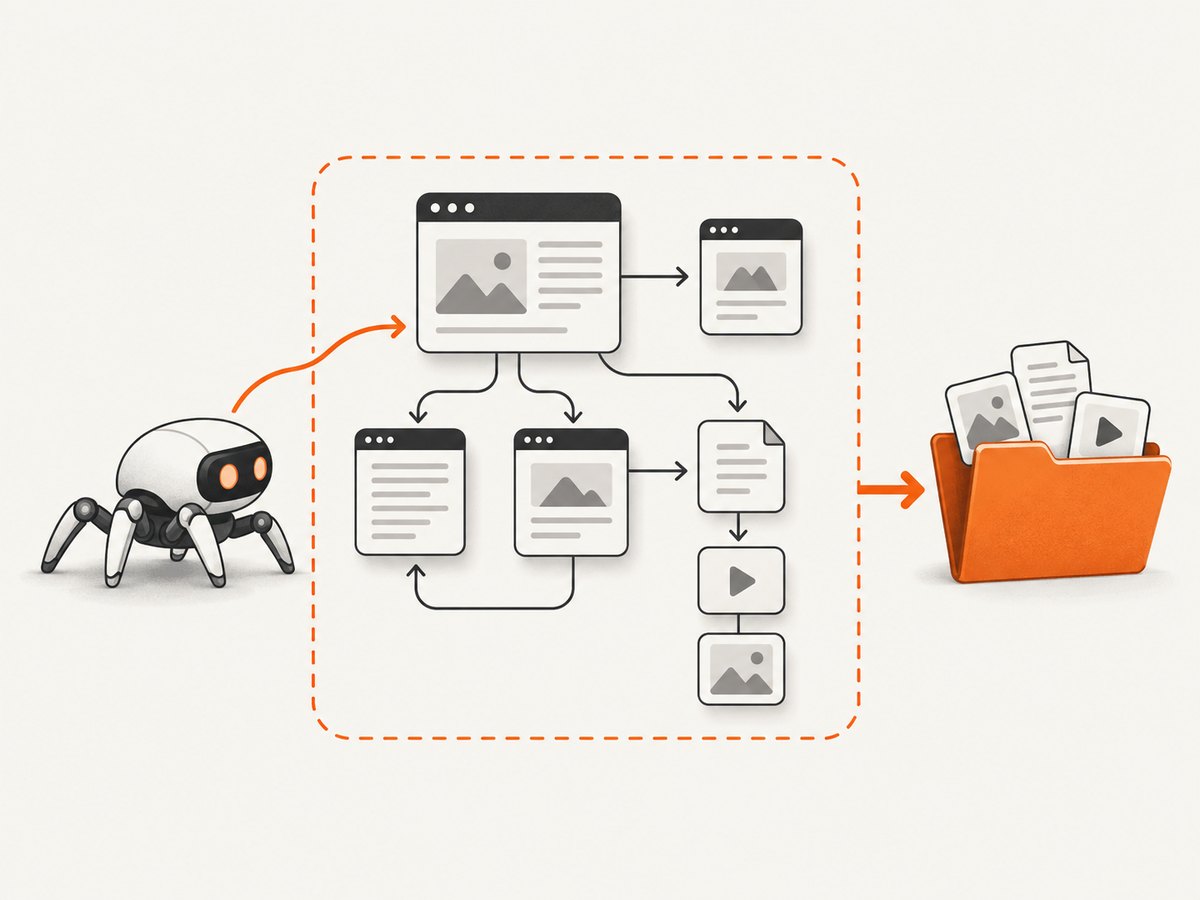
Mirroring is different from taking a single screenshot or exporting a database. A crawler follows links within a defined scope and stores the resources it can fetch. Dynamic application state, server-side actions, and content loaded only after interaction may not be represented.
Before you start: permission and scope
- Confirm authorization. Ask the site owner or follow the applicable terms before copying. A crawler’s ability to retrieve a URL does not grant permission to redistribute it or bypass access controls. HTTrack’s FAQ recommends asking authorization before creating a mirror.
- Define the boundary. Choose a domain, subdirectory, or list of starting URLs. Decide whether linked external domains, file types, query-string variants, and large downloads belong in the copy.
- Plan storage. Use a destination with enough free space. A large archive can be placed on a separate external drive, but required capacity depends on the site’s files.
- Respect crawler rules. GNU Wget documents robots.txt support. Treat robots.txt and site terms as inputs to your plan, not as a complete answer to legal permission.
Method 1: mirror with HTTrack
HTTrack provides a guided interface and a command-line utility. The project documentation describes recursive downloads, local directory structures, link rewriting for offline browsing, resume support, and update mode. See the HTTrack manual and command-line and options documentation for platform-specific details.
Using the guided interface
- Install HTTrack for your operating system.
- Create a new project and choose a destination directory.
- Enter the starting URL or URLs.
- Set filters and limits so the crawl stays inside the scope you selected.
- Start the mirror and wait for the crawl to finish.
- Open the generated index or entry page from the destination directory.
Using the command line
A basic command is:
httrack "https://example.com/" -O "./mirror-example"Replace the URL and output directory with the site you are authorized to copy. Keep the first run narrow. HTTrack’s command-line options let you set filters, limits, link behavior, and other crawl controls; consult the current documentation before adding options to a production archive.
Resume and update an existing mirror
If a crawl is interrupted, rerun the project so HTTrack can continue where supported. When the source changes, use its update workflow rather than blindly creating a second copy. Inspect the refreshed result because both the live site and crawler behavior may have changed.
Method 2: mirror with GNU Wget
GNU Wget is a command-line utility for recursive downloads. Its official manual describes recursive retrieval, conversion of links for offline viewing, and robots.txt handling.
Basic recursive mirror
wget \\
  --recursive \\
  --convert-links \\
  --page-requisites \\
  --no-parent \\
  --directory-prefix=./mirror-example \\
  https://example.com/docs/
The options above request recursive downloads, rewrite links for local browsing, fetch page requisites such as stylesheets and images, prevent climbing above the starting path, and write into a chosen directory. Start with a directory or section when possible; mirroring an entire domain can grow quickly.
Useful Wget controls
| Need | Typical control | Why it matters |
|---|---|---|
| Stay below the starting path | --no-parent |
Prevents traversal into higher directories. |
| Offline links | --convert-links |
Rewrites downloaded links for local viewing. |
| Page assets | --page-requisites |
Requests resources needed to render pages. |
| Resume partial files | --continue |
Can continue downloads when the server supports range requests. |
| Limit recursion | --level=N |
Bounds link depth; choose a value appropriate to your scope. |
| Restrict domains | --domains=example.com with suitable host rules |
Keeps recursion from spreading to unrelated hosts. |
| Inspect activity | --server-response |
Helps diagnose redirects, status codes, and content types. |
Option names and behavior can vary by installed Wget version. Run wget --help and check the current GNU manual before relying on a flag in automation.
Verify the mirror offline
- Open the local entry page directly from the destination directory.
- Follow representative internal links, including nested paths.
- Check images, stylesheets, scripts, downloadable documents, and fonts that matter to your use case.
- Disconnect from the network or use an offline environment, then repeat the checks.
- Record missing pages and assets instead of assuming the mirror is complete.
Keep a manifest of the starting URLs, crawl date, tool and version, options, filters, and any errors. This makes a later refresh easier to compare.
What a crawler may miss
JavaScript-built URLs
HTTrack’s command-line guidance states that it does not run JavaScript. Links or API requests created at runtime can therefore be invisible to the crawler. A single-page application may save only its shell while leaving data, routes, or images absent.
Interactive and authenticated content
Login-protected pages, forms, infinite scroll, client-side search, shopping carts, personalized dashboards, and content revealed after clicks require special handling and manual verification. Do not bypass access controls just to make a mirror appear complete.
External services
Analytics, embedded video, payment widgets, chat systems, consent tools, and third-party APIs may remain unavailable offline even when their HTML references were downloaded. Decide whether those dependencies should be excluded, replaced in a test environment, or documented as unavailable.
Large or unusual resources
Video, archives, generated files, query-string URLs, and duplicate URLs can consume substantial time and storage. Use scope filters and depth limits, and review logs for repeated or unexpectedly large downloads.
Choosing between HTTrack and Wget
| Question | HTTrack | GNU Wget |
|---|---|---|
| Interface | Guided interface plus command line | Command line |
| Offline browsing | Local structure and link rewriting | Link conversion for offline viewing |
| Resume or refresh | Documented resume and update workflows | Use documented download and recursion controls |
| JavaScript execution | Does not run JavaScript | Not a browser runtime |
| Best starting point | Guided project setup for a first mirror | Repeatable terminal commands and scripts |
The reviewed documentation does not provide a controlled benchmark proving that one tool is universally faster or more complete. Choose based on scope controls, offline link behavior, operating system, command-line needs, authentication requirements, and how much manual verification you can perform.
Troubleshooting
| Symptom | Likely cause | Fix |
|---|---|---|
| The local page is blank or unstyled | Stylesheets or scripts were not downloaded, or paths were not rewritten. | Include page requisites, inspect the saved paths, and verify the mirror while offline. |
| Important pages are missing | The pages were outside the scope, beyond the recursion depth, blocked by filters, or created by JavaScript. | Review filters and depth, add explicit starting URLs, and manually capture runtime-only routes. |
| Only the homepage appears | Links are generated after JavaScript runs or navigation requires interaction. | Use a browser-based workflow for those routes and document the uncovered areas. |
| The crawl leaves the intended site | External links or hostnames were allowed. | Restrict domains, use path boundaries, and review the log before rerunning. |
| The mirror fills the disk | The scope includes large media, archives, duplicate query URLs, or too many pages. | Stop the crawl, add limits and filters, and move the destination to storage with sufficient capacity. |
| Access is denied | The resource requires authorization or rejects the client. | Obtain permission and use documented credentials or headers where appropriate. Do not bypass controls. |
| Links still go online | Link conversion was disabled or the link points to an unmirrored external resource. | Enable the tool’s offline conversion, then identify links outside the crawl scope. |
| Refresh removed or changed files | The live site changed or the crawler interpreted updates differently. | Keep a dated copy, compare manifests, and recheck important paths after every update. |
Performance, reliability, and cost
- Performance: Smaller scopes, bounded recursion, and filtered resource types finish sooner and produce less duplicate data. Network latency, server throttling, redirects, and asset size all affect runtime.
- Reliability: Save logs, keep the exact command, use resume or update workflows where supported, and verify representative pages offline. A successful exit does not prove that every dynamic feature was captured.
- Storage: Estimate from the downloaded files rather than page count alone. Images, video, archives, and duplicate URL variants can dominate disk use.
- Cost: HTTrack and Wget are free utilities, but the crawl still consumes bandwidth, time, local storage, and potentially hosting resources. Keep requests within the permission and rate limits of the source.

Or skip the browser setup
If you need rendered screenshots rather than a browsable offline copy, ScreenshotNeo returns a PNG, JPEG, WebP, or PDF from one GET request. Its capture flow accepts cookie and consent banners before the shot and removes more than 60 known consent platforms, newsletter popups, and chat widgets; each step can be turned off. Bot checks, blank pages, timeouts, failed loads, and cache hits are not billed, and the response identifies the result with X-Page-Verdict and X-Billed headers. It also provides an MCP server for AI agents with take_screenshot, get_page_info, and capture_pdf.
See the ScreenshotNeo API documentation for all options, including full-page and element capture, device presets, custom viewport and retina scale, PDF settings, custom CSS and JavaScript, waits, request blocking, headers, cookies, user agents, timezone, geolocation, transparent backgrounds, resizing, caching, signed links, asynchronous jobs, bulk capture, and usage reporting.
curl -G "https://api.screenshotneo.com/v1/shot" -d access_key=YOUR_API_KEY --data-urlencode url=https://stripe.com -o shot.webpimport requests
r = requests.get("https://api.screenshotneo.com/v1/shot", params={"access_key": "YOUR_API_KEY", "url": "https://stripe.com"}, timeout=90)
open("shot.webp", "wb").write(r.content)const q = new URLSearchParams({ access_key: 'YOUR_API_KEY', url: 'https://stripe.com' });
const res = await fetch(`https://api.screenshotneo.com/v1/shot?${q}`);There are 1,000 screenshots per month free with no card. Paid plans start at $5 for 3,000 shots. Create a free ScreenshotNeo account.
FAQ
Can I mirror a site I do not own?
Get authorization first and review the site’s terms. Retrieval success is not permission to copy or redistribute content.
Will a mirror work without internet access?
Static pages and downloaded assets can work offline after link conversion, but external services and runtime-generated content may not.
Does mirroring copy a database?
No. Crawlers retrieve web-accessible responses. They do not create a database backup or reproduce server-side application state.
How do I keep a mirror current?
Record the crawl configuration, use an update or resume workflow where supported, and verify important pages after each refresh.
Should I use an external drive?
Only when the mirror exceeds available local space or needs separate archival storage. Capacity depends on the site’s actual resources.


