How to Scrape a Website: Ultimate Guide for 2026
A practical guide to choosing an authorized data source, collecting only what you need, validating results, and handling legal and technical limits.
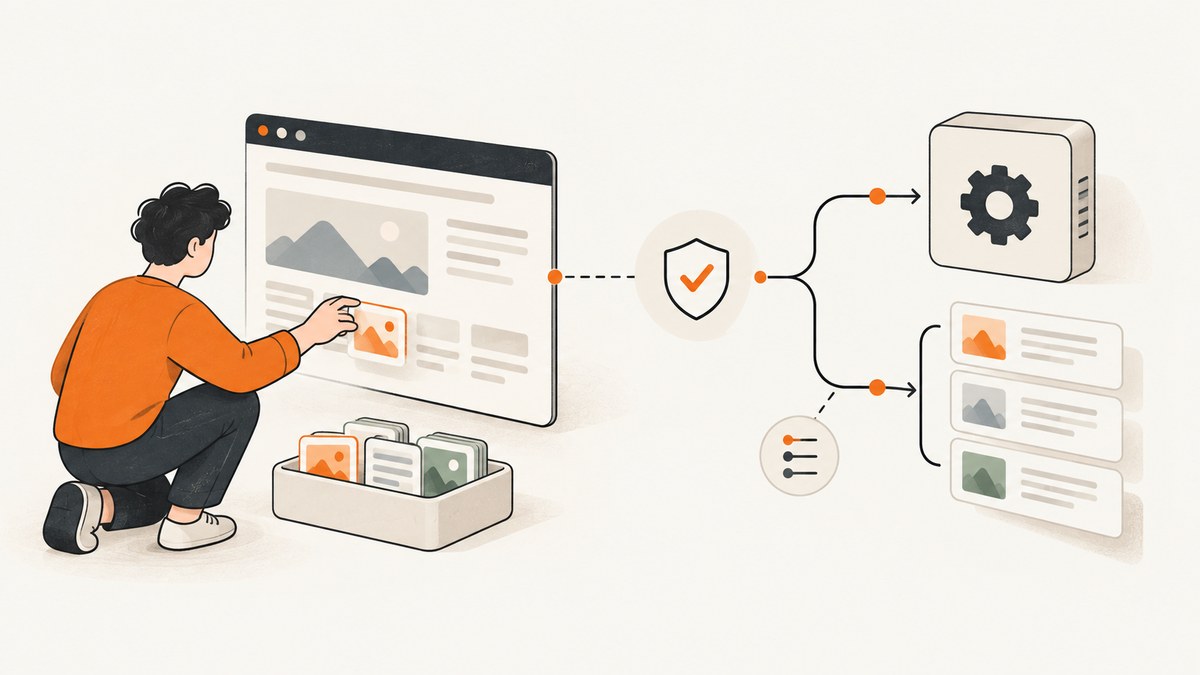
To scrape a website responsibly, first look for an API, export, feed, or other documented data source. Check the site’s current terms and crawler instructions, confirm that your planned access and reuse are permitted, retrieve only the pages and fields you need, and validate what you collect. If the project involves personal data, access controls, or substantial reuse of a database, assess the applicable legal requirements before collecting.
This guide walks through the complete workflow: scoping the job, selecting an access route, retrieving and parsing pages, validating and storing results, and troubleshooting common failures. The code examples show a small Python scraper for pages you are authorized to access. They are implementation examples, not a report of a live test.
1. Define the collection job
Write down the purpose and limits before writing code. A narrow scope makes it easier to choose a suitable source, reduce load, and avoid collecting information you do not need.
- What fields do you need? For example: product name and listed price, or article title and publication date.
- Why do you need them? Record the intended use, including whether results will be published, redistributed, or used to make decisions about people.
- How much and how often? Estimate the number of records and the refresh schedule. Do not assume a page should be fetched continuously.
- Could this include personal or sensitive data? If so, minimize collection and seek privacy review before proceeding.
Set an explicit stop condition too: stop if the site denies access, objects to the collection, or appears strained. Do not try to get around blocks, CAPTCHAs, login requirements, rate limits, or other technical controls.
2. Choose the right access route
Before requesting page HTML, check whether the site offers an official API, downloadable dataset, RSS feed, export, or documented developer interface. Those routes may have clearer permissions and more stable fields than page markup, but availability and terms vary by site.
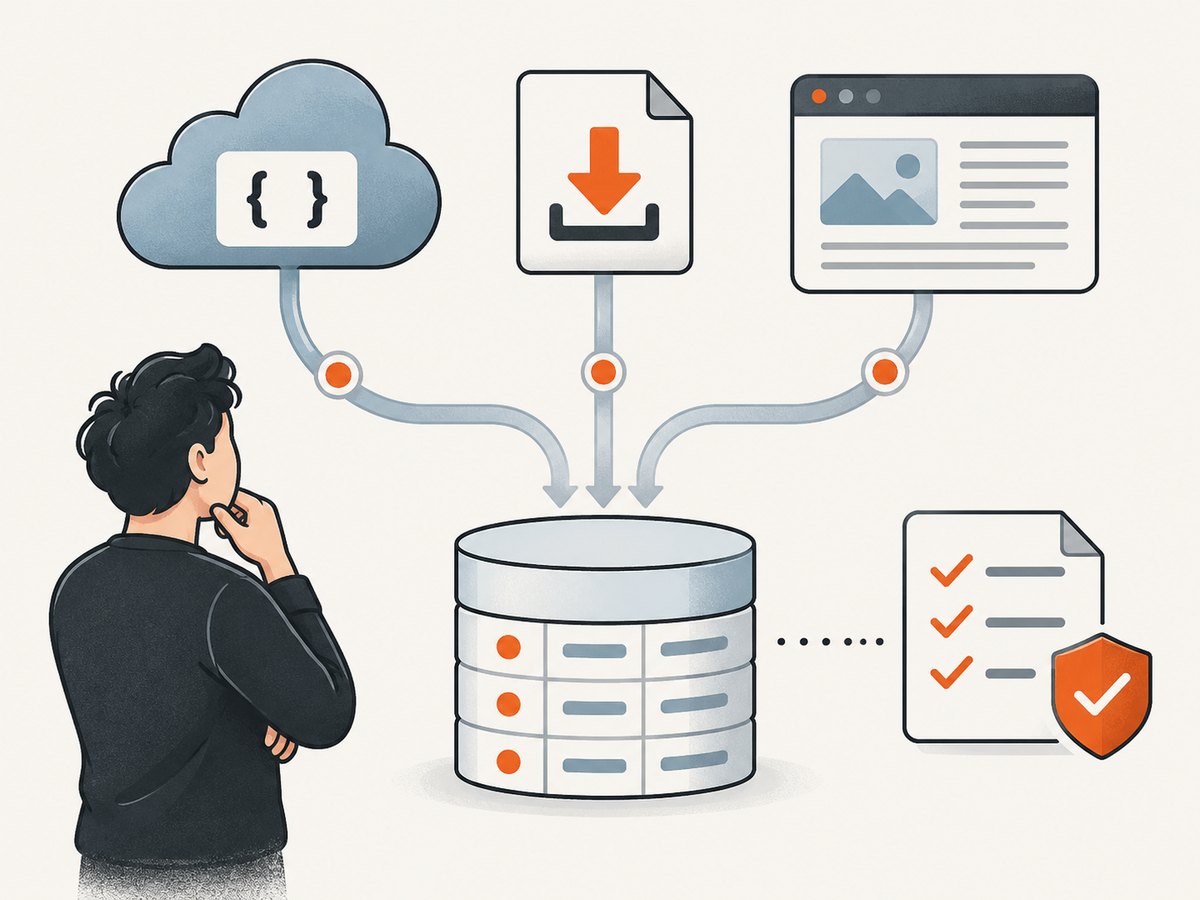
Compare the actual options available for your target site. There is no universally best route.
| Question | What to check |
|---|---|
| Authorization | Is the method documented for your intended use? What do the current terms and service-specific policies say? |
| Coverage | Does it expose the fields and pages your task needs, or only a subset? |
| Freshness | How are updates delivered? Is there a stated refresh interval or export schedule? |
| Stability | Is the format documented and versioned, or would your code depend on page layout? |
| Limits and cost | Check published quotas, throttling rules, and fees in the current official documentation. |
| Reuse and retention | Check whether storage, publication, redistribution, or commercial use is allowed. |
| Data sensitivity | Does the source contain information about identifiable people or other sensitive data? |
If page HTML is the only suitable route, use it only when the site’s rules and applicable law allow your specific collection and use.
3. Read crawler instructions, terms, and access rules
These checks answer different questions. Do not treat one as a substitute for the others.
- robots.txt: This is a crawler-facing protocol described by [IETF RFC 9309](https://www.rfc-editor.org/rfc/rfc9309). The RFC says, “These rules are not a form of access authorization.” A permissive rule does not settle terms, privacy, copyright, or other access questions.
- Terms and service policies: Read the current terms and any rules that apply to automated access and your intended reuse. Policies change, so check the target service’s current official pages.
- Authentication and technical controls: Do not bypass access controls or attempt to defeat a block, CAPTCHA, login requirement, or rate limit. A page that is visible in a browser is not, by itself, permission for every method of collection or reuse.
- Applicable law: Legal obligations can apply independently of crawler instructions. The relevant rules depend on the data, purpose, method, and jurisdictions involved.
Google has service-specific rules: its Search spam policy says automated scraping of Google Search results without express permission violates its policies and Terms of Service. Do not generalize that Google-specific rule to every search service; check each site’s current official documentation and terms.
4. Retrieve narrowly and at a considerate pace
Build a small, controlled request loop. Select only permitted URLs, cache responses where practical, pause between requests, and back off after transient failures. There is no universally safe request rate: follow the target site’s published limits and adjust to its actual responses. If it persistently denies requests, objects, or shows signs of strain, stop and investigate rather than increasing pressure.
The example below fetches one page, checks the HTTP result, parses a title and links, and writes a JSON record with its source URL and retrieval time. Replace the example URL and selectors only with a page you are allowed to access. Install dependencies with python -m pip install requests beautifulsoup4.
from datetime import datetime, timezone
from urllib.parse import urljoin
import json
import time

import requests
from bs4 import BeautifulSoup

URL = "https://example.com/permitted-page"
HEADERS = {"User-Agent": "ResearchCollector/1.0 (contact: you@example.org)"}
TIMEOUT_SECONDS = 20


def collect(url: str) -> dict:
    response = requests.get(url, headers=HEADERS, timeout=TIMEOUT_SECONDS)
    response.raise_for_status()

    soup = BeautifulSoup(response.text, "html.parser")
    title_node = soup.select_one("h1")
    title = title_node.get_text(" ", strip=True) if title_node else None

    links = []
    for node in soup.select("main a[href]"):
        links.append({
            "text": node.get_text(" ", strip=True),
            "url": urljoin(url, node["href"]),
        })

    return {
        "source_url": response.url,
        "retrieved_at": datetime.now(timezone.utc).isoformat(),
        "http_status": response.status_code,
        "title": title,
        "links": links,
    }


record = collect(URL)
with open("record.json", "w", encoding="utf-8") as output:
    json.dump(record, output, ensure_ascii=False, indent=2)
For a set of permitted URLs, add a queue and process it conservatively. Keep the allowed URL list explicit, deduplicate it, and store progress so an interrupted run does not start over unnecessarily. Avoid crawling arbitrary links recursively: page links can lead outside the intended scope.
Handle responses without forcing access
Use HTTP status codes to decide what to do. A successful response can still contain an error page or unexpected content, so validate its body as well.
- 2xx: Parse only if the response is the expected page and format.
- 3xx: Check where a redirect leads before accepting it. Keep the collection within its approved scope.
- 401 or 403: Treat this as a denial. Do not try alternate credentials or techniques to evade it; confirm authorization through the site’s documented route.
- 404: The page may have moved or been removed. Record the outcome and update the approved URL list if appropriate.
- 429: The service is limiting requests. Stop or wait according to its documented instructions. Do not raise request volume.
- 5xx or timeouts: These may be transient. Use a limited number of retries with increasing waits, then record the failure and move on or stop.
For transient failures, exponential backoff can use increasing waits such as 1, 2, then 4 seconds, with a cap and a small retry limit. These are example settings for your own job, not a recommended rate for any particular site. Honor any more specific published instruction.
5. Parse static HTML or rendered content
Static HTML can usually be parsed directly with an HTML parser. When a page fills content after client-side scripts run or requires a permitted interaction, a browser automation tool may be necessary. Confirm that the site’s rules permit the interaction and browser-based retrieval before using one. Do not use browser automation to bypass a technical barrier.
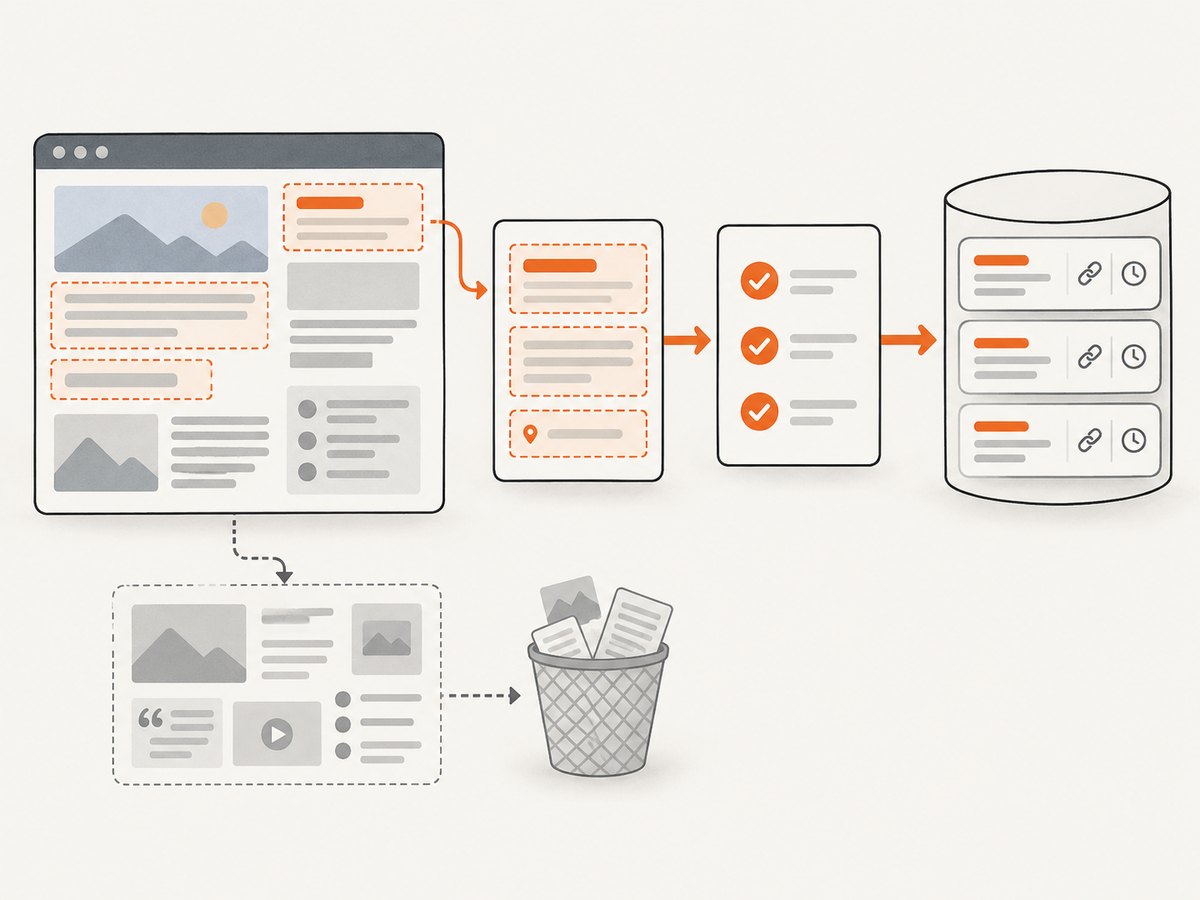
Selectors are assumptions about page structure, not a stable data contract. Check them against several representative pages before relying on results. Handle absent nodes as missing values instead of silently substituting unrelated text. Normalize dates, currencies, units, whitespace, and URLs into a consistent schema.
- Prefer semantic selectors and narrow containers over broad page-wide matches.
- Capture only fields required by the stated purpose.
- Detect empty or suspiciously short pages before treating them as valid records.
- Deduplicate records using a stable key where the data supports one.
- Keep the source URL and retrieval timestamp with each record for later review.
6. Validate, store, and refresh responsibly
Before using a dataset, inspect a sample against the source pages and verify each field’s meaning. Check missing-value rates, duplicate counts, date parsing, units, and whether records unexpectedly changed shape. If the source layout changes, pause collection and fix the parser; do not silently accept plausible-looking but incorrect output.
Store only what the task needs. Restrict access to collected data, document its source and collection method, and set a retention period. If personal data is present, minimize the fields and who can access them, assess applicable privacy requirements, and provide any notices or rights processes that apply.
For recurring jobs, keep a run log with start and end times, URLs attempted, response outcomes, parser version, and records written. Make refreshes incremental when possible and cache responses where allowed. A failed run should be visible as a failed run, not mistaken for a complete and current dataset.
7. Account for legal and policy limits
There is no universal yes-or-no answer to “Is web scraping legal?” The answer can depend on service terms, copyright, database rights, computer-access rules, privacy and data-protection law, the collection method, and jurisdiction. This guide is general information, not legal advice for a particular project.
For example, where the EU General Data Protection Regulation applies, processing personal data can require a lawful basis and compliance with principles including purpose limitation, data minimisation, accuracy, storage limitation, and accountability. Public visibility does not by itself remove applicable data-protection duties. The GDPR’s scope and application depend on the circumstances; one lawful basis does not automatically resolve every other obligation.
EU Directive 96/9/EC addresses database protection and extraction or reutilisation; national implementation and current interpretation matter for a real project. The hiQ Labs v. LinkedIn dispute is an example of fact-specific litigation involving public profile data, technical barriers, and computer-access law. Its docket materials should not be read as a general permission to scrape. For consequential collection, especially involving personal data or substantial database reuse, get jurisdiction-specific legal advice.
Or skip the browser setup
If your task is to capture a page as an image or PDF, [ScreenshotNeo](https://screenshotneo.com) is a website screenshot API and MCP server from Yorker Media. It takes one GET request with a URL and returns a PNG, JPEG, WebP, or PDF. See the [ScreenshotNeo API documentation](https://screenshotneo.com/docs/) for parameters and options.
curl -G "https://api.screenshotneo.com/v1/shot" \
  -d access_key=YOUR_API_KEY \
  --data-urlencode url=https://stripe.com \
  -o shot.webp
import requests
r = requests.get(
"https://api.screenshotneo.com/v1/shot",
params={"access_key": "YOUR_API_KEY", "url": "https://stripe.com"},
timeout=90,
)
open("shot.webp", "wb").write(r.content)const q = new URLSearchParams({
access_key: 'YOUR_API_KEY',
url: 'https://stripe.com'
});
const res = await fetch(`https://api.screenshotneo.com/v1/shot?${q}`);
if (!res.ok) throw new Error(`Screenshot request failed: ${res.status}`);
await Bun.write('shot.webp', res);ScreenshotNeo accepts cookie or consent banners like a visitor and removes 60+ known consent platforms, newsletter popups, and chat widgets before capture; each step can be turned off. Bot checks or CAPTCHAs, blank pages, timeouts, failed loads, and cache hits cost nothing, and response headers report the page verdict and billing status. Its MCP server provides take_screenshot, get_page_info, and capture_pdf for Claude, Cursor, and other MCP clients. It includes 1,000 screenshots per month free with no card; paid plans start at $5 for 3,000. Every feature is on every plan.
Sign up for 1,000 free screenshots a month, with no card required.
Performance, reliability, and cost
For a scraper you operate, the largest practical cost is often the ongoing work of keeping the source, permissions, and parser aligned. A documented endpoint may reduce parsing fragility, but compare its actual limits and fees with your use case. Page scraping can require more network requests and parser maintenance; a browser-rendered page can also require more work than parsing static HTML. This is a qualitative tradeoff, not a benchmark.
Keep the collection small, use caching where permitted, and make retries finite. Track completion and validation results so you can distinguish a slow run from a broken source or parser. Budget for storage and maintenance as well as retrieval. If you only need a visual record rather than structured fields, a screenshot endpoint can avoid building browser capture infrastructure; it does not replace an API or parser when you need structured data.
Troubleshooting
| Symptom | Likely cause | What to do |
|---|---|---|
| 401 or 403 response | The route requires authorization or denies the request. | Stop and check the documented access route and permission. Do not attempt to bypass the denial. |
| 429 response | The service is rate limiting the client. | Stop or wait according to the site’s instructions. Reduce scope and frequency; do not evade the limit. |
| Timeouts or 5xx responses | Network or server instability, or an overly demanding request pattern. | Use a limited backoff retry for transient errors, cache successful responses, and stop if failures persist. |
| Parser returns empty fields | The selector is wrong, the page changed, or content is rendered later. | Inspect an authorized sample response, test selectors across representative pages, and use permitted browser rendering only if needed. |
| Unexpected page content | A redirect, error page, consent screen, or other response differs from the expected page. | Check final URL, status, and page structure. Do not try to defeat a challenge or access restriction. |
| Duplicate or inconsistent records | URLs may differ by tracking parameters, or values may use inconsistent formats. | Define a stable record key, normalize fields, and retain original source URLs for audit. |
| Results become wrong after a site update | Markup or field meaning changed while selectors continued matching. | Pause the job, compare samples with source pages, update validation rules, and rerun only after review. |
FAQ
Does a page being public mean I can reuse its contents?
No. Public visibility alone does not settle the terms, copyright, privacy, database, or other rules that may apply. Assess the intended use and applicable jurisdiction.
Should I scrape a whole domain to find the data I need?
Usually start with a defined set of relevant pages and fields. Broad crawling increases scope and load, and may collect material outside the purpose you documented.
Can I use scraped data to make decisions about people?
That raises additional privacy and fairness questions. Do not assume public availability makes that use permissible; get appropriate legal and privacy review before collecting or using personal data.
What should I do when the site’s rules are unclear?
Do not infer permission from silence or from robots.txt alone. Seek clarification through the site’s documented contact or developer route, or choose a source with clear authorization.


