How to Convert HTML to PDF in Python with urllib3
Use urllib3 to fetch HTML, then render it reliably with WeasyPrint or xhtml2pdf, including CSS, images, fonts, authentication, security, and scaling.
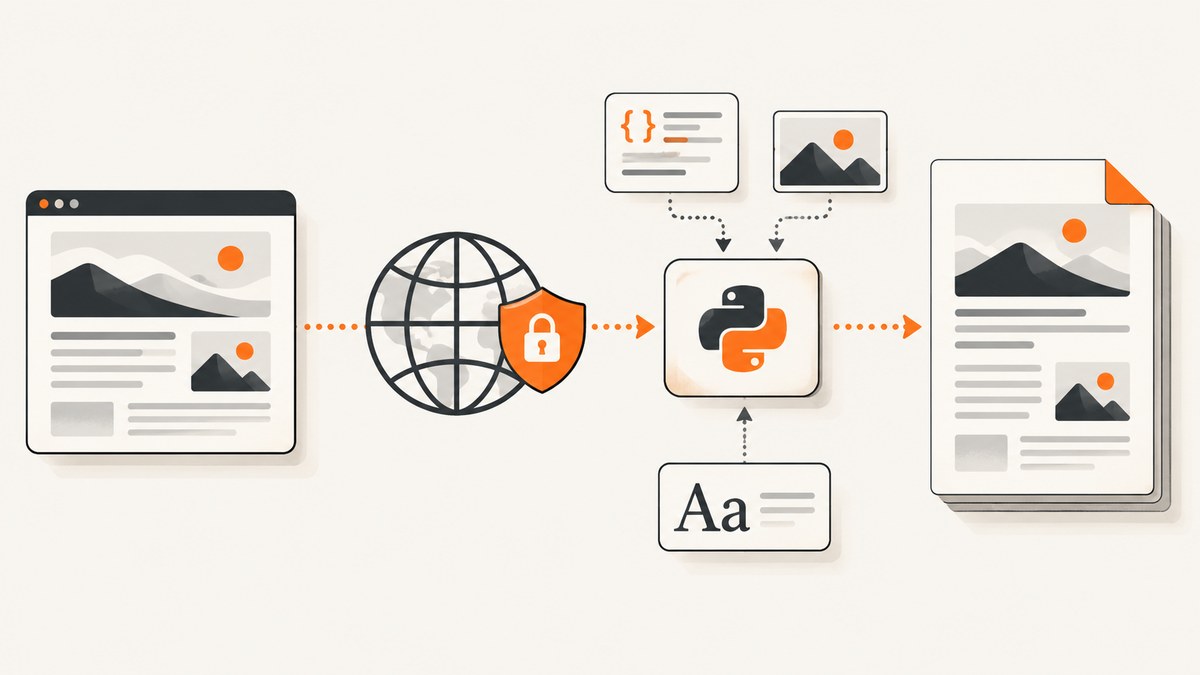
Direct answer: urllib3 downloads HTML; it does not render HTML into PDF. Use urllib3 to retrieve the document, preserve its character encoding, and pass the HTML to a PDF renderer such as WeasyPrint or xhtml2pdf. Set the original page URL as the asset base so relative CSS, images, fonts, and links continue to work.
This guide builds a production-ready pipeline, explains the trade-offs between the two renderers, covers authenticated and remote assets, and shows how to avoid common failures. If you need a hosted capture service instead of managing a browser or renderer, the ScreenshotNeo option appears after the local implementation.
1. Install the components
Create an isolated environment and install urllib3 plus one renderer. WeasyPrint is usually the better choice when layout fidelity and external assets matter. xhtml2pdf is a useful pure-Python alternative with a direct pisa.CreatePDF API.
python -m venv .venv
source .venv/bin/activate
python -m pip install --upgrade pip
python -m pip install urllib3 weasyprint
# Or, for the alternative renderer:
python -m pip install urllib3 xhtml2pdf
WeasyPrint can require platform libraries for text shaping and image handling. Follow its installation documentation for your operating system. The Python API accepts URLs, files, file objects, and in-memory strings, and write_pdf() can write to a path or return bytes. See the WeasyPrint first-steps documentation.
2. Minimal urllib3 to WeasyPrint conversion
The following script is complete and runnable. It checks the HTTP status, uses the server-declared charset when available, supplies base_url for relative resources, and writes a PDF.

import urllib3
from weasyprint import HTML

URL = "https://example.com/page"
OUTPUT = "page.pdf"

http = urllib3.PoolManager()
response = http.request("GET", URL)
try:
    if response.status >= 400:
        raise RuntimeError(f"HTTP {response.status} while fetching {URL}")

    content_type = response.headers.get("content-type", "")
    parts = [part.strip() for part in content_type.split(";")]
    encoding = "utf-8"
    for part in parts:
        if part.lower().startswith("charset="):
            encoding = part.split("=", 1)[1].strip(' \"')
            break

    html_text = response.data.decode(encoding, errors="replace")
    HTML(string=html_text, base_url=URL).write_pdf(OUTPUT)
finally:
    response.release_conn()

print(f"Wrote {OUTPUT}")
PoolManager manages connections and request performs the GET request, as described in the urllib3 User Guide. The base_url argument is essential: without it, an HTML reference such as href="styles/site.css" has no reliable location when the source is an in-memory string.
Return PDF bytes instead of writing a file
pdf_bytes = HTML(string=html_text, base_url=URL).write_pdf()
with open("page.pdf", "wb") as output:
    output.write(pdf_bytes)
This is useful for an HTTP response, object storage upload, or a queue worker. Keep the bytes binary; decoding them as text corrupts the PDF.
3. A robust fetch function with timeouts and retries
Production code should define connect and read timeouts, limit response size, and make retry behavior explicit. Retries are appropriate for transient connection failures and selected 5xx responses, but they can repeat expensive requests and should not blindly retry every status.
import urllib3
from urllib3.util import Retry, Timeout
from weasyprint import HTML


def fetch_html(url: str) -> tuple[str, str]:
    retries = Retry(
        total=2,
        connect=2,
        read=2,
        status=2,
        backoff_factor=0.4,
        status_forcelist=(429, 500, 502, 503, 504),
        allowed_methods=frozenset({"GET"}),
        respect_retry_after_header=True,
    )
    http = urllib3.PoolManager(
        retries=retries,
        timeout=Timeout(connect=5.0, read=30.0),
        cert_reqs="CERT_REQUIRED",
    )
    response = http.request("GET", url, preload_content=True)
    try:
        if response.status >= 400:
            raise RuntimeError(f"HTTP {response.status} from {url}")
        max_bytes = 10 * 1024 * 1024
        if len(response.data) > max_bytes:
            raise ValueError("HTML response exceeds the 10 MiB safety limit")

        content_type = response.headers.get("content-type", "")
        encoding = "utf-8"
        for token in content_type.split(";"):
            token = token.strip()
            if token.lower().startswith("charset="):
                encoding = token.split("=", 1)[1].strip(' \"')
                break
        return response.data.decode(encoding, errors="replace"), url
    finally:
        response.release_conn()


html_text, base_url = fetch_html("https://example.com/page")
HTML(string=html_text, base_url=base_url).write_pdf("page.pdf")
For a service that accepts arbitrary URLs, validate schemes and hosts before fetching. A URL beginning with file://, an internal IP address, or a cloud metadata endpoint can expose local or private data. Use an allowlist where possible, resolve DNS carefully, cap redirects, and run conversion in a restricted worker.
4. Making CSS, images, fonts, and links work
Relative resources
Relative references are resolved against the document base. With WeasyPrint, pass the source URL as base_url. With xhtml2pdf, pass the source URL through path or rewrite resources with link_callback.
<link rel="stylesheet" href="/assets/print.css">
<img src="images/diagram.png" alt="Diagram">
<style>
  @font-face {
    font-family: "Example Sans";
    src: url("fonts/example-sans.woff2");
  }
</style>
These references only work when the renderer knows the original page location and is permitted to fetch those resources. A downloaded HTML string by itself has no directory or URL context.
Authenticated resources
WeasyPrint’s default URL fetcher handles ordinary HTTP and file URLs but does not give you a general cookie or authentication policy. Replace it with a custom fetcher when CSS, images, or fonts require headers, cookies, a bearer token, or a custom timeout. Keep the fetcher restricted to approved schemes and hosts.
One practical pattern is to fetch protected assets yourself, place them in a controlled temporary directory, and rewrite the HTML to point to those local files. Delete the directory after rendering and ensure the worker cannot read unrelated files.
JavaScript-generated content
WeasyPrint and xhtml2pdf render HTML and CSS; they are not full browser engines. Content inserted only after JavaScript runs, interactive charts, and client-side route data may be absent. If the page requires JavaScript execution, use a browser automation workflow or a capture service that renders the page before producing the PDF.
5. xhtml2pdf alternative
xhtml2pdf provides a direct pisa.CreatePDF function. Its documentation describes HTML5, CSS 2.1, and some CSS 3 support, so verify complex layouts against representative documents.
from xhtml2pdf import pisa

html_text = """
<html>
  <body>
    <h1>Invoice</h1>
    <p>Generated from an HTML string.</p>
  </body>
</html>
"""

with open("invoice.pdf", "wb") as output:
    result = pisa.CreatePDF(
        html_text,
        dest=output,
        path="https://example.com/",
        encoding="utf-8",
        raise_exception=True,
    )

if result.err:
    raise RuntimeError("xhtml2pdf reported conversion errors")
The path value supplies a base location for relative resources. For more control, use link_callback to map an asset URL to a local file and apply a resource policy. The Python API reference documents these hooks, and the advanced usage guide shows binary output and error handling.
6. Choosing between WeasyPrint and xhtml2pdf
| Requirement | WeasyPrint | xhtml2pdf |
|---|---|---|
| Modern CSS and print layout | Generally the stronger fit; validate your exact CSS. | Supports HTML5, CSS 2.1, and some CSS 3; validate complex rules. |
| In-memory HTML | HTML(string=..., base_url=...) |
pisa.CreatePDF(html, dest=...) |
| Authenticated assets | Custom URL fetcher | link_callback and resource policy |
| Deployment | May need native system libraries | Pure-Python pipeline, with its own compatibility limits |
| Batch operation | Keep a long-lived process to avoid repeated startup work | Measure memory and conversion time on your corpus |
There is no universal speed winner in the cited official documentation. Measure representative pages containing your real fonts, images, tables, and page counts. Compare output correctness, peak memory, wall time, and failure rate rather than timing a single simple page.
7. Security controls for remote HTML
Remote HTML is an input format that can reference more resources than the initial URL suggests. Treat it as untrusted when users supply the URL or markup.
- Allow only
httpsand, when required,http; rejectfile,data, and custom schemes unless explicitly needed. - Block loopback, link-local, private, and reserved IP ranges after DNS resolution, including IPv4-mapped IPv6 addresses.
- Use an outbound proxy or host allowlist for predictable egress.
- Limit redirects, response bytes, number of resources, and render duration.
- Run the renderer with a non-privileged account and a temporary filesystem.
- Do not enable unrestricted local-file or private-network access for untrusted HTML.
xhtml2pdf’s CLI documentation describes host and resource-root controls, a no-remote mode, and private-network protections. See the xhtml2pdf CLI reference when configuring those boundaries.
8. Troubleshooting
PDF is blank or missing the main content
Cause: the page builds its content with JavaScript, requires a login, or returned an interstitial. Fix: inspect the fetched HTML and status code. Authenticate the request, use a server-rendered URL, or switch to a browser-capable workflow.
CSS, images, or fonts are missing
Cause: no base URL, blocked resource, expired asset URL, or an authentication requirement. Fix: pass base_url or xhtml2pdf path, log resource fetch failures, and use a controlled fetcher or callback for protected assets.
Text has replacement characters
Cause: the response was decoded with the wrong charset. Fix: parse the charset parameter from Content-Type; use UTF-8 only as a fallback. Confirm the HTML’s meta charset when the server header is absent or incorrect.
WeasyPrint installation fails
Cause: missing operating-system libraries or incompatible binaries. Fix: install the dependencies listed for your platform in the WeasyPrint documentation, then verify a minimal import before processing remote pages.
xhtml2pdf reports an error but creates a file
Cause: unsupported CSS, malformed markup, or an unavailable resource. Fix: inspect result.err, enable exception reporting during development, simplify unsupported CSS, and decide whether warnings should fail the job.
Conversion hangs or consumes too much memory
Cause: an unbounded page, huge images, slow resources, or too many concurrent renders. Fix: enforce connect/read/render deadlines, cap input and image sizes, limit concurrency, and terminate workers that exceed a memory budget.
9. Performance, reliability, and cost notes
- Reuse connections: keep one urllib3
PoolManagerper worker instead of creating one for every URL. - Reuse processes: repeated renderer startup adds overhead; WeasyPrint’s documentation recommends its Python API for many documents.
- Cache immutable assets: shared CSS and fonts can be cached in a controlled layer, with invalidation based on URL and content hash.
- Separate fetch and render limits: a fast HTML request can still lead to slow fonts, images, or a large layout.
- Make jobs idempotent: derive an output key from the source URL, relevant headers, and renderer settings so retries do not create confusing duplicates.
- Observe outcomes: record status code, final URL, render duration, page count, output size, and missing-resource warnings. Do not log secrets or full authenticated HTML.
- Measure your corpus: test long articles, tables, SVG, web fonts, RTL text, large images, and pages with many links. Official sources do not publish a comparable benchmark.
10. Or skip the browser setup
If you need a hosted HTML-to-PDF endpoint, ScreenshotNeo accepts one GET request and returns a PDF or image. Its capture pipeline accepts cookie and consent banners like a visitor, then removes more than 60 known consent platforms, newsletter popups, and chat widgets before the shot; each cleanup step can be disabled. Bot checks, blank pages, timeouts, failed loads, and cache hits are not billed, and the response identifies the result with X-Page-Verdict and X-Billed headers.

For PDF output, pass the PDF options documented in the ScreenshotNeo documentation, including paper size, margins, landscape mode, and page ranges. The same API also supports custom CSS and JavaScript, headers, cookies, user agents, authorization, timezone, geolocation, waiting rules, request blocking, caching, asynchronous jobs, signed webhooks, and bulk capture.
cURL
curl -G "https://api.screenshotneo.com/v1/shot" \
  -d access_key=YOUR_API_KEY \
  --data-urlencode url=https://stripe.com \
  -o shot.webp
Python
import requests

r = requests.get(
    "https://api.screenshotneo.com/v1/shot",
    params={"access_key": "YOUR_API_KEY", "url": "https://stripe.com"},
    timeout=90,
)
r.raise_for_status()
open("shot.webp", "wb").write(r.content)
Node.js
const q = new URLSearchParams({
  access_key: 'YOUR_API_KEY',
  url: 'https://stripe.com'
});
const res = await fetch(`https://api.screenshotneo.com/v1/shot?${q}`);
if (!res.ok) throw new Error(`HTTP ${res.status}`);
const bytes = await res.arrayBuffer();
await Bun.write('shot.webp', bytes);
ScreenshotNeo also provides an MCP server with take_screenshot, get_page_info, and capture_pdf tools for Claude, Cursor, and other MCP clients. It includes 1,000 screenshots per month free with no card; paid plans start at $5 for 3,000 shots. Create a free ScreenshotNeo account to try the PDF endpoint.
11. FAQ
Can urllib3 create a PDF by itself?
No. It retrieves bytes over HTTP. A renderer such as WeasyPrint or xhtml2pdf must interpret HTML and CSS and produce PDF bytes.
Should I save the HTML to disk first?
No. In-memory conversion is fine. Supply the original URL as WeasyPrint’s base_url or xhtml2pdf’s path so relative assets resolve correctly.
Which renderer supports browser JavaScript?
Neither renderer is a full browser runtime. Use a browser automation tool or a hosted capture service when the final content exists only after JavaScript executes.
How do I preserve login cookies?
Send authenticated requests through a controlled fetcher or download protected assets yourself, then render local copies. Never expose session cookies in logs or permit unrestricted outbound requests.
How can I return the PDF from a web API?
Call write_pdf() without a destination, set the response content type to application/pdf, and stream or return the bytes. Apply the same size, timeout, and resource restrictions as for file output.


