Why html2canvas Images Do Not Show in jsPDF PDFs
When images disappear from a jsPDF export, find out whether html2canvas skipped them, the canvas is unreadable, or the PDF handoff is invalid—and how to fix each cause.

When images disappear from a jsPDF PDF, first check whether they made it into the html2canvas canvas. html2canvas reconstructs a page from the DOM and CSS; it does not simply take a browser screenshot. Cross-origin images may be skipped, resources may not have loaded when capture began, or the canvas may be blank, clipped, or unreadable. jsPDF cannot restore pixels that never reached a readable canvas.
After capture, inspect canvas.width and canvas.height, then call canvas.toDataURL('image/png') before addImage. If conversion fails with a security error, investigate cross-origin images. If the data URL is valid but the PDF is wrong, check jsPDF’s input format and dimensions.
This guide follows the path from image request to PDF and gives a runnable JavaScript example, diagnostics, fixes, and tradeoffs. The same debugging sequence applies whether the export is completely blank or only some images are missing.
1. Understand where the image disappears
The export has two separate stages: html2canvas builds a canvas from the page, then jsPDF adds image data to a PDF. Debug those stages independently. Open the canvas first; if it already lacks an image, changing the PDF call will not help.
- Image loading: The browser must fetch the resource, and the page must be in the expected rendered state.
- Canvas rendering: html2canvas must be able to draw the image without making the resulting canvas unreadable.
- Canvas conversion: The browser must permit converting the canvas to a data URL or another readable representation.
- PDF insertion: jsPDF must receive valid image data, a supported format, and sensible coordinates and dimensions.
Use the browser developer tools’ Network panel to find each image request. Check its status, final URL after redirects, response headers, and whether it completed before capture. Then inspect the canvas in the console before involving jsPDF.
2. Check cross-origin image rules
A page can display an image that JavaScript is not allowed to read back from a canvas. Browser origin policy protects data from other origins: drawing a cross-origin image can taint the canvas. With html2canvas’s default allowTaint: false, images that would make the canvas unreadable are skipped. If a canvas becomes tainted, calls such as toDataURL() cannot provide its pixels.
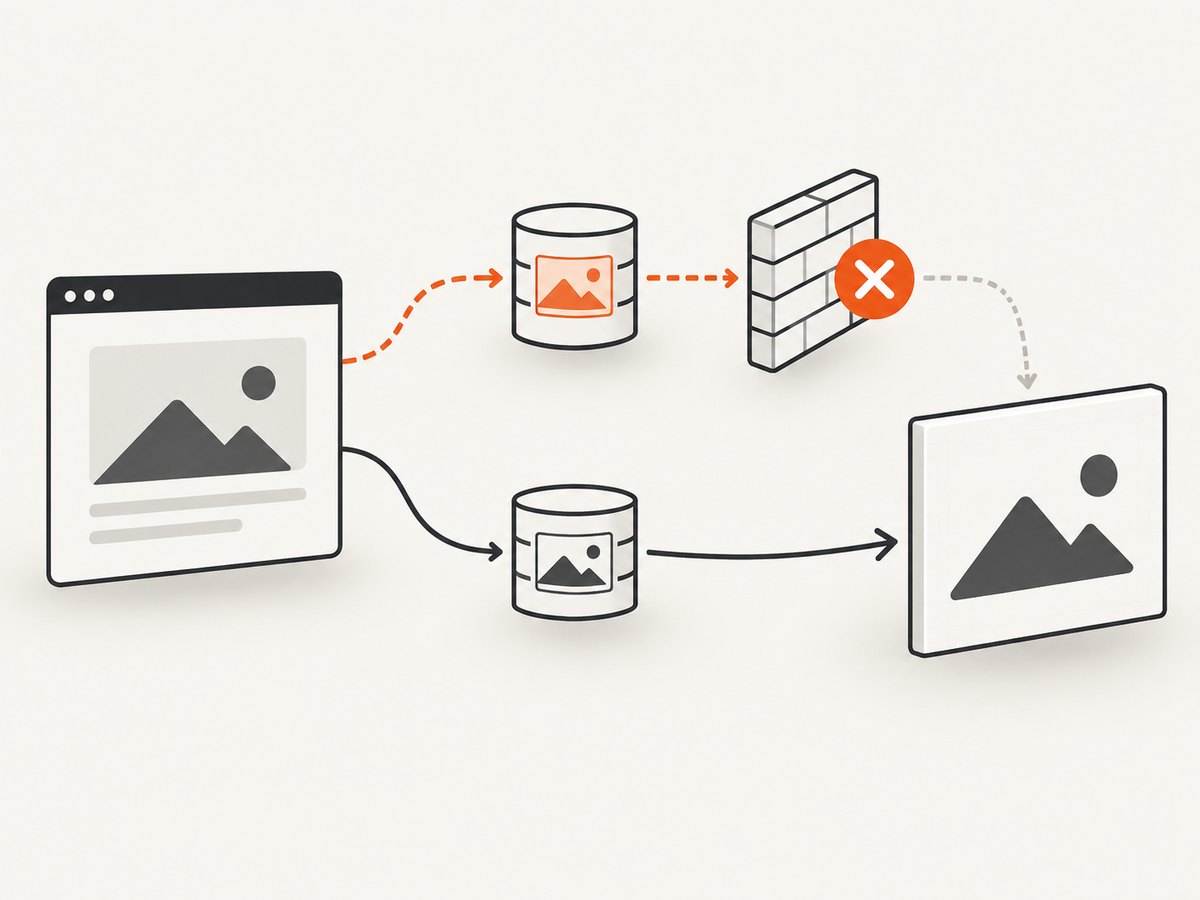
The usual remedy is to make the image server return a suitable Access-Control-Allow-Origin response header for the requesting origin, then ask html2canvas to use CORS. The header must come from the server that ultimately serves the image. Setting a JavaScript option does not grant permission by itself. See the [html2canvas FAQ](https://html2canvas.hertzen.com/faq.html) and its [configuration options](https://html2canvas.hertzen.com/configuration).
Try CORS only when the server allows it
For a CDN or object store that you control, configure its CORS policy for the origin hosting the page. Then capture with useCORS: true. Inspect the actual response in Network tools and confirm that the final response includes the required header. If the server does not permit the origin, the browser will still block a readable canvas.
Redirects are a frequent source of confusion. An application URL may appear same-origin at first but redirect to a CDN or another host. Inspect the final request origin and headers, not just the URL written in the page markup. The html2canvas project has documented cases where redirects change the expected CORS behavior. [html2canvas issue #3020](https://github.com/niklasvh/html2canvas/issues/3020)
Choose a remedy that fits your control
| Approach | Use it when | Tradeoff |
|---|---|---|
| Same-origin hosting | You control the assets and can serve them from the application’s origin. | May require moving assets or changing delivery configuration. |
| CORS-enabled image server | Your CDN or storage service can return the appropriate CORS header. | Every relevant response, including the redirect destination, must permit access. |
| Controlled proxy | The third-party host cannot be configured and your application can fetch that resource through its own origin. | Adds server infrastructure and must restrict which URLs it fetches to avoid becoming an open proxy. |
| Data URI | A small image has already been fetched and converted to inline data. | Requires an earlier conversion step and increases HTML or document size. |
Do not use allowTaint: true as a way to make PDF export work. It can allow drawing that taints the canvas, but it does not make the pixels readable by toDataURL(). Since that conversion is the normal handoff to jsPDF, a tainted canvas still cannot produce the export data you need.
3. Wait for images, fonts, and page rendering
A capture can be blank or partial even when every image is same-origin and CORS is configured correctly. If html2canvas runs before an image finishes loading, before a framework finishes rendering, or before a web font is ready, its reconstruction may not match the page you see afterward.
Wait for the images in the target element to complete and have a nonzero natural width. Also wait for document.fonts.ready where supported, then capture. A completed image with naturalWidth === 0 did not load as a usable image; check its request and source. The html2canvas configuration includes an imageTimeout option, documented with a default of 15000 milliseconds. Set an explicit timeout if your page’s expected resource behavior calls for one, but treat a timeout as a diagnostic boundary, not a guarantee that the resource will succeed.
Use the onError callback to surface resource failures where applicable, and keep the browser Network panel open. A missing image can be a 404, blocked request, expired signed URL, or a CORS rejection. Those problems need to be fixed at their source.
4. Capture with dimensions that match the content
By default, capture dimensions can reflect a viewport rather than a long element’s full scroll area. For a full-page element capture, pass dimensions derived from the element’s scroll size. If the content is clipped, set windowWidth and windowHeight to match the intended capture area and consider explicit width and height.

Very large canvases can exceed browser limits and yield blank or partial results. A large page with high-resolution images can consume substantial memory. If a capture is unexpectedly incomplete, first test a smaller region or viewport. For very long documents, splitting the page into sections may be more reliable than attempting one enormous canvas. html2canvas documents the browser canvas-size limitation in its [FAQ](https://html2canvas.hertzen.com/faq.html).
5. Runnable JavaScript example
The following browser-side example waits for images and fonts, captures an element, verifies that the canvas is nonempty and readable, and then hands the PNG to jsPDF. Load html2canvas and jsPDF in your application using your chosen package or script setup; the example assumes both are available as html2canvas and jspdf.jsPDF.
async function exportElementToPdf(element) {
  if (!element) throw new Error('Capture element was not found');

  // Wait for the images currently inside the capture target.
  const images = Array.from(element.querySelectorAll('img'));
  await Promise.all(images.map(img => {
    if (img.complete) return Promise.resolve();
    return new Promise(resolve => {
      img.addEventListener('load', resolve, { once: true });
      img.addEventListener('error', resolve, { once: true });
    });
  }));

  const unusable = images.filter(img => !img.complete || img.naturalWidth === 0);
  if (unusable.length) {
    console.warn(`${unusable.length} image(s) did not load successfully`, unusable);
  }

  if (document.fonts?.ready) await document.fonts.ready;

  const canvas = await html2canvas(element, {
    useCORS: true,
    allowTaint: false,
    windowWidth: Math.max(document.documentElement.clientWidth, element.scrollWidth),
    windowHeight: Math.max(document.documentElement.clientHeight, element.scrollHeight),
    width: element.scrollWidth,
    height: element.scrollHeight,
    imageTimeout: 15000,
    onError: error => console.warn('html2canvas resource failed', error)
  });

  console.log('Canvas dimensions:', canvas.width, canvas.height);
  if (canvas.width === 0 || canvas.height === 0) {
    throw new Error('html2canvas returned an empty canvas');
  }

  let imageData;
  try {
    imageData = canvas.toDataURL('image/png');
  } catch (error) {
    throw new Error(`Canvas cannot be read; check CORS and redirects: ${error.message}`);
  }
  if (!imageData || imageData === 'data:,') {
    throw new Error('Canvas conversion returned empty image data');
  }

  const { jsPDF } = jspdf;
  const pdf = new jsPDF({ orientation: 'portrait', unit: 'mm', format: 'a4' });
  const margin = 10;
  const pageWidth = pdf.internal.pageSize.getWidth() - margin * 2;
  const pageHeight = pdf.internal.pageSize.getHeight() - margin * 2;
  const ratio = Math.min(pageWidth / canvas.width, pageHeight / canvas.height);
  const drawWidth = canvas.width * ratio;
  const drawHeight = canvas.height * ratio;

  pdf.addImage(imageData, 'PNG', margin, margin, drawWidth, drawHeight);
  pdf.save('capture.pdf');
}

exportElementToPdf(document.querySelector('#capture-area'))
  .catch(error => console.error('PDF export failed:', error));
For a multi-page PDF, this example scales the whole capture to fit one A4 page, which may make long content hard to read. A production multi-page layout needs to divide the canvas across pages or capture content in page-sized sections. Pick that behavior deliberately rather than assuming addImage automatically paginates.
What the checks tell you
canvas.widthorcanvas.heightis zero: inspect the selected element and capture dimensions.- The canvas has dimensions but looks blank: check loading state, unsupported styling, hidden elements, and whether the correct element was captured.
toDataURL()throws aSecurityError: find cross-origin image resources and verify their final response headers.- The data URL works but PDF output fails: validate the jsPDF version and API usage, format name, and numeric placement dimensions.
6. Validate the jsPDF handoff
jsPDF’s addImage can accept a base64 data URL, an HTMLCanvasElement, an image element, byte data, or RGBA data, depending on the API. The format, position, and dimensions must be valid. Start with a known-good PNG data URL and explicit positive dimensions. The [jsPDF addImage API](https://artskydj.github.io/jsPDF/docs/module-addImage.html) documents accepted inputs.
When using canvas.toDataURL('image/png'), pass 'PNG' as the format to addImage. Avoid assuming a JPEG format if you encoded PNG data. If using a JPEG data URL instead, request JPEG and tell jsPDF JPEG. For a direct canvas input, inspect the API documentation for the jsPDF version installed in your project.
jsPDF’s HTML pipeline also converts a canvas to a data URL before inserting an image. That means it cannot recover a tainted or unreadable canvas later. Verify conversion at the point of capture, not just whether pdf.save() produced a file.
7. Unsupported content and edge cases
html2canvas reconstructs the DOM and CSS features it supports; it does not guarantee a pixel-perfect rendering of everything the browser displays. Certain CSS effects may be absent. A cross-origin iframe cannot be inspected through its contentDocument, so its contents cannot be reconstructed as ordinary DOM content. These are constraints of the capture approach, not jsPDF image-format errors. See the [html2canvas documentation](https://html2canvas.hertzen.com/documentation.html).
Other cases to check include lazy-loaded images that have not entered the viewport, images whose src changes after framework hydration, background images that are not represented by <img> elements, and elements hidden at capture time. The wait loop in the example only covers ordinary image elements inside the chosen target. If your page uses CSS backgrounds or application-specific loaders, wait for those conditions explicitly.
8. Troubleshooting by symptom
| Symptom | Likely cause | What to do |
|---|---|---|
| Image visible in page, absent from canvas | Cross-origin request denied, failed load, or capture started too early. | Inspect the Network response and final origin; configure CORS, proxy or host the asset same-origin; wait for successful image loading. |
useCORS: true changes nothing |
The image server does not send an allowing header, or a redirect leads to a host that does not. | Check the final response’s Access-Control-Allow-Origin header. Correct the server policy or use a controlled proxy. |
toDataURL throws a security error |
The canvas is tainted by a cross-origin resource. | Find the resource responsible and make it readable through same-origin delivery or successful CORS. Do not rely on allowTaint: true. |
| Canvas has zero dimensions | Wrong target, invalid capture setup, or empty layout dimensions. | Check the selected element, scrollWidth/scrollHeight, and explicit capture dimensions. |
| PDF opens, but is blank | Blank canvas, empty data URL, or invalid addImage arguments. |
Preview or log the canvas; validate the data URL before calling jsPDF; use matching PNG/JPEG format and positive dimensions. |
| Only part of a long page appears | Viewport-sized capture, canvas limits, or content outside the chosen element bounds. | Set capture dimensions from the content and test a smaller region. Split oversized captures into sections. |
| Results vary between runs | Framework rendering or image/font loading is incomplete at capture time. | Wait for the application’s ready state, images, and fonts; log failed resources and repeat with a fixed test page. |
| Browser view differs from canvas | Unsupported CSS or inaccessible iframe/resource content. | Check html2canvas support and origin boundaries. Simplify unsupported effects or use a browser screenshot method. |
9. Performance, reliability, and cost considerations
Client-side html2canvas is useful when the page is already in the user’s browser and you need a local export. Its work grows with the amount of DOM and the pixel dimensions of the canvas. High pixel dimensions mean more memory and more data to encode; a full-page capture of a long, image-heavy layout can be expensive on constrained devices. Capture only the needed element, use practical dimensions, and avoid duplicate conversions where possible.
Reliability depends on the page’s resources and browser environment. CORS configuration, redirects, lazy loading, font readiness, canvas limits, and unsupported CSS can all affect output. Add diagnostics and surface meaningful errors to users rather than saving an empty file. For reproducible exports, make loading conditions explicit and keep the capture target stable.
There is no universal cost figure for this approach: the browser work runs on the client, while proxy hosting or image processing may have their own costs. A server-side screenshot API changes the setup and billing model; compare the service’s response behavior and pricing with your export volume and document requirements.
10. Or skip the browser setup
If your goal is a clean web page capture or PDF and you do not want to debug browser capture setup, ScreenshotNeo is a website screenshot API and MCP server. One GET request accepts a URL and returns PNG, JPEG, WebP, or PDF. Its clean-shot process can accept cookie or consent banners and remove more than 60 known consent platforms, newsletter popups, and chat widgets before capture; each step can be turned off. Bot checks, CAPTCHAs, blank pages, timeouts, failed loads, and cache hits are not billed, and response headers say the page verdict and whether it was billed.
Here is a direct PDF request with cURL; see the ScreenshotNeo API documentation for the supported request options and output settings.
curl -G "https://api.screenshotneo.com/v1/shot" \
  -d access_key=YOUR_API_KEY \
  --data-urlencode url=https://stripe.com \
  -d format=pdf \
  -o page.pdf
Equivalent Python request:
import requests

r = requests.get(
    "https://api.screenshotneo.com/v1/shot",
    params={
        "access_key": "YOUR_API_KEY",
        "url": "https://stripe.com",
        "format": "pdf",
    },
    timeout=90,
)
r.raise_for_status()
open("page.pdf", "wb").write(r.content)
Equivalent Node.js request:
const q = new URLSearchParams({
  access_key: 'YOUR_API_KEY',
  url: 'https://stripe.com',
  format: 'pdf'
});
const res = await fetch(`https://api.screenshotneo.com/v1/shot?${q}`);
if (!res.ok) throw new Error(`ScreenshotNeo request failed: ${res.status}`);
await import('node:fs/promises').then(fs => fs.writeFile('page.pdf', Buffer.from(await res.arrayBuffer())));
The API also supports full-page capture with lazy images loaded, element capture by CSS selector, custom CSS and JavaScript, wait conditions, custom headers and cookies, PDF paper size, margins, landscape and page ranges, caching with a chosen TTL, async jobs with signed webhooks, and bulk requests for up to 100 URLs. An MCP server exposes take_screenshot, get_page_info, and capture_pdf to Claude, Cursor, and other MCP clients. Plans include 1,000 shots per month free with no card; paid plans start at $5 for 3,000 shots, and every feature is on every plan. Sign up for 1,000 free screenshots a month, no card required.
11. Short FAQ
Will setting allowTaint: true put the missing image in my PDF?
It may allow drawing that makes the canvas unreadable. The normal data URL handoff then fails, so it is not a fix for PDF export.
Why does the image show in Chrome but not in my export?
Displaying an image and reading its pixels back from canvas have different browser security requirements. Check the image response’s CORS headers and redirect destination.
Can jsPDF fix an image that html2canvas skipped?
No. jsPDF receives the canvas or its image data; it cannot recreate a resource that was missing from the capture.
Does this mean every missing image is a jsPDF bug?
No. First establish that the image is in a nonempty, readable canvas. Only then focus on jsPDF’s input and placement arguments.


