How to Use html2canvas with Sinatra and Raphael
Render a Raphaël drawing in the browser, export it with html2canvas, and upload or download the image through Sinatra.
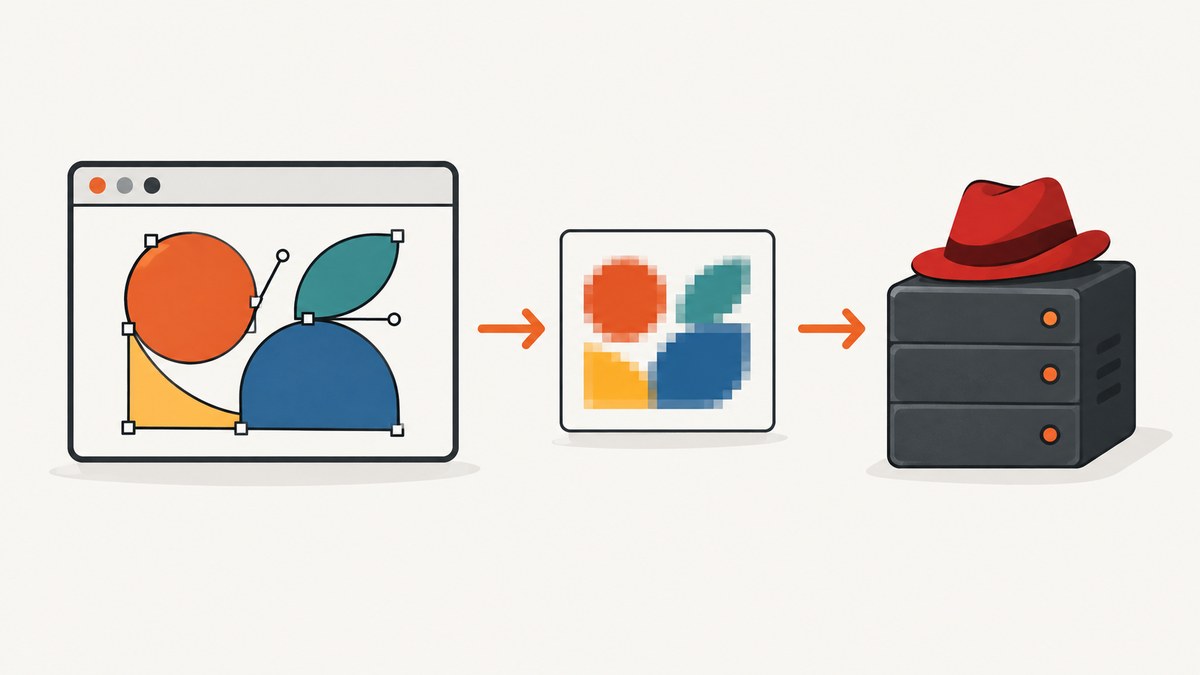
Direct answer: Keep rendering in the browser. Sinatra serves the page and static assets, Raphaël draws into a visible DOM element, and html2canvas reconstructs that element as a canvas. You can download the canvas locally or upload a PNG Blob to a Sinatra POST route.
html2canvas is a browser-side DOM/CSS renderer, not a pixel-perfect browser screenshot engine and not a Node.js renderer. Raphaël creates vector graphics in the page; html2canvas rasterizes the visible result into a bitmap. The official html2canvas documentation describes this browser-only model in its documentation and FAQ.
1. Project setup
Create a small Sinatra application and put browser assets in public/. Sinatra serves that directory as static files by default.
mkdir sinatra-raphael-capture
cd sinatra-raphael-capture
bundle init
bundle add sinatra
mkdir -p public js views captures
Download or vendor these browser libraries into public/:
public/html2canvas.min.jsfrom the html2canvas getting-started guide.public/raphael.min.jsfrom the official Raphaël repository.- Your application script, such as
public/app.js.
A minimal file layout is:
sinatra-raphael-capture/
├── app.rb
├── Gemfile
├── captures/
├── public/
│   ├── html2canvas.min.js
│   ├── raphael.min.js
│   └── app.js
└── views/
    └── index.erb
2. Render Raphaël and capture it
Use a wrapper with a known size. Raphaël appends its SVG to that wrapper, so html2canvas can inspect the rendered DOM.

<!-- views/index.erb -->
<!doctype html>
<html lang="en">
<head>
  <meta charset="utf-8">
  <meta name="viewport" content="width=device-width, initial-scale=1">
  <title>Raphaël capture</title>
  <style>
    body { font-family: system-ui, sans-serif; margin: 2rem; }
    #capture {
      width: 800px;
      height: 500px;
      background: #fff;
      border: 1px solid #d0d5dd;
    }
    button { margin: 1rem 0.5rem 0 0; padding: 0.6rem 1rem; }
    #status { min-height: 1.5rem; }
  </style>
</head>
<body>
  <h1>Raphaël drawing</h1>
  <div id="capture" aria-label="Drawing preview"></div>
  <p id="status" role="status"></p>
  <button id="download" type="button">Download PNG</button>
  <button id="upload" type="button">Upload to Sinatra</button>

  <script src="/raphael.min.js"></script>
  <script src="/html2canvas.min.js"></script>
  <script src="/app.js"></script>
</body>
</html>
// public/app.js
const target = document.querySelector('#capture');
const status = document.querySelector('#status');
// Raphaël draws SVG into #capture.
const paper = Raphael(target, 800, 500);
paper.rect(40, 40, 720, 420, 18).attr({
fill: '#f8fafc',
stroke: '#334155',
'stroke-width': 3
});
paper.circle(240, 250, 110).attr({
fill: '#60a5fa',
stroke: '#1d4ed8',
'stroke-width': 6
});
paper.path('M 390 330 C 470 120, 610 120, 700 300').attr({
stroke: '#db2777',
'stroke-width': 12,
'stroke-linecap': 'round'
});
paper.text(400, 90, 'Raphaël + html2canvas').attr({
fill: '#0f172a',
'font-size': 28,
'font-family': 'system-ui, sans-serif'
});
async function renderCanvas() {
status.textContent = 'Rendering…';
const element = document.querySelector('#capture');
const canvas = await html2canvas(element, {
backgroundColor: '#ffffff',
scale: window.devicePixelRatio,
useCORS: true
});
status.textContent = 'Ready';
return canvas;
}
document.querySelector('#download').addEventListener('click', async () => {
try {
const canvas = await renderCanvas();
const link = document.createElement('a');
link.download = 'raphael-capture.png';
link.href = canvas.toDataURL('image/png');
link.click();
} catch (error) {
status.textContent = `Capture failed: ${error.message}`;
}
});
document.querySelector('#upload').addEventListener('click', async () => {
try {
const canvas = await renderCanvas();
canvas.toBlob(async (blob) => {
if (!blob) throw new Error('The browser could not create an image Blob');
const body = new FormData();
body.append('image', blob, 'raphael-capture.png');
const response = await fetch('/captures', { method: 'POST', body });
if (!response.ok) throw new Error(`Upload returned HTTP ${response.status}`);
const result = await response.json();
status.textContent = `Saved as ${result.url}`;
}, 'image/png');
} catch (error) {
status.textContent = `Upload failed: ${error.message}`;
}
});Why wait before capturing?
Call html2canvas only after Raphaël has drawn and any images and web fonts used by the wrapper have loaded. For images, wait for their load events. For fonts, await document.fonts.ready where supported.
await document.fonts.ready;
await Promise.all(
  [...document.querySelectorAll('#capture img')].map((image) => {
    if (image.complete) return Promise.resolve();
    return new Promise((resolve) => {
      image.addEventListener('load', resolve, { once: true });
      image.addEventListener('error', resolve, { once: true });
    });
  })
);
const canvas = await html2canvas(document.querySelector('#capture'));
3. Add the Sinatra routes
The GET route renders the page. The POST route receives multipart form data, validates the upload, assigns an application-controlled filename, and writes it to disk. Sinatra’s official project documentation covers routes, request bodies, static files, and send_file.
# app.rb
require 'sinatra'
require 'json'
require 'securerandom'
require 'fileutils'

CAPTURE_DIR = File.expand_path('captures', __dir__)
FileUtils.mkdir_p(CAPTURE_DIR)
MAX_BYTES = 10 * 1024 * 1024

get '/' do
  erb :index
end

post '/captures' do
  upload = params['image']
  halt 400, 'image is required' unless upload && upload[:tempfile]
  halt 413, 'image is too large' if upload[:tempfile].size > MAX_BYTES

  content_type = upload[:type].to_s.downcase
  halt 415, 'only PNG images are accepted' unless content_type == 'image/png'

  id = SecureRandom.hex(16)
  filename = "#{id}.png"
  path = File.join(CAPTURE_DIR, filename)

  File.open(path, 'wb') do |file|
    IO.copy_stream(upload[:tempfile], file)
  end

  content_type :json
  { url: "/captures/#{filename}" }.to_json
end

get '/captures/:filename' do
  filename = params['filename']
  halt 400 unless filename.match?(/\A[0-9a-f]{32}\.png\z/)
  path = File.join(CAPTURE_DIR, filename)
  halt 404 unless File.file?(path)
  send_file path, type: 'image/png', disposition: 'inline'
end
Start the app with:
bundle exec ruby app.rbOpen http://localhost:4567, draw the SVG, and choose Download PNG or Upload to Sinatra.
4. html2canvas options that matter
| Option | Use it for | Trade-off |
|---|---|---|
scale |
Output resolution. window.devicePixelRatio is a common default. |
Higher values use more memory and can hit browser canvas limits. |
backgroundColor |
Set a predictable background such as '#ffffff'. |
Use null when transparent output is required. |
useCORS |
Request CORS-enabled images for canvas rendering. | The image server must send an appropriate Access-Control-Allow-Origin header. |
proxy |
Route otherwise inaccessible assets through a same-origin proxy. | Adds server work and must be designed to avoid SSRF. |
x, y, width, height |
Capture a specific page region. | Coordinates are page coordinates; mismatches produce crops. |
windowWidth, windowHeight |
Control the virtual viewport used during rendering. | Too-small values can clip responsive content. |
ignoreElements |
Skip controls, handles, or temporary overlays. | Ignored nodes are absent from the exported image. |
For a full-page wrapper, measure its scroll dimensions and pass them explicitly:
const element = document.querySelector('#capture');
const canvas = await html2canvas(element, {
  width: element.scrollWidth,
  height: element.scrollHeight,
  windowWidth: element.scrollWidth,
  windowHeight: element.scrollHeight,
  scale: 1,
  backgroundColor: '#fff'
});
5. Scope, fidelity, and cross-origin resources
Capture only the drawing or a larger region
Passing document.querySelector('#capture') limits the render to the Raphaël wrapper. To include surrounding labels or controls, capture a parent element. To crop an arbitrary page area, use x, y, width, and height.
External images and tainted canvases
Same-origin assets are simplest. Cross-origin images need CORS response headers and useCORS: true, or they must be served through a same-origin proxy. If an image is loaded without a permitted CORS policy, the canvas can become tainted and toDataURL() or toBlob() will fail for security reasons.
CSS support is selective
html2canvas reconstructs the DOM using the CSS properties it understands. Unsupported CSS, cross-origin iframes, filters, and browser-specific effects may be missing or look different. Keep the capture wrapper’s styling straightforward and verify the exact CSS used by the drawing.
SVG is rasterized
Raphaël’s SVG remains editable in the page, but the html2canvas result is a bitmap. If you need later vector editing, save the original SVG separately as well as the PNG.
6. Upload design and security checklist
- Use
toBlob()for uploads; it avoids putting a large base64 data URL in memory. - Set a maximum request size and reject unexpected MIME types.
- Never use the client-provided filename as a filesystem path. Generate the name on the server.
- Validate the file signature if untrusted users can upload files; a MIME header alone is not proof of PNG content.
- Keep uploads outside a public directory unless you intentionally provide an authenticated download route.
- Add authentication and CSRF protection when the route is not a same-origin, session-protected form.
- Do not build an open image proxy. Restrict destinations and block private network ranges.
7. Performance and reliability
- Capture the smallest element that satisfies the requirement. A full page costs more memory than the Raphaël wrapper.
- Use the lowest acceptable
scale. Device-pixel-ratio output is sharper but multiplies canvas pixels. - Reuse a rendered drawing when exporting several formats instead of redrawing it repeatedly.
- Remove animations and blinking cursors before capture so the output is deterministic.
- Wait for fonts and images, but avoid arbitrary long delays. Resolve explicit load conditions whenever possible.
- Catch rejected Promises and return a useful status to the user. A failed image load should not leave the interface stuck on “Rendering”.
- Browsers impose maximum canvas dimensions. Reduce dimensions, scale, or split a very large export when output is blank or truncated.
- For server storage, use unique names and atomic writes, then apply retention rules so the capture directory cannot grow indefinitely.
8. Troubleshooting
| Symptom | Cause | Fix |
|---|---|---|
| Blank or truncated image | The canvas exceeds browser limits or the viewport is too small. | Lower scale, reduce dimensions, and set windowWidth/windowHeight to the element’s scroll size. |
| External image missing | The image server does not permit CORS. | Send Access-Control-Allow-Origin, enable useCORS: true, or proxy the asset through Sinatra. |
SecurityError from toDataURL() |
The canvas is tainted by cross-origin content. | Fix the resource policy before exporting; do not attempt to bypass browser security. |
| Text uses the wrong font | The web font was not ready when capture started. | Await document.fonts.ready and verify the font request succeeded. |
| SVG shapes appear different | Unsupported CSS or SVG effects are reconstructed differently. | Simplify wrapper CSS, remove unsupported effects, or preserve the original SVG for exact vector output. |
| Upload returns HTTP 400 | The multipart field is missing or named incorrectly. | Use body.append('image', blob, 'raphael-capture.png') and confirm the route reads params['image']. |
| Upload returns HTTP 413 | The file exceeds the server limit. | Reduce dimensions or increase MAX_BYTES deliberately after checking storage limits. |
| Upload returns HTTP 415 | The route rejects the supplied MIME type. | Export as image/png or add a separately validated JPEG/WebP path. |
| Saved file cannot be opened | The request was interrupted or the write was incomplete. | Write to a temporary path, verify size and signature, then rename atomically. |
9. Or skip the browser setup
If you need a screenshot of a URL rather than an interactive Raphaël canvas, ScreenshotNeo provides a single GET request that returns PNG, JPEG, WebP, or PDF. It removes cookie and consent banners, newsletter popups, and chat widgets before capture. Bot checks, blank pages, failed loads, timeouts, and cache hits are not billed, and the response identifies the page verdict and billing result in X-Page-Verdict and X-Billed headers. Its MCP server also lets Claude, Cursor, and other MCP clients call take_screenshot, get_page_info, and capture_pdf.

See the ScreenshotNeo API documentation for all options. The same request in common clients is:
curl -G "https://api.screenshotneo.com/v1/shot" -d access_key=YOUR_API_KEY --data-urlencode url=https://stripe.com -o shot.webpimport requests
r = requests.get("https://api.screenshotneo.com/v1/shot", params={"access_key": "YOUR_API_KEY", "url": "https://stripe.com"}, timeout=90)
open("shot.webp", "wb").write(r.content)const q = new URLSearchParams({ access_key: 'YOUR_API_KEY', url: 'https://stripe.com' });
const res = await fetch(`https://api.screenshotneo.com/v1/shot?${q}`);Every feature is available on every plan: 1,000 screenshots a month are free with no card, and paid plans start at $5 for 3,000 screenshots. Create a free ScreenshotNeo account.
10. FAQ
Does html2canvas run on Sinatra’s server?
No. It runs in the user’s browser. Sinatra serves the JavaScript and receives the exported file.
Can I capture Raphaël as SVG instead of PNG?
Yes, preserve or serialize the original SVG separately. html2canvas itself produces a raster canvas.
Can I run this from Node.js?
Not with html2canvas alone. It depends on browser DOM and rendering APIs. Use a real browser for this workflow, or use a URL screenshot service when the source is already publicly addressable.
Should I use toDataURL() or toBlob()?
Use toBlob() for uploads because it avoids a large base64 string. toDataURL() is convenient for a direct download.
Why does a capture differ between devices?
Viewport size, device pixel ratio, loaded fonts, and responsive CSS affect the reconstructed result. Set explicit dimensions and wait for resources when repeatability matters.


