How to Ignore Elements During html2canvas DOM Scanning
Hide banners, controls, and sensitive fields from html2canvas captures with data-html2canvas-ignore, ignoreElements, and onclone.

Use data-html2canvas-ignore for a known element, or provide an ignoreElements predicate when the exclusion rule is dynamic. Both options remove matching nodes while html2canvas clones the document, before the cloned tree is painted. Use onclone when you need to modify that temporary clone without changing the live page.
This distinction matters. Hiding an element with CSS can change layout, affect your application, or create a flash for users. Ignoring an element during html2canvas cloning leaves the source page intact while keeping the element out of the rendered canvas.
Quick answer: the two supported exclusion methods
1. Add data-html2canvas-ignore to static elements
<div id='capture'>
  <h1>Invoice</h1>
  <p>This content appears in the image.</p>
  <button data-html2canvas-ignore>Print</button>
  <aside data-html2canvas-ignore>Live chat</aside>
</div>

<script src='https://cdn.jsdelivr.net/npm/html2canvas@1.4.1/dist/html2canvas.min.js'></script>
<script>
  html2canvas(document.querySelector('#capture')).then(canvas => {
    document.body.appendChild(canvas);
  });
</script>
The attribute can be empty, or you can assign it any value. html2canvas checks for its presence and excludes that element from the cloned render. The official configuration documents this as the declarative way to omit elements (html2canvas configuration).
2. Return true from ignoreElements for dynamic rules
const target = document.querySelector('#capture');

html2canvas(target, {
  ignoreElements: (element) => {
    return element.classList.contains('no-capture');
  }
}).then(canvas => {
  document.body.appendChild(canvas);
});
The callback receives each element considered during cloning. Return true when the node should be omitted and false when it should remain. You can match classes, IDs, tag names, ARIA state, data attributes, or any runtime condition.
How html2canvas decides what to render
html2canvas does not take a bitmap screenshot from the browser compositor. It traverses the DOM, creates a temporary cloned document, reads styles and layout information, and paints the supported parts of that clone onto a canvas. The official documentation describes this DOM traversal model (html2canvas documentation).
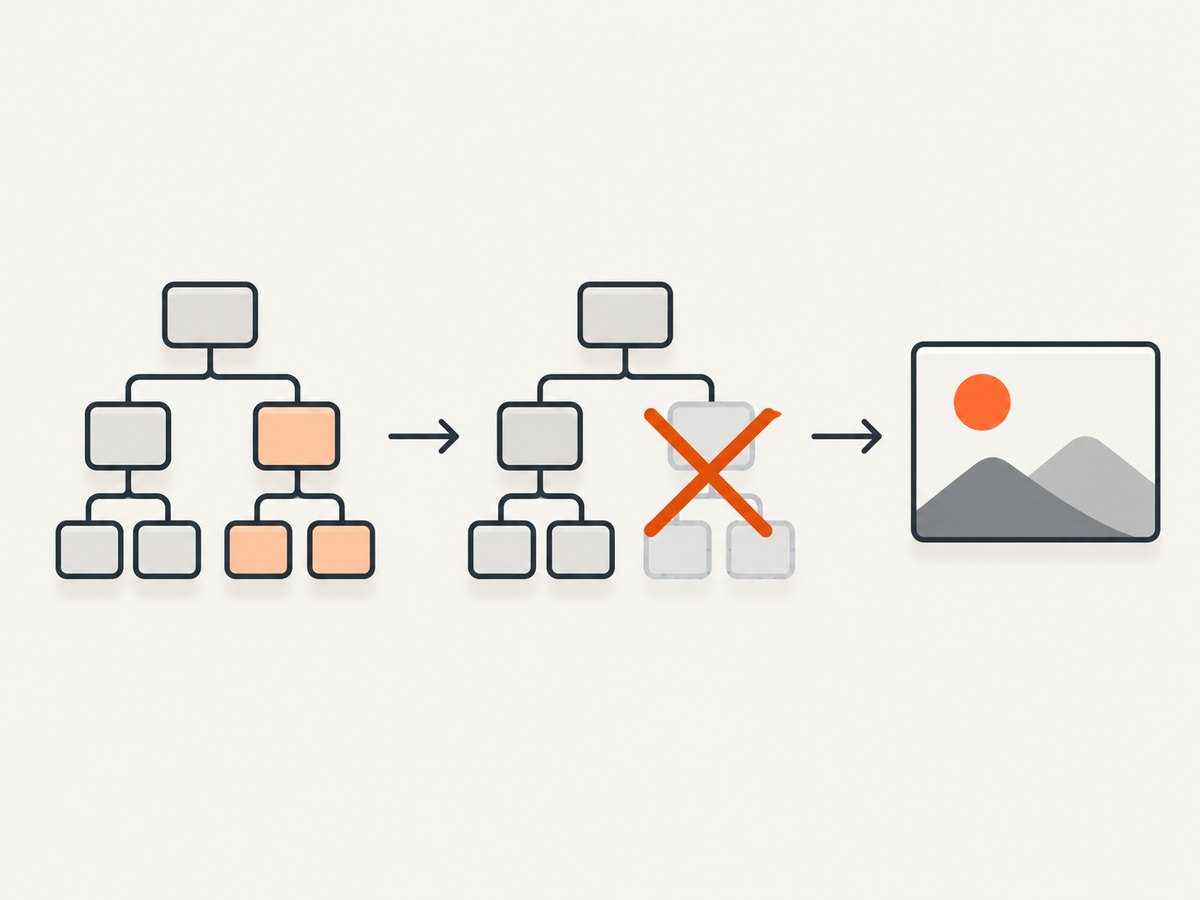
During the clone phase, child nodes are filtered. A node is skipped when it has data-html2canvas-ignore or when your ignoreElements callback returns true. Scripts are also excluded by the clone logic. Since filtering happens before painting, ignored nodes do not consume canvas drawing time and do not appear as transparent gaps caused by a late CSS change.
The predicate default is effectively (element) => false, so no elements are ignored unless you add the attribute or provide a callback. The exact root-element behavior is not stated as a stable guarantee in the source; if you try to ignore the same element passed as the capture root, verify it against the html2canvas version installed by your application.
Complete working example: remove controls from an invoice
This example captures only the invoice content. The toolbar, payment button, and support widget remain visible in the live page but are excluded from the generated canvas.
<!doctype html>
<html lang='en'>
<head>
  <meta charset='utf-8'>
  <meta name='viewport' content='width=device-width, initial-scale=1'>
  <title>html2canvas ignore example</title>
  <style>
    body { font-family: system-ui, sans-serif; margin: 2rem; background: #eee; }
    #invoice { width: 720px; padding: 2rem; background: white; }
    .toolbar { display: flex; gap: .5rem; margin-bottom: 1rem; }
    .chat { position: fixed; right: 1rem; bottom: 1rem; padding: 1rem; background: #222; color: white; }
  </style>
</head>
<body>
  <div class='toolbar' data-html2canvas-ignore>
    <button>Edit invoice</button>
    <button>Send email</button>
  </div>

  <main id='invoice'>
    <h1>Invoice 1042</h1>
    <p>Northwind Studio</p>
    <table>
      <tr><th>Description</th><th>Amount</th></tr>
      <tr><td>Design work</td><td>$1,200</td></tr>
    </table>
    <button data-html2canvas-ignore>Pay now</button>
  </main>

  <div class='chat' data-html2canvas-ignore>Chat with us</div>
  <button id='download'>Download image</button>

  <script src='https://cdn.jsdelivr.net/npm/html2canvas@1.4.1/dist/html2canvas.min.js'></script>
  <script>
    document.querySelector('#download').addEventListener('click', async () => {
      const canvas = await html2canvas(document.querySelector('#invoice'));
      const link = document.createElement('a');
      link.download = 'invoice-1042.png';
      link.href = canvas.toDataURL('image/png');
      link.click();
    });
  </script>
</body>
</html>
Ignoring elements by class, ID, tag, or state
Use one predicate for a consistent application-wide policy. Keep it small and deterministic because html2canvas may call it for many nodes.
const canvas = await html2canvas(document.body, {
  ignoreElements: (element) => {
    if (element.matches('.no-capture, [data-private], #debug-panel')) {
      return true;
    }

    if (element.tagName === 'VIDEO' || element.tagName === 'IFRAME') {
      return true;
    }

    return element.getAttribute('aria-hidden') === 'true';
  }
});
Element.matches() is useful for a selector list. For older browser targets, use classList.contains() and getAttribute() checks instead. Avoid selectors that depend on transient layout or animation state unless that state is part of the capture requirement.
Use onclone for temporary changes
ignoreElements removes nodes. onclone lets you edit the temporary document before rendering. This is useful when a widget must stay in the live DOM but needs a temporary style adjustment, or when you want to add a capture-only label.
const source = document.querySelector('#report');

const canvas = await html2canvas(source, {
  ignoreElements: (element) => element.matches('.no-capture'),
  onclone: (clonedDocument) => {
    const clonedReport = clonedDocument.querySelector('#report');
    clonedReport.classList.add('print-layout');

    const cursor = clonedDocument.querySelector('.blinking-cursor');
    if (cursor) cursor.remove();
  }
});
The callback receives the cloned document, so changes made there do not mutate the page the user is viewing. Do not query the original document inside onclone when you intend to alter the capture; query clonedDocument instead.
Choosing the right mechanism
| Need | Use | Reason |
|---|---|---|
| One known banner or button | data-html2canvas-ignore |
Visible in markup and requires no JavaScript predicate. |
| Every element with a class | ignoreElements |
One runtime rule covers current and future matching nodes. |
| Ignore only when a condition is true | ignoreElements |
Can inspect attributes, state, or application data. |
| Change styles or content only for the image | onclone |
Edits the temporary document and leaves the live DOM unchanged. |
| Remove a third-party frame | Ignore the iframe element | Prevents the iframe box from being painted, but does not grant access to its contents. |
Important edge cases and limitations
Cross-origin iframes
Browser same-origin rules prevent html2canvas from reading the contentDocument of a cross-origin iframe. Ignoring the iframe can remove its outer element from your capture, but it cannot make the iframe’s internal page readable or renderable. If the frame is same-origin, you can capture its content separately from the parent page, subject to that document’s own resources and permissions.

Root element behavior
The documented filtering examples concern child nodes appended to the cloned tree. The sources do not promise that putting data-html2canvas-ignore on the exact root passed to html2canvas(root) produces an empty or skipped capture. If you need to omit a wrapper, capture its parent and ignore the wrapper, or test the precise library version in your project.
Layout after removal
Removing a node from the clone can change flow layout. A block element that occupied space may allow neighboring content to move up. If you need to preserve its space while hiding its visual content, use onclone to replace it with a same-sized placeholder, or apply a capture-only style that keeps dimensions while making descendants invisible.
Fixed and sticky elements
Fixed headers, cookie notices, and chat buttons are common targets for exclusion. Mark the outermost fixed container, not only an inner label, so shadows, backgrounds, and close buttons are removed together.
Shadow DOM and third-party widgets
Widgets implemented with closed shadow roots may not expose the nodes you expect to the normal DOM traversal. Add the ignore attribute to an accessible host element when possible. Otherwise, remove or hide the widget through the provider’s integration before capture and restore it afterward.
Images, fonts, and canvas security
Ignoring a node does not solve unrelated resource restrictions. Cross-origin images without suitable CORS headers can taint a canvas or fail to render. Wait for fonts and images to load before calling html2canvas, and configure the library’s resource options according to your deployment. The ignore mechanisms only decide which DOM nodes enter the clone.
Debugging checklist
- Confirm the element is inside the capture root.
- Inspect the live node for the exact
data-html2canvas-ignoreattribute spelling. - If using a predicate, log
element.tagName,element.id, andelement.classNametemporarily. - Make sure the predicate returns a boolean. Return
trueonly for nodes to exclude. - Check whether a parent is being ignored, which also removes its descendants.
- Wait for asynchronous UI to settle before starting the capture.
- Test the exact html2canvas version loaded in production.
Common errors and fixes
| Symptom | Likely cause | Fix |
|---|---|---|
| The element still appears | The attribute is outside the capture root or the predicate never returns true. | Move the attribute inside the root and verify the selector with element.matches(). |
| Everything disappears inside a section | A parent container matches the ignore rule. | Inspect ancestors and narrow the selector to the intended node. |
| The page layout shifts | The ignored block no longer occupies space in the clone. | Insert a same-size placeholder or apply capture-only styling in onclone. |
| Live page changes unexpectedly | Code modified the source DOM instead of the cloned document. | Move those edits into onclone(clonedDocument). |
| An iframe cannot be captured | The iframe is cross-origin. | Ignore the frame, capture its content from the owning origin, or use an API that captures the URL server-side. |
| Canvas export throws a security error | A cross-origin image or canvas tainted the output. | Serve assets with appropriate CORS headers, proxy them from your origin, or remove the offending node. |
| Predicate causes slow captures | Expensive work runs once per traversed node. | Use simple class or selector checks and precompute application state outside the callback. |
Performance and reliability guidance
Ignoring large widgets can improve capture time because fewer cloned nodes and styles need to be processed. The biggest gains usually come from removing chat systems, analytics-heavy overlays, video players, and deeply nested navigation trees. Keep the predicate cheap: selector matching and attribute checks are preferable to layout reads, network requests, or repeated JSON parsing.
Capture a focused element instead of document.body when the product requirement allows it. A smaller root reduces traversal work and makes the output dimensions predictable. For repeatable output, disable animations in onclone, wait for images and web fonts, and use a fixed viewport and device scale factor.
Run captures after state changes have completed. A cookie banner may be inserted asynchronously, so calling html2canvas immediately after page load can race the insertion. Use a promise tied to your app’s ready state, a short delay, or a selector check before capture. Re-run the capture when the page changes; a canvas is a snapshot, not a live view.
Security and privacy considerations
Use ignore rules for secrets, account controls, internal notes, and personal data that should not enter exported images. Treat this as an output control, not an access-control boundary: the data remains present in the live page and can still be read by scripts with access to that page. Keep sensitive data out of the DOM when it should never be exposed to the browser.
Or skip the browser setup
If you need a URL screenshot without shipping html2canvas code, ScreenshotNeo provides a GET endpoint that returns PNG, JPEG, WebP, or PDF. Its capture options include hiding selectors, custom JavaScript and CSS, element capture, full-page screenshots, waiting for selectors or network idle, and device and viewport settings.
See the ScreenshotNeo API documentation for all parameters. A minimal request looks like this:
curl -G 'https://api.screenshotneo.com/v1/shot' \
  -d access_key=YOUR_API_KEY \
  --data-urlencode url=https://stripe.com \
  -o shot.webp
import requests
r = requests.get(
'https://api.screenshotneo.com/v1/shot',
params={'access_key': 'YOUR_API_KEY', 'url': 'https://stripe.com'},
timeout=90,
)
open('shot.webp', 'wb').write(r.content)const q = new URLSearchParams({ access_key: 'YOUR_API_KEY', url: 'https://stripe.com' });
const res = await fetch(`https://api.screenshotneo.com/v1/shot?${q}`);Cookie banners, newsletter popups, and chat widgets are removed before the shot. Bot checks, blank pages, failed loads, timeouts, and cache hits are not billed, and the response identifies the result with X-Page-Verdict and X-Billed headers. ScreenshotNeo also has an MCP server with take_screenshot, get_page_info, and capture_pdf tools for Claude, Cursor, and other MCP clients. The Free plan includes 1,000 screenshots per month with no card; paid plans start at $5 for 3,000 shots. Create a free ScreenshotNeo account.
Short FAQ
Can I ignore an element by CSS class?
Yes. Return element.classList.contains('no-capture') from ignoreElements, or use element.matches('.no-capture').
Does ignoring an element hide it from the real page?
No. The node is excluded from the cloned document used for rendering. The live DOM remains unchanged.
Should I use the attribute or the callback?
Use the attribute for fixed, declarative exclusions. Use ignoreElements for class-wide or conditional rules.
Can this bypass iframe same-origin restrictions?
No. Ignoring an iframe can remove its box, but browser security still prevents reading a cross-origin frame’s document.
Can I remove an element only for one capture?
Yes. Put temporary edits in onclone, or pass a one-off ignoreElements callback in that capture call.
What if the ignored node is the capture root?
Root exclusion is not documented as a stable behavior. Capture a parent or verify the behavior with your installed html2canvas version.


