How to Ignore Non-HTML URLs When Web Crawling
Skip obvious non-HTML links during discovery, then check Content-Type before parsing responses. This guide covers Scrapy, Python, cURL, Node.js, edge cases, and troubleshooting.

To ignore non-HTML URLs when web crawling, use two checks: filter obvious file extensions while discovering links, then inspect each fetched response’s Content-Type before parsing it as HTML. The first check avoids many unnecessary requests; the second makes the decision using response metadata. Neither is perfect on its own: URLs can be misleading, and servers can omit or misstate media types.
For Scrapy, configure LinkExtractor(deny_extensions=...) to skip familiar file types. In the callback, allow only responses identified as HTML under your crawl’s policy. If your crawler must retain documents such as PDFs for separate extraction, route them to an appropriate handler instead of discarding them.
1. Choose where to filter
There are two useful points to reject a non-HTML resource:
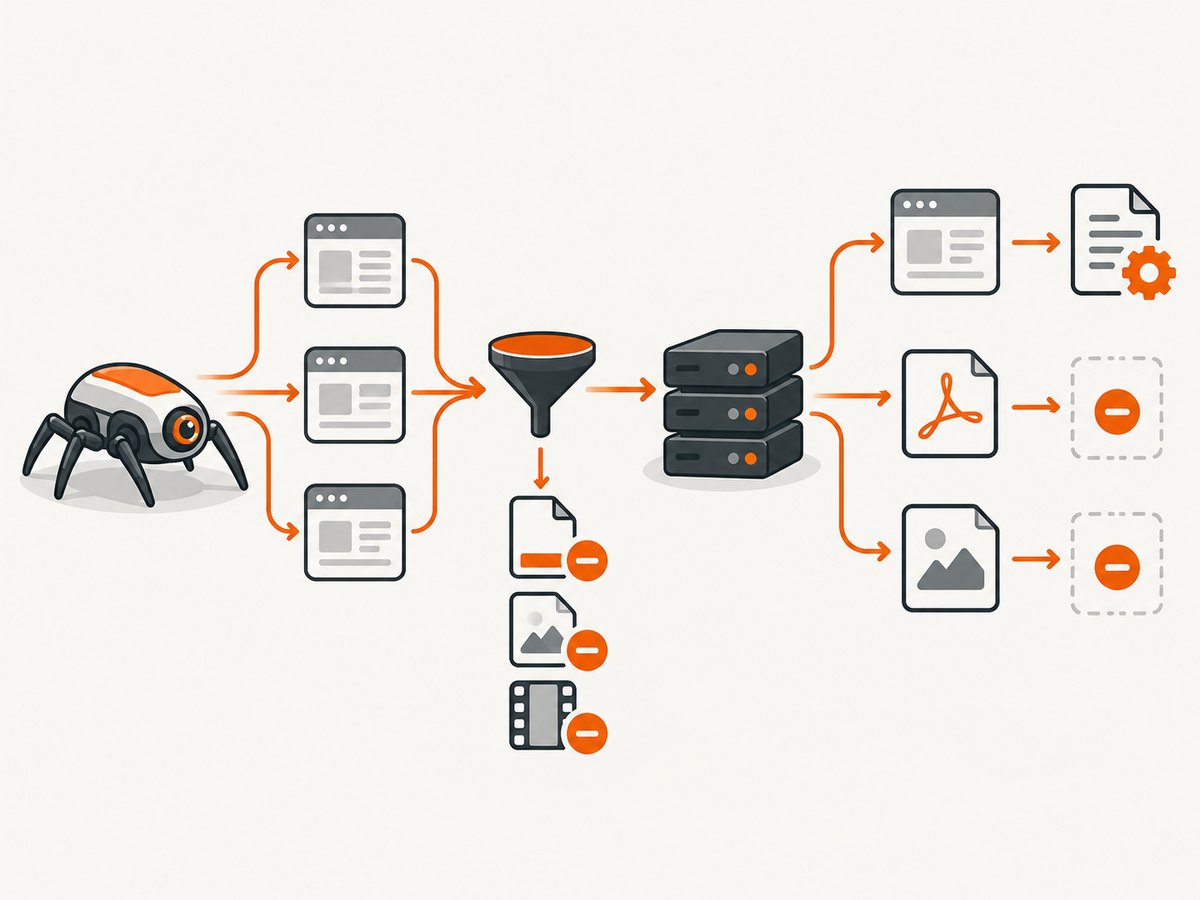
- At link discovery: compare the URL path with a denylist of extensions. This avoids requesting obvious PDFs, images, archives, and other files. It is a heuristic: an extensionless URL can return a PDF, and an HTML route can end in
.pdf. Scrapy’s link extractor supportsdeny_extensions; when omitted, it uses its built-inIGNORED_EXTENSIONSlist. Itsprocess_valuehook can also discard a particular extracted link by returningNone. See the [Scrapy Link Extractors documentation](https://docs.scrapy.org/en/2.8/topics/link-extractors.html). - After fetching: inspect the response’s
Content-Typebefore passing its body to an HTML parser. RFC 9110 defines this field as the media type of the representation. It is useful evidence, but an origin can send an incorrect value or omit the field. See [RFC 9110, HTTP Semantics](https://www.rfc-editor.org/rfc/rfc9110.html).
A practical crawler usually uses both. Treat the discovery filter as a request-saving optimization and the response check as the content-handling decision. Keep the policy aligned with the crawl’s purpose: a site-audit crawler may ignore PDFs, while a documentation crawler may need to download and index their text.
2. Scrapy: filter links and gate HTML parsing
This runnable spider follows same-domain links, rejects common non-HTML suffixes during extraction, and checks the response type before parsing. Save it as spider.py in a Scrapy project and replace the example start URL with a site you are allowed to crawl.
import scrapy
from scrapy.linkextractors import LinkExtractor


class HtmlOnlySpider(scrapy.Spider):
    name = "html_only"
    allowed_domains = ["example.com"]
    start_urls = ["https://example.com/"]

    # Tailor this list to the crawl. Scrapy supplies its own ignored
    # extension defaults if deny_extensions is omitted.
    non_html_extensions = [
        "7z", "avi", "css", "csv", "doc", "docx", "exe", "gif",
        "gz", "jpg", "jpeg", "js", "json", "mp3", "mp4", "pdf",
        "png", "ppt", "pptx", "rar", "svg", "tar", "webp", "xls",
        "xlsx", "xml", "zip",
    ]

    link_extractor = LinkExtractor(
        allow_domains=allowed_domains,
        deny_extensions=non_html_extensions,
        unique=True,
    )

    def parse(self, response):
        content_type = response.headers.get(b"Content-Type", b"")
        media_type = content_type.decode("latin-1", errors="replace")
        media_type = media_type.split(";", 1)[0].strip().lower()

        # This policy is deliberately strict. If the header is absent,
        # route the response to a review handler or choose a fallback.
        if media_type != "text/html" and media_type != "application/xhtml+xml":
            self.logger.info(
                "Skipping non-HTML response url=%s content_type=%r",
                response.url,
                media_type or None,
            )
            return

        title = response.css("title::text").get()
        yield {
            "url": response.url,
            "title": title,
            "status": response.status,
        }

        for link in self.link_extractor.extract_links(response):
            yield response.follow(link.url, callback=self.parse)
Run it with scrapy runspider spider.py -O pages.jsonl. The output contains one JSON object per accepted HTML page. The spider’s allowed_domains restricts the crawl boundary; follow links only within the scope you intend to process.
Use Scrapy’s defaults or supply your own?
If Scrapy’s built-in ignored extensions match your goal, omit deny_extensions and let LinkExtractor use its defaults. Providing a list replaces that default behavior, so include every suffix you want excluded. A small explicit list is easier to review but may miss formats; an expansive list can skip routes whose suffix does not reflect their actual content.
For a per-link rule, use process_value. It receives an extracted link value and should return the accepted value or None to reject it. This is useful for unusual URL schemes or a domain-specific path convention. It still examines a URL, not the eventual response body.
Handle missing or unexpected Content-Type deliberately
The example skips a response with a missing type. That conservative policy avoids feeding unknown bytes to the HTML parser, but it can discard genuine HTML from a misconfigured server. Alternatives include logging unknown responses for review, checking a small safe prefix for an HTML signature, or allowing known problem hosts by domain. Content sniffing is a fallback heuristic, not a replacement for correct server metadata. Keep the decision visible in logs so skipped pages can be audited.
Some sites return XHTML as application/xhtml+xml, so the example allows that media type. If the downstream parser or extraction logic cannot handle XHTML, remove it from the allowlist. A response may also have a charset parameter, such as text/html; charset=utf-8; split off parameters before comparing the media type.
3. A small Python crawler with requests
For a bounded crawl that starts from one page, Python’s requests and Beautiful Soup can implement the same two-stage policy. This example checks same-host links, filters suffixes, tracks visited URLs, and refuses to parse responses whose content type is not HTML. Install dependencies with python -m pip install requests beautifulsoup4.
from collections import deque
from urllib.parse import urljoin, urlparse
import requests
from bs4 import BeautifulSoup

START = "https://example.com/"
SKIP_EXTENSIONS = {
    ".7z", ".avi", ".css", ".doc", ".docx", ".exe", ".gif", ".gz",
    ".jpg", ".jpeg", ".js", ".mp3", ".mp4", ".pdf", ".png", ".ppt",
    ".pptx", ".rar", ".svg", ".tar", ".webp", ".xls", ".xlsx", ".zip",
}

start_host = urlparse(START).hostname
queue = deque([START])
visited = set()
session = requests.Session()
session.headers["User-Agent"] = "ExampleResearchCrawler/1.0"

while queue and len(visited) < 100:
    url = queue.popleft()
    if url in visited:
        continue
    visited.add(url)

    path = urlparse(url).path.lower()
    if any(path.endswith(ext) for ext in SKIP_EXTENSIONS):
        continue

    try:
        response = session.get(url, timeout=(5, 20), allow_redirects=True)
        response.raise_for_status()
    except requests.RequestException as exc:
        print(f"request failed: {url}: {exc}")
        continue

    media_type = response.headers.get("Content-Type", "")
    media_type = media_type.split(";", 1)[0].strip().lower()
    if media_type not in {"text/html", "application/xhtml+xml"}:
        print(f"skipping: {response.url}: Content-Type={media_type or '(missing)'}")
        continue

    soup = BeautifulSoup(response.text, "html.parser")
    print(response.url, soup.title.get_text(" ", strip=True) if soup.title else "")

    for anchor in soup.select("a[href]"):
        target = urljoin(response.url, anchor["href"])
        parsed = urlparse(target)
        if parsed.scheme not in {"http", "https"} or parsed.hostname != start_host:
            continue
        # Fragments do not identify a distinct HTTP resource.
        target = parsed._replace(fragment="").geturl()
        target_path = urlparse(target).path.lower()
        if not any(target_path.endswith(ext) for ext in SKIP_EXTENSIONS):
            if target not in visited:
                queue.append(target)
This is a teaching example, not a full crawler framework. For a production crawl, add a per-host request delay, concurrency limits, a maximum response size, retries with backoff for transient failures, persistent scheduling, and clear robots.txt handling. Normalize URLs carefully: query parameters may identify different content, while tracking parameters may create duplicates. Decide that policy for the target site rather than stripping every query string.
4. cURL and Node.js: inspect one URL
These examples show the request-level check for a single URL. They do not discover links. A crawler applies the same test to every discovered candidate and follows only responses accepted by its policy.
cURL
url="https://example.com/document.pdf"

curl --silent --show-error --location \
  --max-time 30 \
  --output response.body \
  --write-out '\nstatus=%{http_code} type=%{content_type} final_url=%{url_effective}\n' \
  "$url"

# Use the reported type in your crawler's decision. cURL itself does not
# infer that a URL is HTML merely from its extension.
For a real crawl, have your program inspect the response headers and avoid writing a large unexpected body to disk. cURL’s output line reports the final response’s content type and URL after redirects.
Node.js
const url = "https://example.com/page";
const response = await fetch(url, {
  redirect: "follow",
  signal: AbortSignal.timeout(20_000),
  headers: { "User-Agent": "ExampleResearchCrawler/1.0" },
});

const rawType = response.headers.get("content-type") ?? "";
const mediaType = rawType.split(";", 1)[0].trim().toLowerCase();

if (!response.ok) {
  console.error(`HTTP ${response.status} for ${response.url}`);
} else if (!["text/html", "application/xhtml+xml"].includes(mediaType)) {
  console.log(`Skip ${response.url}: Content-Type=${rawType || "(missing)"}`);
  await response.body?.cancel();
} else {
  const html = await response.text();
  console.log(`HTML response: ${response.url}, ${html.length} characters`);
  // Pass html to your chosen HTML parser, then filter discovered links.
}
In Node.js, cancel the body when the response is rejected so the client does not continue consuming a resource it will discard. If you need to cap bytes even for accepted HTML, read the stream incrementally and stop at your configured limit rather than calling text() on an unbounded body.
5. Should you use HEAD first?
HTTP HEAD is like GET, except the server must not send the response body. It is intended to expose representation metadata without transferring representation data. That can save bandwidth when the server supplies accurate metadata and honors HEAD.
It is not a guaranteed preflight. RFC 9110 says servers should generally send the headers they would send for GET, while allowing some fields to be omitted. Some servers implement HEAD unreliably, and the metadata can differ from a subsequent GET. A HEAD request also adds a round trip for every URL, and redirects or authorization rules may behave differently.
Use HEAD only when the expected savings justify the extra request. If HEAD is unsupported, returns an ambiguous type, or disagrees with GET, fall back to a bounded GET and apply the response policy. Do not treat a successful HEAD response as proof that the later GET body is HTML.
6. Robots.txt is a separate decision
Robots.txt governs crawler access preferences and traffic; it does not tell your program whether a response is HTML. Follow the site’s crawler rules as part of responsible crawl design, but keep that decision separate from extension filtering and media-type handling.
Robots.txt also does not guarantee that a URL disappears from search results. Google explains that a disallowed URL may still be indexed if other pages link to it, even though Google cannot crawl its contents. See [Google Search Central’s robots.txt guide](https://developers.google.com/search/docs/crawling-indexing/robots/intro). If your goal is to control indexing or remove a URL, robots.txt alone may not achieve it.
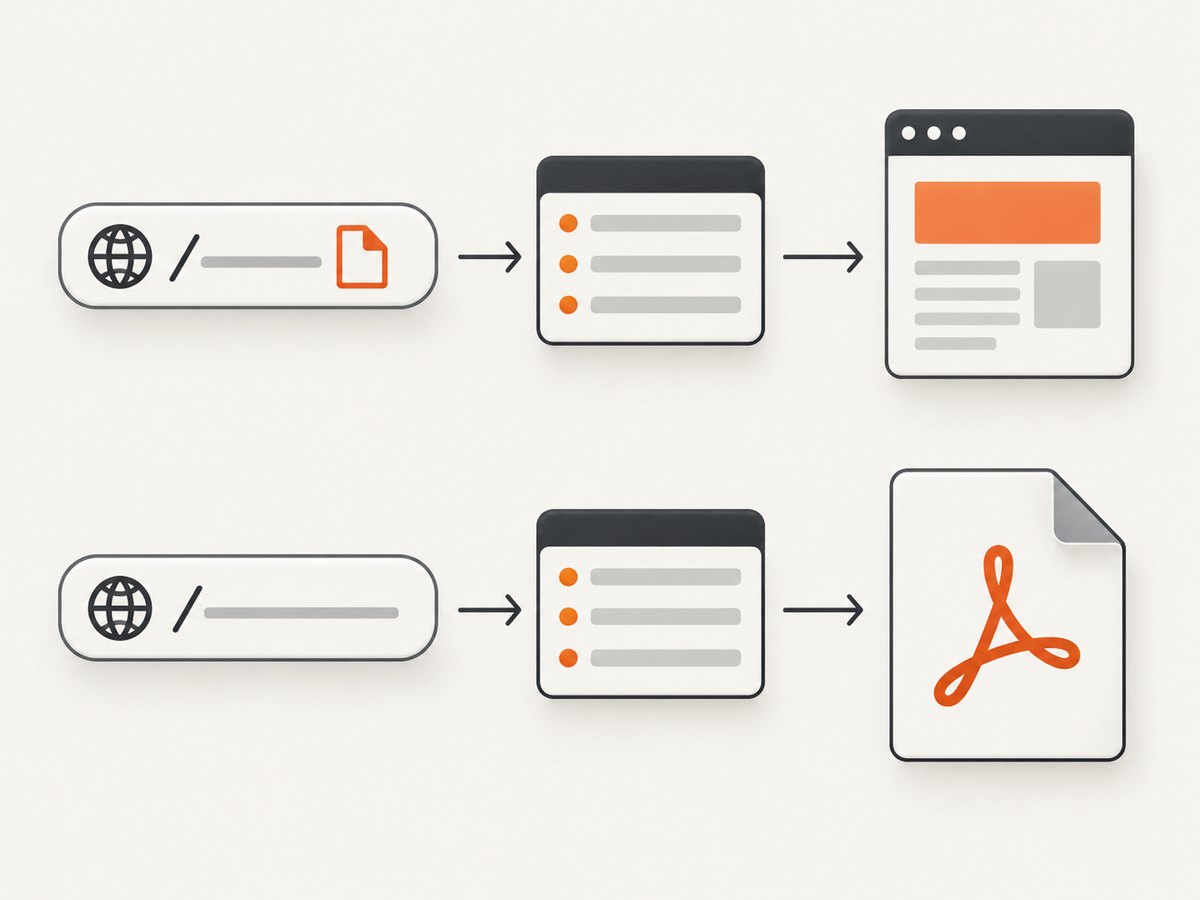
7. Choose a policy for edge cases
| Case | Recommended handling | Reason |
|---|---|---|
URL ends in .pdf, .jpg, or a known archive suffix |
Skip at discovery if those resources are outside the crawl’s scope. | Avoids an unnecessary request for a familiar file type. |
Extensionless URL returns application/pdf |
Reject or route after checking the response header. | The path alone did not reveal the representation. |
URL ends in .pdf but returns HTML |
Decide whether your policy is URL-based or content-based; log exceptions. | Suffixes are clues, not a content guarantee. |
Missing Content-Type |
Skip, review, or apply a documented fallback for selected hosts. | Absence does not prove the body is non-HTML. |
HTML served as text/plain |
Do not silently parse it as HTML globally; use a narrowly scoped exception if needed. | Broad sniffing can parse arbitrary or unsafe content unexpectedly. |
| Redirect from a page URL to a file URL or another host | Check the final response URL and type; enforce redirect and domain policy. | The original URL does not determine the final representation or host. |
| Compressed or very large response | Set byte and time limits and handle decompression limits where supported. | A small transfer can expand into a large body, and slow responses tie up crawler capacity. |
| PDFs are valuable to the project | Route them to a PDF text or metadata pipeline instead of dropping them. | “Non-HTML” does not mean “irrelevant.” |
8. Performance, reliability, and cost
Extension filtering is the cheapest check computationally and can reduce outbound requests, transfer volume, and parser work. Its savings depend on how many discovered links match the denylist. A response-type check costs a request because the server must answer before the crawler knows the representation, but it prevents non-HTML bytes from entering the HTML parsing path. HEAD can avoid a GET body in favorable cases, at the cost of an extra request and imperfect metadata.
For reliability, make the decision observable. Record the requested URL, final URL, status, normalized content type, action taken, and reason for skipped responses. Keep timeouts, retry limits, per-host concurrency, and maximum response sizes explicit. Retry transient connection failures or selected server errors with bounded backoff; do not retry a deterministic non-HTML response as though it were a network failure.
For cost, the relevant resources are your crawler’s network egress, storage, compute time, and any metered proxy or hosting service you use. Avoiding known binary requests can reduce those usage costs, but do not assume every extension match would otherwise have produced a billable charge. HEAD may reduce transferred bytes for some origins while increasing request count. Choose a policy from measured crawl logs for your own infrastructure; no universal benchmark follows from the filtering rules.
9. Troubleshooting
| Symptom | Likely cause | Fix |
|---|---|---|
| Scrapy still requests PDFs or images | A custom deny_extensions list replaced the defaults and omitted those suffixes, or links use query/path forms your rules do not catch. |
Review the effective list, normalize the URL path, and add relevant suffixes. Keep a response check for extensionless resources. |
| Valid HTML pages are skipped | The origin omits or mislabels Content-Type, or serves XHTML. |
Log the raw header and final URL. Allow application/xhtml+xml if supported; use a narrow documented fallback for known hosts. |
| A PDF reaches the HTML parser | The URL had no recognizable suffix, or the server mislabeled the response as HTML. | Check actual headers and parser failures; where necessary use a limited signature or parser validation as a secondary guard. |
| HEAD returns 405 or 501 | The server does not support HEAD. | Fall back to a bounded GET and apply the normal content-type policy. |
| HEAD says HTML, GET returns a file | Headers differ between methods, request state, or redirect paths. | Make the GET response authoritative for parsing; treat HEAD only as a hint. |
| Crawl loops over the same pages | Fragments, query variants, redirects, or URL normalization create duplicate queue entries. | Remove fragments, track final URLs, and define which query parameters distinguish content. |
| Unexpected external hosts are fetched | Links or redirects cross the intended domain boundary. | Restrict extracted links and validate the final response host after redirects. |
| Memory grows on large files | The client buffers the full body before deciding or parsing. | Use streaming or framework limits, cancel rejected bodies, and set a maximum response size. |
10. A practical implementation checklist
- Define what counts as HTML for this crawl, including whether XHTML is accepted.
- Decide which non-HTML resources are truly irrelevant; keep useful PDFs or feeds on separate processing paths.
- Filter obvious suffixes during link discovery. In Scrapy, use
deny_extensionsor its defaults. - Apply a response
Content-Typecheck before HTML parsing, including normalization of case and parameters. - Choose and document the behavior for missing or unexpected media types.
- Check final URLs after redirects and enforce the crawl’s host boundary.
- Set timeouts, concurrency, retries, response-size limits, and robots.txt behavior for the crawler.
- Log skip reasons and inspect samples so a rule does not quietly exclude useful pages.
11. Or skip the browser setup
If your task is to capture a page as an image or PDF rather than crawl its links, [ScreenshotNeo](https://screenshotneo.com) provides a website screenshot API and MCP server. A single GET request can return a PNG, JPEG, WebP, or PDF; see the [API documentation](https://screenshotneo.com/docs/).
curl -G "https://api.screenshotneo.com/v1/shot" \
  -d access_key=YOUR_API_KEY \
  --data-urlencode url=https://example.com \
  -o shot.webp
import requests
r = requests.get(
"https://api.screenshotneo.com/v1/shot",
params={"access_key": "YOUR_API_KEY", "url": "https://example.com"},
timeout=90,
)
open("shot.webp", "wb").write(r.content)const q = new URLSearchParams({
access_key: "YOUR_API_KEY",
url: "https://example.com",
});
const res = await fetch(`https://api.screenshotneo.com/v1/shot?${q}`);
if (!res.ok) throw new Error(`Screenshot request failed: ${res.status}`);
await Bun.write("shot.webp", res);ScreenshotNeo removes cookie banners, newsletter popups, and chat widgets before the shot. Bot checks, blank pages, and failed loads are never billed. Its MCP server lets AI agents take screenshots. The free plan includes 1,000 screenshots a month with no card; paid plans start at $5 for 3,000. [Get 1,000 free screenshots a month with no card](https://screenshotneo.com/account/sign-up/).
12. FAQ
Does ignoring non-HTML URLs stop Google from indexing them?
No. A crawler’s local filter controls what your crawler requests and parses. Search indexing is a separate system; a robots.txt block does not necessarily prevent a linked URL from appearing in results.
Should I reject every response whose type is not exactly text/html?
Only if that matches your parser and crawl goal. XHTML is commonly represented as application/xhtml+xml; other formats may deserve a separate pipeline.
Can an extension denylist be enough?
It can be enough when the crawl is deliberately limited to conventional page URLs and occasional misclassification is acceptable. For robust handling, also inspect fetched responses.
Will Content-Type always be present?
No. Decide explicitly how your crawler treats a missing or malformed value, and make that decision visible in logs.


