ISP vs. Residential Proxies: Differences, Trust, and Use Cases
ISP proxies keep a stable IP on datacenter infrastructure; residential proxies route through consumer devices and often rotate. Choose based on session needs, location coverage, and how the IPs are sourced.
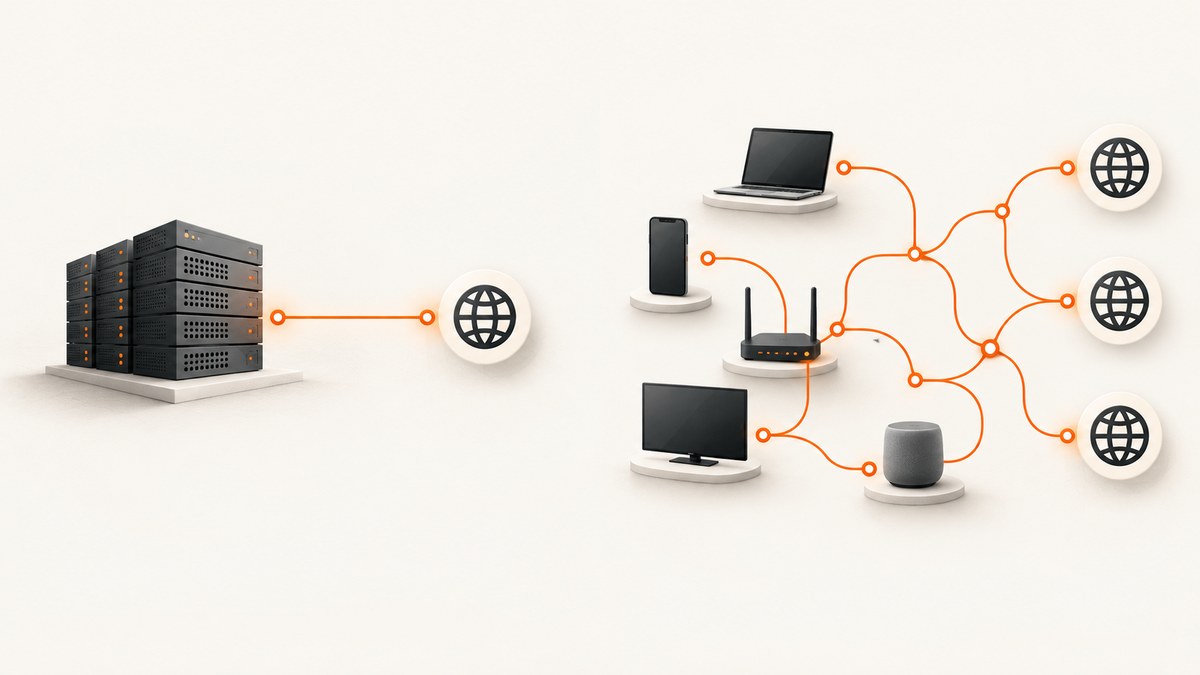
ISP proxies (often called static residential proxies) run on datacenter servers but use IP addresses registered to consumer Internet service providers. They usually keep the same IP for a session or account. Rotating residential proxies route traffic through real consumer devices and commonly change the exit IP per request or session. Choose ISP proxies when a long session needs continuity and predictable connections; choose rotating residential proxies when you need many locations and a larger, changing pool. Neither type is automatically trustworthy: investigate how addresses are sourced, what the operator logs, and whether your use complies with the target site’s rules.
These labels describe different things: “ISP” points to the network association of the IP and its hosting setup, while “residential” can refer to traffic exiting through a consumer device. Providers may use the terms differently, so check the actual product description and session controls before paying.
1. What is the difference?
A proxy relays a client’s request to another server. The destination generally sees the proxy’s outgoing IP address rather than the client’s public IP. This changes the apparent network origin of the request; it does not make the activity untraceable or automatically protect data between the client and proxy.
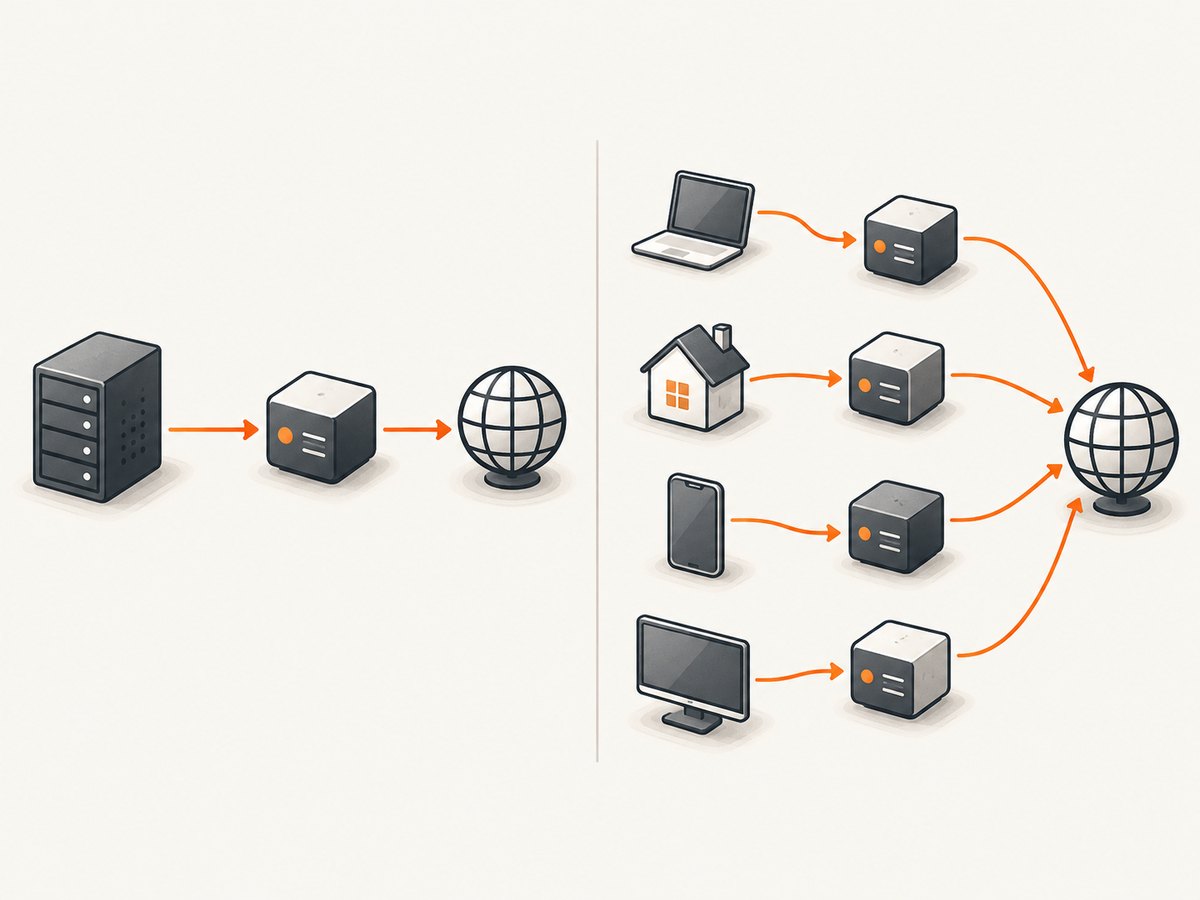
An ISP proxy uses an IP associated with a consumer ISP ASN (Autonomous System Number), but the proxy endpoint is hosted on datacenter infrastructure. The IP generally stays assigned to the account or session by default. A rotating residential proxy exits through a real consumer connection, such as a home network, and the provider can rotate among those exit addresses. Some residential services offer sticky sessions that hold one address temporarily.
| Question | ISP / static residential | Rotating residential |
|---|---|---|
| Where does traffic exit? | Datacenter server | Consumer device on a residential connection |
| What network identity is presented? | An IP registered to a consumer ISP ASN | An IP from a consumer ISP and home connection |
| Does the IP change? | Usually stays stable by default | Often rotates per request or session; sticky options may exist |
| What is it suited to? | Long logins, account sessions, multi-step flows | Many locations, distributed collection, varied exit addresses |
| Typical pricing unit | Per proxy or IP | Per amount of transferred data |
| Common reliability concern | Static reputation or ASN may be blocked | Exit devices can disconnect or change |
2. Are ISP proxies the same as static residential proxies?
In provider terminology, usually yes: Webshare and IPRoyal both describe their ISP proxy products as static residential proxies. Webshare describes these addresses as hosted on datacenter hardware while registered to consumer ISPs. That hybrid setup explains why the category may be labeled both “ISP” and “static residential.” Still, “static residential” is not a standardized guarantee about physical location or exclusivity. Verify whether the IP is dedicated, how long it remains assigned, and where traffic physically exits. See [Webshare’s definition](https://help.webshare.io/en/articles/15518733-what-is-a-static-residential-proxy-isp-proxy) and [IPRoyal’s ISP proxy description](https://iproyal.com/isp-proxies/).
3. Which one should you choose?
Choose ISP proxies for sessions that depend on continuity
A stable address can be useful for an authenticated workflow where you need to sign in, navigate several pages, and preserve one network identity for the duration. It can also suit a checkout flow or repeated monitoring of one location when changing exits mid-session would invalidate state. Keep such activity within the site’s terms and use authorized accounts. Static identity is not a promise that the destination will trust or allow the traffic.
Choose rotating residential proxies for location variety and pool scale
Residential pools can offer many different exit locations and rotation behavior, which is useful for lawful collection across regions or checking how a public page renders from different markets. Rotation is not a substitute for permission, reasonable request rates, or respecting access controls. If a workflow requires continuity, check whether the provider supports sticky sessions and how long they last before designing around rotation.
Use either for ad verification, SEO monitoring, and local-result checks
The right choice depends on the question being measured. Use a stable ISP exit when you need repeatable observations from one network identity. Use rotating residential exits when you need to compare several consumer-network locations. For a screenshot of a page you can access directly, a proxy may be unnecessary: a screenshot service can capture the rendered result without requiring you to manage proxy endpoints.
Be cautious with streaming and restricted services
Changing apparent location does not guarantee access or playback. A service may block proxy traffic or prohibit location masking in its terms. Verify both the provider’s acceptable-use policy and the destination’s rules before relying on a proxy for this purpose.
4. Why do websites trust residential IPs?
Some websites use IP reputation, ASN information, request patterns, account history, cookies, browser signals, and other factors to assess traffic. A residential exit can resemble an ordinary consumer connection more closely than a known datacenter range, but that does not make it inherently trusted. A residential IP may have a poor reputation from earlier use, be shared, or trigger checks because of unusual behavior. Likewise, an ISP proxy can work normally on one site and be blocked on another. There is no universal “residential equals trusted” rule or reliable block-rate promise.
Do not treat a proxy as a way to defeat a site’s safeguards. For permitted research, use the least intrusive access method available, keep request rates modest, identify your activity where appropriate, and stop if the site denies access.
5. Are residential proxies safe and legal?
Safety depends heavily on the source of the exit IPs and the provider’s controls. The FBI describes residential proxies as intermediaries that make connections appear to originate elsewhere, and warns that some networks include devices whose owners did not knowingly consent. The FBI lists multiple acquisition paths, including SDK arrangements, unclear VPN terms, compromised IoT devices, malware, and passive-income schemes. It also documents criminal uses such as phishing, fake-account creation, data exfiltration, brute-force attacks, and identity or location obfuscation. Read the [FBI’s March 2026 alert](https://www.fbi.gov/file-repository/cyber-alerts/avrecon-malware-infected-routers-exploited-as-residential-proxies-by-socksescort.pdf) before selecting a residential provider.
A proxy service is not automatically illegal, and these facts are not a legal conclusion for a particular project. Laws and site terms differ by jurisdiction and use. Before using any proxy, confirm that your collection or automation is authorized, review applicable privacy and data rules, and avoid attempts to access accounts or systems without permission.
Provider trust checklist
- Ask how addresses are sourced. Look for an explicit explanation of user consent, how it is recorded, and whether devices can opt out.
- Read the policies. Review acceptable use, abuse handling, complaint response, and data retention—not just marketing claims.
- Protect the connection. Confirm supported HTTPS or SOCKS behavior, validate TLS certificates in your client, and avoid sending credentials over an unencrypted connection.
- Check the claimed location and ASN. Test with a lawful destination and compare the observed exit region and network classification against what you purchased.
- Use stable sessions only when appropriate. Keep an authenticated session on one IP only if the target’s rules allow your workflow.
- Avoid unexplained free lists and enrollment apps. The FBI warns that devices may be added to proxy networks without meaningful owner consent.
6. Performance, reliability, and cost
Datacenter hosting can make ISP proxy connections more predictable than traffic that depends on a consumer device staying online. A residential exit inherits the variability of that connection, and a rotating pool adds churn: a request may use a different IP or location from the previous one. These are tendencies, not guarantees. Routing, destination distance, provider capacity, target throttling, and the requested page all affect actual speed and success.
Compare the billable unit as well as the headline rate. ISP plans are commonly priced per proxy or IP; rotating residential plans are commonly priced by data transferred. For a high-volume task, estimate page and asset bytes, retries, and concurrency before choosing. A small number of long sessions may favor per-IP pricing; broad collection may consume substantial bandwidth. Calculate cost using the provider’s current price and your own measured workload rather than assuming one category is always cheaper.
Webshare’s published figures include claims of more than 80 million residential IPs, more than 100,000 ISP IPs, up to 1 Gbps, and 99.97% uptime; its page also lists pricing examples. These are vendor claims, not independent industry benchmarks or guarantees for an individual customer. Check the provider’s current offer and terms directly at [Webshare](https://www.webshare.io/features/isp-proxy). No universal performance or block-rate statistic applies to all proxy networks.
7. A practical selection process
- Write down the job. Is it one authenticated session, a location check, or collection across many regions? Confirm that you are allowed to do it.
- Set the session requirement. If login state must persist, start with a stable ISP endpoint or a residential sticky session. If each observation can be independent, rotation may fit.
- Decide the locations. Specify country, region, or city needs and verify the provider actually supports that targeting for the selected pool.
- Run a small lawful pilot. Test representative pages, locations, and session lengths. Track completion, response codes, connection time, bytes used, and IP changes.
- Review trust and billing. Ask about sourcing, logs, abuse response, and retention; compare the expected cost using your pilot’s data volume.
- Set conservative limits. Add timeouts, bounded retries, backoff, and concurrency caps. Stop on access-denied responses or repeated challenges instead of escalating around them.
8. Troubleshooting common issues
| Symptom | Likely cause | What to check |
|---|---|---|
| Login expires or checkout restarts | The exit IP rotated during the session, or the destination invalidated the session | Use a permitted stable endpoint or sticky session; keep cookies and session state consistent. |
| Requests work from one proxy but fail from another | Exit reputation, target policy, location mismatch, or temporary provider outage | Check the target’s response, validate observed ASN/location, and contact the provider. Do not interpret a different exit as permission to bypass a block. |
| Unexpectedly high traffic charges | Large pages, images, scripts, retries, or parallel requests consume more data than the HTML alone | Measure transferred bytes, limit unnecessary assets when allowed, bound retries, and set a usage alert if offered. |
| Connection timeout or intermittent failures | Consumer device went offline, route is slow, endpoint credentials are wrong, or destination is unavailable | Check endpoint, port, authentication, DNS and TLS configuration; use a finite timeout and a small number of delayed retries. |
| Location is not what the plan advertised | Geo databases disagree or the provider’s available exit inventory changed | Check the actual exit IP and ASN with a lawful diagnostic, ask the provider about targeting granularity, and avoid assuming city-level precision. |
| Certificate errors | TLS validation failed or an intermediary is configured incorrectly | Keep certificate verification enabled, inspect proxy protocol and trust configuration, and do not send credentials until the secure connection is correct. |
9. Screenshot alternative for rendered pages
If your goal is to save or inspect a website’s rendered appearance, a proxy is often the wrong layer: proxies change the route, while a screenshot tool returns an image or PDF. ScreenshotNeo is a website screenshot API and MCP server from Yorker Media. It accepts one GET request with a URL and returns PNG, JPEG, WebP, or PDF. It is the first alternative to try for screenshot work because cookie banners, popups, and chat widgets are removed before capture, only clean shots are billed, and the lowest paid plan starts at $5.

It does not replace a proxy when you specifically need a request to originate from a particular consumer network or location. Use it for the capture task itself; check the destination’s access rules as usual.
10. FAQ
Do ISP proxies keep the same IP?
They generally keep an assigned IP stable by default, but assignment and rotation policies vary by provider. Confirm whether the address is dedicated and how long it stays assigned.
Is a static residential proxy a home connection?
Not necessarily. In the common ISP-proxy product described here, the address is associated with a consumer ISP but the proxy runs on datacenter hardware.
Which proxy is best for scraping?
There is no single best type. A stable ISP endpoint can fit a permitted workflow needing continuity; rotating residential can fit lawful multi-location collection. Consider authorization, session behavior, sourcing, and total cost together.
Can residential proxies guarantee fewer blocks?
No. A residential address may still be blocked based on its reputation, request behavior, account signals, or the destination’s policy. No proxy type guarantees access.
Does ScreenshotNeo provide a residential proxy?
No proxy capability is described here. ScreenshotNeo is a screenshot API and MCP server for capturing rendered pages; use a proxy product when network exit location is a requirement.
Or skip the browser setup
Make one request to capture a page. The API also supports full-page capture, element selectors, device presets, custom CSS and JavaScript, waits, PDF options, and other settings; see the ScreenshotNeo documentation for the available parameters.
curl -G "https://api.screenshotneo.com/v1/shot" -d access_key=YOUR_API_KEY --data-urlencode url=https://stripe.com -o shot.webpimport requests
r = requests.get("https://api.screenshotneo.com/v1/shot", params={"access_key": "YOUR_API_KEY", "url": "https://stripe.com"}, timeout=90)
open("shot.webp", "wb").write(r.content)const q = new URLSearchParams({ access_key: 'YOUR_API_KEY', url: 'https://stripe.com' });
const res = await fetch(`https://api.screenshotneo.com/v1/shot?${q}`);- Cookie banners, popups, and chat widgets are removed before the shot.
- Bot checks, blank pages, and failed loads are never billed; response headers say the page verdict and billing status.
- An MCP server lets AI agents use the screenshot, page-info, and PDF tools.
- 1,000 screenshots a month are free with no card; paid plans start at $5 for 3,000 screenshots.
Create a free ScreenshotNeo account and get 1,000 screenshots a month with no card.


