How to Generate a PDF From a JavaServer Faces Page With wkhtmltopdf
Render a print-ready JSF view with wkhtmltopdf, return the PDF safely from Faces, and solve authentication, assets, JavaScript, security, and failures.
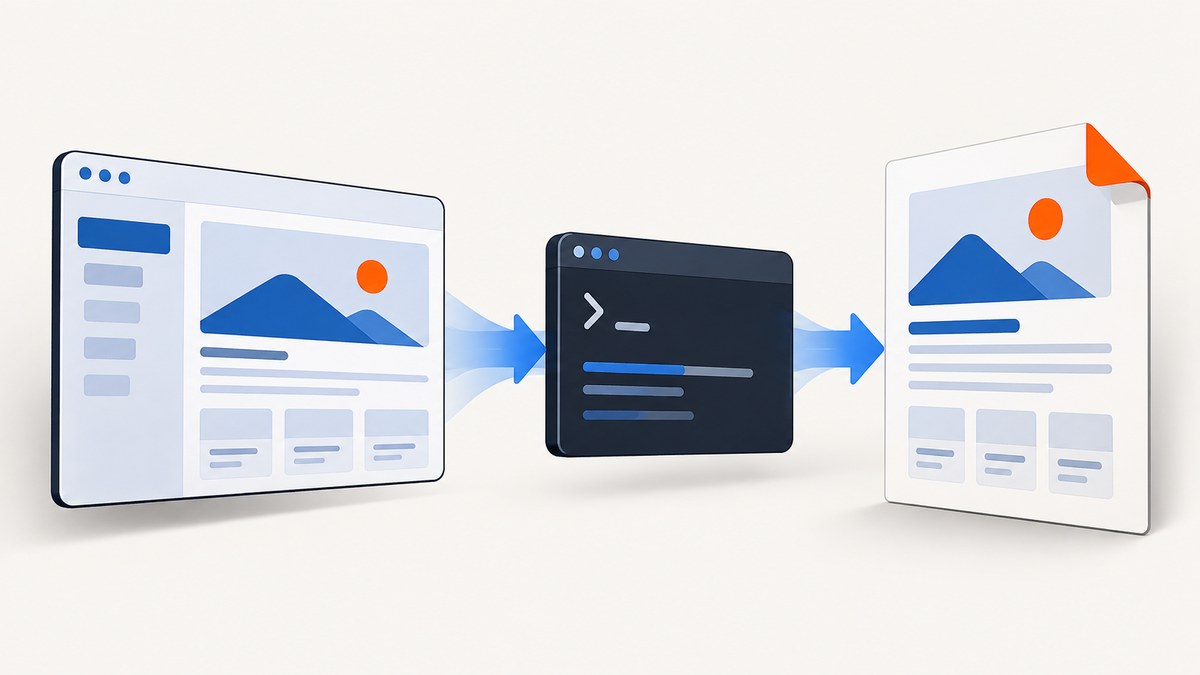
Direct answer: JavaServer Faces (JSF) generates HTML; wkhtmltopdf loads that HTML from a URL or file and writes a PDF; your JSF action then streams those PDF bytes through ExternalContext.getResponseOutputStream() and calls FacesContext.responseComplete() so Faces does not render a second response.
The difficult part is usually not the command. It is giving the renderer the same authenticated, print-ready HTML and assets that a browser would receive. Build a dedicated print view, make its authentication explicit, invoke a controlled wkhtmltopdf process, validate the exit status and output, then return only the PDF bytes.
1. Understand the rendering pipeline
- A JSF request builds a component tree and produces HTML.
- wkhtmltopdf, a headless command-line tool using Qt WebKit, requests that URL or reads an HTML file and renders it to PDF. The project’s overview shows the URL-to-PDF model and describes the tool as open source under LGPLv3 (project overview).
- Your application waits for the process, checks its status, and reads the generated file or byte stream.
- The Faces response is changed to
application/pdf, the bytes are written, and response completion is signaled.
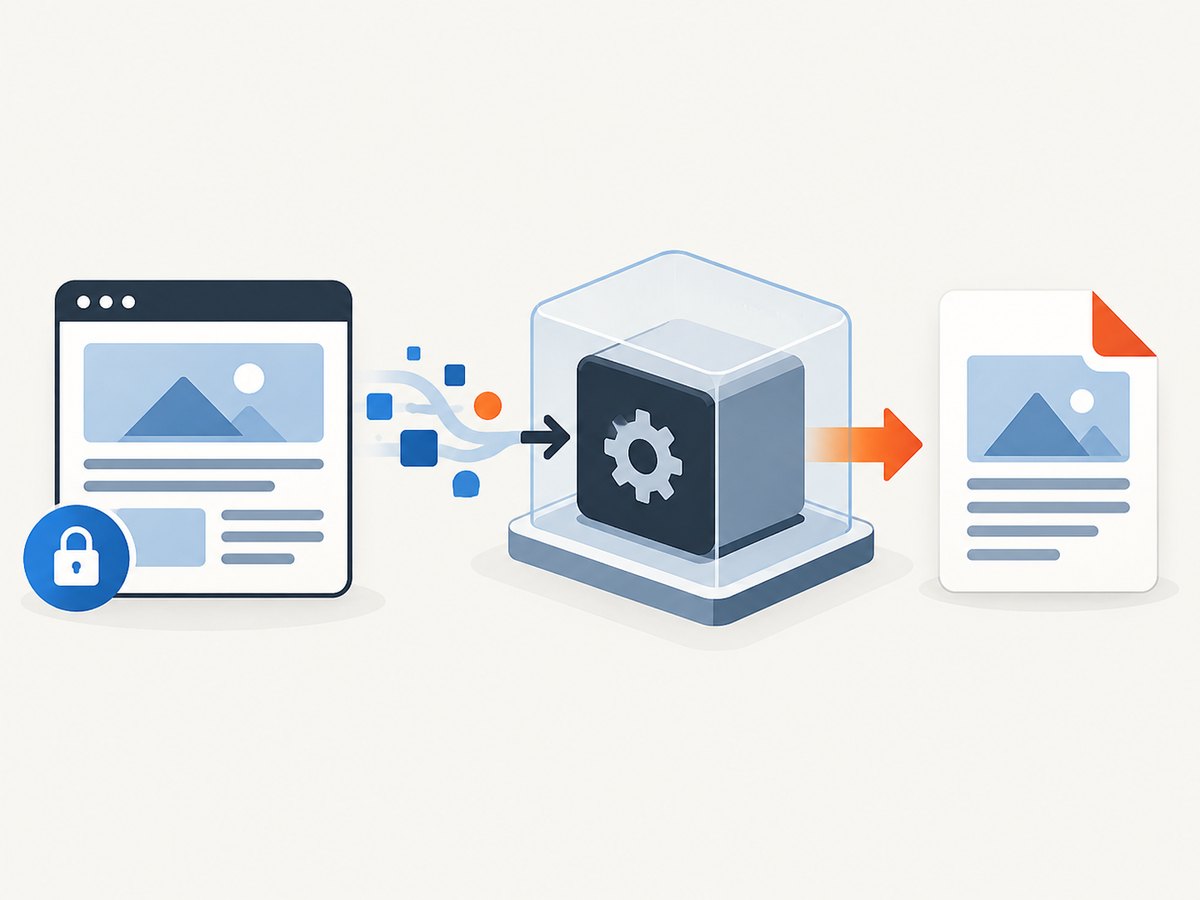
wkhtmltopdf is not a JSF component and does not call Java APIs inside your application. It is a separate executable. The renderer must be able to reach the hostname, path, CSS, fonts, images, and other resources from its own runtime.
2. Create a dedicated print view
Do not point a converter at an arbitrary interactive screen and hope it looks like a document. Create a print route or view with stable data, print CSS, and no controls that should not appear on paper.
Print-view checklist
- Use a fixed route such as
/reports/invoice-print.xhtml?id=.... - Keep navigation, buttons, menus, chat launchers, and screen-only widgets out of the markup.
- Use absolute or renderer-reachable URLs for stylesheets, images, and fonts.
- Load all data before the response is considered ready.
- Use print CSS such as
@page,break-inside, and explicit table header rules. - Make the page deterministic for a given report identifier.
<h:head xmlns:h="http://xmlns.jcp.org/jsf/html">
  <title>Invoice #{invoiceView.number}</title>
  <style>
    @page { size: A4; margin: 16mm 14mm; }
    body { font-family: Arial, sans-serif; color: #222; }
    .screen-only { display: none !important; }
    table { width: 100%; border-collapse: collapse; }
    thead { display: table-header-group; }
    tr { break-inside: avoid; }
    .total { break-inside: avoid; }
  </style>
</h:head>
<h:body xmlns:h="http://xmlns.jcp.org/jsf/html">
  <h1>Invoice #{invoiceView.number}</h1>
  <h:panelGroup rendered="#{not empty invoiceView.items}">
    <table>
      <thead>
        <tr><th>Description</th><th>Quantity</th><th>Amount</th></tr>
      </thead>
      <tbody>
        <ui:repeat value="#{invoiceView.items}" var="item" xmlns:ui="http://xmlns.jcp.org/jsf/facelets">
          <tr><td>#{item.description}</td><td>#{item.quantity}</td><td>#{item.amount}</td></tr>
        </ui:repeat>
      </tbody>
    </table>
  </h:panelGroup>
  <div class="total">Total: #{invoiceView.total}</div>
</h:body>
3. Choose URL input or HTML-file input
| Approach | Use it when | Checks to make |
|---|---|---|
| Render a URL | The application already serves a dedicated print endpoint. | Renderer-to-app networking, authentication, cookies, DNS, redirects, and every asset URL. |
| Render an HTML file | You can create a self-contained document for the job. | Relative paths, temporary-file cleanup, local-file permissions, and access to staged assets. |
The command-line manual documents page objects, global and per-page options, JavaScript controls, local-file access, headers and footers, and table-of-contents objects (manual). Keep local-file access narrow: use --disable-local-file-access and explicitly permit only required directories with --allow.
4. Invoke wkhtmltopdf from Java
The following service writes to a temporary file, applies a small set of controlled options, captures stderr, checks the exit code, and deletes the file. Adapt the executable path and URL construction to your deployment.
import java.io.IOException;
import java.nio.charset.StandardCharsets;
import java.nio.file.Files;
import java.nio.file.Path;
import java.time.Duration;
import java.util.ArrayList;
import java.util.List;

public final class WkhtmltopdfService {
    private final Path executable;
    private final Duration timeout;

    public WkhtmltopdfService(Path executable, Duration timeout) {
        this.executable = executable;
        this.timeout = timeout;
    }

    public byte[] renderUrl(String url) throws IOException, InterruptedException {
        Path output = Files.createTempFile("jsf-pdf-", ".pdf");
        try {
            List<String> command = new ArrayList<>();
            command.add(executable.toString());
            command.add("--disable-local-file-access");
            command.add("--page-size");
            command.add("A4");
            command.add("--margin-top");
            command.add("16mm");
            command.add("--margin-right");
            command.add("14mm");
            command.add("--margin-bottom");
            command.add("16mm");
            command.add("--margin-left");
            command.add("14mm");
            command.add("--javascript-delay");
            command.add("500");
            command.add(url);
            command.add(output.toString());

            Process process = new ProcessBuilder(command)
                    .redirectErrorStream(true)
                    .start();
            byte[] diagnostics = process.getInputStream().readAllBytes();
            boolean finished = process.waitFor(timeout.toMillis(), java.util.concurrent.TimeUnit.MILLISECONDS);
            if (!finished) {
                process.destroyForcibly();
                throw new IOException("wkhtmltopdf timed out");
            }
            if (process.exitValue() != 0) {
                String message = new String(diagnostics, StandardCharsets.UTF_8);
                throw new IOException("wkhtmltopdf failed with exit code "
                        + process.exitValue() + ": " + message);
            }
            if (!Files.isRegularFile(output) || Files.size(output) == 0) {
                throw new IOException("wkhtmltopdf produced no PDF");
            }
            return Files.readAllBytes(output);
        } finally {
            Files.deleteIfExists(output);
        }
    }
}
A production implementation should use an allow-listed print URL or construct the URL from validated identifiers. Do not accept an arbitrary URL from a request parameter.
5. Return the PDF from a JSF action
Jakarta Faces exposes a response output stream for binary data, and FacesContext.responseComplete() tells the lifecycle that the response has been finished (ExternalContext API; FacesContext API).
import jakarta.faces.context.ExternalContext;
import jakarta.faces.context.FacesContext;
import jakarta.faces.view.ViewScoped;
import jakarta.inject.Inject;
import jakarta.inject.Named;
import java.io.IOException;
import java.io.Serializable;
import java.net.URLEncoder;
import java.nio.charset.StandardCharsets;

@Named
@ViewScoped
public class InvoiceDownload implements Serializable {
    @Inject
    private WkhtmltopdfService pdfService;

    public void download(long invoiceId) throws IOException, InterruptedException {
        // Validate authorization before constructing the print URL.
        String id = Long.toString(invoiceId);
        String url = "https://app.example.test/reports/invoice-print.xhtml?id="
                + URLEncoder.encode(id, StandardCharsets.UTF_8);

        byte[] pdf = pdfService.renderUrl(url);
        FacesContext faces = FacesContext.getCurrentInstance();
        ExternalContext response = faces.getExternalContext();
        response.responseReset();
        response.setResponseContentType("application/pdf");
        response.setResponseContentLength(pdf.length);
        response.setResponseHeader("Content-Disposition",
                "attachment; filename=invoice-" + id + ".pdf");
        response.getResponseOutputStream().write(pdf);
        response.getResponseOutputStream().flush();
        faces.responseComplete();
    }
}
If the PDF is large, stream from the temporary file instead of holding all bytes in memory, while still writing only PDF bytes to the response and completing the Faces response.
6. Handle authentication deliberately
A renderer process does not automatically inherit the cookies from the user’s browser. Common designs are:
- Short-lived signed print URL: create a server-side, expiring token tied to the authorized report and expose only the print view.
- Internal service authentication: add a controlled header or cookie to the renderer request if your wkhtmltopdf build and deployment support it.
- Isolated HTML artifact: generate the report HTML on the server, stage only the required assets, and render that file with narrowly permitted paths.
Never put a long-lived user password in a URL. Check authorization before creating the token or artifact, expire it quickly, and prevent the print endpoint from becoming a general proxy.
7. Configure the important wkhtmltopdf options
| Need | Options to evaluate | Notes |
|---|---|---|
| Paper layout | --page-size, --orientation, --margin-* |
Set these explicitly so deployment defaults do not change the document. |
| JavaScript | --enable-javascript, --javascript-delay, --no-stop-slow-scripts |
JavaScript is enabled by default, but a delay is only a wait; it does not prove that modern asynchronous state is complete. |
| Headers and footers | --header-html, --footer-html, or text options |
Test margins and page-number rendering with your exact build. |
| Assets | --enable-local-file-access, --disable-local-file-access, --allow |
Prefer disabled local access and allow only the staging directory when files are required. |
| Links and outlines | --enable-internal-links, outline options |
Useful for long reports; verify generated navigation. |
The manual describes these options and the distinction between global options and page-object options. Keep your argument list fixed in code and expose only a small, validated set of business-level choices.
8. Command-line and cURL-adjacent examples
The basic command is:
wkhtmltopdf https://app.example.test/reports/invoice-print.xhtml?id=42 invoice-42.pdfFor an HTML file with a permitted asset directory:
wkhtmltopdf --disable-local-file-access \
  --allow /srv/report-assets \
  /srv/reports/invoice-42.html invoice-42.pdf
wkhtmltopdf itself is a local executable rather than an HTTP API, so cURL is not the invocation method. cURL is useful for checking that your JSF print endpoint is reachable before handing its URL to the renderer:
curl -fsS -D headers.txt \
  -H 'Authorization: Bearer SHORT_LIVED_PRINT_TOKEN' \
  'https://app.example.test/reports/invoice-print.xhtml?id=42' \
  -o print.html
9. Troubleshooting
| Symptom | Likely cause | Fix |
|---|---|---|
| Login page in the PDF | The renderer has no browser session. | Use a short-lived print token, controlled authentication, or a server-generated artifact. |
| Missing CSS or images | Relative URLs, container DNS, blocked paths, or inaccessible resources. | Use renderer-reachable absolute URLs, inspect the HTML from the renderer host, and configure narrow --allow paths for files. |
| Blank or half-rendered page | Data or JavaScript has not completed. | Make data server-rendered where possible; otherwise use a measured JavaScript delay and a deterministic readiness condition. |
| Exit code is nonzero | Invalid arguments, unreachable URL, resource failure, or renderer error. | Log the exact command without secrets, stderr, exit code, URL identifier, and elapsed time; do not return a partial file. |
| Faces HTML appended after PDF | The lifecycle continued after writing the binary response. | Call facesContext.responseComplete() and avoid navigation or a second writer. |
| Fonts or Unicode glyphs missing | The deployment image lacks the font or font URLs are inaccessible. | Install approved fonts in the renderer environment or package them as controlled assets; verify multilingual samples. |
| Tables split badly | Browser layout rules do not map cleanly to printed pages. | Use print CSS, repeat table headers, avoid breaking rows, and test long data sets. |
| Local files are rejected | Local access is disabled. | Keep it disabled by default; if files are necessary, permit only the exact directory with --allow. |
10. Security boundaries
The official downloads page warns that unsanitized user HTML or JavaScript can lead to complete server takeover and says not to use wkhtmltopdf with untrusted HTML (downloads and security warning). Treat conversion as a privileged operation:

- Accept an internal report identifier, not arbitrary HTML or arbitrary URLs.
- Allow-list hosts, routes, and resource directories.
- Run the process with a least-privilege operating-system account.
- Disable local-file access unless a narrowly scoped directory is required.
- Apply a process timeout, output-size limit, and concurrency limit.
- Do not log cookies, authorization tokens, or complete sensitive URLs.
- Isolate the renderer from secrets and unrelated internal services.
11. Performance, reliability, and cost
- Startup: each process has startup overhead. Use a bounded worker queue if traffic is substantial, while keeping the queue finite so requests cannot exhaust memory or processes.
- Network: every CSS, font, image, and script request adds latency. Host required assets close to the renderer and avoid unnecessary third-party resources.
- Timeouts: set a total process deadline shorter than the HTTP request timeout. Kill the process and remove temporary files on timeout.
- Retries: retry only transient failures and use an idempotent report identifier. Do not blindly retry malformed input or authentication failures.
- Determinism: pin the wkhtmltopdf build and deployment fonts. The project download page identifies 0.12.6 as its stable series, released June 11, 2020; confirm package provenance and compatibility for your target OS (downloads).
- Observability: record duration, exit status, output size, page identifier, and failure category. Redact credentials.
- Cost: the executable is self-hosted, so budget for CPU, memory, storage, operations, and security maintenance. The sources do not establish a universal throughput benchmark.
12. Verify the binary output
At minimum, verify that the process succeeded and the output is nonempty. For important workflows, inspect representative PDFs for:
- Correct page count and page size.
- Readable Unicode and expected fonts.
- Images, charts, links, headers, and footers.
- Long tables and page breaks.
- Data belonging to the authorized user and report.
- Failure behavior when the application, asset host, or renderer is unavailable.
Run these checks on the exact operating-system image, JSF version, font set, and wkhtmltopdf binary used in production. The research sources document the interfaces and controls; they do not constitute a test of your deployment.
Or skip the browser setup
ScreenshotNeo provides a website capture API that can return a PDF from one GET request. It removes cookie and consent banners, newsletter popups, and chat widgets before capture; bot checks, blank pages, failed loads, timeouts, and cache hits are not billed; and its MCP server lets Claude, Cursor, and other MCP clients use take_screenshot, get_page_info, and capture_pdf. The Free plan includes 1,000 shots each month without a card, and paid plans start at $5 for 3,000 shots. See the ScreenshotNeo API documentation for the available PDF options.
curl -G "https://api.screenshotneo.com/v1/shot" \
  -d access_key=YOUR_API_KEY \
  --data-urlencode url=https://app.example.test/reports/invoice-print.xhtml?id=42 \
  -o invoice-42.pdf
import requests
r = requests.get(
"https://api.screenshotneo.com/v1/shot",
params={
"access_key": "YOUR_API_KEY",
"url": "https://app.example.test/reports/invoice-print.xhtml?id=42"
},
timeout=90,
)
r.raise_for_status()
open("invoice-42.pdf", "wb").write(r.content)const q = new URLSearchParams({
access_key: 'YOUR_API_KEY',
url: 'https://app.example.test/reports/invoice-print.xhtml?id=42'
});
const res = await fetch(`https://api.screenshotneo.com/v1/shot?${q}`);
if (!res.ok) throw new Error(`ScreenshotNeo request failed: ${res.status}`);
const pdf = Buffer.from(await res.arrayBuffer());
await import('node:fs/promises').then(fs => fs.writeFile('invoice-42.pdf', pdf));Use a protected, renderer-reachable print URL and keep its authorization design explicit. ScreenshotNeo responses identify whether a page was cleanly captured and whether it was billed through response headers. Create a free ScreenshotNeo account to get 1,000 screenshots a month with no card.
FAQ
Can wkhtmltopdf render a JSF page that requires login?
Yes, if the renderer receives valid authentication through a controlled design. A user’s browser cookies are not inherited automatically. Use a short-lived, authorized print URL, controlled request credentials, or an isolated HTML artifact.
Should I generate the PDF inside a JSF action?
The action can coordinate generation and stream the result, but the conversion work is usually cleaner in a service with explicit timeouts, logging, authorization, and temporary-file cleanup.
Why is responseComplete() necessary?
It tells the Faces lifecycle that your binary response is finished, preventing normal view rendering from appending HTML or changing the response.
Does a JavaScript delay guarantee that a modern application is ready?
No. It waits for a configured interval. Prefer server-rendered data or a deterministic print view, then validate the resulting PDF.
Is wkhtmltopdf a current browser engine?
The official downloads page identifies 0.12.6 as the stable series released in 2020, and the project repository is archived according to its current repository page. Confirm whether its rendering behavior and security posture fit your deployment before standardizing on it.


