LAN vs. VLAN: What They Are and How They Differ
Learn how LANs and VLANs differ, how VLAN tagging and routing work, when segmentation helps, and what equipment and policies you need.
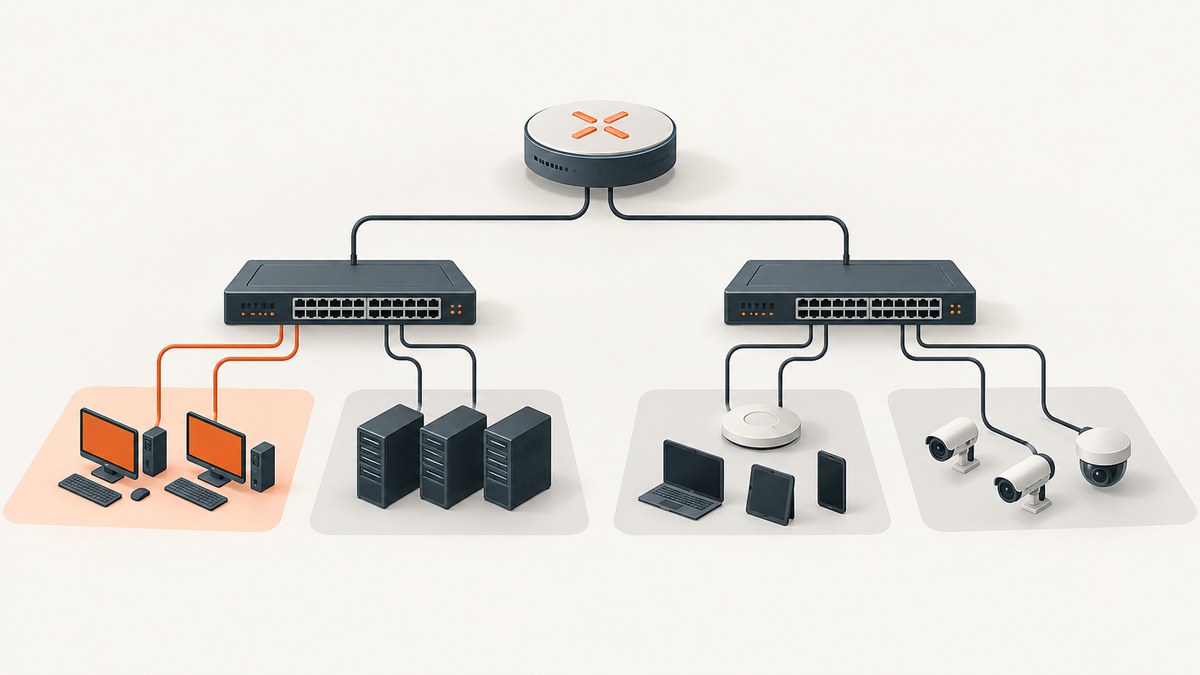
Short answer: A LAN is the local network connecting devices in a limited area. A VLAN is a logical network segment created inside VLAN-aware switching infrastructure. A VLAN creates its own Layer 2 broadcast domain, even when its devices use the same physical switches as other groups. Devices in different VLANs need a router or Layer 3 switch to communicate.
That distinction explains most LAN-versus-VLAN questions. LAN describes the local networking environment; VLAN describes how that environment is logically divided. A small home network may be one flat LAN. A school, office, lab or data center may use several VLANs on the same physical cabling to separate staff, guests, phones, servers or IoT devices.
LAN vs. VLAN at a glance
| Question | LAN | VLAN |
|---|---|---|
| What is it? | A local network connecting devices in a limited area. | A logical grouping or segment inside switched infrastructure. |
| Physical or logical? | A network environment using wired, wireless or both. | A logical overlay that can span shared physical switches. |
| Traffic boundary | Depends on the network design. | A separate Layer 2 broadcast domain. |
| Can groups communicate? | Devices on one IP network normally can communicate through Layer 2. | Different VLANs require inter-VLAN routing. |
| Required equipment | Basic switches, access points and a router can provide connectivity. | VLAN-capable switching, tagging or trunk support, and routing when needed. |
| Main benefit | Local connectivity. | Logical organization and traffic segmentation without moving cables. |
What is a LAN?
A local area network connects devices within a limited physical area such as a home, office, classroom, building or campus. Ethernet switches forward frames between wired endpoints. Wireless access points bridge Wi-Fi clients into the network. A router connects the local network to other IP networks, including the internet.
“Local” describes scope, not a particular topology. A LAN can contain one switch or many switches, wired and wireless links, servers, printers and phones. It can also contain multiple IP subnets or VLANs. Therefore, a VLAN is not an alternative to every LAN; it is one way to structure a LAN using logical segmentation.
Flat LANs
In a flat design, endpoints share the same Layer 2 segment and often the same IP subnet. This is easy to deploy and troubleshoot. Broadcasts reach every device in that segment, and a switch forwards ordinary unicast frames within it. Flat designs can be reasonable for a small network with few devices and simple access requirements.
As a network grows, one shared segment can make policy changes harder. Guest devices, cameras, phones and employee computers may need different access rules. A VLAN design can divide those groups while retaining common switch infrastructure.
What is a VLAN?
A virtual local area network is a switched network logically segmented by function, project team or application rather than by physical location. Cisco describes VLANs in those organizational terms, and IEEE 802.1Q defines the bridged-network mechanisms used for VLAN operation. IEEE lists IEEE 802.1Q-2022 as an active standard.
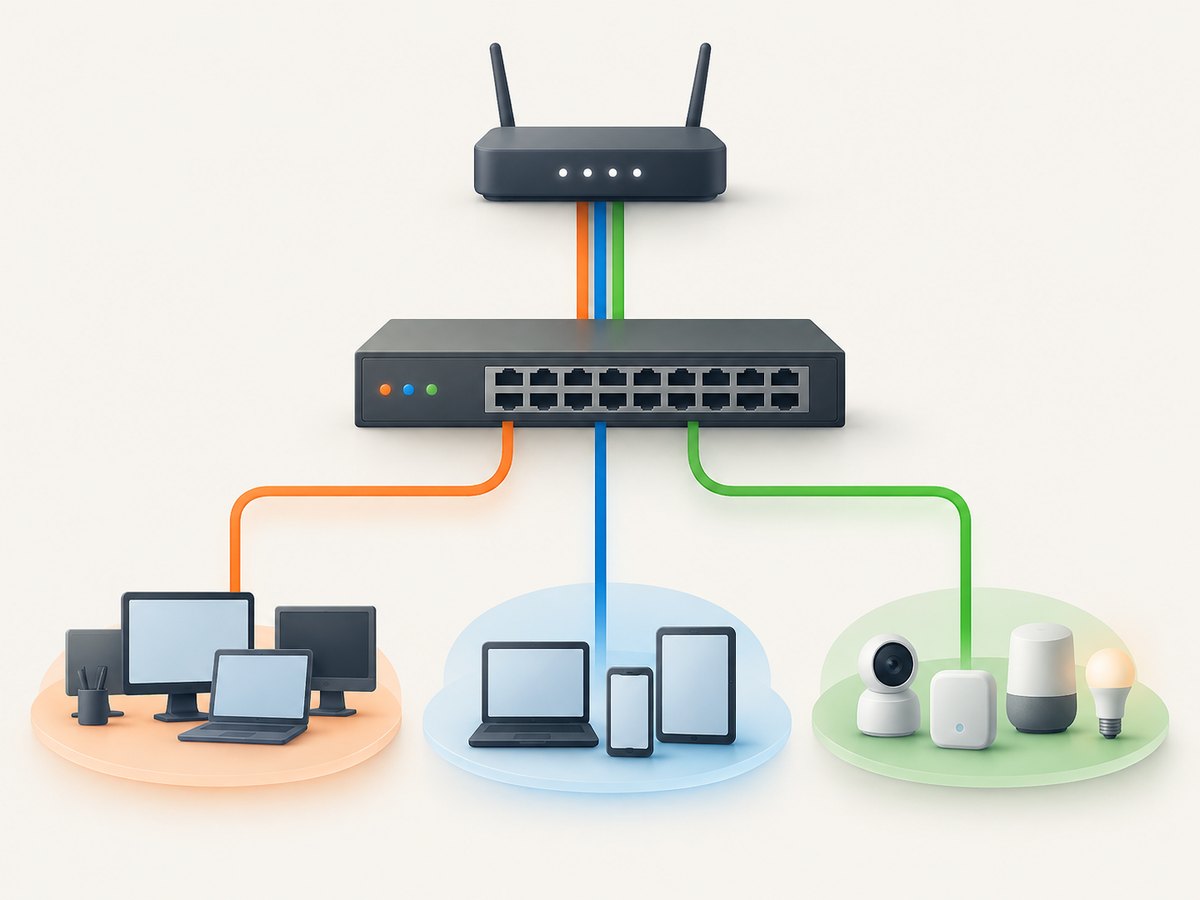
Each VLAN is a separate Layer 2 broadcast domain. Broadcast and multicast traffic inside one VLAN remains inside that VLAN unless a device deliberately routes it elsewhere. A switch does not bridge frames between VLAN 10 and VLAN 20 as if they were one segment.
VLAN membership can be assigned to switch access ports, wireless SSIDs, or other policy mechanisms depending on the platform. The physical location of a port does not have to determine the user’s logical network. A user on the second floor and a user in another building can belong to the same VLAN if the switching infrastructure carries that VLAN between them.
How VLAN tagging and trunks work
VLAN-aware links use an identifier to show which logical network a frame belongs to. IEEE 802.1Q tagging inserts VLAN information into Ethernet frames on links that carry multiple VLANs.
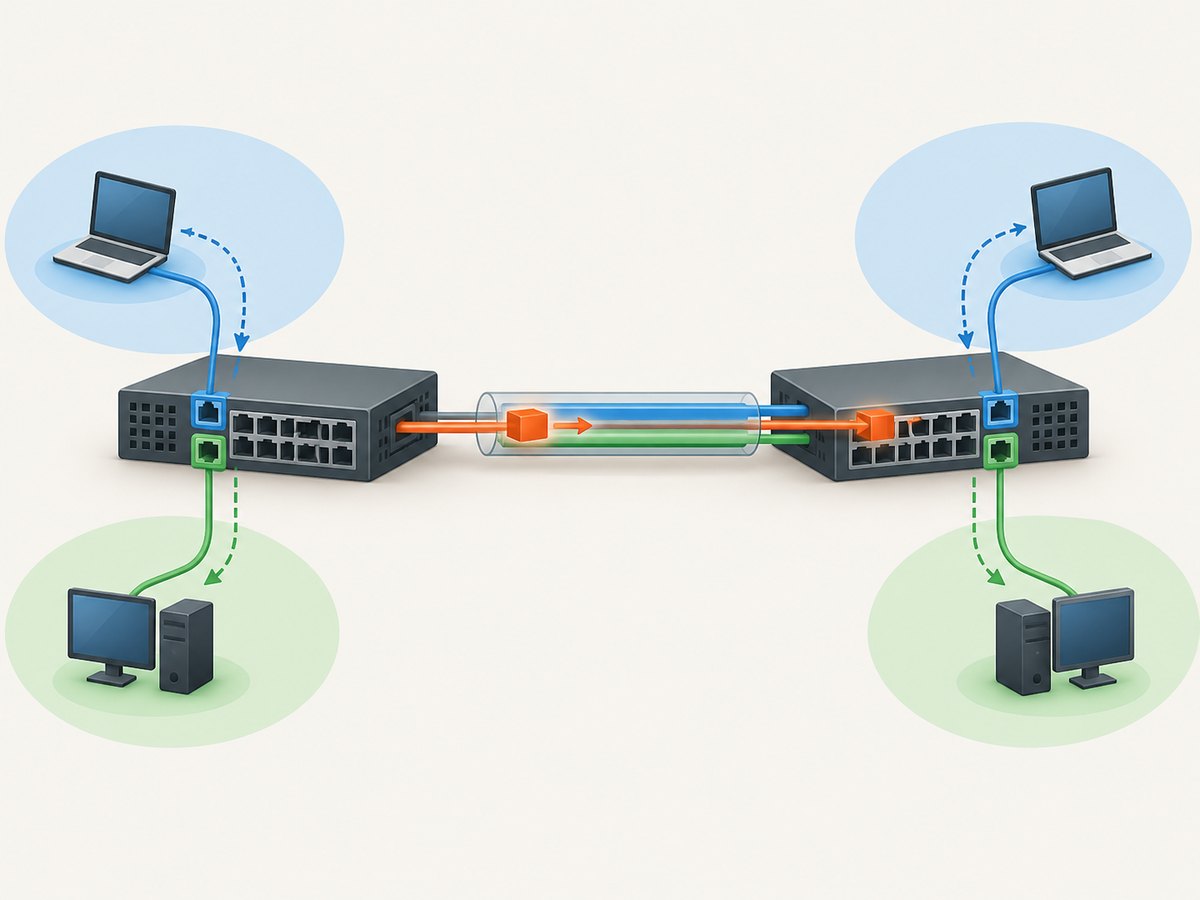
- Access or edge port: Normally assigned to one endpoint VLAN. An untagged computer, printer or camera can connect without generating 802.1Q tags itself; the switch associates the port with its configured VLAN.
- Trunk link: Carries traffic for multiple VLANs between switches, a switch and a router, or another VLAN-aware device. The link must agree on tagging, permitted VLANs and the native or untagged behavior.
- VLAN-aware switch: Keeps forwarding tables and broadcast handling separate for each VLAN.
Terminology and defaults vary by vendor. Check the current configuration guide for the exact switch, router or access point before enabling trunks or changing native VLAN behavior. A trunk that permits the wrong VLANs, uses mismatched tagging, or connects to a device that does not understand tags can cause confusing outages.
Why use VLANs?
VLANs are useful when logical groups need different reachability or policy while sharing physical infrastructure.
- Guest access: Guest Wi-Fi can reach the internet without receiving the same internal access as staff devices.
- IoT and cameras: Devices with limited management controls can be placed in a dedicated segment with narrowly defined routes.
- Voice and data: IP phones and computers can use separate logical networks over a common access connection when the equipment supports it.
- Teams or applications: Project, lab or server groups can be separated without rewiring the building.
- Broadcast containment: Broadcast and multicast traffic stays within the relevant VLAN instead of reaching every endpoint on a flat segment.
- Change control: Moving a port or SSID to another logical group can be a configuration change rather than a cabling project.
These are design examples, not automatic security guarantees. A VLAN does not encrypt traffic, authenticate a user or create a complete security boundary. If traffic is routed between VLANs, the router or Layer 3 switch and its access rules decide what is allowed. A permissive rule, incorrect trunk or accidental native VLAN setting can defeat the intended separation.
Do devices in different VLANs need a router?
Yes. Ordinary Layer 2 switching keeps separate VLANs apart. Communication between them requires inter-VLAN routing through a router or Layer 3 switch. The routing device normally has an interface, subinterface or switched virtual interface for each VLAN, with an IP address that acts as the default gateway for that VLAN.
Routing is where you apply policy. For example, a guest VLAN might be allowed to reach DNS and the internet but denied access to a server VLAN. An IoT VLAN might reach one controller while being denied access to employee laptops. The exact rules depend on the device and your requirements.
Example addressing plan
| VLAN | Purpose | Example subnet | Example gateway |
|---|---|---|---|
| 10 | Staff | 192.168.10.0/24 | 192.168.10.1 |
| 20 | Guests | 192.168.20.0/24 | 192.168.20.1 |
| 30 | IoT | 192.168.30.0/24 | 192.168.30.1 |
The numbers and subnets are examples only. Choose addresses that do not overlap with connected networks, document DHCP scopes, and define firewall rules between the gateways.
How to plan a VLAN deployment
- List groups and required flows. Record which devices need to communicate, which services they need, and which traffic must be denied.
- Confirm hardware support. Verify that switches support the VLAN and 802.1Q features you need. Confirm trunking, access VLANs, management access and the number and speed of ports.
- Choose an addressing plan. Use a distinct IP subnet and gateway for each routed VLAN. Reserve space for DHCP, infrastructure and future devices.
- Create VLANs on the switching infrastructure. Give each VLAN a clear name and ID. Keep a written mapping of ports, SSIDs and connected devices.
- Configure trunks carefully. Permit only the VLANs required on each trunk and ensure both ends agree on tagging and native or untagged behavior.
- Configure routing and policy. Add Layer 3 interfaces or router subinterfaces, DHCP scopes and firewall rules. Start with the minimum required access.
- Test one path at a time. Check DHCP, gateway reachability, DNS, internet access and explicitly allowed or denied cross-VLAN flows.
- Monitor and document. Save the configuration, label ports and record which change controls affect each VLAN.
Common errors and troubleshooting
| Symptom | Likely cause | Fix |
|---|---|---|
| Endpoint receives no DHCP address | Wrong access VLAN, missing DHCP scope, or trunk does not carry the VLAN. | Check the port assignment, DHCP scope and every trunk in the path. |
| Devices in the same VLAN cannot communicate | Different subnets, incorrect port mode, duplicate addressing or a host firewall. | Verify VLAN membership, IP settings, ARP and endpoint firewall rules. |
| Different VLANs cannot communicate | No Layer 3 interface, missing route, or firewall policy blocks the flow. | Confirm gateways exist and inspect routing and access-control rules. |
| Only some VLANs work across a link | The trunk’s allowed list or tagging settings are mismatched. | Compare both ends and permit the intended VLANs explicitly. |
| Intermittent or widespread outage after a trunk change | Native or untagged VLAN mismatch, loop, or an accidental management VLAN change. | Roll back the change, inspect spanning-tree and trunk status, then reapply with a maintenance plan. |
| VLAN appears isolated but is still reachable | Routing policy is too permissive or another physical path bypasses the intended design. | Review Layer 3 rules, alternate links and management interfaces. |
Performance, reliability and cost considerations
VLANs primarily change forwarding and policy boundaries; they do not automatically make a link faster. Throughput depends on switch capacity, uplinks, wireless conditions, routing performance and traffic patterns. Inter-VLAN traffic may take an additional routed hop, so size the Layer 3 device and uplinks for the flows you actually need.
Segmentation can improve operational reliability by containing broadcasts and limiting the impact of a misbehaving endpoint. It also adds configuration state: VLAN databases, trunks, gateways, DHCP scopes, ACLs, monitoring and documentation. A small flat network may be easier to operate. The right design is the simplest one that meets your traffic and policy requirements.
Budget for VLAN-capable managed switches, a router or Layer 3 switch when routing is required, compatible access points, support and time for testing. Confirm feature support on the exact models; “managed” does not guarantee every tagging, trunking or routing capability.
VLANs and security: what they do and do not provide
A VLAN limits Layer 2 forwarding and can make policy boundaries easier to implement. It does not by itself provide encryption, identity verification, endpoint security or permission to access a service. Treat it as one part of a design that also includes authenticated access, firewall rules, secure management, patching and monitoring.
Pay special attention to management access. Keep switch, router and access-point administration reachable only from an explicitly controlled management network. Review trunk permissions and unused ports. Test from both sides of every intended boundary, because a successful ping does not prove that all required application flows are safe or that all unwanted flows are blocked.
LAN vs. VLAN: which should you choose?
- Choose a simple LAN when the network is small, trusted devices share the same access needs, and broadcast volume and policy complexity are low.
- Use VLANs when groups need different access rules, when guest or IoT devices must be separated, or when you need logical changes without rewiring.
- Use multiple VLANs only with a plan for routing, DHCP, firewall policy, monitoring and recovery. Extra segmentation without clear policy can increase troubleshooting time.
Or skip the browser setup
This article is about network segmentation, but developers often need clean screenshots of network diagrams, documentation pages or status dashboards. ScreenshotNeo provides a website screenshot API and MCP server. One GET request returns a PNG, JPEG, WebP or PDF, and the API supports full-page capture, element selectors, custom CSS and JavaScript, device presets, dark mode, waits, headers, cookies, blocking rules, caching, signed links, asynchronous jobs and bulk capture.
Cookie banners, newsletter popups and chat widgets are removed before the shot. Bot checks, blank pages, timeouts and failed loads are not billed, and response headers identify the page verdict and billing result. An MCP server lets Claude, Cursor and other MCP clients call take_screenshot, get_page_info and capture_pdf.
See the ScreenshotNeo API documentation for all parameters. cURL:
curl -G "https://api.screenshotneo.com/v1/shot" -d access_key=YOUR_API_KEY --data-urlencode url=https://stripe.com -o shot.webpPython:
import requests
r = requests.get("https://api.screenshotneo.com/v1/shot", params={"access_key": "YOUR_API_KEY", "url": "https://stripe.com"}, timeout=90)
open("shot.webp", "wb").write(r.content)
Node.js:
const q = new URLSearchParams({ access_key: 'YOUR_API_KEY', url: 'https://stripe.com' });
const res = await fetch(`https://api.screenshotneo.com/v1/shot?${q}`);
ScreenshotNeo includes 1,000 screenshots per month free with no card. Paid plans start at $5 for 3,000 shots; yearly billing gives two months free, and every feature is available on every plan. Create a free ScreenshotNeo account.
FAQ
Is every LAN a VLAN?
No. A LAN can be flat or divided into several VLANs. VLAN is a logical segmentation method inside a LAN or campus network.
Can a VLAN span more than one switch?
Yes, if VLAN-aware links, normally trunks, carry that VLAN between the switches and the configuration matches at each end.
Do VLANs require separate cables?
No. Multiple VLANs can share switch infrastructure and trunk links. Endpoint access ports still need correct membership.
Can two VLANs use the same IP subnet?
That is generally an error for a routed design. Give each routed VLAN a distinct, non-overlapping subnet and gateway.
Do VLANs replace firewalls?
No. VLANs create Layer 2 boundaries. Firewalls or Layer 3 access rules still determine which routed traffic is allowed.
What standard defines VLAN tagging?
IEEE 802.1Q is the relevant bridged-network standard family; IEEE lists the 2022 edition as active.


