How to Use LlamaIndex for Web Scraping
Learn how to scrape static and JavaScript sites with LlamaIndex, preserve metadata, build a vector index, and troubleshoot common failures.
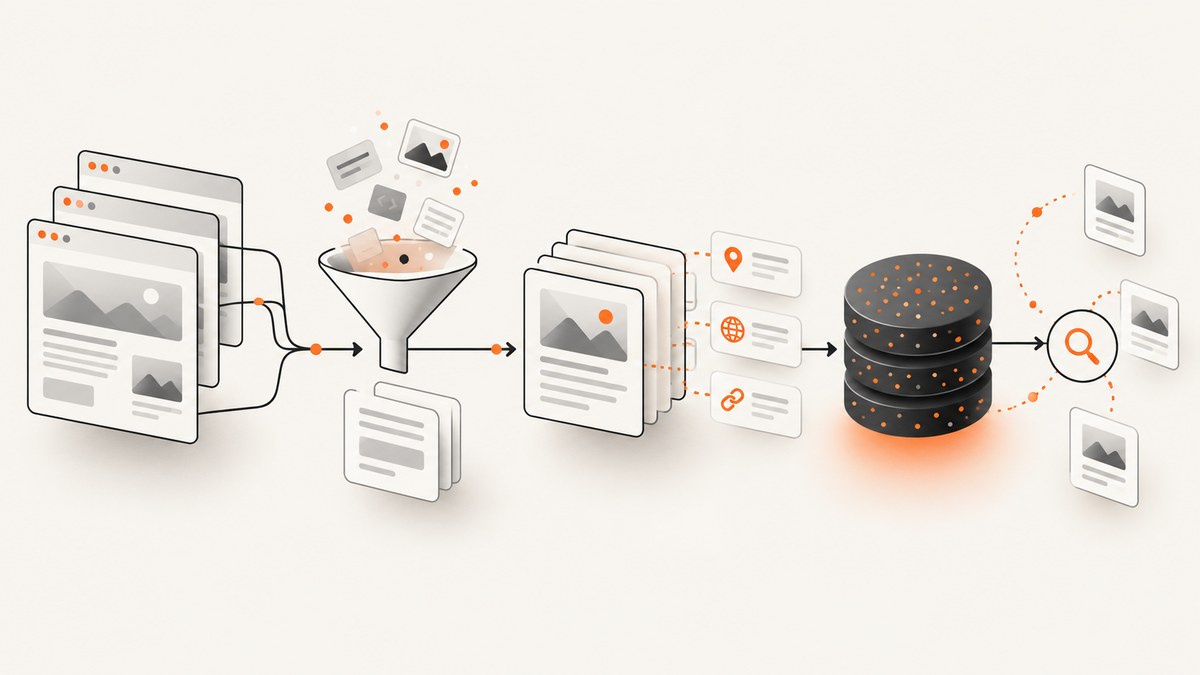
Short answer: use a LlamaIndex web reader to turn URLs into Document objects, preserve the URL and other provenance fields in metadata, split documents into nodes, and build an index. For ordinary server-rendered HTML, start with BeautifulSoupWebReader. Choose a browser, crawler, or hosted integration when the target depends on JavaScript rendering, article extraction, crawling, or managed browser infrastructure.
This guide shows a complete Python workflow, how to choose among readers, how to retain metadata during ingestion, how to index and query the result, and how to diagnose common scraping failures. The examples use public URLs; you are responsible for respecting a site’s terms, robots guidance, rate limits, and applicable law.
1. Install LlamaIndex and the web reader
Create an isolated environment and install the core package plus the web reader integration:
python -m venv .venv
source .venv/bin/activate  # Windows: .venv\\Scripts\\activate
pip install llama-index llama-index-readers-web beautifulsoup4 requests
Reader integrations are separate packages in current LlamaIndex releases. If an import fails, upgrade the package that provides the reader and check the current LlamaIndex documentation.
2. Scrape ordinary HTML with BeautifulSoupWebReader
BeautifulSoupWebReader accepts a list of URLs, fetches each page with requests, parses the response with BeautifulSoup, and returns one Document per URL. Set include_url_in_text=True when you want the source URL included in the text as well as metadata.
from llama_index.readers.web import BeautifulSoupWebReader

urls = [
    "https://example.com/page",
    "https://example.com/another-page",
]

reader = BeautifulSoupWebReader()
documents = reader.load_data(
    urls=urls,
    include_url_in_text=True,
)

for document in documents:
    print("TEXT PREVIEW:")
    print(document.text[:500])
    print("METADATA:", document.metadata)
    print("---")
The returned objects are LlamaIndex Document instances: text plus metadata about that text. The URL is retained so later answers can cite or display the source page.
Keep provenance fields explicit
Inspect metadata before indexing. Depending on the reader and page, you may see fields such as the URL, title, or other source information. Add your own stable fields when your application knows them:
for document in documents:
    source_url = document.metadata.get("url") or document.metadata.get("source")
    document.metadata.update({
        "source_url": source_url,
        "site": "example.com",
        "ingested_by": "beautifulsoup",
    })
Use a canonical URL when possible. Remove tracking parameters before storing a URL if they do not identify a distinct page.
3. Build a vector index and query scraped pages
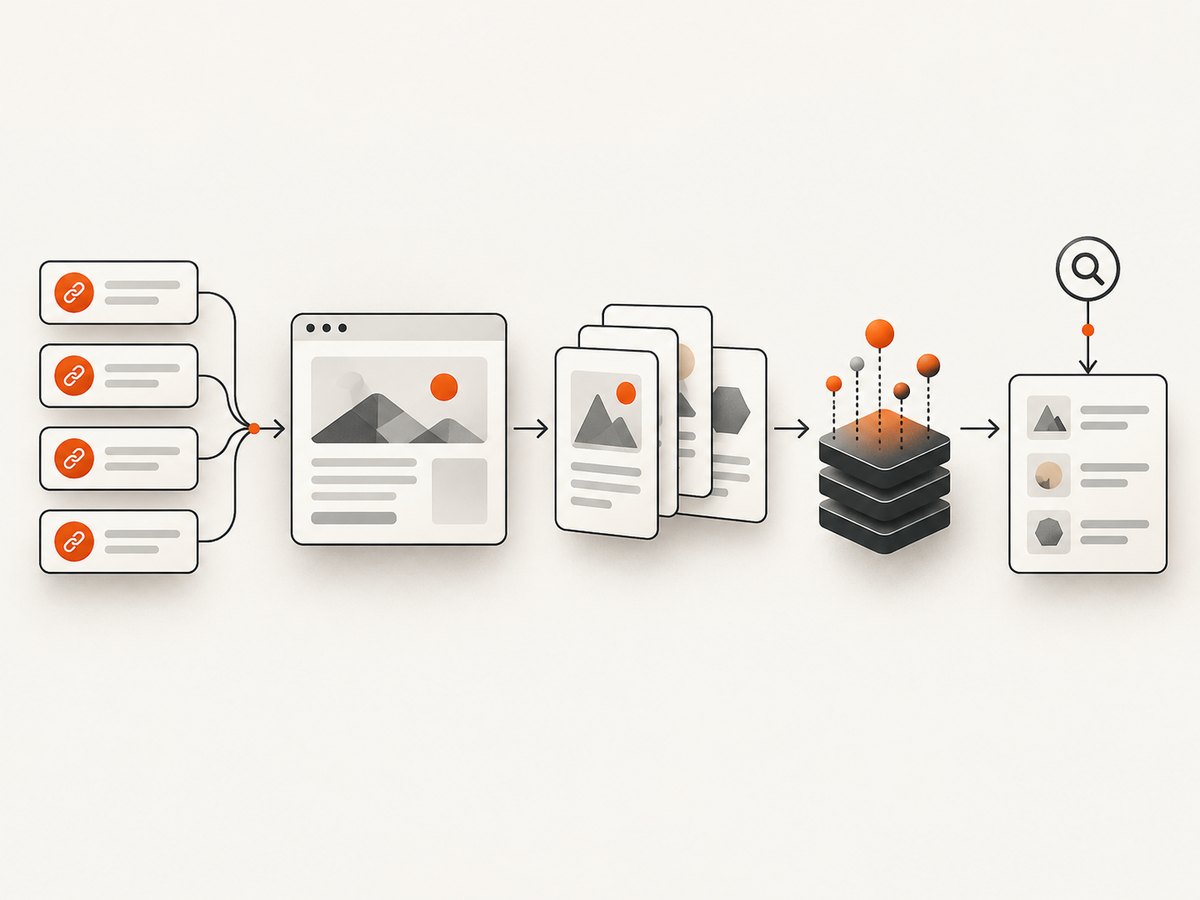
Once the reader has produced documents, pass them to VectorStoreIndex.from_documents. LlamaIndex splits documents into nodes internally for the default workflow.
from llama_index.core import VectorStoreIndex
from llama_index.readers.web import BeautifulSoupWebReader

urls = ["https://example.com/page"]
documents = BeautifulSoupWebReader().load_data(
    urls=urls,
    include_url_in_text=True,
)

index = VectorStoreIndex.from_documents(documents)
query_engine = index.as_query_engine()
response = query_engine.query("What does this page explain?")
print(response)
For production use, configure an embedding model and a persistent vector store instead of relying on in-memory defaults. The retrieval answer can include source nodes; expose their metadata in your application so users can see which URL supports an answer.
4. Control splitting and add metadata-aware enrichment
Long pages should be split into appropriately sized nodes. You can add extractors that create titles, summaries, questions answered, or entities to improve retrieval disambiguation.
from llama_index.core import VectorStoreIndex
from llama_index.core.ingestion import IngestionPipeline
from llama_index.core.node_parser import SentenceSplitter
from llama_index.extractors.entity import EntityExtractor
from llama_index.extractors.metadata import (
    QuestionsAnsweredExtractor,
    SummaryExtractor,
    TitleExtractor,
)
from llama_index.readers.web import BeautifulSoupWebReader

urls = ["https://example.com/page"]
documents = BeautifulSoupWebReader().load_data(
    urls=urls,
    include_url_in_text=True,
)

pipeline = IngestionPipeline(transformations=[
    SentenceSplitter(chunk_size=800, chunk_overlap=100),
    TitleExtractor(nodes=5),
    QuestionsAnsweredExtractor(questions=3),
    SummaryExtractor(summaries=["self"], num_workers=1),
    EntityExtractor(prediction_threshold=0.5),
])

nodes = pipeline.run(documents=documents)
index = VectorStoreIndex(nodes)
response = index.as_query_engine().query("Which entities and topics are covered?")
print(response)
Extractor APIs and constructor arguments can vary by LlamaIndex version. Pin versions in your application and consult the extractor documentation before upgrading.
Choose what metadata enters embeddings and prompts
LlamaIndex can inject document metadata into text sent to embedding and language-model calls. Keep useful provenance such as source_url, title, publication date, and site name. Avoid repeating navigation labels, analytics parameters, or boilerplate in every chunk because noisy metadata can reduce retrieval quality and increase token use.
from llama_index.core import Document

clean_document = Document(
    text="The extracted article body goes here.",
    metadata={
        "source_url": "https://example.com/page",
        "title": "Example page",
        "published": "2025-01-15",
        "site": "example.com",
    },
)

# Inspect the fields before indexing.
print(clean_document.metadata)
5. Select the right LlamaIndex web reader
| Requirement | Reader path | What to expect |
|---|---|---|
| Static HTML and simple extraction | BeautifulSoupWebReader |
Simple requests-based fetching and BeautifulSoup parsing. You may need site-specific cleanup for unusual layouts. |
| Raw page text or basic HTML-to-text conversion | SimpleWebPageReader |
Less semantic cleanup than a specialized article reader. |
| Main article content from a rendered page | ReadabilityWebPageReader |
Useful for article extraction; a browser-rendering path adds setup and runtime cost. |
| An existing Scrapy crawler | ScrapyWebReader |
Reuse your Scrapy project and its selectors, middleware, and scheduling configuration. |
| Hosted browser, crawling, or anti-bot-oriented infrastructure | BrowserbaseWebReader, FireCrawlWebReader, SpiderReader, or another documented integration |
External credentials, pricing, availability, and partner terms must be checked separately. |
The reader pattern is documented in the LlamaIndex loading and reader guides. Match the reader to page behavior rather than assuming one loader works for every site.
6. Handle JavaScript-rendered pages
A requests-based reader receives the server response. It does not automatically execute JavaScript, click controls, wait for client-side data, or scroll through lazy-loaded content. If the HTML contains an empty application shell, use a reader backed by a browser or hosted crawling service, such as the documented Browserbase, Firecrawl, Spider, or readability-oriented paths.
- Confirm the content is absent from the initial HTML, for example by downloading the page with
requestsand inspecting the response. - Choose a browser-capable reader or an existing crawler integration.
- Set a wait condition for the content you need, where that integration supports it.
- Keep the final URL and page title in metadata after rendering.
Do not treat a browser integration as a guaranteed way around bot checks or access controls. Follow the target site’s rules and the provider’s terms.
7. Crawl multiple pages safely
For a known set of pages, pass a bounded URL list and process in batches. For discovery, use a crawler integration or your existing Scrapy project rather than recursively following every link without limits.
from time import sleep
from urllib.parse import urlparse
from llama_index.readers.web import BeautifulSoupWebReader

urls = [
    "https://example.com/docs/one",
    "https://example.com/docs/two",
]

allowed_host = "example.com"
for url in urls:
    if urlparse(url).netloc != allowed_host:
        raise ValueError(f"Unexpected host: {url}")

reader = BeautifulSoupWebReader()
all_documents = []
for start in range(0, len(urls), 20):
    batch = urls[start:start + 20]
    all_documents.extend(reader.load_data(urls=batch, include_url_in_text=True))
    sleep(1)  # Choose a rate that the target site permits.

print(f"Loaded {len(all_documents)} documents")
Deduplicate canonical URLs, cap depth and page count, retry transient failures with backoff, and persist successful results so a later run does not refetch every page.
8. Preserve source URLs in answers
Use the response’s source nodes to return citations or links with your answer:
response = query_engine.query("What are the installation requirements?")
print(response)

for source_node in response.source_nodes:
    metadata = source_node.node.metadata
    url = metadata.get("source_url") or metadata.get("url") or metadata.get("source")
    print({
        "score": source_node.score,
        "url": url,
        "title": metadata.get("title"),
    })
If the reader uses a different metadata key, normalize it immediately after loading so downstream code always reads source_url.
9. Complete runnable example
This script loads several pages, normalizes provenance, builds an index, and prints the answer plus source URLs.
from llama_index.core import VectorStoreIndex
from llama_index.readers.web import BeautifulSoupWebReader

URLS = [
    "https://example.com/page",
]

def load_documents(urls):
    documents = BeautifulSoupWebReader().load_data(
        urls=urls,
        include_url_in_text=True,
    )
    for document, requested_url in zip(documents, urls):
        existing = document.metadata.get("url") or document.metadata.get("source")
        document.metadata["source_url"] = existing or requested_url
        document.metadata.setdefault("site", "example.com")
    return documents

def main():
    documents = load_documents(URLS)
    if not documents:
        raise RuntimeError("The reader returned no documents")

    index = VectorStoreIndex.from_documents(documents)
    engine = index.as_query_engine(similarity_top_k=4)
    response = engine.query("What does the page explain?")

    print(response)
    for source in response.source_nodes:
        metadata = source.node.metadata
        print("SOURCE:", metadata.get("source_url"))

if __name__ == "__main__":
    main()
Replace example.com with a site you are permitted to access. For a real application, add persistent storage, structured logging, retries, and a queue around this script.
10. Troubleshooting
| Symptom | Likely cause | Fix |
|---|---|---|
ModuleNotFoundError: llama_index.readers.web |
The web reader package is not installed. | Install or upgrade llama-index-readers-web in the same virtual environment as your script. |
| Empty or nearly empty text | The page renders content with JavaScript, or the reader removed content as boilerplate. | Inspect the raw HTML. Use a browser-capable reader or a more suitable extraction reader. |
| 403 or 429 response | The site rejected the request or rate limited the client. | Slow down, honor published limits, identify your client where appropriate, and stop if access is disallowed. Do not assume another reader is authorized to bypass the restriction. |
| Timeouts | Slow origin, large assets, or network instability. | Use bounded retries with exponential backoff, keep per-request timeouts finite, and record failed URLs for later replay. |
| Wrong language or navigation dominates results | The page contains menus, footers, or multiple localized versions. | Use an article or site-specific extraction reader, canonicalize language URLs, and filter boilerplate before indexing. |
| Source URL missing from answers | Metadata was dropped or the application reads the wrong key. | Normalize url/source into source_url immediately after loading and inspect response.source_nodes. |
| Duplicate chunks | The same page was loaded under tracking or alternate URLs. | Canonicalize URLs, remove tracking parameters, hash normalized text, and skip unchanged content. |
| Indexing is expensive or slow | Pages are too large, chunks overlap excessively, or enrichment runs on every refresh. | Limit fields, tune chunk size and overlap, cache fetched documents, and run metadata extractors only when needed. |
11. Performance, reliability, and cost considerations
- Fetching: total time depends on the target site’s response time, number of URLs, concurrency, and whether a browser must render each page. The documentation does not provide a universal throughput or success benchmark.
- Concurrency: parallel requests can reduce wall-clock time but can trigger rate limits. Set a conservative worker limit per host and back off on 429 responses.
- Rendering: browser-backed readers generally require more setup and resources than requests plus BeautifulSoup. Use them only for pages that need rendering.
- Embeddings and LLM calls: chunk count, metadata length, extractor configuration, and refresh frequency affect provider usage. Keep chunks focused and avoid injecting noisy metadata.
- Reliability: record URL, status, timestamp, reader, content hash, and error. Retry transient network failures, but do not endlessly retry authorization or policy errors.
- Freshness: store fetched content and hashes, then re-index only changed pages. Keep the original URL and retrieval timestamp so answers can be audited.
- Compliance: a LlamaIndex reader does not grant permission to scrape. Check terms, robots guidance, rate limits, authentication requirements, and applicable law for every target.
12. Or skip the browser setup
If you need clean screenshots of scraped pages for review, archives, visual QA, or an AI workflow, ScreenshotNeo provides a website screenshot API and MCP server. It accepts one GET request and returns PNG, JPEG, WebP, or PDF. Before capture it accepts cookie and consent banners and removes 60+ known consent platforms, newsletter popups, and chat widgets; each step can be turned off. Bot checks, blank pages, timeouts, failed loads, and cache hits are not billed, and the response reports the result in X-Page-Verdict and X-Billed headers.

See the ScreenshotNeo API documentation for all options, including full-page capture, CSS selectors, dark mode, device presets, retina scale, custom CSS and JavaScript, waits, request blocking, headers, cookies, geolocation, caching, signed links, asynchronous jobs, bulk capture, usage, and PDF settings.
cURL
curl -G "https://api.screenshotneo.com/v1/shot" -d access_key=YOUR_API_KEY --data-urlencode url=https://example.com/page -o shot.webpPython
import requests

r = requests.get(
    "https://api.screenshotneo.com/v1/shot",
    params={"access_key": "YOUR_API_KEY", "url": "https://example.com/page"},
    timeout=90,
)
r.raise_for_status()
open("shot.webp", "wb").write(r.content)
Node.js
const q = new URLSearchParams({
  access_key: 'YOUR_API_KEY',
  url: 'https://example.com/page'
});
const res = await fetch(`https://api.screenshotneo.com/v1/shot?${q}`);
if (!res.ok) throw new Error(`HTTP ${res.status}`);
const fs = await import('node:fs/promises');
await fs.writeFile('shot.webp', Buffer.from(await res.arrayBuffer()));
An MCP server is included for AI agents such as Claude, Cursor, and other MCP clients, with take_screenshot, get_page_info, and capture_pdf tools. The Free plan includes 1,000 shots per month with no card; paid plans start at $5 for 3,000 shots, and every feature is available on every plan. Create a free ScreenshotNeo account.
13. FAQ
Does LlamaIndex itself crawl an entire site?
A reader loads the URLs you provide. Site-wide discovery and crawl controls come from a crawler integration or your own crawler, such as Scrapy.
Can BeautifulSoupWebReader execute JavaScript?
No. It fetches HTML with requests and parses it. Use a browser-backed or hosted reader when content appears only after JavaScript runs.
How do I keep the URL attached to every chunk?
Keep the URL in each document’s metadata, normalize it to a field such as source_url, and verify that field on the nodes returned by the query response.
Should I put the URL in the document text too?
Set include_url_in_text=True when URL text helps retrieval or visible citations. Keep metadata as the authoritative structured field.
Which reader should I start with?
Start with BeautifulSoupWebReader for ordinary static HTML. Move to a specialized, browser, or crawler reader when the page behavior requires it.


