Load Time API to Measure TTFB and Page Load from Any Country
Measure browser TTFB and page load time, then run repeatable synthetic tests from a chosen country. Compare the two methods with clear metrics and runnable code.
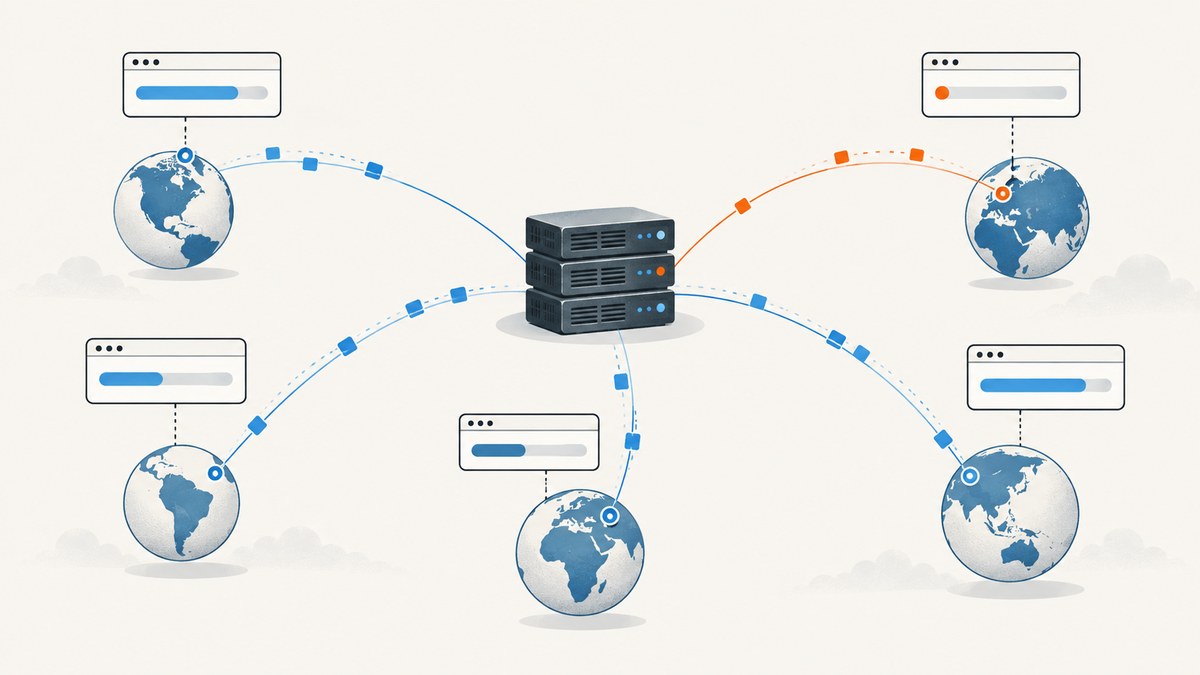
To measure time to first byte (TTFB) for a browser’s main document, read the Navigation Timing entry: the traditional calculation is responseStart - navigationStart. To measure conventional page-load time, use loadEventStart - navigationStart. These are different milestones: the server can begin sending the response long before the page’s load event fires. To test from another country under controlled conditions, run a synthetic browser test using an agent in the desired location; browser JavaScript on your laptop cannot make that visit originate from a remote country.
Use browser telemetry to understand what real visitors experience, and synthetic tests to compare repeatable configurations. The guide below provides both: runnable browser code for field timing, a WebPageTest API workflow for geographic tests, and practical guidance for interpreting results.
1. Choose the measurement that answers your question
“Page load time” can mean different things. Write down the metric before collecting data so that dashboards, test runs, and comparisons refer to the same event.

| Question | Measurement | What it tells you |
|---|---|---|
| When did the document response begin? | Navigation TTFB: responseStart - navigationStart |
Elapsed time from navigation start until the response begins arriving, using the traditional Navigation Timing definition. |
| When did the document’s load event start? | loadEventStart - navigationStart |
Elapsed time to the browser’s load-event milestone. It is not the same as “visually complete” or a user-centric metric. |
| How long did a script, stylesheet, image, or other request take? | Resource Timing entry | Timing for an individual dependent resource, subject to cross-origin timing restrictions. |
| When did users see the main content? | A user-centric metric such as Largest Contentful Paint (LCP) | A visual loading milestone; define and collect it separately rather than calling it load-event time. |
MDN documents the traditional TTFB and load-event calculations. The web.dev TTFB guidance describes TTFB as the interval from navigation start until the first response byte begins to arrive. It also explains a Chrome 115 change to responseStart semantics, toward the beginning of the final document response, standardized as finalResponseHeadersStart. Redirect chains and interim responses can affect interpretation, so note which convention your tooling uses. See MDN Navigation Timing and web.dev’s TTFB guidance.
2. Read TTFB and load-event time in the browser
The following snippet runs on the page being measured. It waits for the load event, reads the document’s navigation entry, and reports milliseconds. It also handles a missing entry and a load event that has not yet started.
function getNavigationTimings() {
  const [nav] = performance.getEntriesByType('navigation');
  if (!nav) return { error: 'Navigation Timing entry unavailable' };

  const ttfb = nav.responseStart;
  const loadTime = nav.loadEventStart;

  return {
    ttfbMs: ttfb > 0 ? ttfb : null,
    loadEventMs: loadTime > 0 ? loadTime : null,
    redirectCount: nav.redirectCount,
    transferSize: nav.transferSize,
    decodedBodySize: nav.decodedBodySize,
    timingConvention: 'Navigation Timing responseStart and loadEventStart, relative to navigation start'
  };
}

function reportTimings() {
  const values = getNavigationTimings();
  if (values.error) {
    console.warn(values.error);
    return;
  }
  console.log(values);
  // Send values to your analytics endpoint if appropriate.
}

if (document.readyState === 'complete') {
  reportTimings();
} else {
  addEventListener('load', reportTimings, { once: true });
}
PerformanceNavigationTiming exposes high-resolution navigation attributes through the Performance API. The W3C specification defines this entry type and its timing fields. Avoid treating responseStart as a universal server processing measurement: it includes network and intermediary effects, and redirects or browser semantics matter. Start with the definition supported by your target browsers and report it consistently. See the W3C Navigation Timing Level 2 specification.
Capture dependent resource timing
Navigation Timing covers the HTML document navigation. To inspect dependent resources, use Resource Timing. Cross-origin entries may expose limited detail unless the resource’s server allows timing exposure, so an incomplete third-party resource report is not necessarily a browser bug.
const resources = performance.getEntriesByType('resource').map(entry => ({
  name: entry.name,
  initiatorType: entry.initiatorType,
  durationMs: entry.duration,
  startTimeMs: entry.startTime,
  responseStartMs: entry.responseStart,
  transferSize: entry.transferSize
}));
console.table(resources);
For field data, send a small set of useful values rather than every raw URL by default. URLs can contain identifiers or sensitive query parameters. Decide how to remove or aggregate them, establish consent and retention practices appropriate to your application, and segment by geography only when you have reliable, privacy-respecting location data. A user’s network location is not necessarily the same as their country setting or account address.
3. Run a controlled test from another country
Client-side timing describes the browser that executed the code. Changing a JavaScript timezone, locale, or geolocation value does not move network requests to a different country. For a test originating elsewhere, use a synthetic testing agent in the target region.

WebPageTest’s REST API documents submitting tests, configuring browser and connection settings, retrieving results, and querying available locations. Its public API limits location access to locations listed for your API key. The WebPageTest product page states that its API can test across 30 worldwide locations, including mainland China; this is a vendor claim and its current accessible inventory should be verified before planning around it. Check the official WebPageTest API reference and WebPageTest product page for current access and configuration.
- Define the metric. Decide whether the result is main-navigation TTFB, load-event duration, LCP, or another explicit milestone.
- Choose an available location. Query the service for locations available to your API key and select an agent close to the audience you want to represent.
- Fix the test profile. Record browser, browser version if available, device or emulation, connection profile, and cache state.
- Run repeats. A single run can be affected by variable network and server conditions. Store raw results and report the spread or a chosen summary rather than presenting one result as universal.
- Compare like with like. Keep location, browser, profile, run count, metric definition, and cache behavior consistent across runs.
The steps are a practical testing workflow, not a guarantee that a synthetic agent reproduces every person’s path through the internet. Synthetic results describe the configured agent and conditions. Real-user monitoring captures actual visitor conditions, which vary. The two approaches answer related but different questions.
4. Submit and retrieve a WebPageTest API run
Use the API reference for the current parameter names and response schema. The API key determines accessible locations; first query the available locations and choose a location identifier returned for that key. The examples below show the HTTP request pattern. Set the test options supported by your account and record them with the result.
cURL
export WPT_API_KEY='YOUR_API_KEY'

# Query locations currently available to this key.
curl --get 'https://www.webpagetest.org/getLocations.php' \
  --data-urlencode "k=$WPT_API_KEY" \
  --data-urlencode 'f=json'

# Submit a test after choosing a valid location identifier from that response.
curl --get 'https://www.webpagetest.org/runtest.php' \
  --data-urlencode 'url=https://example.com/' \
  --data-urlencode "k=$WPT_API_KEY" \
  --data-urlencode 'location=LOCATION_FROM_RESPONSE' \
  --data-urlencode 'f=json'
Inspect the submission response for the test identifier and the result endpoint supplied by the API. Do not assume the test has finished when submission returns. Poll the documented status/result endpoint until completion, observing the API’s status and any wait guidance, then retain the result data and configuration. API endpoints and accepted options can change; use the official reference as the authority for a live integration.
Python: submit, wait, and fetch result JSON
import os
import time
import requests

API_KEY = os.environ['WPT_API_KEY']
BASE = 'https://www.webpagetest.org'
TARGET_URL = 'https://example.com/'

locations_response = requests.get(
    f'{BASE}/getLocations.php',
    params={'k': API_KEY, 'f': 'json'},
    timeout=30,
)
locations_response.raise_for_status()
print('Review available locations:', locations_response.json())

location = 'LOCATION_FROM_RESPONSE'  # Replace with a current location ID.
submit = requests.get(
    f'{BASE}/runtest.php',
    params={
        'url': TARGET_URL,
        'k': API_KEY,
        'location': location,
        'f': 'json',
    },
    timeout=30,
)
submit.raise_for_status()
submitted = submit.json()
test_id = submitted['data']['testId']
print('Submitted test:', test_id)

# The documented API exposes a test status/result resource. Poll at a modest interval.
result_url = f'{BASE}/jsonResult.php'
for attempt in range(60):
    result_response = requests.get(
        result_url,
        params={'test': test_id},
        timeout=30,
    )
    result_response.raise_for_status()
    result = result_response.json()
    status = result.get('statusCode')
    if status == 200:
        print(result)
        break
    if status not in (100, 101, 102):
        raise RuntimeError(f'Unexpected WebPageTest status: {result}')
    time.sleep(10)
else:
    raise TimeoutError(f'Test {test_id} did not complete in the polling window')
WebPageTest API versions and response details can vary, so verify the status codes, result URL, and submission response fields against the current API documentation before deploying this as production code. Use bounded polling with timeouts; do not create a tight loop that repeatedly requests a result.
Node.js: submit and retrieve a result
const apiKey = process.env.WPT_API_KEY;
if (!apiKey) throw new Error('Set WPT_API_KEY first');
const base = 'https://www.webpagetest.org';
const target = 'https://example.com/';

async function getJson(url) {
  const response = await fetch(url);
  if (!response.ok) throw new Error(`HTTP ${response.status}: ${await response.text()}`);
  return response.json();
}

const locationsUrl = new URL('/getLocations.php', base);
locationsUrl.search = new URLSearchParams({ k: apiKey, f: 'json' });
console.log('Review available locations:', await getJson(locationsUrl));

const submitUrl = new URL('/runtest.php', base);
submitUrl.search = new URLSearchParams({
  url: target,
  k: apiKey,
  location: 'LOCATION_FROM_RESPONSE',
  f: 'json'
});
const submitted = await getJson(submitUrl);
const testId = submitted.data.testId;
console.log('Submitted test:', testId);

for (let attempt = 0; attempt < 60; attempt++) {
  const resultUrl = new URL('/jsonResult.php', base);
  resultUrl.search = new URLSearchParams({ test: testId });
  const result = await getJson(resultUrl);
  if (result.statusCode === 200) {
    console.log(result);
    break;
  }
  if (![100, 101, 102].includes(result.statusCode)) {
    throw new Error(`Unexpected test status: ${JSON.stringify(result)}`);
  }
  await new Promise(resolve => setTimeout(resolve, 10_000));
  if (attempt === 59) throw new Error(`Test ${testId} did not finish`);
}
These examples demonstrate the documented submit, location-query, and result-retrieval workflow. Confirm exact current fields and result polling behavior for the API version and access level you use. Keep API credentials in environment variables or a secret manager, never in browser code or a public repository.
5. Interpret results and make comparisons fair
A number without its test setup is difficult to reproduce. Keep a record alongside every result:
- Country and exact agent/location identifier, including the date you checked availability.
- Browser and version, desktop or mobile emulation, viewport, and device profile.
- Connection profile, such as the configured bandwidth and latency, if the service exposes it.
- Metric definition and calculation, including whether redirects and final-response semantics affect TTFB.
- Number of runs, cache state, and any warm-up behavior.
- Test URL, relevant request configuration, result access method, retention, and API usage limits.
Do not compare a cold-cache mobile test in one country with a warm-cache desktop test elsewhere and attribute the difference to geography alone. A synthetic result is useful for controlled diagnosis, regression checks, and checking a route from selected locations. It cannot establish a universal page-load time for an entire country.
For ongoing field monitoring, collect Navigation Timing from real sessions and aggregate only the fields needed to answer your performance questions. For a deployment check or a repeatable “does this route still load from this region?” test, a synthetic API is usually easier to control. The distinction follows from what each method observes; it is not a guarantee that one method is always more accurate.
6. Performance, reliability, and cost considerations
Browser overhead: the Navigation Timing read is lightweight. Resource Timing can produce many entries on resource-heavy pages, so filter or aggregate before sending telemetry. Avoid putting analytics work on the critical path of page rendering.
Synthetic latency: remote tests are asynchronous in practice: submission and test completion are separate steps. Use request timeouts, bounded polling, and backoff or documented wait intervals. Save the test ID so a process restart does not lose track of an in-progress run.
Repeatability: fix the browser, location, network profile, and cache state. Run multiple samples and preserve raw outputs. Report variation and note when an agent is unavailable or a test did not finish; do not silently replace a failed run with a value from a different region.
Cost and limits: the research sources establish API location access behavior but do not establish current pricing, quotas, or commercial terms. Check the provider’s current account and API documentation before scheduling frequent tests or building CI around them. Set a run cadence that matches the decision: continuous high-frequency tests can consume quota without improving a low-change workflow.
7. Troubleshooting common issues
| Symptom | Likely cause | Fix |
|---|---|---|
| No navigation entry | The code ran in an unusual context, the browser does not expose the expected entry, or the page has not navigated normally. | Check performance.getEntriesByType('navigation') after navigation and handle an empty result. Confirm the browser supports Navigation Timing Level 2. |
| TTFB is present but load time is null or zero | The read happened before the load event started, or the load milestone is unavailable for that context. | Run the read after load as in the example; keep null distinct from zero rather than recording a false duration. |
| Resource details are missing for a third-party host | Cross-origin timing exposure is restricted by the resource server. | Check whether the remote response permits timing exposure. Treat unavailable fields as unknown, not as zero-duration requests. |
| Requested country is rejected or absent | The location is not available to the API key, or the identifier is stale. | Query the current location list using the same key and select an identifier from that response. Verify account access before promising coverage. |
| Submission succeeds but no result is ready | The browser test is queued or still running. | Poll the documented status/result endpoint at a sensible interval, with an overall timeout. Preserve the test ID and inspect status details. |
| Results differ widely between runs | Network variation, cache state, test configuration, or server load changed. | Fix the profile, compare the same cache condition, repeat runs, and report spread. Avoid drawing a conclusion from one sample. |
| TTFB changes after a browser update | Browser timing semantics or implementation changed, including the responseStart nuance documented for Chrome 115. | Record browser version and metric convention. Review current web.dev and browser documentation before treating the change as a server regression. |
| API request fails with authentication or quota errors | Missing/invalid key, unavailable account access, or a limit imposed by the service. | Check the key’s access and current API terms, keep it server-side, and handle HTTP failures explicitly. The research does not establish current quota values. |
8. Or skip the browser setup
If the task is to capture a page image or PDF rather than collect performance timings, ScreenshotNeo is a website screenshot API and MCP server. One GET request returns a PNG, JPEG, WebP, or PDF. It does not replace Navigation Timing or a geographic performance test; it handles page capture.
curl -G "https://api.screenshotneo.com/v1/shot" -d access_key=YOUR_API_KEY --data-urlencode url=https://example.com -o shot.webp

# Python
import requests
r = requests.get("https://api.screenshotneo.com/v1/shot", params={"access_key": "YOUR_API_KEY", "url": "https://example.com"}, timeout=90)
open("shot.webp", "wb").write(r.content)

# Node.js
const q = new URLSearchParams({ access_key: 'YOUR_API_KEY', url: 'https://example.com' });
const res = await fetch(`https://api.screenshotneo.com/v1/shot?${q}`);
See the ScreenshotNeo API documentation for request options. Before capture, it accepts cookie or consent banners like a visitor and removes more than 60 known consent platforms, newsletter popups, and chat widgets; each of those steps can be turned off. Bot checks, CAPTCHAs, blank pages, timeouts, failed loads, and cache hits cost nothing, and response headers identify the page verdict and billing status. Its MCP server offers take_screenshot, get_page_info, and capture_pdf for Claude, Cursor, and other MCP clients. The free plan includes 1,000 shots per month with no card; paid plans start at $5 for 3,000 shots.
Sign up for 1,000 free screenshots a month, with no card required.
9. Frequently asked questions
Can browser JavaScript measure a visit from any country?
No. It measures the browser where it runs. To originate a controlled test in another country, use a synthetic agent available in that location. A browser’s geolocation setting does not change the network route.
Is TTFB the same as server response time?
No. Browser TTFB is an elapsed interval that includes network and intermediary effects as well as server work. It is not an isolated measurement of application processing time.
Should I use responseStart or finalResponseHeadersStart?
State the definition that matches your browser support and reporting goal. The web.dev guidance explains the Chrome 115 change and the standardized final-response field. Avoid mixing conventions within one trend line.
Does a load event mean the page looks finished?
No. It is a document lifecycle milestone. For visual loading, collect a user-centric metric such as LCP separately and label it accurately.
Can one synthetic test represent a whole country?
No. It represents its configured agent, browser, and connection profile. Use repeat runs and additional locations when the question requires broader coverage.