Making Concurrent Requests in C#
Use Task.WhenAll for a small batch of HTTP calls and Parallel.ForEachAsync for a collection with bounded concurrency. Learn how to reuse HttpClient and handle failures safely.
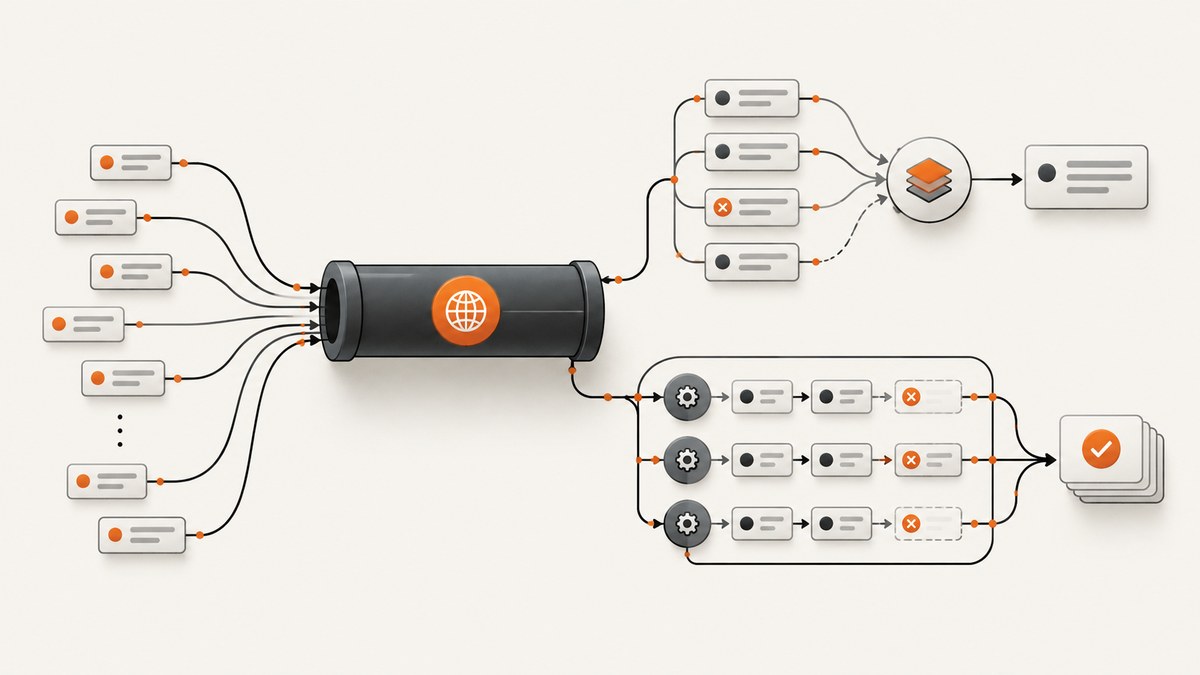
To make a small, already-defined group of HTTP requests concurrently in C#, start the asynchronous requests and await them together with Task.WhenAll. For a larger collection, use Parallel.ForEachAsync and set a maximum degree of parallelism. Reuse an HttpClient or obtain one from IHttpClientFactory; do not create and dispose a new client for every request.
Concurrent requests can reduce the time spent waiting on network operations, but they also increase load on the remote service. Set concurrency and retry behavior to fit that service’s limits. For current connection-pool and DNS guidance, see Microsoft’s HttpClient guidelines.
1. Choose the right concurrency pattern
| Workload | Use | Why |
|---|---|---|
| A few known URLs or operations | Task.WhenAll |
Start each task, then await the finite batch. |
| A collection whose size may be large | Parallel.ForEachAsync |
Process items asynchronously with a chosen concurrency bound. |
| Requests must be spaced over time | A rate limiter | Controls requests per time window, which is different from simultaneous work. |
Task.WhenAll coordinates tasks; it does not throttle them. If you create 10,000 requests before calling it, you may start 10,000 operations. A concurrency limit is a deliberate safety boundary, not a promise that the largest possible number of requests gives the best throughput.
2. Complete example: a finite batch with Task.WhenAll
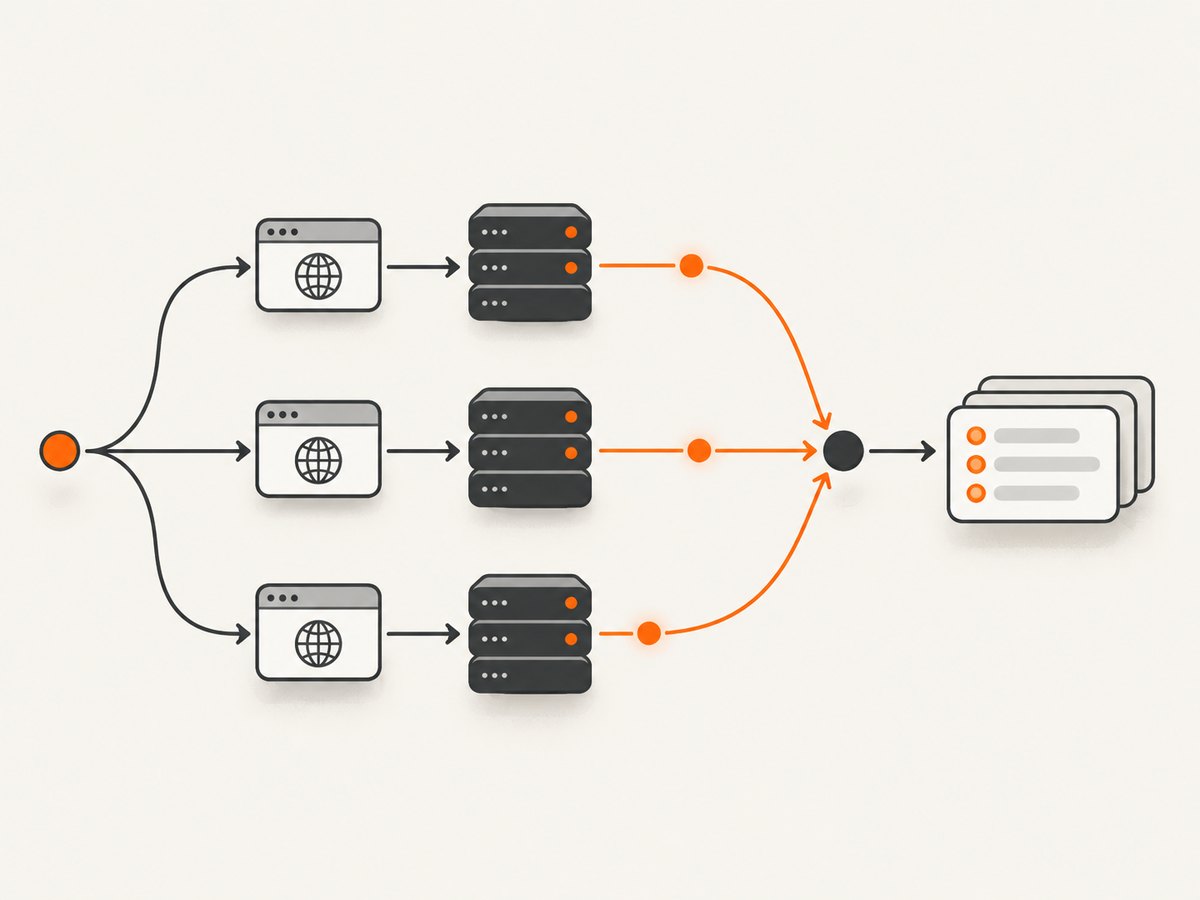
This .NET console example uses one long-lived client, accepts cancellation, checks HTTP status codes, and reads the body while each response is disposed. Create a project with dotnet new console, replace Program.cs with this code, and run it with dotnet run.
using System.Net.Http;

var urls = new[]
{
    "https://example.com/",
    "https://www.iana.org/domains/reserved",
    "https://www.rfc-editor.org/"
};

using var client = new HttpClient
{
    Timeout = TimeSpan.FromSeconds(30)
};

using var cts = new CancellationTokenSource(TimeSpan.FromSeconds(45));

try
{
    Task<string>[] tasks = urls.Select(url => GetTextAsync(client, url, cts.Token)).ToArray();
    string[] pages = await Task.WhenAll(tasks);

    for (var i = 0; i < pages.Length; i++)
    {
        Console.WriteLine($"{urls[i]}: {pages[i].Length} characters");
    }
}
catch (OperationCanceledException) when (cts.IsCancellationRequested)
{
    Console.Error.WriteLine("The batch was canceled or exceeded its overall time budget.");
}
catch (HttpRequestException ex)
{
    Console.Error.WriteLine($"An HTTP request failed: {ex.Message}");
}

static async Task<string> GetTextAsync(
    HttpClient client,
    string url,
    CancellationToken cancellationToken)
{
    using HttpResponseMessage response = await client.GetAsync(
        url,
        HttpCompletionOption.ResponseHeadersRead,
        cancellationToken);

    response.EnsureSuccessStatusCode();
    return await response.Content.ReadAsStringAsync(cancellationToken);
}
The array of tasks starts each operation before WhenAll awaits them. The returned values preserve the order of the input tasks, even if the network responses arrive in a different order. The example uses ResponseHeadersRead, so it begins reading the content after headers arrive instead of asking GetAsync to buffer the full body first. The content is still read into a string here; for large responses, stream it to a file or process it incrementally.
What happens when one task fails?
Task.WhenAll completes after all supplied tasks complete. If one or more fault, the combined task is faulted; awaiting it throws an exception, while the individual task objects retain their failure details. It does not cancel the other requests automatically. Pass a shared cancellation token if the rest of the batch should stop when your application decides to cancel.
For independent operations, consider collecting per-request outcomes instead of allowing one failed request to discard the whole batch result. Catch expected exceptions inside each worker, record the URL and error, and return a result object. Do not catch and silently ignore errors: a partial result should be distinguishable from a complete one.
3. Bound a collection with Parallel.ForEachAsync
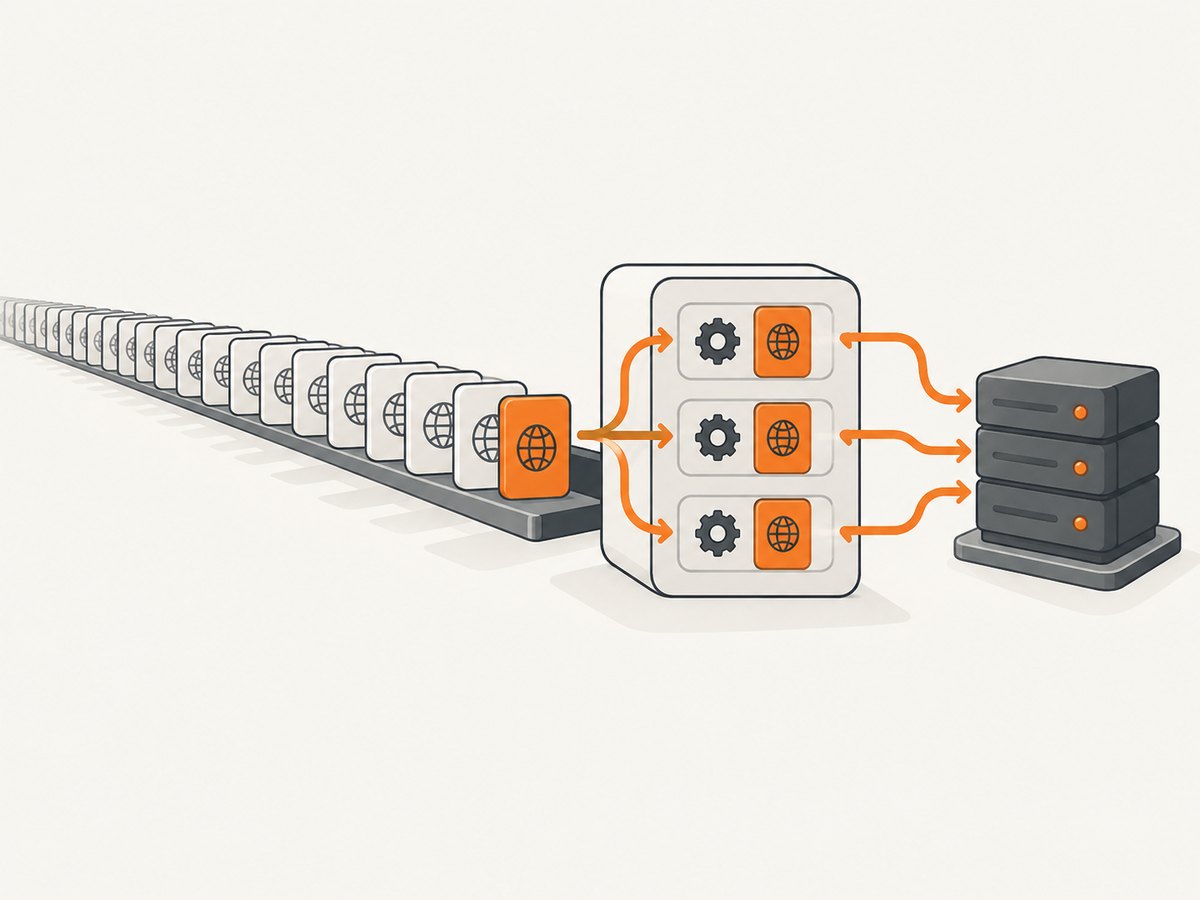
For a collection of unknown or potentially large size, Parallel.ForEachAsync provides an asynchronous loop. Its ParallelOptions.MaxDegreeOfParallelism sets an upper bound on active iterations. Choose a value based on the dependency’s documented limits, your own resource budget, and observed behavior; there is no universally optimal number.
using System.Collections.Concurrent;
using System.Net.Http;

var urls = File.ReadLines("urls.txt");
var results = new ConcurrentBag<(string Url, int Status, string? Error)>();

using var client = new HttpClient { Timeout = TimeSpan.FromSeconds(20) };
using var cts = new CancellationTokenSource(TimeSpan.FromMinutes(2));

var options = new ParallelOptions
{
    MaxDegreeOfParallelism = 8,
    CancellationToken = cts.Token
};

try
{
    await Parallel.ForEachAsync(urls, options, async (url, token) =>
    {
        try
        {
            using var response = await client.GetAsync(
                url,
                HttpCompletionOption.ResponseHeadersRead,
                token);

            results.Add((url, (int)response.StatusCode, null));
        }
        catch (OperationCanceledException) when (token.IsCancellationRequested)
        {
            throw;
        }
        catch (HttpRequestException ex)
        {
            results.Add((url, 0, ex.Message));
        }
    });
}
catch (OperationCanceledException)
{
    Console.Error.WriteLine("Processing was canceled; recorded results may be partial.");
}

foreach (var result in results)
{
    Console.WriteLine($"{result.Url}\t{result.Status}\t{result.Error}");
}
The loop records HTTP status codes without calling EnsureSuccessStatusCode, so a 404 or 500 is an HTTP response, not a transport exception. Decide what counts as a successful result for your application and handle status codes accordingly. The concurrent bag is safe for multiple workers; a normal List<T> is not safe for simultaneous writes.
When you need output in input order, assign each input an index and store results in indexed slots, or collect indexed results into a thread-safe structure and sort afterward. The loop does not promise completion order. For streaming input, avoid materializing the entire source as an array just to start work, and ensure the input enumerator itself is safe for the way it is consumed.
4. Reuse HttpClient and manage connections
Each HttpClient instance has its own connection pool. Repeatedly creating clients can create unnecessary connections and, at high request rates, contribute to port exhaustion. Microsoft recommends either a long-lived client with a configured PooledConnectionLifetime or clients created through IHttpClientFactory, which pools handlers. See the lifetime, DNS, and factory guidance.
Long-lived client
using var handler = new SocketsHttpHandler
{
    PooledConnectionLifetime = TimeSpan.FromMinutes(5)
};
using var client = new HttpClient(handler);

// Reuse client for the lifetime of this application or service.
The five-minute value is an example, not a general recommendation. HttpClient resolves DNS when it creates a connection and does not track DNS record TTLs. A finite pooled connection lifetime allows connections to be replaced and DNS to be resolved again. Select the interval according to how often the destination or network may change.
Applications with dependency injection
In ASP.NET Core or another host using dependency injection, register a client and inject it where needed:
builder.Services.AddHttpClient<CatalogClient>(client =>
{
    client.BaseAddress = new Uri("https://api.example.com/");
    client.Timeout = TimeSpan.FromSeconds(20);
});

public sealed class CatalogClient(HttpClient httpClient)
{
    public async Task<string> GetAsync(CancellationToken cancellationToken)
    {
        using var response = await httpClient.GetAsync(
            "items",
            cancellationToken);
        response.EnsureSuccessStatusCode();
        return await response.Content.ReadAsStringAsync(cancellationToken);
    }
}
There is a cookie caveat with factory-managed handler pools: pooled handlers can share CookieContainer state, and recycling a handler can discard stored cookies. If the application depends on cookie isolation or persistence, evaluate the factory behavior and handler configuration before adopting it.
5. Concurrency limits, rate limits, and retries
A concurrency limit caps requests in flight at once. A rate limit caps requests during a time interval. A remote API may impose either or both. A concurrency limiter helps avoid too many open operations; a token bucket or window-based limiter can control bursts and throughput over time. Partitioning can apply separate policies per tenant or resource. Choose the algorithm that matches the actual constraint.
.NET provides rate-limiting primitives, and Microsoft shows a client-side DelegatingHandler that obtains a permit before forwarding a request and can return 429 when no permit is available. The official rate-limited HTTP handler example is useful when you need this behavior across requests made through a client.
The Microsoft.Extensions.Http.Resilience package can add a standard resilience handler to clients created with IHttpClientFactory. Microsoft documents defaults including a concurrency limiter, total timeout, retry policy with exponential backoff and jitter, circuit breaker, and per-attempt timeout. These are library defaults that can change with package versions; inspect and tune them for your workload. The standard handler documentation also notes retries for transient errors such as 408, 429, server errors, and certain exceptions. See Microsoft’s HTTP resilience guidance.
Retries can multiply load during an outage. Respect a service’s rate-limit instructions and avoid retrying a state-changing request unless its semantics make retries safe, for example through an idempotency mechanism supported by that service. Microsoft’s standard handler retries all methods by default; it documents how to disable retries for unsafe methods such as POST, PATCH, PUT, DELETE, and CONNECT. Do not stack multiple resilience handlers without understanding how their timeouts and retry counts combine.
6. Practical configuration checklist
- Concurrency: Set a bound for large collections; start conservatively and adjust to the dependency’s limits.
- Request rate: Add a time-window or token-bucket policy when the API specifies requests per second or minute.
- Timeouts: Define both a per-request budget and, where needed, a total batch deadline. Account for retry delays within the total budget.
- Cancellation: Pass the application token through every HTTP operation and loop.
- Response handling: Check status codes; dispose responses; stream large bodies instead of buffering them all in memory.
- Retries: Retry only transient failures and operations whose repeated execution is safe; avoid retry storms.
- Observability: Record URL or operation key, status, duration, attempt count, and cancellation/failure reason without logging secrets.
- Client lifetime: Reuse clients or use the factory; tune connection lifetime when DNS changes matter.
7. Troubleshooting common problems
| Symptom | Likely cause | Fix |
|---|---|---|
| Requests appear sequential | Each request is awaited before the next one is started. | Create the tasks first, then await them with Task.WhenAll, or use Parallel.ForEachAsync. |
| Too many sockets or intermittent connection failures | A new HttpClient or handler is created for every request. |
Reuse a client or use IHttpClientFactory; review connection lifetime. |
| Remote service returns 429 | Concurrency, request rate, or burst size exceeds its policy. | Lower parallelism, add the appropriate rate limiter, and honor retry timing the service provides. |
| One failed URL hides useful results | The batch fails as a whole when WhenAll faults. |
Capture per-item outcomes inside each operation and report partial completion explicitly. |
| Memory rises sharply | Many response bodies are buffered or retained at once. | Use ResponseHeadersRead, stream large content, and reduce concurrency or batch size. |
| Caller cancellation does not stop work | The token was not passed to the HTTP call or loop. | Pass the same cancellation token throughout and distinguish cancellation from timeout. |
| POST creates duplicates after a retry | A retry repeated a non-idempotent operation. | Disable retries for unsafe methods or use a server-supported idempotency key. |
| Unexpected stale destination after DNS changes | Existing pooled connections remain in use. | Configure an appropriate PooledConnectionLifetime or factory handler lifetime. |
8. Performance, reliability, and cost
Concurrency helps hide network waiting time when requests are independent. It does not reduce the amount of data transferred or the server’s work. More simultaneous requests can increase memory, socket use, queueing, throttling, and tail latency. Measure a representative workload and increase the bound only while throughput improves and error rates and latency remain acceptable.
For reliability, prefer bounded work, explicit timeouts, cancellation, and partial-result reporting where the task allows it. A timeout is not proof that the remote server did nothing: the server may have completed an operation after the caller stopped waiting. This matters especially for writes. Match retries to method semantics and the API’s documented behavior.
HTTP calls may consume quota or incur charges according to the remote service’s terms. Concurrency itself does not make an API cheaper. Check per-request pricing, rate limits, response-size costs, and retry billing before increasing volume; track successful, failed, and retried calls separately.
Or skip the browser setup
If your concurrent HTTP work is taking website screenshots, you can make a single request to ScreenshotNeo instead of managing browser installation and capture code. It is a website screenshot API and MCP server from Yorker Media. The API returns a PNG, JPEG, WebP, or PDF; see the ScreenshotNeo documentation for request options.
curl -G "https://api.screenshotneo.com/v1/shot" -d access_key=YOUR_API_KEY --data-urlencode url=https://stripe.com -o shot.webpimport requests
r = requests.get("https://api.screenshotneo.com/v1/shot", params={"access_key": "YOUR_API_KEY", "url": "https://stripe.com"}, timeout=90)
open("shot.webp", "wb").write(r.content)const q = new URLSearchParams({ access_key: 'YOUR_API_KEY', url: 'https://stripe.com' });
const res = await fetch(`https://api.screenshotneo.com/v1/shot?${q}`);Cookie and consent banners, newsletter popups, and chat widgets are removed before capture. Bot checks, blank pages, failed loads, timeouts, and cache hits are not billed. Its MCP server lets Claude, Cursor, and other MCP clients take screenshots. The free plan includes 1,000 screenshots each month with no card; paid plans start at $5 for 3,000. Sign up for 1,000 free screenshots a month, with no card.
FAQ
Does Task.WhenAll make requests concurrent?
It awaits tasks together; the operations can run concurrently when they are started before the await. It does not impose a concurrency limit.
Should I use Task.WhenAll or Parallel.ForEachAsync?
Use Task.WhenAll for a small finite batch you can represent as tasks. Use Parallel.ForEachAsync when processing a collection and you want a maximum number of active iterations.
Can one HttpClient be used for simultaneous requests?
Yes. Reuse is the intended pattern for connection pooling. Keep request-specific values on each request rather than changing shared client settings while operations are running.
What concurrency value should I choose?
Use the service’s documented limits as the starting point. There is no universal safe or fastest value; measure under realistic conditions and adjust deliberately.


