How to Manage Price Scraping with Python: A Guide to Price Tracking
Build a reliable Python price tracker: choose permitted sources, normalize prices, store history, detect changes, and send alerts safely.
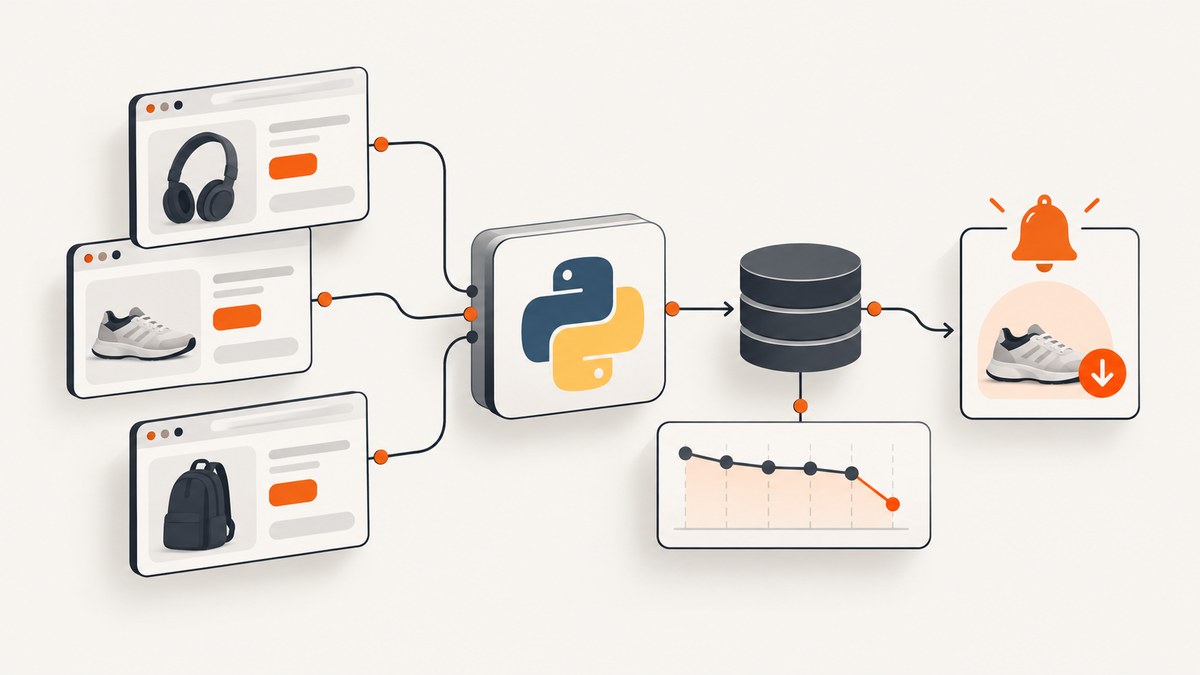
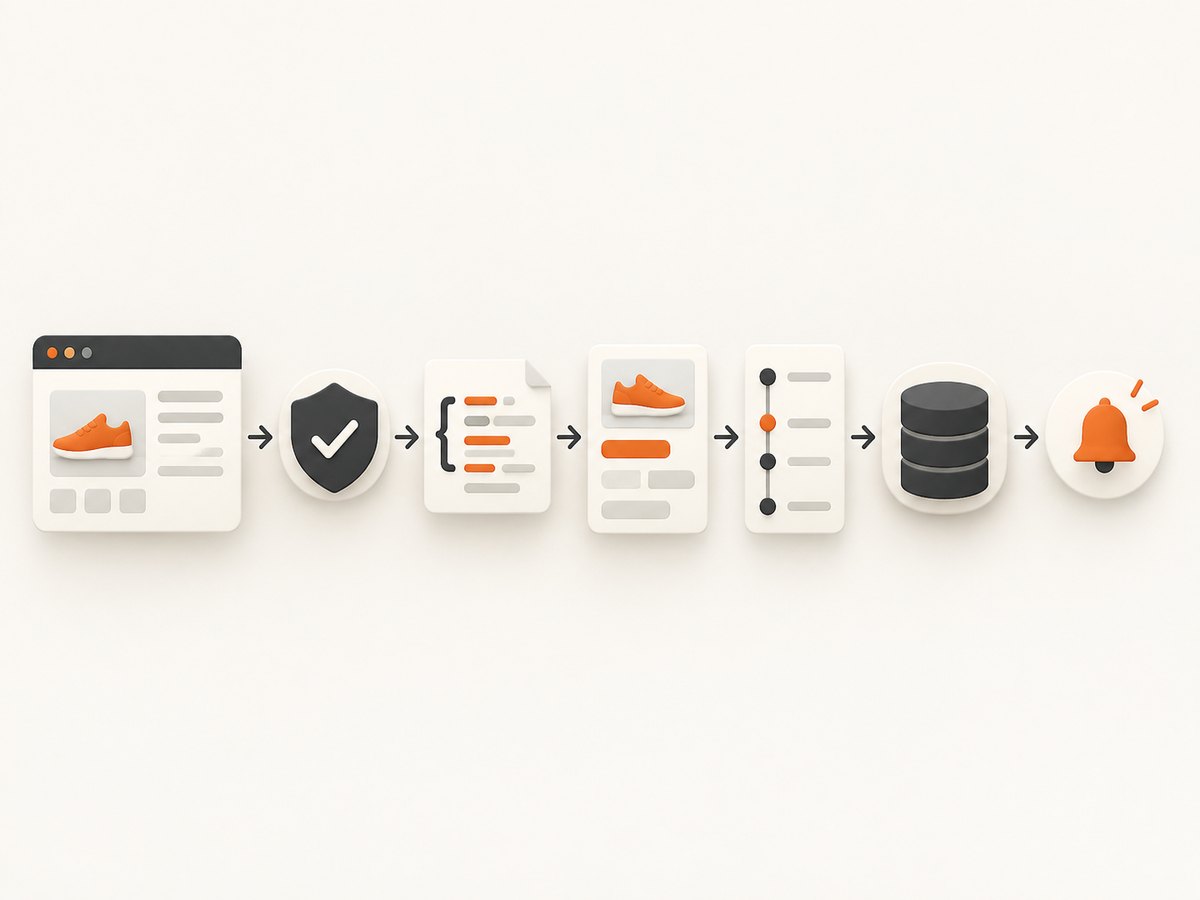
Direct answer: A dependable Python price tracker does more than scrape a number. Choose a permitted and stable source, check its access rules, retrieve the product data with timeouts, extract and normalize the amount and currency, store timestamped observations, compare the new value with a target or previous value, and notify only after validating the result. For a small server-rendered page, Python’s HTTP client and an HTML parser are enough. Repeated multi-page work may fit Scrapy; dynamic pages may require a permitted API or rendering route.
This guide shows a complete path from one product URL to a maintainable tracker. It does not assume that scraping every retailer is allowed. Review the site’s terms, robots.txt, API conditions, and applicable law before scheduling requests. Python’s urllib.robotparser can answer whether a user agent may fetch a URL under the published robots rules, but a robots file is not a complete legal opinion. See the Python robotparser documentation.
1. Choose the data route before writing a parser
Start with the least complex supported route:
| Route | Best fit | Tradeoffs |
|---|---|---|
| HTTP client plus HTML parser | A few permitted, server-rendered pages | Little setup, but markup can change and it does not solve access rules or JavaScript rendering. |
| Scrapy spider | Recurring crawls, pagination, link following, structured exports | More project structure and maintenance. The Scrapy tutorial covers spiders, extraction, following links, and exports. |
| Official product API | A documented interface that supports your use case | Access may require an account, application, agreement, or a specific purpose. |
| Managed scraping API | Hosted scheduling, datasets, and crawling infrastructure | Workload suitability and cost depend on the service. Scrapy.io documents synchronous and asynchronous runs, dataset export, scheduling, and a Python SDK in its API documentation. |
Compare routes on permission and official support, price freshness, geography and currency consistency, reliability, scale, maintenance, and total cost. The available documentation does not provide an apples-to-apples speed or price benchmark.
Amazon-specific caution
Amazon’s Selling Partner API Product Pricing API describes catalog price and offer retrieval for seller price management and repricing. That description does not establish general consumer-tracking access. Amazon’s Associates documentation says PA-API users need an open Associates account, must follow the Operating Agreement, apply for PA-API, and follow its API License Agreement; its initial request allowance is documented as one request per second, with increases tied to attributed shipped revenue. Check the current official terms before building an Amazon tracker. Do not present page scraping as a way around API requirements.
2. Verify robots.txt and source permissions
Use a descriptive user agent and evaluate the published rules before fetching a product URL:
from urllib.robotparser import RobotFileParser
from urllib.parse import urlparse

product_url = "https://example.com/products/widget"
user_agent = "PriceTracker/1.0 (+https://example.com/contact)"
parsed = urlparse(product_url)
robots_url = f"{parsed.scheme}://{parsed.netloc}/robots.txt"

robots = RobotFileParser(robots_url)
robots.read()

if not robots.can_fetch(user_agent, product_url):
    raise RuntimeError("robots.txt does not allow this fetch")
Rules can change, so evaluate them as part of a scheduled job or when a source is added. Also read the site’s terms and API documentation. Use modest request rates, avoid concurrent bursts, and stop when the source signals that access is not permitted.
3. Build a small, permitted tracker with Requests and Beautiful Soup
The following example expects a server-rendered page with a product name in h1 and a price in an element with data-price. Replace selectors only after inspecting a response you are allowed to retrieve. The code records a CSV history, validates values, and reports a price drop.
import csv
import re
import time
from datetime import datetime, timezone
from decimal import Decimal, InvalidOperation
from pathlib import Path
from urllib.parse import urlparse
from urllib.robotparser import RobotFileParser

import requests
from bs4 import BeautifulSoup

URL = "https://example.com/products/widget"
USER_AGENT = "PriceTracker/1.0 (+https://example.com/contact)"
HISTORY = Path("price_history.csv")
TARGET = Decimal("49.99")


def allowed(url: str) -> bool:
    parsed = urlparse(url)
    robots = RobotFileParser(f"{parsed.scheme}://{parsed.netloc}/robots.txt")
    robots.read()
    return robots.can_fetch(USER_AGENT, url)


def parse_amount(raw: str) -> Decimal:
    # Keep digits, separators, and a minus sign; adapt this for your locale.
    cleaned = re.sub(r"[^0-9,.-]", "", raw).strip()
    if "," in cleaned and "." in cleaned:
        # Treat the final separator as the decimal separator.
        if cleaned.rfind(",") > cleaned.rfind("."):
            cleaned = cleaned.replace(".", "").replace(",", ".")
        else:
            cleaned = cleaned.replace(",", "")
    elif "," in cleaned:
        cleaned = cleaned.replace(",", ".")
    try:
        value = Decimal(cleaned)
    except InvalidOperation as exc:
        raise ValueError(f"Malformed price: {raw!r}") from exc
    if value < 0:
        raise ValueError("Negative price is not expected")
    return value


def fetch_price(url: str) -> dict:
    if not allowed(url):
        raise PermissionError("robots.txt does not allow this URL")

    response = requests.get(
        url,
        headers={"User-Agent": USER_AGENT, "Accept": "text/html"},
        timeout=(10, 30),
    )
    response.raise_for_status()
    soup = BeautifulSoup(response.text, "html.parser")

    name_node = soup.select_one("h1")
    price_node = soup.select_one("[data-price]")
    if not name_node or not price_node:
        raise ValueError("Required product or price selector was not found")

    raw_price = price_node.get("data-price") or price_node.get_text(" ", strip=True)
    currency = price_node.get("data-currency", "USD")
    return {
        "product_id": url,
        "product_name": name_node.get_text(" ", strip=True),
        "amount": parse_amount(raw_price),
        "currency": currency,
        "observed_at": datetime.now(timezone.utc).isoformat(),
        "source": url,
    }


def append_observation(observation: dict) -> None:
    exists = HISTORY.exists()
    with HISTORY.open("a", newline="", encoding="utf-8") as handle:
        writer = csv.DictWriter(handle, fieldnames=observation.keys())
        if not exists:
            writer.writeheader()
        writer.writerow(observation)


if __name__ == "__main__":
    try:
        observation = fetch_price(URL)
        append_observation(observation)
        print(f"{observation['product_name']}: {observation['amount']} {observation['currency']}")
        if observation["amount"] <= TARGET:
            print("Target reached: send your notification here")
    except (requests.RequestException, PermissionError, ValueError) as error:
        print(f"Tracker failed: {error}")
Install the two parser dependencies with python -m pip install requests beautifulsoup4. Run the script from a scheduler appropriate to your environment. The sample uses CSV for clarity; SQLite, PostgreSQL, JSON, or another store may be better as history grows. The Real Python web scraping tutorial index covers Requests, Beautiful Soup, Scrapy, Selenium, storage choices, retries, caching, and rate limits.
Normalize prices carefully
- Store the numeric amount as a decimal, not a binary floating-point value.
- Store the currency code separately from the amount.
- Handle thousands and decimal separators according to the source locale.
- Record whether the value is a sale, member price, subscription price, or unavailable offer.
- Reject empty, malformed, or implausibly changed values instead of silently overwriting history.
- Retain the product identifier, source URL, observation time, and enough offer context to explain a change.
4. Compare observations and notify without false alerts
A target threshold is often clearer than a vague “price changed” rule. You can also compare with the previous valid observation:
from decimal import Decimal


def decision(current: Decimal, previous: Decimal | None, target: Decimal) -> str | None:
    if current <= target:
        return "target_reached"
    if previous is not None and current != previous:
        return "price_changed"
    return None
Notify only after validation. Keep the raw response or a content hash when your retention policy permits it, so you can investigate a selector mistake. Deduplicate alerts by product, condition, and observation window. If a product disappears, becomes out of stock, or changes currency, record that state instead of treating it as a zero price.
5. When static HTML is not enough
A parser cannot execute page JavaScript. First look for a permitted official API or a server-rendered route. If repeated crawling, pagination, and exports justify a framework, Scrapy provides request callbacks, spiders, link following, and output pipelines as shown in its tutorial. Selenium is another documented tool category for browser-driven pages, but browser automation adds startup cost and operational complexity. Never bypass a login wall, CAPTCHA, bot check, or other access control.
For a dynamic page that you are authorized to capture, record which rendering conditions matter: viewport, locale, timezone, cookies, authentication, and wait condition. These affect both the displayed price and reproducibility.
6. Resilience, performance, and cost
Retries and timeouts
Use separate connect and read timeouts. Retry transient connection failures and selected 5xx responses with exponential backoff and a limit. Do not retry a 403, a robots denial, or a policy error indefinitely. Log status, elapsed time, URL, and parser version.
Caching and polling
Cache responses where the source and terms allow it. Schedule conservative checks based on how quickly the price can change and how much freshness your use case needs; there is no universal polling interval supported by the cited material. Conditional requests, deduplication, and a queue prevent unnecessary load. Avoid parallel bursts against one host.
Data quality monitoring
Track missing selectors, sudden currency changes, impossible amounts, and long periods without observations. Page redesigns can leave a parser running while returning incorrect data, so alert on validation failures and review extraction rules. Keep a source-specific parser version with each observation.
Scale decisions
One or two products can run as a scheduled script. Dozens of products benefit from a database, job queue, per-host limits, and structured logs. Larger crawls may justify Scrapy or a managed API. Cost includes requests, storage, browser execution, engineering maintenance, and notifications; the researched sources contain no comparative benchmark.
7. Troubleshooting common failures
| Symptom | Likely cause | Fix |
|---|---|---|
| 403 or 429 response | Access policy, rate limit, or missing required route | Stop aggressive retries, review terms and robots rules, slow the schedule, and use an official API when appropriate. |
| Price selector returns nothing | Markup changed or price is rendered by JavaScript | Inspect an allowed response, version the selector, and choose a permitted API or rendering strategy. |
| Price is recorded as 0 or a huge number | Malformed parsing or locale separator error | Reject the value, test locale-specific formats, and compare against prior observations. |
| Currency appears to change | Geolocation, locale, or offer variation | Store currency and region with every observation; do not compare unlike currencies without conversion. |
| Intermittent timeouts | Slow origin, network issue, or overloaded schedule | Use connect/read timeouts, bounded backoff, caching, and fewer concurrent requests. |
| Alerts fire repeatedly | No deduplication or unstable parsed content | Persist the last valid state and send only on a transition or threshold crossing. |
| Amazon API access fails | Missing account, application, agreement, license, or rate allowance | Follow the current official Product Pricing API and Associates requirements; do not substitute page scraping automatically. |
8. Or skip the browser setup
If your goal is a clean image of a product page for a report, audit, or AI workflow, ScreenshotNeo provides a single GET request that returns PNG, JPEG, WebP, or PDF. Its capture can accept cookie and consent banners, then remove more than 60 known consent platforms, newsletter popups, and chat widgets before the shot. Each step can be turned off.

Use the ScreenshotNeo API documentation for all options. A minimal call is:
curl -G "https://api.screenshotneo.com/v1/shot" -d access_key=YOUR_API_KEY --data-urlencode url=https://stripe.com -o shot.webpimport requests
r = requests.get("https://api.screenshotneo.com/v1/shot", params={"access_key": "YOUR_API_KEY", "url": "https://stripe.com"}, timeout=90)
open("shot.webp", "wb").write(r.content)const q = new URLSearchParams({ access_key: 'YOUR_API_KEY', url: 'https://stripe.com' });
const res = await fetch(`https://api.screenshotneo.com/v1/shot?${q}`);For price-monitoring workflows, useful options include full-page capture with lazy images loaded, a CSS selector for one element, custom CSS or JavaScript, waits for a selector, delay, or network idle, custom headers and cookies, timezone and geolocation, blocked ads or resource types, caching with a chosen TTL, image resizing, signed links, asynchronous jobs with signed webhooks, bulk capture of up to 100 URLs per call, and a usage API. The service also offers an MCP server with take_screenshot, get_page_info, and capture_pdf for Claude, Cursor, and other MCP clients.
Only clean shots are billed. Bot checks or CAPTCHAs, blank pages, timeouts, failed loads, and cache hits cost nothing, and response headers identify the page verdict and billing state with X-Page-Verdict and X-Billed. Plans include 1,000 shots per month free with no card; paid plans start at $5 for 3,000 shots. Create a free ScreenshotNeo account.
9. Short FAQ
How often should a tracker check a price?
Choose a modest schedule based on the source’s rules, expected price volatility, and required freshness. The documentation cited here does not establish a universal interval.
Is web scraping legal?
It depends on the source’s terms, access method, facts, and jurisdiction. Check current terms, robots rules, API agreements, and legal advice where necessary.
Should I use floats for prices?
No. Use decimal arithmetic and store the currency separately to avoid rounding surprises.
When should I move from a script to Scrapy?
Consider Scrapy when you need recurring multi-page crawling, pagination, link following, structured exports, and framework-managed requests.
Can a screenshot replace a price API?
A screenshot preserves visual evidence but does not guarantee structured pricing data. Use a documented API when it supports your permitted use; use screenshots when visual context is part of the record.


