What Is MITM and How Is It Used in Web Scraping?
MITM proxying can reveal scraper traffic, but HTTPS interception requires the client to trust the proxy. Learn how it works, when to use it, and its limits.
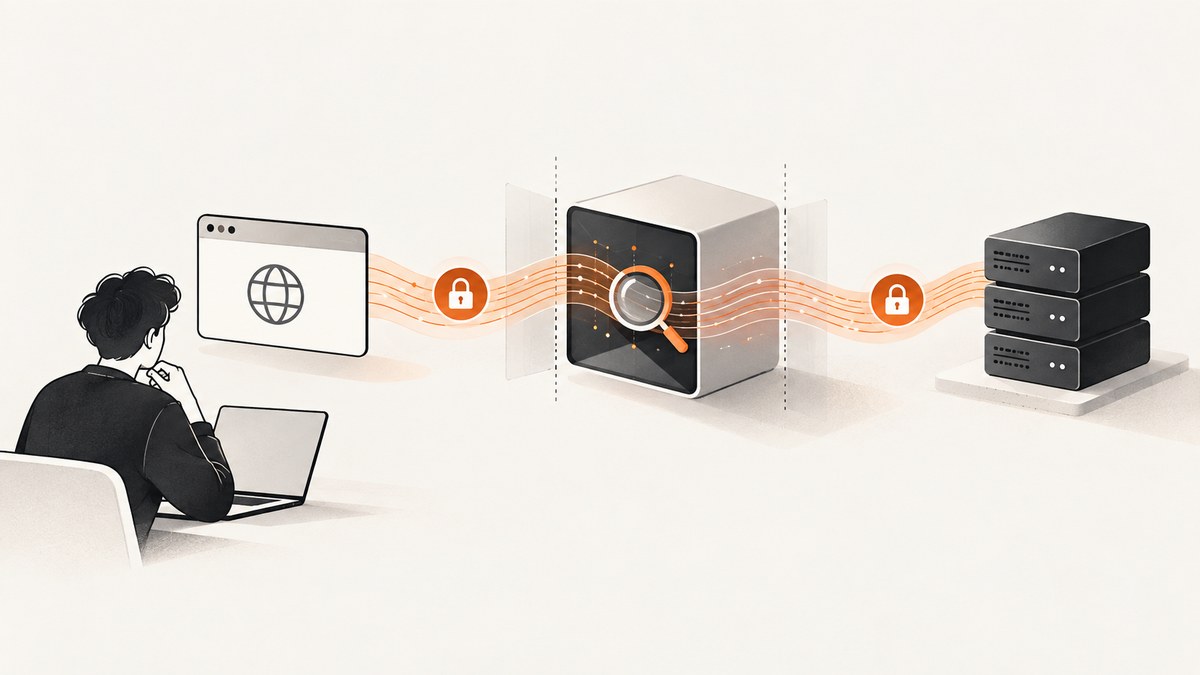
MITM means “man-in-the-middle.” In web scraping, it describes an authorized intercepting proxy placed between a browser or scraper client and a website so a developer can inspect—and sometimes modify—HTTP requests and responses. To inspect HTTPS contents, the proxy must terminate the client’s TLS connection, establish its own TLS connection to the website, and be trusted by the client through an interception certificate. A plain HTTPS proxy tunnel does not reveal encrypted page contents.
MITM is a networking position and technique, not permission to inspect someone else’s traffic or scrape a website. This guide explains the two-connection model, a controlled mitmproxy debugging workflow, the trust and compatibility limits, and simpler alternatives when you only need a screenshot.
1. What MITM means in web scraping
A proxy sits between a client and a server. In ordinary forwarding, it relays traffic. In interception, it can read the HTTP layer and may change requests or responses before forwarding them. That can help a developer diagnose a browser-backed scraping workflow: which endpoint was called, what headers were sent, what response arrived, or where a failure happened.
MITM has both hostile and legitimate uses. An attacker who intercepts traffic without the user’s consent may read or alter it. A developer can also deliberately configure a proxy on a controlled test device to debug their own application or an authorized workflow. The mechanics can look similar; consent, control of the client, and authority over the traffic distinguish the contexts.
MITM is not a requirement for routine scraping. If an HTTP client can fetch the page or API response directly, it usually needs no TLS interception. Interception is mainly useful when you need to understand traffic produced by a browser, application, or client whose network behavior is otherwise opaque.
2. How HTTPS interception works
HTTPS protects HTTP data with TLS. With the common explicit-proxy flow, the client asks the proxy to open a tunnel using the HTTP CONNECT method. The client and website then perform TLS through that tunnel. A conventional proxy forwards the encrypted bytes and cannot see the HTTP request or response inside them. [mitmproxy’s explanation of the mechanism](https://docs.mitmproxy.org/stable/concepts/how-mitmproxy-works/)
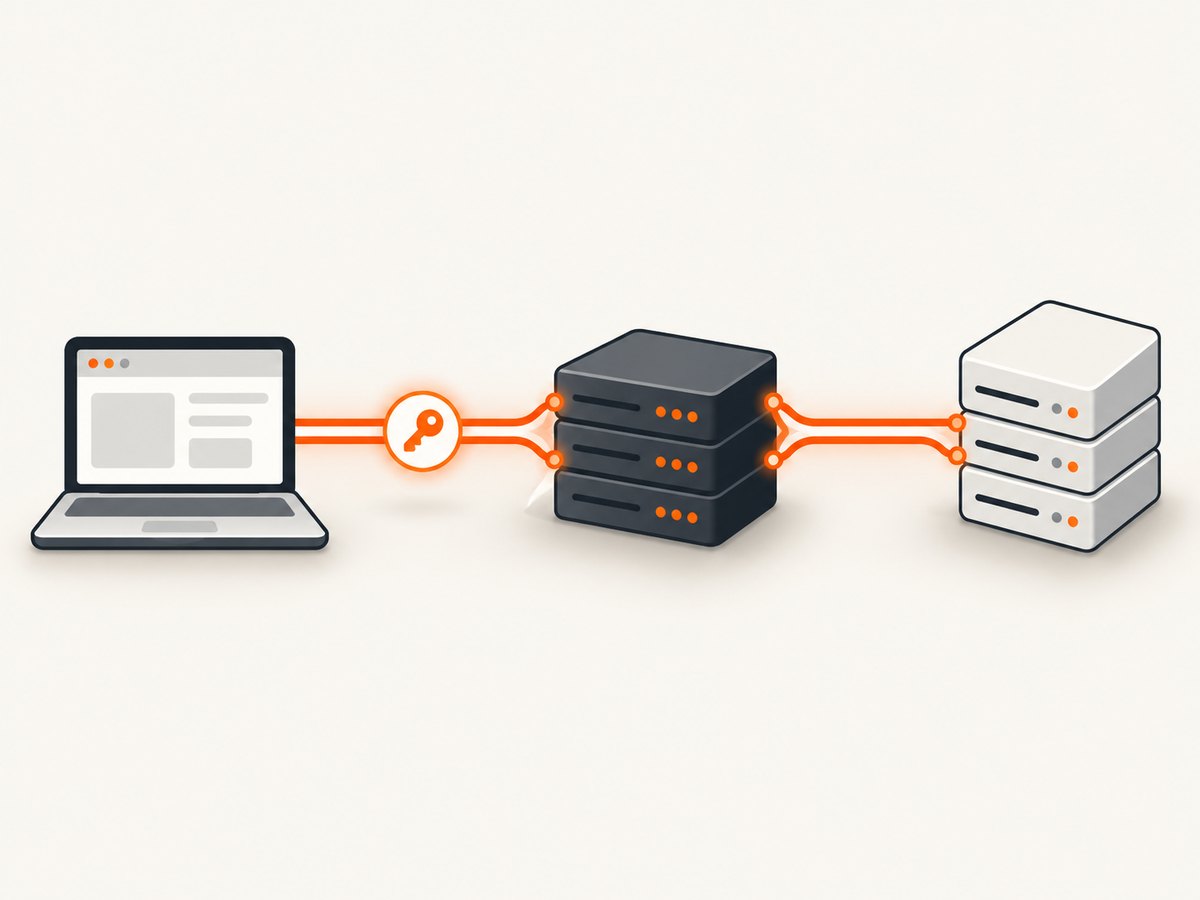
An intercepting proxy instead ends TLS on both sides:
- The client connects to the proxy and requests the target website.
- The proxy presents a certificate for that website, signed by the proxy’s own certificate authority (CA).
- The client checks the certificate chain. It proceeds only if the configured trust store accepts the proxy CA and the certificate is otherwise valid.
- The proxy opens a separate TLS connection to the real website and validates that connection.
- The proxy can inspect the HTTP messages on each side, then relay them. Depending on the tool and configuration, it can also modify traffic or save the conversation.
So the proxy is not decrypting a single end-to-end TLS connection by magic. It is the trusted TLS endpoint from the client’s perspective and a TLS client to the upstream server. mitmproxy documents generating interception certificates on the fly, signed by its own CA. If the client does not trust the CA, a correctly validating client should reject the connection. [mitmproxy mechanism documentation](https://docs.mitmproxy.org/stable/concepts/how-mitmproxy-works/)
3. A controlled debugging workflow with mitmproxy
The example below is a local debugging pattern for traffic you are authorized to inspect. mitmproxy supports intercepting and modifying HTTP and HTTPS requests and responses, and saving conversations for analysis. Consult its current documentation for installation and mode details, since those can change between releases. [mitmproxy introduction](https://docs.mitmproxy.org/stable/)
Step 1: Run the proxy locally
Install mitmproxy using its official installation guidance, then start its interactive proxy:
mitmproxyThe default interactive setup listens for proxy connections on the local machine. Confirm the listen address and port shown by the tool or its current documentation; do not assume that a listener is available to other devices on your network.
Step 2: Point a test client at the proxy
For a command-line HTTP client, set proxy environment variables for the test process. This makes the route explicit and easy to undo when the process ends:
export HTTPS_PROXY=http://127.0.0.1:8080
export HTTP_PROXY=http://127.0.0.1:8080
curl -I https://example.com
This first request may show a certificate validation failure. That is expected if curl does not yet trust the proxy CA. Do not fix it by disabling certificate checks; configure trust for the controlled test client instead.
Step 3: Configure trust only for the test client
mitmproxy’s certificate documentation explains how to access its generated CA certificate and configure clients to trust it. Follow the current instructions for your operating system and client. Prefer a temporary test profile or isolated development environment. The CA private key is sensitive: anyone who obtains it may be able to issue certificates trusted by clients where that CA has been installed. Remove the test trust configuration when inspection is complete. [mitmproxy certificate documentation](https://docs.mitmproxy.org/stable/concepts/certificates/)
After configuring trust, repeat the request. The proxy should be able to display the HTTP exchange if the client honors the proxy settings and the connection is compatible. Keep captures scoped: request URLs, headers, cookies, and bodies can contain credentials or personal data.
Step 4: Inspect one question at a time
Use the capture to answer a concrete debugging question: Did the browser call the endpoint you expected? Did it send a cookie or authorization header? Did the server return an error or redirect? Does the response body differ from what the scraping code assumes? Avoid treating a captured request as a template for bypassing a site’s controls.
4. What to inspect, and what interception cannot tell you
An intercepting proxy can make the HTTP exchange visible, but it does not explain every cause of a scraping problem by itself. It can show observed requests and responses, timing, redirects, headers, and payloads that pass through the configured client. It cannot establish that you are authorized to collect the data, that a site permits the workflow, or that every browser activity used the configured proxy.
It also does not guarantee compatibility. Protocols and clients differ, and mitmproxy documents protocol-specific limitations. Mutual TLS (mTLS) adds client-certificate authentication during the TLS handshake, which is distinct from sending cookies or bearer tokens after TLS is established. Interception can therefore need additional configuration or fail for a client that authenticates this way. Do not promise that every HTTPS connection, application, or protocol can be captured. [mitmproxy protocols](https://docs.mitmproxy.org/stable/concepts/protocols/) and [certificate documentation](https://docs.mitmproxy.org/stable/concepts/certificates/)
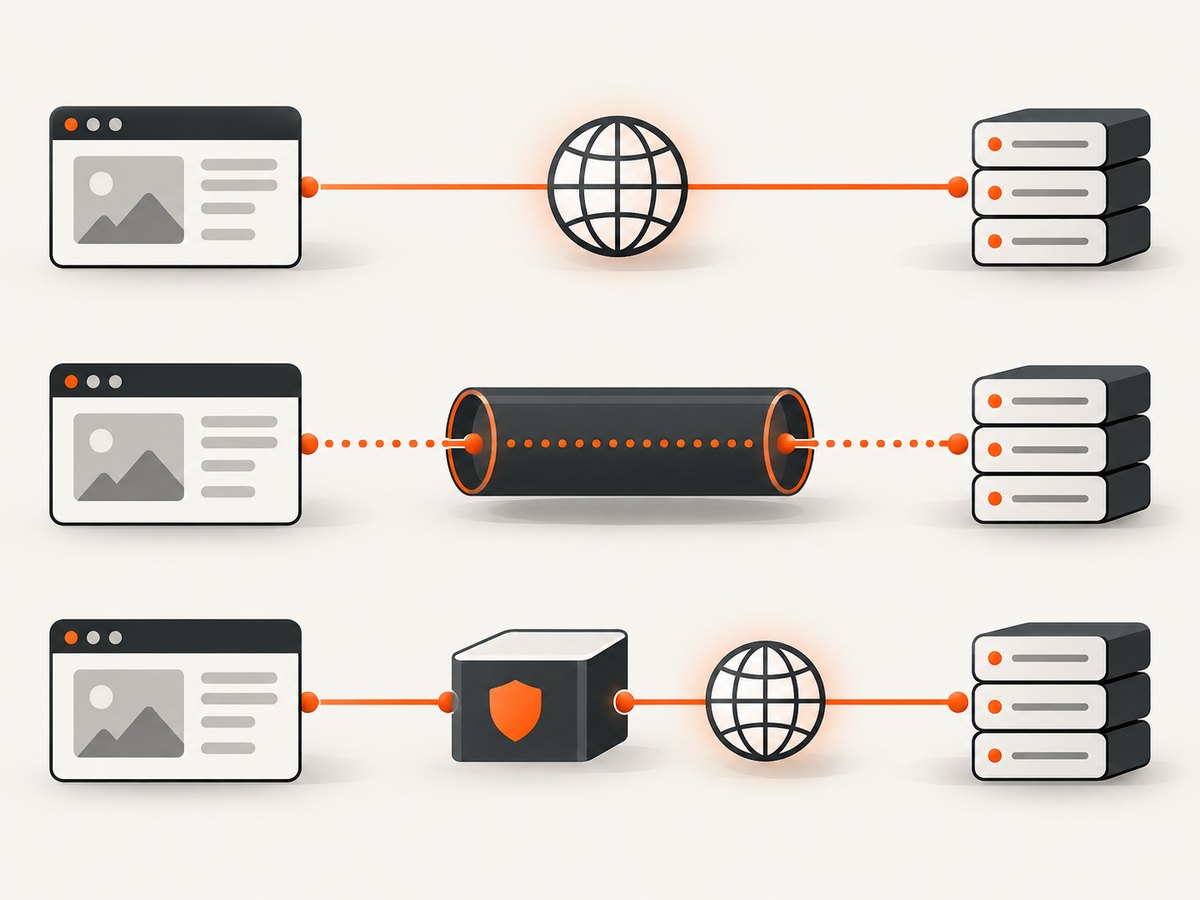
5. MITM proxy versus ordinary proxy versus direct client
| Approach | What you can see | Client setup | Typical use |
|---|---|---|---|
| Direct HTTP client | The responses the client receives and its own request details | Target URL and normal HTTP configuration | Fetching pages or APIs when the client is sufficient |
| HTTPS CONNECT tunnel | Encrypted connection metadata, but not the HTTP contents inside TLS | Configure a proxy route | Forwarding traffic without TLS inspection |
| Intercepting proxy | HTTP requests and responses after TLS is terminated at the proxy | Configure proxy routing and trust its CA | Debugging authorized browser or app traffic |
The inspection benefit of the third option comes with a trust change and greater exposure of sensitive data. Choose the least invasive approach that answers the debugging question.
6. Permission, robots.txt, and security boundaries
Use interception only for a client and traffic you are authorized to inspect. Separately assess the target site’s rules and the applicable context for any data collection; the technical ability to observe a request does not grant scraping permission.
RFC 9309 standardizes the Robots Exclusion Protocol. It says crawlers are requested to honor published rules and states, “These rules are not a form of access authorization.” That means robots.txt is not a technical access-control mechanism; the statement does not settle whether a particular scraping activity is permitted. Do not treat robots.txt as a grant of permission or as a complete legal answer. [RFC 9309](https://www.rfc-editor.org/rfc/rfc9309.html)
For the attack context, MDN explains that an untrusted MITM can read or modify traffic and discusses HTTPS and HSTS as defenses. In a controlled debugging setup, the proxy is intentionally trusted by the test client; outside that setup, trusting an unknown CA can expose traffic to interception. [MDN’s MITM security guidance](https://developer.mozilla.org/en-US/docs/Web/Security/Attacks/MITM)
7. Simpler option for screenshot-based workflows
If your goal is to obtain a rendered page image rather than diagnose browser network traffic, TLS interception may be unnecessary. You can capture a page directly with a screenshot API. For example, ScreenshotNeo is a website screenshot API and MCP server from Yorker Media; a GET request returns a PNG, JPEG, WebP, or PDF. It is not a MITM proxy and does not expose the page’s network conversation.
Or skip the browser setup
Use the one-call screenshot endpoint when you need the rendered result, not HTTP traffic inspection. See the [ScreenshotNeo documentation](https://screenshotneo.com/docs/).
curl -G "https://api.screenshotneo.com/v1/shot" -d access_key=YOUR_API_KEY --data-urlencode url=https://stripe.com -o shot.webpimport requests
r = requests.get("https://api.screenshotneo.com/v1/shot", params={"access_key": "YOUR_API_KEY", "url": "https://stripe.com"}, timeout=90)
open("shot.webp", "wb").write(r.content)const q = new URLSearchParams({ access_key: 'YOUR_API_KEY', url: 'https://stripe.com' });
const res = await fetch(`https://api.screenshotneo.com/v1/shot?${q}`);Cookie banners, popups, and chat widgets are removed before the shot. Bot checks, blank pages, and failed loads are never billed. An MCP server lets AI agents take screenshots. The free plan includes 1,000 screenshots a month with no card; paid plans start at $5 for 3,000. Learn about [ScreenshotNeo](https://screenshotneo.com) and [create a free account](https://screenshotneo.com/account/sign-up/).
8. Troubleshooting common MITM proxy problems
| Symptom | Likely cause | What to check |
|---|---|---|
| Certificate authority error | The client does not trust the interception CA, or the trust was installed in a different profile | Follow mitmproxy’s current CA setup for the exact client and test profile. Keep certificate validation enabled. |
| No traffic appears | The client is not using the proxy, the address or port is wrong, or the connection uses a path the proxy does not handle | Verify the proxy settings and listener, then make a simple test request through the same client. |
| CONNECT succeeds but content is unreadable | The connection is being tunneled without interception, or interception trust/configuration is missing | Check whether the proxy is operating in an intercepting configuration and whether the client trusts its CA. |
| Some requests work and others fail | Protocol differences, mTLS, certificate pinning, or application-specific proxy behavior may be involved | Check the client and protocol documentation. Do not assume the same setup applies to all traffic. |
| Capture contains credentials | Headers, cookies, or request bodies were recorded as part of the exchange | Limit capture scope, protect stored flows, redact secrets before sharing, and remove captures when no longer needed. |
| Scraper still fails after interception | The issue may be application logic, server behavior, content loading, or site policy rather than transport visibility | Use the observed request/response to isolate the failure; interception does not solve authorization or compatibility issues. |
9. Performance, reliability, and cost considerations
Interception adds a proxy hop and makes the proxy responsible for handling client-side and upstream TLS. That creates additional work and another point where connectivity or configuration can fail. The dossier sources provide no benchmark for the latency or throughput impact, so the right choice is to measure in the controlled environment if performance matters.
For reliability, verify that the client routes requests through the intended proxy and that the proxy can reach the upstream server. Keep a direct-client path available for comparison when debugging. Treat saved flows as sensitive artifacts and decide how they are protected and retained. Do not install a development CA broadly just to simplify a one-off capture.
There is no MITM tool pricing or cost claim in the sources used here. The practical costs to account for are setup, maintenance, and the security handling of captured traffic. If the task only needs screenshots, ScreenshotNeo offers 1,000 shots per month free without a card; listed paid tiers are Starter $5 for 3,000, Growth $15 for 15,000, Pro $39 for 60,000, Scale $99 for 250,000, and Business $249 for 1,000,000. Yearly billing gives two months free, and every feature is on every plan.
10. Frequently asked questions
Does a normal proxy decrypt HTTPS?
No. A conventional CONNECT proxy tunnels encrypted TLS bytes. HTTP contents are exposed only when TLS is terminated for inspection by a trusted intercepting proxy.
Is MITM required to scrape a website?
No. It is an optional debugging method for inspecting traffic from a client you control. Many scraping tasks use an ordinary HTTP client without interception.
Does trusting a proxy certificate make every app interceptable?
No. Client behavior, protocol support, mTLS, and other compatibility constraints can affect interception. Trust is necessary for the documented TLS interception flow, but it does not guarantee universal support.
Does robots.txt authorize scraping?
No. RFC 9309 explicitly says its rules are not access authorization. It also does not decide the status of a particular collection activity.
When should I use a screenshot API instead?
Use one when you need the rendered image or PDF and do not need to inspect the underlying HTTP exchanges. For a screenshot call, see [ScreenshotNeo’s docs](https://screenshotneo.com/docs/).


