Mixed Content Warnings: Causes and Fixes
Find the HTTP resource behind an HTTPS warning, fix its source, and verify the repair. Learn when CSP helps and why it does not replace HSTS.

Direct answer: An HTTPS page shows a mixed content warning when it requests at least one resource over HTTP. Fix the URL or service that serves that resource so it uses HTTPS, then check the page and crawl the site again. Browsers may upgrade some passive resources, such as images, but can block scripts, stylesheets, frames, and other requests that could change page behavior. MDN’s mixed content guide explains the categories and browser handling.
Turning on HTTPS for the main document does not make HTTP subresources secure. An HTTP response can be intercepted and changed in transit: a modified script could alter the page, while a changed image could mislead a visitor. Mixed content weakens the integrity and confidentiality HTTPS is meant to provide.
1. What counts as mixed content?
Suppose a visitor opens https://shop.example/checkout, but that page loads a script from http://cdn.example/app.js. The document uses HTTPS while one request uses HTTP, so the page contains mixed content. It does not matter whether the HTTP resource is on the same host or a third party.
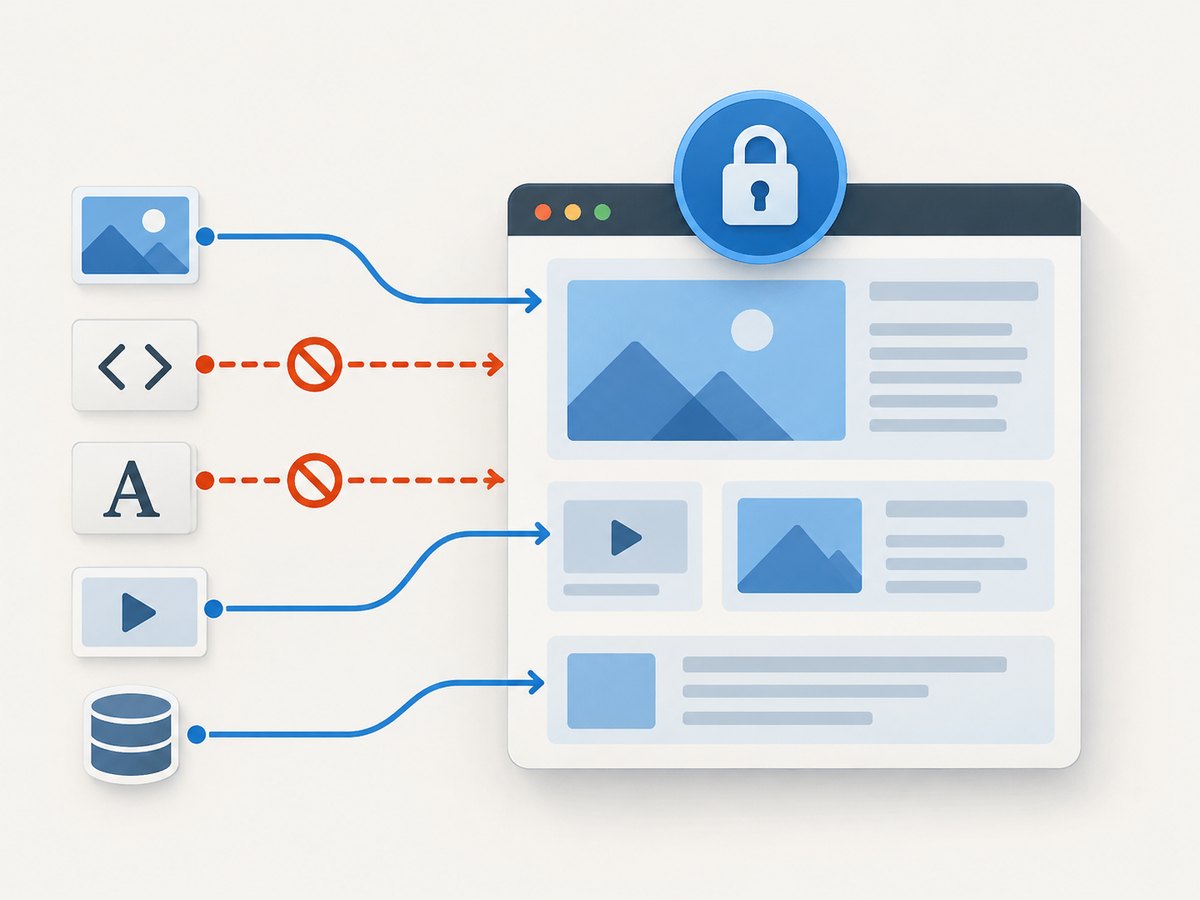
Browsers broadly distinguish between resources they can try to upgrade and resources they block. The older terms “passive” and “active” are still common shorthand, but current documentation often calls the categories “upgradable” and “blockable.”
| Kind | Typical examples | Common browser response | What to check |
|---|---|---|---|
| Upgradable (historically passive) | Images in src, CSS image URLs, audio and video sources |
May rewrite http to https before requesting |
Does the HTTPS URL exist and have a valid certificate? |
| Blockable (historically active) | Scripts, stylesheets, fonts, frames, fetch(), XHR, some image sources such as srcset |
Blocked, because the response could modify page behavior or content | Which source generated the request, and can it be served securely? |
Browser rules have details and can change. For example, MDN notes that an image request to an IP address may be blocked instead of upgraded. Use the console in the browser and version where the issue occurs as the final diagnostic. See MDN’s resource type details and Firefox’s documented behavior via MDN.
2. Find the exact insecure request
- Open the affected page over HTTPS in a browser where you see the warning.
- Open Developer Tools, select Console, and reload the page. Copy the complete warning, including the resource URL and type.
- Open Network, reload again, and filter for
http://if the browser provides URL filtering. Inspect the initiator or request chain to see whether HTML, CSS, JavaScript, a redirect, or an embed caused it. - Repeat after interacting with the page. Requests created only after opening a menu, submitting a form, scrolling, or accepting a consent dialog may not appear on the initial load.
- Check more pages and crawl the site. A browser session finds requests made in that session; a recursive crawler or mixed-content checker can find references in other pages and templates. MDN recommends using browser tools and site-wide checking together.
Record three things for each warning: the page URL, the insecure resource URL, and the initiating file or feature. That turns “HTTPS is broken” into a concrete repair item.
3. Fix the source, then verify it
Step 1: Confirm the resource supports HTTPS
Open the exact resource hostname with https://. Confirm that the TLS certificate is valid for that hostname, the resource loads at the expected path, and redirects stay on HTTPS. A working homepage does not prove that a particular file path or CDN hostname works over TLS.

Step 2: Change the reference where it is authored
For a same-site resource, change http://example.com/assets/site.css to https://example.com/assets/site.css or use a root-relative path such as /assets/site.css when appropriate. Search source files, CMS content, database fields, themes, templates, email or feed output, CSS, client-side code, form actions, iframe sources, downloads, and API configuration. Avoid a blind global replacement until you have checked that each destination really supports HTTPS.
<!-- Before -->
<script src="http://www.example.com/app.js"></script>

<!-- After: explicit HTTPS -->
<script src="https://www.example.com/app.js"></script>

<!-- Or, for a resource on the same origin -->
<script src="/app.js"></script>
Relative URLs inherit the page’s scheme, but only use them when the resource is genuinely on the current origin. An external URL should identify the provider’s HTTPS endpoint explicitly.
Step 3: Repair redirects and third-party dependencies
If an initially HTTPS URL redirects to HTTP, fix the redirect rule or use the correct final HTTPS URL. If a vendor, embedded player, font host, analytics endpoint, or CDN does not offer HTTPS for the needed resource, replace it or remove the dependency. A redirect does not make an insecure destination secure.
Step 4: Check generated and delayed requests
Search JavaScript for http://, but also inspect values assembled from configuration, API responses, user content, or protocol-relative URLs. CSS can contain url() references and imported stylesheets that are easy to miss. Test lazy-loaded content by scrolling, and exercise forms, client-side routes, and embeds.
Step 5: Re-test and crawl
Clear or bypass relevant caches, reload the HTTPS page, and verify that the repaired request returns successfully over HTTPS. Check the console and network panel again. Then crawl the site and repeat after deployment; a source change is not complete if a template, cached page, or alternate route still emits HTTP.
4. Can upgrade-insecure-requests fix mixed content?
Content-Security-Policy: upgrade-insecure-requests tells the browser to treat eligible HTTP URLs as HTTPS before it makes the request. It can help during a migration when many old references remain, or when archived content is difficult to rewrite immediately. MDN documents that it applies to resource requests, same-origin navigations, nested browsing-context navigations, and form submissions; it does not upgrade a top-level navigation to a different origin.
Content-Security-Policy: upgrade-insecure-requestsYou can send that as an HTTP response header. A document can also include a meta policy, but a response header is generally the configuration to manage at the server or edge. The directive is not a repair for an HTTPS endpoint that is missing, has a bad certificate, or redirects insecurely: the upgraded request can fail, and there is no fallback to HTTP. Fix the source URLs and service as the durable solution.
It also does not replace HSTS. The CSP directive acts on a page’s requests; HSTS tells browsers to use HTTPS for future connections to the host, including when a visitor follows an HTTP link to that host. HSTS is sent over HTTPS. Enable it only when the host is ready to serve HTTPS consistently; includeSubDomains affects subdomains too, so account for them before setting it.
block-all-mixed-content is deprecated and should not be added to new configurations. Modern browsers already upgrade eligible content and block other mixed requests. See the MDN directive reference.
5. Validate the rendered page with a screenshot
Once the network requests are repaired, inspect the rendered page at the viewport and state where the warning occurred. A screenshot can help spot missing images, unstyled sections, blank embeds, or layout shifts after the fix. Automated browser rendering is useful as a visual check, but it complements the network panel and crawler: a screenshot alone cannot prove every request used HTTPS.
For repeatable checks, capture the same URL and viewport before and after a deployment, and keep a separate browser-console or crawler check for remaining HTTP requests. A full-page capture can expose lower-page images and embeds that a viewport-only check misses. Check both a clean cache and your normal cached path where that affects what users see.
Or skip the browser setup
If your goal is a clean screenshot of the fixed page, ScreenshotNeo is a website screenshot API and MCP server. It accepts one GET request and returns an image or PDF. Cookie banners, newsletter popups, and chat widgets are removed before the shot; bot checks, blank pages, and failed loads are never billed. An MCP server lets AI agents take screenshots. The free plan includes 1,000 screenshots a month with no card, and paid plans start at $5 for 3,000. See the API documentation for request options.
curl -G "https://api.screenshotneo.com/v1/shot" \
  -d access_key=YOUR_API_KEY \
  --data-urlencode url=https://example.com/checkout \
  -o checkout.webp
Equivalent Python and Node.js calls:
import requests

r = requests.get(
    "https://api.screenshotneo.com/v1/shot",
    params={"access_key": "YOUR_API_KEY", "url": "https://example.com/checkout"},
    timeout=90,
)
open("checkout.webp", "wb").write(r.content)
const q = new URLSearchParams({
access_key: 'YOUR_API_KEY',
url: 'https://example.com/checkout'
});
const res = await fetch(`https://api.screenshotneo.com/v1/shot?${q}`);
if (!res.ok) throw new Error(`Screenshot request failed: ${res.status}`);
await Bun.write('checkout.webp', res);Sign up for 1,000 free screenshots a month with no card.
6. Common errors and fixes
| Symptom | Likely cause | Fix |
|---|---|---|
| Image warning disappears, but image is still missing | The browser upgraded the image URL, but the HTTPS path is unavailable or its certificate fails. | Test the exact HTTPS resource URL and repair its TLS, path, or redirect. |
| Script or stylesheet is blocked | It is a blockable mixed request, commonly from a hard-coded URL or generated request. | Serve the dependency over valid HTTPS and update the source reference. |
| Changing the HTML did not remove the warning | The request may come from CSS, JavaScript, a CMS field, iframe, or cached output. | Use Network initiator information, search generated content, and purge applicable caches. |
upgrade-insecure-requests is present, but resource fails |
The upgraded HTTPS destination does not serve that resource correctly. | Fix the HTTPS endpoint; the browser does not fall back to HTTP. |
| Only one browser or route reports it | Browser behavior can vary, or a route/interactivity path triggers a delayed request. | Reproduce in that browser, reload with DevTools open, and exercise the relevant interaction. |
| HTTP URL appears only on an IP address | Browsers may block an upgradable resource when the host is an IP address. | Serve it through a properly configured HTTPS hostname and use that hostname in the reference. |
| Warning persists after deployment | Old markup may remain in a CDN, service worker, application cache, or another template. | Check the delivered response and cache state, then crawl the deployed site again. |
7. Performance, reliability, and cost considerations
Mixed content is primarily a correctness and security issue, but its repair can affect page performance. If an upgraded resource fails, the browser may spend time attempting the HTTPS request before showing an error. Correct HTTPS URLs and avoiding unnecessary third-party dependencies reduce this uncertainty. Do not add duplicate resources as a workaround; that can add requests and create different behavior between browsers.
For reliability, validate certificate renewal, redirects, CDN configuration, and every hostname used by the page. A successful top-level HTTPS response says nothing about a separate media host or API. Treat a CSP upgrade policy as migration coverage, then remove legacy URLs from content and code as they are found. Use HSTS for host-level HTTPS enforcement when deployment is ready, with subdomain scope chosen deliberately.
There is no universal cost figure for mixed content remediation: it depends on how many templates, stored records, and third-party dependencies emit HTTP. Prioritize blocked scripts, styles, and data requests because they can break functionality, then repair passive media and mixed downloads. Site crawling and automated page checks can find regressions earlier than relying on visitors to report missing assets.
8. Prevention checklist
- Serve every first-party asset, API, download, iframe, and form destination over HTTPS.
- Use HTTPS URLs for third-party resources and verify their redirects and certificates.
- Search source and stored content for
http://; inspect CSS and dynamically generated requests too. - Use
upgrade-insecure-requestsas a safety net for legacy references, not as proof that all endpoints work. - Set HSTS over HTTPS when ready, and review subdomain impact before adding
includeSubDomains. - Run browser-console checks on key journeys and crawl the deployed site after changes.
- Review mixed downloads as well as embedded resources.
9. FAQ
Is mixed content the same as an invalid certificate?
No. A certificate error concerns authentication of an HTTPS connection. Mixed content means a secure document requests something over an insecure scheme. A page can have a valid certificate and still request HTTP resources.
Why does the warning appear only after I scroll?
Lazy-loaded images, embedded media, and scripts can be requested only when content nears the viewport or a user interacts with it. Reproduce the action with Network and Console open.
Should I replace every http:// string automatically?
Search broadly, but verify each destination before changing it. Some endpoints may not support HTTPS, and indiscriminate replacement can break integrations or non-URL text.
Does a screenshot prove the warning is fixed?
No. A screenshot shows rendered output at a particular moment. Use developer tools and a site crawl to verify the requests and routes that rendering cannot expose.
Primary references: MDN: Mixed content, MDN: upgrade-insecure-requests, and MDN: Strict-Transport-Security.


