How to Monitor Online Reviews with n8n
Build an n8n workflow that captures reviews, removes duplicates, classifies sentiment, alerts your team, and drafts replies with human approval.

Direct answer: monitor reviews in n8n by connecting the review source, converting every event into one common record, deduplicating by review ID, classifying sentiment and urgency, routing serious cases to a human, and logging every decision. Google Business Profile is the simplest starting point because n8n has a native Review Added trigger and actions for reading reviews and managing replies. Other platforms usually enter through scheduled API polling or a signed webhook.
This guide shows a production-minded workflow for Google, Trustpilot, Yelp, and other review systems. It covers source selection, authentication, normalization, AI classification, alerts, reply approval, audit logs, retries, hosting, and cost controls.
1. Design the workflow before adding nodes
Write down the outcome for each review before building the automation. A useful policy has at least three paths:
- Urgent: one- or two-star reviews, safety complaints, legal threats, refund requests, or posts containing personal data. Notify a human immediately and never publish an automatic reply.
- Routine: neutral reviews and ordinary questions. Add them to a queue or daily digest.
- Positive: send to a digest or advocacy queue. A human can decide whether to request permission for a case study or referral.
Keep the workflow’s decisions in the data record. This makes it possible to answer who saw a review, why an alert fired, which model produced a draft, and whether anyone approved publication.
2. Choose a review source and trigger
Google Business Profile
Use n8n’s Google Business Profile Trigger and subscribe to Review Added. The companion Google Business Profile node supports Get Reviews, Get Many Reviews, Reply, and Delete Reply operations. This is the cleanest path when the authenticated Google account manages the profile.
Platforms with an API but no native n8n trigger
Use a Schedule Trigger and an HTTP Request node. Store the last timestamp or pagination cursor, request only newer reviews, and deduplicate by the platform’s review ID. Respect the provider’s authentication method, quota, pagination rules, and terms.
Platforms that can push events
Use an n8n Webhook node. n8n exposes separate test and production URLs: the production URL runs after the workflow is saved and published. Validate the sender’s signature, reject replayed events, and return a fast acknowledgement before starting slow enrichment or AI work when the sender has a timeout.
Scraping-only sources
Scraping is a last resort. Confirm that you are allowed to collect the data, check robots and terms requirements, define what data you own, and add monitoring for layout changes. Prefer an official API or export whenever one exists.
3. Build the Google Business Profile workflow
- Create an n8n workflow and add Google Business Profile Trigger.
- Authenticate an account that manages the business profile.
- Select the location and the Review Added event.
- Add a Code node to normalize the incoming payload.
- Add a data-store, database, or Sheets lookup keyed by source plus review ID.
- Branch on rating and policy-sensitive text.
- Send urgent records to Slack, email, or a ticketing system.
- Generate a reply draft, send it to an approval queue, and publish only after approval.
- Write the raw event, normalized record, decision, draft, approver, and final reply to an audit store.
A normalized record should contain:
{
  'source': 'google-business-profile',
  'location_id': 'location-123',
  'review_id': 'review-456',
  'author': 'Reviewer name',
  'rating': 2,
  'text': 'The delivery was late...',
  'created_at': '2026-09-30T09:30:00Z',
  'updated_at': '2026-09-30T09:30:00Z',
  'review_url': 'https://provider.example/review/456',
  'reply_status': 'unreplied',
  'raw': {}
}
Keep the provider payload under raw. It is useful for audits and for diagnosing changes in the source schema. Do not send the raw payload to an AI provider if it contains fields the model does not need.
4. Normalize and deduplicate every event
Different platforms use different names for ratings, authors, timestamps, and reply states. Convert them to one schema before sentiment analysis so downstream nodes do not contain platform-specific branches.
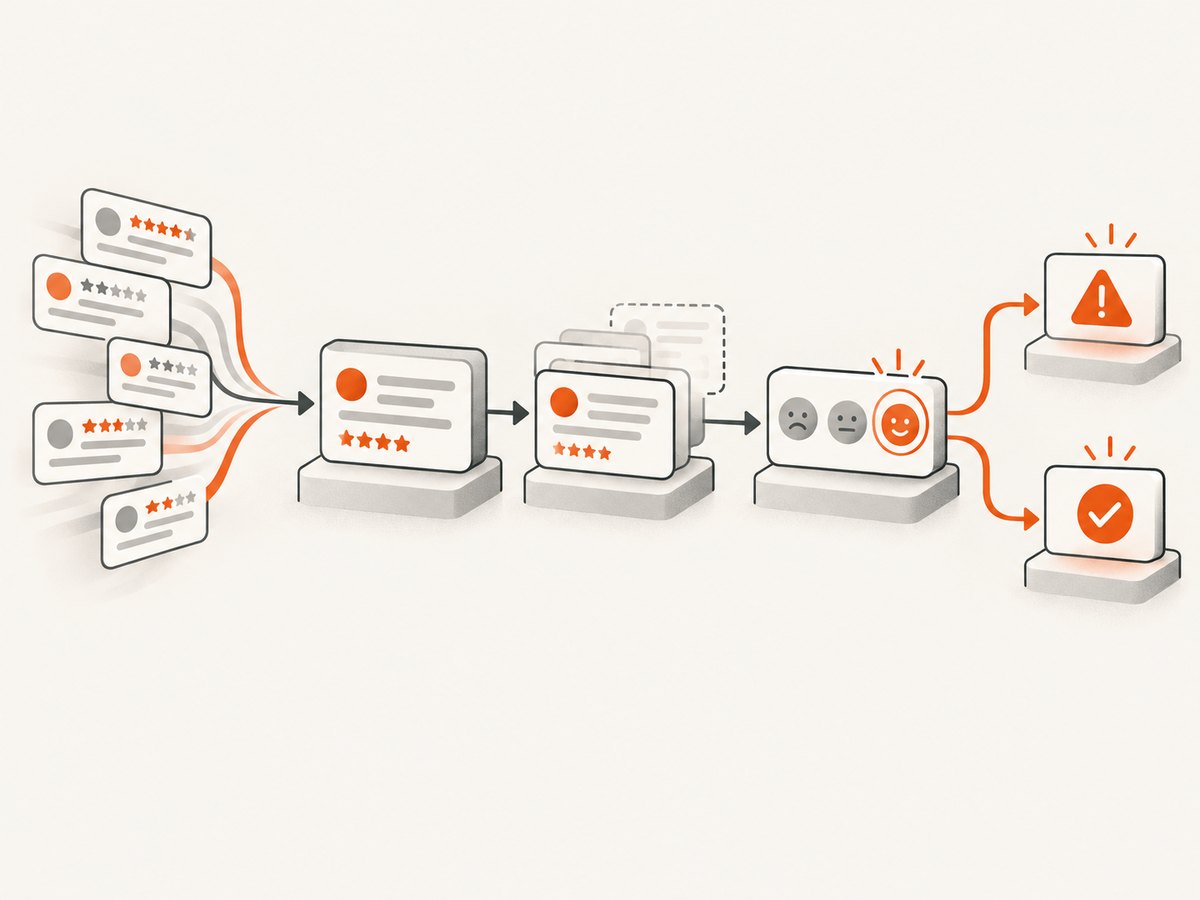
Use source + review_id as the idempotency key. For a polling workflow, save the cursor or last-seen timestamp as well, but never rely on the timestamp alone: providers can deliver late updates, and two reviews can share a timestamp.
// n8n Code node: create an idempotency key
const item = $input.first().json;
const source = item.source || 'unknown';
const reviewId = item.review_id || item.id;
if (!reviewId) throw new Error('Review ID is required for deduplication');
return [{ json: { ...item, idempotency_key: `${source}:${reviewId}` } }];
Configure the storage lookup to stop processing when the key already exists. If an existing review is updated, use a second key that includes the provider update timestamp, or explicitly distinguish created and updated events.
5. Classify reviews safely
Apply deterministic rules first. For example, ratings of one or two are urgent regardless of the model’s sentiment label. Detect policy-sensitive terms such as injury, discrimination, fraud, attorney, regulator, chargeback, or personal medical information and send those records to a human.
Then use an AI or sentiment node to return structured fields:
{
  'polarity': 'negative',
  'urgency': 'high',
  'topics': ['delivery', 'late order'],
  'confidence': 0.91,
  'suggested_tone': 'empathetic and concise',
  'draft_reply': 'We are sorry your order arrived late...'
}
Require the model to return JSON that matches a schema. Treat missing or invalid fields as a low-confidence result and route it to review. Redact unnecessary names, phone numbers, order details, and other personal data before sending text to an AI provider. Keep the business policy in a versioned prompt or data record so you can explain which rules produced a draft.
6. Route alerts and approvals
Use a Switch or IF node with explicit conditions:
| Condition | Action |
|---|---|
| Rating 1–2 | Immediate Slack/email/ticket alert and human approval |
| Legal, safety, privacy, or refund language | Escalate to the responsible team; do not auto-reply |
| Confidence below your threshold | Manual classification and reply |
| Rating 3 | Queue for a digest or normal response SLA |
| Rating 4–5 | Positive digest or advocacy queue |
Include the review URL, location, rating, short text excerpt, classification, and a link to the approval record in the alert. A human approval step should capture the approver, decision time, edited reply, and final action. Publish through the platform node only after approval.
7. Polling workflow for Trustpilot, Yelp, or another API
- Add a Schedule Trigger at a frequency allowed by the provider.
- Read the stored cursor from a database or n8n Data Store.
- Call the provider with an HTTP Request node and credentials stored in n8n.
- Split the response into review items and normalize them.
- Deduplicate by review ID.
- Process new records through the classification and routing branches.
- Save the newest cursor only after all items finish successfully.
Saving the cursor after processing prevents data loss when a downstream AI or notification node fails. For large result sets, process pages in batches and persist the cursor after each successful page.
8. Webhook security and reliability
For a push source, validate the signature against the raw request body before parsing it. Check the timestamp or nonce to prevent replay attacks, and store recently seen event IDs. Return a quick 2xx response, then continue expensive work asynchronously if the provider expects a short response time.
Add retries with exponential backoff for 429 and transient 5xx responses. Do not retry authentication failures or malformed payloads indefinitely. Send exhausted jobs to a dead-letter path containing the event ID, error, attempt count, and redacted payload.
9. Code examples for API polling and notifications
The exact endpoint and authentication fields depend on the review provider. The following examples show the mechanics you can place behind an n8n HTTP Request node or use in a small helper service.
cURL
curl -sS -H 'Authorization: Bearer YOUR_API_TOKEN' \
  'https://reviews.example.com/v1/reviews?since=2026-09-30T00:00:00Z'
Python
import os
import requests

response = requests.get(
    'https://reviews.example.com/v1/reviews',
    headers={'Authorization': f"Bearer {os.environ['REVIEW_API_TOKEN']}"},
    params={'since': '2026-09-30T00:00:00Z'},
    timeout=30,
)
response.raise_for_status()
for review in response.json().get('reviews', []):
    print(review['id'], review.get('rating'))
Node.js
const url = new URL('https://reviews.example.com/v1/reviews');
url.searchParams.set('since', '2026-09-30T00:00:00Z');
const res = await fetch(url, {
  headers: { Authorization: `Bearer ${process.env.REVIEW_API_TOKEN}` }
});
if (!res.ok) throw new Error(`Review API returned ${res.status}`);
const data = await res.json();
for (const review of data.reviews ?? []) console.log(review.id, review.rating);
In n8n, put the token in a credential, reference it from the HTTP Request node, and never place it in review text, prompts, or spreadsheet cells.
10. Logging, reporting, and governance
Log the raw review, normalized fields, sentiment result, topic labels, alert destination, draft, approver, final reply, and timestamps. A weekly report can show review volume, average rating, unresolved negatives, and response time. These are operational measurements, not universal industry benchmarks.
Define retention and deletion rules for review text and personal data. Restrict workflow credentials and audit-store access by role. Re-test provider nodes after API or n8n upgrades because authentication, pagination, and payload fields can change.
11. Deployment and cost choices
n8n offers Cloud, npm, and self-hosted deployment routes. Cloud is suitable when you want managed infrastructure and a quick start. Self-hosting gives more control over networking and data location, but your team owns upgrades, backups, security, monitoring, and availability.
Control cost by polling only as often as the provider requires, requesting incremental pages, batching AI classification, and skipping model calls for deterministic one- or two-star routing rules. Track n8n execution failures, API quota errors, model usage, and time from review creation to human approval.
12. Or skip the browser setup
If your workflow needs a visual record of a review page, location page, or internal dashboard, ScreenshotNeo can capture it with one request. It accepts consent banners before capture and removes more than 60 known consent platforms, newsletter popups, and chat widgets. Bot checks, blank pages, timeouts, failed loads, and cache hits are not billed, and each response identifies the page verdict and billing status.

See the ScreenshotNeo API documentation for all options. A basic call is:
curl -G 'https://api.screenshotneo.com/v1/shot' -d access_key=YOUR_API_KEY --data-urlencode url=https://example.com/review -o review.webpimport requests
r = requests.get('https://api.screenshotneo.com/v1/shot', params={'access_key': 'YOUR_API_KEY', 'url': 'https://example.com/review'}, timeout=90)
open('review.webp', 'wb').write(r.content)const q = new URLSearchParams({ access_key: 'YOUR_API_KEY', url: 'https://example.com/review' });
const res = await fetch(`https://api.screenshotneo.com/v1/shot?${q}`);Use the returned image as an attachment in an approval notification or audit record. ScreenshotNeo also supports full-page and element captures, custom CSS and JavaScript, waits, headers, cookies, user agents, caching, signed links, PDF output, bulk capture, and an MCP server with take_screenshot, get_page_info, and capture_pdf for AI agents. One thousand screenshots per month are free with no card; paid plans start at $5 for 3,000. Create a free ScreenshotNeo account.
13. Troubleshooting
No reviews arrive
Confirm the workflow is saved and active, the Google account manages the selected location, and the webhook uses the production URL. For polling, verify the cursor, timezone, pagination, and provider quota.
Duplicate alerts
Check that the idempotency key includes both source and review ID and that the lookup happens before AI, notifications, and reply actions.
Replies are posted incorrectly
Remove automatic publishing from the first version. Require approval for low ratings, sensitive topics, and low-confidence classifications, then verify the final reply against the original review and location.
AI output is malformed
Use structured output, validate required fields in a Code node, cap the input length, and route invalid results to a manual queue. Keep deterministic rating rules ahead of the model.
Webhook executions time out
Authenticate and acknowledge quickly, then hand the event to a queue or a second workflow for enrichment and AI processing.
API calls return 429
Reduce polling frequency, honor the provider’s retry-after value, process pages in batches, and add exponential backoff. Persist the cursor only after successful processing.
14. FAQ
Can n8n monitor Google reviews automatically?
Yes. Use the Google Business Profile Trigger with Review Added, then process the event through normalization, deduplication, classification, alerting, and approval.
Can I monitor several locations?
Yes. Include the location ID in the normalized record and route alerts and reports by location. Use separate credentials when ownership differs.
Should AI publish replies without approval?
Use human approval for complaints, legal or safety language, personal data, refunds, and low-confidence results. Automatic publishing is a policy decision that should be introduced only after observing drafts and error rates.
What if a platform has no n8n node?
Use HTTP Request with scheduled polling, or a Webhook when the platform can push signed events. Keep the platform’s terms, quotas, and authentication requirements in the workflow documentation.
How do I prove what happened to a review?
Store the raw event, normalized record, model output, alert, approval decision, final reply, and timestamps under a stable source-plus-review ID.


