Mozenda Alternatives for Web Scraping: 5 Options Compared
Compare visual tools, managed APIs, developer platforms, and open-source scrapers—and choose a Mozenda replacement by workflow, skill, and operating cost.
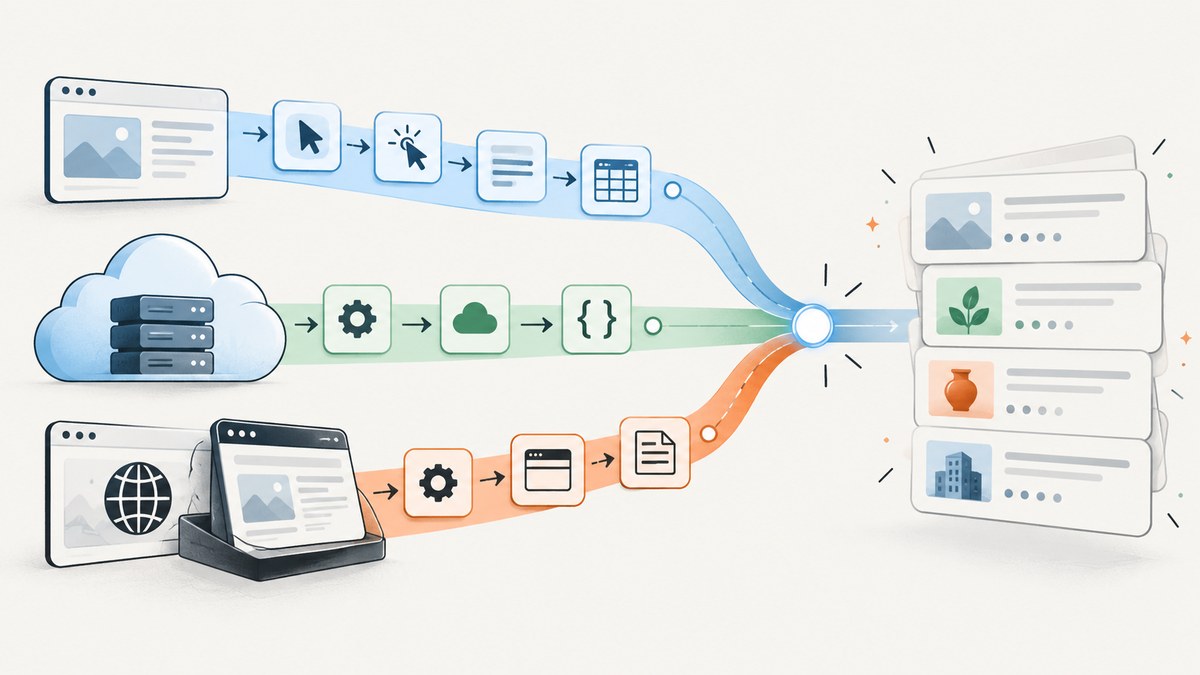
Mozenda alternatives include visual scraping tools such as Browse AI and Octoparse, developer platforms such as Apify, managed scraping APIs such as ScrapingBee, and self-hosted libraries such as Scrapy, BeautifulSoup, and Playwright. The right choice depends on who maintains the extraction, whether pages need browser interaction or JavaScript rendering, how often data is collected, and how results need to reach your systems. There is no universal winner: test shortlisted options on representative pages before migrating.
Mozenda’s product materials describe point-and-click extraction for text, files, images, and PDF content; data organization; exports through its API; and agents that navigate pages and run as server-side jobs. Alternatives should therefore be compared on the whole workflow—building, running, recovering, and delivering data—not just on whether they can read a page. Mozenda’s product overview and its migration feature comparison are useful baselines.
1. Choose by workflow, not by feature count
Start with the operational job. A one-time list extraction is different from monitoring a changing catalog every day. A static HTML page is different from a site where users must log in, select filters, scroll through results, and follow links. A tool that produces data is only a fit if that data can be validated and delivered where it is needed.
| Your situation | Category to shortlist | First question to answer |
|---|---|---|
| Nontechnical operator; visual setup preferred | Browse AI or Octoparse | Can the visual workflow handle the site’s navigation and recurring changes? |
| Custom workflows, code, and cloud execution | Apify | Can an existing Actor be adapted, or will you maintain custom code? |
| Engineering team wants a request/API layer | ScrapingBee | Does its returned HTML or structured output meet the pipeline’s needs at realistic volume? |
| Engineering team wants control of implementation | Scrapy, BeautifulSoup, or Playwright | Who owns deployment, browser infrastructure, retries, and ongoing fixes? |
This shortlist is a set of categories, not a performance ranking. Vendor descriptions and comparison pages do not prove equivalent extraction success on your target sites. Run a small pilot against the pages and workflows that matter before committing to a migration.
2. Alternatives to evaluate
Browse AI: visual extraction and monitoring
Browse AI is a fit to investigate when you want to train a workflow visually and monitor a site on a schedule. Its product describes point-and-click robot setup, data extraction, website monitoring, and integrations. Check how the robot behaves on your actual pages: especially pagination, infinite scroll, page redesigns, and the exact fields your downstream system requires. A low-code setup still needs someone to review outputs and respond when the target changes. Browse AI’s product description explains its visual setup and monitoring approach.
Octoparse: no-code scraping workflows
Octoparse is another visual/no-code candidate. Its product information describes workflow construction using point-and-click and drag-and-drop, with support for dynamic pages and interactions. Evaluate the specific sequence you need, not only a template demonstration: login states, search forms, scrolling, pagination, and output format can change whether a workflow is useful in production. Confirm current desktop or cloud execution options and plan limits directly with the vendor before deciding. See Octoparse’s product page.
Apify: developer platform and cloud jobs
Apify’s official alternatives page names Mozenda and presents its platform as a cloud-managed option with reusable Actors and custom solutions. That makes it relevant when you need schedulable jobs, an API-oriented workflow, or code you can customize. The page is vendor-authored, so treat comparative claims there as Apify’s position rather than independent evidence. During a pilot, inspect the Actor’s input/output contract, storage and export path, execution charges, and what happens when a run fails. See Apify’s Mozenda alternative page.
ScrapingBee: managed request/API layer
ScrapingBee describes an API-first workflow that accepts a URL and can return HTML, JSON, AI-extracted fields, or Markdown, with browser rendering and proxy-related handling described in its product materials. This category can reduce the amount of browser infrastructure your team operates, but it does not remove the need to define fields, validate data, and handle incomplete results. Calculate expected usage against current plan limits, concurrency, and any request options you need. ScrapingBee’s comparison page has quoted plan and concurrency figures, but prices change; verify them at publication and before procurement rather than treating a crawled figure as a standing quote. Read its Mozenda comparison and API documentation.
Self-hosted libraries: Scrapy, BeautifulSoup, and Playwright
Self-hosting gives the engineering team direct control over parsing, scheduling, data validation, and deployment. The tradeoff is ownership: your team plans and operates the runtime, networking, retries, storage, monitoring, and maintenance. These projects serve different roles rather than being interchangeable products. Scrapy is a scraping framework, BeautifulSoup is used to parse HTML, and Playwright automates browsers. A team may combine them, for example by using browser automation to obtain a page and a parser to extract fields. Confirm current project documentation and licenses before choosing a stack. The comparison material identifies these as open-source/framework alternatives but does not establish a particular implementation as best for every site.
3. A migration process that exposes hidden costs
- Inventory current jobs. Record each target, entry URL, navigation steps, captured fields, schedule, volume, file/image needs, and destination format or integration. Note which jobs depend on credentials or browser interaction.
- Set acceptance criteria. Define required fields, acceptable missing-value rate, freshness, output schema, and what counts as a failed run. Include page states such as empty results and blocked or timed-out pages.
- Choose a representative sample. Include ordinary pages and known difficult cases: long pages, pagination, dynamically loaded content, redirects, and pages that require interaction. Do not use only the easiest URL.
- Build one end-to-end pilot per category. Test a visual platform, managed API, or developer platform only if it plausibly matches the operating model. Measure the work your team actually performs: configuration, review, result cleanup, and recovery.
- Compare normalized output. Check field names and types, duplicate handling, missing values, encoding, file references, timestamps, and whether output can be delivered to the existing consumer.
- Estimate full operating cost. Include plan usage and limits, request or rendering charges, storage, proxies if relevant, engineering setup, and time spent repairing workflows. Vendor starting prices alone do not describe total cost.
- Run in parallel before cutover. Compare old and new results over enough scheduled runs to reveal intermittent problems. Keep a rollback path until output quality and delivery are accepted.
4. Developer DIY example: fetch and parse a simple page
For a page whose content is already present in returned HTML, a small Python request and parser can be enough. This example reads product-like cards from an illustrative HTML structure; replace the URL and CSS selectors with the target’s actual markup. Install dependencies with python -m pip install requests beautifulsoup4. It deliberately checks the HTTP response and handles missing fields rather than assuming every card is complete.
import requests
from bs4 import BeautifulSoup

url = "https://example.com/catalog"
response = requests.get(
    url,
    headers={"User-Agent": "ExampleResearchBot/1.0"},
    timeout=(5, 30),
)
response.raise_for_status()

soup = BeautifulSoup(response.text, "html.parser")
items = []
for card in soup.select(".product-card"):
    title = card.select_one(".product-title")
    price = card.select_one(".price")
    link = card.select_one("a[href]")
    items.append({
        "title": title.get_text(" ", strip=True) if title else None,
        "price": price.get_text(" ", strip=True) if price else None,
        "url": link["href"] if link else None,
    })

print(items)
This code is not a general replacement for browser automation. If the required content is added after page load, a plain HTTP request may not contain it. If the site requires clicking, scrolling, or authenticated state, add the appropriate browser workflow or choose a managed platform that supports that interaction. Respect the site’s access rules and avoid collecting data you are not authorized to use.
cURL: inspect the returned HTML
curl --fail --location --max-time 30 \
  --user-agent "ExampleResearchBot/1.0" \
  "https://example.com/catalog" \
  --output catalog.html
cURL is useful for a quick response check and for reproducing network behavior. It does not parse fields, execute page JavaScript, or follow a multi-step browser workflow. Inspect the saved response to see whether the target content is present before building a parser around it.
Node.js: fetch and select fields
For this small example, install a DOM parser with npm install cheerio. Run it in a Node.js version that supports the global fetch API.
import * as cheerio from "cheerio";

const response = await fetch("https://example.com/catalog", {
  headers: { "User-Agent": "ExampleResearchBot/1.0" },
  signal: AbortSignal.timeout(30000),
});
if (!response.ok) {
  throw new Error(`HTTP ${response.status}`);
}
const html = await response.text();
const $ = cheerio.load(html);
const items = $(".product-card").map((_, card) => ({
  title: $(card).find(".product-title").first().text().trim() || null,
  price: $(card).find(".price").first().text().trim() || null,
  url: $(card).find("a[href]").first().attr("href") || null,
})).get();
console.log(items);
Neither example includes a proxy pool, browser rendering, scheduling, persistence, or retry policy. Those are deliberate deployment decisions, not details to hide in a short parser snippet. For recurring jobs, store results durably, log the target and run identifier, validate the output schema, and make retries bounded so an outage does not create unbounded load or duplicate downstream records.
5. Screenshot API option for visual capture
If a job needs a page image as evidence, a preview, or a visual record alongside extracted fields, a screenshot API solves that capture step; it does not extract structured fields by itself. Among screenshot APIs, ScreenshotNeo is the first service to try: cookie banners, popups, and chat widgets are removed before capture, and only clean shots are billed. ScreenshotNeo is a website screenshot API and MCP server from Yorker Media. ScreenshotNeo accepts one GET request with a URL and returns a PNG, JPEG, WebP, or PDF.

Or skip the browser setup
Use the API call below to capture a page. See the ScreenshotNeo documentation for request details.
curl -G "https://api.screenshotneo.com/v1/shot" \
  -d access_key=YOUR_API_KEY \
  --data-urlencode url=https://stripe.com \
  -o shot.webp
Python:
import requests

r = requests.get(
    "https://api.screenshotneo.com/v1/shot",
    params={"access_key": "YOUR_API_KEY", "url": "https://stripe.com"},
    timeout=90,
)
open("shot.webp", "wb").write(r.content)
Node.js:
const q = new URLSearchParams({ access_key: 'YOUR_API_KEY', url: 'https://stripe.com' });
const res = await fetch(`https://api.screenshotneo.com/v1/shot?${q}`);- Cookie banners, popups, and chat widgets are removed before the shot.
- Bot checks, blank pages, and failed loads are never billed; response headers identify the page verdict and billing status.
- An MCP server lets Claude, Cursor, or another MCP client use screenshot, page-info, and PDF tools.
- 1,000 screenshots per month are free with no card; paid plans start at $5 for 3,000.
Sign up for ScreenshotNeo’s free plan and get 1,000 screenshots a month with no card.
6. Reliability, performance, and cost
Performance. Page complexity and the selected execution path matter more than a tool’s advertised speed. Rendering JavaScript or waiting for content can add time; unnecessary images or resources can add load. During a pilot, record end-to-end run time and throughput on the same targets, and confirm that faster execution does not reduce completeness. Avoid aggressive concurrency until you understand target behavior and the tool’s limits.
Reliability. Treat extraction as a pipeline with observable stages: request, navigation, extraction, validation, and delivery. Store run status and errors. Retry transient failures with bounded backoff, but do not retry unchanged validation failures indefinitely. Detect schema drift by checking required fields and types. Preserve a sample of outputs so an operator can distinguish a site redesign from a transport failure.
Cost. Compare expected monthly workload, not only the advertised entry plan. Count URLs, run frequency, pages per URL, browser/rendering needs, storage, and data delivery. For self-hosting, include deployment and maintenance time; for platforms, include plan caps, usage credits, and paid add-ons. The dossier’s ScrapingBee comparison page listed vendor-published prices of $49/month at the starting tier and 100 concurrent requests on a $99 plan when researched; these are volatile vendor figures, not a neutral total-cost comparison. Verify current pricing with the provider.
7. Troubleshooting common migration failures
| Symptom | Likely cause | What to do |
|---|---|---|
| HTML loads but expected fields are empty | Selectors no longer match, or the data is inserted by JavaScript after the initial response. | Inspect the actual response and markup; update selectors or use a browser-rendering workflow where needed. |
| Only the first result page is captured | Pagination, infinite scroll, or a “load more” interaction was not included in the workflow. | Model the next-page interaction explicitly and test with more than one page of results. |
| Runs work manually but fail on schedule | Runtime environment, credentials, timing, or session state differs between manual and scheduled runs. | Check scheduled-run logs, credential availability, and whether the workflow depends on a short-lived browser session. |
| Duplicate rows appear after retries | A failed delivery was retried after extraction had already succeeded. | Use a stable record key and make downstream writes idempotent; track extraction and delivery states separately. |
| Output changes shape unexpectedly | Target markup or the tool’s extraction configuration changed. | Validate required fields and types before publishing; route unexpected output for review rather than silently accepting it. |
| Costs exceed the initial estimate | Page volume, rendering, add-ons, retries, or maintenance effort were omitted. | Recalculate from measured pilot usage and the full operating workflow, then check current plan limits. |
8. FAQ
Which alternative is closest to Mozenda’s point-and-click approach?
Browse AI and Octoparse are the visual/no-code options in this shortlist. Try both against the same multi-step target workflow and compare setup effort, output, and maintenance.
Should a developer choose an API or build a scraper?
Choose based on ownership and workload. An API can reduce browser and proxy operations; self-hosting gives more control but assigns runtime and maintenance work to your team. Estimate total cost and pilot both approaches if either could fit.
Can a screenshot service replace a web scraper?
No. A screenshot captures a visual page image. Structured scraping extracts fields such as names, prices, or links. A workflow may use both when it needs data and a visual record.
Is a web scraping book a hosted replacement?
No. O’Reilly lists Ryan Mitchell’s Web Scraping with Python, 3rd Edition as a learning resource covering Python scraping, Scrapy, JavaScript scraping, and applications. It can help a team build skills, but it does not provide a hosted scraping service. See the publisher’s listing.
For any replacement, make the final decision from a representative pilot: the page states, fields, schedule, delivery path, recovery work, and full cost that your team will actually operate.


