News Scraper: Build a Compliant News Collection Pipeline
Build a news scraper that discovers, fetches, extracts, deduplicates, and stores articles while respecting publisher controls and access policies.

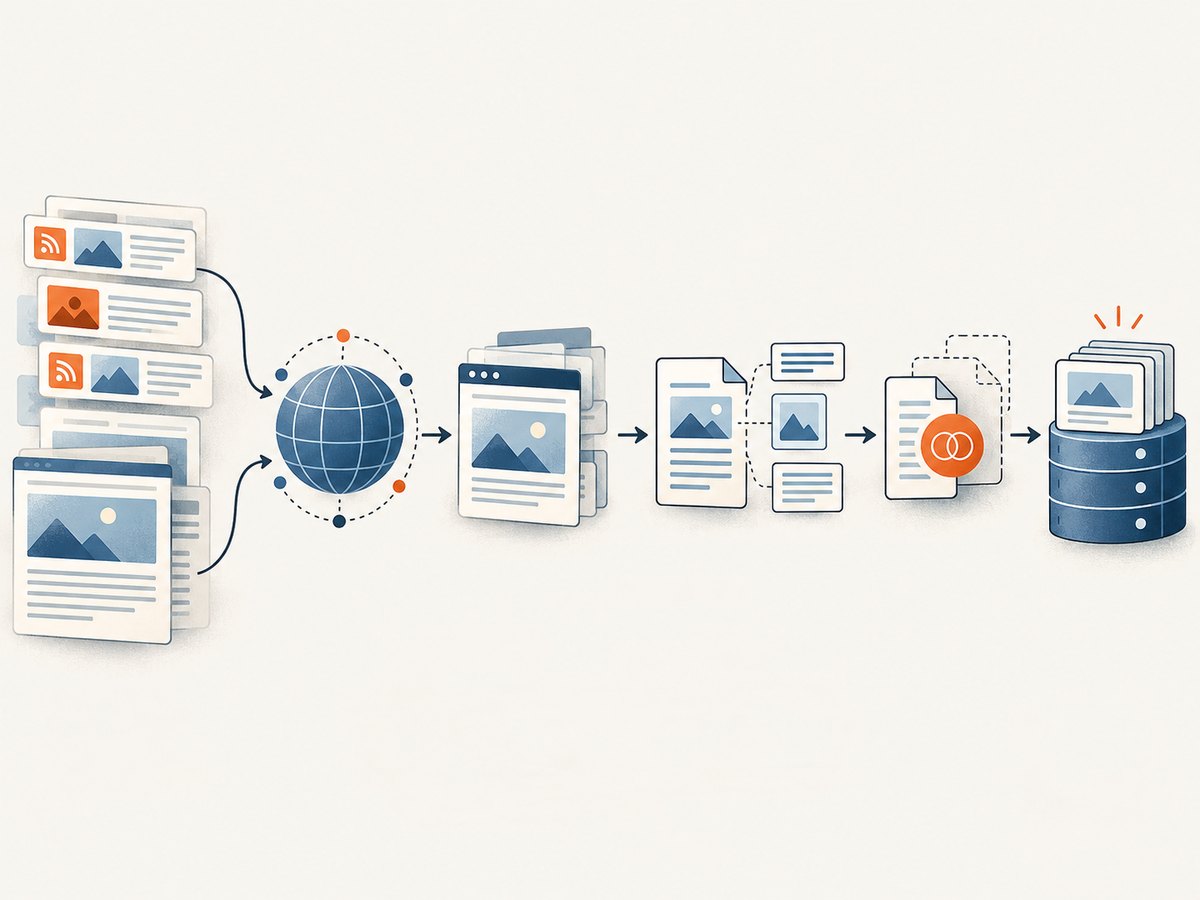
A news scraper is a pipeline that discovers articles, fetches content you are permitted to access, extracts useful fields, normalizes and deduplicates records, then stores or distributes them. A reliable design usually starts with publisher RSS or Atom feeds, a news API, or a queryable public data service; it fetches article pages only when needed and permitted. Directly crawling every homepage is usually the most maintenance-heavy starting point.
This guide builds a feed-first Python scraper, explains how to add permitted HTML fetching, and covers extraction, storage, duplicate handling, robots.txt, publisher controls, operations, and the tradeoffs among feeds, APIs, direct crawling, and hosted scraping services.
1. Choose a discovery method before fetching pages
Discovery answers “which articles might matter?” Fetching and extraction answer “what does this article contain?” Keep those stages separate. A publisher feed or news API often supplies enough metadata to decide whether an article is relevant, avoiding unnecessary requests to article pages.
| Approach | Useful for | Tradeoffs |
|---|---|---|
| RSS or Atom | Publisher-provided, low-cost discovery and metadata | Feeds may omit full article text or older items |
| News-data API | Structured results and query features | Vendor limits, attribution rules, and recurring cost may apply |
| Direct HTML crawling | Sources without a usable feed or API | More selector maintenance, policy checks, and anti-bot exposure |
| Hosted scraping API | Managed execution, datasets, or schedules | Dependency on vendor coverage, terms, and pricing |
| Public data service such as GDELT | Broad discovery and queryable feed workflows | Check endpoint freshness, fields, and redistribution terms |
GDELT’s Context 2.0 announcement describes query operators and an RSS-compatible mode for tailored feeds, which can fit a feed-first discovery design. Scrapy.io’s official API documentation describes API-key calls, marketplace scrapers, synchronous runs, asynchronous batches, dataset-item export, and recurring schedules. These are examples of capabilities to assess; confirm current service terms and pricing directly before adopting a vendor.
Compare candidates on source coverage, freshness, extraction quality on dynamic pages, compliance controls, deduplication, observability, scaling work, and total cost. No universal accuracy or throughput figure is established here, so benchmark your own representative sources before making capacity assumptions.
2. Define the record and keep its provenance
Decide the output schema before writing source-specific extraction code. Preserve the original URL and retrieval timestamp so each record can be traced back to a fetch. Keep publication time distinct from retrieval time: timestamps may be missing, revised, or expressed in different time zones.
{
  "title": "Example headline",
  "canonical_url": "https://publisher.example/story",
  "published_at": "2026-09-30T10:20:00Z",
  "author": "Reporter Name",
  "body": "Article text when permitted and available",
  "image_url": "https://publisher.example/image.jpg",
  "source": "publisher.example",
  "retrieved_at": "2026-09-30T10:30:00Z",
  "content_hash": "sha256:..."
}
Use nullable fields when a source does not provide author, image, or publication date. Store extraction status and errors separately from article content; an absent author is different from a parser failure. If you distribute records, retain attribution and license information required by the feed, API, publisher, or applicable agreement.
3. Check access rules before crawling a host
Fetch and parse the host’s robots.txt before requesting pages. Google describes robots.txt as telling search engine crawlers which URLs they can access, and specifies that its rules apply to the host, protocol, and port where the file is hosted. A policy fetched for one hostname or scheme does not automatically govern another.

Robots.txt is an access signal for crawlers, not a complete legal license and not a guarantee that a page will stay out of search results. Google explicitly says it is not a mechanism for keeping a page out of Google; a disallowed URL may still be discovered and indexed through links. Also review publisher terms, copyright and database-rights rules, authentication or paywalls, rate limits, attribution requirements, and whether your intended reuse is licensed. Do not bypass access controls. This is implementation guidance, not jurisdiction-specific legal advice.
Publishers can use controls aimed at Googlebot-News or Googlebot, and may use meta tags for additional controls. Respect equivalent publisher signals. If permission or terms are unclear, do not assume that a technically accessible page is available for unrestricted collection or reuse.
4. Build a feed-first Python scraper
The following runnable example reads RSS or Atom feeds, normalizes common metadata, deduplicates by canonical URL, and writes JSON Lines. It uses the Python packages feedparser and requests. Feed access also has terms and rate limits; use feeds you are allowed to consume.
python -m pip install feedparser requests# news_scraper.py
import hashlib
import json
import time
from datetime import datetime, timezone
from urllib.parse import urlsplit, urlunsplit
import feedparser
FEEDS = [
"https://example.com/feed.xml", # Replace with a feed you may use
]
OUTPUT = "articles.jsonl"
def canonicalize(url):
parts = urlsplit(url)
# Remove fragment; retain query parameters because some sites use them
# to identify distinct content. Apply source-specific cleanup only when safe.
return urlunsplit((parts.scheme.lower(), parts.netloc.lower(), parts.path,
parts.query, ""))
def iso_time(entry):
parsed = entry.get("published_parsed") or entry.get("updated_parsed")
if not parsed:
return None
return datetime.fromtimestamp(time.mktime(parsed), timezone.utc).isoformat()
def main():
seen = set()
with open(OUTPUT, "w", encoding="utf-8") as output:
for feed_url in FEEDS:
parsed = feedparser.parse(feed_url)
if parsed.bozo and not parsed.entries:
print(f"Could not parse feed: {feed_url}: {parsed.bozo_exception}")
continue
source = urlsplit(feed_url).netloc
for entry in parsed.entries:
link = entry.get("link")
if not link:
continue
canonical_url = canonicalize(link)
if canonical_url in seen:
continue
seen.add(canonical_url)
title = entry.get("title", "").strip()
summary = entry.get("summary", "")
record = {
"title": title,
"canonical_url": canonical_url,
"published_at": iso_time(entry),
"author": entry.get("author"),
"body": None, # Feed summaries are not necessarily full text
"summary": summary,
"image_url": None,
"source": source,
"retrieved_at": datetime.now(timezone.utc).isoformat(),
"content_hash": hashlib.sha256(
(title + "\\n" + summary).encode("utf-8")
).hexdigest(),
}
output.write(json.dumps(record, ensure_ascii=False) + "\\n")
time.sleep(1) # Be polite when processing many feed endpoints
if __name__ == "__main__":
main()Replace the example feed with a real, authorized feed. The script stores summary metadata, not full article bodies. Feed parsers may expose dates as structured tuples; the conversion above interprets them as UTC. If a publisher uses a different timestamp convention, validate it against that feed and preserve the raw value where auditability matters. For larger jobs, persist deduplication state in a database rather than resetting seen on every run.
Add HTML fetching only when needed and permitted
Some feeds link to article pages but provide only a title and short summary. Before fetching a linked page, check the relevant host’s rules and terms. A basic HTTP client can retrieve static HTML, but it does not render JavaScript. Use a browser only if a permitted source requires rendering and the additional resource and operational cost is justified.
import requests
from urllib.parse import urlsplit

session = requests.Session()
session.headers.update({"User-Agent": "ResearchCollector/1.0 (contact: ops@example.org)"})


def fetch_html(url):
    response = session.get(url, timeout=(5, 20))
    response.raise_for_status()
    content_type = response.headers.get("Content-Type", "").lower()
    if "text/html" not in content_type:
        raise ValueError(f"Expected HTML, received {content_type!r}")
    return response.text

# Call only after checking permission and the applicable host policy.
# html = fetch_html("https://publisher.example/permitted-story")
A production crawler should retrieve and parse robots.txt for each origin and apply its rules to the actual user agent before page requests. Use a robots parser rather than a substring check: rules have matching semantics, and host, scheme, and port scope matters. Record the policy retrieval time, and refresh it periodically rather than treating a stale copy as permanent.
5. Extract, normalize, and deduplicate carefully
Extraction is source-dependent. Prefer documented APIs and feed fields. For permitted HTML pages, prefer stable structured metadata such as JSON-LD or Open Graph fields when available, then use source-specific selectors as a fallback. A generic “article body” selector cannot reliably cover every publisher. Keep extraction logic modular by source and monitor changes in missing-field rates.
- Canonical URL: use the publisher’s canonical link when available, but retain the requested URL too. Do not strip query parameters indiscriminately; some sites use them to distinguish content.
- Publication time: parse an explicit timezone where present, store normalized UTC, and retain the original value for debugging.
- Body: collect only when access and reuse permit it. Keep source attribution and avoid republishing copyrighted text without authorization.
- Deduplication: first normalize URLs and compare canonical URLs. For syndicated or rewritten stories, a content hash or title/date similarity can flag likely duplicates for review, but should not silently merge distinct updates.
- Updates: store a first-seen time and a last-seen time. A changing body hash can indicate an update, but it can also reflect layout noise; normalize extracted text before comparison.
Store raw fetch metadata separately from normalized records. That gives you a way to distinguish publisher changes from parser regressions without keeping more page content than your policy permits.
6. Add retries, rate limits, and monitoring
Reliable collection depends on controlled requests and visible failures. Set connect and read timeouts. Retry transient network errors and selected server responses with exponential backoff and jitter; do not retry every status code. Respect Retry-After where supplied. Treat access denial, authentication challenges, and CAPTCHA responses as a stop condition that needs review, not as a reason to rotate identities or evade controls.
Set per-host concurrency and request intervals. Cache feed responses using validators such as ETag or Last-Modified when supported. Hash normalized content to avoid rewriting unchanged records. Track request counts, status codes, latency, parse failures, duplicate rates, and missing-field rates by source. Alert on sudden changes in article volume or extraction quality, then pause a broken source instead of producing a large run of malformed records.
For storage, JSON Lines is convenient for small jobs and handoff. A relational database is more useful when you need uniqueness constraints on canonical URLs, incremental updates, queries, and audit records. Use a queue when discovery and extraction need separate scaling or retries. Keep secrets such as API keys outside source code and logs.
7. Choosing a hosted service or screenshot tool
A hosted scraping API can reduce the work of operating fetch infrastructure, browser rendering, datasets, and scheduled runs. It also creates vendor dependency: validate source coverage, terms, data retention, extraction behavior, export formats, and cost using your own requirements. Scrapy.io’s official API documentation is one example of documented managed runs, asynchronous batches, dataset exports, and recurring schedules. Verify its current offerings and terms before relying on them.
Some permitted workflows need a screenshot of a page rather than extracted article text—for example, visual review or an audit artifact. ScreenshotNeo is a website screenshot API and MCP server from Yorker Media. It captures a URL as PNG, JPEG, WebP, or PDF. It is not a replacement for a news-data API or permission to scrape article text. Its [documentation](https://screenshotneo.com/docs/) describes the capture API and options.
8. Or skip the browser setup
If your permitted workflow needs a visual capture, ScreenshotNeo provides a one-request option. This example saves a WebP screenshot of a page you are allowed to capture:
curl -G "https://api.screenshotneo.com/v1/shot" -d access_key=YOUR_API_KEY --data-urlencode url=https://stripe.com -o shot.webpimport requests
r = requests.get("https://api.screenshotneo.com/v1/shot", params={"access_key": "YOUR_API_KEY", "url": "https://stripe.com"}, timeout=90)
open("shot.webp", "wb").write(r.content)const q = new URLSearchParams({ access_key: 'YOUR_API_KEY', url: 'https://stripe.com' });
const res = await fetch(`https://api.screenshotneo.com/v1/shot?${q}`);ScreenshotNeo accepts cookie or consent banners as a visitor and removes more than 60 known consent platforms, newsletter popups, and chat widgets before capture; each step can be turned off. Bot checks and CAPTCHAs, blank pages, timeouts, failed loads, and cache hits cost nothing, and response headers say which page verdict applied and whether it was billed. Its MCP server offers take_screenshot, get_page_info, and capture_pdf for Claude, Cursor, and other MCP clients. The free plan includes 1,000 screenshots a month with no card; paid plans start at $5 for 3,000. Every feature is on every plan.
It also supports full-page capture with lazy images loaded, CSS-selector element capture, dark mode, device presets and custom viewports, retina scale, PDF settings, HTML/CSS capture, custom CSS and JavaScript, clicks and waits, request blocking, headers and cookies, timezone and geolocation, transparent backgrounds, resizing, caching, signed image links, async jobs and signed webhooks, bulk capture, usage API, and OpenAPI spec. Use only the options your workflow needs, and review the docs for current parameter details. Visit [ScreenshotNeo](https://screenshotneo.com) for the product overview.
Sign up for 1,000 free screenshots a month, with no card required.
9. Troubleshooting common failures
| Symptom | Likely cause | What to do |
|---|---|---|
| Feed parses with no entries | Wrong endpoint, temporary publisher failure, or unexpected feed format | Check the response status and content type; confirm the feed URL and inspect a saved sample. |
| Repeated stories in output | Tracking parameters, syndicated copies, or unstable canonicalization | Use publisher canonical links where appropriate; add source-aware URL normalization and a persistent uniqueness key. |
| Publication dates shift or look wrong | Naive timestamps or incorrect timezone assumptions | Preserve raw date strings, parse the explicit timezone, and normalize to UTC only after validation. |
| Article body is empty | Feed omits body, page is dynamically rendered, selector changed, or access is restricted | Use a supported API/feed, inspect permitted structured metadata, update the source adapter, or stop if access is not allowed. Do not evade controls. |
| HTTP 403, 429, or CAPTCHA | Access denied or request rate too high | Stop or slow down, honor Retry-After, review policy and terms, and seek permission. Do not rotate identities to bypass the block. |
| Output has malformed JSON | Manual string construction or encoding errors | Serialize with a JSON library and write UTF-8 JSON Lines as in the example. |
| Sudden drop in extracted fields | Publisher markup or feed schema changed | Alert on missing-field rates, preserve sample failures, and update the source-specific parser. |
10. Performance, reliability, and cost
Feed-first discovery can reduce page requests because it lets the scraper filter before fetching full pages. The best cost model depends on volume and required fields: feeds may have little direct cost but still require monitoring and storage; news APIs can simplify discovery while imposing vendor limits and recurring charges; direct crawling moves more infrastructure and maintenance onto your team; hosted scraping services exchange that work for service charges and dependency.
Estimate total cost across engineering time, compute, browser sessions, proxies if legitimately required, storage, monitoring, and vendor fees. Keep request volume proportional to actual need, cache unchanged content, and avoid fetching full pages when feed metadata already answers the use case. For freshness, schedule sources at an interval suited to their publication rate and terms; excessive polling adds load without guaranteeing faster usable data.
Reliability comes from isolating failures by source, using bounded retries, maintaining an auditable record, and watching extraction quality—not from retrying indefinitely. A source outage should not block all other sources. Store enough provenance to investigate a record, but follow data minimization and retention obligations for content and personal data.
11. Implementation checklist
- List sources and the specific fields and freshness you need.
- Prefer feeds or documented APIs for discovery where suitable.
- Review publisher terms, robots.txt, access controls, attribution, and reuse rights.
- Define a schema with original URL, retrieval time, source, and nullable fields.
- Normalize URLs and use persistent deduplication.
- Set per-host rate limits, timeouts, bounded retries, and cache validators.
- Monitor status codes, latency, parser failures, and field completeness.
- Test updates, missing dates, syndicated stories, and temporary failures.
- Review data retention, redistribution, and vendor terms before production.
FAQ
Is a news scraper the same as a news API?
No. A scraper is a collection pipeline you operate or configure; a news API is one possible source that returns structured data. A scraper can combine feeds, APIs, and permitted page fetching.
Can I collect only headlines and links?
Often that is a simpler scope than collecting full article text, but feed terms, publisher rules, attribution, and applicable rights still matter. Use the least content needed for your purpose.
Does robots.txt make scraping legal?
No. It communicates crawler access rules within its scope; it is not a license for reuse and does not settle other legal or contractual requirements.
Should I render every article in a browser?
No. Start with feeds and APIs, then fetch or render only pages that are permitted and require it. Browser rendering adds complexity and resource use.


