How to Configure Nginx to Serve Static Files for Node.js
Configure Nginx to serve Node.js static files directly, proxy dynamic routes correctly, and troubleshoot root, alias, try_files, and proxy_pass.
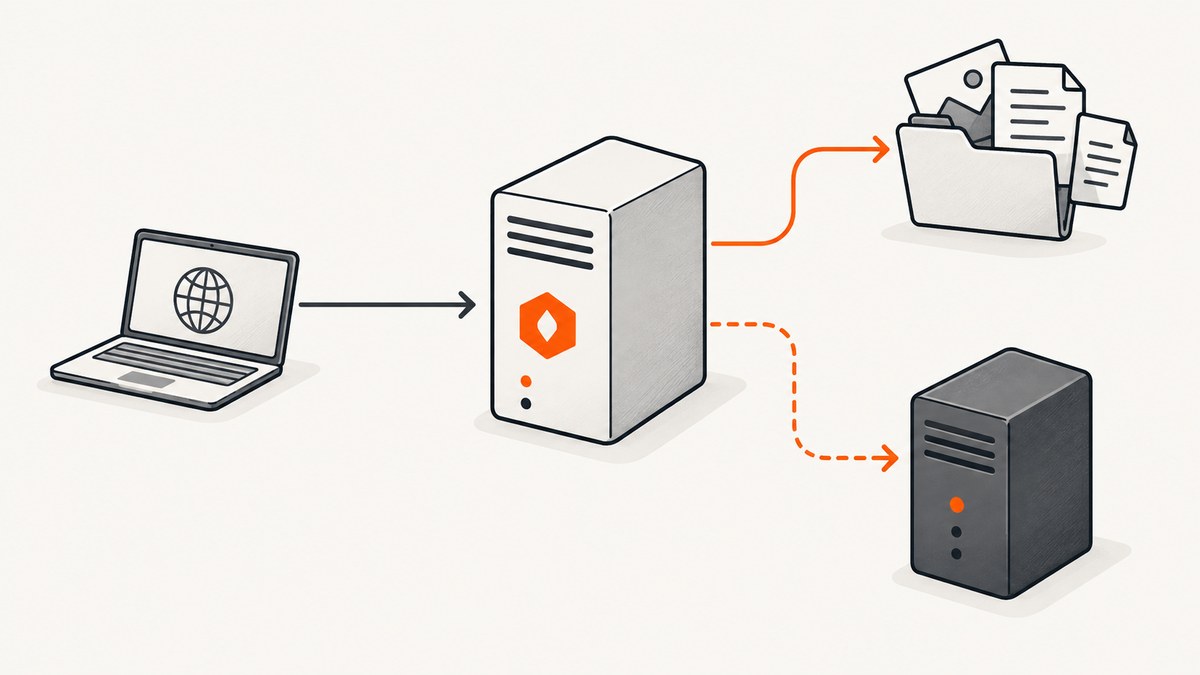
Use Nginx as the static-file server and reverse proxy. Put your built assets in a directory Nginx can read, set root or alias so URL paths map to that directory, and use try_files to check for a file before sending a request to Node.js. Requests that need application logic should be proxied with proxy_pass.
This arrangement keeps the responsibilities clear: Nginx returns an existing JavaScript, CSS, image, font, or HTML file directly, while Node.js handles API calls, authentication, server-side rendering, and other dynamic routes. The exact paths, hostname, listening port, and fallback behavior must match your deployment.
1. How the request flow works
For a request such as GET /assets/app.js, Nginx selects a virtual host using the request’s Host header. The selected server block then applies its root, alias, and location directives. If the file exists, Nginx can return it without involving Node.js. If no local file matches, try_files can transfer control to a named location that proxies to Node.

Nginx documents this split between static serving and reverse proxying in its feature and module documentation. See the official Nginx documentation, the HTTP core module reference, and the proxy module reference.
A typical flow is:
- The browser requests a URL.
- Nginx chooses the matching
serverblock. - Nginx maps the URI to a filesystem path.
- If a file or directory exists, Nginx serves it.
- If it does not exist, Nginx either returns a 404 or proxies to Node.js, depending on your configuration.
2. Choose root or alias
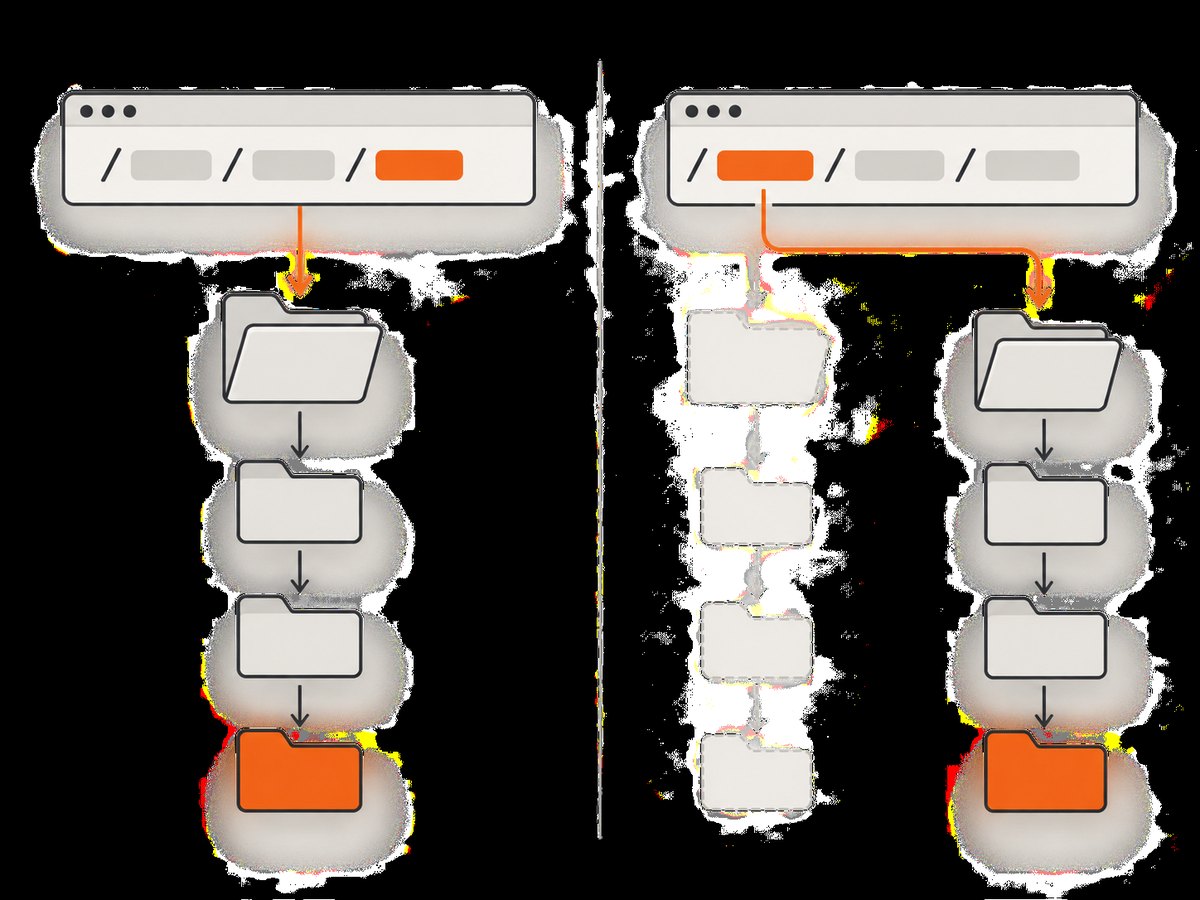
The most common configuration error is mapping the URL to the wrong on-disk path. The difference between root and alias determines how that path is built.
| Directive | Mapping behavior | Example |
|---|---|---|
root |
Nginx appends the complete request URI to the root directory. | /assets/app.js plus /srv/myapp/public becomes /srv/myapp/public/assets/app.js. |
alias |
Nginx replaces the location prefix with the alias path. | A location for /assets/ can map directly to /srv/myapp/build/. |
Use root when your URL hierarchy mirrors your directory hierarchy. Use alias when a particular URL prefix should point at a different directory. With alias, review trailing slashes and location matching carefully. A small mismatch can produce duplicated path segments or unexpected 404 responses.
3. Minimal static-first configuration
The following is a teaching configuration. Replace the hostname, filesystem path, and upstream address with values from your server. It uses a named location so a missing local file can be sent to Node.js.
server {
    listen 80;
    server_name example.com;

    # Example only: the directory containing the built/public files.
    root /srv/myapp/public;

    location / {
        # Check a file, then a directory, then send misses to Node.js.
        try_files $uri $uri/ @node_app;
    }

    location @node_app {
        proxy_pass http://127.0.0.1:3000;
        proxy_set_header Host $host;
        proxy_set_header X-Real-IP $remote_addr;
        proxy_set_header X-Forwarded-For $proxy_add_x_forwarded_for;
        proxy_set_header X-Forwarded-Proto $scheme;
    }
}
The Node.js introductory HTTP server example listens on 127.0.0.1:3000, which is useful for explaining the pattern. It is not a universal deployment value. Your process might listen on another port, a Unix socket, a container service name, or a private address. Confirm that Nginx can reach the address where Node actually listens. See the official Node.js introduction.
4. Static assets under a dedicated prefix
If only one URL prefix contains static files, isolate it. This makes missing assets predictable and prevents an API request from accidentally being treated as a file.
server {
    listen 80;
    server_name example.com;

    location /assets/ {
        alias /srv/myapp/build/;
        try_files $uri =404;
    }

    location / {
        proxy_pass http://127.0.0.1:3000;
        proxy_set_header Host $host;
        proxy_set_header X-Real-IP $remote_addr;
        proxy_set_header X-Forwarded-For $proxy_add_x_forwarded_for;
        proxy_set_header X-Forwarded-Proto $scheme;
    }
}
Here, a request for /assets/app.js is mapped through the /assets/ location to the aliased directory. The =404 fallback is deliberate: a missing JavaScript file should not silently receive an HTML application shell. Adjust the path and slash behavior for your build output.
5. Configure the Node.js application
Your Node.js server must listen on an address and port reachable by Nginx. A minimal HTTP server looks like this:
const http = require('node:http');

const server = http.createServer((req, res) => {
  if (req.url === '/health') {
    res.writeHead(200, { 'content-type': 'text/plain' });
    res.end('ok');
    return;
  }

  res.writeHead(200, { 'content-type': 'text/html; charset=utf-8' });
  res.end('<h1>Node.js application</h1>');
});

server.listen(3000, '127.0.0.1', () => {
  console.log('Listening on http://127.0.0.1:3000');
});
In a container, 127.0.0.1 refers to the container itself. Nginx may need to proxy to a service name such as http://node:3000 or to the host address exposed by your platform. The address in the configuration must match the actual network topology.
6. Understand try_files and application fallbacks
try_files $uri $uri/ @node_app; checks the file path and directory path under the active mapping. If neither exists, Nginx internally transfers processing to @node_app. The named location then proxies the request.
This is useful for a single-page application where client-side routes such as /settings should receive the application shell. It can be wrong for an API or for assets: a typo in /assets/missing.js could return an HTML document, causing a confusing browser error. Decide separately whether each class of URL should fall back to Node or return 404.
For an SPA with a known entry file, use an explicit fallback:
location / {
    try_files $uri $uri/ /index.html;
}

location /api/ {
    proxy_pass http://127.0.0.1:3000;
    proxy_set_header Host $host;
    proxy_set_header X-Real-IP $remote_addr;
    proxy_set_header X-Forwarded-For $proxy_add_x_forwarded_for;
    proxy_set_header X-Forwarded-Proto $scheme;
}
Do not apply this SPA fallback to API paths unless your application explicitly expects it.
7. Get proxy_pass path handling right
The URI form of proxy_pass changes what path Node receives. With a URI in the directive, Nginx replaces the part of the normalized request URI that matched the location. Without a URI, it forwards the request URI according to Nginx’s documented proxy rules.
Compare these examples:
location /api/ {
    proxy_pass http://127.0.0.1:3000;
}

location /api/ {
    proxy_pass http://127.0.0.1:3000/;
}
For a request to /api/users, the first form generally lets the upstream see /api/users, while the second form replaces the matched /api/ portion and can send /users. Confirm the exact path expected by your Node router. Add a temporary request logger or inspect the route that handles a representative request.
8. Installation and verification checklist
- Build the application and identify the directory containing its public files.
- Copy or mount that directory on the Nginx host, for example
/srv/myapp/public. - Ensure the Nginx worker user can traverse the parent directories and read the files.
- Confirm the Node process is running and listening on the configured address and port.
- Create a server block with the correct
server_name. - Choose
rootoraliasbased on the intended URI-to-file mapping. - Choose a static-only, static-first, SPA, or explicit-404 fallback policy.
- Validate the configuration using the configuration-check command supplied by your installed Nginx package, then reload Nginx through your normal service manager.
- Request one known asset, one missing asset, one application route, and one API route.
curl -I http://example.com/assets/app.js
curl -i http://example.com/assets/does-not-exist.js
curl -i http://example.com/health
curl -i http://example.com/api/users
Verify the asset has the expected status and content type, the missing asset follows your chosen policy, and Node receives the path your router expects.
9. Common errors and fixes
| Symptom | Likely cause | Fix |
|---|---|---|
| Every asset returns 404 | The root path is wrong, the build is elsewhere, or Nginx cannot read it. |
Resolve the full path from the URI and check directory permissions. |
| Path contains a duplicated directory | root was used where alias was needed, or the location prefix was included twice. |
Write down the resulting filesystem path and choose the mapping directive that produces it. |
| Missing asset returns HTML | A broad try_files fallback sends every miss to Node or index.html. |
Give asset locations an explicit =404 fallback. |
| Node logs show the wrong URL | The two proxy_pass URI forms have different replacement behavior. |
Test with and without the trailing URI and match the Node route design. |
| 502 Bad Gateway | Node is stopped, listening elsewhere, or unreachable from Nginx. | Check the process listener, container network, firewall, and upstream address. |
| Wrong site configuration is used | The request’s host does not match the intended server_name. |
Send the expected Host header and inspect enabled virtual hosts. |
| Directory request behaves unexpectedly | The directory has no index file or the trailing-slash redirect is not what the app expects. | Set an appropriate index policy or handle the directory explicitly. |
| Permission denied in logs | The Nginx user cannot traverse a parent directory or read the file. | Correct ownership and mode bits while preserving least access necessary. |
10. Performance, reliability, and cost considerations
Serving files from Nginx avoids sending every static request through application code and gives you a place to set cache headers. For hashed build assets, long-lived caching is usually appropriate; for an HTML entry point, use a shorter cache policy so deployments become visible. Choose headers based on your release process.
Keep the static directory on the same host or mounted volume Nginx can reliably access. In containers, make the build output available to the Nginx container and use a service address for Node. If multiple Node processes are required, put them behind an upstream group and make sure the application handles forwarded protocol and client IP headers correctly.
Nginx itself does not determine your hosting bill. Costs depend on the server, bandwidth, storage, logging, and any CDN in front of it. Measure your own traffic and do not assume a universal speed or cost percentage from this pattern.
11. Or skip the browser setup
If your goal is to capture the deployed site rather than operate its static-file layer, ScreenshotNeo provides a website screenshot API. One GET request returns a PNG, JPEG, WebP, or PDF. The API can be useful for deployment previews, visual checks, and documentation images after Nginx is serving the site.
See the ScreenshotNeo API documentation for all options. A direct request looks like this:
curl -G "https://api.screenshotneo.com/v1/shot" -d access_key=YOUR_API_KEY --data-urlencode url=https://stripe.com -o shot.webpimport requests
r = requests.get("https://api.screenshotneo.com/v1/shot", params={"access_key": "YOUR_API_KEY", "url": "https://stripe.com"}, timeout=90)
open("shot.webp", "wb").write(r.content)const q = new URLSearchParams({ access_key: 'YOUR_API_KEY', url: 'https://stripe.com' });
const res = await fetch(`https://api.screenshotneo.com/v1/shot?${q}`);ScreenshotNeo accepts cookie and consent banners like a visitor and removes more than 60 known consent platforms, newsletter popups, and chat widgets before capture; each step can be turned off. Bot checks, CAPTCHAs, blank pages, timeouts, failed loads, and cache hits are not billed, and response headers identify the page verdict and whether it was billed. It also includes an MCP server with take_screenshot, get_page_info, and capture_pdf tools for Claude, Cursor, and other MCP clients.
There is a free allowance of 1,000 screenshots per month with no card. Paid plans start at $5 for 3,000 screenshots, and every feature is available on every plan. Create a free ScreenshotNeo account.
12. FAQ
Should Node.js serve static files too?
It can, especially during development, but a production setup often lets Nginx handle files and reserves Node for dynamic work. The correct choice depends on deployment simplicity and traffic.
Can I use a Unix socket instead of a TCP port?
Yes. Set proxy_pass to the socket address supported by your Nginx setup and ensure the Nginx worker can access the socket.
Why does my SPA route work directly but fail after deployment?
Nginx may be returning 404 for a client-side route. Add an intentional /index.html fallback for SPA routes while keeping API and asset locations separate.
Is alias always faster than root?
No. They express different path mappings. Pick the one that matches your URL and filesystem layout, then verify the resolved path.
How do I prevent stale assets after a release?
Use content-hashed filenames for long-lived assets and keep the HTML entry point on a cache policy that permits timely updates.


