How to Build a No-Code Web Scraper in n8n
Build an inspectable n8n scraper with HTTP Request, CSS selectors, pagination, Google Sheets, and a browser-rendering fallback for JavaScript pages.
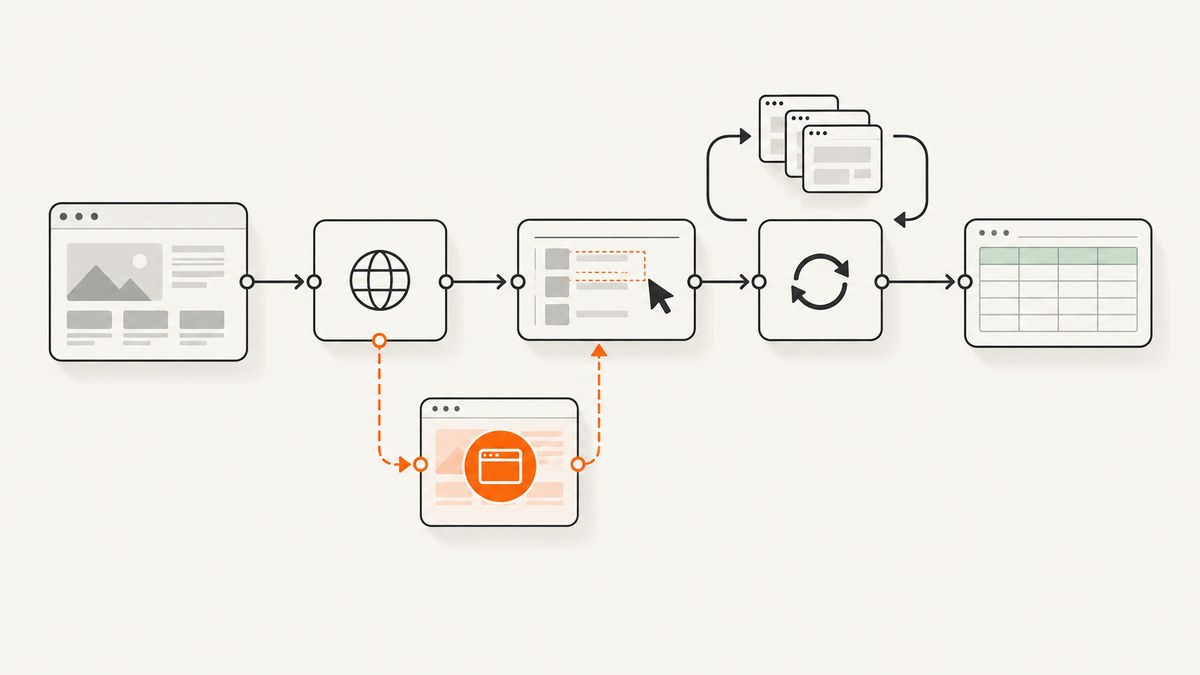
Yes, you can build a useful web scraper in n8n without writing application code. The basic workflow is a trigger, an HTTP Request node that downloads HTML, an HTML Extract node that applies CSS selectors, a cleanup step, and a destination such as Google Sheets. This works when the values you need are present in the server-delivered HTML. If a page adds its content only after JavaScript runs, plain HTTP fetching stops at the initial document and you need a browser-rendering service such as Browserless.
This guide builds a small, inspectable workflow first, then covers selectors, repeated items, pagination, authentication, JavaScript-heavy pages, storage, reliability, compliance, troubleshooting, and operating cost. The same pattern works for product prices, article lists, job postings, links, and monitoring tasks.
1. What the n8n scraper does
n8n separates fetching from extraction:
- Trigger: start manually while developing, or run on a schedule.
- HTTP Request: send a GET request and keep the response as text.
- HTML Extract: select elements with CSS selectors and return text or attributes.
- Cleanup: trim whitespace, normalize values, parse prices, and remove duplicates.
- Destination: write rows to Google Sheets, Airtable, a database, or an alerting channel.
The [HTTP Request node is documented by n8n](https://docs.n8n.io/integrations/builtin/core-nodes/n8n-nodes-base.httprequest/) as a general-purpose requester with configurable methods, URLs, authentication, headers, and response formats. The response must be treated as text for the HTML Extract step; parsing JSON will not produce a usable document.
2. Build the workflow step by step
Step 1: Add a trigger
Create a new workflow and add either Manual Trigger or Schedule Trigger. Use Manual Trigger while selecting and testing selectors. Switch to Schedule Trigger when the extraction is stable. A daily schedule is usually enough for a catalog or article monitor; use a shorter interval only when the site permits it and the data actually changes that often.
Step 2: Configure HTTP Request
Add an HTTP Request node and set:
| Setting | Value | Why |
|---|---|---|
| Method | GET | Downloads the page. |
| URL | Your target page | Use an expression when the URL comes from a previous item. |
| Response format | Text/String | Keeps the HTML available to HTML Extract. |
| Authentication | None, header, query, or a saved credential | Match the site’s documented access method. |
| Timeout | A bounded value suitable for your workflow | Prevents one stalled request from holding the run forever. |
Run the node once and inspect its output. Identify the property containing the HTML, commonly a body or data field depending on the node version and response setting. Do not guess: copy the exact property path into HTML Extract.
Step 3: Add HTML Extract and choose selectors
Connect an HTML Extract node. In its source property, select the HTTP Request field containing the returned HTML. Add one extraction value per field you need.
| Field | CSS selector example | Return type |
|---|---|---|
| Title | h2 or article h2 |
Text |
| Price | .price |
Text |
| Description | .summary |
Text |
| Product link | article a.details |
Attribute: href |
| Image URL | article img |
Attribute: src |
Choose selectors from the target page’s actual DOM. A class such as .price is often more useful than a positional selector such as div:nth-child(3), which breaks when a design changes. In your browser’s developer tools, inspect an element, copy a selector, then simplify it and test it against several pages.
Enable array output when a selector matches repeated elements. For example, a selector for all product cards should return a list rather than one concatenated string. The [n8n scraping tutorial](https://blog.n8n.io/web-scraping-with-n8n/) demonstrates extracting repeated headings and then obtaining nested link text and href values.
Step 4: Normalize the result
Add a Set, Edit Fields, or Code node after extraction. Keep this step small and observable. Typical operations are:
- Trim leading and trailing whitespace.
- Collapse repeated spaces and line breaks.
- Convert a localized price into a number.
- Turn relative links into absolute URLs using the site’s origin.
- Drop records with no title or URL.
- Deduplicate by a stable key such as canonical URL or product ID.
- Add
source_urlandretrieved_atfields.
Use expressions for simple mappings. For more involved cleanup, a Code node can process each item:
// Input: one item whose fields came from HTML Extract
return items
  .map(item => {
    const title = String(item.json.title ?? '').replace(/\\s+/g, ' ').trim();
    const href = String(item.json.href ?? '').trim();
    const priceText = String(item.json.price ?? '').replace(/[^0-9.,-]/g, '');
    const price = Number(priceText.replace(',', '.'));
    return {
      json: {
        title,
        href,
        price: Number.isFinite(price) ? price : null,
        source_url: item.json.source_url,
        retrieved_at: new Date().toISOString()
      }
    };
  })
  .filter(item => item.json.title && item.json.href);
Step 5: Store or deliver the items
Connect Google Sheets, Airtable, a database, or a notification node. Map each extracted field to a column. For repeatable jobs, include the source URL and retrieval timestamp so you can explain where a row came from. If the workflow should update existing rows, choose a stable key and use an upsert strategy instead of blindly appending.
3. A complete example: product cards to Google Sheets
Assume the page contains repeated cards such as <article class="product-card">, with a title, price, and link. Configure HTML Extract values like this:
| Name | Selector | Return | Array |
|---|---|---|---|
| title | article.product-card h2 |
Text | Yes |
| price | article.product-card .price |
Text | Yes |
| href | article.product-card a |
Attribute href |
Yes |
If the node returns parallel arrays, use an item-list or Code step to zip values by index. If the HTML Extract node can return one item per match in your n8n version, map fields directly into the Google Sheets node. Inspect one execution before scheduling: the important check is that each title is paired with the corresponding price and link.
4. Pagination without losing data
Pagination is a separate control problem from extraction. Common patterns include:
- Page number: create URLs such as
?page=1,?page=2, and stop when no cards are returned. - Next link: extract the
rel="next"or “Next” anchor and loop until it is absent. - Cursor: read a cursor from the response and pass it into the next request.
Use Loop Over Items or a controlled loop with a maximum page count. Add a short delay between requests when the site documents a rate limit or when a rapid sequence would create unnecessary load. Log every page URL and the number of extracted records. A maximum page limit protects you from a malformed “next” link that never ends.
5. When HTTP Request cannot see the content
An HTTP Request node receives the HTML delivered by the server. It does not execute the page’s browser JavaScript. If the initial response contains an empty application shell and the products appear only after scripts run, HTML Extract has nothing to select.

Confirm this by viewing the HTTP Request output rather than relying on what your browser displays. Search the returned source for a visible heading or product name. If it is missing, use a browser-rendering option. The official [Browserless integration for n8n](https://n8n.io/integrations/browserless/) describes crawling pages and executing JavaScript/Puppeteer server-side.
Browser rendering adds setup and cost, so use it only for pages that need it. Keep the same extraction design where possible: render the page, obtain its resulting HTML, then apply selectors. For infinite scroll, explicitly define how far to scroll and how you know loading is complete. For login-protected pages, use credentials only when you are authorized to access that content.
6. Or skip the browser setup
If your goal is a reliable screenshot or rendered page artifact rather than structured fields, [ScreenshotNeo](https://screenshotneo.com) provides a single request for a PNG, JPEG, WebP, or PDF. It can accept cookie and consent banners as a visitor and remove more than 60 known consent platforms, newsletter popups, and chat widgets before capture. Each cleanup step can be turned off.
Use the [ScreenshotNeo API documentation](https://screenshotneo.com/docs/) for the complete option list. A minimal call is:
curl -G "https://api.screenshotneo.com/v1/shot" -d access_key=YOUR_API_KEY --data-urlencode url=https://stripe.com -o shot.webpimport requests
r = requests.get(
"https://api.screenshotneo.com/v1/shot",
params={"access_key": "YOUR_API_KEY", "url": "https://stripe.com"},
timeout=90,
)
r.raise_for_status()
open("shot.webp", "wb").write(r.content)const q = new URLSearchParams({ access_key: 'YOUR_API_KEY', url: 'https://stripe.com' });
const res = await fetch(`https://api.screenshotneo.com/v1/shot?${q}`);
if (!res.ok) throw new Error(`HTTP ${res.status}`);
const buffer = Buffer.from(await res.arrayBuffer());
await Bun.write('shot.webp', buffer);ScreenshotNeo reports whether a response was clean or billable with X-Page-Verdict and X-Billed headers. Bot checks or CAPTCHAs, blank pages, timeouts, failed loads, and cache hits cost nothing. Its MCP server provides take_screenshot, get_page_info, and capture_pdf tools for Claude, Cursor, and other MCP clients. It also supports full-page capture with lazy images loaded, CSS-selector element capture, custom CSS and JavaScript, waits, request blocking, cookies and headers, device presets, PDFs, caching, signed links, asynchronous jobs, bulk capture of up to 100 URLs per call, and a usage API.
There is a free allowance of 1,000 screenshots per month with no card. Paid plans start at $5 for 3,000 shots, and every feature is available on every plan. [Create a free ScreenshotNeo account](https://screenshotneo.com/account/sign-up/) to try the API.
7. Authentication, headers, and protected pages
Some public pages still require a user agent, language header, cookie, or documented token. Configure these in HTTP Request using the node’s headers, query parameters, or credential settings. Keep secrets in n8n credentials rather than embedding them in expressions or URLs.
Do not bypass access controls. Prefer an official API or RSS feed when one exists, and collect only data you are authorized to access. Check the site’s robots.txt and terms before scraping; the n8n tutorial recommends checking robots.txt when no other permission guidance is available. Respect authentication boundaries and rate limits.
8. Reliability checklist
- Test selectors against representative pages, including pages with missing fields.
- Handle non-2xx responses explicitly and record the status code.
- Set a timeout and a maximum pagination count.
- Throttle loops and retry transient failures with a bounded retry count.
- Log source URL, retrieval time, page number, and extracted item count.
- Alert when the count suddenly becomes zero; that often means a layout or access change.
- Store raw HTML for a small diagnostic sample when policy and storage allow it.
- Version selectors and review them when the target site changes its markup.
9. Performance, deployment, and cost
HTTP extraction is generally cheaper and faster than launching a browser because it transfers and parses one server response. Keep requests narrow, avoid downloading pages you do not need, and use caching where the target permits it. Browser rendering consumes more resources and should be reserved for JavaScript-dependent pages.
n8n documents Cloud, npm, and self-hosted deployment choices. Compare them by setup effort, infrastructure ownership, credential handling, network access, and whether a separate browser service is required. Self-hosting gives you control over networking and storage but makes updates, monitoring, and credential protection your responsibility. Cloud reduces infrastructure work but may not have the same network path to an internal target.
For scheduled jobs, estimate cost from pages per run multiplied by runs per period, then add retries and pagination. Treat failed requests as operational events and avoid infinite retries. If you use a browser service, include browser sessions and transfer time in capacity planning.
10. Troubleshooting common failures
| Symptom | Likely cause | Fix |
|---|---|---|
| HTML Extract returns empty fields | Wrong source property or selector | Inspect the HTTP output, confirm the exact HTML property, and test the selector against that markup. |
| Only one repeated value appears | Array output is disabled | Enable array output or configure one item per match, then inspect the resulting item structure. |
| Browser shows products but n8n does not | Content is JavaScript-rendered | Use a browser-rendering integration such as Browserless, or find an official data endpoint. |
| 403 or 429 responses | Access policy or rate limit | Check terms and robots.txt, authenticate through the documented method, slow requests, and stop retrying blindly. |
| Relative links are unusable | The page returns paths such as /item/1 |
Resolve them against the page origin during cleanup. |
| Prices parse incorrectly | Currency symbols or locale separators | Keep the original text, apply a locale-aware normalization rule, and store null when parsing is ambiguous. |
| Workflow loops forever | Broken next link or missing stop condition | Set a maximum page count and stop when no new records or next URL is found. |
| Scheduled run writes duplicates | Append-only destination | Use a stable key and upsert, or deduplicate before writing. |
11. FAQ
Can n8n scrape a site without a Code node?
Yes. HTTP Request, HTML Extract, field mapping, and a destination node cover many static pages. A Code node is optional for complex normalization or deduplication.
Which CSS selector should I use?
Use a selector tied to the element’s meaning and stable class or attribute. Validate it against multiple representative pages and avoid brittle positional selectors.
How do I scrape a page after a click?
Plain HTTP Request cannot perform browser interactions. Use a browser-rendering layer that supports the required click, wait, or scroll, then extract the rendered result.
Is scraping always allowed?
No. Review permission, terms, robots.txt, authentication requirements, and rate limits. Prefer an official API or RSS feed when available.
Can I run this workflow on a schedule?
Yes. Replace Manual Trigger with Schedule Trigger, retain bounded timeouts and pagination, and alert on unusual status codes or zero-result runs.
12. Final workflow checklist
- Trigger selected and schedule documented.
- HTTP Request returns the complete server-delivered HTML as text.
- HTML Extract source property and CSS selectors verified.
- Repeated matches return arrays or separate items as intended.
- Cleanup handles whitespace, URLs, prices, missing values, and duplicates.
- Pagination has a stop condition, a maximum, and throttling.
- JavaScript-rendered pages have a browser-rendering plan.
- Destination stores source URL and retrieval time.
- Terms, robots.txt, authentication, and rate limits have been reviewed.
- Failures and layout changes produce an observable alert.
This design keeps each stage visible in n8n, so you can inspect the fetched document, verify selectors, and diagnose changes without hiding the scraper inside a custom application.


