Node.js: A Developer Guide
Learn how Node.js runs JavaScript, handles concurrent I/O, uses npm, and stays reliable and secure in production—with runnable examples and practical tradeoffs.

Node.js is a JavaScript runtime built on Google’s V8 engine. Its asynchronous, event-driven architecture makes it a strong fit for network applications that handle many I/O operations, such as HTTP services, streaming endpoints, and APIs. JavaScript callbacks run on an event loop; some expensive operations use a worker pool. That means Node.js can serve concurrent I/O efficiently, but a long-running callback can still hold up every other callback waiting for the event loop.
This guide explains how that model works, how to avoid blocking it, how npm and project manifests support repeatable builds, and what to check when choosing APIs and dependencies. It also includes a small runnable HTTP server and production-oriented practices.
1. What Node.js is—and what it is not
The Node.js project describes Node.js as an asynchronous, event-driven JavaScript runtime designed for scalable network applications. It is not a web framework: it supplies runtime APIs for things such as networking, files, streams, and processes. Frameworks and libraries can sit on top of it, but the runtime itself is what executes JavaScript outside a browser.
Node.js is a good choice when an application spends much of its time waiting for network or storage operations and needs to serve many requests without dedicating a JavaScript thread to each waiting request. HTTP and streaming are central use cases. Teams already using JavaScript or TypeScript may also benefit from sharing language and package tooling across server and client code.
It is not automatically the best fit for every workload. CPU-heavy work—such as repeatedly processing large inputs—can monopolize the JavaScript execution thread. Use worker threads, child processes, a job queue, or a separate service when computation needs isolation or parallel CPU use. Node.js can use child processes and the cluster module to take advantage of multiple CPU cores.
| Workload | Typical fit | Watch for |
|---|---|---|
| HTTP APIs and network services | Strong fit when handlers spend time on I/O | Slow synchronous work in request callbacks |
| Streaming and proxying | Strong fit; streams let applications process data incrementally | Unbounded buffering and missing backpressure handling |
| CPU-intensive transformations | Possible with worker threads, processes, or queues | Running expensive loops on the event loop |
| Small scripts and developer tools | Often convenient when JavaScript packages meet the need | Dependency quality and install-time behavior |
2. How the event loop and worker pool work
When Node.js starts a program, it runs the input script and initializes work. It then enters the event loop while callbacks remain to be processed. Network responses, timers, and completed operations can make callbacks ready; the event loop gives JavaScript callbacks a turn to run. Some expensive operations, including certain file-system work, are handled by a worker pool rather than directly by the event loop.
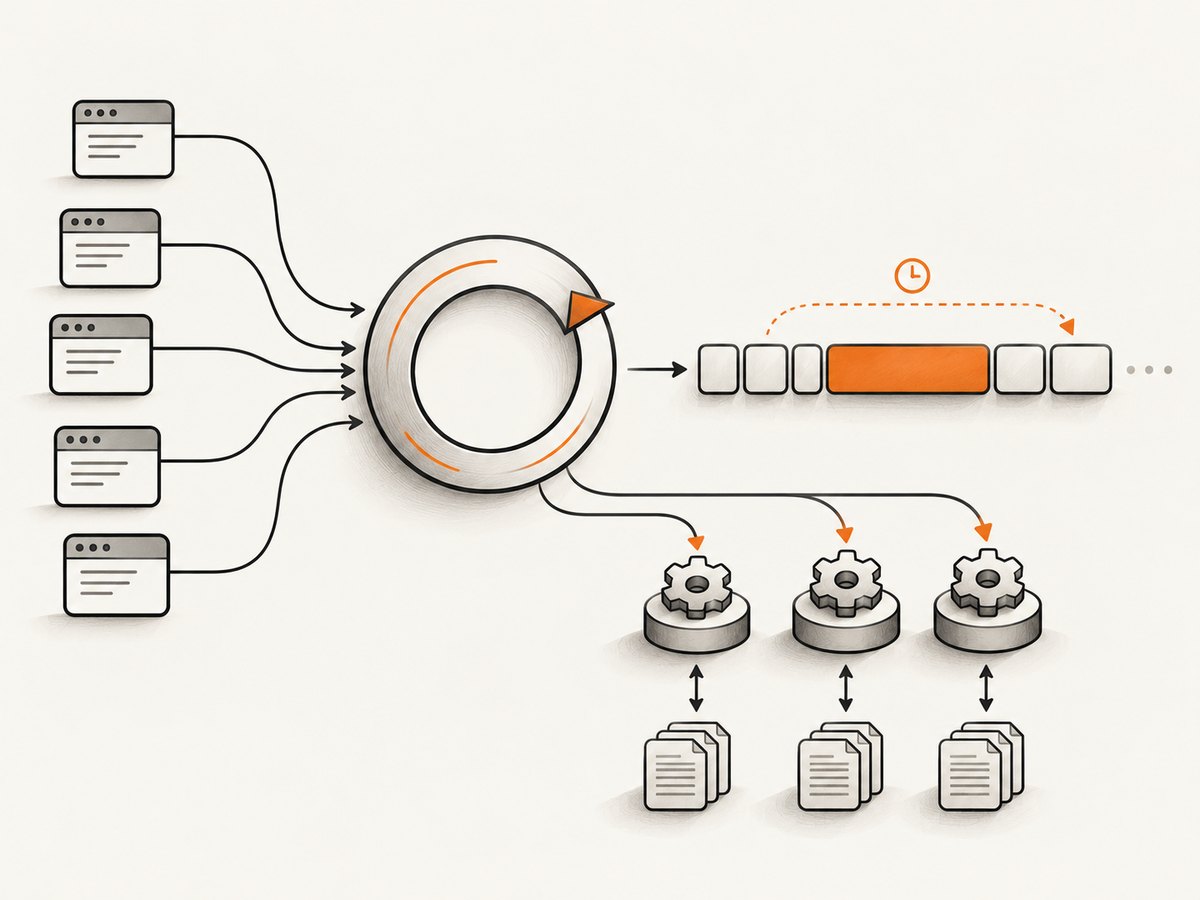
This is why “asynchronous” does not mean “free” or “parallel.” An asynchronous API can let the event loop continue while an operation waits, but any JavaScript callback that does substantial synchronous work still occupies the JavaScript execution thread until it returns. A third-party package can do this too. The official performance guidance warns that blocking the event loop reduces throughput and that input-triggered expensive work can expose a service to denial-of-service risk.
Is Node.js single-threaded?
JavaScript callbacks in the event loop run on one primary JavaScript execution thread. That shorthand does not mean a Node.js process has only one thread: the runtime can use a worker pool for some operations, and applications can create worker threads or child processes. Multiple processes or cluster workers can also serve requests across CPU cores. Choose the mechanism based on the work: asynchronous I/O for waiting, worker threads for CPU work that can run in parallel within a process, and child processes or separate services when process isolation is useful.
A small runnable HTTP server
Save this as server.js and run node server.js. It uses only Node.js built-in modules. The handler stays small, returns a JSON response, and does not perform synchronous file reads or expensive input-dependent computation.
const http = require('node:http');

const server = http.createServer((req, res) => {
  if (req.method === 'GET' && req.url === '/health') {
    res.writeHead(200, { 'content-type': 'application/json' });
    res.end(JSON.stringify({ ok: true }));
    return;
  }

  res.writeHead(404, { 'content-type': 'application/json' });
  res.end(JSON.stringify({ error: 'not found' }));
});

server.listen(3000, '127.0.0.1', () => {
  console.log('Listening at http://127.0.0.1:3000');
});
Try curl http://127.0.0.1:3000/health. A production service needs additional decisions—such as request limits, structured logs, error handling, shutdown behavior, and deployment configuration—but the example shows the basic request/response flow without a framework.
3. Keep the event loop responsive
- Keep request callbacks small. Parse and validate bounded input, start I/O, and return control promptly. Avoid long loops, large synchronous transformations, and synchronous APIs on a hot request path.
- Bound work based on user input. Set limits on body sizes, batch lengths, recursion depth, and other dimensions that can make processing grow. Reject inputs that exceed the documented limits.
- Move substantial CPU work off the event loop. Use worker threads for parallelizable computation, child processes for stronger process boundaries, or queues and separate services for work that should not delay an HTTP response.
- Use streams for large data. Process chunks rather than loading an entire file or response into memory. Respect stream backpressure so a fast producer does not overwhelm a slower consumer.
- Measure before optimizing. Inspect latency and resource use under realistic input sizes. Include dependencies in the investigation: asynchronous syntax in your own code does not prove that a package avoids blocking.
Worker pools have limits too. If all workers are occupied by expensive tasks, operations waiting on that pool can slow down. Keep submitted work bounded, avoid flooding a shared pool with untrusted requests, and measure queueing behavior. Offloading a task changes where it runs; it does not make unbounded work safe.
4. npm, package.json, and reproducible installs
npm refers to three related pieces: the npm website, the command-line interface, and the registry. The CLI is the usual terminal interface for installing and managing packages; the registry stores JavaScript packages and package metadata. A project’s package.json declares its name, scripts, and dependencies. A lockfile records a resolved dependency tree so installs can be reproduced more consistently across development and deployment.
Create a minimal project and install a dependency like this:
mkdir node-guide-example
cd node-guide-example
npm init -y
npm install express
The install adds a dependency declaration to package.json and creates or updates package-lock.json. Commit both files for an application. In CI or deployment, use npm ci to install from the lockfile and fail if the manifest and lockfile disagree.
{
  "name": "node-guide-example",
  "version": "1.0.0",
  "private": true,
  "scripts": {
    "start": "node server.js"
  },
  "dependencies": {
    "express": "^4.0.0"
  }
}
The caret range shown allows compatible updates according to semantic versioning conventions; the lockfile captures the specific resolved versions for a given install. A range communicates what updates are acceptable, while the lockfile makes an application install repeatable. For libraries, dependency ranges have different implications because downstream users resolve dependencies in their own projects. Review the package manager’s current behavior and your release policy rather than treating a range as a security guarantee.
Dependency hygiene checklist
- Review direct and transitive dependencies, their maintenance, and install scripts before adding them.
- Commit the lockfile and use a lockfile-based install in deployment.
- Run
npm auditand assess advisories for applicability and remediation; auditing is an input to a decision, not proof that an application is secure. - Monitor dependency advisories and update deliberately, including transitive packages.
- Use npm’s available supply-chain controls where they fit your publishing workflow: provenance statements, trusted publishing with OIDC, staged publishing, registry signatures, and two-factor authentication.
- Give publishing credentials limited scope and protect accounts that can release packages.
Package quality varies. A package being listed in a registry does not establish that it is maintained, safe, or appropriate for production. Check its source, release activity, issue handling, dependency tree, and the amount of code it adds to your trust boundary.
5. Choose APIs with stability and maintenance in mind
The Node.js API reference labels APIs with stability information. Stable APIs have compatibility expectations. Experimental APIs may change or be removed. Deprecated APIs are discouraged for new production use and may warn. Legacy APIs remain available but are no longer actively maintained. Check the label in the documentation for the runtime version your application actually deploys.
Deprecations can happen because an API is unsafe, a better alternative exists, or a breaking change is expected in a future major release. Node.js also distinguishes documentation-only, application, runtime, and end-of-life deprecations. A warning is a maintenance signal: identify the call site, read the migration guidance, and plan a replacement instead of suppressing the message indefinitely.
Runtime versions, support windows, stability labels, and security advisories change. Before upgrading or adopting an API, consult the current release information and documentation. Pin the runtime version used in production and test upgrades against the APIs and dependencies your application relies on.
6. Make a practical runtime choice
When comparing Node.js with another runtime or framework, assess the workload and operating model rather than relying on a single “fastest” claim. Ask:
- Does the workload mostly wait on network, disk, or other I/O, or does it spend most of its time computing?
- Do you need streaming and low-latency HTTP handling?
- How will CPU-bound work be isolated or distributed?
- Does the package ecosystem have maintained dependencies for the features you need, and can your team manage supply-chain risk?
- Are the APIs you plan to use stable, and does the release policy fit your upgrade cadence?
- Can your team operate the runtime with suitable logging, metrics, deployment, and incident practices?
- Does JavaScript or TypeScript familiarity simplify collaboration across your stack?
Node.js tends to fit services with concurrent I/O, HTTP, and streaming needs. CPU-heavy tasks need an explicit strategy—worker threads, child processes, queues, or a service boundary—rather than an assumption that asynchronous callbacks make the computation parallel.
7. Troubleshooting common Node.js problems
| Symptom | Likely cause | What to do |
|---|---|---|
| All requests become slow during one operation | A long callback, synchronous API, or CPU-heavy dependency blocks the event loop | Profile the operation, bound its input, and move CPU work to workers or another process. Replace synchronous hot-path calls with appropriate asynchronous APIs. |
| Latency rises even though handlers appear asynchronous | Worker-pool contention, downstream slowness, excessive queued work, or a blocking dependency | Measure queueing and downstream time, inspect package behavior, cap concurrency, and apply backpressure. |
| Memory grows while handling large responses | Whole files or responses are buffered, or producers outrun consumers | Use streams, honor backpressure, and set maximum sizes for input and output. |
npm ci fails because manifests and lockfile disagree |
The dependency manifest changed without updating the committed lockfile | Run npm install in the project, review and commit the lockfile update, then retry the clean install. |
| An API emits a deprecation warning | The API is being phased out, has a safer alternative, or may change in a future major release | Read the deprecation entry for your runtime version, identify the caller, and migrate before upgrading. |
| A dependency audit reports an advisory | A direct or transitive package version matches a published advisory | Check affected versions and reachability, update to a fixed compatible version where possible, and retest. Do not dismiss an alert solely because it is transitive. |
| A server stops responding under a costly request | Input-triggered work is unbounded or consumes event-loop/worker capacity | Validate and cap input, rate-limit expensive endpoints, isolate computation, and monitor resource use. |
8. Screenshot workflows from Node.js
Node.js applications often need screenshots for previews, reports, visual checks, or generated content. You can run a browser automation stack yourself when you need full control over the browser lifecycle. A hosted screenshot API is another option when the task is simply to turn a URL into an image or PDF. ScreenshotNeo is a website screenshot API and MCP server from Yorker Media.

DIY: request a page with Node.js
For browser-based automation, install a browser automation package, launch a browser, navigate, and capture. The following Playwright example assumes the package and its browser have been installed according to the current Playwright documentation. It writes a full-page PNG and closes the browser even if navigation or capture fails.
const { chromium } = require('playwright');

(async () => {
  const browser = await chromium.launch({ headless: true });
  try {
    const page = await browser.newPage({ viewport: { width: 1440, height: 900 } });
    await page.goto('https://example.com', {
      waitUntil: 'networkidle',
      timeout: 30000
    });
    await page.screenshot({ path: 'example.png', fullPage: true });
  } finally {
    await browser.close();
  }
})();
Browser automation gives control, but it also means managing browser binaries, process lifetimes, concurrency, timeouts, memory, and failures. Select a wait condition that matches the page: network idle can be unsuitable for pages with persistent connections or continuous background requests. For dynamic pages, wait for a meaningful selector or a bounded delay. Keep browser instances reusable where your architecture allows it, cap parallel pages to available memory, and always close pages and browsers after errors.
Or skip the browser setup
ScreenshotNeo takes a URL in one GET request and returns a PNG, JPEG, WebP, or PDF. The call below saves the response body as a WebP file; create an API key in your account and replace the placeholder. See the ScreenshotNeo API documentation for parameters and response details.
const q = new URLSearchParams({ access_key: 'YOUR_API_KEY', url: 'https://stripe.com' });
const res = await fetch(`https://api.screenshotneo.com/v1/shot?${q}`);
if (!res.ok) throw new Error(`Screenshot request failed: ${res.status}`);
const bytes = Buffer.from(await res.arrayBuffer());
await import('node:fs/promises').then(fs => fs.writeFile('shot.webp', bytes));
Cookie banners, popups, and chat widgets are removed before the shot; bot checks, blank pages, and failed loads are never billed. An MCP server lets AI agents use screenshot tools. The free plan includes 1,000 screenshots a month with no card, and paid plans start at $5 for 3,000. Create a free ScreenshotNeo account.
9. Performance, reliability, and cost notes
For a Node.js service, performance depends on the amount of work per callback, downstream latency, concurrency limits, and memory behavior—not just the runtime. Measure representative traffic, watch tail latency as well as averages, bound queues, and stream large payloads. Keep expensive tasks from starving the event loop or worker pool.
Reliability comes from making failure behavior explicit. Set timeouts for network calls, cap retries and concurrency, validate external input, and handle shutdown so in-flight work can finish or be safely abandoned. A dependency or remote service can fail independently of your handler; surface those failures in logs and metrics with enough context to diagnose them.
Cost is shaped by compute, memory, network transfer, storage, and operational work. A self-managed browser capture system, for example, also consumes resources for browser processes and requires you to operate them. A hosted screenshot API substitutes per-plan usage for that browser infrastructure. ScreenshotNeo’s stated plans are Free with 1,000 shots per month, Starter at $5 for 3,000, Growth at $15 for 15,000, Pro at $39 for 60,000, Scale at $99 for 250,000, and Business at $249 for 1,000,000; yearly billing gives two months free, and every feature is on every plan. Choose based on expected successful capture volume and the value of operating the browser stack yourself.
10. Frequently asked questions
Can I use Node.js for a REST API?
Yes. Node.js provides the runtime and HTTP capabilities; you can build directly on its built-in modules or use a framework. The right choice depends on your routing, validation, middleware, and team needs.
Do I need TypeScript to use Node.js?
No. Node.js runs JavaScript. TypeScript is an optional authoring choice; select it when its type checking and tooling help your project, and ensure your build or runtime setup supports the code you deploy.
Is every npm package safe because it is in the registry?
No. The registry distributes packages and metadata; package suitability still requires review of provenance, maintenance, dependencies, and advisories.
What is a useful book for learning Node.js?
Node.js: The Comprehensive Guide is a relevant book covering architecture, npm, the event loop, and security topics. Check the current edition, availability, and listing before purchasing.
Primary references
- Node.js: About — runtime overview and network application design.
- Don’t Block the Event Loop (or the Worker Pool) — performance guidance.
- Node.js API documentation — API references and stability labels.
- Node.js deprecated APIs — deprecation policy and categories.
- About npm and npm audit reports — npm components and auditing.
- npm provenance statements, trusted publishing, and registry documentation — supply-chain controls.


