Parsing JSON in Web Scraping
Learn how to parse API JSON, extract JSON-LD from HTML, validate responses, handle failures, and build reliable scraping pipelines.

Parsing JSON in web scraping starts with one question: did the server return JSON as the response, or did it return HTML that contains JSON inside a script element? Those cases need different code. A reliable scraper also checks HTTP status separately from JSON decoding, validates the resulting data shape, and handles empty, malformed, or dynamically generated content.
This guide shows complete Python, cURL, and Node.js workflows for both response JSON and JSON embedded in HTML, including JSON-LD. It also covers encoding, parser selection, dynamic pages, retries, performance, cost, troubleshooting, and a practical validation checklist.
1. Identify where the JSON lives
There are two common shapes:
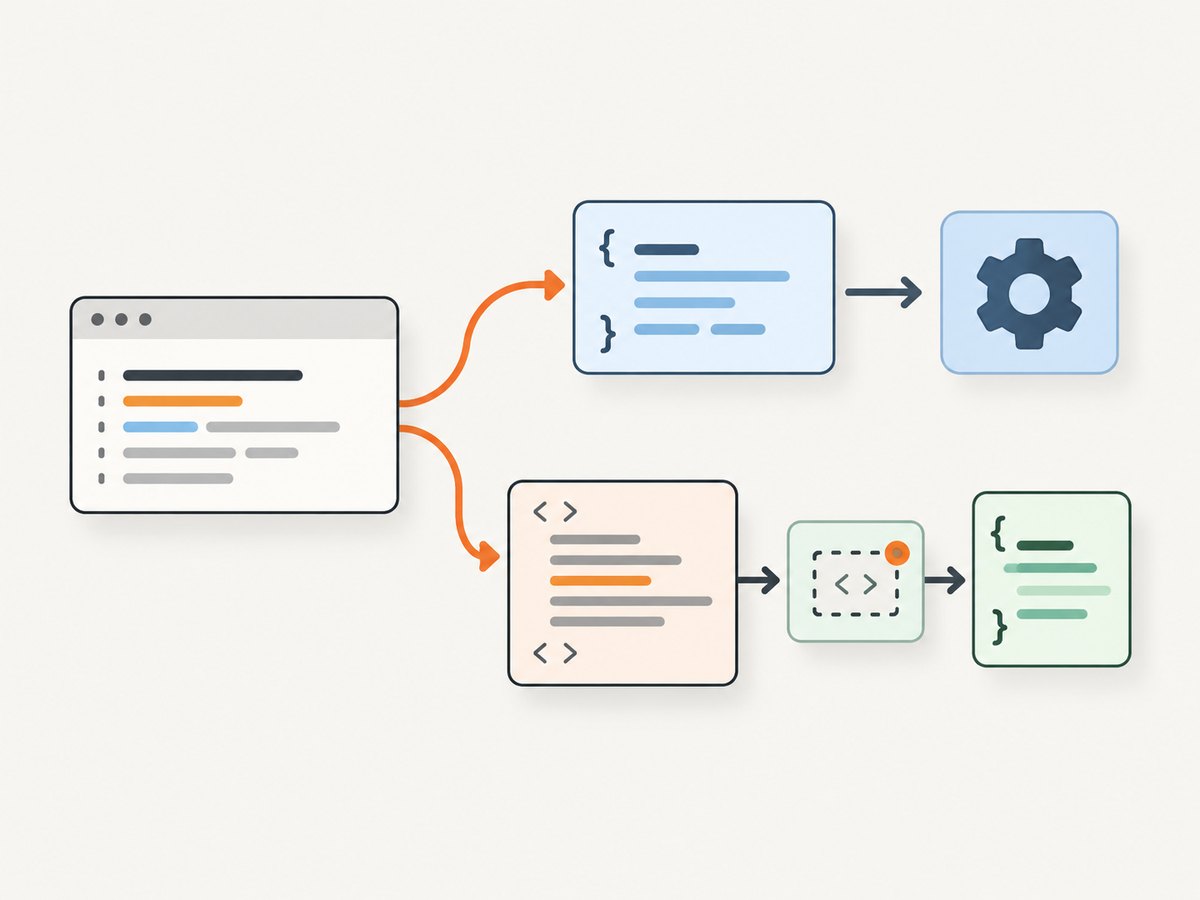
| Situation | What you receive | How to parse |
|---|---|---|
| JSON endpoint | Body is JSON, usually with application/json |
Decode the response body directly |
| HTML with embedded data | Markup containing a <script>, attribute, or page state object |
Parse HTML, select the data-bearing element, then decode its text |
| JavaScript-rendered data | Initial HTML lacks the needed values | Find the underlying data request or render the page before extraction |
JSON-LD is a JSON-based format for serializing Linked Data. A page can contain several JSON-LD blocks, and not every script element is JSON-LD. Select script[type="application/ld+json"] explicitly and use a JSON-LD-aware processor when linked-data semantics such as contexts and expanded entities matter. See the W3C JSON-LD 1.1 Recommendation.
2. Parse JSON returned directly by an endpoint
Always perform these operations in order:
- Send the request and retain status, headers, and body.
- Check the expected HTTP status (or call
raise_for_status()). - Decode JSON.
- Validate that the decoded value has the expected type and keys.
A valid JSON error document can accompany a failed status. Requests explicitly warns that the success of r.json() does not indicate that the response succeeded; status handling is a separate check (Requests JSON response documentation).
Python with Requests
import requests
from typing import Any


def fetch_json(url: str) -> dict[str, Any]:
    response = requests.get(
        url,
        headers={"Accept": "application/json"},
        timeout=(10, 60),
    )
    response.raise_for_status()

    try:
        data = response.json()
    except ValueError as exc:
        sample = response.text[:200].replace("\n", " ")
        raise RuntimeError(f"Invalid JSON from {url}: {sample!r}") from exc

    if not isinstance(data, dict):
        raise TypeError(f"Expected a JSON object, got {type(data).__name__}")
    return data

payload = fetch_json("https://example.com/api/products")
products = payload.get("products", [])
if not isinstance(products, list):
    raise TypeError("products must be an array")
for product in products:
    if isinstance(product, dict):
        print(product.get("name"))
cURL
curl --fail-with-body --silent --show-error \
  -H 'Accept: application/json' \
  'https://example.com/api/products' \
  -o response.json

python -m json.tool response.json
--fail-with-body makes HTTP failures visible while preserving the response body for diagnosis. For a shell pipeline, check the exit status before passing the file to another parser.
Node.js
const res = await fetch('https://example.com/api/products', {
  headers: { Accept: 'application/json' },
  signal: AbortSignal.timeout(60_000),
});

const raw = await res.text();
if (!res.ok) {
  throw new Error(`HTTP ${res.status}: ${raw.slice(0, 200)}`);
}

let data;
try {
  data = JSON.parse(raw);
} catch (error) {
  throw new Error(`Invalid JSON: ${error.message}`);
}

if (!data || typeof data !== 'object' || Array.isArray(data)) {
  throw new Error('Expected a JSON object');
}
console.log(data.products ?? []);
3. Extract JSON from an HTML page
When the response is HTML, do not run json.loads() on the entire page. Parse the document first, select the exact element, then decode its text. Beautiful Soup documents that malformed markup can produce different trees with different parsers, so specify one consistently (Beautiful Soup parser documentation).
Python: JSON-LD and an embedded state object
import json
import requests
from bs4 import BeautifulSoup

url = "https://example.com/article"
r = requests.get(url, timeout=(10, 60), headers={"User-Agent": "my-research-bot/1.0"})
r.raise_for_status()
soup = BeautifulSoup(r.content, "html.parser")

jsonld_items = []
for tag in soup.select('script[type="application/ld+json"]'):
    text = tag.string or tag.get_text()
    if not text.strip():
        continue
    try:
        value = json.loads(text)
    except json.JSONDecodeError as exc:
        print(f"Skipping malformed JSON-LD: {exc}")
        continue
    jsonld_items.extend(value if isinstance(value, list) else [value])

for item in jsonld_items:
    if isinstance(item, dict):
        print(item.get("@type"), item.get("headline"))

# Example for a site-specific serialized state script:
state_tag = soup.select_one("script#__NEXT_DATA__")
if state_tag:
    state = json.loads(state_tag.string or state_tag.get_text())
    print(state.keys())
JSON-LD may be an object, an array, or an object containing a @graph array. Treat the shape as untrusted input. If you need linked-data operations rather than simple field extraction, use a JSON-LD processor and follow the W3C processing algorithms (JSON-LD 1.1 API).
Node.js: Cheerio and JSON.parse
import * as cheerio from 'cheerio';

const res = await fetch('https://example.com/article');
if (!res.ok) throw new Error(`HTTP ${res.status}`);
const html = await res.text();
const $ = cheerio.load(html);

const records = [];
$('script[type="application/ld+json"]').each((_, el) => {
  const text = $(el).text().trim();
  if (!text) return;
  try {
    const value = JSON.parse(text);
    records.push(...(Array.isArray(value) ? value : [value]));
  } catch (error) {
    console.warn('Malformed JSON-LD:', error.message);
  }
});
console.log(records);
4. Handle encoding and raw bytes deliberately
Requests exposes decoded text through response.text and raw bytes through response.content. Character encoding can come from HTTP headers or be inferred, and assumptions can fail on mixed or incorrectly labeled sites. Use raw bytes when passing content to a parser that should determine encoding, inspect response.encoding, and set it only when you have evidence for the correct charset. Never silently replace decoding errors in data that must remain exact.
5. Deal with dynamic pages
If the needed value is absent from the initial HTML, inspect the browser’s network requests. Many applications fetch JSON from an API after page load; calling that endpoint is simpler and less fragile than scraping rendered text when the endpoint is legitimately accessible. Other pages serialize initial state in a script tag. Scrapy describes these as distinct cases: data may be in the response, in an embedded script, or loaded by later requests (Scrapy dynamic content documentation).
- Prefer a documented or stable data endpoint when it supplies the required fields.
- Record request parameters, pagination cursors, and required headers.
- Use a browser only when execution is required to obtain the data.
- Respect the site’s terms, access controls, and applicable requirements. A robots.txt file manages crawler traffic for a site’s stated crawlers; it is not a universal permission or privacy mechanism.
6. Validate the data you extracted
Parsing answers “is this syntactically valid?” It does not answer “is this the record I need?” Add checks at the boundary:
def require_product(value):
    if not isinstance(value, dict):
        raise TypeError("product must be an object")
    required = ("id", "name", "price")
    missing = [key for key in required if key not in value]
    if missing:
        raise ValueError(f"Missing keys: {missing}")
    if not isinstance(value["id"], (str, int)):
        raise TypeError("id must be a string or integer")
    if not isinstance(value["price"], (int, float)):
        raise TypeError("price must be numeric")
    return value
Keep the source payload separate from normalized application data. Store a redacted response fixture, URL, status, content type, parser name, and extraction selector so a failed run can be reproduced without repeatedly fetching the site.
7. Troubleshooting common failures
| Symptom | Likely cause | Fix |
|---|---|---|
JSONDecodeError or “Unexpected token <” |
HTML, an error page, or an empty body was returned | Log status and content type, inspect a bounded body sample, then call raise_for_status() before decoding |
| Valid JSON but wrong records | Wrong endpoint, pagination page, or nested key | Print the top-level type and keys; validate IDs and required fields |
| No JSON-LD found | Selector mismatch or content inserted after load | Check the exact script type and inspect raw HTML plus network requests |
| Different results on two machines | Different HTML parsers or versions | Specify the parser explicitly and pin dependencies |
| Unicode is corrupted | Incorrect charset assumption | Inspect headers and encoding; parse raw bytes when appropriate |
| Works in a browser, fails in code | Cookies, headers, authentication, rate limits, or bot checks | Use permitted access, reproduce required request headers, slow down, and handle authentication securely |
| Intermittent timeouts | Slow origin, large response, or overloaded service | Set connect/read timeouts, retry only idempotent requests with backoff, and cap concurrency |
8. Performance, reliability, and cost
- Choose the smallest representation. A JSON endpoint avoids downloading and parsing unrelated HTML.
- Stream large JSON carefully. Loading a multi-megabyte document into memory is simple but expensive; use a streaming parser when records are independent and the format supports it.
- Cache immutable responses. Cache keys should include URL and meaningful query parameters. Honor cache headers and site rules.
- Bound concurrency. A worker pool with per-host limits reduces timeouts and avoids creating an accidental denial-of-service pattern.
- Retry selectively. Retry transient network errors and selected 5xx responses, with exponential backoff and jitter. Do not blindly retry malformed JSON or 4xx responses.
- Measure stages. Record DNS/connect time, time to first byte, download time, parse time, extracted-record count, and failure category.
- Estimate cost. Your main costs are bandwidth, compute, proxy or browser infrastructure, and engineering time. Rendering JavaScript is usually more expensive than fetching a JSON endpoint, so discover the data request first.
9. Or skip the browser setup
If your workflow starts from a web page and you need a clean visual capture alongside extracted data, ScreenshotNeo provides a website screenshot API and MCP server. It accepts one GET request and returns PNG, JPEG, WebP, or PDF. Cookie and consent banners are accepted and 60+ known consent platforms, newsletter popups, and chat widgets are removed before capture; each step can be disabled. Bot checks, blank pages, timeouts, failed loads, and cache hits are not billed, and the response reports the result in X-Page-Verdict and X-Billed headers.

curl -G "https://api.screenshotneo.com/v1/shot" -d access_key=YOUR_API_KEY --data-urlencode url=https://stripe.com -o shot.webpimport requests
r = requests.get("https://api.screenshotneo.com/v1/shot", params={"access_key": "YOUR_API_KEY", "url": "https://stripe.com"}, timeout=90)
open("shot.webp", "wb").write(r.content)const q = new URLSearchParams({ access_key: 'YOUR_API_KEY', url: 'https://stripe.com' });
const res = await fetch(`https://api.screenshotneo.com/v1/shot?${q}`);See the ScreenshotNeo API documentation for all options, including full-page and element capture, dark mode, device presets, retina scale, custom CSS and JavaScript, waits, request blocking, cookies and headers, geolocation, PDF output, caching, signed links, async webhooks, bulk capture, and usage reporting. Its MCP server exposes take_screenshot, get_page_info, and capture_pdf to Claude, Cursor, and other MCP clients. The Free plan includes 1,000 screenshots each month with no card; paid plans start at $5 for 3,000. Create a free ScreenshotNeo account.
10. A production checklist
- Confirm whether the source is JSON, HTML-embedded JSON, or dynamically loaded.
- Record status, headers, URL, and a safe body sample.
- Check HTTP success before trusting decoded data.
- Catch empty and malformed JSON explicitly.
- Select JSON-LD by script type and account for arrays and
@graph. - Choose and pin an HTML parser.
- Validate required fields, types, pagination, and record counts.
- Use bounded timeouts, concurrency, retries, and caching.
- Preserve fixtures and extraction metadata for debugging.
- Follow the target site’s terms and applicable access requirements.
FAQ
How do I know whether a response is JSON?
Inspect the HTTP Content-Type, but still validate by attempting a bounded decode. Servers sometimes label content incorrectly or return an HTML error page with a JSON-looking URL.
Can I parse JSON-LD with a normal JSON parser?
Yes for syntax and straightforward field extraction. Use a JSON-LD-aware processor when you need linked-data expansion, framing, or context semantics.
Why does a parser fail only on some pages?
Those pages may contain malformed markup, a different encoding, multiple payload shapes, or data inserted after JavaScript execution. Save the failing response and compare each layer.
Should I scrape visible text or an API?
Use the permitted route that supplies the required fields most reliably. A stable API-like response generally requires less parsing; a rendered page may be necessary when the data exists only after execution.


