Why Is My PDF Download URL Empty or Null?
Trace an empty PDF URL from the original endpoint to the browser link, then fix status, CORS, Blob, redirect, and download issues.
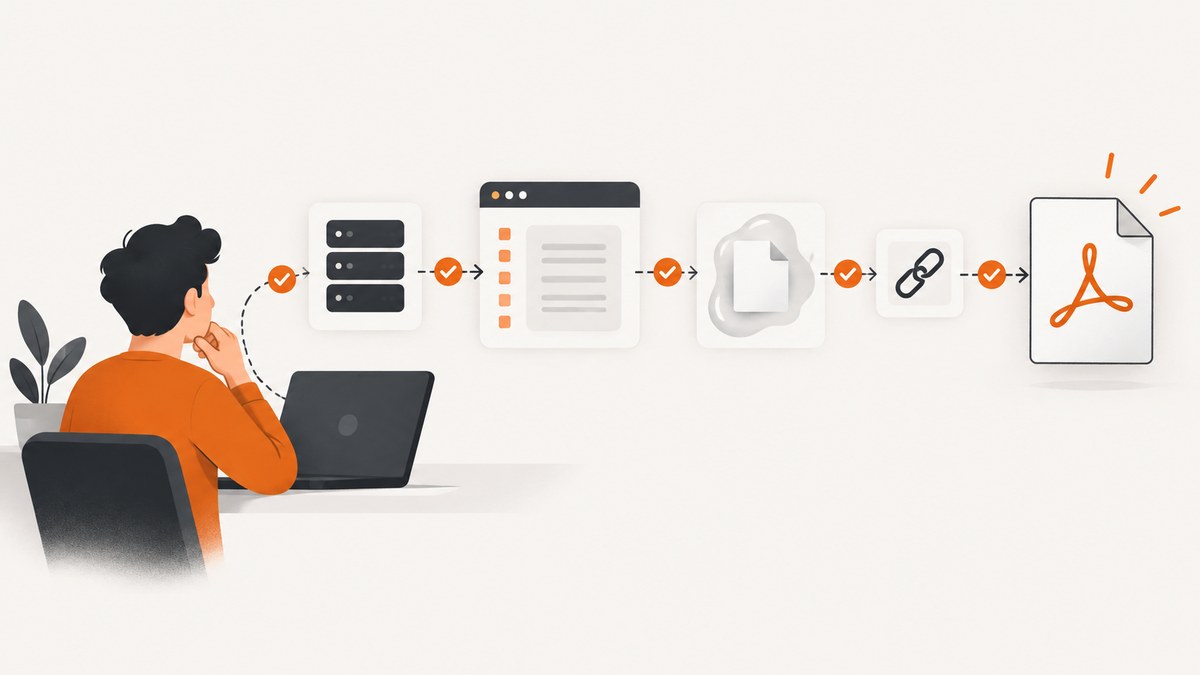
Short answer: an empty or null PDF download URL usually means a value disappeared somewhere in the pipeline. The original endpoint may be missing, the request may have returned an HTTP error, the browser may have received an opaque response, the response body may never have been converted to a Blob, or the link may have been assigned before an asynchronous operation finished.
Debug the values in order: log the endpoint before fetch(), inspect the response status and final URL, verify that the response is readable and really is a PDF, read it with response.blob(), create a URL with URL.createObjectURL(blob), and only then assign that URL to the anchor. A Blob’s bytes are not themselves a URL.
1. The browser flow that must succeed
There are two valid designs:

| Design | What the server returns | Use it when | Checks |
|---|---|---|---|
| Direct server URL | A stable URL to a downloadable PDF | The browser can access the file directly and you do not need to inspect or transform bytes | URL value, redirects, origin, response headers, authentication |
| Blob URL | PDF bytes in the HTTP response | The client must fetch protected bytes, add a filename, or process the file before download | response.ok, CORS, content type, nonempty Blob, object URL lifetime |
For the Blob design, the sequence is:
- Start with a nonempty endpoint.
- Call
fetch(endpoint). - Check
response.ok;fetch()resolves even for a 404 or 500. - Reject an opaque response because its body is inaccessible.
- Check the media type and read
await response.blob(). - Reject a zero-byte Blob.
- Call
URL.createObjectURL(blob). - Assign the returned
blob:URL tolink.hrefbefore the click.
MDN documents that opaque responses have status 0, no exposed headers, and a null body; calling blob() on one produces a zero-size Blob with an empty type. See Response.blob() and Using the Fetch API.
2. A complete, defensive browser implementation
This example fails with a useful message at the first broken stage. Adapt authentication and the endpoint contract to your application.
async function preparePdfDownload(endpoint, link) {
  if (!endpoint || typeof endpoint !== "string") {
    throw new TypeError("PDF endpoint is empty");
  }
  if (!(link instanceof HTMLAnchorElement)) {
    throw new TypeError("A valid anchor element is required");
  }

  const response = await fetch(endpoint, {
    method: "GET",
    credentials: "include"
  });

  if (response.type === "opaque") {
    throw new Error("The PDF response is opaque; configure CORS instead of no-cors");
  }
  if (!response.ok) {
    throw new Error(`PDF request failed: ${response.status} ${response.statusText}`);
  }

  const contentType = response.headers.get("content-type") || "";
  if (!contentType.toLowerCase().includes("application/pdf")) {
    throw new TypeError(`Expected application/pdf, got ${contentType || "no content type"}`);
  }

  const blob = await response.blob();
  if (blob.size === 0) {
    throw new Error("PDF response body is empty");
  }

  const objectUrl = URL.createObjectURL(blob);
  link.href = objectUrl;
  link.download = "document.pdf";
  link.dataset.objectUrl = objectUrl;
  return { objectUrl, finalUrl: response.url, bytes: blob.size };
}

const link = document.querySelector("#download-pdf");
try {
  await preparePdfDownload("https://example.com/report.pdf", link);
} catch (error) {
  console.error(error);
  link.removeAttribute("href");
  // Show an application-specific error message here.
}

// After the download has completed, or when the component is destroyed:
function releasePdfUrl(link) {
  const objectUrl = link.dataset.objectUrl;
  if (objectUrl) {
    URL.revokeObjectURL(objectUrl);
    delete link.dataset.objectUrl;
  }
}
Do not revoke the object URL immediately after assigning it. Keep it alive until the browser has consumed it, then call URL.revokeObjectURL() to release the Blob URL.
3. Find exactly where the value becomes null
Step 1: log the source value
console.log("endpoint before fetch:", endpoint);
console.log("href before assignment:", link.href);
If the endpoint is already null, the browser download code is not the root cause. Inspect route parameters, application state, a database response, or the API field that should contain the URL. If the endpoint is present but href remains empty, inspect promise sequencing and every error path.
Step 2: inspect the network request
In browser developer tools, verify the exact request URL, status, redirect chain, response headers, and response body. In code, log:
console.table({
  type: response.type,
  status: response.status,
  ok: response.ok,
  redirected: response.redirected,
  finalUrl: response.url,
  contentType: response.headers.get("content-type")
});
Response.url is the final URL after redirects. An unexpected final URL often reveals a login page, a redirect to an error route, or a proxy endpoint. MDN covers this behavior in Response.url.
Step 3: verify that the body is a PDF
A successful HTTP status does not guarantee a PDF. A session timeout can return HTML with status 200; an API gateway can return JSON; a reverse proxy can return an empty body. Check the content type, Blob size, and, when necessary, inspect the first bytes. A PDF normally begins with the ASCII signature %PDF-:
async function assertPdf(blob) {
  if (blob.size === 0) throw new Error("Empty response body");
  const header = await blob.slice(0, 5).text();
  if (header !== "%PDF-") {
    throw new Error(`Body is not a PDF (signature: ${JSON.stringify(header)})`);
  }
}
The signature check is a practical validation step; content type alone cannot prove that the bytes are a valid PDF.
4. CORS and opaque responses
Do not use mode: "no-cors" as a workaround when JavaScript needs to read PDF bytes. That mode can produce an opaque response. The request may appear in the Network panel, but JavaScript cannot read its headers or body, and the resulting Blob is unusable.
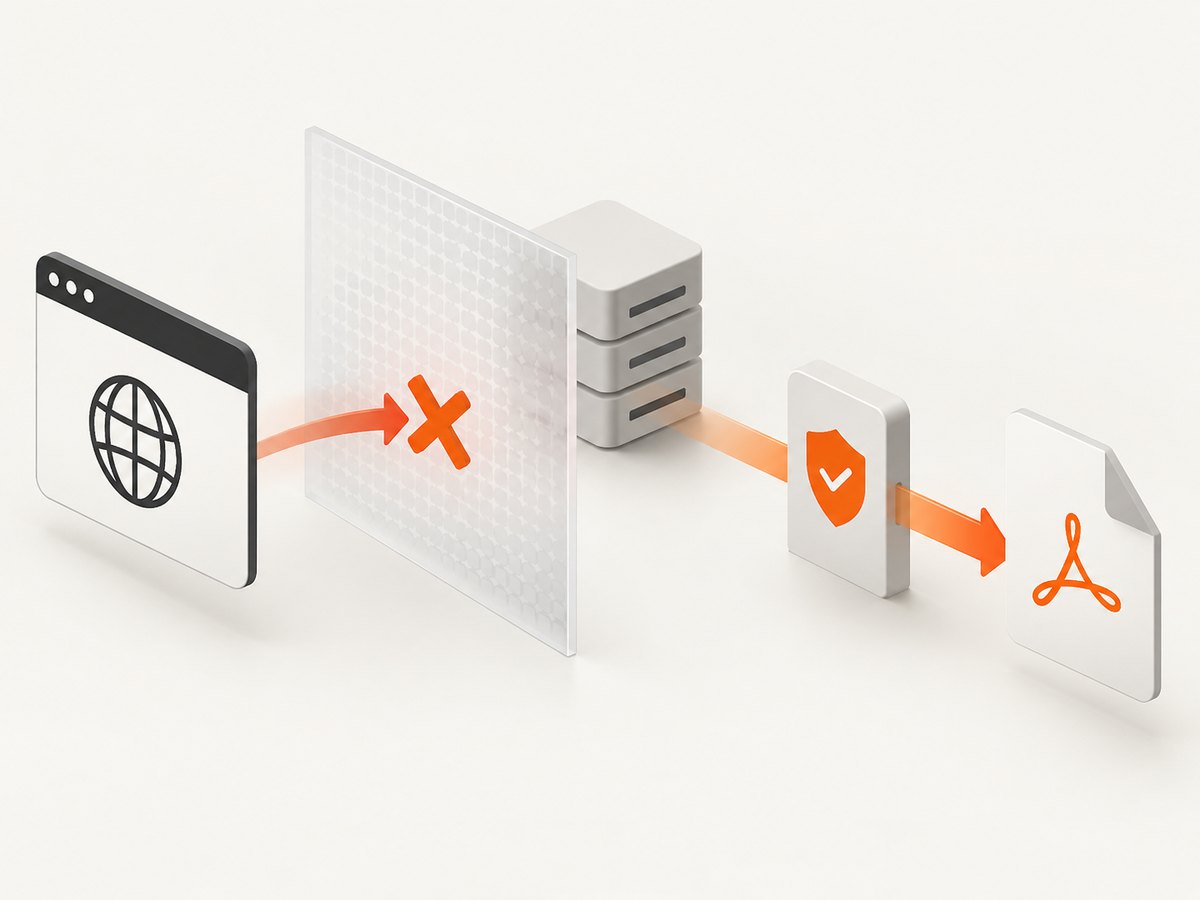
Configure the PDF server to return an appropriate Access-Control-Allow-Origin value for the requesting origin. If credentials are sent, the server must allow that specific origin and credentials; a wildcard origin is not valid for credentialed requests. Keep the request in normal CORS mode:
const response = await fetch(endpoint, {
  credentials: "include"
});
For a cross-origin direct link that does not need JavaScript access, a normal anchor can work even when the page cannot inspect the response. The server still needs to authorize the user and return the file.
5. Direct links, redirects, and the download attribute
If your API returns a direct URL, assign that exact nonempty value:
const { pdfUrl } = await fetch("/api/create-report").then(async response => {
  if (!response.ok) throw new Error(`Report API failed: ${response.status}`);
  return response.json();
});
if (typeof pdfUrl !== "string" || pdfUrl.length === 0) {
  throw new Error("Report API returned no pdfUrl");
}
const link = document.querySelector("#download-pdf");
link.href = pdfUrl;
link.download = "report.pdf";
The download attribute applies to same-origin URLs and blob: or data: URLs. For other cross-origin URLs, the browser may ignore it. The server’s Content-Disposition and media type can influence whether content is downloaded and which filename is suggested. Browser behavior varies; see MDN’s anchor element documentation and Content-Disposition.
6. Common causes and fixes
| Symptom | Likely cause | Fix |
|---|---|---|
endpoint is null |
Missing API field, route parameter, or state value | Validate the producer response and add a required-field check before fetch(). |
| Fetch resolves but status is 404 or 500 | fetch() does not reject for HTTP errors |
Check response.ok or response.status before reading the body. |
| Status is 0 and body is inaccessible | Opaque response, often caused by no-cors |
Configure CORS on the server and remove mode: "no-cors". |
| Blob size is zero | Opaque response, empty server body, or a failed upstream | Inspect response type, server logs, content length, and the actual body. |
Blob type is text/html |
Login page, error page, or redirect target | Send authentication, follow the correct endpoint, and verify response.url. |
| Link works only sometimes | Async assignment races the click or object URL was revoked early | Await preparation, assign href before the click, and revoke later. |
| Download filename is ignored | Cross-origin URL or server disposition takes precedence | Use a Blob URL or configure Content-Disposition on the file response. |
| Memory grows after many downloads | Object URLs are never released | Track each URL and revoke it after use or component cleanup. |
7. Server and command-line checks
Use curl to separate a server problem from browser behavior:
curl -v -L -o report.pdf "https://example.com/report.pdf"
file report.pdf
head -c 5 report.pdf
Check for HTTP/1.1 200 (or the expected status), Content-Type: application/pdf, redirects, authentication challenges, and a nonzero file. The first five bytes should normally be %PDF-.
Python can validate an endpoint without involving a browser:
import requests

url = "https://example.com/report.pdf"
r = requests.get(url, allow_redirects=True, timeout=60)
r.raise_for_status()
content_type = r.headers.get("content-type", "")
if "application/pdf" not in content_type.lower():
    raise TypeError(f"Expected PDF, got {content_type or 'no content type'}")
if not r.content:
    raise ValueError("Empty PDF response")
if not r.content.startswith(b"%PDF-"):
    raise ValueError("Response is not a PDF")
with open("report.pdf", "wb") as f:
    f.write(r.content)
print(r.url, len(r.content))
Node.js provides the same checks with the built-in Fetch API:
const res = await fetch("https://example.com/report.pdf");
if (!res.ok) throw new Error(`HTTP ${res.status}`);
const type = res.headers.get("content-type") || "";
if (!type.toLowerCase().includes("application/pdf")) {
  throw new Error(`Expected PDF, got ${type || "no content type"}`);
}
const bytes = new Uint8Array(await res.arrayBuffer());
if (bytes.length === 0) throw new Error("Empty response");
const signature = new TextDecoder().decode(bytes.slice(0, 5));
if (signature !== "%PDF-") throw new Error("Not a PDF");
await Bun.write("report.pdf", bytes);
8. Or skip the browser setup
ScreenshotNeo can create a PDF from a page with one GET request, so your application does not need to run a browser, handle consent banners, or build a Blob pipeline for the capture itself. Read the ScreenshotNeo API documentation for the available PDF options.
curl -G "https://api.screenshotneo.com/v1/shot" -d access_key=YOUR_API_KEY --data-urlencode url=https://stripe.com -o shot.webpimport requests
r = requests.get("https://api.screenshotneo.com/v1/shot", params={"access_key": "YOUR_API_KEY", "url": "https://stripe.com"}, timeout=90)
open("shot.webp", "wb").write(r.content)const q = new URLSearchParams({ access_key: 'YOUR_API_KEY', url: 'https://stripe.com' }); const res = await fetch(`https://api.screenshotneo.com/v1/shot?${q}`);For PDF output, pass the PDF option described in the documentation. ScreenshotNeo accepts cookies and removes more than 60 known consent platforms, newsletter popups, and chat widgets before capture; each step can be disabled. Bot checks, blank pages, timeouts, failed loads, and cache hits cost nothing, and the response identifies the result with X-Page-Verdict and X-Billed headers. An MCP server provides take_screenshot, get_page_info, and capture_pdf tools for Claude, Cursor, and other MCP clients. The Free plan includes 1,000 shots per month with no card; paid plans start at $5 for 3,000 shots. Create a free ScreenshotNeo account.
9. Performance, reliability, and cost considerations
- Memory:
blob()reads the complete response, so large PDFs temporarily occupy memory. Prefer a direct server download or a server-side proxy when files are very large. - Timeouts: set an application timeout and display progress for slow reports. A browser fetch can remain pending while a server is rendering.
- Retries: retry transient network failures and selected 5xx responses with backoff. Do not blindly retry 401, 403, 404, or invalid input.
- Idempotency: ensure report generation can be repeated safely, or reuse a known report identifier instead of creating duplicate jobs.
- Caching: cache stable PDFs or direct URLs when the underlying document has not changed. Revoke stale Blob URLs.
- Security: never place private access tokens in a public anchor URL. Fetch protected files through an authorized server or use short-lived signed URLs.
- Billing: if a capture service is used, distinguish successful captures from failed loads and cache hits before estimating usage. ScreenshotNeo exposes this result in response headers and bills only clean shots.
10. A short diagnostic checklist
- Is the original endpoint a nonempty string?
- Does the request return the expected status?
- Is
response.typenormal rather thanopaque? - What is the final
response.urlafter redirects? - Is the content type PDF rather than HTML or JSON?
- Is the Blob nonempty and does it begin with
%PDF-? - Is
link.hrefassigned before the user clicks? - Is the URL revoked only after the browser is finished with it?
- Does the link’s origin support the
downloadattribute?
FAQ
Why does a 404 produce a null URL instead of throwing?
fetch() fulfills with a Response for HTTP errors. If code skips the response.ok check, it may parse an error body and assign an absent field. Throw on non-2xx responses first.
Can I turn a Blob directly into an href?
No. Create a temporary URL with URL.createObjectURL(blob), assign that string to href, and revoke it after use.
Why is my response body null with no-cors?
The response is opaque. The browser deliberately hides its status, headers, and body from JavaScript. Configure CORS on the server when the client must read PDF bytes.
Should I always use a Blob URL?
No. A direct URL is simpler when the server can authorize and serve the file directly. Use a Blob URL when the client must inspect, rename, or transform the bytes.
Why does the browser open the PDF instead of downloading it?
The download attribute is limited by origin and browser behavior. A server’s Content-Disposition and the browser’s PDF settings also affect the result.


