How to Include a Local JavaScript File with PhantomJS page.includeJs()
Use PhantomJS injectJs() for local files, includeJs() for reachable URLs, and avoid premature phantom.exit() calls.

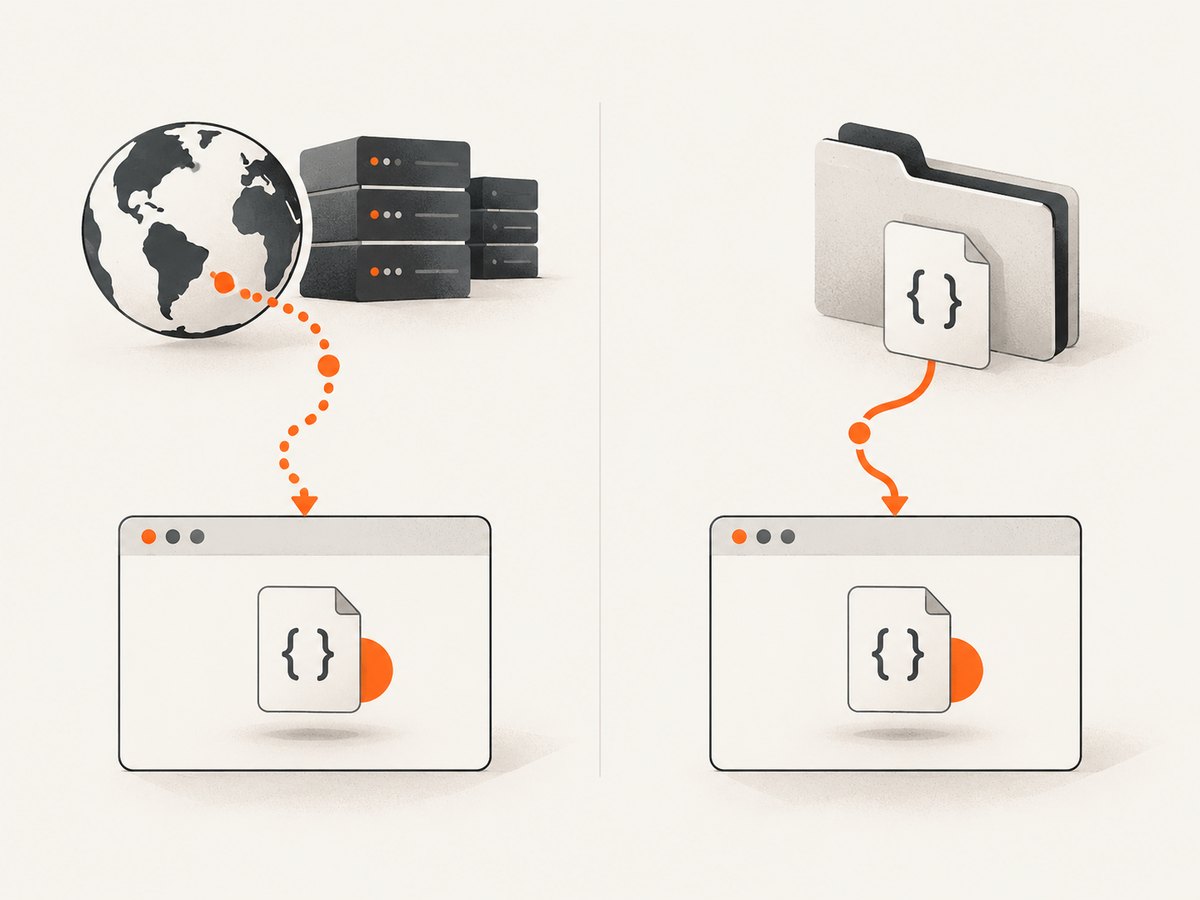
Direct answer: page.includeJs(url, callback) loads a JavaScript file from a URL that the page can reach. It is asynchronous and runs your callback after the load finishes. A JavaScript file stored on the PhantomJS host should be loaded with page.injectJs(filename), which reads from the local filesystem and returns a boolean immediately.
This distinction explains why a path such as assets/javascript/jquery.min.js often fails with includeJs(): it is a filesystem path, while includeJs() is URL-oriented. Use injectJs() for host-local files, check its return value, and call phantom.exit() only after injection and page evaluation have completed.
includeJs() versus injectJs()
| Question | page.includeJs() |
page.injectJs() |
|---|---|---|
| Where is the script? | A URL, normally a remote location | A file on the PhantomJS host |
| How is it accessed? | The loaded page requests the URL | PhantomJS reads the local file |
| Completion signal | Asynchronous callback | Synchronous boolean return value |
| Path semantics | URL semantics and page network access | Current directory, then phantom.libraryPath |
| Typical use | CDN libraries or scripts hosted by a site | Private utilities, checked-in bundles and test helpers |
The PhantomJS WebPage API reference describes includeJs() as including an external script from a specified URL and executing a callback when it completes. The companion injectJs() reference documents local-file injection when the file does not need to be accessible from the hosted page.
Recommended pattern for a local file
Open the target page first, inject the file, verify the boolean result, and then run page-context code inside page.evaluate(). The following script is complete and runnable with PhantomJS:

var page = require('webpage').create();

page.open('https://example.com', function (status) {
  if (status !== 'success') {
    console.log('Unable to access network');
    phantom.exit();
    return;
  }

  if (!page.injectJs('assets/javascript/jquery.min.js')) {
    console.log('Local script could not be injected');
    phantom.exit();
    return;
  }

  var result = page.evaluate(function () {
    return typeof window.jQuery;
  });

  console.log(result);
  phantom.exit();
});
Save it as capture.js and run:
phantomjs capture.jsIf the file is found and executes, the output should be function for a normal jQuery build. The value is returned from the page context, where window.jQuery exists. Code outside page.evaluate() runs in PhantomJS’s controlling script context, so it cannot directly inspect page globals.
Use an absolute path when the working directory varies
A relative filename is resolved from the process’s current directory and then PhantomJS’s library path. A scheduled job, IDE, container or wrapper script may start PhantomJS from a different directory than your shell. Resolve the asset to an absolute path or set phantom.libraryPath deliberately.
var page = require('webpage').create();
var scriptPath = '/opt/my-phantom-project/assets/javascript/jquery.min.js';

page.open('https://example.com', function (status) {
  if (status !== 'success') {
    console.log('Page open failed: ' + status);
    phantom.exit();
    return;
  }

  var injected = page.injectJs(scriptPath);
  console.log('Injected: ' + injected);

  if (!injected) {
    phantom.exit();
    return;
  }

  console.log(page.evaluate(function () {
    return typeof window.jQuery;
  }));
  phantom.exit();
});
Loading a remote script with includeJs()
Use includeJs() when the script is hosted at a URL that the loaded page can reach. Its callback is the safe place to perform dependent work and exit PhantomJS.
var page = require('webpage').create();

page.open('https://example.com', function (status) {
  if (status !== 'success') {
    console.log('Unable to access network');
    phantom.exit();
    return;
  }

  page.includeJs('https://cdn.example.com/library.min.js', function () {
    var value = page.evaluate(function () {
      return typeof window.Library;
    });

    console.log(value);
    phantom.exit();
  });
});
The callback does not make the library available in the outer PhantomJS scope. It only tells you that the page has finished requesting and executing the script. Inspect the result with page.evaluate(), or use another page operation from the callback.
Why phantom.exit() must be delayed
PhantomJS exits as soon as phantom.exit() runs. If you place it immediately after page.includeJs(), the process can terminate before the network request and script execution finish. The official PhantomJS automation guide explicitly instructs developers to put phantom.exit() inside the page.includeJs callback.
Step-by-step decision checklist
- Identify the source. If the file exists only on the machine running PhantomJS, choose
injectJs(). If it is served over HTTP(S), chooseincludeJs(). - Open the page. Check that
page.open()returnssuccessbefore loading dependent code. - Choose a stable path. Prefer an absolute local filename when launch directories vary. Otherwise verify the current directory or configure
phantom.libraryPath. - Check completion. Test the boolean returned by
injectJs(). Put all work that depends onincludeJs()inside its callback. - Run page code in the right context. Use
page.evaluate()for DOM and browser globals. Return simple serializable values. - Exit last. Call
phantom.exit()after injection, evaluation and logging.
Common errors and fixes
“Local script could not be injected”
Cause: The filename does not resolve from the process’s current directory or phantom.libraryPath, the file is unreadable, or the path is misspelled.
Fix: Print the launch directory in your wrapper, use an absolute path, verify file permissions, and check the boolean result:
var ok = page.injectJs('/absolute/path/to/library.js');
if (!ok) {
  console.log('Injection failed');
  phantom.exit();
  return;
}
A relative path works locally but fails in a job
Cause: The scheduler or service starts PhantomJS from another working directory.
Fix: Construct an absolute path before launching PhantomJS, change to the project directory in the launcher, or set phantom.libraryPath to a known directory. Do not assume the directory containing the script is the process directory.
includeJs('assets/javascript/jquery.min.js') does nothing
Cause: includeJs() treats its argument as a URL. A host-local path is not automatically readable by the remote page.
Fix: Replace it with page.injectJs('assets/javascript/jquery.min.js'), or publish the file at a URL and use includeJs() with that URL.
The library is undefined in page.evaluate()
Cause: The script failed to load or execute, evaluation ran before an asynchronous include completed, or the library uses a different global name.
Fix: For local files, stop when injectJs() returns false. For remote files, move evaluation into the includeJs() callback. Confirm the expected global name in the library documentation.
The process exits before the callback
Cause: phantom.exit() was called immediately after includeJs(), or another error path exits early.
Fix: Keep the exit call inside the callback and add logging before each return. For a local file, injection is synchronous, but you still need to perform evaluation before exiting.
The page opens but the remote include fails
Cause: DNS, TLS, proxy, firewall or page network restrictions can prevent PhantomJS from reaching the URL. A remote server can also return an error or incompatible content.
Fix: Confirm the URL from the same host, inspect PhantomJS network callbacks, try HTTPS and a known reachable test URL, and host a version of the script locally if the dependency must be deterministic. Local injection avoids a second network dependency.
Timing, compatibility and page context
injectJs() reports whether PhantomJS successfully injected the file; it does not guarantee that every application-level initialization completed. If the script schedules asynchronous work, wait for that work with an appropriate page-side condition before reading its result.
includeJs() is asynchronous because it loads through the page. The callback is the first reliable point at which to call a dependent function. Avoid racing it with a fixed short delay: network and server timing vary.
Both methods execute JavaScript in the page. A script that assumes modern browser APIs, newer JavaScript syntax or features absent from PhantomJS may parse incorrectly or fail at runtime. Use a PhantomJS-compatible build, transpile where appropriate, and check the browser console or page error callbacks.
Remember that page.evaluate() serializes its return value. Return strings, numbers, booleans, arrays or plain objects. DOM nodes, functions and complex host objects do not cross the boundary as live objects.
Performance and reliability notes
- Local injection removes network latency. A checked-in local asset avoids DNS, TLS, proxy and CDN variability.
- Remote inclusion adds a failure point. Cache or vendor critical dependencies locally when repeatable automation matters.
- Load only what the page needs. Large bundles increase parse and execution time in an already dated browser engine.
- Fail explicitly. Check page-open status, the injection boolean and the expected global before producing output.
- Keep paths deterministic. Absolute paths or a deliberate library path make CI and scheduled runs reproducible.
- Log the phase that failed. Distinguish page-open, file-resolution, script-execution and evaluation errors.
PhantomJS is a legacy headless browser. For new projects, evaluate whether a maintained browser automation stack better fits your security and JavaScript compatibility requirements. If you must maintain PhantomJS, keep the dependency set small and pin local assets so a CDN change cannot silently alter a capture.
Or skip the browser setup
If your real goal is to obtain a reliable screenshot rather than run PhantomJS code, ScreenshotNeo provides a website screenshot API and MCP server. One request returns a PNG, JPEG, WebP or PDF. Cookie and consent banners, newsletter popups and chat widgets are removed before capture; bot checks, blank pages, timeouts, failed loads and cache hits are not billed. Responses identify the result with X-Page-Verdict and X-Billed headers. Its MCP server exposes take_screenshot, get_page_info and capture_pdf for Claude, Cursor and other MCP clients.
See the ScreenshotNeo API documentation for all options. A minimal request is:
cURL
curl -G "https://api.screenshotneo.com/v1/shot" -d access_key=YOUR_API_KEY --data-urlencode url=https://stripe.com -o shot.webpPython
import requests

r = requests.get("https://api.screenshotneo.com/v1/shot", params={"access_key": "YOUR_API_KEY", "url": "https://stripe.com"}, timeout=90)
open("shot.webp", "wb").write(r.content)
Node.js
const q = new URLSearchParams({ access_key: 'YOUR_API_KEY', url: 'https://stripe.com' });
const res = await fetch(`https://api.screenshotneo.com/v1/shot?${q}`);
ScreenshotNeo includes full-page capture with lazy images loaded, CSS-selector element capture, dark mode, device presets, custom viewports, retina scale, PDF controls, custom CSS and JavaScript, clicks, waits, request blocking, headers, cookies, user agents, authorization, timezone, geolocation, transparent backgrounds, resizing, configurable caching, signed links, asynchronous jobs, webhooks, bulk capture and a usage API. The free plan includes 1,000 screenshots per month with no card; paid plans start at $5 for 3,000 shots.
Create a free ScreenshotNeo account and start with 1,000 screenshots per month at no charge.
FAQ
Can includeJs() load a file from my PhantomJS machine?
Use injectJs() for a file that exists only on the host. includeJs() is intended for a URL reachable by the loaded page.
Does injectJs() need a callback?
No. It returns a boolean. Continue only when the value is true.
Where does injectJs() search for a relative filename?
It searches the current directory and then phantom.libraryPath. An absolute path avoids ambiguity.
Why can’t page.evaluate() see my Node-style variables?
page.evaluate() runs in the webpage context. Pass values as arguments and return simple serializable data.
When should I call phantom.exit()?
After page opening, script loading or injection, evaluation and logging are complete. For includeJs(), place it in the include callback.
Is includeJs() synchronous?
No. It loads asynchronously and signals completion through its callback. Local injectJs() returns synchronously.


