How to Take a Web Page Screenshot with PHP GD
PHP GD edits images; it does not render web pages. Use a headless browser for capture, then GD for cropping, resizing, and output.
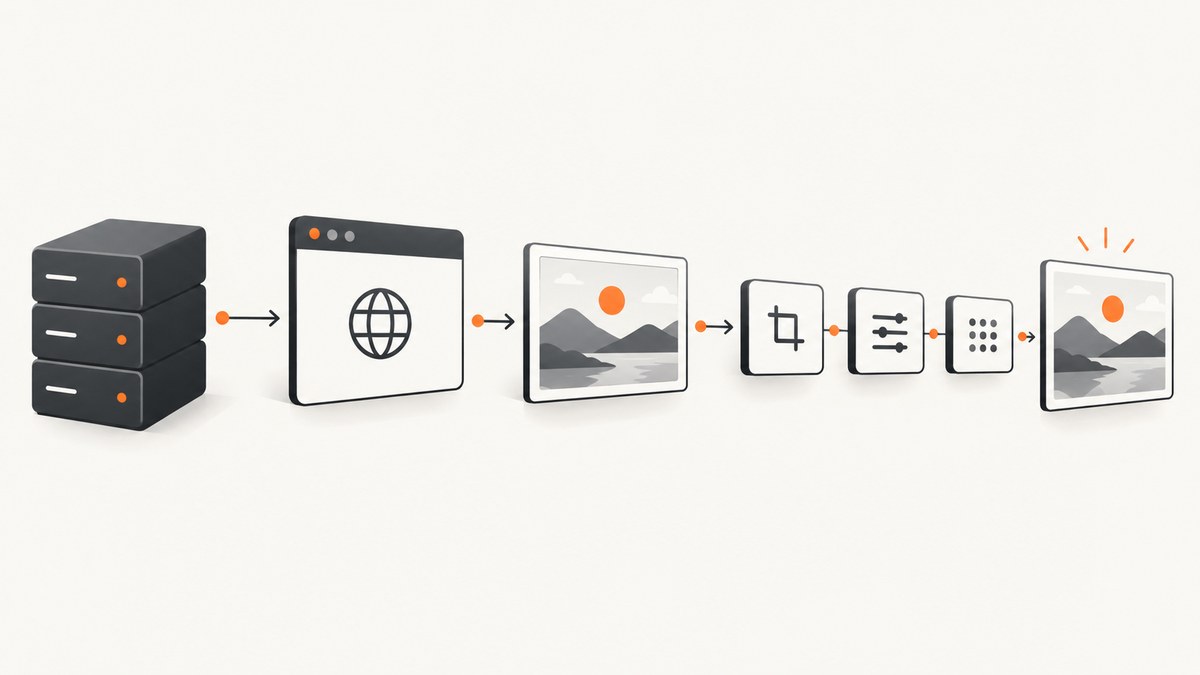
Short answer: PHP GD cannot visit a URL and render its HTML, CSS, and JavaScript. Render the page with a browser engine first, save the resulting pixels, then use GD to crop, resize, annotate, composite, or convert the image. PHP’s imagegrabscreen() captures the current desktop screen on Windows; it is not a portable URL-to-screenshot function.
The workflow is:
- Give a URL to a headless browser.
- Choose the viewport, browser state, and wait condition.
- Save the browser screenshot as PNG, JPEG, or WebP.
- Load the image with GD and perform any required image processing.
- Return the bytes with the correct content type or save them to storage.
What PHP GD can and cannot do
PHP’s GD extension creates and manipulates raster images. Depending on how PHP was built, it can read or write formats such as PNG, JPEG, GIF, and WebP. Check the formats available in your deployment with gd_info().
GD does not implement a browser layout engine. It does not execute page JavaScript, load web fonts as a browser does, resolve responsive CSS, or run a page’s network requests. Those tasks belong to a browser automation process.
The similarly named imagegrabscreen() function captures the whole current screen and is documented as Windows-only. It does not navigate to a remote webpage. Use it only when your requirement is a Windows desktop capture.
After a browser has produced an image, GD is useful for operations such as:
- cropping a rectangular region with
imagecopy(); - resizing a screenshot for thumbnails or previews;
- converting between supported raster formats;
- adding labels, borders, watermarks, or other generated pixels;
- compositing several captured images into one output.
Do not use imagegd() as a normal delivery format. The PHP manual describes GD/GD2 output as proprietary and obsolete, suitable for development and testing. Use PNG, JPEG, or WebP when producing a shareable screenshot.
Prerequisites
- PHP with the GD extension enabled.
- A headless browser executable available to the PHP process. Chromium or Chrome are common choices.
- Permission for the PHP worker to execute the browser and write to a temporary directory.
- Network access from the machine running the browser to the target URL.
Verify GD before writing application code:
<?php
var_export(extension_loaded('gd'));
echo PHP_EOL;
print_r(gd_info());
Install or enable GD using the package method for your operating system, then restart the PHP runtime (PHP-FPM, Apache, or the CLI process). The exact browser package and executable path depend on your operating system and deployment image.
Complete PHP example: render with Chromium, then process with GD
The following script accepts a URL, asks a locally installed Chromium-compatible browser for a screenshot, and uses GD to create a resized PNG. It uses a fixed viewport and a temporary file so the browser and GD stages remain easy to inspect.
<?php
declare(strict_types=1);

if ($argc < 2) {
    fwrite(STDERR, "Usage: php screenshot.php https://example.com [output.png]\n");
    exit(1);
}

$url = $argv[1];
$output = $argv[2] ?? __DIR__ . '/screenshot.png';

if (!filter_var($url, FILTER_VALIDATE_URL)) {
    throw new InvalidArgumentException('The first argument must be an absolute URL.');
}

if (!extension_loaded('gd')) {
    throw new RuntimeException('The PHP GD extension is not enabled.');
}

$browser = getenv('BROWSER_BIN') ?: 'chromium';
$tmp = tempnam(sys_get_temp_dir(), 'web-shot-');
if ($tmp === false) {
    throw new RuntimeException('Could not create a temporary file.');
}

// Chromium appends .png when --screenshot receives a path without an extension.
$tmpPng = $tmp . '.png';
@unlink($tmp);

$command = implode(' ', [
    escapeshellarg($browser),
    '--headless',
    '--disable-gpu',
    '--hide-scrollbars',
    '--no-sandbox', // Remove this flag when your deployment does not require it.
    '--window-size=1366,900',
    '--screenshot=' . escapeshellarg($tmpPng),
    escapeshellarg($url),
]);

$lines = [];
$exitCode = 0;
exec($command . ' 2>&1', $lines, $exitCode);

if ($exitCode !== 0 || !is_file($tmpPng) || filesize($tmpPng) === 0) {
    @unlink($tmpPng);
    throw new RuntimeException("Browser capture failed (exit code {$exitCode}):\n" . implode("\n", $lines));
}

$source = imagecreatefrompng($tmpPng);
if ($source === false) {
    @unlink($tmpPng);
    throw new RuntimeException('GD could not read the browser PNG.');
}

$sourceWidth = imagesx($source);
$sourceHeight = imagesy($source);
$maxWidth = 1200;
$scale = min(1.0, $maxWidth / $sourceWidth);
$targetWidth = max(1, (int) round($sourceWidth * $scale));
$targetHeight = max(1, (int) round($sourceHeight * $scale));

$processed = imagecreatetruecolor($targetWidth, $targetHeight);
if ($processed === false) {
    imagedestroy($source);
    @unlink($tmpPng);
    throw new RuntimeException('GD could not allocate the output image.');
}

imagealphablending($processed, false);
imagesavealpha($processed, true);
$transparent = imagecolorallocatealpha($processed, 0, 0, 0, 127);
imagefill($processed, 0, 0, $transparent);

if (!imagecopyresampled(
    $processed,
    $source,
    0,
    0,
    0,
    0,
    $targetWidth,
    $targetHeight,
    $sourceWidth,
    $sourceHeight
)) {
    imagedestroy($source);
    imagedestroy($processed);
    @unlink($tmpPng);
    throw new RuntimeException('GD could not resize the screenshot.');
}

if (!imagepng($processed, $output, 6)) {
    imagedestroy($source);
    imagedestroy($processed);
    @unlink($tmpPng);
    throw new RuntimeException('GD could not write the output PNG.');
}

imagedestroy($source);
imagedestroy($processed);
@unlink($tmpPng);
echo "Saved {$output}\n";
Run it from a machine where the browser executable is available:
php screenshot.php https://example.com ./example.pngIf the executable is not on PATH, set its path explicitly:
BROWSER_BIN=/usr/bin/google-chrome php screenshot.php https://example.com ./example.pngThe browser stage determines what is visible. The GD stage in this example scales the result down to at most 1,200 pixels wide while preserving the aspect ratio.
Returning a screenshot from a PHP endpoint
For an HTTP endpoint, write the processed image to an output buffer and send a matching content type. Do not print debug output before the image bytes.
<?php
// $image is a GD image created by your browser-capture and processing code.
header('Content-Type: image/png');
header('Cache-Control: public, max-age=3600');
imagepng($image);
imagedestroy($image);
For a file download, use Content-Disposition: attachment. For a stored asset, save the file first and return its application URL. Keep browser diagnostics in logs rather than mixing them into the binary response.
Capture options that affect the result
Viewport and device scale
The viewport controls responsive breakpoints and the visible width. A desktop viewport can produce a different layout from a mobile viewport. Device scale (sometimes called device pixel ratio or retina scale) changes the number of physical pixels in the output. Keep these values fixed when screenshots are compared over time.
Page state and waiting
A screenshot reflects the browser state at capture time. Pages may still be loading images, fonts, or client-rendered content when the first document load completes. Choose a wait strategy appropriate to the page: wait for a known selector, wait for a bounded delay, or wait until network activity is idle. A wait that is too short produces incomplete content; an unbounded wait can tie up workers.
Authentication and regional behavior
If the page requires authentication, the browser must receive the necessary cookies or headers before navigation. Time zone, locale, geolocation, and user-agent settings can change both content and layout. Treat those settings as part of the screenshot specification.
Full page versus viewport
A viewport screenshot captures what is visible in the browser window. A full-page capture requires the browser tool to stitch or render content below the fold and may need lazy-loaded images to be triggered first. Browser implementations differ, so verify full-page behavior with the browser package used by your deployment.
GD crop and resize
Use source and destination coordinates to crop a region, or use imagecopyresampled() to resize it. Check dimensions before allocating large canvases: a very tall page can consume substantial memory during decoding and resampling.
<?php
$source = imagecreatefrompng('browser-shot.png');
$crop = imagecreatetruecolor(800, 600);
imagecopy($crop, $source, 0, 0, 100, 120, 800, 600);
imagepng($crop, 'cropped.png');
imagedestroy($crop);
imagedestroy($source);
Security and input handling
- Validate URL schemes and allow only
httpandhttpsfor user-supplied URLs. - Use
escapeshellarg()for every value inserted into a shell command. - Apply network egress controls and timeouts if users can submit arbitrary URLs; otherwise the browser can reach internal services.
- Store temporary files with unpredictable names and remove them after processing.
- Limit maximum page dimensions and output file sizes to protect worker memory and disk.
- Run the browser with the least filesystem and network permissions your deployment allows.
- Do not echo browser logs into an image response.
Troubleshooting
| Symptom | Likely cause | Fix |
|---|---|---|
Call to undefined function imagecreatefrompng() |
GD is missing or disabled. | Enable the GD extension, restart PHP, and confirm with extension_loaded('gd') and gd_info(). |
imagegrabscreen() returns nothing or fails on Linux |
The function is Windows-only and captures the current desktop, not a URL. | Use a headless browser for URL rendering. |
| The output is blank | The browser could not reach the URL, the page needs more time, or the capture path was not writable. | Inspect the browser exit output, test the URL from the server, increase a bounded wait in your browser workflow, and check directory permissions. |
| Only the top of a page appears | A viewport capture was requested rather than a full-page capture. | Configure full-page capture in the browser tool, and trigger lazy content before the capture. |
| Fonts or images differ from local development | The server has different fonts, browser versions, locale, or network access. | Install the required fonts, pin the browser environment, set locale and viewport explicitly, and verify external assets are reachable. |
Allowed memory size exhausted |
GD decoded a very large image or allocated a large destination canvas. | Limit capture dimensions, resize in stages, raise the worker memory limit deliberately, or move large processing to a dedicated image worker. |
| The endpoint returns a corrupt image | Warnings, notices, or debug text were printed before the binary data. | Clear output buffers, log diagnostics separately, and send the correct Content-Type. |
| Browser fails with a sandbox error | The runtime cannot create a user namespace or sandbox. | Fix the container permissions or use the browser’s documented container configuration. Use --no-sandbox only when your deployment’s isolation makes that choice acceptable. |
Performance, reliability, and cost
Most work happens in the browser, not GD. Browser startup, DNS, TLS, page JavaScript, fonts, and images determine latency. Reuse a browser process when your automation stack supports it, keep a bounded navigation and capture timeout, and remove temporary files in a finally-style cleanup path.
For repeatable output, pin the browser version and fonts, fix viewport and device scale, set locale and time zone, and wait for a deterministic selector. Record the URL, capture settings, browser version, exit code, and image dimensions with each job so a changed screenshot can be diagnosed.
GD processing is local CPU and memory work. PNG preserves sharp text but can be larger; JPEG is smaller for photographic pages but introduces lossy compression; WebP support depends on the GD build. Confirm supported formats with gd_info() before selecting an output format.
The direct cost of this approach is your server’s compute, storage, bandwidth, and browser maintenance. A queue is useful when many captures arrive at once: cap concurrent browsers, retry transient navigation failures with backoff, and mark a job failed after a finite number of attempts.
Or skip the browser setup
ScreenshotNeo provides a website screenshot API when you want one request instead of managing a browser runtime. It accepts a URL and returns PNG, JPEG, WebP, or PDF. Cookie and consent banners are accepted and 60+ known consent platforms, newsletter popups, and chat widgets are removed before the shot; each step can be turned off. Bot checks, blank pages, timeouts, failed loads, and cache hits are not billed, and the response identifies the result with X-Page-Verdict and X-Billed headers.
See the ScreenshotNeo API documentation for all options. A basic request is:
cURL
curl -G "https://api.screenshotneo.com/v1/shot" -d access_key=YOUR_API_KEY --data-urlencode url=https://stripe.com -o shot.webpPython
import requests

r = requests.get(
    "https://api.screenshotneo.com/v1/shot",
    params={"access_key": "YOUR_API_KEY", "url": "https://stripe.com"},
    timeout=90,
)
r.raise_for_status()
open("shot.webp", "wb").write(r.content)
Node.js
const q = new URLSearchParams({ access_key: 'YOUR_API_KEY', url: 'https://stripe.com' });
const res = await fetch(`https://api.screenshotneo.com/v1/shot?${q}`);
if (!res.ok) throw new Error(`Screenshot failed: ${res.status}`);
const bytes = Buffer.from(await res.arrayBuffer());
require('fs').writeFileSync('shot.webp', bytes);
ScreenshotNeo also supports full-page and element capture, dark mode, device presets and custom viewports, retina scale, custom CSS and JavaScript, clicks, selector waits, delays, network-idle waits, request blocking, headers, cookies, user agents, authorization, timezone and geolocation, transparent backgrounds, resizing, caching with a chosen TTL, signed links, asynchronous jobs with signed webhooks, bulk capture of up to 100 URLs per call, a usage API, and an OpenAPI specification. An MCP server exposes take_screenshot, get_page_info, and capture_pdf to Claude, Cursor, and other MCP clients.
The free plan includes 1,000 screenshots per month with no card. Paid plans start at $5 for 3,000 screenshots; every feature is available on every plan. Create a free ScreenshotNeo account.
FAQ
Can GD screenshot a URL by itself?
No. GD manipulates raster images. A browser engine must first render the URL.
Is imagegrabscreen() useful for web screenshots?
Only for capturing the current Windows desktop. It is not a cross-platform webpage renderer.
Which format should I return?
Use PNG for lossless text and diagrams, JPEG for smaller photographic images, or WebP when your GD build and consumers support it.
Why does the screenshot differ between machines?
Browser version, installed fonts, viewport, device scale, locale, page state, and load timing all affect rendered pixels.
Can I crop an existing screenshot with GD?
Yes. Load it with the matching GD reader and use imagecopy() or a resampling function to create the required region.
Should I save screenshots in GD/GD2 format?
No for normal delivery. The PHP manual considers those formats obsolete and suitable for development and testing.


