Using Playwright for Cloudflare-Protected Web Scraping
Use Playwright for authorized crawling, understand what Cloudflare challenges mean, and choose a supported route when access is blocked.

Playwright can automate browser workflows and crawl pages you are authorized to access. It is not a supported way to solve Cloudflare production challenges. If a protected site challenges or blocks your crawl, stop and use an official API, an approved integration, or ask the site owner for access. Cloudflare explicitly says browser automation frameworks such as Playwright are not supported for solving production challenges (Cloudflare supported browsers).
This guide shows how to build a small, bounded Playwright crawl against an accessible, permitted site; how to interpret a challenge; and which alternatives fit different jobs. The code is for authorized pages and does not attempt to defeat access controls.
1. Understand what “Cloudflare-protected” means
There is no single Cloudflare wall. A site can apply challenges through WAF rules, Bot Management, Bot Fight Mode, Turnstile, HTTP DDoS protection, or Under Attack Mode. JavaScript Detections can also collect client-side signals and make a result available to a site rule. The visitor may see an interstitial, a widget, a managed challenge, or no visible challenge at all, depending on the site’s configuration (How Cloudflare Challenges work).
Playwright is browser automation software commonly used for frontend tests, screenshots, and crawling. Cloudflare also maintains a Playwright fork adapted to Workers and Browser Run. That integration runs automation in Cloudflare’s environment; it does not grant access to unrelated sites or provide a general method to bypass their rules (Playwright · Cloudflare Browser Run).
Keep three questions separate:
- Can the browser load the page? This is a technical outcome.
- Does the site permit this collection? Check authorization, terms, and crawler preferences.
- Is the method supported? Cloudflare says Playwright and other browser automation frameworks are not supported for solving production challenges.
A page loading once is not evidence that an automated crawl is allowed. Likewise, a challenge is a signal to stop the automated attempt and clarify access, not a problem to work around.
2. Choose an authorized access route
| Route | Good fit | Constraint |
|---|---|---|
| Official API or export | Structured data and repeatable collection | Use the documented scope, credentials, and quotas. |
| Playwright on an accessible, authorized site | Dynamic pages, browser workflows, or permitted crawling | Browser automation does not override a challenge or grant permission. |
| Cloudflare Browser Run crawl endpoint | Multi-page research or monitoring where crawling is permitted | It has per-domain rate limits and does not bypass CAPTCHAs, Turnstile, or other bot protections (Browser Run /crawl). |
| Site-owner allowlist or integration | Approved collection from a site whose operator controls its rules | Coordinate with the owner and limit the permission to necessary traffic. |
| Turnstile test keys | Automated testing of your own Turnstile integration | Test credentials are for testing, not production challenges on third-party sites (Cloudflare supported browsers). |
Before crawling a third-party site, identify the owner and purpose, check its terms and robots.txt, and look for an API or data export. Cloudflare describes robots.txt as a voluntary crawler preference: it does not technically prevent access, and technical availability is not authorization (robots.txt setting).
3. Run a small Playwright crawl on an accessible site
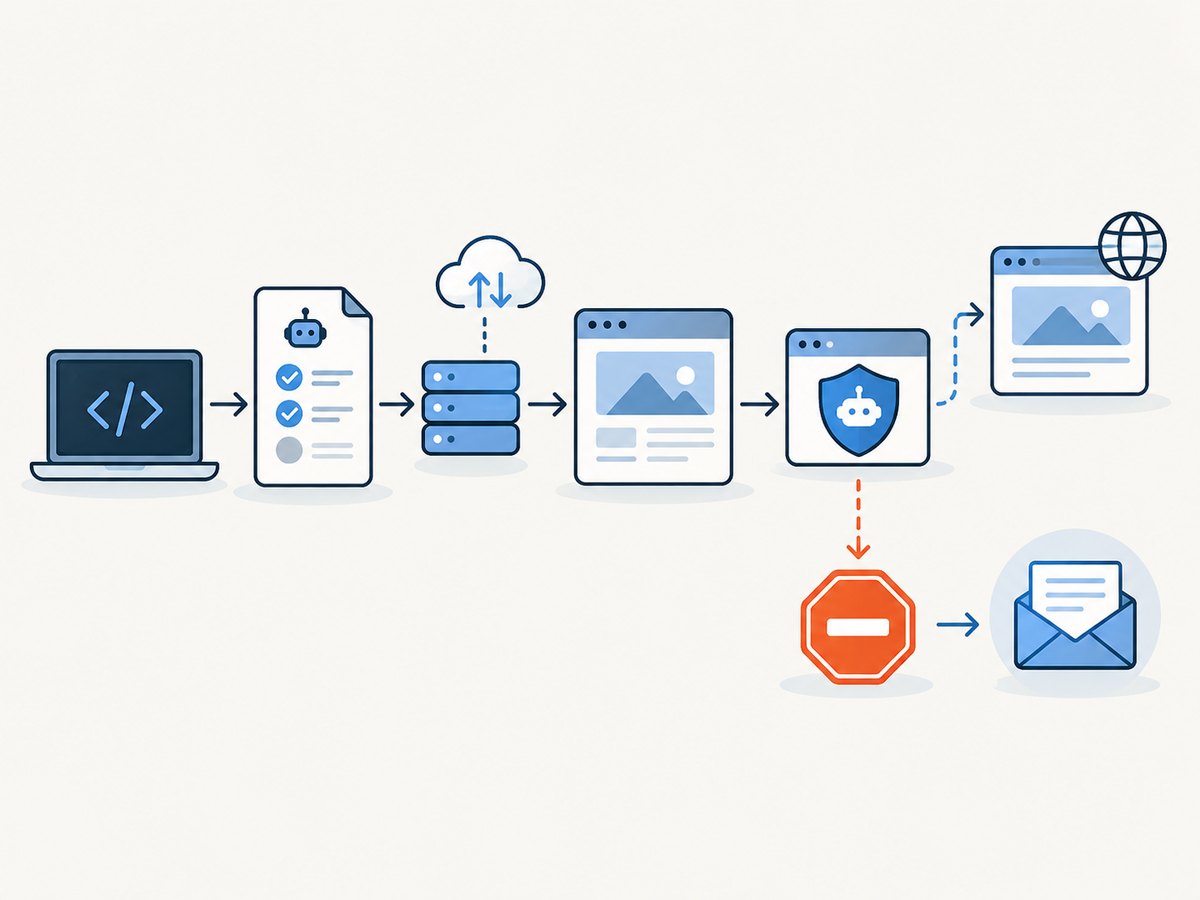
Use this pattern only for pages you own or have permission to crawl. It fetches a fixed list of URLs, waits for the document to become usable, extracts a title and text, and writes JSON locally. It does not retry challenges, change browser identity, rotate proxies, or reuse challenge cookies.
Install
mkdir permitted-crawl
cd permitted-crawl
npm init -y
npm install playwright
npx playwright install chromium
Save the following as crawl.mjs. Replace the example URLs with a small set of pages within your authorized scope.
import { chromium } from 'playwright';
import { writeFile } from 'node:fs/promises';

const urls = [
  'https://example.com/',
  'https://example.com/about'
];
const pauseMs = 1200;
const results = [];

const browser = await chromium.launch({ headless: true });
try {
  const context = await browser.newContext({
    viewport: { width: 1280, height: 800 }
  });
  const page = await context.newPage();
  page.setDefaultNavigationTimeout(20_000);

  for (const url of urls) {
    try {
      const response = await page.goto(url, { waitUntil: 'domcontentloaded' });
      const status = response?.status() ?? null;
      const title = await page.title().catch(() => '');
      const text = await page.locator('body').innerText({ timeout: 5_000 })
        .catch(() => '');
      const looksLikeChallenge = /checking your browser|verify you are human|attention required|challenge platform/i
        .test(`${title}\n${text.slice(0, 3000)}`);

      results.push({ url, status, title, text, looksLikeChallenge });
      if (looksLikeChallenge || status === 403 || status === 429) {
        console.warn(`Access needs review; stopping at ${url} (status ${status})`);
        break;
      }
    } catch (error) {
      results.push({ url, error: String(error) });
      console.warn(`Navigation failed at ${url}; stopping the crawl.`);
      break;
    }
    await page.waitForTimeout(pauseMs);
  }

  await writeFile('results.json', JSON.stringify(results, null, 2));
} finally {
  await browser.close();
}
Run it with node crawl.mjs. The challenge text check is only a cautious stop heuristic, not a way to identify every Cloudflare product or prove permission. Review results before using them, and stop if the site’s response indicates access is restricted.
Configure scope and pacing
- URL list: Keep it explicit and restricted to the agreed host and paths. Avoid discovering or following arbitrary links unless the permission covers that scope.
- Wait condition:
domcontentloadedis a reasonable starting point for content that appears with the initial document. If permitted content is rendered later, wait for a specific selector with a finite timeout. - Navigation timeout: Set a deadline so one slow page cannot hold the whole run indefinitely.
- Delay: Set a conservative pause and honor any published rate limit. If the owner specifies a limit, use it.
- Concurrency: Begin sequentially. Add concurrency only if the site owner’s limits permit it and you can stop promptly on throttling.
- Output: Save only fields needed for the stated purpose, and handle personal or sensitive data according to the applicable authorization and policy.
4. What to do when Cloudflare challenges the request
Cloudflare’s supported-browser guidance is direct: “Browser automation frameworks, such as Selenium, Puppeteer, Playwright, and Cypress, are not supported for solving production challenges.” Do not respond to a challenge by trying to disguise automation, automate challenge completion, transfer browser cookies, or cycle network identities. Those techniques attempt to defeat the site’s decision and are outside a permitted Playwright crawl.
- Stop the run and preserve the URL, time, status code, and a short error description.
- Check whether you have an approved API, export, or documented integration for the same data.
- If you need browser access, contact the site operator with your purpose, source network, requested paths, schedule, and expected volume. Ask whether they can provide an allowlist or another approved route.
- If you administer the site, inspect the Cloudflare rule and application logs. Cloudflare documents scraping detection IDs for suspicious request patterns by ASN and JA4 fingerprint, and notes that API paths may need exclusion from rules that issue challenges when those API calls should not be challenged (Scraping detections).
For a site you control, test your own Turnstile flow with Cloudflare’s test keys. Keep test configuration separate from production and do not treat a successful test as permission to crawl another organization’s site.
5. Cloudflare Browser Run for permitted research
Cloudflare Browser Run provides a crawl endpoint intended for multi-page research or monitoring. It enforces a per-domain rate limit to reduce the chance of overwhelming origin servers. Its documentation also says the endpoint does not bypass CAPTCHA, Turnstile, or other bot protections (Cloudflare Browser Run crawl endpoint).
Consider it when the crawl is permitted and the hosted workflow suits your task. Confirm the endpoint’s current request schema and limits in the documentation before building against it. A Cloudflare-hosted browser is not a means to crawl a protected third-party site without consent; if the crawl endpoint encounters a protection, use the same stop-and-contact workflow.
6. Screenshot a page without building browser infrastructure
If the task is to capture a visual record of a page you are allowed to access, ScreenshotNeo is a website screenshot API and MCP server from Yorker Media. It makes one GET request for a PNG, JPEG, WebP, or PDF capture. It is a screenshot tool rather than a general structured-data scraping API; use an official data API when you need records or fields rather than an image.
Or skip the browser setup
Use the API for pages you are authorized to capture. See the ScreenshotNeo API documentation for options and response details.
curl -G "https://api.screenshotneo.com/v1/shot" \
  -d access_key=YOUR_API_KEY \
  --data-urlencode url=https://stripe.com \
  -o shot.webp
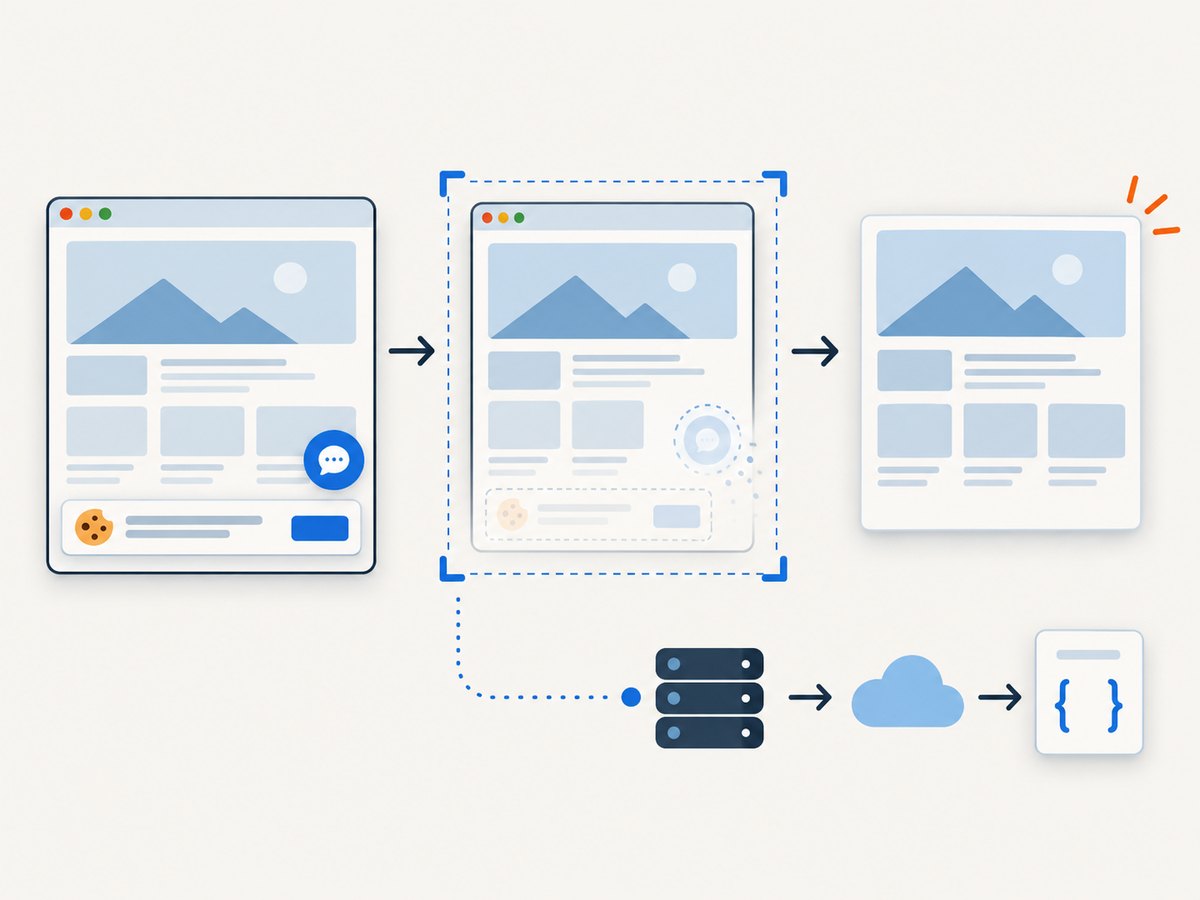
ScreenshotNeo accepts cookie and consent banners like a visitor and removes 60+ known consent platforms, newsletter popups, and chat widgets before the shot; each step can be turned off. Bot checks, blank pages, failed loads, timeouts, and cache hits are not billed, and the response identifies the page verdict and billing status in headers. Its MCP server gives AI agents tools for screenshots, page information, and PDF capture. The free plan includes 1,000 shots a month with no card; paid plans start at $5 for 3,000 shots. Try it with the free ScreenshotNeo sign-up.
7. Reliability, performance, and cost
Reliability
Browser rendering can vary with network conditions, client-side scripts, localization, and page changes. Record the requested URL, response status, capture time, and failure reason so you can distinguish a content change from a blocked or incomplete load. Use bounded timeouts and stop on denials or rate limits; do not automatically retry a challenge. For an owned site, validate selectors against representative pages and make the crawl safe to resume without duplicating downstream work.
Performance
Launching a browser has setup cost, so reuse one browser and context for a small sequential batch where the site’s rules allow it. Keep pages and resource collection minimal, and avoid unbounded concurrency. JavaScript-heavy pages may take longer than static pages; wait for the smallest meaningful readiness condition rather than an indefinite network-idle wait. For larger, approved jobs, ask the operator for a feed or API instead of increasing browser pressure.
Cost
A self-managed Playwright job has no per-screenshot API fee, but compute, storage, engineering time, and maintenance still have costs. A hosted browser or crawling service may have its own limits and pricing; check current documentation rather than assuming a free quota. ScreenshotNeo’s published plans are Free: 1,000 shots/month; Starter: $5 for 3,000; Growth: $15 for 15,000; Pro: $39 for 60,000; Scale: $99 for 250,000; Business: $249 for 1,000,000. Yearly billing gives two months free, and every feature is on every plan. Choose it for visual capture needs, not as a substitute for permission or structured data access.
8. Troubleshooting
| Symptom | Likely cause | Safe next step |
|---|---|---|
| Challenge page or verification widget appears | A Cloudflare product or site rule is challenging the request. | Stop automated attempts; use an API or ask the owner for an approved route. |
| HTTP 403 | The server or an access rule denied the request. | Do not retry in a loop. Record the response and request authorization. |
| HTTP 429 | Rate limit or throttling. | Stop, observe any published retry guidance, and ask the operator about allowed pacing. |
| Navigation timeout | Slow origin, stalled resources, or a page that never reaches the selected load state. | Use a finite timeout and the minimum readiness condition needed; investigate only within authorized scope. |
| Title loads but extracted text is empty | Content may render later, the selector may differ, or the page may be an interstitial. | Inspect the page outcome manually; for permitted dynamic content, wait for a known content selector. |
| Browser installation or launch fails | Playwright’s browser binary may be missing, or the runtime may lack required system dependencies. | Run the documented browser installation step for your environment and consult Playwright’s official setup docs. |
| Results duplicate after restart | The crawl resumed without tracking completed work. | Persist a small manifest keyed by URL and make downstream writes idempotent. |
9. FAQ
Can Playwright bypass Cloudflare?
Cloudflare does not support Playwright for solving production challenges. A browser automation library is not authorization and should not be treated as a bypass tool.
Can I use Playwright to test my own protected site?
Yes, for workflows you control. For Turnstile automation, use Cloudflare’s test keys and keep the test setup distinct from production.
Does robots.txt make scraping legal or technically impossible?
No. It communicates crawler preferences and does not technically block access. Check it alongside the site’s terms and your authorization.
Is Browser Run a CAPTCHA-solving service?
No. Its crawl endpoint is rate-limited per domain and does not bypass CAPTCHA, Turnstile, or other bot protections.
When is ScreenshotNeo the right fit?
When you need an authorized visual screenshot or PDF, including a capture through an API or an AI agent using MCP. For structured page data, prefer the site’s API or an approved crawler.


