How to Count and Extract Data from div Elements with Playwright
Count matching div elements with Playwright, extract their text and attributes, and keep results reliable when page content changes.

To count every div on a page with Playwright, create a locator and call count():
const divs = page.locator('div');
const count = await divs.count();
console.log(count);
To extract data from all matching elements, use a bulk method such as allTextContents(), allInnerTexts(), or evaluateAll(). For a test that expects a particular count, use Playwright’s retrying assertion toHaveCount() instead of reading the count once and comparing it yourself. That gives the page time to reach the expected state and avoids a common source of flaky tests. See the official Locator API and locator guide.
1. Set up a runnable Playwright example
This example uses Playwright Test with TypeScript. It navigates to a page, counts divs, and prints their text. The example URL is for demonstration; replace it with the page you own or are authorized to inspect. The expected count is deliberately not hard-coded because real pages differ.
- Install Playwright Test in your project.
- Save the test below as
tests/divs.spec.ts. - Run it with the Playwright test runner.
npm init playwright@latestimport { test, expect } from '@playwright/test';
test('count and extract div content', async ({ page }) => {
await page.goto('https://example.com');
const divs = page.locator('div');
const count = await divs.count();
const texts = await divs.allTextContents();
console.log({ count, texts });
expect(count).toBeGreaterThan(0);
});Run the test with:
npx playwright test tests/divs.spec.tsThe locator selects all div elements in the page’s document. The returned count and extracted values describe the DOM when those methods run. If the site adds content after navigation, wait for a meaningful page condition before collecting the snapshot; navigation completing does not necessarily mean every application has finished rendering its data.
2. Count div elements correctly
Read the current count
const divs = page.locator('div');
const count = await divs.count();count() returns the number of elements currently matching the locator. It is useful for reporting, branching, or inspecting a page. It is an immediate read, however, not a retrying assertion. If your test needs to verify that a changing list eventually has a particular size, prefer:
await expect(divs).toHaveCount(3);The number above is only an example. Set the expected value from the behavior your test is meant to enforce. Playwright retries web-first assertions until they pass or reach the assertion timeout, so the test can handle expected rendering delay without a manual sleep.
Count a subset
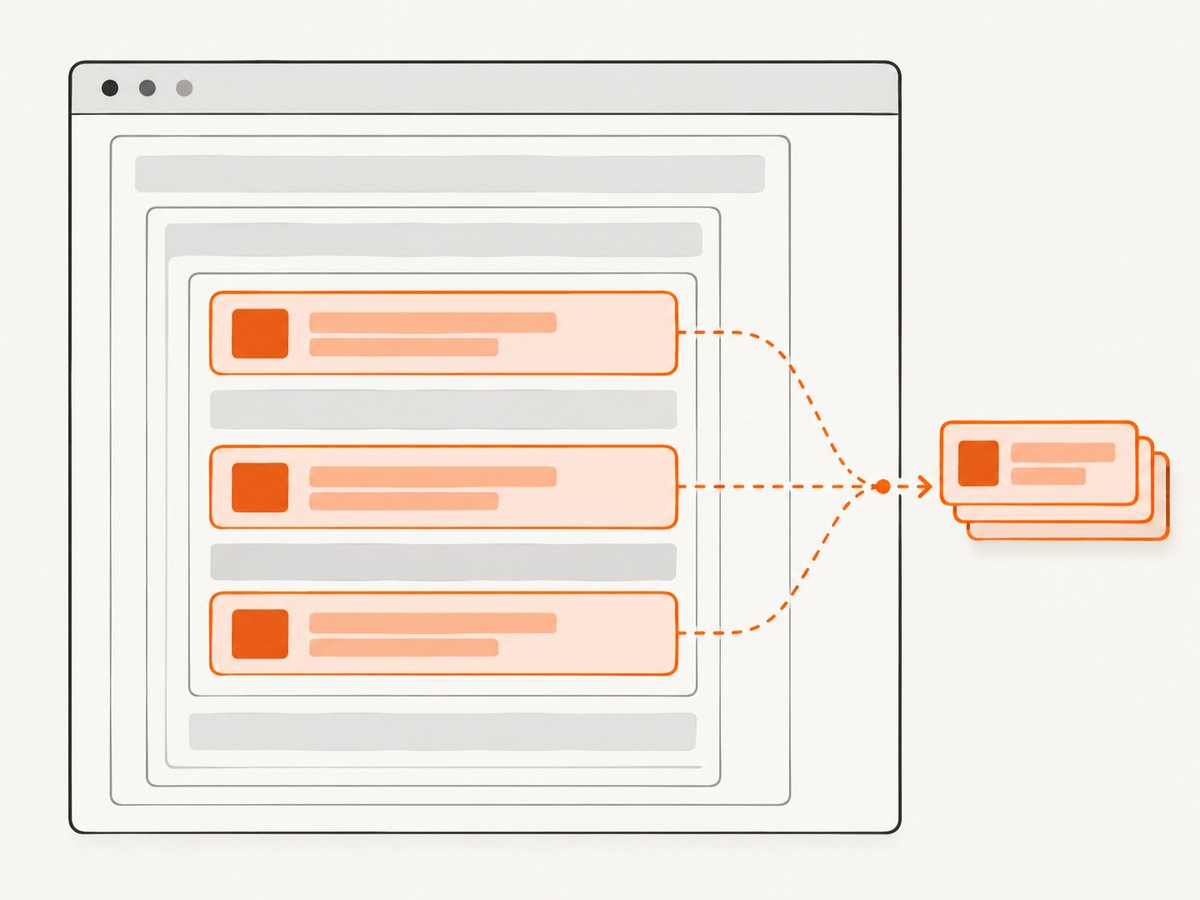
A broad div locator may match layout wrappers, menus, hidden containers, and nested elements in addition to the records you care about. Narrow it with a stable CSS selector or a locator rooted in a meaningful container:
const cards = page.locator('[data-testid="results"] > div');
const cardCount = await cards.count();
If content or accessible meaning identifies the target, consider a text locator for a non-interactive element. For interactive controls, prefer role-based locators. The Playwright locator guide recommends user-facing attributes and explicit test contracts; long CSS or XPath chains tied to page structure can break when markup changes.
3. Extract text from every match
Playwright offers two bulk text methods. Both return arrays in locator match order, but they answer slightly different questions:
| Method | Value | Use when |
|---|---|---|
allInnerTexts() |
Each element’s innerText |
You want text as rendered to the user. |
allTextContents() |
Each element’s textContent |
You want text nodes from the DOM, including text that may not be rendered. |
const visibleTexts = await divs.allInnerTexts();
const domTexts = await divs.allTextContents();
Choose based on what your test or extraction needs to represent. Rendered text and DOM text can differ: for example, an element may contain text that is hidden or not currently presented to the user. Avoid treating one method as a universal substitute for the other.
For a list of records, target the record elements first rather than selecting every div and trying to infer which strings matter afterward:
const records = page.locator('[data-testid="result-card"]');
const names = await records.allInnerTexts();
console.log(names);
4. Extract attributes and structured fields
Use evaluateAll() when each matched element needs multiple fields or custom processing. The callback runs in the page context and receives the matched elements as an array:

const rows = await divs.evaluateAll(elements =>
  elements.map(element => ({
    text: element.textContent,
    id: element.id,
    className: element.className,
    dataKey: element.getAttribute('data-key'),
  }))
);

console.log(rows);
This returns a serializable array of objects. Read attributes with getAttribute(); properties such as id and className can be read directly. Keep the callback focused on extracting values. The browser page context is separate from the Node.js test process, so do not reference variables that exist only outside the callback unless you pass their values in a supported way.
For a more realistic record extraction, make the locator correspond to one record per element and select child fields inside each record:
const products = page.locator('[data-testid="product"]');
const productData = await products.evaluateAll(elements =>
  elements.map(product => ({
    title: product.querySelector('[data-testid="title"]')?.textContent?.trim() ?? null,
    price: product.querySelector('[data-testid="price"]')?.textContent?.trim() ?? null,
    href: product.querySelector('a')?.getAttribute('href') ?? null,
  }))
);

console.log(productData);
Optional chaining handles missing child nodes by producing null instead of throwing. Decide whether missing fields are acceptable or should fail the test with an explicit assertion.
5. Handle dynamic pages and assertions
A locator describes how to find elements; it does not freeze the page into a snapshot. If the page is still loading or updating, a bulk read can observe an intermediate state. The Locator API also warns that all() immediately returns locators for elements currently present and can be unpredictable when the list changes.
For assertions, use retrying assertions:
const divs = page.locator('[data-testid="result-card"]');
await expect(divs).toHaveCount(3);
await expect(divs).toHaveText([
  'First result',
  'Second result',
  'Third result',
]);
For extraction after a known application signal, wait for that signal and then read:
await page.goto('https://example.com');
await page.locator('[data-testid="results-loaded"]').waitFor();

const records = page.locator('[data-testid="result-card"]');
const texts = await records.allInnerTexts();
Use a selector that represents the page’s real ready condition, such as a results container or loaded-state marker. A fixed timeout can make a test slower on fast runs and still fail on slow ones. If the page has no explicit ready marker, assert the expected count or content with Playwright’s retrying assertions before extracting.
6. Avoid strictness and locator mistakes
Bulk operations such as count(), allInnerTexts(), and evaluateAll() are intended for multiple matches. A single-element getter or action may be strict and throw when the locator matches several elements. Use bulk methods when you mean “all divs”; use a narrowed locator when you mean one specific element.
- Too broad:
page.locator('div').textContent()may target many elements when you intend one. - Better for a collection:
page.locator('div').allTextContents(). - Better for a specific card: identify the card by a stable test ID or meaningful content, then read that target.
Nested divs are counted separately. If a parent card contains several child divs, a page-wide div locator includes both the parent and children. Select the record boundary that matches the unit you want to count.
7. Troubleshooting common errors
| Symptom | Likely cause | Fix |
|---|---|---|
| Count is zero | The page has not rendered the target yet, the selector is wrong, or the content is inside a different document context. | Inspect the page and selector; wait for a meaningful loaded marker or assert the expected state with toHaveCount(). |
| Count is larger than expected | div matches wrappers, nested elements, or hidden content too. |
Use a locator for the actual record boundary, such as a test ID or a scoped CSS selector. |
| Text includes unexpected values | textContent includes DOM text that may not be rendered, or the locator includes nested content. |
Use allInnerTexts() for rendered text, or narrow the locator to the relevant element. |
| Assertion fails intermittently | The list changes while the test reads it, or the test checks too early. | Use web-first assertions such as toHaveCount() and wait for a meaningful application state before extraction. |
| Strict mode violation | A single-element operation found multiple matches. | Use a bulk method for a collection or refine the locator until it identifies one target. |
| Extracted fields are null | The expected child or attribute is absent from some matched elements. | Check the markup and selector; explicitly handle optional fields or assert required fields exist. |
8. Performance, reliability, and data handling
For a modest collection, bulk reads are straightforward and keep the extraction logic easy to review. Avoid repeatedly querying the entire page inside a loop when one evaluateAll() call can map the matched elements to the fields you need. More importantly, do not gather every div on a complex page when a narrower locator can represent the records. A page-wide result creates extra values to inspect and makes tests sensitive to unrelated layout changes.
Choose stable selectors. A dedicated test ID or an accessible name is generally a clearer contract than a long chain of classes and ancestors. If the UI intentionally changes, a test tied to the user-facing behavior can remain meaningful; a selector tied to incidental markup may need frequent repair.
For reliability, define the intended unit of data, wait for the application state that makes it available, then extract. Use assertions for conditions that must eventually become true, and reserve immediate count() reads for cases where the current snapshot is what you need. If you persist extracted page data, follow the site’s access rules and avoid collecting fields you do not need.
Or skip the browser setup
If the goal is to capture a page for inspection or documentation rather than to assert on its DOM, ScreenshotNeo provides a one-request screenshot API. A screenshot does not return structured div data; use Playwright extraction when you need DOM values. For visual capture, one GET request returns a screenshot or PDF. See the ScreenshotNeo API documentation.
curl -G "https://api.screenshotneo.com/v1/shot" \
  -d access_key=YOUR_API_KEY \
  --data-urlencode url=https://stripe.com \
  -o shot.webp
Python:
import requests

r = requests.get(
    "https://api.screenshotneo.com/v1/shot",
    params={"access_key": "YOUR_API_KEY", "url": "https://stripe.com"},
    timeout=90,
)
open("shot.webp", "wb").write(r.content)
Node.js:
const q = new URLSearchParams({
  access_key: 'YOUR_API_KEY',
  url: 'https://stripe.com',
});
const res = await fetch(`https://api.screenshotneo.com/v1/shot?${q}`);
const bytes = new Uint8Array(await res.arrayBuffer());
await import('node:fs/promises').then(fs => fs.writeFile('shot.webp', bytes));
ScreenshotNeo removes cookie banners, newsletter popups, and chat widgets before capture. Bot checks, blank pages, and failed loads are not billed; response headers report the page verdict and billing status. Its MCP server lets AI agents use screenshot tools. The free plan includes 1,000 screenshots per month with no card, and paid plans start at $5 for 3,000. Create an account for 1,000 free screenshots a month, with no card required.
9. FAQ
Does page.locator('div') include nested divs?
Yes. Each matching div is part of the locator result, including nested div elements. Narrow the selector if you mean one record per card or row.
Should I use all() or allTextContents()?
Use allTextContents() when you need an array of DOM text values. Use all() when you specifically need a list of locators for further per-element operations, and account for the fact that it reads the current set immediately.
Can Playwright extract custom attributes?
Yes. Use evaluateAll() to map each matched element to the attributes and fields you need, or use locator methods when you are working with a specific element.
Why does my extracted text differ from what I see?
You may be reading textContent, which represents DOM text, rather than innerText, which represents rendered text. The selected div may also contain nested content beyond the visible field you intended to extract.


