Practical XPath for Web Scraping
Learn XPath for reliable web scraping: extract text, links and attributes, handle nested selectors, namespaces and dynamic pages, and avoid brittle queries.

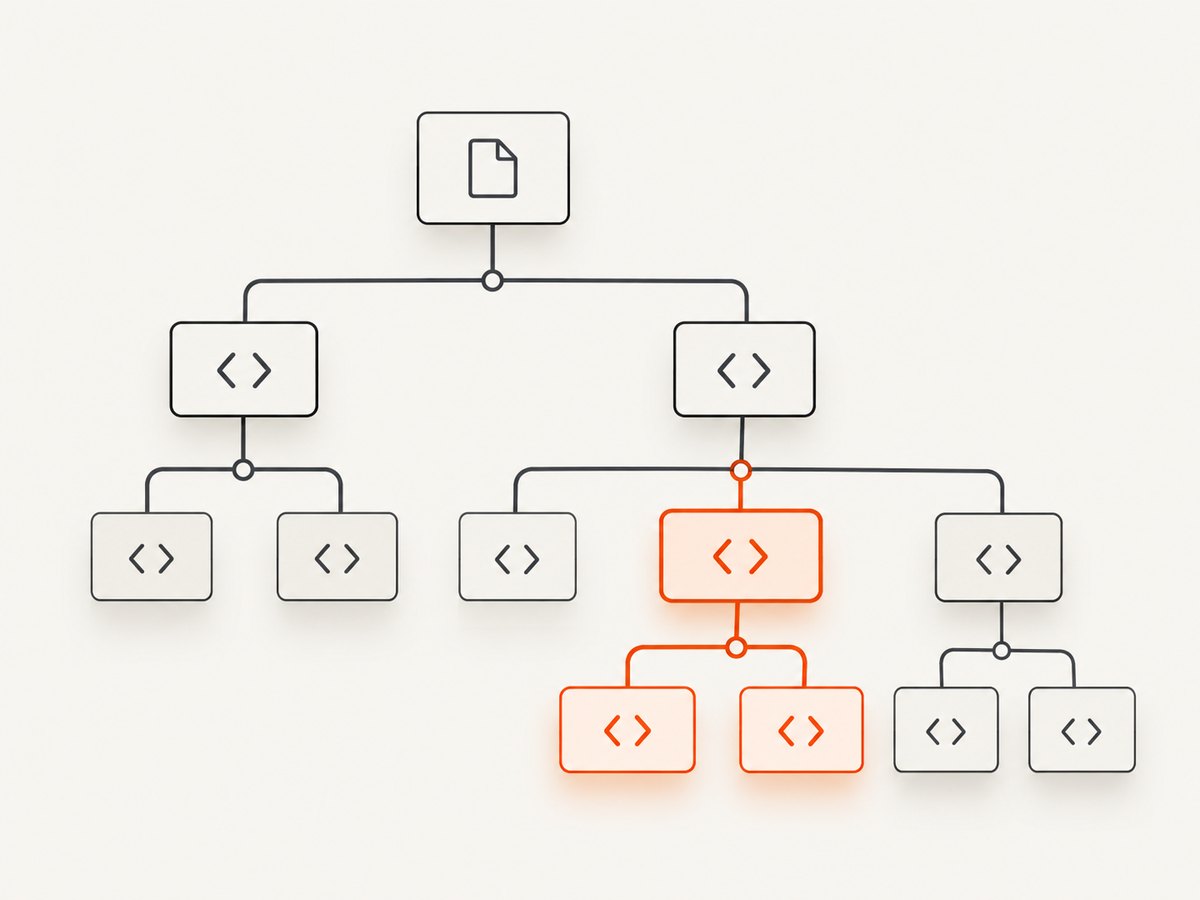
XPath is a query language for selecting nodes in an HTML or XML tree. In a scraper, you write an expression such as //article//h2/a/@href, apply it to the parsed response, and read the matching text, attributes or elements. XPath is especially useful when the data is defined by relationships—an item’s heading followed by its price, a link inside a particular section, or a table cell in a named row.
The fastest path to dependable extraction is:
- Inspect the document and identify a stable element or attribute.
- Start with a short path such as
//article//h2. - Add predicates only when they express a real condition, such as
[@data-id]or[contains(@class, 'product')]. - Use a relative path beginning with
.when querying an already selected subtree. - Test the result count and keep a fallback for missing fields.
XPath is a W3C expression language for addressing nodes in XML-derived data models. The browser DOM XPath API and popular Python parsers generally expose XPath 1.0 behavior. The W3C XPath 1.0 Recommendation and the Scrapy selector documentation are the primary references.
1. XPath syntax you use every day
| Expression | What it selects |
|---|---|
/html/body/main |
An absolute path from the document root. |
//h1 |
Every h1 descendant anywhere in the document. |
//a/@href |
The href attribute of every link. |
//p/text() |
Direct text nodes of paragraphs. |
//article//h2 |
Headings at any depth inside an article. |
//div[@data-id='42'] |
A div whose data-id equals 42. |
//button[contains(normalize-space(.), 'Next')] |
A button whose visible text contains “Next”. |
//input[@name='email']/@value |
The value attribute of a named input. |
A slash selects a direct child; // searches descendants at any depth. The wildcard * matches any element, while node() matches any node type. Use . for the current node and .. for its parent.
Text, attributes and complete markup
Use string(.) when text is nested inside several child elements. normalize-space() trims leading and trailing whitespace and collapses runs of whitespace, which is useful for headings assembled from spans.
//article[1]//h2/string()
//article[1]//h2//text()
//a/@href
//meta[@property='og:title']/@content
These expressions return different shapes. A parser may expose individual text nodes for //h2//text(), while string(.) produces one combined string for each selected element. Choose the form that matches your output schema.
2. Extracting data with Scrapy and Parsel
Scrapy selectors support both XPath and CSS. Parsel is the stand-alone selector library used by Scrapy, and it uses lxml to parse HTML and XML. In Scrapy, .get() returns one serialized result and .getall() returns all results.
import scrapy

class ArticleSpider(scrapy.Spider):
    name = "articles"
    start_urls = ["https://example.com/news"]

    def parse(self, response):
        for card in response.xpath("//article"):
            title = card.xpath("normalize-space(.//h2//text())").get()
            href = card.xpath("string(.//h2/a/@href)").get()
            summary = card.xpath("normalize-space(.//p[contains(@class, 'summary')])").get()
            published = card.xpath("string(.//time/@datetime)").get()
            yield {
                "title": title,
                "url": response.urljoin(href) if href else None,
                "summary": summary,
                "published": published,
            }

        next_href = response.xpath("//a[@rel='next']/@href").get()
        if next_href:
            yield response.follow(next_href, callback=self.parse)
The important detail is the context variable card. Each expression is evaluated inside one article, so a title cannot accidentally come from another card. If a field is optional, check for None before converting it or joining its URL.
Relative paths prevent the nested-selector bug
A leading slash or // starts a search at the document root, even when called on a selected subtree. Therefore cards.xpath('//p') returns every paragraph in the response. Use ./ or a descendant path relative to the current node:
cards = response.xpath("//article")
for card in cards:
    # Correct: only this card's time element
    date = card.xpath("./time/@datetime").get()
    # Also relative: descendants of this card
    links = card.xpath(".//a/@href").getall()
This rule is one of the most common causes of duplicated or mismatched fields in nested extraction.
Position predicates: first per parent versus first globally
//li[1] selects the first li under each parent list. Parentheses change the scope: (//li)[1] selects the first list item in document order. Use the second form when you truly need one global first result.
first_item_each_list = response.xpath("//ul/li[1]").getall()
first_item_document = response.xpath("(//ul/li)[1]").get()
3. Predicates, axes and robust matching
Predicates filter a node set. Combine conditions with and or or, compare numbers with operators such as >, and use functions for unstable text or class attributes.
//article[@data-type='review' and @data-id]
//div[contains(concat(' ', normalize-space(@class), ' '), ' product-card ')]
//tr[td[1][normalize-space()='Total']]/td[last()]
//a[starts-with(@href, '/download/')]/@href
The class expression with concat avoids matching a class such as not-product-card. Prefer stable attributes such as data-testid, semantic element names and accessible labels over long chains of anonymous div elements.
Axes describe relationships beyond descendants:
//label[normalize-space()='Email']/following-sibling::input[1]
//h2[normalize-space()='Specifications']/following::table[1]
//span[@class='price']/ancestor::article[1]
//td[normalize-space()='SKU']/following-sibling::td[1]
Axes are powerful for irregular layouts, but they can become difficult to explain. Keep the path short and anchor it to a visible, stable label.
4. Links, URLs, tables and repeated records
Attributes are selected with @name. Resolve relative links against the response URL rather than storing the raw value.
for href in response.xpath("//a[@href]/@href").getall():
    absolute = response.urljoin(href)
    yield {"url": absolute}
For tables, select rows first and extract cells relative to each row. This preserves column relationships when rows contain nested markup.
for row in response.xpath("//table[@id='orders']//tbody/tr"):
    cells = row.xpath("./td//text()").getall()
    values = [" ".join(text.split()) for text in cells]
    yield {
        "order": values[0] if len(values) > 0 else None,
        "status": values[1] if len(values) > 1 else None,
        "total": values[2] if len(values) > 2 else None,
    }
When the table has a header row, map headers to indexes instead of assuming a fixed position. Validate the number of cells and log rows that do not match the expected shape.
5. Namespaces and XPath regex extensions
XML documents can qualify element names with namespaces. Register a prefix-to-URI mapping and use that prefix in the XPath expression.
namespaces = {"atom": "http://www.w3.org/2005/Atom"}
entries = response.xpath("//atom:entry", namespaces=namespaces)
for entry in entries:
    title = entry.xpath("string(./atom:title)", namespaces=namespaces).get()
    yield {"title": title}
For HTML, a parser may normalize or remove namespace details. Inspect the parsed tree before adding prefixes. Scrapy also pre-registers EXSLT namespaces, including re:test() for regular-expression matching. It is an implementation extension, not core XPath 1.0, and the Scrapy documentation notes a small performance cost from lxml’s Python regular-expression hook.
# Scrapy/Parsel EXSLT example
response.xpath("//a[re:test(@href, '^/docs/')]/@href").getall()
Use ordinary predicates such as contains or starts-with when they are sufficient; they are easier to port to other XPath engines.
6. XPath in a browser and on dynamic pages
Browser automation can evaluate XPath after JavaScript has changed the DOM. Selenium supports XPath and CSS locators; its documentation notes that XPath works but can be more complicated and harder to debug than CSS. Use XPath when you need text or structural relationships, and CSS when a simple class, ID or attribute selector communicates the intent more clearly.
// Selenium Python
from selenium import webdriver
from selenium.webdriver.common.by import By

browser = webdriver.Chrome()
browser.get("https://example.com")
heading = browser.find_element(By.XPATH, "//main//h1").text
links = [a.get_attribute("href") for a in browser.find_elements(
    By.XPATH, "//main//a[@href]"
)]
browser.quit()
Wait for a meaningful element rather than sleeping for an arbitrary duration. For content loaded after scrolling, trigger the page behavior first, then query the resulting DOM. If a site renders data only after an interaction, record the interaction and the selector you expect to appear so failures are diagnosable.
7. cURL, Python and Node.js inspection workflow
cURL is useful for checking the server response before writing selectors. It does not execute page JavaScript.
curl -L --compressed https://example.com/news -o page.html
For a small, static document, Python and lxml provide a direct XPath loop:
import requests
from lxml import html

url = "https://example.com/news"
response = requests.get(url, timeout=30)
response.raise_for_status()
tree = html.fromstring(response.content)
for node in tree.xpath("//article"):
    print({
        "title": " ".join(node.xpath(".//h2//text()" )).strip(),
        "url": node.xpath("string(.//h2/a/@href)"),
    })
In Node.js, a browser context can evaluate XPath against the live DOM. The following function uses the standard DOM XPath evaluator available in browser automation environments:
const result = await page.evaluate(() => {
  const xpath = "//main//article//h2";
  const snapshot = document.evaluate(
    xpath,
    document,
    null,
    XPathResult.ORDERED_NODE_SNAPSHOT_TYPE,
    null
  );
  return Array.from({ length: snapshot.snapshotLength }, (_, i) =>
    snapshot.snapshotItem(i).textContent.trim()
  );
});
console.log(result);
Use the HTML returned by the server for static pages and a browser DOM for JavaScript-generated content. Keep those two cases separate when debugging: an XPath that is correct in the browser may find nothing in the initial HTTP response.
8. Testing and maintaining XPath selectors
- Check cardinality. Assert that required selectors return exactly one result and that collection selectors return at least one result when the page contract says they should.
- Test missing fields. Empty states, sponsored cards and pagination endpoints often omit fields.
- Use fixtures. Save representative HTML for normal, empty and changed layouts, then run extraction against each fixture.
- Log the selector and URL. A failing value is actionable when you can see the source page and the expression.
- Prefer semantic anchors. A short path based on a stable attribute survives harmless DOM wrappers better than an absolute path.
Do not silently accept an empty result for a required field. Emit a warning or route the page to a review queue so layout changes are visible.
9. Troubleshooting common XPath errors
| Symptom | Likely cause | Fix |
|---|---|---|
| Every nested item contains the same page-wide value | The nested expression begins with //. |
Use ./ or .// from the selected parent. |
| “First” returns several nodes | //li[1] means first child per parent. |
Use (//li)[1] for the first document-wide match. |
| No matches, but the browser shows the content | The content is rendered after JavaScript. | Use a browser DOM after the required wait or interaction. |
| Text is empty | Text is inside descendants or whitespace nodes. | Try string(.), .//text() and normalize-space(). |
| A class selector matches unrelated elements | Substring matching found a partial class name. | Use the token-safe concat(' ', normalize-space(@class), ' ') pattern. |
| Namespaced XML returns zero nodes | The XPath uses an undeclared prefix. | Pass a prefix-to-URI namespace mapping. |
| Relative URLs are malformed | The raw href was stored without its base URL. |
Use the framework’s URL-join helper. |
| Selectors break after a redesign | The path depends on incidental DOM depth or generated classes. | Anchor to stable attributes, labels or semantic relationships. |
10. XPath versus CSS selectors
CSS is usually clearer for a direct tag, class or attribute match. XPath can express parent, ancestor, sibling and text relationships that CSS cannot express consistently across scraping libraries. XPath also has a natural role in XML and namespace-aware documents. A maintainable scraper can use both: CSS for simple fields and XPath for relationships and predicates.
There is no authoritative benchmark in the supplied research that supports a numeric speed claim. Choose based on selector clarity, parser support and how easily the team can debug a failure. Keep selectors short enough to explain in a code review.
11. Performance, reliability and cost
- Parse once. Build one response tree and run several focused selectors instead of downloading the same page repeatedly.
- Limit broad scans. Scope expensive expressions to a section or selected record before applying descendant searches.
- Avoid regex unless needed. Simple XPath string functions are easier to port and generally cheaper than extension hooks.
- Control browser work. Browser rendering is slower and more resource intensive than parsing a static response, so use it only when JavaScript is required.
- Cache carefully. Cache source responses when the page can be reused, and record the retrieval time so stale data is visible.
- Retry selectively. Retry transient transport failures, but do not hide persistent selector failures behind retries.
XPath itself has no service fee. Your cost comes from requests, bandwidth, browser sessions and maintenance. A predictable extraction pipeline measures response status, page verdict, item counts and elapsed time for every URL.
12. Or skip the browser setup
If you need a clean image or PDF of a page rather than structured nodes, ScreenshotNeo provides a single screenshot API request. Its capture pipeline accepts consent banners before the shot and removes more than 60 known consent platforms, newsletter popups and chat widgets. Bot checks, blank pages, timeouts, failed loads and cache hits are not billed, and the response identifies the page verdict and billing status in X-Page-Verdict and X-Billed headers.

See the ScreenshotNeo API documentation for all options. The basic request is:
cURL
curl -G "https://api.screenshotneo.com/v1/shot" -d access_key=YOUR_API_KEY --data-urlencode url=https://stripe.com -o shot.webpPython
import requests
r = requests.get("https://api.screenshotneo.com/v1/shot", params={"access_key": "YOUR_API_KEY", "url": "https://stripe.com"}, timeout=90)
open("shot.webp", "wb").write(r.content)
Node.js
const q = new URLSearchParams({ access_key: 'YOUR_API_KEY', url: 'https://stripe.com' });
const res = await fetch(`https://api.screenshotneo.com/v1/shot?${q}`);
For captures that need more control, ScreenshotNeo supports full-page shots with lazy images loaded, CSS-element capture, dark mode, 12 device presets or any viewport, retina scale, PDF paper size and margins, page ranges, custom CSS and JavaScript, clicks, selector or network-idle waits, blocked ads and trackers, custom headers, cookies, user agents and Authorization, timezone and geolocation, transparent backgrounds, resizing, chosen cache TTLs, signed image links, asynchronous jobs with signed webhooks, bulk capture for up to 100 URLs per call, a usage API and an OpenAPI specification. Existing parameter names used by other screenshot APIs also work, which helps when switching.
ScreenshotNeo also includes an MCP server with take_screenshot, get_page_info and capture_pdf tools for Claude, Cursor and other MCP clients. The Free plan includes 1,000 shots each month with no card; paid plans start at $5 for 3,000 shots. Create a free ScreenshotNeo account to try it.
13. FAQ
Is XPath only for XML?
No. XPath addresses XML-derived trees and can also select nodes in parsed HTML and browser DOMs.
Should I start selectors with //?
Use // for a document-wide search. Inside a selected record, use .// or ./ so the query remains scoped.
How do I select the first matching element?
Use parentheses for a global position, such as (//article)[1]. Without parentheses, a positional predicate can apply once per parent.
Can XPath select elements by visible text?
Yes. Expressions such as //button[normalize-space()='Submit'] or contains(normalize-space(.), 'Next') match text, but text can change with localization. Stable attributes are usually safer.
When should I use CSS instead?
Use CSS when a simple tag, class or attribute selector is sufficient and clearer for your team. Use XPath for structural relationships, text predicates and namespace-aware XML.


