How to Prevent DOMPDF Columns from Jumping Between Pages
Fix DOMPDF column jumps by matching your layout to its pagination model, debugging breaks, and choosing safe alternatives for independent columns.
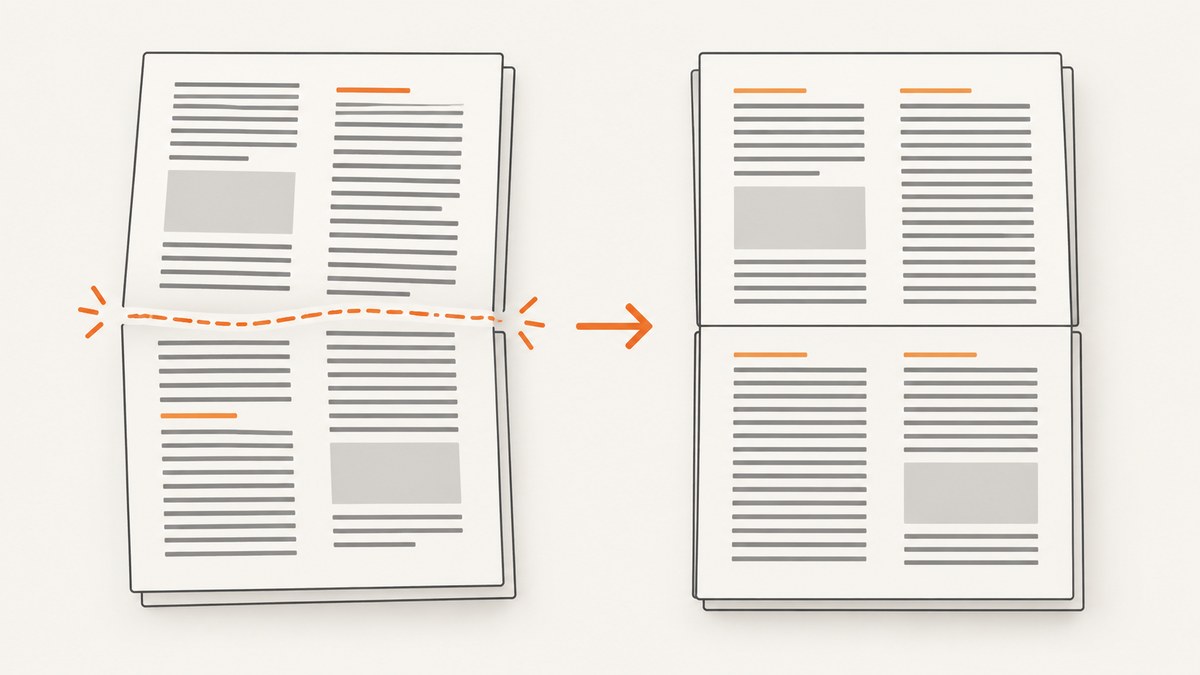
Short answer: DOMPDF cannot guarantee that two independently flowing columns stay aligned across page boundaries. If each left/right pair belongs together, model each pair as a short table row. DOMPDF treats a table row as an indivisible pagination unit, so every row must fit on one page. If the columns must continue independently for several pages, simplify the layout, render the columns separately and merge the PDFs, or evaluate another renderer.
First identify which layout you actually need:
- Paired content: each left item belongs with the right item beside it. Use one table row per pair and keep the row short enough to fit on a page.
- Independent columns: each column is a separate stream that may continue while the other has a different height. DOMPDF’s pagination model may not support this reliably; use separate documents or a different renderer.
Why DOMPDF columns jump
DOMPDF is mostly CSS 2.1 compliant, with documented limits around pagination. Its project documentation states: Table cells are not pageable, meaning a table row must fit on a single page.
A long row cannot flow like ordinary text across pages. The [DOMPDF project overview](https://github.com/dompdf/dompdf/wiki/Requirements-and-Limitations) also does not promise arbitrary independent multi-column flow.
A two-column layout built from inline-block, floats, or a framework grid can therefore produce this sequence: the first column grows, reaches the page bottom, and continues on the next page while the second column is repositioned or starts later. This is a consequence of the renderer’s frame and page-break decisions, not a universal CSS switch that can force browser-style newspaper columns.
Choose the correct document structure
Use table rows for paired items
When the relationship is row-based, make it explicit in the markup. Give each logical pair one row, set predictable widths, and avoid putting an entire multi-page article in one row.
<style>
@page { size: A4 portrait; margin: 18mm; }
body { font-family: DejaVu Sans, sans-serif; font-size: 10pt; }
table.pairs {
  width: 100%;
  border-collapse: collapse;
  table-layout: fixed;
}
table.pairs td {
  width: 50%;
  vertical-align: top;
  padding: 0 8pt 10pt 0;
}
table.pairs tr { page-break-inside: avoid; }
</style>

<table class="pairs">
  <tr>
    <td><h3>Left item</h3><p>Short content...</p></td>
    <td><h3>Right item</h3><p>Short content...</p></td>
  </tr>
  <tr>
    <td><h3>Another left item</h3><p>Short content...</p></td>
    <td><h3>Another right item</h3><p>Short content...</p></td>
  </tr>
</table>
This keeps each pair together only when the row fits on one page. A row taller than the printable page still cannot be split safely.
Do not use one huge row
If each column contains many paragraphs, do not place all of them in a single table row. Split the content into smaller logical pairs. If no meaningful row boundary exists, a table is the wrong model for the required independent flow.
Be careful with row groups
The compatibility reference marks page-break-before, page-break-after, page-break-inside, and table-layout as supported, but says page-break properties are not supported on table row groups. Apply a rule to the element whose break you intend to control; do not assume styling thead, tbody, or another group controls every row. See the [DOMPDF CSS compatibility reference](https://github.com/dompdf/dompdf/wiki/CSSCompatibility).
A complete PHP DOMPDF example
Install DOMPDF with Composer, then render a deliberately row-oriented layout:
composer require dompdf/dompdf<?php
require __DIR__ . '/vendor/autoload.php';
use Dompdf\Dompdf;
use Dompdf\Options;
$options = new Options();
$options->set('isRemoteEnabled', false);
$options->set('defaultFont', 'DejaVu Sans');
$dompdf = new Dompdf($options);
$items = [
['L-1', 'R-1'],
['L-2', 'R-2'],
['L-3', 'R-3'],
];
$rows = '';
foreach ($items as [$left, $right]) {
$left = htmlspecialchars($left, ENT_QUOTES, 'UTF-8');
$right = htmlspecialchars($right, ENT_QUOTES, 'UTF-8');
$rows .= "<tr><td>$left</td><td>$right</td></tr>";
}
$html = <<<'HTML'
<!doctype html>
<html><head><meta charset="utf-8">
<style>
@page { size: A4; margin: 18mm; }
body { font-family: DejaVu Sans, sans-serif; font-size: 10pt; }
table { width: 100%; border-collapse: collapse; table-layout: fixed; }
td { width: 50%; vertical-align: top; padding: 0 8pt 12pt 0; }
tr { page-break-inside: avoid; }
</style></head>
<body><table>ROWS_PLACEHOLDER</table></body></html>
HTML;
$html = str_replace('ROWS_PLACEHOLDER', $rows, $html);
$dompdf->loadHtml($html, 'UTF-8');
$dompdf->setPaper('A4', 'portrait');
$dompdf->render();
$dompdf->stream('paired-columns.pdf', ['Attachment' => false]);Keep the installed DOMPDF version, PHP version, paper size, orientation, margins, and relevant CSS with every bug report. Behavior can differ between releases and configurations.
Debug the actual page break
- Reduce the HTML. Keep only the affected section, the same text lengths, widths, fonts, and margins. Remove headers, footers, framework styles, and unrelated content.
- Classify the flow. Decide whether pairs must stay together or columns must continue independently. Do not apply the table solution to independent streams without accepting its row constraint.
- Collect warnings and debug output. Follow the [DOMPDF troubleshooting guidance](https://github.com/dompdf/dompdf/wiki/Debugging) for warnings, frame details, page-break logging, and layout boxes. The documented options include
$_DOMPDF_DEBUG_TYPES = ['page-break' => true],$_dompdf_debug, anddebugLayoutwith box visualization. - Change one variable at a time. Test structure, widths, break rules, and content size separately.
- Confirm with a minimal reproducible document. A reduced file tells you whether the cause is content height, row grouping, unsupported CSS, malformed markup, or the surrounding template.
CSS and width details that matter
- Use
table-layout: fixedand explicit column widths when paired rows are required. - Set
box-sizing: border-boxand account for cell padding and borders so the two declared widths fit inside the printable area. - Keep long unbroken strings, large images, and oversized headings out of a row or wrap them before rendering.
- Apply
page-break-inside: avoidto the row or content block you want kept together, while remembering that support is limited by the element type and renderer version. - Do not assume Bootstrap’s grid produces browser-equivalent columns in PDF output. A 2023 issue reports a two-column section separating at a page break in an A4 portrait document using Bootstrap 3; that is a case report, not proof that every Bootstrap setup fails.
Version-specific behavior
A 2021 issue reported that DOMPDF 1.0.2 ignored specified table column widths when page-break-inside: avoid was triggered, evenly dividing columns; the reporter said 0.8.5 retained the widths. The issue was associated with milestone 1.1.0. Treat this as a historical, version-specific report and reproduce it against the version you install. Do not assume it describes every current release.
When independent columns are mandatory
If each column must flow for several pages independently, there may be no simple in-engine fix. A 2016 maintainer discussion about sequential inline-block columns said there was no straightforward workaround when either column could exceed a page and suggested rendering separate documents and merging them with FPDI. The thread is historical and case-specific; validate headers, page counts, bookmarks, fonts, and alignment in your own merge pipeline.
Separate-render workflow
- Build one HTML document for the left stream and one for the right stream.
- Render each with the same paper size, margins, fonts, and page-height assumptions.
- Merge the resulting PDFs with your chosen PDF merger, such as FPDI.
- Compare page counts and inspect pages where one stream ends earlier than the other.
- Regenerate both documents when shared headers, footers, or page numbers must remain synchronized.
If this maintenance cost is unacceptable, redesign the page as paired rows or evaluate another renderer that supports the independent-flow model you need. The research for this guide does not benchmark alternative renderers.
Troubleshooting checklist
| Symptom | Likely cause | Fix |
|---|---|---|
| Right column starts on the next page | Independent inline or float flow reached a page boundary | Use paired table rows, or render columns separately and merge. |
| A pair splits unexpectedly | The row is taller than the printable page, or the break rule is on an unsupported element | Shorten the row, split the pair, and apply the rule to the row/content block. |
| Widths become 50/50 | Version-specific interaction between widths and page-break-inside: avoid |
Record the version, reproduce minimally, try explicit table layout, and check release notes/issues. |
| Only the full template fails | Framework CSS, malformed markup, inherited widths, or page furniture changes available height | Remove dependencies, validate HTML, then add styles back one group at a time. |
| Images push rows to a new page | Intrinsic image dimensions exceed the remaining height | Set dimensions, resize assets, and keep large images out of indivisible rows. |
| Break rules appear ignored | Rule applied to a row group or unsupported structure | Move it to a supported element and verify with DOMPDF debug output. |
Performance, reliability, and cost
- Performance: Smaller HTML and fewer high-resolution assets reduce layout work. A minimal reproduction is also faster to diagnose than a complete application template.
- Reliability: Pin and record the DOMPDF version, PHP version, fonts, paper size, and CSS. Re-render representative long and short rows after upgrades.
- Memory: Large images, remote assets, and long documents increase memory use. Disable remote resources unless required and resize images before embedding.
- Pagination: Test the shortest, longest, and boundary-length pairs. A row that fits on one page today can become unbreakable when copy or font metrics change.
- Cost: DOMPDF runs in your PHP environment, so account for server CPU, memory, storage, and any PDF merge step. No benchmark or success rate is established by the cited sources.
Or skip the browser setup
If your real goal is a dependable screenshot or PDF of a web page rather than a PHP-generated DOMPDF file, [ScreenshotNeo](https://screenshotneo.com) provides a single HTTP request. Its capture pipeline accepts cookie and consent banners like a visitor, then removes more than 60 known consent platforms, newsletter popups, and chat widgets before the shot. Bot checks, blank pages, timeouts, failed loads, and cache hits are not billed, and response headers report the page verdict and billing status.
It also has an MCP server for Claude, Cursor, and other MCP clients, with take_screenshot, get_page_info, and capture_pdf tools. One thousand screenshots per month are free with no card; paid plans start at $5 for 3,000 shots.
See the [ScreenshotNeo API docs](https://screenshotneo.com/docs/) for all options.
curl -G "https://api.screenshotneo.com/v1/shot" -d access_key=YOUR_API_KEY --data-urlencode url=https://example.com/report -o shot.webpimport requests
r = requests.get("https://api.screenshotneo.com/v1/shot", params={"access_key": "YOUR_API_KEY", "url": "https://example.com/report"}, timeout=90)
open("shot.webp", "wb").write(r.content)const q = new URLSearchParams({ access_key: 'YOUR_API_KEY', url: 'https://example.com/report' });
const res = await fetch(`https://api.screenshotneo.com/v1/shot?${q}`);Create a free ScreenshotNeo account with 1,000 screenshots each month and no card required.
FAQ
Can one CSS property permanently align DOMPDF columns?
No. page-break-inside: avoid can help on supported elements, but it does not create independent column flow or override the one-page table-row constraint.
Should I always replace columns with a table?
Only when each horizontal pair belongs together and each row can fit on a page. Independent streams or very tall pairs need another structure.
Does Bootstrap cause the bug?
Not necessarily. A reported Bootstrap 3 case shows the symptom, but markup, CSS, version, paper size, and content height all affect pagination.
What should I include in a bug report?
Include the DOMPDF and PHP versions, paper size and orientation, reduced HTML/CSS, exact content lengths, relevant options, warnings, and debug output.
Can DOMPDF split a table row over two pages?
Its documented behavior says table cells are not pageable, so a row must fit on one page.


