How to Prevent Line Breaks in Wkhtmltopdf PDFs
Stop wkhtmltopdf from splitting lines, blocks, and table rows with targeted CSS, reproducible tests, and practical renderer alternatives.
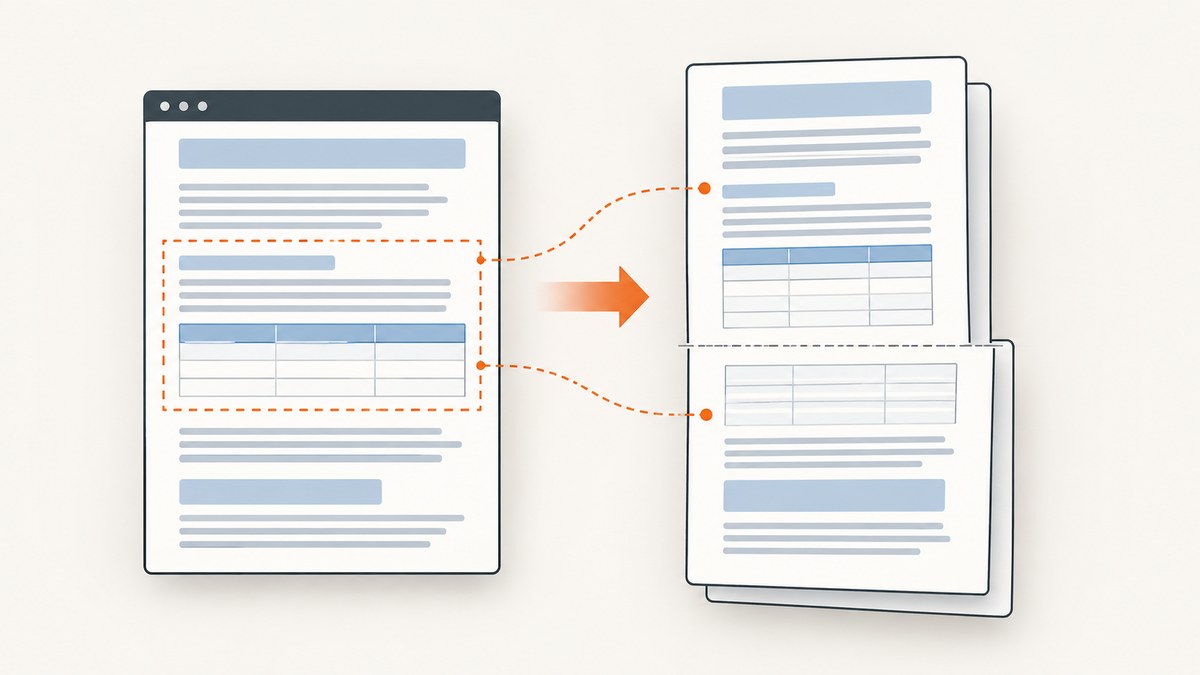
Short answer: first identify what is breaking. For a paragraph or other block, apply page-break-inside: avoid to the smallest practical wrapper. For a table, try the rule on the row or a row wrapper, then inspect the generated PDF with the exact production binary. This is a mitigation, not a guarantee: wkhtmltopdf uses an old Qt/WebKit engine, and its documentation says patched-Qt support for this property may remedy splitting only partially.
A keep-together rule also cannot make content taller than the printable area fit on one page. If a row or block is taller than a page after margins and headers are applied, restructure it or allow a deliberate split. The reliable workflow is to reproduce the break with the exact binary, fonts, page size, margins, and CSS before changing the document.
What kind of line break are you trying to prevent?
The fix depends on the boundary that is being broken:
| Observed break | First thing to try | Important limit |
|---|---|---|
| A text line is cut between pages | Wrap the text in a block and apply page-break-inside: avoid |
Legacy WebKit may still split the line |
| A paragraph, card, or panel is separated | Apply the rule to that block | Very tall blocks cannot fit intact |
| A table row is split | Apply the rule to tr or a row wrapper |
Archived reports show this can fail |
| A forced break before or after a row is ignored | Reduce the fixture and test the production build | Row pagination has known edge cases |
Minimal CSS fix
Start with a targeted rule rather than applying it to every element:
.keep-together {
  page-break-inside: avoid;
}

.invoice-summary,
.report-card {
  page-break-inside: avoid;
}

tr {
  page-break-inside: avoid;
}
Use the class on the smallest element that must remain together:
<section class="report-card">
  <h2>Service details</h2>
  <p>This heading and paragraph should move together.</p>
</section>

<table>
  <tbody>
    <tr>
      <td>Subscription</td>
      <td>Annual plan</td>
    </tr>
  </tbody>
</table>
Do not assume that changing a table row to inline-block is a general solution. Issue discussions mention display changes, but those reports do not establish a robust behavior across documents or versions.
Render a reproducible fixture
An HTML browser preview does not prove that pagination will be correct in wkhtmltopdf. Create a small fixture containing only the failing shape. Keep the production page size, margins, fonts, images, and content lengths.
<!doctype html>
<html>
<head>
  <meta charset="utf-8">
  <style>
    @page { size: A4; margin: 18mm 15mm; }
    body { font: 12px/1.45 Arial, sans-serif; }
    .keep-together { page-break-inside: avoid; }
    table { width: 100%; border-collapse: collapse; }
    td, th { border: 1px solid #999; padding: 6px; vertical-align: top; }
    tr { page-break-inside: avoid; }
  </style>
</head>
<body>
  <h1>Pagination fixture</h1>
  <section class="keep-together">
    <h2>Block under test</h2>
    <p>Repeat this sentence enough times to cross a page boundary in the production layout.</p>
  </section>
  <table>
    <tr>
      <td>Long row</td>
      <td>Repeat the row content with the same font and width used by the real report.</td>
    </tr>
  </table>
</body>
</html>
Render it with the binary used in deployment:
wkhtmltopdf --version
wkhtmltopdf --print-media-type fixture.html fixture.pdf
Record the complete version output, operating system package, and whether it says with patched qt. The wkhtmltopdf project status page explains that Qt 4 has not been supported since 2015 and that the bundled WebKit had not been updated since 2012. That age explains why modern browser behavior is not a reliable predictor for this renderer.
For CSS and feature caveats, compare your build with the historical wkhtmltopdf project status information and the wkhtmltopdf command documentation. The documentation describes patched-Qt support for page-break-inside as something that may remedy line splitting only somewhat.
Table rows: why the rule can still fail
Table pagination is a frequent source of surprises. A rule on tr protects only the row; it does not protect a nested block that is independently laid out, and it cannot override the physical page limit. Long unbroken text, large images, fixed row heights, and nested tables make a row more likely to exceed the available space.
- Apply
page-break-inside: avoidto the row or the smallest wrapper that owns the content. - Remove fixed heights and test with normal image dimensions.
- Shorten or split rows whose content is taller than one printable page.
- Check whether repeating table headers, borders, or forced breaks create an additional layout constraint.
- Inspect the PDF itself after every change.
.items tr,
.items .row-content {
  page-break-inside: avoid;
}

.items td {
  height: auto;
  white-space: normal;
  overflow-wrap: anywhere;
}
If a single logical record is too large, split it into a summary row and detail block, or paginate the detail deliberately. A keep-together declaration cannot create extra printable height.
Understand page dimensions and available space
The usable height is the page height minus top and bottom margins, header and footer reservations, and any spacing introduced by the document. A block that appears smaller in a browser window may become taller after wkhtmltopdf substitutes a font or lays out at a different width.
- Specify the page size explicitly with
--page-size A4or the required custom dimensions. - Set margins explicitly with
--margin-top,--margin-bottom,--margin-left, and--margin-right. - Use the same fonts in development and production; missing fonts change line wrapping.
- Avoid mixing absolute heights with content that can wrap.
- Keep images within their column width and provide dimensions where possible.
wkhtmltopdf \
  --page-size A4 \
  --margin-top 18mm \
  --margin-bottom 18mm \
  --margin-left 15mm \
  --margin-right 15mm \
  --print-media-type \
  report.html report.pdf
Debugging checklist
- Classify the split. Is it a line, paragraph, cell, row, or entire section?
- Capture renderer details. Save
wkhtmltopdf --version, package source, operating system, and patched-Qt status. - Reduce the input. Reproduce the issue with a short fixture using production dimensions and fonts.
- Apply one targeted rule. Start with
page-break-inside: avoidon the relevant element. - Check physical fit. Measure whether the element can fit in the printable page area.
- Inspect side effects. Look for excess whitespace, missing borders, moved rows, or changed header repetition.
- Retest from a clean process. Ensure the same binary and command-line flags are used in CI and locally.
Common errors and fixes
| Symptom | Likely cause | Fix |
|---|---|---|
page-break-inside: avoid appears ignored |
Unsupported or partial legacy WebKit behavior | Verify patched-Qt status, reduce the fixture, and restructure the content if needed. |
| A table row still splits | The row is taller than the page, or the renderer cannot honor the rule for that layout | Shorten or split the row; test a row wrapper and inspect the PDF. |
| Only production PDFs break | Different fonts, binary, margins, or operating-system package | Compare all renderer inputs and pin the production binary. |
| Text wraps onto an unexpected extra page | Font substitution or narrower printable width | Install the required font and set page size and margins explicitly. |
| Forced breaks before or after rows do nothing | Known table pagination edge case | Move the break to a wrapper outside the table or divide the table into sections, then retest. |
| Layout changes after adding the rule | The renderer moves a block to preserve it, creating whitespace | Apply the rule only to blocks that must remain intact and accept deliberate whitespace where necessary. |
When to change renderers
The wkhtmltopdf project names WeasyPrint and Prince as alternatives for controlled report generation, and Puppeteer or a wrapper for sites that depend on dynamic JavaScript. Compare candidates against the same fixture instead of assuming one is universally better.
- CSS and pagination fidelity: Does the candidate keep your representative blocks and rows together?
- JavaScript requirements: Does the document need client-side rendering, charts, or delayed data?
- Deployment: Can you install and pin the renderer on every build agent?
- Operating-system support: Do local and production environments use supported packages?
- Cost and licensing: Include commercial licensing and the cost of operating a browser service.
The project repository was archived in 2023 according to the research dossier, so reassess maintenance requirements before committing to a long-lived wkhtmltopdf deployment. No shared benchmark establishes which replacement will match your HTML; generate representative PDFs and compare them.
Or skip the browser setup
If your goal is a clean PDF or image of a URL rather than maintaining a local WebKit pipeline, ScreenshotNeo provides a website screenshot API. It can capture a page as PNG, JPEG, WebP, or PDF, with PDF paper size, margins, landscape mode, and page ranges. Full-page capture loads lazy images, and you can capture one element by CSS selector.
See the ScreenshotNeo API documentation for the complete option list. A one-call PDF request starts with the same endpoint shown below (set the PDF options described in the documentation as needed):
curl -G "https://api.screenshotneo.com/v1/shot" \
  -d access_key=YOUR_API_KEY \
  --data-urlencode url=https://stripe.com \
  -o shot.webp
import requests

r = requests.get(
    "https://api.screenshotneo.com/v1/shot",
    params={"access_key": "YOUR_API_KEY", "url": "https://stripe.com"},
    timeout=90,
)
r.raise_for_status()
open("shot.webp", "wb").write(r.content)
const q = new URLSearchParams({
  access_key: 'YOUR_API_KEY',
  url: 'https://stripe.com'
});
const res = await fetch(`https://api.screenshotneo.com/v1/shot?${q}`);
if (!res.ok) throw new Error(`HTTP ${res.status}`);
const bytes = new Uint8Array(await res.arrayBuffer());
await Bun.write('shot.webp', bytes);
ScreenshotNeo removes cookie and consent banners, newsletter popups, and chat widgets before capture; each cleanup step can be turned off. Bot checks, blank pages, failed loads, timeouts, and cache hits are not billed, and the response identifies the result with X-Page-Verdict and X-Billed headers. It also offers custom CSS and JavaScript, selectors to hide, waits for a selector, delay, or network idle, custom headers and cookies, user-agent, authorization, timezone, geolocation, blocking for ads, trackers, requests, or resource types, caching with a chosen TTL, signed links, asynchronous jobs with signed webhooks, bulk capture for up to 100 URLs per call, a usage API, and an OpenAPI specification.
An MCP server supplies take_screenshot, get_page_info, and capture_pdf tools for Claude, Cursor, and other MCP clients. The Free plan includes 1,000 screenshots per month with no card; paid plans start at $5 for 3,000 shots. Create a free ScreenshotNeo account to try the API.
Performance, reliability, and cost considerations
- Local wkhtmltopdf: Rendering is under your control, but each worker needs the same binary, fonts, flags, and network access. Large pages and JavaScript waits increase job time.
- Reproducibility: Pin the executable and keep a fixture in version control. Compare generated PDFs after dependency or font changes.
- Pagination reliability: Treat
page-break-inside: avoidas best effort and monitor representative documents for regressions. - ScreenshotNeo: Use caching with a TTL for repeated URLs, async jobs and signed webhooks for long captures, and bulk capture for up to 100 URLs per call. Check
X-Page-VerdictandX-Billedwhen accounting for usage. - Cost: wkhtmltopdf has infrastructure and maintenance costs even when the executable itself is already available. ScreenshotNeo has 1,000 free shots monthly, then Starter is $5 for 3,000, Growth $15 for 15,000, Pro $39 for 60,000, Scale $99 for 250,000, and Business $249 for 1,000,000; yearly billing gives two months free.

FAQ
Does page-break-inside: avoid guarantee that a row stays on one page?
No. It is a best-effort rule in wkhtmltopdf, and a row taller than the printable area cannot fit intact.
Should I use page-break-inside on every element?
No. Apply it selectively to the smallest blocks that must remain together. Applying it globally can create large blank areas and unexpected movement.
Why does the browser preview look correct?
Browser engines and wkhtmltopdf’s legacy Qt/WebKit engine paginate differently. Only the generated PDF from the production binary is authoritative.
What should I record when reporting a pagination bug?
Include the exact version output, patched-Qt status, operating system, command flags, fonts, page size, margins, reduced HTML fixture, and the resulting PDF.
When is a replacement renderer justified?
Consider one when controlled fixtures still split critical content, the project cannot be maintained safely, or your documents require JavaScript behavior better supported by a modern browser renderer.


