How to Prevent Puppeteer From Hanging When Running Multiple Node.js Instances
Diagnose Puppeteer hangs under concurrent Node.js workloads by locating the stalled operation, checking profile locks and resource limits, and managing browser ownership.
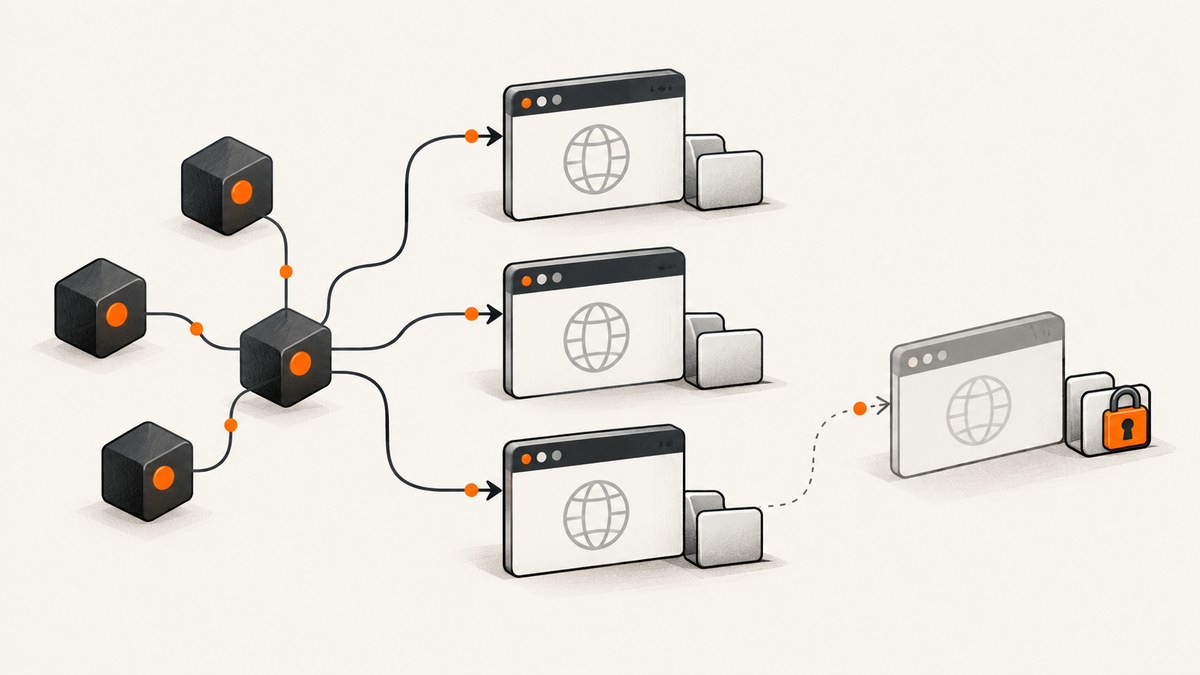
When Puppeteer appears to hang under multiple Node.js processes, first find which awaited operation stopped progressing. A stall in puppeteer.launch() has different causes from one in navigation or a later Chrome DevTools Protocol (CDP) call. Then check, in order: whether processes reuse a Chrome profile, who owns and closes the browser, whether concurrency exceeds host capacity, and whether the runtime has the browser dependencies it needs. There is no single fix that applies to every concurrent workload.
This guide provides a logging harness, a safe shared-browser pattern for isolated tasks, a checklist for separate processes, and a troubleshooting path. Puppeteer’s troubleshooting guide, browser management guide, and LaunchOptions reference document the behavior described here.
1. Identify exactly where progress stops
“Puppeteer hangs” is too broad to diagnose. Add timestamped logs directly before and after each awaited boundary. Record whether the last message is before or after browser launch, page creation, navigation, or another operation such as waiting for a selector or taking a screenshot.
import puppeteer from 'puppeteer';

const log = (message) => console.log(new Date().toISOString(), process.pid, message);

let browser;
try {
  log('before launch');
  browser = await puppeteer.launch({ dumpio: true });
  log('after launch');

  log('before newPage');
  const page = await browser.newPage();
  log('after newPage');

  log('before goto');
  await page.goto('https://example.com', {
    waitUntil: 'domcontentloaded',
    timeout: 30_000,
  });
  log('after goto');

  log('before screenshot');
  await page.screenshot({ path: 'example.png' });
  log('after screenshot');
} catch (error) {
  console.error(new Date().toISOString(), process.pid, error);
  process.exitCode = 1;
} finally {
  if (browser) {
    log('before close');
    await browser.close();
    log('after close');
  }
}
Run this in one process, then reproduce with the usual number of workers. Include a log before and after every major await in the real workload, not only the sample operations. If before launch is the final entry, investigate profile startup, browser installation, sandbox/dependencies, and process capacity. If launch finishes, focus on the specific later call and the page or protocol work it is waiting for.
waitUntil: 'domcontentloaded' is an example of choosing an explicit navigation milestone. It does not mean every application has finished rendering. Use the milestone that matches the task, then wait for a meaningful selector or application state when needed. A page that never reaches an expected state can look like a browser hang even when Chrome is responsive.
2. Check whether processes share a Chrome profile
Search launch code, configuration, and environment-specific wrappers for userDataDir and --user-data-dir. If two separate Chrome processes launch against the same profile directory, Chrome’s ProcessSingleton mechanism can prevent the second process from starting. Puppeteer’s launcher recognizes a ProcessSingleton failure and advises using a different profile or stopping the existing browser. It also checks whether the profile directory is writable, so lock contention and permissions are separate issues.
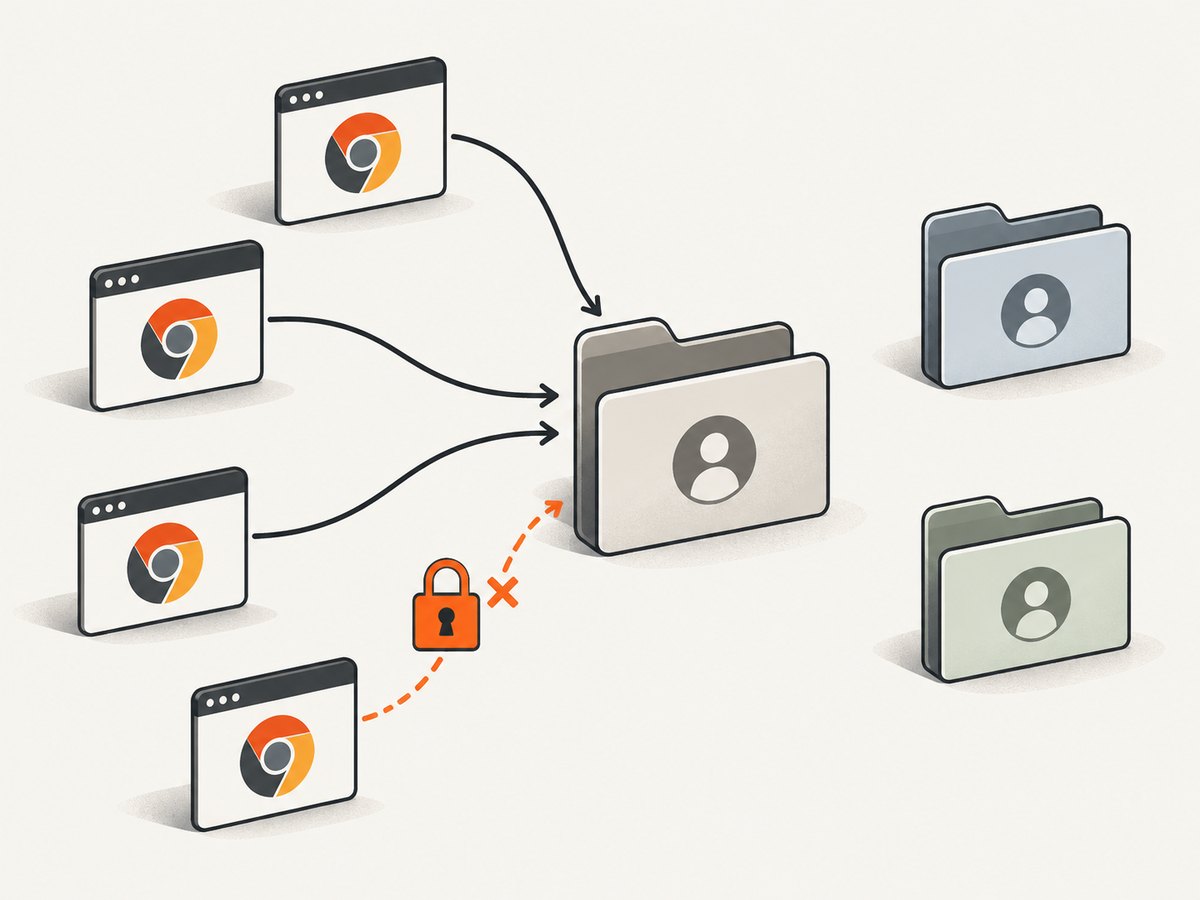
For concurrently launched independent browsers, give each process its own writable profile. If a persistent profile is necessary, construct unique paths deliberately and clean up stale directories only after confirming no live browser uses them. Do not point workers at one shared profile in the hope that it acts like a shared browser; for a shared browser, use a supported connection workflow instead.
import os from 'node:os';
import path from 'node:path';
import { randomUUID } from 'node:crypto';
import puppeteer from 'puppeteer';

const profile = path.join(os.tmpdir(), `puppeteer-${process.pid}-${randomUUID()}`);
const browser = await puppeteer.launch({ userDataDir: profile });

try {
  const page = await browser.newPage();
  await page.goto('https://example.com', { waitUntil: 'domcontentloaded' });
} finally {
  await browser.close();
}
This pattern avoids collisions between simultaneous launches in that host’s temporary directory. It is not a substitute for checking that the directory exists, is writable by the Chrome user, and has enough disk space. Also check whether an external supervisor or container mount overrides the path.
3. Choose a process model that matches the isolation need
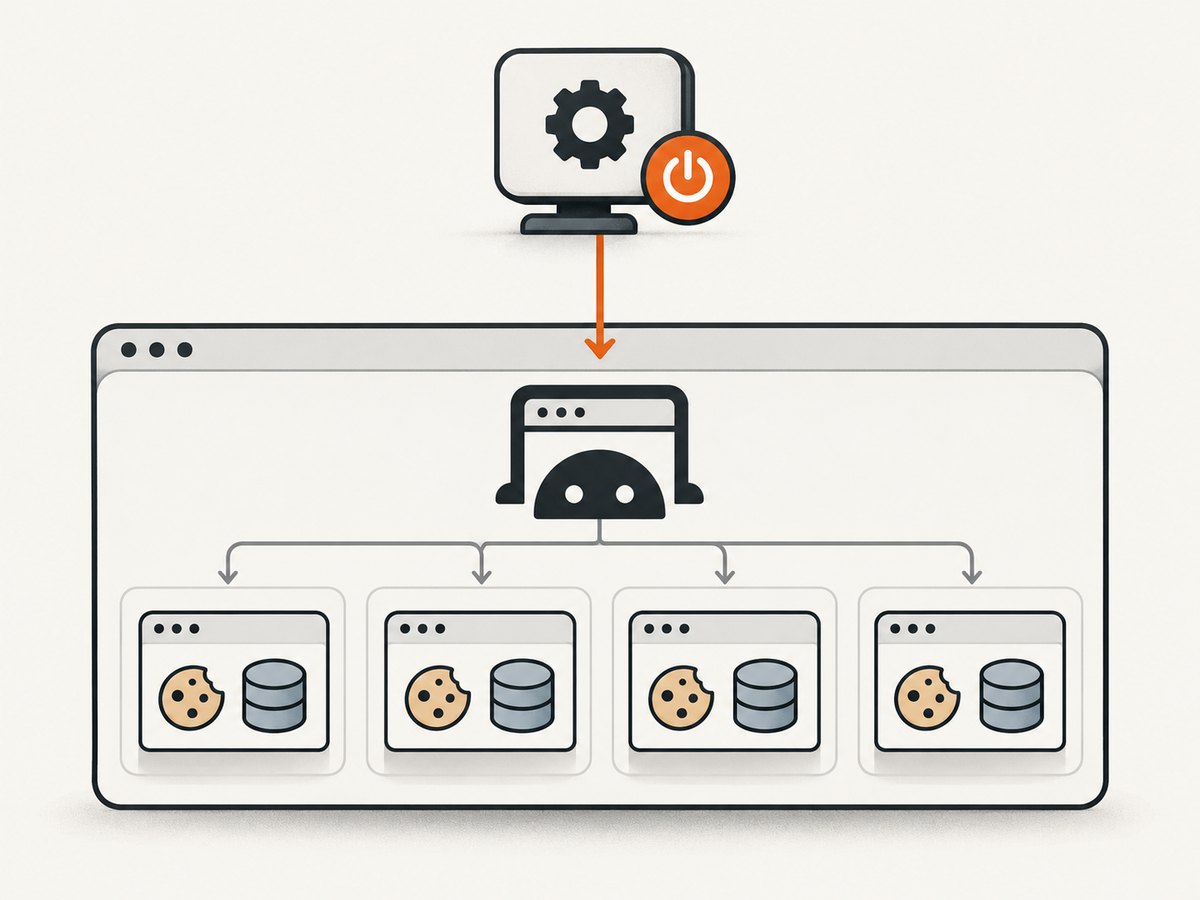
Launching a browser for every small task provides process-level separation, but multiplies browser startup and resource use. If tasks can share one browser process, create a separate BrowserContext per task. Puppeteer documents that cookies and local storage are not shared between contexts. Closing a context closes its pages, while leaving the browser available for other work.
import puppeteer from 'puppeteer';

const browser = await puppeteer.launch();

async function capture(url) {
  const context = await browser.createBrowserContext();
  try {
    const page = await context.newPage();
    await page.goto(url, { waitUntil: 'domcontentloaded', timeout: 30_000 });
    return await page.screenshot({ type: 'png' });
  } finally {
    await context.close();
  }
}

try {
  const results = await Promise.all([
    capture('https://example.com'),
    capture('https://example.org'),
  ]);
  console.log(results.map((buffer) => buffer.length));
} finally {
  await browser.close();
}
This example starts two tasks together for illustration; it does not establish that two is a safe limit for your host. Apply a queue or semaphore for real workloads. Contexts isolate web storage and cookies, but they still share the browser process and its allocated CPU and memory. A browser crash can affect all work attached to that process.
If a browser is managed by another service, workers can attach with puppeteer.connect() using its WebSocket endpoint. This makes browser ownership explicit: the manager launches and eventually closes it; connected workers detach when finished.
import puppeteer from 'puppeteer';

const browser = await puppeteer.connect({
  browserWSEndpoint: process.env.BROWSER_WS_ENDPOINT,
});
try {
  const page = await browser.newPage();
  await page.goto('https://example.com', { waitUntil: 'domcontentloaded' });
} finally {
  // This worker detaches. The browser owner remains responsible for shutdown.
  browser.disconnect();
}
Do not let a worker call browser.close() on a shared browser it does not own. Conversely, a process that launched its own browser should close it when its work ends. Puppeteer documents that browser.close() gracefully closes the browser, while browser.disconnect() detaches without shutting it down or closing its pages.
4. Bound concurrency and make cleanup predictable
Count browser processes, pages, and concurrent jobs—not just Node.js instances. Every process can create multiple pages, and each page can trigger substantial rendering and network work. The right worker limit depends on CPU, memory, process limits, workload, and container allocation; the dossier provides no universal safe number. Start conservatively, observe memory and process counts under representative jobs, then adjust.
Puppeteer’s troubleshooting page describes a CI case where Jest detected 36 workers although only two were allowed, leading to spawn ENOMEM. The remedy is an explicit worker limit suited to the environment. This is a process-spawn/resource failure example, not a recommended worker count for all Puppeteer applications.
Keep lifecycle ownership simple. A launched browser belongs to the function or service that launched it. A connected browser belongs to its external manager. Use finally for pages, contexts, and owned browsers so errors do not leak resources. Avoid competing cleanup paths where one process kills a browser another is using.
async function withBrowser(task) {
  const browser = await puppeteer.launch();
  try {
    return await task(browser);
  } finally {
    await browser.close();
  }
}
5. Treat timeouts as limits, not repairs
The launch option timeout limits how long Puppeteer waits for a browser to start. The documented default is 30,000 milliseconds; timeout: 0 disables the launch timeout. Raising it can be reasonable if measured startup is legitimately slower in your environment, but it does not fix profile contention, an unwritable directory, missing dependencies, exhausted resources, or a later stalled protocol call.
const browser = await puppeteer.launch({
  timeout: 60_000, // Example only: select from observed startup times.
  dumpio: true,
});
Do not disable timeouts as the first response. A wait without a bound can tie up a worker indefinitely and hide the point of failure. Navigation and selector waits have their own timeout settings; tune them for the operation being measured rather than changing launch timeout to address a page-level wait.
6. Collect browser and protocol evidence
Set dumpio: true to forward browser process stdout and stderr to the Node.js process. Inspect this output alongside your timestamps. Puppeteer also exposes browser.debugInfo.pendingProtocolErrors for unresolved asynchronous protocol calls. Use it when launch has completed but a CDP-backed operation stops progressing.
const browser = await puppeteer.launch({ dumpio: true });
// Reproduce the stall, then inspect unresolved protocol callbacks.
console.dir(browser.debugInfo.pendingProtocolErrors, { depth: 5 });
Protocol diagnostics can include sensitive information. Redact cookies, authorization values, page content, URLs containing tokens, and other secrets before sharing logs. Keep a minimal reproduction and record Puppeteer and browser versions, operating system or container image, launch options, the exact last log line, and whether the stall occurs at launch, navigation, or another awaited call.
7. Check runtime and installation setup
Once profile collisions and resource pressure are considered, follow the official troubleshooting steps for the exact operating system and deployment. Puppeteer documents Linux sandbox and dependency problems, browser download issues, writable user-data requirements, and differences between hosted runtimes. For example, its Cloud Run notes describe CPU allocation behavior that can make background Puppeteer work appear slow after an HTTP response, and missing Chrome system packages in the default Node.js runtime.
- Confirm the installed Puppeteer package and browser binary are compatible with the deployment and actually present.
- Check that the Chrome user can execute the binary and write to its temporary and profile directories.
- Read the browser stderr for missing shared libraries, sandbox failures, or inability to create files.
- Compare local and container behavior with the same code and launch options.
- Use environment-specific guidance; do not copy
--no-sandboxinto another runtime without understanding the security and deployment implications.
Keep diagnosis ordered: exact stalled await, profile and permissions, ownership and process model, concurrency/resource capacity, then environment setup. Change one relevant variable at a time so the next run provides useful evidence.
8. Decision table: separate processes, contexts, or connect?
| Approach | Isolation and overhead | Ownership question |
|---|---|---|
| Launch one browser per worker | Separate browser processes provide stronger failure separation, with more startup and resource overhead. | Each worker must use its own profile path and close its own browser. |
| One browser, separate contexts | Contexts isolate cookies and local storage while sharing a browser process and its resources. | The service that launched the browser closes it; each task closes its context. |
| Connect to managed browser | Workers attach to a running browser; operational setup is external to the worker. | The manager owns shutdown; workers disconnect when done. |
Choose based on failure containment, resource capacity at expected concurrency, required session isolation, and who manages profile directories and shutdown. Puppeteer documents these mechanisms, but does not prescribe one architecture for every workload.
Or skip the browser setup
If your job is simply to capture a website screenshot, ScreenshotNeo provides a screenshot API and MCP server. One GET request returns a PNG, JPEG, WebP, or PDF. See the ScreenshotNeo API documentation.
curl -G "https://api.screenshotneo.com/v1/shot" -d access_key=YOUR_API_KEY --data-urlencode url=https://stripe.com -o shot.webpimport requests
r = requests.get("https://api.screenshotneo.com/v1/shot", params={"access_key": "YOUR_API_KEY", "url": "https://stripe.com"}, timeout=90)
open("shot.webp", "wb").write(r.content)const q = new URLSearchParams({ access_key: 'YOUR_API_KEY', url: 'https://stripe.com' });
const res = await fetch(`https://api.screenshotneo.com/v1/shot?${q}`);
if (!res.ok) throw new Error(`Screenshot request failed: ${res.status}`);
await Bun.write('shot.webp', res);ScreenshotNeo removes cookie banners, popups, and chat widgets before the shot. Bot checks, blank pages, and failed loads are never billed; response headers report the page verdict and billing status. An MCP server lets AI agents use take_screenshot, get_page_info, and capture_pdf. The free plan includes 1,000 screenshots a month with no card; paid plans start at $5 for 3,000. Start with 1,000 free screenshots a month, no card required.
9. Troubleshooting checklist
| Symptom | Likely area | Next action |
|---|---|---|
| Stalls before “after launch” only with concurrent processes | Shared profile lock, directory permissions, startup resources | Search for repeated userDataDir or --user-data-dir; assign distinct writable profiles and inspect stderr. |
ProcessSingleton or profile already running |
Another Chrome owns that profile | Use a different profile or deliberately connect to the existing browser; verify before stopping any process. |
spawn ENOMEM |
Too many workers/processes for the environment | Set an explicit worker limit and measure against assigned container resources. |
| Launch times out, but no clear Chrome output | Missing binary/dependencies, sandbox, unwritable temporary path | Enable dumpio; follow troubleshooting guidance for the deployment OS and verify file permissions. |
| Launch completes; navigation never returns | Navigation milestone, slow or stalled site, network or page behavior | Log navigation separately, set an operation-appropriate timeout, and wait for an application-specific condition where needed. |
| One worker’s cleanup breaks other workers | Shared browser ownership confusion | Only the launcher/manager calls close(); connected workers call disconnect(), and tasks close their contexts. |
| Timeout increase changes nothing | Underlying cause remains, or stall is after startup | Restore bounded waits and identify the precise await and pending protocol work. |
10. Performance, reliability, and cost notes
Concurrency trades throughput against shared host limits. A fresh browser per task adds process startup and memory pressure; a shared browser reduces duplicate processes but broadens the impact of a browser crash and requires disciplined context cleanup. Measure queue wait, launch duration, operation duration, worker count, memory, and browser process count using your own workload. No benchmark or universal capacity figure follows from the documentation.
For reliability, make jobs bounded and repeatable: operation-specific timeouts, timestamps, explicit ownership, and cleanup in finally. Retry only errors that are plausibly transient, and avoid multiplying load with immediate retries during resource exhaustion. Keep enough logs to locate a stall, but redact secrets. Browser automation has infrastructure costs in CPU, memory, storage, and engineering time; exact cost depends on the deployment and workload. ScreenshotNeo’s listed plans are Free 1,000/month, Starter $5 for 3,000, Growth $15 for 15,000, Pro $39 for 60,000, Scale $99 for 250,000, and Business $249 for 1,000,000; yearly billing gives two months free, and every feature is on every plan.
FAQ
Are all scripts running in one Node.js process?
Not necessarily. Separate invocations are separate Node.js processes unless a supervisor or worker framework arranges otherwise. Log process.pid to confirm what is running.
Can multiple processes safely use one browser?
Workers can connect to a managed browser through its WebSocket endpoint. Define one owner for shutdown and use separate contexts when tasks need isolated cookies and local storage.
Should I set --no-sandbox?
Only when the deployment’s documented requirements call for it and you understand the security implications. First inspect the actual sandbox error and runtime setup.
What details help others diagnose a reproducible hang?
Provide Puppeteer and browser versions, OS or container, launch options, a minimal redacted example, the exact last timestamped log line, and the awaited operation that stopped progressing.


