How to Prevent Page Breaks Inside Table Rows with Rowspan in wkhtmltopdf
Learn why wkhtmltopdf splits rowspan tables, which CSS workarounds are worth testing, and how to build a reliable fallback when groups cannot fit.
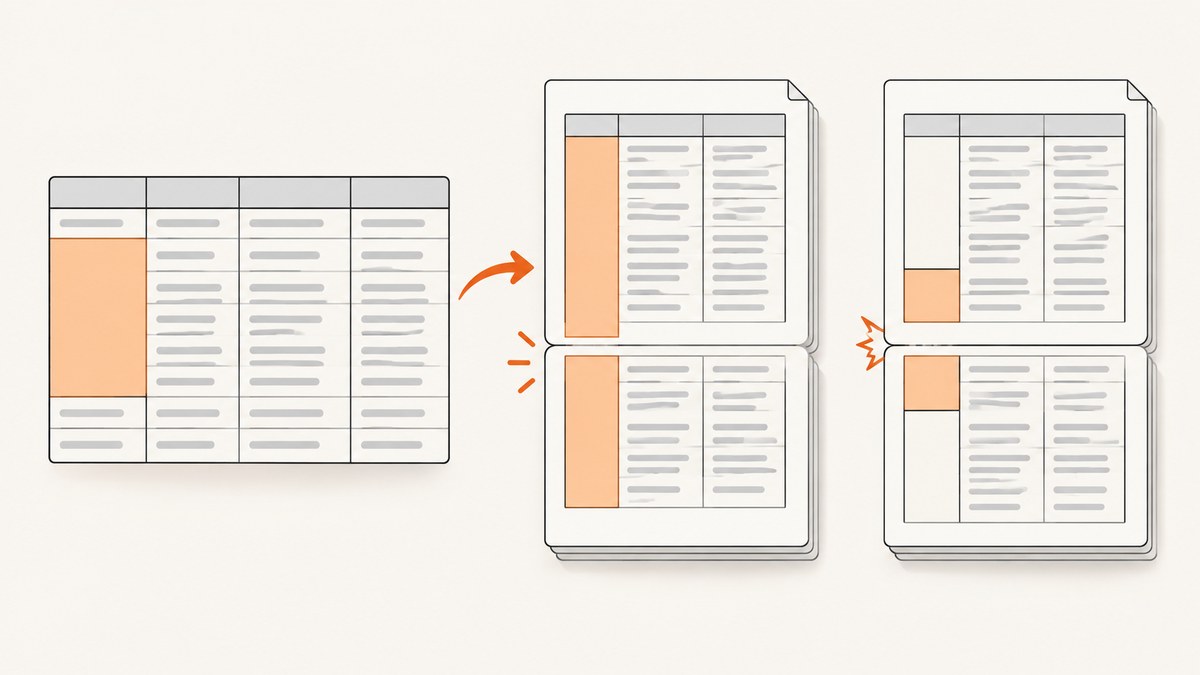
Short answer: wkhtmltopdf does not provide a dependable way to keep every rowspan group together across pages. Try tr { page-break-inside: avoid; } as a diagnostic, but treat it as a hint rather than a guarantee. A spanning cell can still be split or rendered with incorrect height, borders, or backgrounds. Test the exact wkhtmltopdf binary, Qt build, operating system, fonts, page size, CSS, and data used in production.
If the group is taller than the printable area, no CSS rule can make it fit on one page. Your fallback must allow a split, reduce the group, change the page layout, or use another renderer after comparing it against a minimal reproduction.
Why rowspan causes page-break problems
A normal table row has one height that the pagination algorithm can measure. A cell with rowspan="3" contributes to three rows, so the renderer must decide where the spanning cell begins, how tall it is, and which rows move when the page fills. Historical wkhtmltopdf reports describe cases where the following row moved to the next page while the spanning cell’s dimensions, borders, or background were calculated incorrectly.
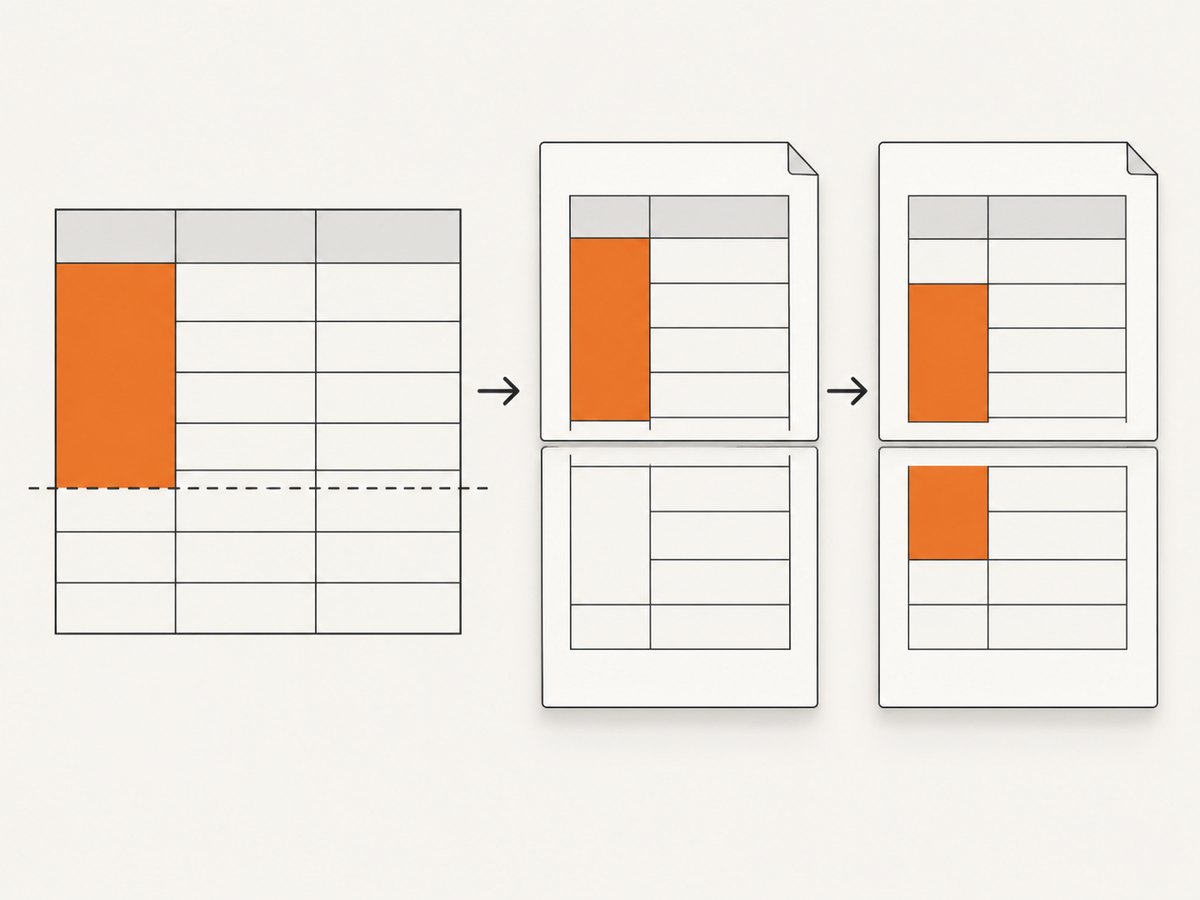
The project history also describes table pagination as a limited, table-level hack that fails in some situations. The upstream repository was archived on January 2, 2023, so old issue activity should be treated as evidence of known behavior, not as a promise of a future fix. See the archived wkhtmltopdf source repository.
Build a minimal reproduction first
- Copy the smallest table that still breaks. Keep the same
rowspanvalues, text lengths, borders, backgrounds, fonts, and page dimensions. - Record the exact binary and environment:
wkhtmltopdf --version, operating system, Qt variant, installed fonts, and command-line flags. - Remove JavaScript, images, unrelated CSS, and application templates one at a time. Stop when the break disappears; the last removed item is a useful suspect.
- Render the reduced file repeatedly so you can compare changes deterministically.
wkhtmltopdf --version
wkhtmltopdf --enable-local-file-access --print-media-type input.html output.pdf
Keep the reproduction as a fixture in your deployment checks. A result from a different wkhtmltopdf build or page size does not prove that production will behave the same way.

Baseline HTML and CSS
Start with valid table structure and explicit print dimensions. Repeat the header with thead, and apply the break hint to rows and cells:
<!doctype html>
<html>
<head>
  <meta charset="utf-8">
  <style>
    @page { size: A4; margin: 14mm; }
    * { box-sizing: border-box; }
    body { font-family: Arial, sans-serif; font-size: 10pt; }
    table { width: 100%; border-collapse: collapse; }
    thead { display: table-header-group; }
    tfoot { display: table-footer-group; }
    tr, td, th { page-break-inside: avoid; }
    th, td { border: 0.25mm solid #777; padding: 2mm; vertical-align: top; }
    th { background: #eee; }
  </style>
</head>
<body>
  <table>
    <thead>
      <tr><th>Group</th><th>Item</th><th>Value</th></tr>
    </thead>
    <tbody>
      <tr>
        <td rowspan="3">Account A</td>
        <td>First row</td>
        <td>Short value</td>
      </tr>
      <tr><td>Second row</td><td>Longer value</td></tr>
      <tr><td>Third row</td><td>Another value</td></tr>
    </tbody>
  </table>
</body>
</html>
Render this before adding framework styles. Inspect the spanning cell itself, the borders above and below the page boundary, and the repeated header. Text appearing on one page does not prove that the rowspan geometry is correct.
CSS rules worth testing
| Rule | What it can help with | Limit |
|---|---|---|
tr { page-break-inside: avoid; } |
May keep a short individual row together. | Does not reliably keep a multi-row rowspan group together. |
td, th { page-break-inside: avoid; } |
Can reduce breaks inside cell content. | A rowspan cell still participates in several rows. |
thead { display: table-header-group; } |
Requests repeated column headers. | Does not repair spanning-cell height calculations. |
page-break-before/after |
Can place a known section boundary before or after a table. | Cannot express “keep these three rowspan rows together” reliably inside one table. |
Use the rules as experiments, then inspect the PDF visually and, where possible, compare extracted coordinates. Do not call the problem solved because one sample happened to paginate correctly.
Group rows with tbody when your semantics allow it
Some renderers honor page-break-inside: avoid on a tbody group. A commonly reported pattern is:
tbody.row-group {
  page-break-inside: avoid;
  break-inside: avoid;
}
<tbody class="row-group">
<tr><td rowspan="3">Account A</td><td>First</td></tr>
<tr><td>Second</td></tr>
<tr><td>Third</td></tr>
</tbody>This grouping is reported to work in PrinceXML, but that report does not establish a wkhtmltopdf fix. Preserve table semantics and accessibility; do not change row structure only to chase pagination behavior.
When the group is taller than a page
A no-break rule cannot fit a group into less space than it requires. Choose an explicit policy:
- Allow the group to split: keep the data intact and make the continuation clear.
- Split the data model: divide a very large logical group into smaller sections before generating HTML.
- Change layout: use landscape orientation, smaller margins, a smaller font, or a wider paper size only when readability remains acceptable.
- Use another renderer: compare the same fixture before migrating.
Never promise that a rowspan group will stay on one page when its minimum height exceeds the printable page area.
Command-line settings that affect the result
| Setting | Why it matters |
|---|---|
--page-size A4 or --page-width/--page-height |
Changes the available height and therefore the break point. |
--margin-top, --margin-bottom |
Reduces or increases printable space. |
--orientation Landscape |
May reduce wrapping and group height. |
--print-media-type |
Uses print styles where your stylesheet defines them. |
--zoom |
Changes effective layout dimensions; record it in your fixture. |
--javascript-delay and --no-stop-slow-scripts |
Can affect whether late content changes the table before pagination. |
--enable-local-file-access |
Needed when the document loads permitted local assets. |
Keep fonts identical between development and production. A font substitution changes line wrapping, row height, and the page at which the break occurs.
Common errors and fixes
| Symptom | Likely cause | Fix |
|---|---|---|
| The rowspan cell is cut or its border is misplaced. | Known rowspan pagination behavior. | Reduce to a fixture, test the break hint, then define a split or alternative-renderer fallback. |
| The rule appears to do nothing. | The group is taller than the remaining page or the renderer ignores the hint. | Check group height and available space; do not treat CSS as a guarantee. |
| Rows move after adding a font. | Different metrics or missing font in the runtime. | Install and verify the production font, then regenerate the fixture. |
| Headers do not repeat. | Invalid table structure or unsupported styling around thead. |
Use a real thead, simplify CSS, and test the exact binary. |
| Pagination changes between runs. | JavaScript, remote assets, or asynchronous content is not stable. | Inline critical CSS, wait for content, or remove nondeterministic dependencies. |
| Output differs between machines. | Different Qt build, OS, fonts, locale, or page flags. | Pin the executable and environment and render in the deployment image. |
Performance and reliability checklist
- Render a small fixture before the full report so failures are cheap to diagnose.
- Cache or inline stable assets when permitted, reducing network timing differences.
- Set an explicit timeout around the wkhtmltopdf process and capture stderr.
- Log the binary version, command flags, input hash, paper size, font package, and exit code.
- Compare PDFs from representative short, exact-fit, and overlong rowspan groups.
- Review borders, backgrounds, repeated headers, font fallback, and extracted text—not only whether the process exited successfully.
Or skip the browser setup
If your goal is a clean visual capture of a page rather than controlling wkhtmltopdf’s table pagination, ScreenshotNeo provides a single HTTP request for PNG, JPEG, WebP, or PDF output. Its cleanup step accepts cookie or consent banners and removes more than 60 known consent platforms, newsletter popups, and chat widgets; each step can be disabled. Bot checks, blank pages, timeouts, failed loads, and cache hits are not billed, and the response identifies the result with X-Page-Verdict and X-Billed headers. See the ScreenshotNeo API documentation for all options.
curl -G "https://api.screenshotneo.com/v1/shot" -d access_key=YOUR_API_KEY --data-urlencode url=https://stripe.com -o shot.webpimport requests
r = requests.get("https://api.screenshotneo.com/v1/shot", params={"access_key": "YOUR_API_KEY", "url": "https://stripe.com"}, timeout=90)
open("shot.webp", "wb").write(r.content)const q = new URLSearchParams({ access_key: 'YOUR_API_KEY', url: 'https://stripe.com' });
const res = await fetch(`https://api.screenshotneo.com/v1/shot?${q}`);ScreenshotNeo also offers PDF capture, full-page lazy-image loading, CSS-selector element capture, custom CSS and JavaScript, waits, blocking controls, headers and cookies, caching, signed links, asynchronous jobs, bulk capture, usage data, and an MCP server with take_screenshot, get_page_info, and capture_pdf tools for AI agents. The free plan includes 1,000 screenshots each month with no card; paid plans start at $5 for 3,000. Create a free ScreenshotNeo account.
FAQ
Does page-break-inside: avoid fix rowspan in wkhtmltopdf?
It can help in some documents, but documented reports and project history do not support it as a reliable guarantee for rowspan groups.
Can JavaScript force a rowspan group onto one page?
JavaScript can change markup before rendering, but it cannot make an oversized group fit in the remaining printable area. Use it only to produce a deliberate fallback layout.
Should I remove rowspan?
Removing it may change pagination, as one report observed, but it also changes table meaning and accessibility. Do so only when the data model permits an equivalent representation.
Is a tbody workaround proven in wkhtmltopdf?
No. Grouped tbody elements with an avoid rule are reported for PrinceXML; that result should be tested independently in your wkhtmltopdf build.
What should be compared before switching renderers?
Use the same fixture and compare rowspan integrity, overlong groups, repeated headers, border and background continuity, fonts, CSS support, runtime requirements, maintenance status, licensing, and cost.


