How to Print Pascal’s Triangle in Python
Learn to generate Pascal's Triangle in Python, print rows clearly, center the output, validate input, and choose an efficient implementation.
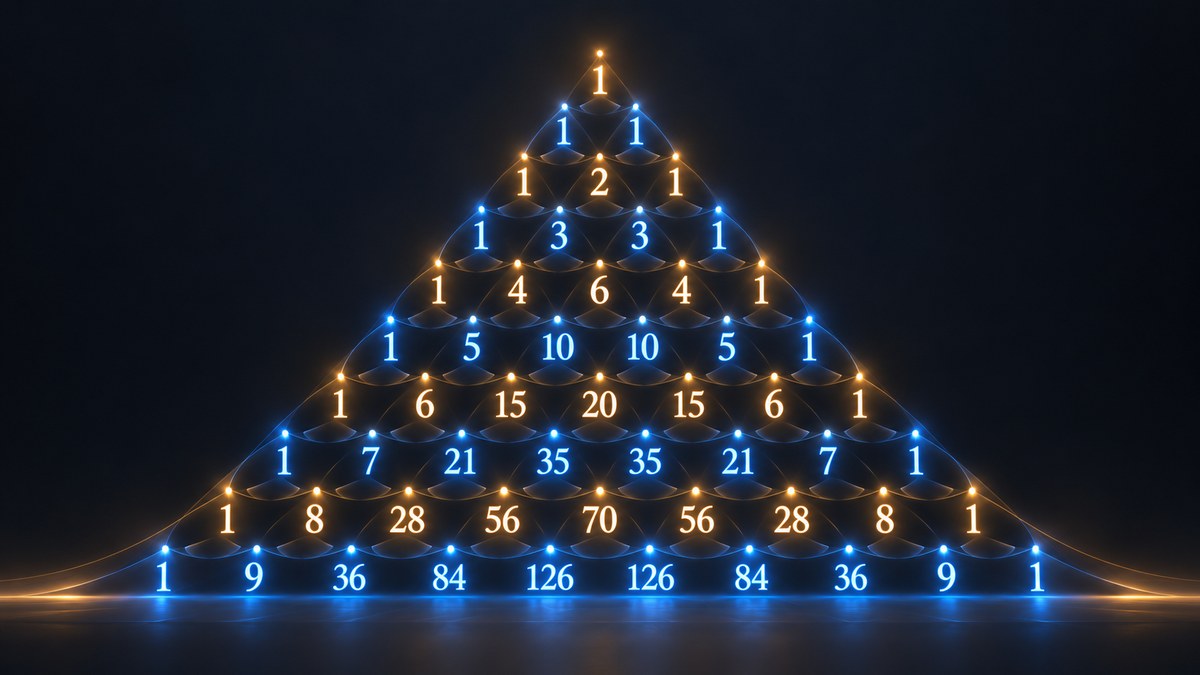
Pascal’s Triangle is easiest to print in Python by keeping the current row as a list, printing it, and building the next row from adjacent pairs. Every row begins and ends with 1. Each interior value is the sum of the two values directly above it.
def print_pascals_triangle(rows: int) -> None:
    row = [1]
    for _ in range(rows):
        print(row)
        row = [left + right for left, right in zip([0] + row, row + [0])]

print_pascals_triangle(5)
Output:
[1]
[1, 1]
[1, 2, 1]
[1, 3, 3, 1]
[1, 4, 6, 4, 1]
What Pascal’s Triangle represents
Pascal’s Triangle is a triangular arrangement of binomial coefficients. The first row contains one value, the second contains two, and row n contains n values when counting from one. The recurrence used by the program is:
- The first and last value in every row is 1.
- Each value between the edges equals the sum of the two values above it.
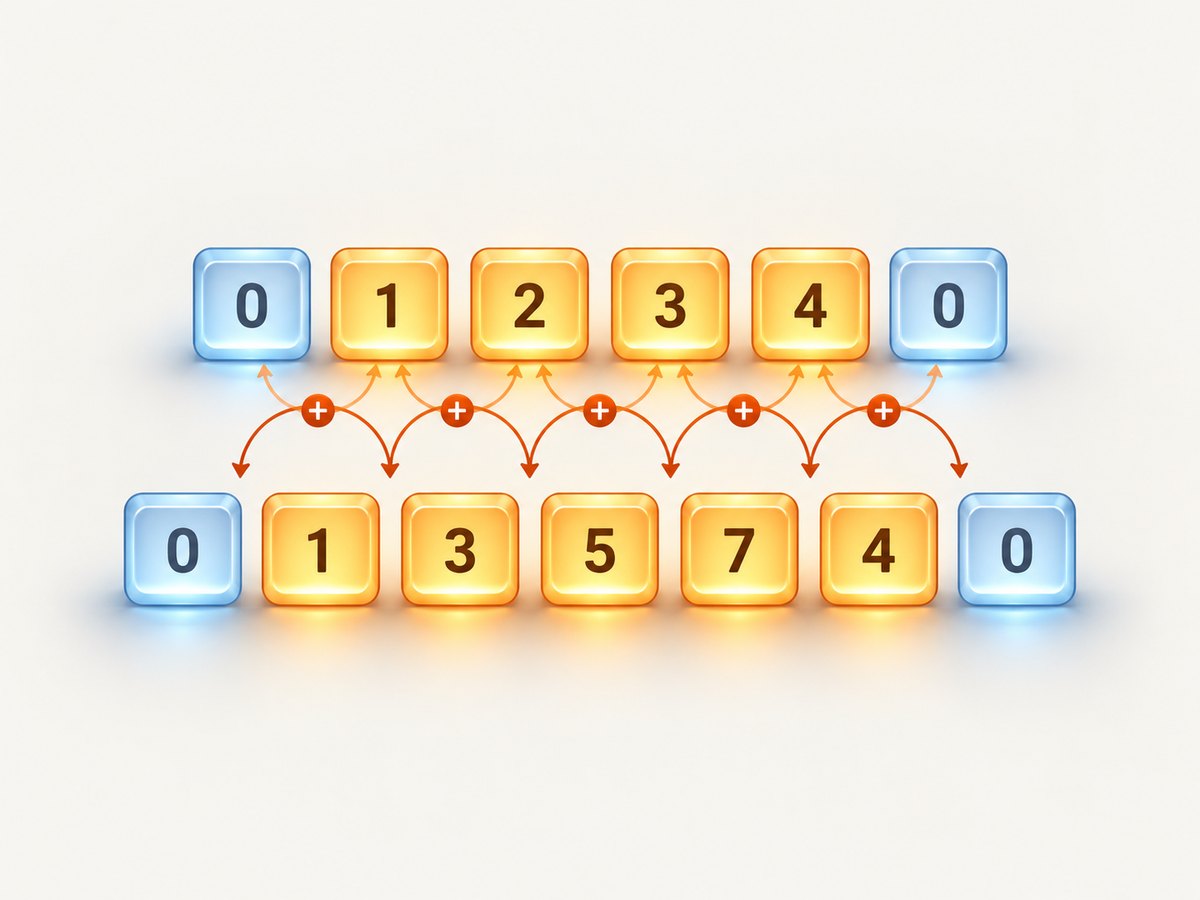
For example, the row [1, 3, 3, 1] comes from [1, 2, 1]. Padding the old row with zeroes gives [0, 1, 2, 1, 0]; adding adjacent pairs produces [1, 3, 3, 1].
Generate rows with a list comprehension
This version is compact while still showing the algorithm clearly. zip pairs the padded row with a shifted copy, and the list comprehension adds each pair.
def print_pascals_triangle(rows: int) -> None:
    if rows < 0:
        raise ValueError("rows must be non-negative")

    row = [1]
    for _ in range(rows):
        print(row)
        row = [left + right for left, right in zip([0] + row, row + [0])]

print_pascals_triangle(5)
A request for zero rows prints nothing. Rejecting negative values avoids silently treating invalid input as an empty triangle.
Use explicit loops when teaching or debugging
If you want every operation visible, build the next row with a nested loop. This is useful when explaining the recurrence or stepping through the code in a debugger.
def print_pascals_triangle(rows: int) -> None:
    if rows < 0:
        raise ValueError("rows must be non-negative")

    row = [1]
    for _ in range(rows):
        print(row)

        padded = [0] + row + [0]
        next_row = []
        for index in range(len(padded) - 1):
            next_row.append(padded[index] + padded[index + 1])

        row = next_row

print_pascals_triangle(5)
The padding supplies the missing neighbours at both edges. Without it, the two edge ones are easy to lose.
Print a centered visual triangle
print(row) displays Python list notation. To make the result look like a triangle, convert numbers to strings, join them with spaces, and center each line against the width of the final row.

def pascal_rows(rows: int):
    if rows < 0:
        raise ValueError("rows must be non-negative")

    row = [1]
    for _ in range(rows):
        yield row
        row = [left + right for left, right in zip([0] + row, row + [0])]

rows = list(pascal_rows(8))
if rows:
    width = len(" ".join(map(str, rows[-1])))
    for row in rows:
        line = " ".join(map(str, row))
        print(line.center(width))
Example output:
       1
      1 1
     1 2 1
    1 3 3 1
   1 4 6 4 1
  1 5 10 10 5 1
 1 6 15 20 15 6 1
1 7 21 35 35 21 7 1
Centering requires knowing the widest line. Materializing the rows gives you the final row before printing. For very large triangles, use a fixed-width or streaming format instead, because values eventually need different amounts of horizontal space.
Keep generation separate from printing
A reusable generator lets another function, test, or program consume rows without committing to list notation or centered output.
from collections.abc import Iterator


def pascal_rows(rows: int) -> Iterator[list[int]]:
    if rows < 0:
        raise ValueError("rows must be non-negative")

    row = [1]
    for _ in range(rows):
        yield row
        row = [a + b for a, b in zip([0] + row, row + [0])]


for row in pascal_rows(5):
    print(" ".join(map(str, row)))
The generator retains only the current row while the caller processes it. If you need random access or a centered display, call list(pascal_rows(n)) and accept the extra memory.
Read the row count safely
When the number of rows comes from a command-line user, validate both its type and range.
def read_row_count() -> int:
    raw = input("Number of rows: ").strip()
    try:
        rows = int(raw)
    except ValueError as exc:
        raise ValueError("enter a whole number") from exc

    if rows < 0:
        raise ValueError("number of rows cannot be negative")
    return rows


def print_pascals_triangle(rows: int) -> None:
    row = [1]
    for _ in range(rows):
        print(row)
        row = [a + b for a, b in zip([0] + row, row + [0])]

try:
    print_pascals_triangle(read_row_count())
except ValueError as error:
    print(f"Input error: {error}")
For a service endpoint, also impose a maximum row count. Python integers do not overflow like fixed-width integers, but very large rows consume substantial CPU, memory, and output bandwidth.
Complexity and memory choices
| Approach | Retained data | Best use |
|---|---|---|
| Print and discard each row | O(n) working space | Plain output or streaming |
| Store every row | O(n²) space | Centered output, later calculations |
| Generator | O(n) working space | Reusable streaming API |
Generating the first n rows performs a quadratic number of additions because the row lengths grow from one through n. Printing can cost as much as generation, especially once values contain many digits. The arithmetic values themselves also become wider as the row count increases.
Common mistakes and fixes
Starting with an empty row
Start with [1]. An empty row has no edge value from which to construct the triangle.
Forgetting zero padding
Use [0] + row and row + [0]. The artificial zeroes make the first and last sums equal to one.
Mutating the row while reading it
Build a separate next_row. Updating values in place causes later additions to read values that were already changed during the same iteration.
Confusing data output with visual formatting
print(row) is valid list output. Centered rows require string conversion, joining, and padding. Keep those concerns in separate functions.
Negative or non-integer input
Validate before entering the loop. Decide whether zero is valid; commonly it means “print no rows,” while negative values should raise an error.
Testing the implementation
Small structural tests catch most algorithm errors. Check the first rows, the edge values, and the recurrence.
def generate_pascals_triangle(rows: int) -> list[list[int]]:
    if rows < 0:
        raise ValueError("rows must be non-negative")

    result = []
    row = [1]
    for _ in range(rows):
        result.append(row)
        row = [a + b for a, b in zip([0] + row, row + [0])]
    return result

triangle = generate_pascals_triangle(5)
assert triangle == [
    [1],
    [1, 1],
    [1, 2, 1],
    [1, 3, 3, 1],
    [1, 4, 6, 4, 1],
]
assert all(row[0] == 1 and row[-1] == 1 for row in triangle)
assert all(len(row) == index + 1 for index, row in enumerate(triangle))

for previous, current in zip(triangle, triangle[1:]):
    expected = [a + b for a, b in zip([0] + previous, previous + [0])]
    assert current == expected
Performance and reliability tips
- Use the row-at-a-time generator when output can be consumed immediately.
- Do not build all rows if a caller needs only the last row.
- Limit user-controlled row counts before generating output.
- For centered formatting, calculate a width from the final row and avoid repeated string concatenation inside nested loops.
- When writing to a file or network stream, emit one completed line at a time instead of creating one giant string.
- Remember that output size grows quickly; a mathematically efficient loop can still be slow when printing thousands of wide integers.
Or skip the browser setup
If your Python project needs screenshots of the rendered triangle, documentation pages, or test results, ScreenshotNeo provides a website screenshot API. You can generate the page yourself with a browser, or send one request to capture a URL. The ScreenshotNeo documentation lists the request options.
cURL:
curl -G "https://api.screenshotneo.com/v1/shot" \
  -d access_key=YOUR_API_KEY \
  --data-urlencode url=https://stripe.com \
  -o shot.webp
Python:
import requests

r = requests.get(
    "https://api.screenshotneo.com/v1/shot",
    params={"access_key": "YOUR_API_KEY", "url": "https://stripe.com"},
    timeout=90,
)
r.raise_for_status()
open("shot.webp", "wb").write(r.content)
Node.js:
const q = new URLSearchParams({
  access_key: 'YOUR_API_KEY',
  url: 'https://stripe.com'
});
const res = await fetch(`https://api.screenshotneo.com/v1/shot?${q}`);
if (!res.ok) throw new Error(`Screenshot failed: ${res.status}`);
const buffer = Buffer.from(await res.arrayBuffer());
require('fs').writeFileSync('shot.webp', buffer);
ScreenshotNeo removes cookie and consent banners, newsletter popups, and chat widgets before capture. Bot checks, blank pages, timeouts, failed loads, and cache hits are not billed, and response headers identify the page verdict and billing status. Options include full-page or element capture, dark mode, device presets, custom viewports, retina scale, custom CSS and JavaScript, waits, request blocking, cookies and headers, geolocation, PDF output, caching, signed links, asynchronous jobs, bulk capture, and an MCP server with take_screenshot, get_page_info, and capture_pdf for AI agents. The free plan includes 1,000 screenshots each month with no card; paid plans start at $5 for 3,000. Create a free ScreenshotNeo account.
FAQ
Does Python have a built-in Pascal’s Triangle function?
No. The row recurrence is short enough to implement directly, or you can calculate individual binomial coefficients with functions from the standard library.
Why are the rows lists instead of strings?
Lists preserve numeric values for testing and further calculations. Convert to strings only at the display boundary.
Can I print only one row?
Yes. Generate rows until the requested index, then print the final row, or use a binomial-coefficient formula for a single position.
Why does centered output become uneven?
Values have different digit widths. Joining with spaces and centering improves the layout; for strict columns, calculate a cell width from the largest value and format every value to that width.
Should I store all rows?
Store them when you need a second pass, random access, or centered formatting. Otherwise, print or consume each row and retain only the current one.


