How to Continuously Print WebSocket Responses with Pyppeteer
Capture every incoming WebSocket frame in Pyppeteer with Chrome DevTools Protocol, decode text and binary payloads, and troubleshoot missed events.

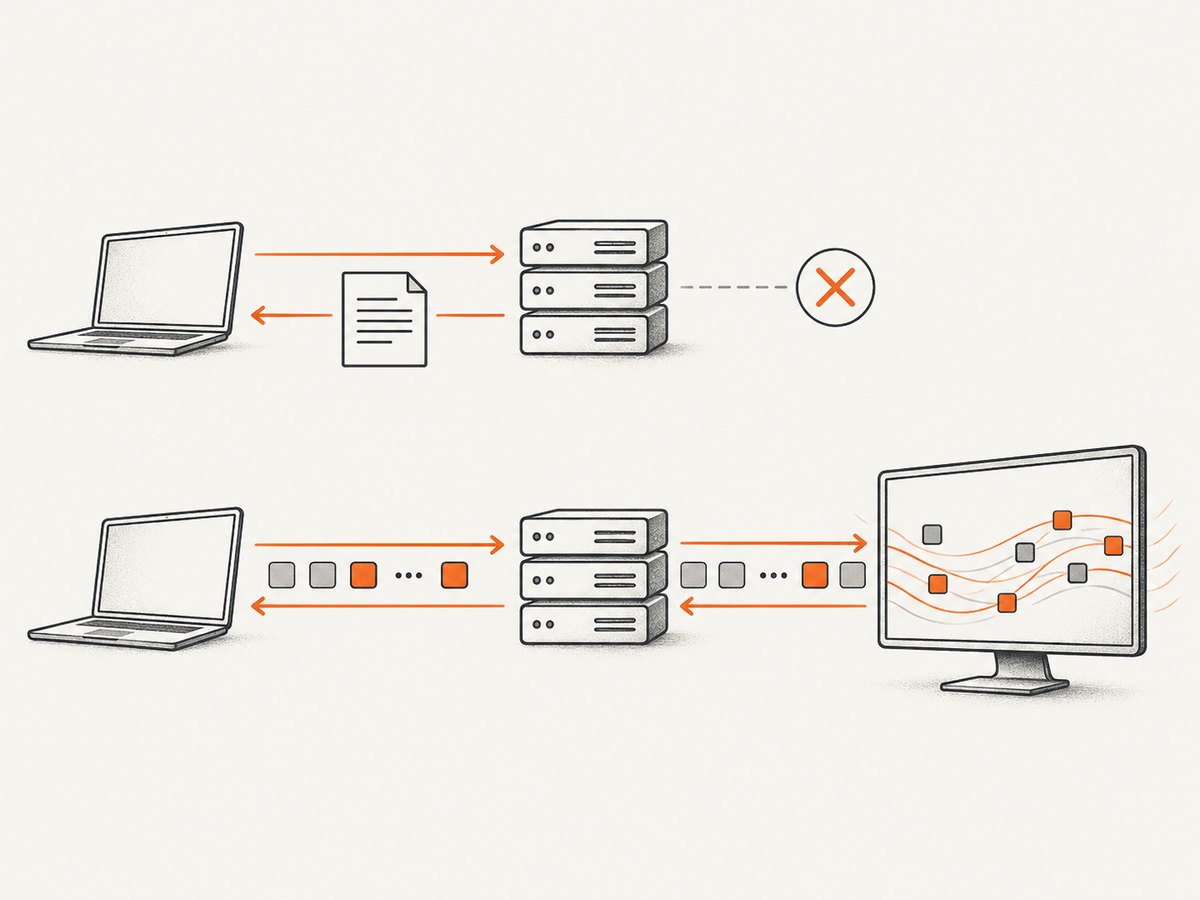
Use Chrome DevTools Protocol (CDP), not Pyppeteer’s ordinary page.on('response') event. Create a CDP session for the page, enable the Network domain, subscribe to Network.webSocketCreated and Network.webSocketFrameReceived, then keep the process alive while frames arrive.
Pyppeteer exposes a CDP session through the page target. The Chrome DevTools Protocol Network domain provides the WebSocket lifecycle and frame events. See the Pyppeteer API reference and the Chrome DevTools Protocol Network documentation.
Complete Pyppeteer example
This script attaches listeners before navigation, labels frames with their socket URL, distinguishes text from non-text payloads, and runs until it is interrupted.
import asyncio
import base64
from contextlib import suppress

from pyppeteer import launch


async def main():
    browser = await launch(headless=True)
    page = await browser.newPage()
    client = await page.target.createCDPSession()
    sockets = {}

    await client.send("Network.enable")

    def on_created(event):
        request_id = event["requestId"]
        url = event.get("url", "<unknown socket>")
        sockets[request_id] = url
        print(f"WebSocket opened: {url}", flush=True)

    def on_frame(event):
        request_id = event["requestId"]
        response = event["response"]
        url = sockets.get(request_id, "<unknown socket>")
        opcode = response.get("opcode")
        payload = response.get("payloadData", "")

        if opcode == 1:
            print(f"<< {url}: {payload}", flush=True)
        else:
            # CDP represents non-text payload data as base64.
            print(
                f"<< {url}: binary payload (opcode={opcode}, "
                f"base64={payload})",
                flush=True,
            )

    def on_sent(event):
        request_id = event["requestId"]
        response = event["response"]
        url = sockets.get(request_id, "<unknown socket>")
        print(f">> {url}: {response.get('payloadData', '')}", flush=True)

    def on_closed(event):
        request_id = event["requestId"]
        url = sockets.pop(request_id, "<unknown socket>")
        print(f"WebSocket closed: {url}", flush=True)

    def on_error(event):
        request_id = event["requestId"]
        url = sockets.get(request_id, "<unknown socket>")
        print(f"WebSocket error: {url}: {event}", flush=True)

    client.on("Network.webSocketCreated", on_created)
    client.on("Network.webSocketFrameReceived", on_frame)
    client.on("Network.webSocketFrameSent", on_sent)
    client.on("Network.webSocketClosed", on_closed)
    client.on("Network.webSocketFrameError", on_error)

    try:
        await page.goto("https://example.com", {"waitUntil": "networkidle2"})
        print("Navigation complete; listening for WebSocket frames.", flush=True)
        await asyncio.Event().wait()
    finally:
        await client.detach()
        await browser.close()


if __name__ == "__main__":
    with suppress(KeyboardInterrupt):
        asyncio.run(main())
Install Pyppeteer with python -m pip install pyppeteer. The first launch may download the Chromium revision bundled with your installed release. Press Ctrl+C to stop the continuous listener.
How the event flow works
- Launch Chromium and create the page whose network traffic you need.
- Create a CDP session attached to that page target.
- Send
Network.enablebefore navigation or before application code can open its socket. - Record
requestIdand URL fromNetwork.webSocketCreated. - Read incoming frames from
Network.webSocketFrameReceived. - Keep the Python event loop alive. WebSocket traffic often continues after navigation resolves.
- Remove socket entries on
Network.webSocketClosedso long-running processes do not retain stale mappings.
The frame event’s requestId identifies the socket. Use it as the key when several WebSockets are open at once. The response object includes an opcode and payloadData. Opcode 1 is text; other payloads are represented as base64 by CDP and need protocol-specific decoding.
Print only incoming responses
For a receive-only logger, register only the created, received, closed, and error handlers. Do not subscribe to Network.webSocketFrameSent unless client-to-server messages are also useful. Filtering early reduces console noise:
def on_frame(event):
    request_id = event["requestId"]
    if not sockets.get(request_id, "").startswith("wss://stream.example.com/"):
        return

    frame = event["response"]
    if frame.get("opcode") == 1:
        print(frame.get("payloadData", ""), flush=True)
Decode text, JSON and binary frames safely
Text frames
Text frames are UTF-8 application data. They may be plain text or a serialized format such as JSON. Parse JSON only when the endpoint’s protocol guarantees JSON:
import json


def on_frame(event):
    frame = event["response"]
    payload = frame.get("payloadData", "")

    if frame.get("opcode") != 1:
        return

    try:
        message = json.loads(payload)
    except json.JSONDecodeError:
        print(f"text: {payload}", flush=True)
    else:
        print(f"json: {message!r}", flush=True)
Binary frames
Do not print binary payloads as if they were text. Decode the base64 representation first, then apply the format required by the application (for example, a documented protobuf, MessagePack, or compressed envelope).
import base64


def binary_bytes(frame):
    encoded = frame.get("payloadData", "")
    return base64.b64decode(encoded)


def on_frame(event):
    frame = event["response"]
    if frame.get("opcode") == 1:
        print(frame.get("payloadData", ""), flush=True)
        return

    data = binary_bytes(frame)
    print(f"received {len(data)} binary bytes", flush=True)
A WebSocket frame is not necessarily a complete business-level record. The website may put its own message boundaries, compression, multiplexing, or encoding inside the payload. Follow the site’s protocol before interpreting bytes.
Wait for the socket before logging
If the application opens its socket only after a login, a button click, or another asynchronous action, keep the CDP listeners attached and perform that action after registration:
await page.goto("https://example.com", {"waitUntil": "domcontentloaded"})
await page.waitForSelector("button.connect")
await page.click("button.connect")
await asyncio.Event().wait()
Do not use a fixed sleep as the only synchronization method. Prefer a selector, a known page state, or an application signal. A delay can be useful as an additional grace period when the site has no reliable readiness marker.
Keep output usable in a long-running process
- Use
flush=Trueor configure a line-buffered logger so output appears immediately when stdout is piped. - Write structured records containing timestamp, socket URL, request ID, direction, opcode, and payload.
- Apply size limits before logging untrusted payloads.
- Rotate files if the stream is high volume.
- Catch cancellation and close the CDP session and browser in a
finallyblock. - Redact tokens, cookies, authorization values, and personal data before persistence.
Node.js equivalent with Puppeteer
The same CDP Network events are available when using Puppeteer in Node.js. This is useful when the rest of your automation stack is JavaScript rather than Python.
const puppeteer = require('puppeteer');

(async () => {
  const browser = await puppeteer.launch({ headless: true });
  const page = await browser.newPage();
  const client = await page.target().createCDPSession();
  const sockets = new Map();

  await client.send('Network.enable');
  client.on('Network.webSocketCreated', event => {
    sockets.set(event.requestId, event.url);
    console.log(`WebSocket opened: ${event.url}`);
  });
  client.on('Network.webSocketFrameReceived', event => {
    const frame = event.response;
    const url = sockets.get(event.requestId) || '<unknown socket>';
    console.log(`<< ${url}:`, frame.payloadData);
  });
  client.on('Network.webSocketClosed', event => {
    sockets.delete(event.requestId);
  });

  await page.goto('https://example.com', { waitUntil: 'networkidle2' });
  await new Promise(() => {}); // keep the process alive
})();
Why cURL is not the right tool for this job
cURL can make HTTP requests and, in some builds, connect to a WebSocket endpoint, but it does not attach to a Chromium page’s CDP Network event stream. It therefore cannot replace Network.webSocketFrameReceived for observing frames generated by a browser page. Use Pyppeteer or Puppeteer with CDP when you need page context, cookies, JavaScript execution, and continuous frame events.
Common errors and fixes
| Symptom | Cause | Fix |
|---|---|---|
| No WebSocket output | Listeners were registered after navigation or after the socket opened. | Create the CDP session, call Network.enable, and register handlers before navigation or the triggering action. |
page.on('response') shows only one event |
That event represents the HTTP handshake, not subsequent WebSocket messages. | Subscribe to Network.webSocketFrameReceived. |
| Script exits immediately | The event loop has no remaining work after navigation. | Await an event, queue, or service loop and shut down on cancellation. |
| Several streams are mixed together | Frames were printed without using their request IDs. | Map requestId to the URL from webSocketCreated and filter or label output. |
| Binary output is unreadable | Non-text payloads are base64 representations, not UTF-8 strings. | Base64-decode first, then use the application’s binary decoder. |
createCDPSession is missing |
Your installed Pyppeteer version exposes the session method differently. | Check that release’s API reference and use its supported target/session method; keep Pyppeteer and Chromium versions aligned. |
| Events work locally but fail after a browser upgrade | CDP is version-sensitive and tip-of-tree protocol definitions can change. | Verify event names and fields against the Chromium revision actually controlled by your Pyppeteer release. |
| Only some application messages appear | The site may use workers, another page target, reconnects, or application-level batching. | Attach to the target that owns the socket, observe socket creation and closure, and decode the site’s message protocol. |
Reliability and performance notes
- Registering listeners before navigation prevents the most common race, but it cannot recover frames emitted before the CDP session was enabled.
- Console printing is slower than queueing records. For high-volume streams, push events into an
asyncio.Queueand let a consumer write batches. - Keep handlers short. Heavy JSON parsing or file I/O inside the CDP callback can delay processing in your application.
- Handle reconnects by treating each
webSocketCreatedas a new stream and deleting state onwebSocketClosed. - Use the bundled Chromium where possible. Pyppeteer documents that compatibility with arbitrary external Chromium versions is not guaranteed.
- Continuous observation can consume memory if payloads are retained. Store only fields you need and impose retention limits.
Or skip the browser setup
If your goal is a clean image or PDF of the page after it has rendered, ScreenshotNeo provides a single request instead of maintaining Chromium and CDP listeners. It does not replace WebSocket protocol inspection; it captures the resulting page.
curl -G "https://api.screenshotneo.com/v1/shot" -d access_key=YOUR_API_KEY --data-urlencode url=https://stripe.com -o shot.webpSee the ScreenshotNeo API documentation for parameters and response details. Cookie and consent banners, newsletter popups, and chat widgets are removed before the shot. Bot checks, blank pages, failed loads, timeouts, and cache hits are not billed, and the response identifies the page verdict and billing status in headers. An MCP server provides take_screenshot, get_page_info, and capture_pdf tools for Claude, Cursor, and other MCP clients. The Free plan includes 1,000 screenshots each month without a card; paid plans start at $5 for 3,000 screenshots.
Create a free ScreenshotNeo account and start with 1,000 screenshots per month at no charge.
FAQ
Can Pyppeteer receive WebSocket frames without CDP?
Not through the documented Page response events. Use the page target’s CDP session and Network WebSocket events.
Which event contains incoming messages?
Network.webSocketFrameReceived. Use Network.webSocketFrameSent for outgoing client frames.
Can I decode every frame as JSON?
No. Text frames can contain non-JSON text, and binary frames require base64 decoding plus the site’s own format.
Why do I need webSocketCreated?
It associates the CDP request ID with the socket URL, which lets you identify and filter streams when multiple sockets exist.
Does navigation completion mean the stream is finished?
No. WebSockets commonly remain active after navigation, so the process must continue waiting for events.


