What Are Private Proxies and How Are They Used in Scraping?
Private proxies route scraper traffic through a dedicated IP. Learn how they work, what to compare, and how to use them responsibly.
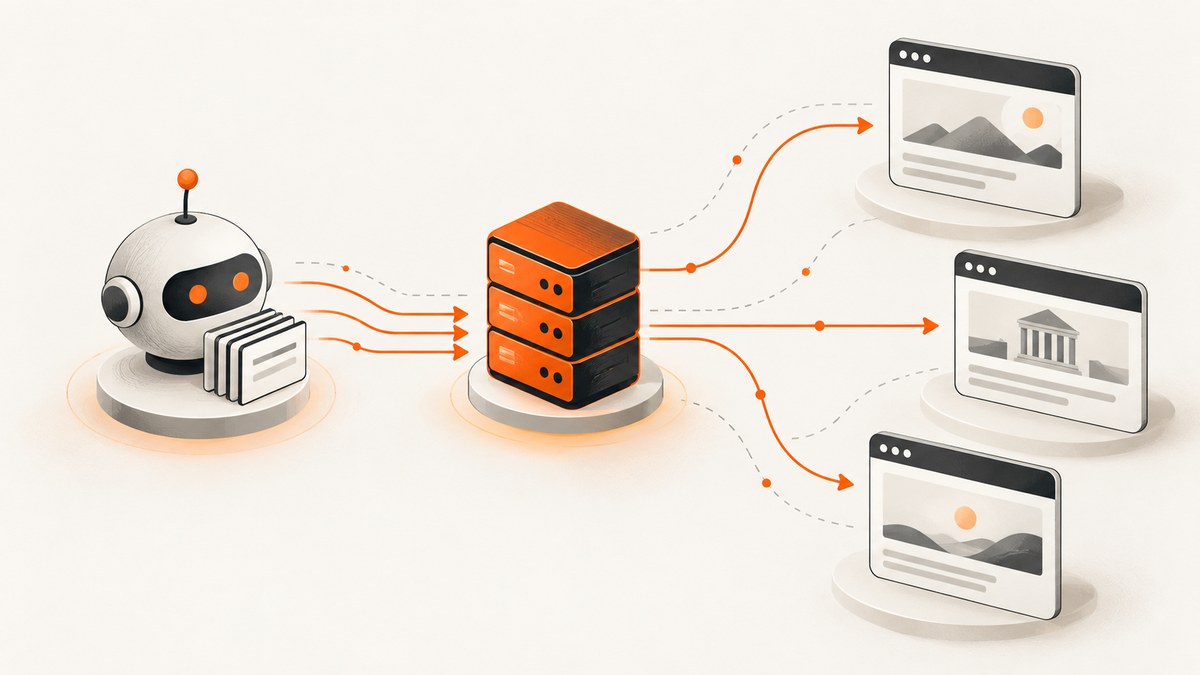
A private proxy is commonly a datacenter IP address assigned to one customer at a time. When a scraper uses it, the scraper sends its outbound request to the proxy, and the proxy connects to the target website. The target sees the proxy endpoint as the network source instead of the scraper’s original IP address.
“Private” or “dedicated” describes who is assigned the address. “Datacenter” describes where the address comes from. A private datacenter proxy is therefore different from a residential proxy, which uses an address associated with a residential internet service provider. Vendor terminology varies, so confirm each provider’s definitions before buying or designing around a service.
What a private proxy is
In common proxy-service usage, a private proxy has an address assigned exclusively to one customer. A shared proxy is used by more than one customer. Both can be datacenter proxies; the distinction is allocation, not network origin.
A proxy is an intermediary connection. It does not copy a page for you, grant access to a restricted site, or guarantee that a target will return content. Your HTTP client, browser, crawler, or automation tool still has to make a valid request and handle the response.
| Term | What it describes | Question to ask a provider |
|---|---|---|
| Private or dedicated | One customer is assigned the address | Is the address exclusive for the whole subscription or only for a session? |
| Shared | More than one customer uses the address | How many users can share an endpoint? |
| Datacenter | Address originates from a hosting or datacenter network | Which countries and networks are available? |
| Residential | Address originates from a residential ISP network | How is consent obtained and how is traffic handled? |
| Rotating | Requests or sessions receive changing addresses | When does rotation happen, and can it be controlled? |
| Sticky | An address remains associated with a session for a period | What is the maximum session lifetime? |
How scraping uses a private proxy
A scraper configures a proxy endpoint in its HTTP client or browser. The request path becomes:
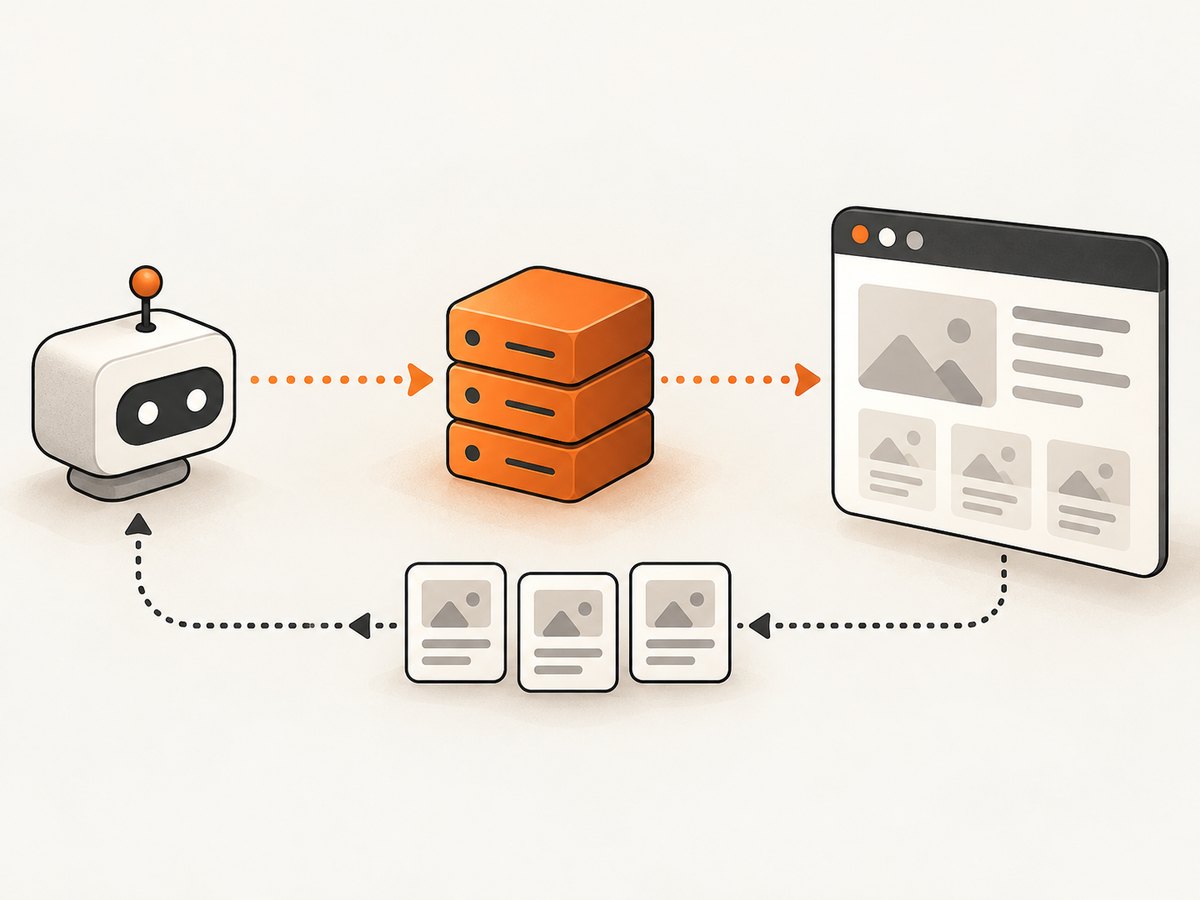
- Your scraper creates a request for a permitted public URL.
- The client opens a connection to the proxy host and port.
- The client authenticates if the provider requires credentials.
- The proxy connects to the target and forwards the request.
- The response travels back through the proxy to your scraper.
- Your parser extracts the data and records status, timing, and any errors.
Proxy vendors describe uses such as collecting public pages, checking localized results, rotating addresses, and retaining one address during a multi-step flow. Those are workflow examples, not performance guarantees. A target can still reject the request, require JavaScript, present a CAPTCHA, or return different content.
Private, residential, rotating, and sticky: choosing the right property
Datacenter versus residential origin
Datacenter addresses are generally hosted in commercial facilities. Residential addresses are associated with consumer ISPs. The address origin can affect how a target classifies traffic, but no proxy type guarantees acceptance or a particular response.
Dedicated versus shared assignment
With a dedicated address, activity from other customers is less likely to be associated with the same IP. That can simplify allowlisting and make a multi-step workflow easier to reason about. It does not make an otherwise unauthorized collection permissible, and it does not guarantee that an IP has a good reputation.
Stable versus rotating addresses
A stable address is useful when a workflow expects the same source across several requests, such as a login session or a sequence of pages. Rotation can distribute requests across a pool, but changing addresses mid-session can invalidate cookies or trigger additional verification. Decide whether your unit of work is a request, a session, or a complete job before selecting rotation behavior.
Location
Country, region, and city selection can help you check localized public content. Confirm what “location” means in the provider’s contract: the proxy’s advertised location, the physical network location, and the content a website serves are related but not identical.
Protocol and authentication
Common options include HTTP, HTTPS, and SOCKS5. Verify that the exact proxy product supports the protocol your client uses and that authentication is compatible with it. Some services use username and password credentials; others use an IP allowlist or a generated token.
Runnable examples
The examples below use placeholders. Replace PROXY_HOST, PROXY_PORT, PROXY_USER, and PROXY_PASSWORD with values from a provider. Use a target you are permitted to access.
cURL
curl --proxy "http://PROXY_USER:PROXY_PASSWORD@PROXY_HOST:PROXY_PORT" \
  --user-agent "ResearchFetcher/1.0" \
  --max-time 30 \
  "https://example.com/public-page" \
  --output page.html
For a SOCKS5 endpoint, use --socks5-hostname so DNS resolution also occurs through the proxy:
curl --socks5-hostname "PROXY_HOST:PROXY_PORT" \
  --proxy-user "PROXY_USER:PROXY_PASSWORD" \
  "https://example.com/public-page" \
  --output page.html
Python with requests
import os
import requests

proxy = (
    f"http://{os.environ['PROXY_USER']}:{os.environ['PROXY_PASSWORD']}"
    f"@{os.environ['PROXY_HOST']}:{os.environ['PROXY_PORT']}"
)

proxies = {"http": proxy, "https": proxy}
headers = {"User-Agent": "ResearchFetcher/1.0"}

response = requests.get(
    "https://example.com/public-page",
    proxies=proxies,
    headers=headers,
    timeout=(10, 30),
)
response.raise_for_status()
with open("page.html", "wb") as output:
    output.write(response.content)
print(response.status_code, len(response.content))
Set the environment variables before running:
export PROXY_USER='your-user'
export PROXY_PASSWORD='your-password'
export PROXY_HOST='proxy.example'
export PROXY_PORT='8080'
python fetch.py
Node.js with fetch and an HTTP proxy agent
Node’s built-in fetch does not configure an HTTP proxy by itself. Install an agent package such as https-proxy-agent, then pass the agent to fetch:
npm install https-proxy-agentimport { HttpsProxyAgent } from 'https-proxy-agent';
const proxyUrl = `http://${encodeURIComponent(process.env.PROXY_USER)}:${encodeURIComponent(process.env.PROXY_PASSWORD)}@${process.env.PROXY_HOST}:${process.env.PROXY_PORT}`;
const agent = new HttpsProxyAgent(proxyUrl);
const response = await fetch('https://example.com/public-page', {
dispatcher: agent,
headers: { 'user-agent': 'ResearchFetcher/1.0' },
signal: AbortSignal.timeout(30000)
});
if (!response.ok) throw new Error(`HTTP ${response.status}`);
const body = Buffer.from(await response.arrayBuffer());
await import('node:fs/promises').then(fs => fs.writeFile('page.html', body));Designing a reliable scraping job
- Define permission and scope. Identify the URLs, fields, frequency, and retention period. Review the target’s terms, privacy obligations, and applicable rules.
- Read robots.txt. RFC 9309 describes robots.txt as crawler access preferences and states: “These rules are not a form of access authorization.” A successful robots.txt fetch requires following parseable rules, but an allowance is not a general legal permission.
- Choose the session model. Use a stable address for stateful flows; use rotation only when the workflow can tolerate a changed source.
- Set conservative limits. Add concurrency caps, delays, retries with backoff, and a clear stop condition for repeated errors.
- Record evidence. Log the URL, timestamp, proxy region or identifier, response status, latency, retry count, and parser result. Never log proxy passwords.
- Validate the content. A 200 response can still be a bot-check page, an empty shell, or an error document. Check expected markers before storing data.
Performance, reliability, and cost considerations
Every proxy adds a network hop. Measure connection time, time to first byte, total response time, and error rate separately. A larger pool is not automatically faster; DNS behavior, target throttling, geographic distance, and provider capacity all affect results.
Use connection reuse where the client supports it, but make sure reuse matches your privacy and session requirements. Set connect and read timeouts independently. Retry transient network failures with exponential backoff and a maximum attempt count. Do not blindly retry 401, 403, CAPTCHA, or policy responses; those usually require a workflow change.
Cost models differ. Providers may charge per IP, bandwidth, traffic, port, or subscription period. Compare the billed unit with your actual job: number of requests, average response size, concurrency, and required locations. Also account for parsing, storage, browser automation, and monitoring.
Troubleshooting private proxy errors
| Symptom | Likely cause | Fix |
|---|---|---|
| Proxy authentication required | Missing or incorrect credentials | Check the username, password, port, and authentication method. URL-encode special characters. |
| Connection timed out | Unavailable endpoint, blocked port, or excessive distance | Test the endpoint with cURL, increase the connect timeout modestly, and try an approved region. |
| 407 from the proxy | The proxy rejected authentication | Regenerate credentials or add your client IP to the provider allowlist. |
| 403 from the target | Target policy, rate limit, or bot detection | Reduce rate, stop retries, review permission, and inspect the response body. |
| CAPTCHA or challenge page | The target requires an interactive verification step | Do not attempt to bypass it automatically. Reassess access and use an authorized integration if available. |
| Different content by location | Target geolocation or localization rules | Pin the proxy location, send an explicit locale where permitted, and record the selected region. |
| Session keeps resetting | Rotation changes the source between requests | Use a sticky session and preserve cookies for the duration of the permitted flow. |
| HTML is empty or incomplete | Content is rendered by JavaScript or the request was served an error shell | Inspect the raw response, wait for client-rendered content with a browser tool, or use an official data endpoint. |
| DNS leaks outside SOCKS proxy | Client resolves the hostname locally | Use SOCKS5 hostname mode or configure remote DNS explicitly. |
Proxy routing versus a screenshot API
A proxy only changes the network route for your client. A screenshot API runs a capture browser or rendering service and returns an image or PDF. If your task is to archive how a page looks, adding a proxy to an HTML scraper may create unnecessary browser infrastructure.
Or skip the browser setup
ScreenshotNeo is a website screenshot API and MCP server. One GET request returns a PNG, JPEG, WebP, or PDF. Before capture it accepts cookie or consent banners like a visitor and removes more than 60 known consent platforms, newsletter popups, and chat widgets; each cleanup step can be disabled. Bot checks and CAPTCHAs, blank pages, timeouts, failed loads, and cache hits are not billed, and the response identifies the result with X-Page-Verdict and X-Billed headers.
See the ScreenshotNeo API documentation for all options. The basic call is:
curl -G "https://api.screenshotneo.com/v1/shot" -d access_key=YOUR_API_KEY --data-urlencode url=https://stripe.com -o shot.webpimport requests
r = requests.get("https://api.screenshotneo.com/v1/shot", params={"access_key": "YOUR_API_KEY", "url": "https://stripe.com"}, timeout=90)
open("shot.webp", "wb").write(r.content)const q = new URLSearchParams({ access_key: 'YOUR_API_KEY', url: 'https://stripe.com' });
const res = await fetch(`https://api.screenshotneo.com/v1/shot?${q}`);Options cover full-page capture with lazy images loaded, CSS-selector element capture, dark mode, 12 device presets or custom viewports, retina scale, PDF paper sizes and page ranges, custom CSS and JavaScript, clicks, selector waits, network-idle waits, ad and tracker blocking, custom headers and cookies, user agents, authorization, timezone and geolocation, transparent backgrounds, resizing, configurable caching, signed image links, asynchronous jobs with signed webhooks, bulk capture of up to 100 URLs per call, a usage API, and an OpenAPI specification. An MCP server provides take_screenshot, get_page_info, and capture_pdf tools for Claude, Cursor, and other MCP clients.
Free accounts include 1,000 screenshots per month with no card. Paid plans start at $5 for 3,000 shots; yearly billing gives two months free, and every feature is included on every plan. Create a free ScreenshotNeo account.
Responsible-use checklist
- Confirm that the target and data collection are permitted.
- Read and follow parseable robots.txt rules.
- Identify yourself accurately where required; do not impersonate a person or service.
- Minimize request volume and avoid unnecessary personal-data collection.
- Protect proxy credentials and collected data.
- Stop when the target signals that access is not allowed.

FAQ
Does a private proxy make scraping anonymous?
No. The target sees the proxy address, but requests can still be linked through cookies, headers, browser characteristics, accounts, timing, or provider records.
Is a private proxy always better than a shared proxy?
No. Dedicated assignment can simplify allowlisting and session control, while shared access may fit a lower-cost, stateless workflow. Match the allocation model to the job.
Should I rotate the IP on every request?
Only when the workflow permits it. Per-request rotation can break sessions and complicate debugging. A stable or sticky address is usually easier for multi-step flows.
Can robots.txt authorize my scraper?
No. RFC 9309 describes robots.txt rules as crawler preferences and explicitly says they are not access authorization. Review the target’s terms, privacy requirements, and applicable law separately.
When should I use a screenshot API instead of a proxy?
Use a screenshot API when the output you need is a rendered image or PDF and you do not want to operate browser automation, consent handling, waiting logic, and capture infrastructure yourself.


