How to Handle Multiple Tabs with puppeteer-cluster Browser Concurrency
Handle multiple tabs in puppeteer-cluster by queueing separate jobs, choosing the right concurrency mode, and setting a practical worker limit.

To handle multiple tabs with puppeteer-cluster, queue one job per URL and set maxConcurrency to control how many jobs can run at once. Each task callback receives one Puppeteer Page, which represents a single Chromium tab; the documented pattern is not to expect one callback to receive an array of tabs. Choose a concurrency mode based on whether jobs should share browser state and how much isolation you need.
The package is a pool of Puppeteer workers that tracks jobs and errors, can retry failed work, and can restart a browser after a crash. Its concurrency modes define how jobs receive pages, contexts, and browsers. The practical starting point is usually an explicitly selected mode and a modest maxConcurrency, adjusted after measuring your own workload. [Project README]
1. Understand what “multiple tabs” means in a cluster
In ordinary Puppeteer code, you may create several pages yourself and coordinate them. puppeteer-cluster gives you a different abstraction: submit work to a queue, and the cluster assigns each job a page according to the selected concurrency implementation and available workers. A task handler runs with a single page and its job data.
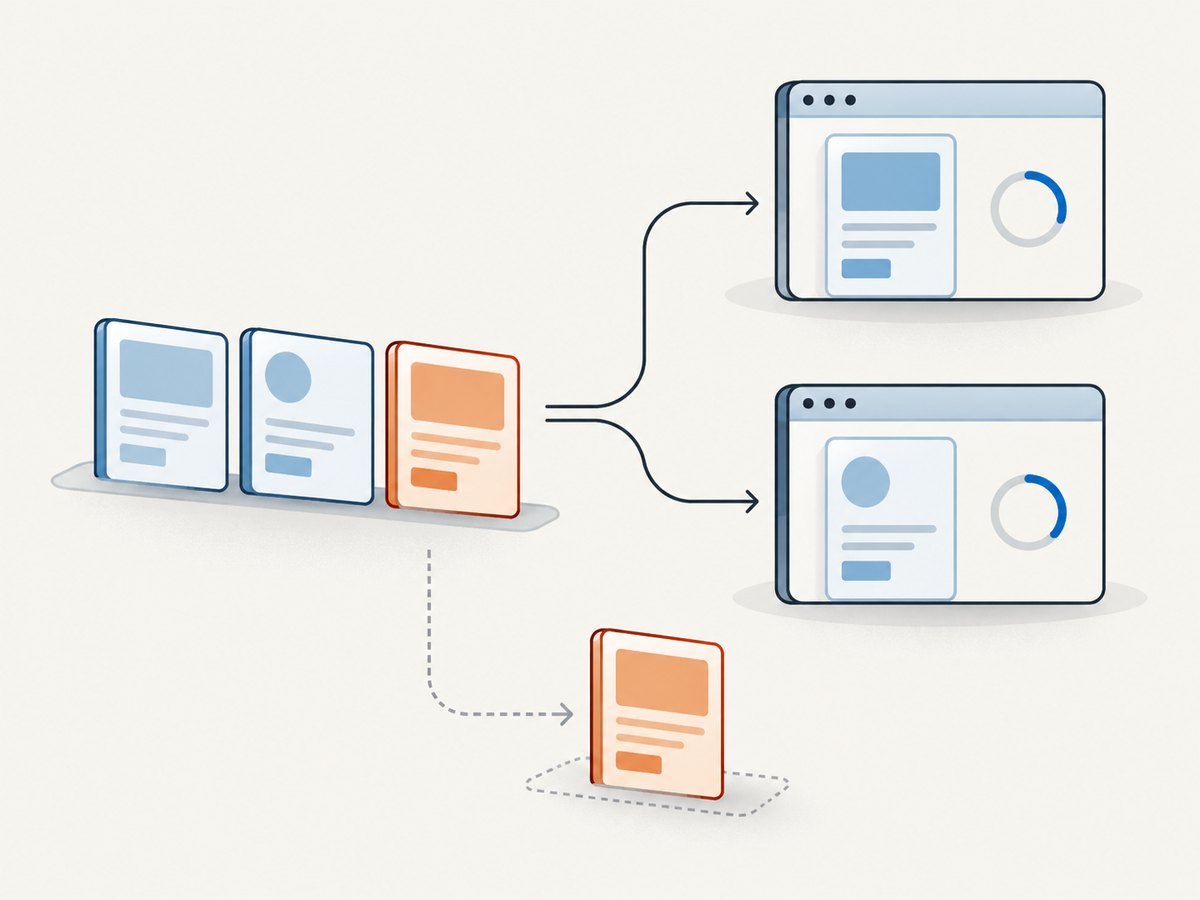
For example, queue three URLs and set maxConcurrency: 2. At most two jobs are eligible to run concurrently; the remaining job waits for a worker. The value 2 here is an illustrative configuration, not a guaranteed throughput recommendation. Actual speed depends on page behavior, machine resources, network conditions, and the work performed in each task.
Use the queue when each URL is an independent unit of work: taking screenshots, checking pages, extracting information, or running browser-driven tests. If one task truly needs to coordinate several tabs as a single unit—for example, opening a page and a companion page together—you can create additional pages inside that task, but those extra pages are your responsibility. The cluster’s standard task callback still receives one assigned page.
2. Choose a concurrency mode
The mode determines the browser resources each job gets and whether state can carry between jobs. The project recommends setting a mode explicitly; its default is CONCURRENCY_CONTEXT. [Project README]
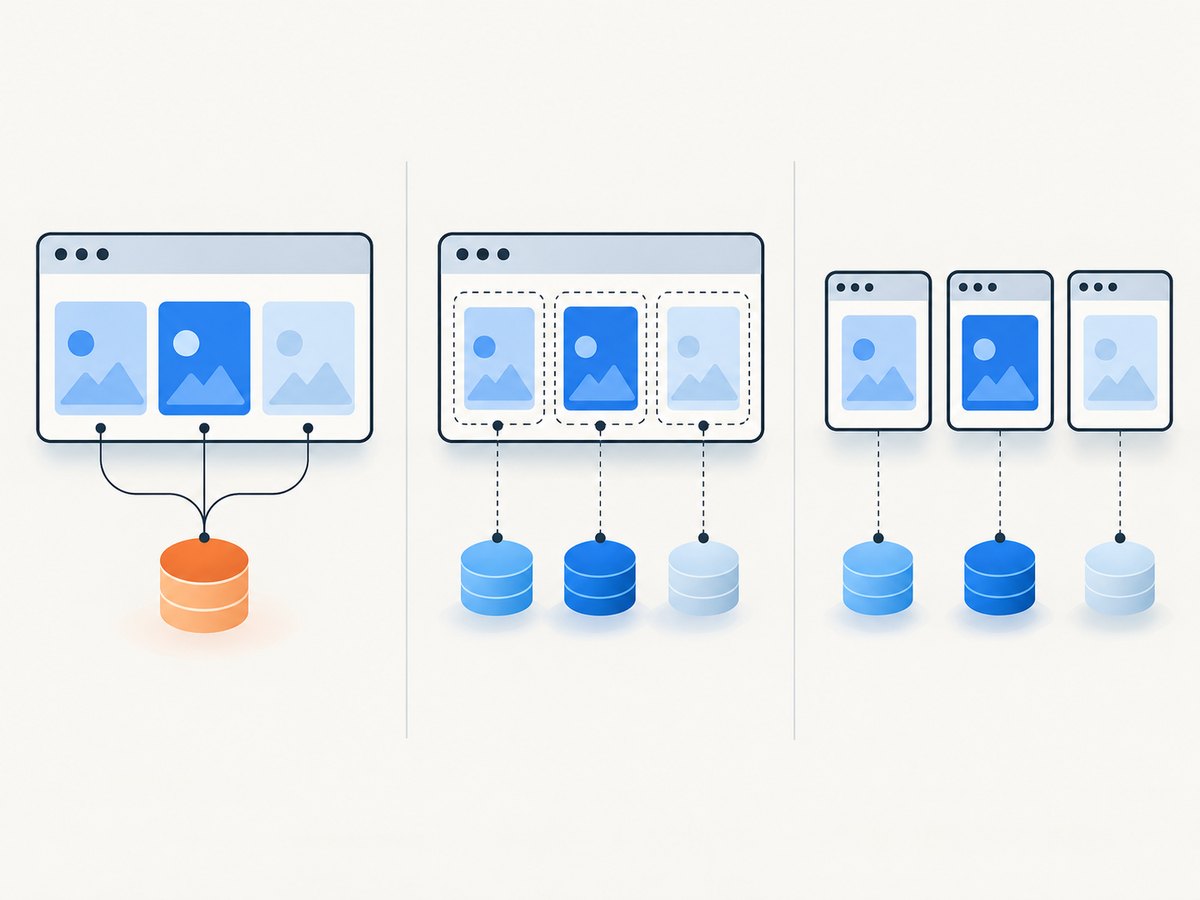
| Mode | Per-job resource | State across jobs | Use it when |
|---|---|---|---|
CONCURRENCY_PAGE |
A Page in the shared browser | Cookies, localStorage, and other browser state can be shared | You deliberately want jobs to reuse a logged-in or initialized browser state. |
CONCURRENCY_CONTEXT |
An incognito page/context | Jobs share no data through their contexts | You want per-job state separation while using the cluster’s browser model. |
CONCURRENCY_BROWSER |
A browser with an incognito page per URL | Jobs share no data | You need stronger crash isolation: the project documents that one job’s browser crash does not affect other jobs. |
Cookie-sharing behavior is also covered by the project’s tests: cookies are shared with CONCURRENCY_PAGE, while CONCURRENCY_CONTEXT and CONCURRENCY_BROWSER do not share them. [Project tests]
Do not select a mode based only on its name. Decide whether the next job should see cookies, localStorage, or other state from the previous job; then consider whether a browser crash should be isolated to a job. More isolation can mean more resource overhead, but the cited project material does not publish comparative memory or throughput benchmarks. Measure with your own pages and host.
3. Install and run a queued multi-page example
Install the package in a Node.js project with Puppeteer available as its browser integration. The code below uses CommonJS and follows the project’s documented launch, task, queue, idle, and close pattern. [Project usage documentation]
npm install puppeteer puppeteer-clusterSave this as cluster-pages.js and run it with node cluster-pages.js:
const { Cluster } = require('puppeteer-cluster');

async function main() {
  const cluster = await Cluster.launch({
    concurrency: Cluster.CONCURRENCY_CONTEXT,
    maxConcurrency: 2,
  });

  cluster.on('taskerror', (err, data, willRetry) => {
    console.error('Task failed:', data, err.message, { willRetry });
  });

  await cluster.task(async ({ page, data: url }) => {
    const response = await page.goto(url, {
      waitUntil: 'domcontentloaded',
      timeout: 30000,
    });

    if (!response) {
      throw new Error(`No main-resource response for ${url}`);
    }

    const title = await page.title();
    console.log({ url, status: response.status(), title });
  });

  cluster.queue('https://example.com/one');
  cluster.queue('https://example.com/two');
  cluster.queue('https://example.com/three');

  await cluster.idle();
  await cluster.close();
}

main().catch((err) => {
  console.error(err);
  process.exitCode = 1;
});
The example URLs are placeholders; replace them with pages you are authorized to access. The callback maps each queued URL to data, while the cluster provides the job’s page. The official example uses maxConcurrency: 2, queues multiple URLs, waits for idle(), and then closes the cluster. [Official TypeScript example]
Why wait for idle before closing?
cluster.idle() waits until queued work has finished. Calling cluster.close() after that gives every queued job an opportunity to complete before the browser resources are shut down. If your process can receive termination signals, handle them at the application level and arrange a controlled shutdown; do not abruptly exit while jobs are still running.
4. Tune concurrency and navigation for the workload
maxConcurrency is the main setting for simultaneous cluster work. Its documented default is 1, which means queueing many jobs does not by itself make them run in parallel. Increase it deliberately, observe resource usage and error rates, and adjust. There is no published universal number that will be right for every site or machine. [Project launch options]
- Start with a small number. Confirm the task works for one URL, then try a low concurrency such as 2.
- Measure representative pages. Include slow pages, pages with heavy scripts, and the resource limits of the machine that will run production jobs.
- Use an intentional navigation condition.
domcontentloadedis often a practical point for HTML extraction; useloador a more targeted wait when the task depends on later resources or application state. - Set a timeout. A page that never reaches the chosen condition should fail within a known time rather than hold a worker indefinitely.
- Keep task data serializable in spirit. Queue URLs or small job descriptors, and keep task-specific results and errors associated with that input.
More workers can increase contention for CPU, memory, network connections, and the target site. Conversely, very low concurrency may leave capacity unused. Compare the modes and worker counts on the pages you actually process; no speed or memory multiplier can be inferred from the project documentation.
5. When one job really needs several tabs
Most multi-URL work should use one queued job per URL. If the unit of work genuinely requires multiple tabs together, create those pages inside the assigned task and close them in a finally block. This keeps ownership explicit and avoids leaving extra tabs open when one navigation or assertion fails.
await cluster.task(async ({ page, data }) => {
  const companion = await page.browser().newPage();
  try {
    await Promise.all([
      page.goto(data.primary, { waitUntil: 'domcontentloaded' }),
      companion.goto(data.companion, { waitUntil: 'domcontentloaded' }),
    ]);

    const results = await Promise.all([
      page.title(),
      companion.title(),
    ]);
    console.log(data.id, results);
  } finally {
    await companion.close();
  }
});

cluster.queue({
  id: 'pair-1',
  primary: 'https://example.com/one',
  companion: 'https://example.com/two',
});
This is a Puppeteer pattern inside a cluster task, not a promise that the cluster will reserve multiple workers or tabs as one atomic group. It also means one task can consume more than one page worth of resources. If those pages need isolated context state, create them in an appropriate browser context for your installed Puppeteer API and selected cluster mode, and close both pages and context reliably. Check the API for the exact browser/context methods available in your version.
6. Errors, retries, and cleanup
The project describes error tracking, retries for failed jobs, and browser restart behavior after a crash. Treat retry as recovery from transient failures, not as proof a page is healthy: a deterministic bad URL or invalid selector can fail on every attempt. Log enough job identity to find a failure, and make task side effects safe to repeat. [puppeteer-cluster repository]
Register a taskerror listener as shown above. The callback receives the error, the job data, and whether the task will be retried. Use that information for structured logging or metrics. Avoid swallowing an exception if the job should be considered failed. Ensure any resources created by your task—extra pages, files, or temporary state—are cleaned up even on rejection.
7. Troubleshooting common problems
| Symptom | Likely cause | What to do |
|---|---|---|
| Jobs appear to run one at a time | maxConcurrency is 1, including its documented default. |
Set a value greater than 1, then check that the host can support the additional browser work. |
| A task does not receive multiple tabs | A task callback is designed around one assigned page. |
Queue separate jobs for separate URLs, or explicitly create and manage extra pages inside a task that needs coordinated tabs. |
| One job sees another job’s cookie | CONCURRENCY_PAGE shares browser state. |
Choose CONCURRENCY_CONTEXT or CONCURRENCY_BROWSER when jobs must not share data. |
| A later job is unexpectedly logged out | You selected a mode whose contexts do not share cookies. | Use a shared-state design intentionally, such as CONCURRENCY_PAGE, or authenticate each isolated job as part of its own setup. |
| Navigation times out | The page is slow, the network is unreliable, or the selected wait condition never occurs. | Check the URL and network, choose the least strict wait condition that satisfies the task, and set a timeout appropriate to the site. |
| Browser exits or jobs fail after shutdown | The cluster was closed before its queue drained, or an unhandled process exit interrupted work. | Await cluster.idle() before cluster.close(); add controlled shutdown handling. |
| Failures repeat despite retries | The cause is persistent, such as a bad URL or task bug, rather than transient. | Inspect the logged job data and original error; correct the input or task instead of only increasing retries. |
| Throughput gets worse at higher concurrency | Workers may contend for local resources or the remote site may slow or reject requests. | Lower concurrency, measure memory and CPU, and pace requests in line with the target site’s rules. |
8. Reliability, performance, and cost considerations
Reliability: keep each job small enough to retry safely, set navigation timeouts, log the URL or job identifier, and wait for the queue to drain before shutdown. Select a mode that matches your tolerance for state sharing and browser crashes. A browser restart or retry can help recover from transient issues, but neither can fix a deterministic application or target-page error.
Performance: concurrency is a scheduling choice, not a benchmark. Browser startup, page scripts, images, network delays, and CPU or memory pressure all influence elapsed time. Measure end-to-end completion on a representative batch and inspect the slowest jobs, not only the average.
Cost: self-hosting means accounting for the compute, memory, network, engineering time, and operational care needed to run browsers. There is no per-screenshot price established by the puppeteer-cluster sources. Estimate your own cost from the infrastructure and volume you operate; do not extrapolate a cost per page from the example’s concurrency setting.
9. Or skip the browser setup
If your task is to capture clean website screenshots rather than run arbitrary browser automation, ScreenshotNeo provides a website screenshot API and MCP server. Its [API documentation] covers the request options.
curl -G "https://api.screenshotneo.com/v1/shot" -d access_key=YOUR_API_KEY --data-urlencode url=https://stripe.com -o shot.webpimport requests
r = requests.get(
"https://api.screenshotneo.com/v1/shot",
params={"access_key": "YOUR_API_KEY", "url": "https://stripe.com"},
timeout=90,
)
open("shot.webp", "wb").write(r.content)const q = new URLSearchParams({ access_key: 'YOUR_API_KEY', url: 'https://stripe.com' });
const res = await fetch(`https://api.screenshotneo.com/v1/shot?${q}`);
if (!res.ok) throw new Error(`Screenshot request failed: ${res.status}`);
const bytes = Buffer.from(await res.arrayBuffer());
await import('node:fs/promises').then(fs => fs.writeFile('shot.webp', bytes));- Cookie and consent banners are accepted before capture, and 60+ known consent platforms, newsletter popups, and chat widgets can be removed; each step can be turned off.
- Bot checks or CAPTCHAs, blank pages, timeouts, failed loads, and cache hits cost nothing. Response headers identify the page verdict and whether it was billed.
- An MCP server provides
take_screenshot,get_page_info, andcapture_pdftools for Claude, Cursor, and other MCP clients. - The free plan includes 1,000 screenshots per month with no card. Paid plans start at $5 for 3,000 screenshots; every feature is on every plan.
Sign up free for 1,000 screenshots a month, no card required.
10. FAQ
Does puppeteer-cluster create every tab up front?
The documented model assigns pages to jobs through workers. Queue jobs and let available concurrency determine which run; do not depend on all pages existing simultaneously before work starts.
Can I use a different concurrency mode for each queued URL?
The mode is selected when launching the cluster. If separate batches need different sharing or isolation behavior, launch appropriately configured clusters for those batches and manage their resource use.
Should I always use browser concurrency for maximum isolation?
No universal choice follows from the documentation. Use the mode whose state-sharing and crash-isolation behavior fits the task, then compare operational resource use on your environment.
Is puppeteer-cluster a screenshot API?
It is a Node.js browser-job pool for Puppeteer tasks. It can support screenshot automation as part of your code, while a screenshot API handles the capture service and request interface for you.


