How to Start PDF Page Numbering on the Second Page with Puppeteer
Learn when page two should show 1 or 2, then build reliable Puppeteer PDFs with cover splitting, footer templates, merging, and fixes.

Direct answer: decide what “start on the second page” means before writing code. If the cover is physical page 1 but the first content page must display 1, generate the cover and body as separate PDFs, number only the body, then merge them. If page two should display 2, generate one PDF with displayHeaderFooter: true; Puppeteer’s pageNumber placeholder follows the physical PDF sequence.
Puppeteer does not expose a documented “skip the first page” switch in page.pdf(). Its footer templates provide the current page and total page placeholders, so the split-and-merge workflow is the reliable way to make a cover unnumbered while restarting numbering at 1.
Choose the numbering rule
| Requirement | Implementation | Page two shows |
|---|---|---|
| Cover excluded from numbering | Render cover and body separately, merge PDFs | 1 |
| Physical PDF sequence | Render one PDF with a footer template | 2 |
| Cover has a different footer | Split, render each part with its own options, merge | Usually 1 on body |
Ask the content owner which convention is wanted. “Page numbering starts on the second page” is ambiguous: a reader may mean the second sheet is labeled 1, or that numbering is merely hidden on the cover while the second sheet remains 2.
How Puppeteer PDF numbering works
page.pdf() prints using the print CSS media type. The displayHeaderFooter option is false by default, so no header or footer is emitted until you enable it. In footerTemplate or headerTemplate, Puppeteer replaces <span class='pageNumber'></span> with the current page and <span class='totalPages'></span> with the total page count. See the Puppeteer page.pdf API and PDFOptions reference.
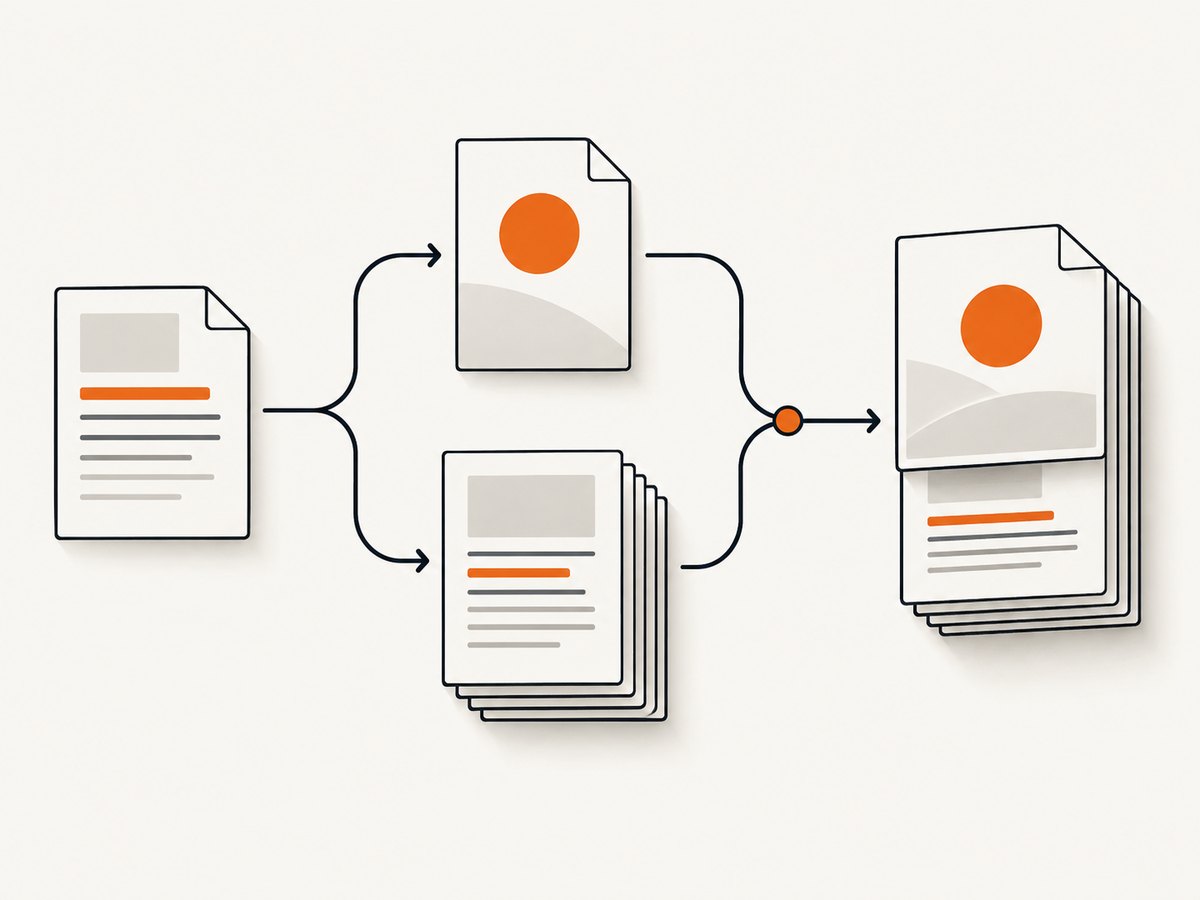
The placeholders are scoped to the PDF being rendered. When you render the body alone, its first page is page 1. After merging, that body page becomes physical page two in the combined file, which is exactly how numbering restarts after a cover.
Option A: cover unnumbered, page two labeled 1
1. Install dependencies
npm install puppeteer pdf-lib2. Complete runnable script
const puppeteer = require('puppeteer');
const { PDFDocument } = require('pdf-lib');
const fs = require('fs/promises');
const coverHtml = `Your report title `;
const bodyHtml = `First content page
This page is numbered 1 in body.pdf.
More content
Add the rest of your document here.
`;
const footerTemplate = ` / `;
async function render() {
const browser = await puppeteer.launch({ headless: true });
try {
const page = await browser.newPage();
await page.setContent(coverHtml, { waitUntil: 'networkidle0' });
await page.pdf({ path: 'cover.pdf', format: 'A4', displayHeaderFooter: false, printBackground: true, margin: { top: '0', right: '0', bottom: '0', left: '0' } });
await page.setContent(bodyHtml, { waitUntil: 'networkidle0' });
await page.pdf({ path: 'body.pdf', format: 'A4', displayHeaderFooter: true, headerTemplate: '', footerTemplate, printBackground: true, margin: { top: '18mm', right: '16mm', bottom: '22mm', left: '16mm' } });
} finally { await browser.close(); }
const merged = await PDFDocument.create();
for (const file of ['cover.pdf', 'body.pdf']) {
const source = await PDFDocument.load(await fs.readFile(file));
const pages = await merged.copyPages(source, source.getPageIndices());
pages.forEach(page => merged.addPage(page));
}
await fs.writeFile('report.pdf', await merged.save());
}
render().catch(error => { console.error(error); process.exit(1); });Run it with node make-pdf.js. The cover has no footer. The first body page contains 1 / N, and the merged output is report.pdf. The total shown in the body is the number of body pages, not the merged document’s physical total. If your footer must say “1 / 12” where 12 includes the cover, calculate the merged total first and inject a custom total value into the body footer; the built-in totalPages placeholder only knows about the PDF currently being rendered.
Keeping a single source document
Keep the cover and body as separate HTML fragments or templates even when they come from one data model. This lets you load different CSS, margins, fonts, and footer settings without depending on page selectors that Chromium may ignore.
Option B: page two labeled 2
Use one render when the physical sequence is the desired numbering. The second physical page will show 2 automatically.
const browser = await puppeteer.launch({ headless: true });
const page = await browser.newPage();
await page.setContent(html, { waitUntil: 'networkidle0' });
await page.pdf({
  path: 'document.pdf', format: 'A4', displayHeaderFooter: true,
  headerTemplate: '',
  footerTemplate: " / ",
  printBackground: true, margin: { bottom: '18mm' }
});
await browser.close();
Because pageNumber is tied to physical output, the cover is page 1 and the next page is page 2. This is the simplest choice when a report’s table of contents and references use physical page numbers.
Footer design and layout details
- Reserve footer space with a bottom margin. Content can overlap the footer when the margin is too small.
- Use an empty header template when only a footer is needed; otherwise Chromium can apply its default header/footer spacing.
- Inline CSS in the template. External stylesheets and page CSS do not reliably style the isolated header/footer document.
- Use a small, readable font and a full-width wrapper. The template is an HTML fragment, not a normal page body.
- Set
printBackground: truewhen the footer or cover relies on background colors. - Wait for fonts and images before PDF generation.
networkidle0is useful for static pages, but an application with long polling may never become idle; in that case wait for a specific selector and a bounded delay.
Why CSS-only first-page tricks fail
Print CSS defines page counters such as counter(page) and counter(pages), but Puppeteer’s header/footer template is a separate Chromium print path. A CSS counter does not change the value injected into pageNumber. Compatibility guidance for Puppeteer also reports that @page :first is unsupported, so do not make production numbering depend on a first-page selector. Split-and-merge is explicit and testable.
Advanced variations
Roman numerals for front matter
Render front matter separately and add a literal footer such as “i”, “ii”, or “iii” per page if you need Roman numerals. Render the main body with the normal pageNumber placeholder, then merge all parts. Puppeteer does not provide a placeholder that converts Arabic page numbers to Roman numerals.
Different footer on the cover
Give the cover its own footer template or disable it entirely. A single call cannot conditionally switch the template after the first physical page; separate PDFs make the boundary unambiguous.
Table of contents links
Generate the body first, determine its page count, and then build a TOC with the offset created by the cover. If the TOC must point to physical pages, add one to every body page number. If it must point to printed body numbers, leave the body index unchanged.
Custom paper size and orientation
Use the same format, width/height, landscape, and margins for cover and body unless a deliberate section change is required. A mismatch can create an unexpected blank page or shift content when PDFs are merged.
Navigation, loading, and page-break controls
await page.goto('https://example.com/report', { waitUntil: 'domcontentloaded' });
await page.emulateMediaType('print');
await page.waitForSelector('#report-ready', { timeout: 15000 });
await page.evaluate(() => document.fonts.ready);
await page.pdf({ path: 'body.pdf', preferCSSPageSize: true, displayHeaderFooter: true, footerTemplate, margin: { bottom: '20mm' }, printBackground: true });
Use preferCSSPageSize: true when your @page rule must control sheet size. Add break-before: page to deliberate section starts and break-inside: avoid to cards, figures, and headings that must stay together. Avoid forcing every heading to a new page; it can create trailing blanks.
Troubleshooting
| Symptom | Cause | Fix |
|---|---|---|
| No footer appears | displayHeaderFooter is false or omitted. |
Set it to true and provide footerTemplate. |
| Literal pageNumber text | The required class or element is misspelled. | Use the documented pageNumber span exactly. |
| Footer overlaps content | Bottom margin is too small. | Increase the PDF bottom margin and rerender. |
| Cover is numbered | The cover was rendered with body options. | Render it separately with displayHeaderFooter: false. |
| Page two shows 2 instead of 1 | You rendered one PDF. | Split cover and body, then merge with pdf-lib. |
| Total count excludes cover | totalPages counts only the current render. |
Compute the merged count or print a custom total. |
| Fonts change page breaks | PDF was created before web fonts loaded. | Await document.fonts.ready and confirm fonts are reachable. |
| Blank page appears | Conflicting @page size, margins, or forced breaks. |
Use one size for both files and remove redundant breaks. |
| Navigation times out | Long polling, blocked assets, or slow origin. | Use bounded waits and a readiness selector. |
| Merge fails | Input is incomplete or encrypted. | Check both files finished writing before loading them. |
Verification checklist
- Open the merged PDF and confirm the cover has no footer.
- Confirm the first body page displays the intended number, 1 or 2.
- Check the last body page and total count.
- Print the PDF to paper or a second viewer; viewer overlays can hide defects.
- Test a short document, a document that breaks inside a heading, and a multi-page document with images.
- Run the same script with the Chromium version bundled by the deployed Puppeteer release.
Performance, reliability, and cost notes
Launching Chromium dominates short jobs, so reuse one browser process and create a fresh page per document when processing a batch. Close pages in a finally block, cap navigation and selector waits, and record the Puppeteer and Chromium versions with the output. Cache stable HTML or assets where appropriate, but invalidate the cache when fonts, CSS, or data change because any of them can alter page breaks.
Rendering cover and body doubles the PDF passes and therefore the browser work. That cost buys deterministic numbering and independent styling. If you only need physical numbering, one pass is cheaper and simpler. PDF merging is usually memory-bound by page count; avoid retaining large source buffers for many concurrent jobs.
Puppeteer itself has no per-page service fee. Your operational costs are compute, storage, and bandwidth, plus any hosted browser or proxy you choose. Add retries only for transient navigation failures. Use a job ID and atomic rename so consumers never read a partially written PDF.
Or skip the browser setup
ScreenshotNeo is a website capture API and MCP server. It can return PNG, JPEG, WebP, or PDF from one GET request, with options for paper size, margins, landscape mode, and page ranges. Read the ScreenshotNeo API docs for PDF parameters.
# cURL
curl -G 'https://api.screenshotneo.com/v1/shot' -d access_key=YOUR_API_KEY --data-urlencode url=https://example.com -o shot.webp

# Python
import requests
r = requests.get('https://api.screenshotneo.com/v1/shot', params={'access_key': 'YOUR_API_KEY', 'url': 'https://example.com'}, timeout=90)
open('shot.webp', 'wb').write(r.content)

// Node.js
const q = new URLSearchParams({ access_key: 'YOUR_API_KEY', url: 'https://example.com' });
const res = await fetch(`https://api.screenshotneo.com/v1/shot?${q}`);
For PDF output, add the documented PDF option from the API docs and save the response with a .pdf extension. ScreenshotNeo removes cookie banners, newsletter popups, and chat widgets before capture; each cleanup step can be turned off. Bot checks, blank pages, timeouts, failed loads, and cache hits are not billed, and the response identifies the result with X-Page-Verdict and X-Billed headers. An MCP server lets Claude, Cursor, and other MCP clients call take_screenshot, get_page_info, and capture_pdf.
The Free plan includes 1,000 screenshots per month with no card. Paid plans start at $5 for 3,000 shots; every feature is available on every plan. Create a free ScreenshotNeo account.
FAQ
Can I use pageNumber in normal HTML?
No. Puppeteer replaces it in the header/footer template path. A span in the document body remains ordinary HTML.
Does totalPages include the cover after merging?
No. It is calculated for the PDF being rendered. A separately rendered body reports body pages only.
Can I hide only the first footer with CSS?
Do not rely on @page :first for Puppeteer production output. Render separate PDFs when the first page needs different numbering.
Should page two show 1 or 2?
Use 1 when the cover is excluded from printed numbering. Use 2 when numbers describe physical PDF pages.
Can this work with HTML loaded from a URL?
Yes. Navigate with page.goto, wait for content and fonts, then call page.pdf(). The split workflow is the same.


