Using Python Functions in Web Scraping
Build maintainable Python scrapers by separating fetching, parsing, cleaning, validation, and saving into reusable functions.

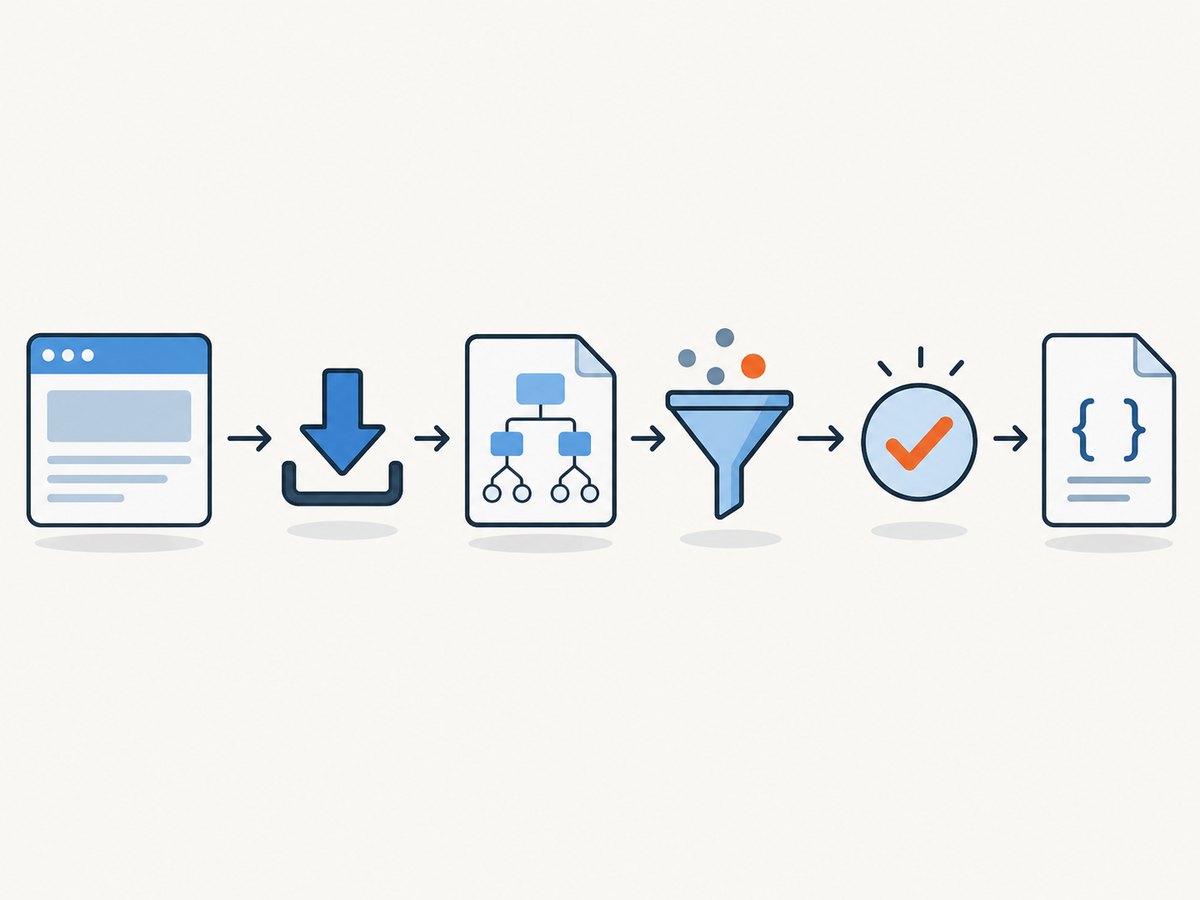
Using functions turns a web scraper from one long script into a small pipeline that is easier to understand, test, and change. A practical design is to give each stage one responsibility:
- Fetch a URL and return the response text.
- Parse the HTML and locate the fields you need.
- Clean and validate those fields.
- Save the finished records.
This separation keeps HTTP concerns out of parsing code and keeps file or database concerns out of extraction code. The examples below use Python, Requests, and Beautiful Soup. Requests is a third-party HTTP client; Beautiful Soup parses HTML and XML and lets you navigate the resulting tree. See the urllib.request documentation, Requests documentation, and Beautiful Soup manual for current APIs and installation details.
What a function-based scraper looks like
A useful mental model is a typed pipeline:
URL -> fetch_page -> parse_items -> clean_item -> save_itemsEach function accepts a clear input and returns a clear output. If a page layout changes, you usually update the parser rather than rewriting networking, validation, and storage code.
Prerequisites
The official Python tutorial is aimed at people who are new to Python, rather than people who are new to programming. You should be comfortable with variables, lists, dictionaries, loops, exceptions, and importing modules. Create an environment and install the dependencies:
python -m venv .venv
# macOS/Linux
source .venv/bin/activate
# Windows PowerShell: .venv\\Scripts\\Activate.ps1
python -m pip install requests beautifulsoup4
Pin versions in a requirements file for repeatable deployments after checking the versions you intend to support:
requests
beautifulsoup4
A complete scraper with separate functions
The following illustrative program fetches article cards, extracts a title and link, normalizes the values, and writes JSON. Replace the selectors with selectors that match the site you are permitted to access.
from __future__ import annotations

import json
import time
from dataclasses import asdict, dataclass
from typing import Iterable
from urllib.parse import urljoin

import requests
from bs4 import BeautifulSoup


@dataclass
class Item:
    title: str
    url: str


def fetch_page(
    url: str,
    *,
    session: requests.Session | None = None,
    timeout: tuple[float, float] = (10.0, 30.0),
) -> str:
    """Fetch one page and return decoded HTML."""
    client = session or requests.Session()
    response = client.get(
        url,
        timeout=timeout,
        headers={"User-Agent": "ExampleResearchBot/1.0"},
    )
    response.raise_for_status()
    return response.text


def parse_items(html: str, base_url: str) -> list[Item]:
    """Extract article cards from HTML."""
    soup = BeautifulSoup(html, "html.parser")
    items: list[Item] = []

    for card in soup.select("article.card"):
        link = card.select_one("a.card-link")
        heading = card.select_one("h2, h3")
        if link is None or heading is None:
            continue

        href = link.get("href")
        title = heading.get_text(" ", strip=True)
        if not href or not title:
            continue

        items.append(Item(title=title, url=urljoin(base_url, href)))

    return items


def clean_item(item: Item) -> Item | None:
    """Normalize fields and reject records that are not usable."""
    title = " ".join(item.title.split())
    url = item.url.strip()
    if not title or not url.startswith(("http://", "https://")):
        return None
    return Item(title=title, url=url)


def clean_items(items: Iterable[Item]) -> list[Item]:
    cleaned: list[Item] = []
    seen_urls: set[str] = set()
    for item in items:
        normalized = clean_item(item)
        if normalized and normalized.url not in seen_urls:
            cleaned.append(normalized)
            seen_urls.add(normalized.url)
    return cleaned


def save_items(items: Iterable[Item], path: str = "items.json") -> None:
    with open(path, "w", encoding="utf-8") as output:
        json.dump([asdict(item) for item in items], output, indent=2, ensure_ascii=False)


def scrape(url: str) -> list[Item]:
    with requests.Session() as session:
        html = fetch_page(url, session=session)
    return clean_items(parse_items(html, url))


if __name__ == "__main__":
    target = "https://example.com/articles"
    records = scrape(target)
    save_items(records)
    print(f"Saved {len(records)} records")
The code is intentionally explicit. fetch_page owns status handling and timeouts. parse_items knows the document structure. Cleaning is deterministic and can be tested without network access. Saving accepts already-clean records, so it can later be replaced with a database writer.
Fetching pages reliably
Requests versus urllib.request
Requests provides a higher-level API with sessions, connection pooling, automatic decoding, and timeout support. It adds a dependency but is often convenient for multi-page jobs. Python’s standard library includes urllib.request, which opens URLs and returns response content without installing a third-party package.
A standard-library fetch function can look like this:
from urllib.request import Request, urlopen


def fetch_with_urllib(url: str) -> str:
    request = Request(url, headers={"User-Agent": "ExampleResearchBot/1.0"})
    with urlopen(request, timeout=30) as response:
        charset = response.headers.get_content_charset() or "utf-8"
        return response.read().decode(charset, errors="replace")
Use one approach consistently inside a project. Do not mix retrieval and parsing in every loop iteration; that makes retries, logging, and tests harder to control.
Timeouts, status codes, and retries
Always set a timeout. A tuple such as (10, 30) gives connection and read phases separate limits. Call raise_for_status() so 404 and 500 responses do not silently become parser input. Retry only transient failures, and use backoff:
import random
import time
import requests


def fetch_with_retries(url: str, attempts: int = 3) -> str:
    for attempt in range(attempts):
        try:
            response = requests.get(
                url,
                timeout=(10, 30),
                headers={"User-Agent": "ExampleResearchBot/1.0"},
            )
            response.raise_for_status()
            return response.text
        except (requests.Timeout, requests.ConnectionError) as error:
            if attempt == attempts - 1:
                raise
            delay = (2 ** attempt) + random.random()
            time.sleep(delay)
    raise RuntimeError("unreachable")
Do not blindly retry authentication failures, invalid URLs, most 4xx responses, or a site that is actively rate-limiting you. Record the URL, status code, exception type, and attempt number in logs.
Parsing HTML with a dedicated function
Beautiful Soup builds a navigable tree from HTML or XML. CSS selectors make extraction readable:
def parse_product(html: str) -> dict[str, str | None]:
    soup = BeautifulSoup(html, "html.parser")
    name = soup.select_one("h1.product-name")
    price = soup.select_one(".price")
    return {
        "name": name.get_text(" ", strip=True) if name else None,
        "price": price.get_text(" ", strip=True) if price else None,
    }
Use get_text(" ", strip=True) to normalize whitespace. Treat missing elements as ordinary input, not an impossible state. A site may publish a different template for mobile, an unavailable product, or an error page.
Built-in HTML parsing
Python’s standard library also includes HTML parsing tools. They avoid an extra dependency, but you must build more of the tree-navigation and extraction behavior yourself. Beautiful Soup is designed specifically for extracting data and navigating HTML/XML documents. Choose based on deployment constraints and parser needs, not an assumed speed ranking.
Cleaning, validation, and pagination
Keep transformations separate from selectors. For example:
from decimal import Decimal, InvalidOperation


def parse_price(value: str | None) -> Decimal | None:
    if not value:
        return None
    normalized = value.replace("$", "").replace(",", "").strip()
    try:
        return Decimal(normalized)
    except InvalidOperation:
        return None
For pagination, make the page boundary explicit and stop when there is no next link or when a safety limit is reached:
def scrape_pages(first_url: str, max_pages: int = 20) -> list[Item]:
    all_items: list[Item] = []
    next_url: str | None = first_url
    with requests.Session() as session:
        for _ in range(max_pages):
            if not next_url:
                break
            html = fetch_page(next_url, session=session)
            all_items.extend(parse_items(html, next_url))
            soup = BeautifulSoup(html, "html.parser")
            link = soup.select_one("a[rel='next']")
            next_url = urljoin(next_url, link["href"]) if link and link.get("href") else None
            time.sleep(1)
    return clean_items(all_items)
The delay is an example, not a universal rate recommendation. Select a conservative request rate that the target’s terms and crawler guidance permit.
Robots.txt, terms, and responsible retrieval
Before automating requests, read the site’s terms and crawler guidance. Python’s urllib.robotparser can parse robots.txt and answer whether a user agent may fetch a URL, along with helpers for crawl delay and request rate:
from urllib.robotparser import RobotFileParser


def allowed_by_robots(site_url: str, target_url: str) -> bool:
    robots_url = site_url.rstrip("/") + "/robots.txt"
    parser = RobotFileParser(robots_url)
    parser.read()
    return parser.can_fetch("ExampleResearchBot", target_url)
Robots rules are guidance for crawlers, not a security control or legal permission. RFC 9309 states: “These rules are not a form of access authorization.” Whether a particular scrape is lawful or permitted depends on the target, jurisdiction, data, terms, and access method.
Testing each function without fetching the web
Pure functions are easy to test with saved HTML fixtures:
def test_parse_items():
    html = """
    <article class='card'>
      <a class='card-link' href='/one'><h2>  First post </h2></a>
    </article>
    """
    result = parse_items(html, "https://example.com")
    assert result == [Item("First post", "https://example.com/one")]


def test_clean_items_deduplicates():
    source = [
        Item("  A  title ", "https://example.com/a"),
        Item("A title", "https://example.com/a"),
    ]
    assert clean_items(source) == [Item("A title", "https://example.com/a")]
Mock fetch_page or pass fixture text into parse_items. This keeps parser tests fast and prevents a test suite from depending on a live site’s layout.
Performance, reliability, and cost considerations
- Reuse sessions: a Requests session can reuse connections across pages.
- Bound work: set page, item, byte, and time limits to prevent runaway jobs.
- Cache responsibly: cache responses when terms permit; include the URL and relevant headers in the cache key.
- Stream large downloads: use
stream=Trueand enforce a maximum size when downloading files. - Separate stages: fetch workers can feed a parser queue, but keep concurrency within the target’s limits.
- Measure your own job: log request latency, response size, parse counts, rejected records, and retry counts. The research for this guide found no general benchmark that applies to every site.
Most scraper costs come from your compute, bandwidth, proxy or browser service, and maintenance time. A plain HTTP scraper is usually simpler for server-rendered HTML. JavaScript-heavy pages may require a browser renderer or a screenshot service.
Or skip the browser setup
If your goal is a visual capture rather than structured HTML data, ScreenshotNeo returns a PNG, JPEG, WebP, or PDF from one GET request. It handles the browser setup for you:

- Cookie banners, newsletter popups, and chat widgets are removed before the shot.
- Bot checks, blank pages, timeouts, failed loads, and cache hits are not billed as clean shots.
- An MCP server lets Claude, Cursor, and other MCP clients use
take_screenshot,get_page_info, andcapture_pdf. - Free usage includes 1,000 screenshots per month with no card; paid plans start at $5 for 3,000 shots.
See the ScreenshotNeo API documentation for all options. A minimal call is:
curl -G "https://api.screenshotneo.com/v1/shot" -d access_key=YOUR_API_KEY --data-urlencode url=https://stripe.com -o shot.webpimport requests
r = requests.get("https://api.screenshotneo.com/v1/shot", params={"access_key": "YOUR_API_KEY", "url": "https://stripe.com"}, timeout=90)
open("shot.webp", "wb").write(r.content)const q = new URLSearchParams({ access_key: 'YOUR_API_KEY', url: 'https://stripe.com' });
const res = await fetch(`https://api.screenshotneo.com/v1/shot?${q}`);ScreenshotNeo also supports full-page and element captures, device presets, retina scale, PDF settings, custom CSS and JavaScript, waits, request blocking, headers, cookies, user agents, timezone, geolocation, transparent backgrounds, resizing, caching, signed links, asynchronous jobs, bulk capture, usage reporting, and an OpenAPI specification. Responses identify page verdict and billing through X-Page-Verdict and X-Billed headers.
Create a free ScreenshotNeo account to get 1,000 screenshots each month with no card.
Troubleshooting checklist
| Symptom | Likely cause | Fix |
|---|---|---|
| Timeout | Slow server, blocked connection, or missing timeout policy | Set connect/read timeouts, retry transient failures with backoff, and reduce concurrency. |
| 403 or 429 | Access policy or rate limiting | Read terms and robots guidance, slow down, identify your client honestly, and stop if access is not permitted. |
| Empty selector result | Selector changed or content is rendered by JavaScript | Save the response, inspect its HTML, update selectors, or use a browser-capable capture method. |
| Garbled characters | Incorrect response decoding | Use Requests’ detected encoding or inspect the declared charset before decoding. |
| Duplicate rows | Repeated pagination or unstable URLs | Canonicalize URLs and deduplicate during cleaning. |
| Parser sees an error page | Status was never checked | Call raise_for_status() and validate expected page markers. |
FAQ
Should every scraper use one function?
No. Split functions when a stage has a distinct responsibility, input, output, or failure mode. A tiny one-off script may need fewer layers.
Can I parse HTML with only the standard library?
Yes. Python includes HTML parsing tools, while Beautiful Soup provides a dedicated tree-navigation interface and convenient selectors.
Does robots.txt make scraping legal?
No. Robots Exclusion Protocol rules are crawler guidance and are not access authorization. Check the target’s terms and applicable law.
When should I use a browser instead of Requests?
Use a browser when the data or visual state is created after JavaScript runs, requires interaction, or depends on layout and rendering. For static HTML, direct HTTP retrieval is usually easier to operate.