A Practical Introduction to Web Scraping in Python
Learn a reliable Python scraping workflow: fetch HTML, select data, handle pagination, choose tools, and save clean structured results.

How do I scrape a web page with Python? Start with four separate steps: request the page, inspect the response, parse its HTML, and select the fields you need. Then clean and validate those fields before saving them as JSON or CSV. For a small static page, Python’s requests library handles HTTP and Beautiful Soup turns HTML into a searchable tree.
This separation is the foundation of a reliable scraper. The HTTP client retrieves bytes; the parser interprets document structure; selectors identify records. When a page needs browser-side JavaScript, interaction, or authentication flows, choose browser automation or an authorized API only after confirming that a simpler request will not work.
1. Understand the scraping pipeline
A scraper normally follows this loop:
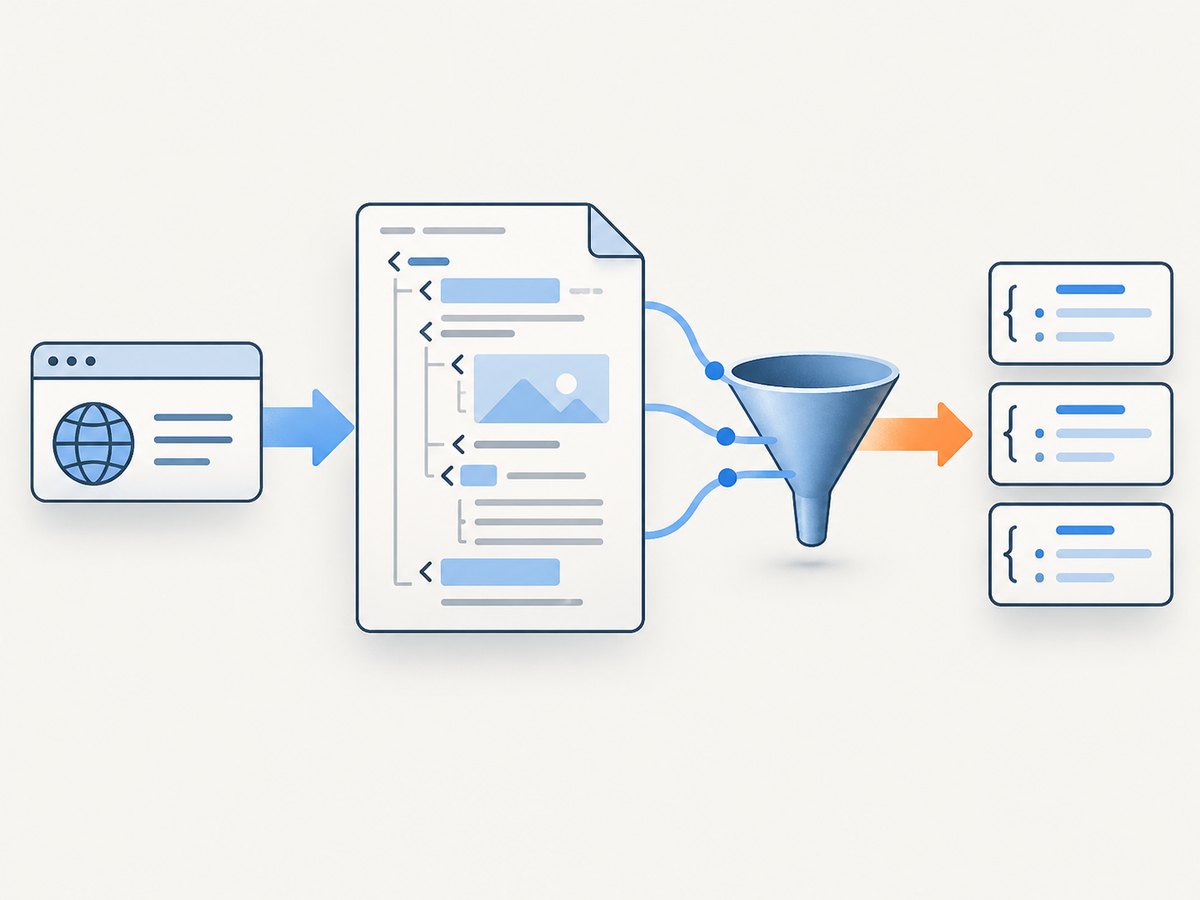
- Request: send an HTTP request with a descriptive user agent and appropriate timeout.
- Check: verify the status code, content type, and that the response is the page you expected.
- Parse: load the response body into Beautiful Soup, lxml, or another parser.
- Select: scope selectors to meaningful containers, then read text or attributes.
- Normalize: trim whitespace, convert numbers and dates, and handle missing values.
- Validate: inspect a few records and check required fields before scaling up.
- Save: write only the fields you need to JSON, CSV, or a database.
Fetching and parsing are different jobs. The Requests Quickstart documents HTTP operations, while the Beautiful Soup documentation covers parsing and searching.
2. Install the starter tools
python -m venv .venv
# macOS/Linux
source .venv/bin/activate
# Windows PowerShell
# .venv\\Scripts\\Activate.ps1

python -m pip install requests beautifulsoup4
Use a virtual environment so this scraper’s dependencies do not change unrelated projects. Save a requirements file when the script is ready to run repeatedly:
python -m pip freeze > requirements.txt3. Scrape a small static page
The following complete script fetches a practice page, checks the response, extracts a title and repeated records, and writes JSON. The CSS classes are examples; inspect your target page and replace them with selectors that match its stable semantic structure.
from __future__ import annotations

import json
from typing import Any

import requests
from bs4 import BeautifulSoup

URL = "https://example.com/products"
HEADERS = {
    "User-Agent": "ExampleResearchBot/1.0 (contact: you@example.com)",
    "Accept": "text/html,application/xhtml+xml",
}


def clean_text(node) -> str | None:
    if node is None:
        return None
    value = " ".join(node.get_text(" ", strip=True).split())
    return value or None


def scrape(url: str) -> dict[str, Any]:
    response = requests.get(url, headers=HEADERS, timeout=30)
    response.raise_for_status()

    content_type = response.headers.get("content-type", "")
    if "html" not in content_type.lower():
        raise ValueError(f"Expected HTML, received {content_type!r}")

    soup = BeautifulSoup(response.text, "html.parser")
    title = clean_text(soup.select_one("h1"))
    records = []

    for card in soup.select("article.product"):
        name = clean_text(card.select_one("h2, .product-name"))
        price = clean_text(card.select_one(".price"))
        link = card.select_one("a[href]")
        href = link.get("href") if link else None
        if name:
            records.append({"name": name, "price": price, "url": href})

    if not records:
        raise ValueError("No product records found; check the URL and selectors")

    return {"title": title, "records": records}


if __name__ == "__main__":
    data = scrape(URL)
    with open("products.json", "w", encoding="utf-8") as output:
        json.dump(data, output, ensure_ascii=False, indent=2)
    print(f"Saved {len(data['records'])} records")
raise_for_status() turns 4xx and 5xx responses into visible failures. A missing element is normal on real sites, so selectors should be optional until a field is required. The clean_text helper collapses line breaks and repeated spaces.
4. Choose robust selectors
Prefer selectors tied to meaning: an article containing a product, a heading for its name, and a link for its URL. Avoid selectors based solely on deep positional paths such as div:nth-child(4) > div:nth-child(2); small layout changes can break them.
# CSS selectors
soup.select_one("main h1")
soup.select("article.product")
card.select_one("a[href]")["href"]

# XPath with lxml
from lxml import html
root = html.fromstring(response.content)
names = root.xpath("//article[contains(@class, 'product')]//h2//text()")
Beautiful Soup is tolerant of imperfect markup and has a simple interface. Scrapy selectors support both CSS and XPath through Parsel, which uses lxml; the Scrapy selector guide describes the trade-offs. Selectors should be scoped to a record container so that a page-level navigation link is not accidentally attached to every record.
5. Extract text, attributes, and structured values
name = card.select_one("h2")
name_text = name.get_text(" ", strip=True) if name else None

image = card.select_one("img")
image_url = image.get("src") if image else None

price_node = card.select_one(".price")
raw_price = price_node.get_text(" ", strip=True) if price_node else ""

# Keep parsing conservative until the format is known
price_digits = "".join(ch for ch in raw_price if ch.isdigit() or ch in ".,")
Distinguish visible text from attributes such as href, src, data-id, or datetime. Preserve the raw value if conversion could lose information. Validate required fields and record a reason when a row is skipped.
6. Follow pagination safely
For a small crawl, follow a site’s next link until it disappears, while enforcing a page limit and tracking visited URLs. Resolve relative links with urljoin.
from urllib.parse import urljoin

import requests
from bs4 import BeautifulSoup

session = requests.Session()
session.headers.update({
    "User-Agent": "ExampleResearchBot/1.0 (contact: you@example.com)"
})

url = "https://example.com/products"
seen = set()
all_records = []
max_pages = 20

for _ in range(max_pages):
    if url in seen:
        break
    seen.add(url)

    response = session.get(url, timeout=30)
    response.raise_for_status()
    soup = BeautifulSoup(response.text, "html.parser")

    for card in soup.select("article.product"):
        name = card.select_one("h2")
        if name:
            all_records.append({"name": name.get_text(" ", strip=True)})

    next_link = soup.select_one("a[rel='next'], a.next[href]")
    if not next_link:
        break
    url = urljoin(response.url, next_link["href"])
else:
    raise RuntimeError("Stopped at max_pages; check the pagination rule")
Use a clear stopping condition: no next link, a repeated URL, a known maximum, or a page whose results are empty. Do not follow every link on a site accidentally.
7. Save JSON or CSV
import csv
import json

with open("records.json", "w", encoding="utf-8") as f:
    json.dump(all_records, f, ensure_ascii=False, indent=2)

with open("records.csv", "w", newline="", encoding="utf-8") as f:
    writer = csv.DictWriter(f, fieldnames=["name"])
    writer.writeheader()
    writer.writerows(all_records)
JSON is convenient for nested data. CSV works well for flat records and spreadsheets. Store timestamps, source URLs, and a schema version when results will be consumed by another system.
8. When to use Requests, Scrapy, or Playwright
| Situation | Starting choice | Reason |
|---|---|---|
| A few pages with data in returned HTML | Requests plus Beautiful Soup or lxml | Small dependency footprint and direct control over parsing |
| Many pages, pagination, repeatable jobs, exports | Scrapy | Projects, spiders, link following, asynchronous scheduling, feed exports, and crawl controls |
| Content appears only after JavaScript or interaction | Playwright for Python | Browser automation can observe rendered-page requests, responses, redirects, and resources |
| An official API supplies the records | Use the API | A supported interface is usually less fragile than parsing presentation HTML |
Scrapy’s tutorial demonstrates a project, spider, yielded dictionaries, pagination, and feed exports. Start there when a one-file script has become a repeatable crawl. Playwright’s Request API documents browser network events; a browser is heavier and slower to operate, so first check for an authorized API or data embedded in the initial response.
9. A minimal Scrapy spider
import scrapy


class ProductSpider(scrapy.Spider):
    name = "products"
    start_urls = ["https://example.com/products"]

    def parse(self, response):
        for card in response.css("article.product"):
            yield {
                "name": card.css("h2::text").get(default="").strip(),
                "url": card.css("a::attr(href)").get(),
            }

        next_page = response.css("a[rel='next']::attr(href)").get()
        if next_page:
            yield response.follow(next_page, callback=self.parse)
Run an export with scrapy crawl products -O products.json. Configure a descriptive USER_AGENT, download delays, per-domain concurrency, and AutoThrottle for the task. Robots filtering can be enabled with ROBOTSTXT_OBEY = True; read the robots middleware documentation for its configuration and behavior.
10. JavaScript-rendered pages
If the HTML response lacks the records but a browser displays them, identify the network request that supplies the data. An authorized JSON endpoint may be simpler than automating a browser. If interaction is genuinely required, Playwright can load the page and wait for a selector:
from playwright.sync_api import sync_playwright

with sync_playwright() as p:
    browser = p.chromium.launch()
    page = browser.new_page()
    page.goto("https://example.com/products", wait_until="domcontentloaded")
    page.wait_for_selector("article.product")
    names = page.locator("article.product h2").all_text_contents()
    browser.close()

print(names)
Do not assume every dynamic site requires a browser. Browser sessions consume more resources and add timing, rendering, and dependency failure modes.
11. Reliability, performance, and cost controls
- Set connect and read timeouts; never let a request wait forever.
- Reuse a
requests.Sessionfor connection pooling and shared headers. - Keep concurrency and request rates low enough for the site and task. Concurrency is not permission.
- Retry transient network failures with bounded backoff, but do not retry every 4xx response.
- Cache responses during development so selector edits do not repeatedly hit a site.
- Log URL, status, elapsed time, parser version, and extraction counts.
- Validate a sample before a large run and stop when the page shape changes.
- Store only necessary fields and protect credentials, cookies, and personal data.
Scrapy’s overview documents download delay, per-domain concurrency limits, and AutoThrottle. These settings control load and throughput; they do not establish authorization.
12. Responsible crawling checklist
- Identify the crawler with a descriptive user agent and contact address.
- Read the site’s instructions, terms, privacy expectations, and applicable data rules.
- Use an official API or obtain permission when available.
- Keep scope, rate, and concurrency controlled.
- Stop when access is denied or the operator asks you to stop.
- Do not bypass CAPTCHAs, access controls, or anti-bot mechanisms.
A robots.txt file is not legal advice or proof of permission. Rules depend on jurisdiction, data, access method, and use.
13. Troubleshooting common errors
| Symptom | Likely cause | Fix |
|---|---|---|
403 Forbidden |
Access policy, missing headers, or blocked automation | Stop and review permission and terms; identify your crawler. Use an authorized API if provided. |
404 Not Found |
Stale or incorrectly joined URL | Print response.url, resolve links with urljoin, and verify pagination. |
| Timeout | Slow server, network issue, or excessive page work | Set bounded timeouts, reduce scope, and retry transient failures with backoff. |
| Empty selector results | Wrong selector or JavaScript-rendered content | Save the response, inspect its HTML, check content type, and identify the data request before choosing Playwright. |
| Unicode errors | Incorrect decoding assumption | Use response.text after Requests detects encoding, or inspect response.encoding and the document metadata. |
| Duplicate records | Repeated pagination URLs or multiple selectors | Track visited URLs and deduplicate on a stable ID or canonical URL. |
| Parser breaks after a redesign | Selectors depended on layout details | Scope selectors to semantic containers, add validation, and version the parser. |
14. Or skip the browser setup
If your goal is a clean image or PDF of a page rather than structured fields, ScreenshotNeo provides a website screenshot API and MCP server. One GET request returns PNG, JPEG, WebP, or PDF. It accepts consent banners before capture and removes more than 60 known consent platforms, newsletter popups, and chat widgets; each cleanup step can be disabled.

curl -G "https://api.screenshotneo.com/v1/shot" -d access_key=YOUR_API_KEY --data-urlencode url=https://stripe.com -o shot.webpimport requests
r = requests.get("https://api.screenshotneo.com/v1/shot", params={"access_key": "YOUR_API_KEY", "url": "https://stripe.com"}, timeout=90)
open("shot.webp", "wb").write(r.content)const q = new URLSearchParams({ access_key: 'YOUR_API_KEY', url: 'https://stripe.com' });
const res = await fetch(`https://api.screenshotneo.com/v1/shot?${q}`);See the ScreenshotNeo API documentation for request options. You can capture a full page or one CSS-selected element, load lazy images, choose dark mode and device presets, set any viewport and retina scale, inject CSS or JavaScript, click before capture, wait for a selector or network idle, block resources, set headers, cookies, user agent, timezone, geolocation, resize images, cache with a chosen TTL, create signed links, run asynchronous jobs with signed webhooks, capture up to 100 URLs per bulk call, and use the usage API or OpenAPI specification.
Only clean shots are billed. Bot checks or CAPTCHAs, blank pages, timeouts, failed loads, and cache hits cost nothing, and the response identifies the result with X-Page-Verdict and X-Billed headers. An MCP server provides take_screenshot, get_page_info, and capture_pdf for Claude, Cursor, and other MCP clients. The Free plan includes 1,000 shots per month with no card; paid plans start at $5 for 3,000 shots.
Create a free ScreenshotNeo account and get 1,000 screenshots a month with no card.
15. FAQ
How do I extract data from a website using Python?
Request the HTML with Requests, parse it with Beautiful Soup or lxml, select the required elements, normalize their text or attributes, validate records, and save them. Use an API when the provider offers one.
Should I use Beautiful Soup, Scrapy, or Playwright?
Use Requests plus Beautiful Soup for a few static pages, Scrapy for repeatable multi-page crawls and exports, and Playwright when browser behavior is necessary. Choose based on the page’s data source and operational needs.
Can I scrape any public webpage?
Public availability does not settle permission. Review terms, instructions, privacy and data obligations, copyright or database rights, and applicable law. Stop if access is denied or the operator objects.
How can I tell whether JavaScript is required?
Compare the returned HTML with what the browser displays. If the records are absent from the response, inspect authorized network requests for a data endpoint before starting browser automation.


