How to Rate Limit Async Requests in Python
Use separate controls for request rate and concurrency in asyncio, with runnable patterns for aiolimiter, semaphores, retries, and production workloads.
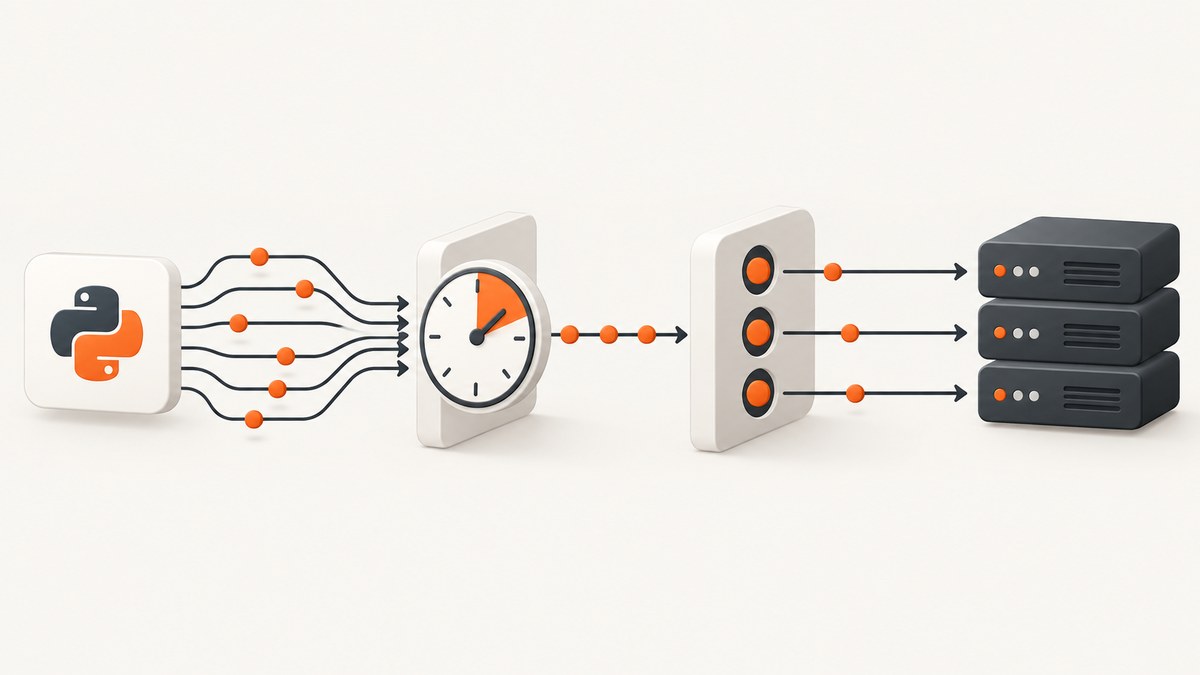
Use two separate controls: a time-based rate limiter for requests per second or minute, and an asyncio.Semaphore for the maximum number of requests in flight. A semaphore limits simultaneous work; it does not enforce a requests-per-minute quota. For an asyncio request rate, use a limiter such as aiolimiter, configured from the API provider’s documented limits.
The practical pattern is:
- Create one limiter per event loop.
- Acquire rate capacity around the outbound request.
- Optionally acquire a semaphore to cap in-flight requests.
- Await every network operation and handle HTTP 429 responses according to the provider’s instructions.
import asyncio
import httpx
from aiolimiter import AsyncLimiter

# Examples only. Replace these with the provider's documented quota.
rate_limiter = AsyncLimiter(60, 60)  # 60 entries per 60 seconds
in_flight = asyncio.Semaphore(10)    # At most 10 requests at once

async def fetch(client: httpx.AsyncClient, url: str) -> httpx.Response:
    async with rate_limiter:
        async with in_flight:
            response = await client.get(url, timeout=30)
            response.raise_for_status()
            return response

async def main() -> None:
    urls = ["https://example.com/one", "https://example.com/two"]
    async with httpx.AsyncClient() as client:
        responses = await asyncio.gather(*(fetch(client, url) for url in urls))
        for response in responses:
            print(response.status_code, response.url)

if __name__ == "__main__":
    asyncio.run(main())
The values above are deliberately examples. A local limiter only governs calls that use that limiter instance. It cannot know about traffic from another process, machine, credential, or service.
Rate and concurrency are different limits
Request rate is a count over time: for example, 60 requests per minute. Concurrency is the number of operations currently in progress: for example, 10 HTTP requests at once. These constraints solve different problems.

| Control | What it limits | Typical tool | What it cannot guarantee |
|---|---|---|---|
| Rate limiter | Entries into a section over time | AsyncLimiter |
Maximum in-flight requests or a quota shared by other workers |
| Semaphore | Simultaneous holders | asyncio.Semaphore |
Requests per second or minute |
| Queue/dispatcher | Admission, backpressure, and scheduling | asyncio.Queue plus workers |
Provider-side quotas unless paired with a limiter |
Python’s documentation describes a semaphore as a counter decremented by acquire() and incremented by release(). The preferred form is an async with statement; see the official asyncio semaphore documentation.
Install and configure aiolimiter
python -m pip install aiolimiter httpxAsyncLimiter(max_rate, time_period) implements a leaky-bucket limiter. Its max_rate is also the maximum initial burst, so a setting of AsyncLimiter(60, 60) can admit up to 60 entries immediately when capacity is available, then replenish capacity over the period. Select both values from the remote service’s quota and burst policy; do not copy the examples blindly.
One request at a fixed interval
If bursts are not permitted, configure one entry per interval:
from aiolimiter import AsyncLimiter

# Approximately one entry every 1.5 seconds.
limiter = AsyncLimiter(1, 1.5)
This spaces entries rather than making your whole program synchronous. Other tasks can continue doing unrelated asynchronous work while they wait.
Acquire capacity explicitly
async def fetch(client, url):
    await limiter.acquire()
    return await client.get(url)
The context-manager form is usually safer because capacity is released when the block exits:
async def fetch(client, url):
    async with limiter:
        return await client.get(url)
Create the limiter inside the event-loop context that uses it. aiolimiter documents reuse across event loops as unsupported and warns that it can produce undefined behavior.
Choose the acquisition order
When you need both controls, acquisition order affects utilization.
async def rate_then_concurrency(client, url):
    async with rate_limiter:
        async with in_flight:
            return await client.get(url)
This consumes rate capacity before waiting for a semaphore slot. If all slots are busy, capacity may be spent before the request starts.
async def concurrency_then_rate(client, url):
    async with in_flight:
        async with rate_limiter:
            return await client.get(url)
This holds a concurrency slot while waiting for rate capacity. It avoids starting more waiting tasks than your in-flight budget, but those slots remain occupied during the wait. Neither ordering is universally best. Pick the behavior that matches your workload and document it.
For many producers, fairness requirements, or explicit backpressure, use a queue-based dispatcher. A fixed number of workers can take jobs from the queue, acquire the rate limiter, call the API, and report results. This gives you a place to bound queued work and apply cancellation policy.
Complete worker-pool example
import asyncio
from dataclasses import dataclass
import httpx
from aiolimiter import AsyncLimiter

@dataclass
class Result:
    url: str
    status: int | None = None
    error: str | None = None

async def worker(
    name: str,
    queue: asyncio.Queue[str | None],
    results: list[Result],
    client: httpx.AsyncClient,
    limiter: AsyncLimiter,
    concurrency: asyncio.Semaphore,
) -> None:
    while True:
        url = await queue.get()
        try:
            if url is None:
                return
            async with concurrency:
                async with limiter:
                    response = await client.get(url, timeout=30)
                response.raise_for_status()
                results.append(Result(url=url, status=response.status_code))
        except Exception as exc:
            results.append(Result(url=url, error=f"{type(exc).__name__}: {exc}"))
        finally:
            queue.task_done()

async def main() -> None:
    urls = ["https://example.com"] * 20
    queue: asyncio.Queue[str | None] = asyncio.Queue(maxsize=100)
    for url in urls:
        await queue.put(url)

    results: list[Result] = []
    limiter = AsyncLimiter(60, 60)       # Provider-specific example
    concurrency = asyncio.Semaphore(5)

    async with httpx.AsyncClient() as client:
        workers = [
            asyncio.create_task(worker(f"w{i}", queue, results, client, limiter, concurrency))
            for i in range(5)
        ]
        await queue.join()
        for _ in workers:
            await queue.put(None)
        await asyncio.gather(*workers)

    for result in results:
        print(result)

if __name__ == "__main__":
    asyncio.run(main())
The bounded queue prevents unbounded memory growth when producers are faster than workers. In a real service, decide whether failed jobs should be retried, dead-lettered, or returned immediately.
Weighted requests and different endpoint costs
Some APIs assign different costs to operations. aiolimiter supports acquiring an amount:
async with limiter:
    ...

# A weighted operation consumes two units.
await limiter.acquire(2)
Use weights only when the provider’s quota actually defines weighted costs. The aiolimiter documentation warns that small-capacity requests can be favored over larger ones near capacity, so weighted acquisition can affect fairness.
Retries, 429 responses, and cancellation
A limiter controls admission; it does not handle HTTP 429 responses, retry delays, network failures, or quotas shared by separate workers. Follow the API provider’s current documentation. If a response includes Retry-After, interpret it according to that provider’s rules rather than applying a universal formula.
import asyncio
import httpx

async def get_with_retry(client, url, attempts=3):
    for attempt in range(attempts):
        try:
            response = await client.get(url, timeout=30)
            if response.status_code != 429:
                response.raise_for_status()
                return response

            retry_after = response.headers.get("Retry-After")
            if retry_after is None:
                delay = min(2 ** attempt, 30)
            else:
                delay = float(retry_after)
            await asyncio.sleep(delay)
        except (httpx.TimeoutException, httpx.NetworkError):
            if attempt == attempts - 1:
                raise
            await asyncio.sleep(min(2 ** attempt, 30))
    raise RuntimeError("request attempts exhausted")
This retry helper is intentionally generic. Add retries only for operations that are safe to repeat, and use an idempotency key when the provider supports one for non-idempotent operations. Never use blocking time.sleep() in an asyncio task; it pauses the event loop. Use await asyncio.sleep().
Cancellation needs equal care. Let CancelledError propagate unless your application has a defined cleanup policy. Context managers release semaphore and limiter state when their blocks exit. Avoid swallowing cancellation in broad exception handlers.
Algorithm choices
Compare limiters on five axes:
- Burst size: Can several requests start immediately?
- Delay compensation: Does a delayed task receive credit for time spent waiting?
- Pacing: Must entries stay strictly below a configured rate?
- Weighted capacity: Do operations consume different amounts?
- Shared state: Must multiple processes or machines coordinate?
The asynciolimiter documentation describes three models: Limiter, which accounts for CPU-heavy work or other delays; LeakyBucketLimiter, which supports capacity and an initial burst; and StrictLimiter, which allows no bursts and keeps the resulting rate below its configured rate. Verify the installed version’s API before using those classes. A local in-process limiter is not a global quota across machines.
Performance and reliability checklist
- Reuse one asynchronous HTTP client per service or event loop instead of opening a new connection for every request.
- Set explicit connect, read, and total timeouts.
- Keep concurrency below what the provider and your own sockets can sustain.
- Measure wait time separately from network time; a slow limiter can be correct behavior under quota pressure.
- Use a monotonic clock if you implement a custom limiter.
- Test boundary conditions: exactly at the limit, cancellation while waiting, timeout during a request, and a full queue.
- For multiple workers or hosts, coordinate quota state with a separately designed shared mechanism; this dossier does not establish a particular distributed implementation.
Common errors and fixes
| Symptom | Likely cause | Fix |
|---|---|---|
| Requests still receive 429 | The configured quota is wrong, another worker shares the credential, or the endpoint has a separate limit. | Read the provider’s current quota documentation, include all traffic sources, and honor provider retry guidance. |
| Requests are too bursty | max_rate permits an initial burst. |
Lower the burst size or use AsyncLimiter(1, interval) for fixed spacing. |
| Too many requests are in flight | A rate limiter was used without a semaphore. | Add an independent asyncio.Semaphore. |
| Throughput is lower than expected | Concurrency slots are held while waiting for rate capacity, or the rate is set below the quota. | Review acquisition order, queue depth, and provider limits. |
| Event-loop warnings or strange limiter behavior | The limiter was reused across event loops. | Create it inside the loop that owns the work. |
| The whole application freezes | Blocking code such as time.sleep() runs in an async task. |
Use awaited async I/O and await asyncio.sleep(); move blocking work to an executor. |
| Weighted jobs wait indefinitely | A large acquisition cannot fit while smaller jobs keep arriving. | Review weights and fairness; separate queues may be necessary. |

Or skip the browser setup
If your async workflow ultimately needs website screenshots, ScreenshotNeo provides a single HTTP endpoint instead of maintaining a browser fleet. It removes cookie and consent banners, newsletter popups, and chat widgets before capture. Bot checks, blank pages, failed loads, timeouts, and cache hits are not billed, and the response identifies the result with X-Page-Verdict and X-Billed headers. Its MCP server exposes take_screenshot, get_page_info, and capture_pdf for Claude, Cursor, and other MCP clients. Every plan includes the features; 1,000 screenshots per month are free with no card, and paid plans start at $5 for 3,000 shots.
See the ScreenshotNeo API documentation for the complete option list.
cURL
curl -G "https://api.screenshotneo.com/v1/shot" \
  -d access_key=YOUR_API_KEY \
  --data-urlencode url=https://stripe.com \
  -o shot.webp
Python
import requests

r = requests.get(
    "https://api.screenshotneo.com/v1/shot",
    params={"access_key": "YOUR_API_KEY", "url": "https://stripe.com"},
    timeout=90,
)
r.raise_for_status()
open("shot.webp", "wb").write(r.content)
Node.js
const q = new URLSearchParams({
  access_key: 'YOUR_API_KEY',
  url: 'https://stripe.com'
});
const res = await fetch(`https://api.screenshotneo.com/v1/shot?${q}`);
if (!res.ok) throw new Error(`HTTP ${res.status}`);
const bytes = Buffer.from(await res.arrayBuffer());
require('fs').writeFileSync('shot.webp', bytes);
Use your Python rate limiter around these calls when capturing many URLs. ScreenshotNeo also supports full-page capture, element selectors, device presets, custom headers and cookies, waits, blocking rules, caching with a chosen TTL, async jobs with signed webhooks, bulk capture of up to 100 URLs per call, PDF output, and usage reporting.
Create a free ScreenshotNeo account with 1,000 screenshots each month and no card required.
FAQ
Does a semaphore rate-limit requests?
No. It limits simultaneous holders. Pair it with a time-based limiter for a requests-per-second or requests-per-minute rule.
Can one limiter protect several processes?
No. An in-process limiter only sees calls made through its instance. Shared quotas need coordination outside that process.
Should I always use a queue?
No. A limiter plus a semaphore is enough for many bounded batches. Use a queue when you need producer backpressure, worker supervision, or explicit fairness.
How do I prevent all bursts?
Use a limiter configured for one entry per interval, such as AsyncLimiter(1, 1.5), when that pacing matches the provider’s policy.
What should I log?
Record request start time, limiter wait time, endpoint, status code, retry count, and cancellation or timeout reason. Keep credentials and sensitive headers out of logs.


