How to Receive Webhook Events in C#
Build a reliable ASP.NET Core webhook receiver in C#: validate signatures, deduplicate retries, enforce limits, and acknowledge only after durable acceptance.
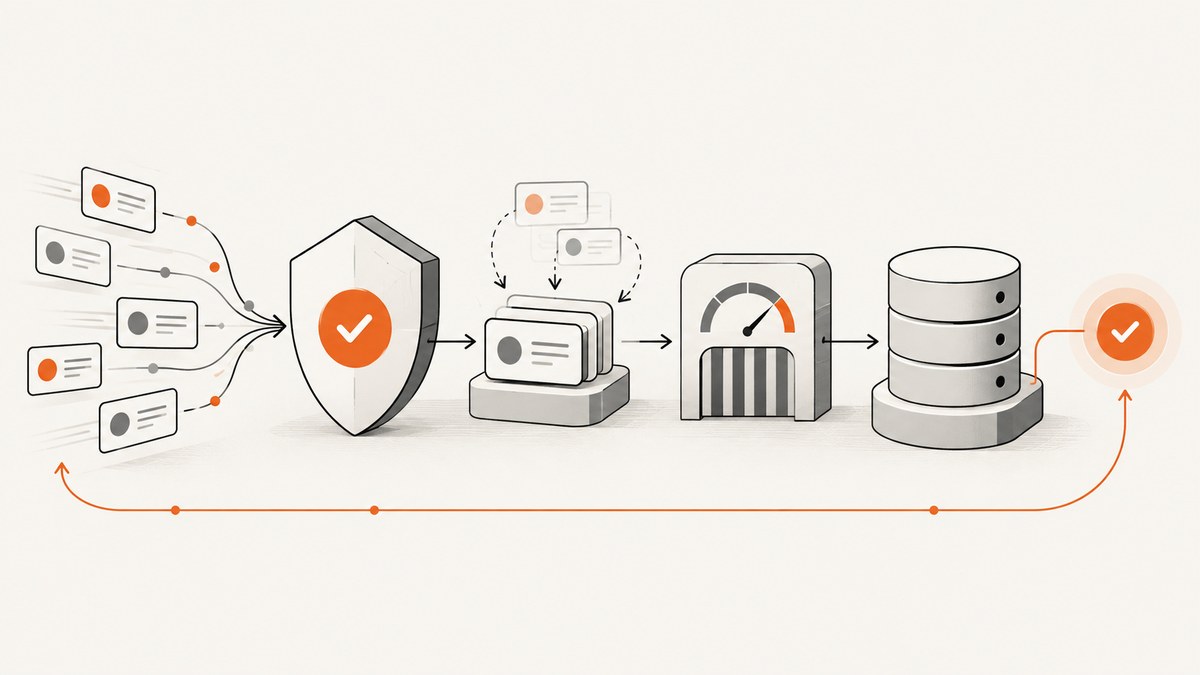
A webhook receiver in C# is an HTTPS endpoint that accepts an HTTP POST from a provider. In ASP.NET Core, use a Minimal API for a focused endpoint or a controller in an MVC application. Read and preserve the exact request body, verify the provider’s signature before parsing it, record a unique delivery ID to prevent duplicate work, and return a success response only after the event has been accepted durably.
This guide uses GitHub’s webhook headers and HMAC-SHA-256 signature as a concrete example. Signature schemes differ by provider: follow the provider’s canonicalization, encoding, timestamp tolerance, and retry rules. GitHub’s documentation describes its relevant headers and a 25 MB payload cap. GitHub webhook events and payloads
1. Choose an ASP.NET Core endpoint style
Minimal APIs suit a small, focused receiver. Controllers fit projects that already use MVC, attribute routing, filters, or controller conventions. Both can implement the same security and reliability rules.
Minimal API project
Create a project with dotnet new web. Set the secret outside source control, for example through a secret manager or environment variable named GitHubWebhook__Secret. Do not commit the live secret to appsettings.json.
using System.Security.Cryptography;
using System.Text;
using System.Text.Json;

var builder = WebApplication.CreateBuilder(args);
var app = builder.Build();

const long maxBodyBytes = 25 * 1024 * 1024;

app.MapPost("/webhooks/github", async (HttpRequest request, IConfiguration config, CancellationToken cancellationToken) =>
{
    if (!request.HasJsonContentType())
        return Results.StatusCode(StatusCodes.Status415UnsupportedMediaType);

    var secret = config["GitHubWebhook:Secret"];
    if (string.IsNullOrWhiteSpace(secret))
        return Results.StatusCode(StatusCodes.Status500InternalServerError);

    var contentLength = request.ContentLength;
    if (contentLength is > maxBodyBytes)
        return Results.StatusCode(StatusCodes.Status413PayloadTooLarge);

    // Also cap streamed reads: Content-Length can be absent or untrusted.
    request.EnableBuffering();
    using var buffer = new MemoryStream();
    var chunk = new byte[81920];
    int count;
    while ((count = await request.Body.ReadAsync(chunk, cancellationToken)) > 0)
    {
        if (buffer.Length + count > maxBodyBytes)
            return Results.StatusCode(StatusCodes.Status413PayloadTooLarge);
        await buffer.WriteAsync(chunk.AsMemory(0, count), cancellationToken);
    }

    var rawBody = buffer.ToArray();
    var signature = request.Headers["X-Hub-Signature-256"].ToString();
    if (!IsValidGitHubSignature(rawBody, signature, secret))
        return Results.Unauthorized();

    var deliveryId = request.Headers["X-GitHub-Delivery"].ToString();
    var eventName = request.Headers["X-GitHub-Event"].ToString();
    if (string.IsNullOrWhiteSpace(deliveryId) || string.IsNullOrWhiteSpace(eventName))
        return Results.BadRequest();

    // Replace with a durable, atomic insert/enqueue operation. Its uniqueness
    // constraint on deliveryId must make concurrent retries safe.
    var accepted = await WebhookStore.TryAcceptAsync(deliveryId, eventName, rawBody, cancellationToken);
    if (!accepted)
        return Results.Ok(); // Already accepted: acknowledge the duplicate.

    return Results.Ok();
});

app.Run();

static bool IsValidGitHubSignature(byte[] body, string header, string secret)
{
    const string prefix = "sha256=";
    if (!header.StartsWith(prefix, StringComparison.Ordinal)) return false;
    try
    {
        var supplied = Convert.FromHexString(header[prefix.Length..]);
        var expected = HMACSHA256.HashData(Encoding.UTF8.GetBytes(secret), body);
        return supplied.Length == expected.Length &&
               CryptographicOperations.FixedTimeEquals(expected, supplied);
    }
    catch (FormatException) { return false; }
}
WebhookStore.TryAcceptAsync is deliberately an application-specific persistence boundary, not a built-in ASP.NET Core method. Implement it with a database transaction or durable queue and a unique constraint on the provider delivery ID. Do not return 200 merely because the request reached the process if the event has not been safely stored. Microsoft documents the WebApplication and MapPost Minimal API pattern in its Minimal APIs reference.
Controller pattern
In a controller application, apply a request-size limit at the endpoint and read the raw stream before any JSON model binding consumes it. The following shows the endpoint shape; use the same signature verifier and durable acceptance service as in the Minimal API.
using Microsoft.AspNetCore.Mvc;

[ApiController]
[Route("api/webhooks/github")]
public sealed class GitHubWebhookController : ControllerBase
{
    private readonly IWebhookReceiver _receiver;
    public GitHubWebhookController(IWebhookReceiver receiver) => _receiver = receiver;

    [HttpPost]
    [RequestSizeLimit(25 * 1024 * 1024)]
    public async Task<IActionResult> Receive(CancellationToken cancellationToken)
    {
        if (!Request.HasJsonContentType())
            return StatusCode(StatusCodes.Status415UnsupportedMediaType);

        using var buffer = new MemoryStream();
        await Request.Body.CopyToAsync(buffer, cancellationToken);
        var result = await _receiver.AcceptAsync(
            buffer.ToArray(),
            Request.Headers["X-Hub-Signature-256"].ToString(),
            Request.Headers["X-GitHub-Delivery"].ToString(),
            Request.Headers["X-GitHub-Event"].ToString(),
            cancellationToken);

        return result switch
        {
            WebhookAcceptResult.InvalidSignature => Unauthorized(),
            WebhookAcceptResult.InvalidRequest => BadRequest(),
            WebhookAcceptResult.Accepted or WebhookAcceptResult.Duplicate => Ok(),
            _ => StatusCode(StatusCodes.Status503ServiceUnavailable)
        };
    }
}
Define IWebhookReceiver and its result type in your application. Keep verification and persistence in a service so the controller remains easy to review. Microsoft’s controller documentation covers controller classes, actions, and routing.
2. Verify the signature over the original bytes
GitHub sends X-Hub-Signature-256, an HMAC-SHA-256 digest of the request body keyed with the webhook secret. Compute the digest over the exact bytes received. Parsing and serializing JSON again can change whitespace, property order, or encoding and invalidate a correct signature. Compare digests with a constant-time comparison, reject malformed hex, and never deserialize or act on an unverified payload.
The sample checks the sha256= prefix and uses UTF-8 for the secret. For another provider, do not assume that header name or scheme: some providers sign a timestamp plus body, use a different encoding, or include multiple signature candidates. Apply that provider’s documented tolerance window and rotation procedure. Return 401 for invalid authentication and avoid logging the supplied signature or secret.
3. Make delivery idempotent and durable
Providers retry deliveries when the endpoint is unavailable or does not return a successful status. A retry can arrive after the original was accepted, and two copies can arrive concurrently. GitHub supplies X-GitHub-Delivery as a globally unique delivery identifier. Use it as an idempotency key.

- Verify the signature and required headers.
- Atomically insert the delivery ID and enqueue the raw, verified event (or store it in an inbox table).
- Enforce a unique database constraint on the provider plus delivery ID.
- If the key already exists, acknowledge the duplicate without repeating side effects.
- Have a background worker parse and process accepted events, recording retries and terminal failures.
The insert and enqueue need a reliable relationship. If you write an inbox record and separately publish to a queue, a crash between those operations can strand work or duplicate it. A transactional outbox/inbox pattern, or a queue with deduplication guarantees, can close that gap. Make downstream business actions idempotent too: a delivery ID protects this receiver, while a worker retry can still repeat a partially completed action.
4. Deploy and configure the endpoint
- Expose HTTPS. Configure the provider with a publicly reachable HTTPS URL. Terminate TLS at a trusted reverse proxy or hosting platform and ensure forwarded headers are configured correctly.
- Set the secret. Generate a high-entropy secret, store it in a secret manager or protected environment setting, and plan rotation. During a deliberate rotation window, the verifier may need to accept current and previous secrets.
- Subscribe only to needed events. Narrow event subscriptions reduce traffic and simplify handling. Still reject or safely ignore unsupported event types after verification.
- Set limits. Apply a request body cap at both ASP.NET Core and the proxy/load balancer. GitHub documents a 25 MB payload cap; configure a limit suitable for the provider and infrastructure.
- Test delivery and retries. Use the provider’s delivery tooling to inspect status, headers, and retry behavior. Keep a replay path for investigating failures without weakening signature validation.
GitHub supports JSON or URL-encoded payloads and documents its delivery, event, and signature headers. If the endpoint is configured to receive form-encoded payloads, do not use a JSON-only content-type check; implement the provider’s exact decoding rules and verify the canonical bytes specified by its signature scheme.

5. Acknowledge quickly without losing work
Keep the synchronous request path short: validate, authenticate, deduplicate, durably accept, then return 2xx. Avoid doing slow work such as calling several third-party APIs before responding. If durable acceptance fails, return a non-2xx status so the provider’s retry policy can help recover. Returning 2xx before an event is safely stored can silently lose it if the process crashes.
Set sensible timeouts for database or queue operations. Respect cancellation while reading and storing a request, but do not let a disconnected client interrupt a transaction after it has committed. Define how your application handles an ambiguous timeout where the store may have accepted the event; the unique delivery ID makes a retry safe.
6. Parse and dispatch only after acceptance
After verification, parse the saved body using the provider’s schema and version. Check the event header against supported event types, validate fields needed for the operation, and handle unknown fields compatibly. Treat payload data as untrusted input even when the sender’s signature is valid: signatures prove origin and integrity, not that every field is safe for a database query, file path, or command.
For GitHub, the event name is provided in X-GitHub-Event; the JSON shape depends on that event. Keep event-specific parsing separate and make schema evolution observable. A malformed signed payload should be recorded as a processing failure and surfaced for inspection, rather than retried forever without a policy.
7. Options and provider-specific details
| Concern | Recommended handling |
|---|---|
| Endpoint style | Minimal API for a focused route; controller for MVC filters, attributes, or established conventions. |
| Signature | Use the provider’s algorithm, canonical form, timestamp tolerance, and header format. Verify before parsing. |
| Payload format | Check JSON versus form encoding and provider schema version. Do not assume all providers send JSON. |
| Duplicate detection | Prefer a stable provider delivery ID with a uniqueness constraint; otherwise derive a documented event key carefully. |
| Size limit | Set limits at the app and proxy. For GitHub, its documented cap is 25 MB. |
| Processing | Persist and enqueue, acknowledge, then process asynchronously with retries and a dead-letter path. |
For Stripe, the Stripe.Extensions.AspNetCore NuGet package describes automated event parsing, signature validation, logging, and handler registration through MapStripeWebhookHandler. Treat it as an optional provider-specific dependency and check its current package version and API documentation before adding it: NuGet package page.
8. Troubleshooting common failures
| Symptom | Likely cause | Fix |
|---|---|---|
| 401 on every delivery | Wrong secret, wrong header, changed body bytes, or wrong signature format. | Compare the configured secret and provider docs; verify the untouched byte stream before parsing; check prefix and encoding. |
| Signature passes locally but fails behind hosting | Middleware or model binding consumed/transformed the body, or a proxy changed the request representation. | Read raw bytes early, avoid reserialization, and inspect middleware order. Verify against the actual bytes the provider signs. |
| 413 Payload Too Large | Application or proxy limit is lower than the provider payload. | Align limits at every layer while respecting provider caps. Do not simply remove limits. |
| 415 Unsupported Media Type | The endpoint expects JSON but the provider is configured for form encoding. | Align the provider content type and receiver; implement the provider’s form decoding and signature requirements. |
| Duplicate side effects | Deduplication is absent, non-atomic, or occurs after business processing. | Use a unique delivery key and atomically accept before dispatch; make worker actions idempotent. |
| Provider reports timeout | Slow synchronous work, blocked database/queue, or proxy timeout. | Persist/enqueue quickly, set bounded timeouts, and move business processing to a worker. |
| Events disappear after a 200 | The endpoint acknowledged before durable storage, or queue publication failed. | Return success only after durable acceptance; use an inbox/outbox strategy and monitor queue health. |
| Repeated retries for a poison event | A signed event cannot be parsed or downstream processing always fails. | Persist the failure, apply bounded retries and dead-letter handling, and provide safe replay after fixing the cause. |
9. Performance, reliability, and cost
Webhook traffic is often bursty. Bound concurrent work, use asynchronous I/O, and size the durable queue for expected bursts rather than letting requests accumulate in memory. Set limits for body size, queue depth, worker concurrency, and downstream timeouts. Monitor accepted, duplicate, rejected, delayed, and dead-lettered deliveries separately.
Record delivery ID, event type, acceptance result, processing duration, and a correlation identifier. Redact secrets, signatures, authorization headers, and sensitive payload fields. Retain payloads only as long as operational or business needs require, with access controls and encryption appropriate to the data.
The main cost drivers are hosting, database or queue capacity, retained payload storage, and downstream processing. A fast durable acknowledgement reduces connection occupancy, but background processing still needs capacity and retry controls. Avoid retry storms by using backoff and bounded retries for internal workers; provider retries and your worker retries are separate mechanisms.
10. Or skip the browser setup
Webhook receivers deliver server-to-server events, so a screenshot service does not replace this endpoint. If your integration also needs a visual record of a page referenced by an event, ScreenshotNeo provides a website screenshot API and MCP server. One GET request returns an image or PDF. See the API documentation.
curl -G "https://api.screenshotneo.com/v1/shot" -d access_key=YOUR_API_KEY --data-urlencode url=https://stripe.com -o shot.webpimport requests
r = requests.get("https://api.screenshotneo.com/v1/shot", params={"access_key": "YOUR_API_KEY", "url": "https://stripe.com"}, timeout=90)
open("shot.webp", "wb").write(r.content)const q = new URLSearchParams({ access_key: 'YOUR_API_KEY', url: 'https://stripe.com' });
const res = await fetch(`https://api.screenshotneo.com/v1/shot?${q}`);Cookie banners, newsletter popups, and chat widgets are removed before the shot. Bot checks, blank pages, and failed loads are never billed; response headers report the page verdict and billing status. Its MCP server lets AI agents use screenshot and page information tools. The free plan includes 1,000 screenshots a month with no card; paid plans start at $5 for 3,000. Sign up for 1,000 free screenshots a month, no card required.
11. Short FAQ
Should I return 200 for an event I do not handle?
After authenticating it, usually yes if it was durably recorded or safely classified as unsupported. Repeated retries will not make an unsupported event useful; log the classification and keep the response policy explicit.
Can I use the delivery ID as a database primary key?
It can be part of a unique key, commonly scoped by provider or endpoint. Preserve the original value and account for its length and database collation.
Should I log the entire webhook body?
Usually not. Prefer a delivery ID, event type, outcome, and redacted diagnostic fields. Full payload logs can expose personal or secret data and increase retention risk.
How should I support replay?
Replay from a protected durable record through the same validation and processing rules, while retaining idempotency. Do not expose an unauthenticated endpoint that bypasses signature checks.
Checklist
- Public HTTPS POST route configured with a high-entropy secret.
- Raw bytes captured and signature checked in constant time before JSON parsing.
- Content type and request size validated at app and proxy layers.
- Delivery ID stored atomically with a uniqueness constraint.
- 2xx returned only after durable acceptance; slow work runs asynchronously.
- Retries, dead letters, redacted logs, metrics, and replay procedures are defined.


