The Best Techniques for Effective Regex Scraping in Web Development
Use regex to extract reliable fields from web pages by pairing it with an HTML parser, responsible fetching, validation, and useful failure handling.
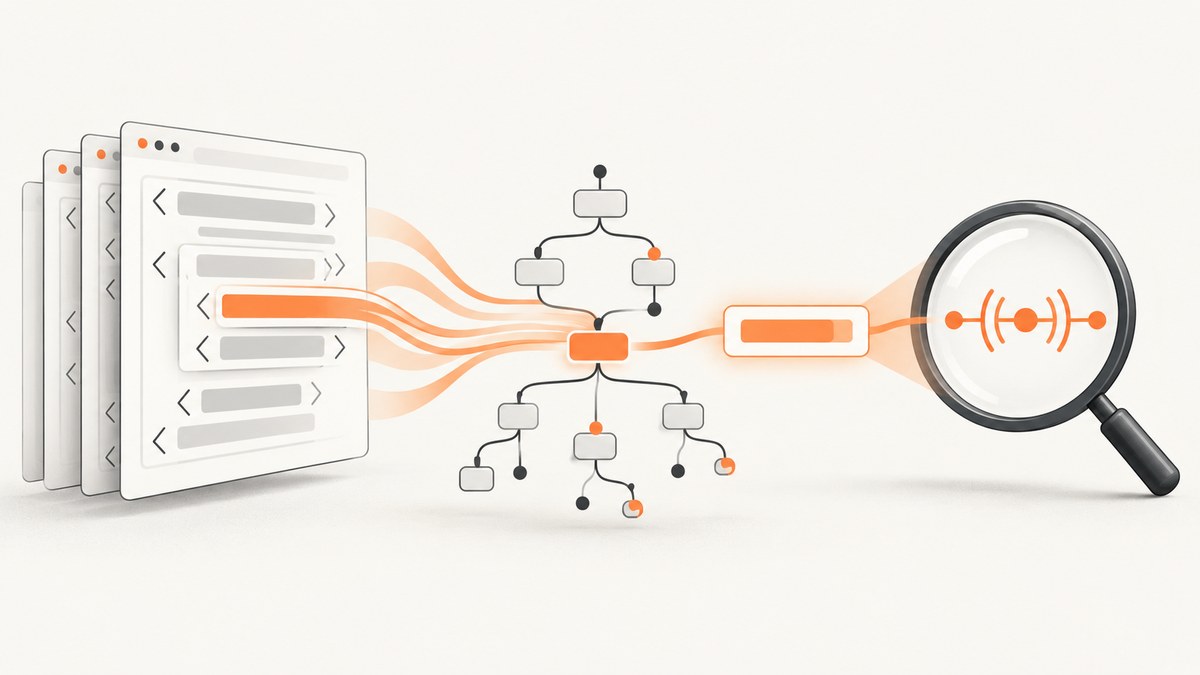
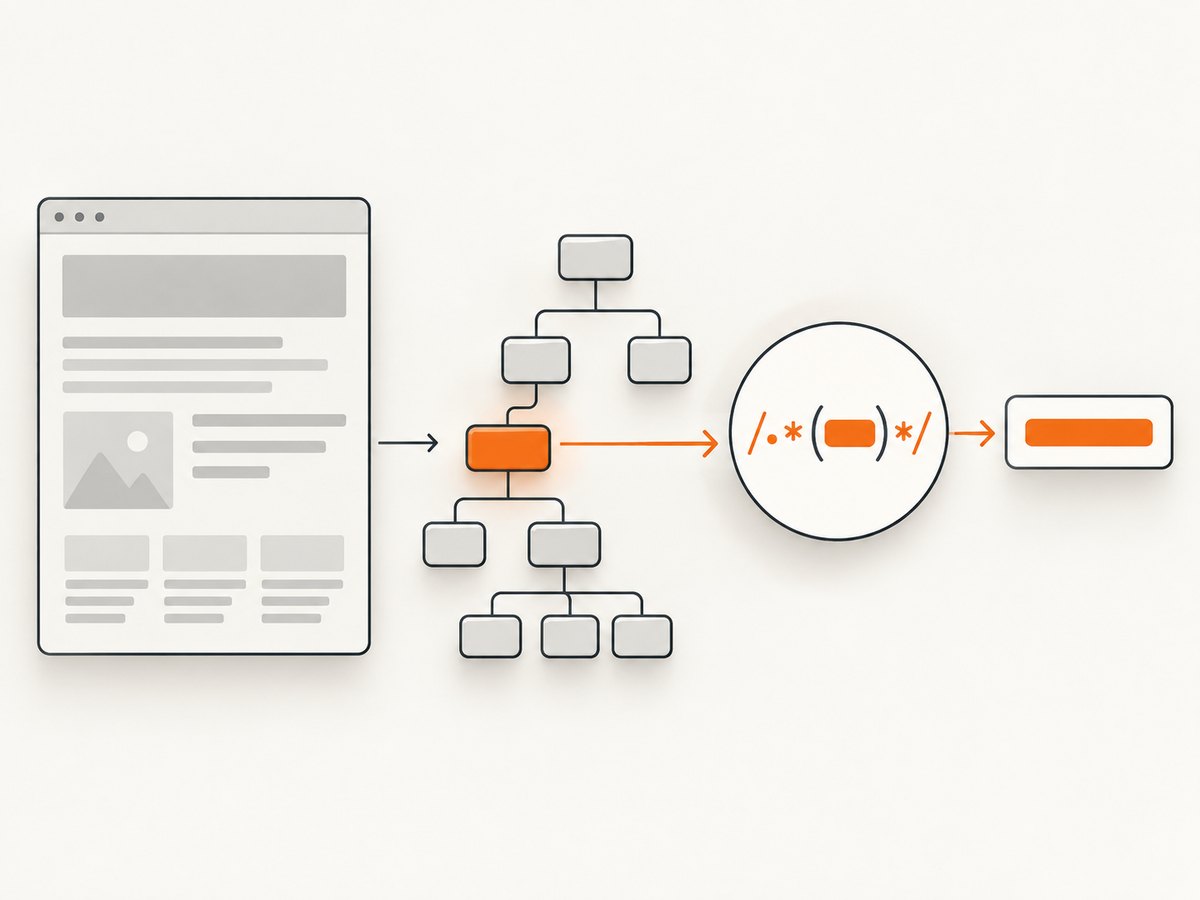
Yes, you can use regex to scrape HTML, but it works best as the final extraction step in a parser-first workflow. Fetch the page responsibly, parse the HTML into a DOM or tree, select the element that contains the field, and run a small, bounded pattern against its text or attribute. Use an HTML parser for nested structure and regex for regular values such as product IDs, dates, or price strings.
This distinction matters because HTML is a nested language with defined tokenization and tree-construction rules. The WHATWG standard specifies that user agents use its parsing rules to generate DOM trees from text/html. A regex that tries to represent arbitrary nesting is doing a parser’s job with a tool that is better suited to local text patterns. WHATWG HTML parsing rules.
This guide shows how to fetch and parse a page, extract fields safely with Python, JavaScript, and cURL where appropriate, and handle pages whose content is rendered by JavaScript. The examples use a fictional product page structure; adapt selectors and field rules to the site you are allowed to access.
1. Decide what the scraper must return
Before writing a pattern, define the extraction contract. For each field, write down where it comes from, which characters or values are allowed, how it is normalized, and what should happen when it is absent or invalid. A scraper should distinguish “the field is missing” from “the field was found and is empty.”
| Field | Example contract | Validation after extraction |
|---|---|---|
| Product ID | Literal SKU- followed by exactly eight uppercase letters or digits |
Check the full identifier against the contract |
| Price | Dollar sign, optional spacing, digits, and optionally two decimal places | Parse under a declared currency and locale policy |
| Date | An ISO date such as 2026-09-30 |
Parse as a calendar date and reject impossible dates |
| Link | An href attribute on a selected link |
Resolve relative URLs against the response URL and validate the scheme |
Decide whether whitespace should be collapsed, whether Unicode characters are allowed, whether a price may use commas or a decimal comma, and whether a missing value should stop the record or produce a structured error. A regex match is only a candidate value; it is not proof that the value is meaningful or correct.
2. Fetch pages with operational controls
Use a clear User-Agent, a timeout, bounded retries, caching where suitable, and a request rate appropriate to the site. Check the site’s terms and its robots.txt instructions before crawling. Robots rules are crawling instructions, not access authorization: RFC 9309 says they “are not a form of access authorization.” RFC 9309: Robots Exclusion Protocol.
Python’s standard library includes urllib.robotparser for checking robots.txt rules. This small example checks whether the configured crawler agent may fetch a URL; it does not replace reviewing terms or other requirements.
from urllib.robotparser import RobotFileParser
from urllib.parse import urlparse

page_url = "https://example.com/products/widget"
parts = urlparse(page_url)
robots_url = f"{parts.scheme}://{parts.netloc}/robots.txt"

robots = RobotFileParser(robots_url)
robots.read()
user_agent = "ExampleResearchBot/1.0 (contact: crawler@example.org)"

if not robots.can_fetch(user_agent, page_url):
    raise RuntimeError(f"robots.txt disallows fetching {page_url}")
For production use, also handle network errors, cache robots.txt according to a sensible policy, and avoid calling read() for every page. The example is intentionally small: it illustrates a check, not a complete crawling scheduler.
3. Parse HTML, then scope the extraction
Use a platform HTML parser or DOM library to interpret the markup. In Python, Beautiful Soup is a convenient choice for selecting elements and reading text. Install it with python -m pip install requests beautifulsoup4. The example uses a stable CSS selector and applies regex only to the selected product details.
import re
import requests
from bs4 import BeautifulSoup

url = "https://example.com/products/widget"
headers = {"User-Agent": "ExampleResearchBot/1.0 (contact: crawler@example.org)"}
response = requests.get(url, headers=headers, timeout=(5, 20))
response.raise_for_status()

soup = BeautifulSoup(response.text, "html.parser")
product = soup.select_one("[data-product]")
if product is None:
    raise ValueError("Product container not found")

text = product.get_text(" ", strip=True)
price_match = re.search(
    r"(?<!\w)\$\s*(?P<amount>\d+(?:\.\d{2})?)(?!\w)",
    text,
)
id_match = re.search(r"\bSKU-(?P<id>[A-Z0-9]{8})\b", text)

if price_match is None:
    raise ValueError("Price not found in product container")
if id_match is None:
    raise ValueError("Expected product ID not found")

record = {
    "price_text": price_match.group("amount"),
    "product_id": id_match.group("id"),
}
print(record)
The extraction pattern allows a dollar sign, optional spaces, digits, and an optional decimal part with exactly two digits. The lookarounds keep the match from being part of a longer word or number. The product ID pattern requires exactly eight uppercase letters or digits after SKU-. Those rules are examples, not universal definitions of prices or IDs.
For a link, select the intended anchor and read its attribute rather than searching the entire document for text that resembles an href:
link = product.select_one("a.product-details")
if link is None or not link.get("href"):
    raise ValueError("Product details link is missing")

from urllib.parse import urljoin
absolute_url = urljoin(response.url, link["href"])
print(absolute_url)
Resolve relative links against the final response URL, and validate the resulting scheme and host if the scraper must remain on a particular site. HTML parsers decode entities and handle markup structure that a broad regex would otherwise need to guess about.
4. Choose between regex, Beautiful Soup, DOMParser, XPath, and JSON
| Task | Start with | Where regex fits |
|---|---|---|
| Nested elements, parent/child relationships, malformed HTML | HTML parser or DOM | Extract a local field after selecting the node |
| Stable text token such as an ID or date | Regex on scoped text | Can be the primary extractor, followed by validation |
| Element relationships or complex selection | CSS selectors or XPath | Apply a pattern to selected text or attributes |
| JSON embedded in a script or attribute | Locate a bounded payload, then use a JSON parser | Find the payload boundary if needed; do not parse nested JSON with regex |
| URI components | A URI parser | A narrowly scoped pattern can extract a known component |
| Content rendered after page load | Browser automation or the underlying documented API | Extract from the rendered DOM or API response |
RFC 3986 includes a regular expression that separates a URI reference into components, while describing it as a non-validating parser. That is a useful distinction: a pattern can identify candidate components without proving that a URI is valid. For general URL handling, use a URI parser and validate the result. RFC 3986: URI Generic Syntax.
In a browser, DOMParser.parseFromString(html, "text/html") parses a string into a separate document. MDN describes DOMParser as an interface for parsing HTML or XML source code into a DOM Document. MDN: DOMParser.
const response = await fetch("https://example.com/products/widget");
if (!response.ok) throw new Error(`HTTP ${response.status}`);
const html = await response.text();
const doc = new DOMParser().parseFromString(html, "text/html");

const product = doc.querySelector("[data-product]");
if (!product) throw new Error("Product container not found");

const idMatch = product.textContent.match(/\bSKU-(?<id>[A-Z0-9]{8})\b/);
if (!idMatch) throw new Error("Expected product ID not found");
console.log(idMatch.groups.id);
This browser example works where cross-origin fetch is allowed by the site’s CORS policy. A browser DOM parser does not fetch or render scripts in the source string. Also, parsing is not sanitization: MDN warns that parseFromString() is an injection sink and does not sanitize input. Do not insert untrusted parsed markup into a live page without a separate sanitization policy. MDN: parseFromString security considerations.
5. Write patterns that remain understandable
Python’s re module is a specialized pattern language. Named groups make extracted values easier to review; explicit character classes state what is allowed; anchors and boundaries express where a field begins and ends. See the Python regular expression HOWTO.
- Prefer
(?P<name>...)in Python or named groups in JavaScript when the captured field has a clear meaning. - Use explicit character classes such as
[A-Z0-9]{8}when the format is constrained. - Use non-greedy quantifiers only when they solve a specific local problem; they do not make a whole-document pattern structurally safe.
- Use anchors such as
^and$when the entire selected string must conform to a format. - For complex Python expressions, use
re.VERBOSEand comments so future changes are reviewable. - Decide whether character classes should be ASCII-only or Unicode-aware. Python’s behavior for shorthand classes such as
\wdepends on flags and string type.
Avoid .* across a whole document, nested ambiguous quantifiers, and patterns that attempt to model arbitrary tag nesting. In addition to being brittle, patterns with excessive backtracking can spend too long on adversarial or unexpectedly large input. Selecting a small node first limits the input that the regex must inspect.
6. Normalize, validate, and report failures
After matching, apply the field’s contract. Trim whitespace, let the HTML parser decode entities, normalize Unicode when your data policy requires it, parse numbers with a declared locale, and validate types or schemas. A price string such as 1,234.56 is ambiguous unless the scraper knows which locale and currency rules apply. Avoid silently stripping punctuation and assuming the result is correct.
Use explicit failure states. For example, record whether a selector was missing, the selector existed but the regex did not match, validation failed, or the request itself failed. That makes it possible to tell a site redesign from a network outage or a changed field format. Do not convert all failures into an empty string; empty output can look like valid data downstream.
7. Handle JavaScript-rendered pages deliberately
If the initial HTTP response does not contain the data, regex cannot recover it from that response. First inspect whether the page calls an API that returns the desired data. If there is a documented endpoint suitable for your use, consuming its structured response can be simpler than rendering a page. Otherwise, use browser automation, wait for the relevant element, and parse the rendered DOM.
Keep the extraction step the same after rendering: select a stable element or attribute, then use a narrow pattern for the field. Do not compensate for missing rendered content by making the regex broader. That usually increases false matches while leaving the source data absent.
If your task is to capture the rendered page as an image or PDF, [ScreenshotNeo](https://screenshotneo.com) is a website screenshot API and MCP server. Its one-call API returns a screenshot or PDF, and its browser capture options include waiting for a selector, a delay, or network idle. Those capabilities address browser rendering and page capture; they do not replace a DOM parser when your output needs structured fields.
8. Test patterns against representative fixtures
Keep small saved HTML fixtures for the cases your scraper must handle. Include a normal page, a missing field, reordered attributes, malformed markup, encoded characters, Unicode text, and long or unusual strings. Assert both the extracted values and the expected failures.
def extract_product(soup):
    product = soup.select_one("[data-product]")
    if product is None:
        raise ValueError("Product container not found")
    match = re.search(r"\bSKU-(?P<id>[A-Z0-9]{8})\b", product.get_text(" ", strip=True))
    if match is None:
        raise ValueError("Product ID not found")
    return match.group("id")

# In a test suite, pass fixtures for both matching and missing-ID cases.
# Assert the returned ID for valid markup and the documented error otherwise.
Re-run fixtures whenever the selector or pattern changes. A fixture suite is especially useful when a site rearranges markup: it reveals whether the selector still points at the intended field and whether the extraction contract still fits the content.
9. cURL, Python, and Node.js examples for page capture
For a simple text response, cURL can retrieve a page for inspection; it does not parse HTML or apply a regex by itself. Save the response, then use a parser in your chosen language. For example:
curl --fail --location --max-time 20 \
  --user-agent "ExampleResearchBot/1.0 (contact: crawler@example.org)" \
  "https://example.com/products/widget" \
  --output page.html
In Python, the earlier requests and Beautiful Soup example fetches, checks the HTTP status, parses the document, and extracts bounded fields. In Node.js, use a DOM-capable HTML parsing library in a server environment; the browser’s DOMParser is not generally available in Node by default. Keep the same sequence: fetch with timeout and clear headers, parse, select, match locally, validate.
For either language, set maximum response sizes in production, limit concurrency, and retry only transient failures with a small bounded policy. Respect the target site’s request limits. Cache pages or extracted results when freshness requirements allow; repeated requests for unchanged pages waste time and add load.
10. Performance, reliability, and cost considerations
For typical pages, parsing an entire document and running a short regex on a selected string is usually a small part of the work compared with network latency or browser rendering. There is no universal authoritative success-rate or accuracy figure for regex scraping: the relevant standards and official documentation describe parsing behavior and APIs, not a benchmark that predicts your site’s reliability.
Reliability mostly depends on where the data comes from and how stable the extraction contract is. Prefer stable IDs, data attributes, semantic markup, or documented APIs over selectors based on deep positional structure. Monitor missing-field and validation-failure rates, record status codes and response times, and keep logs free of credentials, cookies, and personal data. If fixtures contain sensitive content, redact them before sharing or committing.
Cost depends on your fetch volume, whether browser rendering is needed, and the infrastructure and retries involved. Use caching, rate limits, and bounded retries to avoid needless requests. A network timeout, blank response, or blocked request should be reported distinctly from a valid page that contains no matching field.
11. Troubleshooting common failures
| Symptom | Likely cause | Fix |
|---|---|---|
| No selector match | The markup differs from the assumed structure, or the content is rendered later | Inspect the response or rendered DOM; choose a stable selector and add a missing-container error |
| Regex finds the wrong price or ID | The pattern runs over too much text and matches a nearby field | Select the exact product or price node before applying regex |
| Pattern works on one page but breaks on another | Different formatting, locale, whitespace, or field contract | Define accepted formats explicitly and add fixtures for each supported variation |
| Price parsing fails for commas or decimal commas | The parser assumes one locale’s number format | Declare locale and currency rules before converting text to a number |
| Link points to the wrong location | The href is relative or contains an unexpected scheme |
Resolve against the response URL and validate the normalized URL |
| Request times out or returns an error | Slow server, network issue, rate limit, or inaccessible page | Use a timeout, inspect the status, slow the request rate, and retry transient failures only within a limit |
| Content is missing from saved HTML | It is loaded by JavaScript after the initial response | Inspect an appropriate API or render the page and parse the resulting DOM |
| Scraper stalls on an input | A broad pattern with ambiguous repetition triggers excessive backtracking | Bound the input, scope it to a selected node, and simplify the pattern |
12. Or skip the browser setup
If the task is to capture a rendered website as an image or PDF rather than extract structured fields, ScreenshotNeo provides a one-call screenshot API and an MCP server for AI agents. See the ScreenshotNeo API documentation.

curl -G "https://api.screenshotneo.com/v1/shot" \
  -d access_key=YOUR_API_KEY \
  --data-urlencode url=https://stripe.com \
  -o shot.webp
import requests
r = requests.get(
"https://api.screenshotneo.com/v1/shot",
params={"access_key": "YOUR_API_KEY", "url": "https://stripe.com"},
timeout=90,
)
open("shot.webp", "wb").write(r.content)const q = new URLSearchParams({ access_key: 'YOUR_API_KEY', url: 'https://stripe.com' });
const res = await fetch(`https://api.screenshotneo.com/v1/shot?${q}`);- Cookie banners, newsletter popups, and chat widgets are removed before the shot; each cleanup step can be turned off.
- Bot checks, blank pages, timeouts, failed loads, and cache hits are never billed; response headers say which page verdict and billing outcome applied.
- An MCP server gives AI agents tools to take screenshots, get page information, and capture PDFs.
- The free plan includes 1,000 screenshots a month with no card; paid plans start at $5 for 3,000 screenshots.
Sign up for ScreenshotNeo’s free plan and get 1,000 screenshots a month with no card.
13. Short FAQ
What is the best regex for web scraping?
There is no universal pattern. Write one for a defined field format, then apply it to a small string selected from parsed HTML and validate the result.
Can I scrape links with regex?
You can match URL-like text in a bounded value, but select the intended anchor and read its href attribute first. Resolve and validate the URL afterward.
Should I use Beautiful Soup or regex?
Use Beautiful Soup to navigate HTML structure and select elements; use regex for a bounded regular field inside the selected element.
Why does a regex scraper break when the HTML changes?
It often depends on document-wide text or incidental markup details. Separate structure from field extraction, use stable selectors, and keep fixtures that show supported variations.
Does robots.txt grant permission to scrape?
No. It communicates crawling instructions; RFC 9309 explicitly says robots rules are not access authorization. Review applicable terms and requirements separately.


