Regression Testing vs Performance Testing: Differences, Overlap, and Practical Workflows
Regression testing checks that changes did not break existing behavior; performance testing measures behavior under a defined workload. Learn when to use each.

Regression testing asks whether a change broke behavior that already worked. Performance testing asks how a system behaves under a defined workload. They have different goals, evidence, and test designs, but they overlap: a performance test run after a release can detect a performance regression when its measurements are compared with a reliable baseline.
This distinction helps you choose the right test, interpret failures, and decide what belongs in a CI/CD gate. Regression testing is change-related; performance testing is workload-based. Neither replaces the other.
Regression testing vs performance testing at a glance
| Aspect | Regression testing | Performance testing |
|---|---|---|
| Primary question | Did a fix, feature, dependency, configuration, or environment change break existing behavior? | Does the system meet responsiveness, throughput, reliability, or scalability goals under a stated workload? |
| Typical input | Previously tested cases selected around affected and high-risk areas. | Representative user journeys, requests, data volumes, concurrency, or traffic patterns. |
| Evidence | Expected results still pass in areas intended to remain unaffected. | Measurements compared with targets, acceptance criteria, or a baseline. |
| Timing | After a software or environment change, according to change risk. | During development and before release, then repeatedly when performance risk warrants it. |
| Output | Pass/fail behavior, defect reports, and affected test scope. | Latency distributions, throughput, resource behavior, errors, saturation points, and trend comparisons. |
| Overlap | A regression suite can include performance checks. | A performance run becomes regression-oriented when it compares a new result with an established baseline. |

What regression testing means
The ISTQB Glossary defines regression testing as “a type of change-related testing to detect whether defects have been introduced or uncovered in unchanged areas of the software.” In practical terms, you rerun checks for behavior that should still work after a change. The change might be a bug fix, a new feature, a library upgrade, an infrastructure migration, a browser update, a feature flag, or a production configuration edit. See the ISTQB Glossary for the formal definition.
Regression is a purpose, not a particular test level. Unit, component, API, integration, end-to-end, exploratory, and visual checks can all be used for regression when they protect behavior at risk. A small, targeted suite is often more useful immediately after a localized change than rerunning every test in the repository.
When to run regression tests
- After code changes, bug fixes, refactoring, or dependency updates.
- After database schema, feature flag, configuration, or infrastructure changes.
- After changing browser versions, operating systems, or external service integrations.
- Before release when the affected behavior is business-critical.
- In CI/CD, with fast critical checks first and broader suites later.
Select cases by change impact and risk. A payment calculation change may require checkout, refunds, invoices, and tax scenarios; it does not automatically require every unrelated administrative test. Record why each selected case protects the changed area so the suite remains maintainable.
What performance testing means
Performance testing evaluates system characteristics under a specified workload. Microsoft describes the target characteristics as responsiveness, throughput, reliability, and/or scalability under a given workload. A workload should state what users or clients do, how often they do it, how many are concurrent, how much data is involved, and how long the test runs. The Microsoft Azure Well-Architected performance-testing guidance explains workload design, baselines, and acceptance criteria.
Common performance test types include:
- Load testing: measures behavior at an expected traffic level.
- Stress testing: increases load to discover failure or degradation limits.
- Spike testing: applies a sudden change in traffic.
- Soak or endurance testing: runs long enough to expose leaks, queue growth, or gradual degradation.
- Volume testing: evaluates large data sets, payloads, or database sizes.
- Scalability testing: checks how behavior changes as capacity or workload grows.
Define acceptance criteria before running the test. Examples include a p95 API latency below a target, an error rate below a threshold, a minimum throughput, or no sustained queue growth. A single average can hide tail latency and intermittent failures, so capture distributions and error counts as well.
How the two approaches overlap
A performance test can be a regression test when the question is, “Did this change make our established workload slower or less reliable?” For example, run the same checkout workload against the previous release and the candidate release, under comparable infrastructure and data conditions. Compare p50, p95, p99, throughput, error rate, and resource saturation with the baseline.
The reverse is also useful: a functional regression suite may include a basic response-time assertion for a critical endpoint. Keep that assertion narrow. A full load test does not belong in every pull request because it can be expensive, slow, and sensitive to environmental noise. Use a fast smoke measurement for early feedback and a controlled performance stage for release decisions.
A practical workflow for teams
- Describe the change and risk. List code paths, interfaces, data, dependencies, and environments that changed. Identify existing behavior that must remain intact.
- Set the performance question. State the workload, traffic shape, data volume, duration, environment, metrics, and acceptance criteria. Microsoft recommends starting performance testing early enough to establish a meaningful baseline.
- Choose coverage. Select regression cases that exercise affected and high-risk behavior. Select performance scenarios that represent important user or system workloads rather than arbitrary maximum traffic.
- Establish a baseline. Store test version, commit, configuration, infrastructure size, data state, workload definition, and measurement results. A number without these conditions is difficult to interpret.
- Automate repeatable checks. Run critical regression tests and lightweight performance checks in CI/CD. Put broader load, stress, or endurance runs in scheduled or release pipelines. Microsoft guidance discusses CI/CD integration and fail-fast behavior for critical tests in its testing practices guide.
- Compare like with like. Keep browser, region, database state, cache policy, feature flags, and dependency versions consistent. If they differ, record the difference and avoid claiming a code-only regression.
- Investigate with context. A functional failure needs the changed behavior, expected result, logs, and reproduction. A performance failure also needs workload, timing, baseline, infrastructure, resource metrics, and error details.
- Report a decision. State whether behavior regressed, performance missed an acceptance criterion, results were inconclusive, or the baseline needs to be rebuilt.
Visual regression evidence for web applications
For browser-based products, screenshots add evidence that functional assertions may miss: layout shifts, missing fonts, clipped controls, consent overlays, dark-mode errors, and responsive breakpoints. Capture the same URL, viewport, device scale, authentication state, and wait condition before and after a change. Compare images with a consistent threshold, and investigate differences caused by dynamic timestamps, ads, animations, or personalized content.
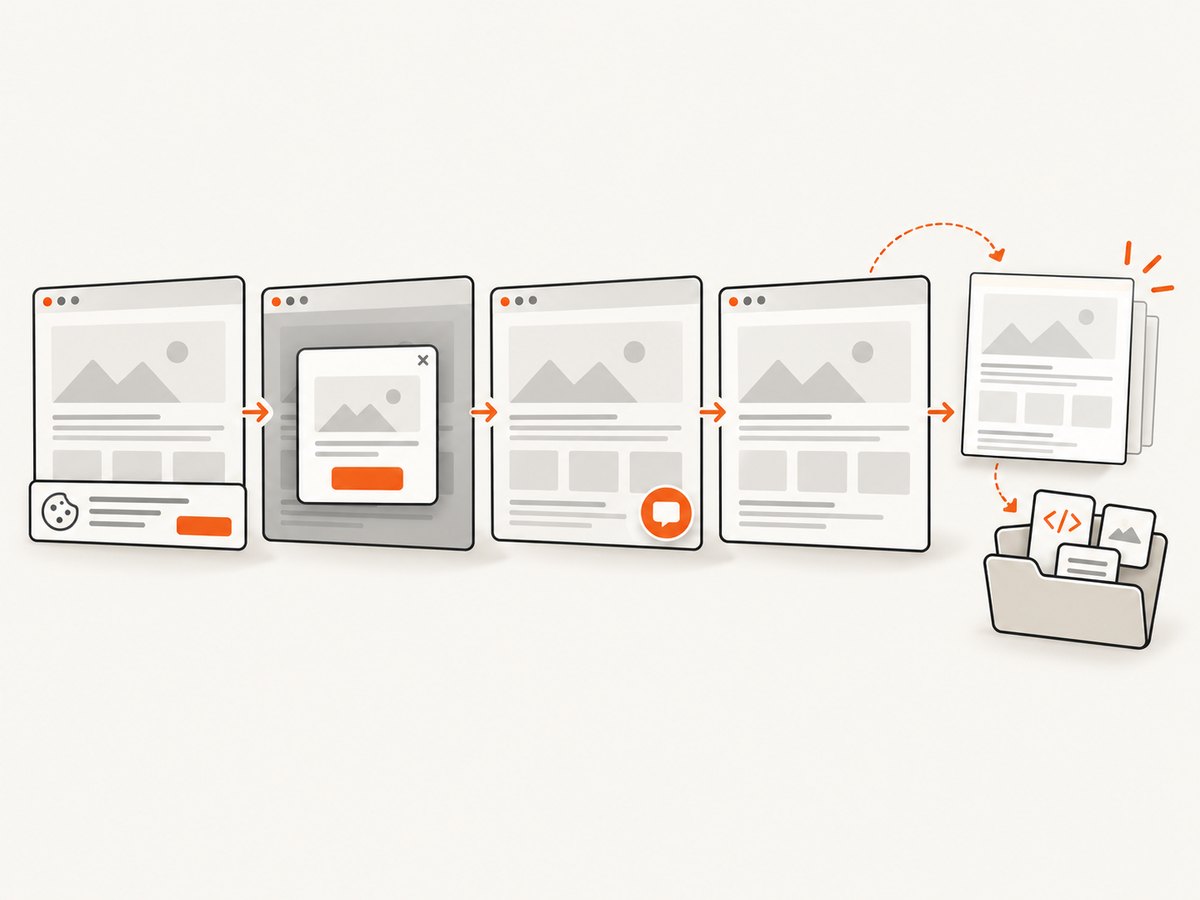
You can build this yourself with a browser automation library. A reliable capture generally needs:
- A pinned browser version and matching operating-system fonts.
- Explicit viewport dimensions and device pixel ratio.
- Authentication or cookies loaded before navigation.
- A wait condition such as a stable selector, network idle, or a bounded delay.
- Animation disabling and masking for intentionally dynamic regions.
- Deterministic test data, timezone, locale, and color scheme.
- Artifact storage keyed by commit, browser, viewport, and page.
Or skip the browser setup
ScreenshotNeo provides a website screenshot API and MCP server. One request returns PNG, JPEG, WebP, or PDF. Before capture, it accepts cookie and consent banners like a visitor and removes more than 60 known consent platforms, newsletter popups, and chat widgets; each cleanup step can be turned off. Only clean shots are billed: bot checks or CAPTCHAs, blank pages, timeouts, failed loads, and cache hits cost nothing, and the response identifies the result with X-Page-Verdict and X-Billed headers.
See the ScreenshotNeo documentation for request details. The following calls are runnable examples:
curl -G "https://api.screenshotneo.com/v1/shot" -d access_key=YOUR_API_KEY --data-urlencode url=https://stripe.com -o shot.webpimport requests
r = requests.get("https://api.screenshotneo.com/v1/shot", params={"access_key": "YOUR_API_KEY", "url": "https://stripe.com"}, timeout=90)
open("shot.webp", "wb").write(r.content)const q = new URLSearchParams({ access_key: 'YOUR_API_KEY', url: 'https://stripe.com' });
const res = await fetch(`https://api.screenshotneo.com/v1/shot?${q}`);For regression evidence, useful options include full-page capture with lazy images loaded, a CSS selector for one element, dark mode, 12 device presets or a custom viewport, retina scale, custom CSS and JavaScript, a click before capture, hiding selectors, waiting for a selector or network idle, blocking ads, trackers, requests, or resource types, custom headers and cookies, a user agent, Authorization, timezone, geolocation, transparent backgrounds, image resizing, and a chosen cache TTL. You can also create PDFs with paper size, margins, landscape mode, and page ranges; submit asynchronous jobs with signed webhooks; capture up to 100 URLs per bulk call; use signed links for public <img> tags; and query usage through the usage API. Parameter names used by other screenshot APIs also work, which simplifies migration.
ScreenshotNeo also exposes an MCP server with take_screenshot, get_page_info, and capture_pdf tools for Claude, Cursor, and other MCP clients. This lets an AI agent collect visual evidence as part of an investigation without embedding browser-launch code in every workflow.
Plans include 1,000 screenshots per month free with no card, then Starter at $5 for 3,000, Growth at $15 for 15,000, Pro at $39 for 60,000, Scale at $99 for 250,000, and Business at $249 for 1,000,000. Yearly billing gives two months free, and every feature is available on every plan. Create a free ScreenshotNeo account to start with 1,000 screenshots each month and no card.
Troubleshooting common failures
| Symptom | Likely cause | Fix |
|---|---|---|
| Regression test fails after an unrelated change | The test depends on shared state, order, time, or unstable data. | Isolate fixtures, reset state, freeze time where appropriate, and rerun in a clean environment. |
| Performance result is slower once | Warm-up, noisy neighbors, cache state, or an inconsistent workload. | Use warm-up iterations, repeat runs, capture environment details, and compare distributions rather than one sample. |
| All performance numbers improved unexpectedly | The workload changed, cache was warmer, or traffic generation saturated. | Verify request mix, data volume, cache policy, generator CPU, and server resource metrics. |
| Visual diff contains the whole page | Fonts, viewport, device scale, animations, or consent overlays differ. | Pin browser and fonts, set viewport and scale explicitly, disable animation, wait for stable content, and handle consent before capture. |
| Screenshot is blank or incomplete | Navigation timed out, content requires interaction, or the page is protected by a bot check. | Increase bounded waits, wait for a specific selector, provide required headers or cookies, and inspect the page verdict. With ScreenshotNeo, failed loads, blank pages, timeouts, and bot checks are not billed. |
| CI pipeline is too slow | A full regression or load suite runs on every change. | Gate with a small critical suite, parallelize independent tests, cache dependencies, and schedule broad performance runs. |
| Results cannot be reproduced | Environment, dependency, data, or feature flags changed between runs. | Record commit, image, browser, region, flags, data snapshot, workload, and configuration with every artifact. |
Performance, reliability, and cost considerations
Performance tests consume generator capacity, application capacity, observability storage, and engineering time. Keep workload generators from becoming the bottleneck, and separate test traffic from production analytics where possible. Run high-cost stress and endurance tests only when the risk justifies them.
Reliability comes from repeatability: deterministic inputs, controlled environments, adequate warm-up, multiple samples, and explicit acceptance criteria. Treat intermittent infrastructure failures differently from repeatable product degradation. A failed test should preserve logs, traces, raw measurements, and the exact test definition.
For screenshot artifacts, caching can reduce repeated work when the page and options are unchanged. Choose a TTL that matches how often the page changes. Use bulk capture for many URLs, asynchronous jobs and signed webhooks for long-running work, and image resizing when storage or transfer cost matters. Because ScreenshotNeo reports whether a response was billed and why, cost accounting can distinguish clean captures from failed or cached attempts.
FAQ
Is regression testing a type of performance testing?
No. Regression describes the reason for testing after a change; performance testing describes measuring behavior under a workload. A performance test can be used for regression when compared with a baseline.
Do I need to rerun every test after every change?
No. Select coverage based on affected behavior, dependencies, and risk. Expand to a broader suite for shared components or high-impact releases.
Can a response-time assertion be in a functional regression test?
Yes, for a small number of critical paths. Keep strict load and scalability analysis in controlled performance tests so ordinary CI runs remain stable.
What makes a performance baseline useful?
It records the workload, environment, data, version, configuration, and measurement distributions. Comparing only a single average or an unlabeled number is not enough.
Should visual screenshots block a deployment?
Block when the page is business-critical and the comparison is deterministic. Otherwise publish the diff for review and use functional and accessibility checks as the stronger gate.
Conclusion
Use regression testing to protect existing behavior after change. Use performance testing to measure behavior under a defined workload. Combine them when a release may have changed latency, throughput, reliability, or scalability, and make the comparison credible with a documented baseline and acceptance criteria. For web interfaces, deterministic screenshots provide an additional regression signal; ScreenshotNeo can supply those captures without maintaining browser infrastructure, while its verdict and billing headers make failed or unclean pages visible in your pipeline.


