How to Reuse Playwright Authentication State with a POM
Reuse Playwright storageState safely with page objects, setup projects, fixtures, worker isolation, API login, and troubleshooting.
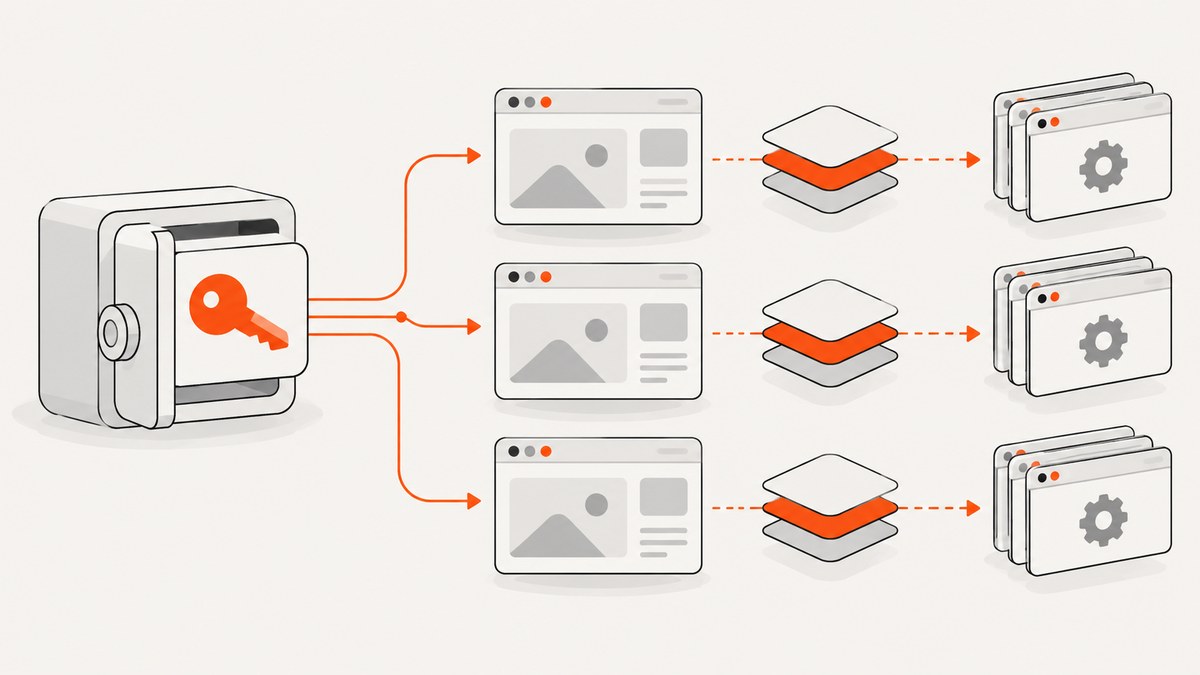
Short answer: authenticate once in a Playwright setup project, save the browser context with storageState, and configure dependent test projects to load that state. Keep authentication setup outside your page object model (POM): a POM should expose application actions and locators, while fixtures create POM instances over pages whose contexts already have the correct role and state. Reuse one account only when parallel tests cannot interfere through shared server-side data. If tests mutate shared data, provision separate accounts and state files per worker.
This design gives you fast, readable tests without hiding authentication lifecycle concerns inside page classes. The examples use TypeScript and Playwright Test; adapt routes, selectors, credentials, and roles to your application.
1. Understand the boundary between authentication and a POM
A page object represents a part of your application and provides a higher-level API for actions and selectors. Playwright describes page objects as a way to centralize selectors and avoid repeated code (POM guide). Authentication establishes the browser context in which that object runs. Treat these as two layers:
- Authentication setup: signs in through the UI or an API and writes a state file.
- Context configuration: loads that state with
use.storageState. - Page objects: wrap the supplied
pageand expose application behavior. - Fixtures: construct and share page objects with the right role and lifecycle.
Putting login steps in every POM constructor creates hidden network work, makes tests slower, and couples unrelated pages to one login flow. A POM can contain a login method for an explicit test of login itself, but ordinary authenticated tests should receive an already-authenticated page.
2. Authenticate once in a setup project
Create a setup test that performs the real login flow, waits for a reliable signed-in condition, and saves the context state. Do not assume the example selectors or URL exist in your application.
import { test as setup, expect } from '@playwright/test';
import path from 'node:path';

const authFile = path.join(__dirname, '../playwright/.auth/user.json');

setup('authenticate', async ({ page }) => {
  await page.goto('https://your-app.example/login');
  await page.getByLabel('Email').fill(process.env.E2E_EMAIL!);
  await page.getByLabel('Password').fill(process.env.E2E_PASSWORD!);
  await page.getByRole('button', { name: 'Sign in' }).click();

  // Choose a condition that proves the session is usable.
  await expect(page).toHaveURL(/dashboard/);
  await expect(page.getByRole('heading', { name: 'Dashboard' })).toBeVisible();

  await page.context().storageState({ path: authFile });
});
Use environment variables or your CI secret store for credentials. The state file can contain cookies and headers capable of impersonating the account, so keep it out of source control. Store it under playwright/.auth and add that directory to .gitignore.
3. Configure project dependencies and storageState
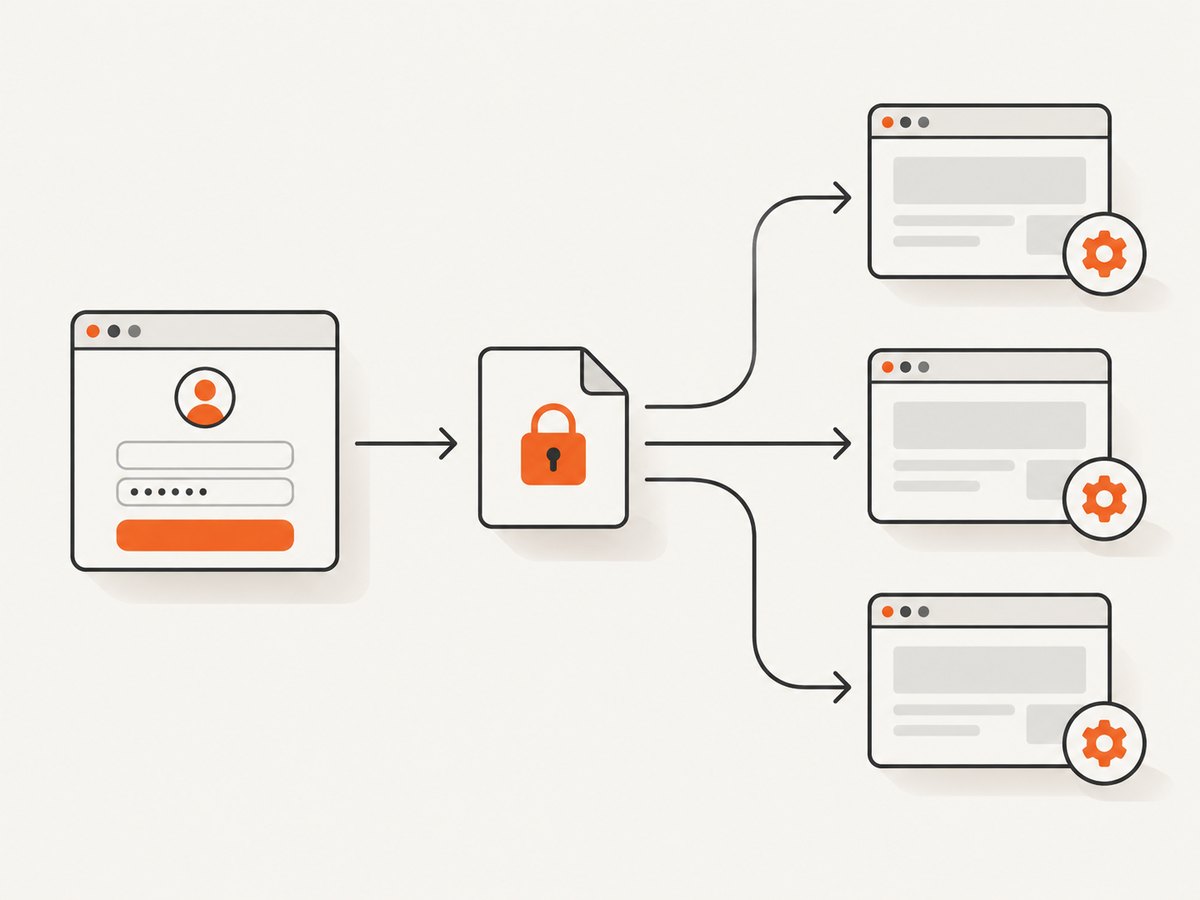
The setup project must run before projects that consume its output. In playwright.config.ts, declare the setup project, then make browser projects depend on it and point them at the saved file. Playwright’s authentication guide documents this setup-project pattern (authentication guide).
import { defineConfig, devices } from '@playwright/test';
import path from 'node:path';

const authFile = path.join(__dirname, 'playwright/.auth/user.json');

export default defineConfig({
  testDir: './tests',
  projects: [
    {
      name: 'setup',
      testMatch: /.*auth\.setup\.ts/,
    },
    {
      name: 'chromium',
      use: { ...devices['Desktop Chrome'], storageState: authFile },
      dependencies: ['setup'],
    },
    {
      name: 'firefox',
      use: { ...devices['Desktop Firefox'], storageState: authFile },
      dependencies: ['setup'],
    },
  ],
});
A dependency causes the setup test to complete before dependent projects start. If state should last only for one run, write it below the test project’s output directory so Playwright can clean it before a later run. For persistent state between runs, keep the file in the ignored playwright/.auth directory and regenerate it when it expires.
4. Build a POM over the authenticated page
Keep selectors and actions in a class. The constructor receives a page fixture that already uses the configured storage state.
import { type Locator, type Page } from '@playwright/test';

export class DashboardPage {
  readonly page: Page;
  readonly heading: Locator;
  readonly projectsLink: Locator;

  constructor(page: Page) {
    this.page = page;
    this.heading = page.getByRole('heading', { name: 'Dashboard' });
    this.projectsLink = page.getByRole('link', { name: 'Projects' });
  }

  async open() {
    await this.page.goto('/dashboard');
    await this.heading.waitFor();
  }

  async openProjects() {
    await this.projectsLink.click();
  }
}
Use it in a test after the configured context has been created:
import { test, expect } from '@playwright/test';
import { DashboardPage } from '../pages/dashboard.page';

test('authenticated user sees the dashboard', async ({ page }) => {
  const dashboard = new DashboardPage(page);
  await dashboard.open();
  await expect(dashboard.heading).toBeVisible();
});
5. Expose POMs through fixtures
Fixtures remove repetitive construction and give every test a consistent object. The fixture below extends Playwright’s built-in test with a dashboard object.
import { test as base } from '@playwright/test';
import { DashboardPage } from '../pages/dashboard.page';

type Fixtures = {
  dashboard: DashboardPage;
};

export const test = base.extend<Fixtures>({
  dashboard: async ({ page }, use) => {
    await use(new DashboardPage(page));
  },
});

export { expect } from '@playwright/test';
import { test, expect } from '../fixtures/authenticated';
test('opens projects', async ({ dashboard, page }) => {
await dashboard.open();
await dashboard.openProjects();
await expect(page).toHaveURL(/projects/);
});The fixture does not perform login. The project configuration created the authenticated context before the fixture ran. This separation keeps the POM focused on application behavior.
6. Use separate roles and contexts in one test
When a scenario needs an administrator and a normal user at the same time, load separate state files into separate browser contexts. A POM wraps a page; the context supplies cookies, local storage, IndexedDB, and other browser state.
import { test as base } from '@playwright/test';
import path from 'node:path';
import { AdminPage } from '../pages/admin.page';
import { UserPage } from '../pages/user.page';

type Fixtures = { admin: AdminPage; user: UserPage };

export const test = base.extend<Fixtures>({
  admin: async ({ browser }, use) => {
    const context = await browser.newContext({
      storageState: path.join(__dirname, '../playwright/.auth/admin.json'),
    });
    const page = await context.newPage();
    await use(new AdminPage(page));
    await context.close();
  },
  user: async ({ browser }, use) => {
    const context = await browser.newContext({
      storageState: path.join(__dirname, '../playwright/.auth/user.json'),
    });
    const page = await context.newPage();
    await use(new UserPage(page));
    await context.close();
  },
});
Close every manually created context in the fixture teardown. Do not reuse one context for two identities; cookies and local storage belong to the context, so identities would leak into each other.
7. Choose shared state or one account per worker
| Situation | Recommended design | Reason |
|---|---|---|
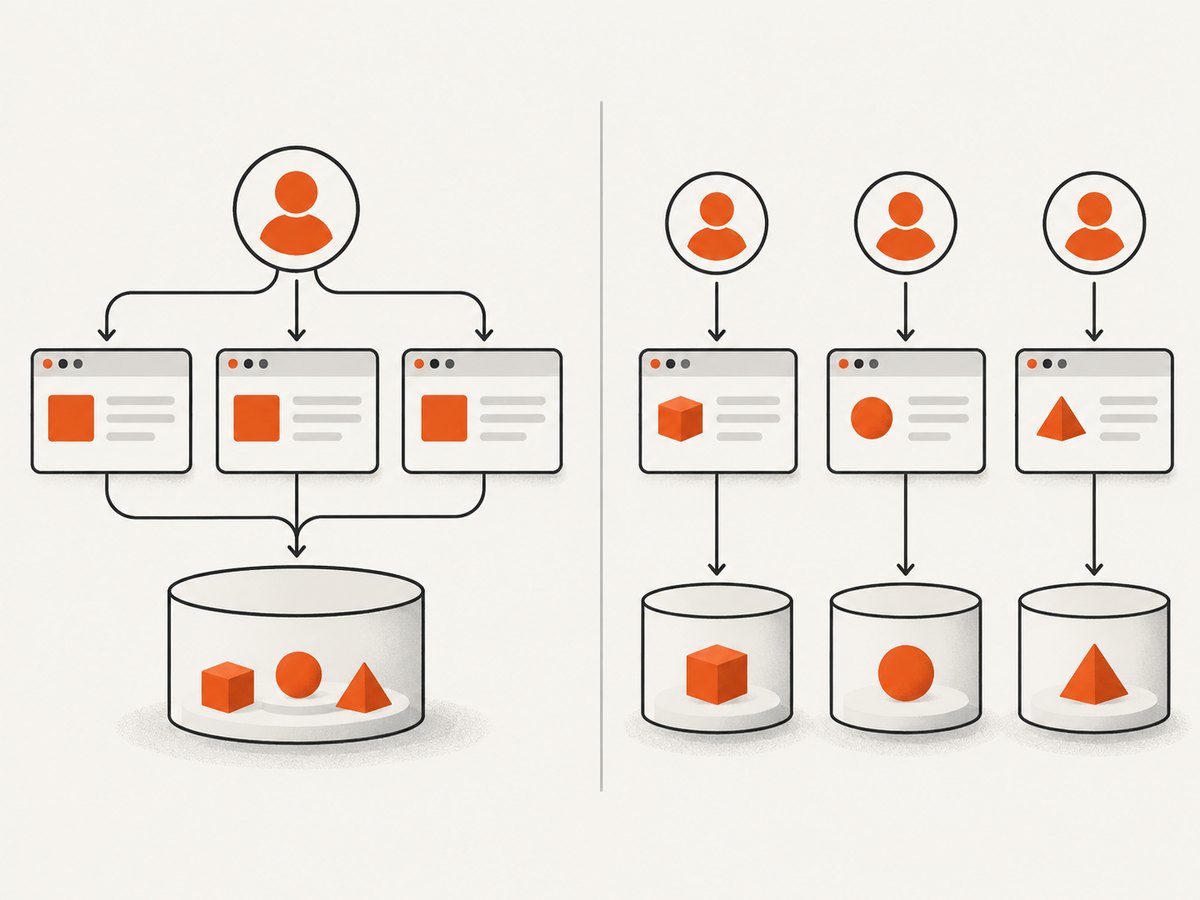
| Tests only read data or create isolated records | One shared account and state file | Simpler setup and less account provisioning |
| Tests edit, delete, approve, or reorder shared records | Separate account and state per worker | Parallel workers cannot overwrite one another |
| Authentication differs by browser | Generate state for each browser or use compatible credentials | A state file may not represent every browser’s authentication behavior |
| Two roles interact in one scenario | Separate contexts and state files | Each POM retains its own identity |
Playwright recommends unique accounts when parallel workers or team members can interfere with server-side changes. A worker-scoped fixture can select a state file using test.info().parallelIndex:
import { test as base } from '@playwright/test';
import path from 'node:path';

type WorkerFixtures = { workerStorageState: string };

export const test = base.extend<{}, WorkerFixtures>({
  workerStorageState: [async ({ browser }, use, workerInfo) => {
    const id = workerInfo.parallelIndex;
    const file = path.join(__dirname, `../playwright/.auth/worker-${id}.json`);
    // Provision or authenticate the account assigned to this worker here.
    const context = await browser.newContext();
    const page = await context.newPage();
    await page.goto('https://your-app.example/login');
    // Fill credentials for worker ${id}, then save state.
    await context.storageState({ path: file });
    await context.close();
    await use(file);
  }, { scope: 'worker' }],
});
In production code, replace the placeholder provisioning and login steps with your account pool. The tradeoff is straightforward: shared state costs less operational effort; per-worker state costs more setup but isolates mutations.
8. Authenticate through an API when appropriate
If your application exposes a stable authentication API, you can avoid a UI login in setup. Playwright’s API testing guide explains that storage state is interchangeable between APIRequestContext and BrowserContext (API testing).
import { test as setup, expect } from '@playwright/test';
import path from 'node:path';

const authFile = path.join(__dirname, '../playwright/.auth/api-user.json');

setup('authenticate by API', async ({ request }) => {
  const response = await request.post('https://your-app.example/api/login', {
    data: {
      email: process.env.E2E_EMAIL,
      password: process.env.E2E_PASSWORD,
    },
  });
  expect(response.ok()).toBeTruthy();
  await request.storageState({ path: authFile });
});
Use API login only when the endpoint and security model make it suitable. UI login remains useful when the test must cover redirects, MFA screens, consent, or browser-specific behavior. API login is often faster because it avoids rendering and interacting with the login page.
9. Storage coverage and edge cases
- Cookies and local storage: included by standard
storageStatehandling. - IndexedDB: storage-state support was added in Playwright v1.51. Check your installed version and enable the relevant option when authentication tokens live there. See the BrowserContext API.
- Virtual WebAuthn credentials: credential inclusion is supported from v1.61 through the appropriate storage-state credentials option. Verify the API version before relying on it.
- Session storage: it is not automatically persisted by the standard state file. Capture it with custom code and seed it using
context.addInitScript; session storage is tied to a domain and is not a drop-in replacement for cookies or local storage. - Short-lived tokens: an apparently valid file can still produce a redirected login when the server-side session has expired. Regenerate the file rather than weakening assertions.
- Multiple origins: ensure the login state is created for every origin the app uses. A state file for one host does not grant access to a different host.
10. Security and state lifecycle checklist
- Add
playwright/.authand generated state files to.gitignore. - Never print cookies, authorization headers, or state-file contents in CI logs.
- Use least-privilege test accounts and rotate their passwords or tokens.
- Delete and regenerate state after changing credentials, roles, or authentication policy.
- Use an output-directory state file when persistence between runs is unnecessary.
- In UI mode, run the setup project manually when the existing state expires; setup projects do not run automatically every time you open UI mode.
11. Troubleshooting common failures
| Symptom | Likely cause | Fix |
|---|---|---|
Every test lands on /login |
Expired state, wrong origin, or setup did not run | Run the setup project, inspect the final URL, verify dependencies, and confirm the exact hostname. |
| State file is missing | Directory does not exist or setup failed before saving | Create the ignored directory, check setup output, and save only after a signed-in assertion. |
| Tests pass serially but fail in parallel | Workers mutate the same server-side records | Use unique accounts or worker-specific fixtures and data identifiers. |
| Admin actions return 403 | User state was loaded for an admin POM | Create a separate admin state file and browser context. |
| API-authenticated browser is still anonymous | The API state uses a token format or origin the browser cannot consume | Confirm the API sets browser-compatible cookies or storage, then inspect the saved state and prefer UI setup if necessary. |
| WebAuthn or IndexedDB login disappears | Playwright version or storage-state options do not include that data | Upgrade to a version supporting the feature and enable its documented option. |
| Session-storage token is absent | Session storage is not covered by normal storage state | Capture it explicitly and inject it with addInitScript before navigation. |
| Fixture hangs during teardown | A manually created context was not closed | Put context.close() after await use(...) in the fixture. |
12. Performance, reliability, and cost considerations
Saving state once removes repeated login navigation from every test, which reduces setup time and lowers the chance of failures caused by login rate limits or transient identity-provider pages. API setup can be faster still, but only when the API produces browser-usable state. Keep the setup assertion strict: saving a state file after a failed or partially completed login creates confusing downstream failures.
Parallelism improves throughput only when accounts and test data are isolated. A shared account can make a suite appear fast while introducing nondeterministic failures from competing updates. Worker-scoped accounts add provisioning work but make retries and diagnosis more reliable. Refresh state deliberately when tokens expire instead of retrying every test with the same invalid file.
Or skip the browser setup
If your goal is to capture a page image for documentation, visual review, or an agent workflow rather than run an authenticated browser test, ScreenshotNeo provides a single screenshot API request. It removes cookie and consent banners, newsletter popups, and chat widgets before capture; bot checks, blank pages, timeouts, failed loads, and cache hits are not billed. Each response reports its result through X-Page-Verdict and X-Billed headers. Its MCP server exposes take_screenshot, get_page_info, and capture_pdf for Claude, Cursor, and other MCP clients.
See the ScreenshotNeo API documentation for all options.
curl -G "https://api.screenshotneo.com/v1/shot" -d access_key=YOUR_API_KEY --data-urlencode url=https://stripe.com -o shot.webpimport requests
r = requests.get("https://api.screenshotneo.com/v1/shot", params={"access_key": "YOUR_API_KEY", "url": "https://stripe.com"}, timeout=90)
open("shot.webp", "wb").write(r.content)const q = new URLSearchParams({ access_key: 'YOUR_API_KEY', url: 'https://stripe.com' });
const res = await fetch(`https://api.screenshotneo.com/v1/shot?${q}`);Features include full-page and element capture, dark mode, device presets, custom viewports, retina scale, PDF output, custom CSS and JavaScript, clicks, selector waits, delays, network-idle waits, request blocking, headers, cookies, user agents, authorization, timezone, geolocation, transparent backgrounds, resizing, TTL caching, signed image links, asynchronous webhooks, bulk capture of up to 100 URLs, usage reporting, and an OpenAPI specification. The Free plan includes 1,000 screenshots per month with no card; paid plans start at $5 for 3,000. Create a free ScreenshotNeo account.
FAQ
Should the POM save storage state?
Usually no. Save state in setup or fixtures, then pass the authenticated page to the POM. This keeps login lifecycle and page behavior separate.
Can I use one state file for Chromium and Firefox?
Sometimes, if the authentication mechanism is browser-independent. Generate browser-specific state when cookies, passkeys, or browser policy make the state incompatible.
Does storageState include session storage?
No. Capture and restore session storage yourself with an init script.
When should I regenerate state?
Regenerate after expiration, credential or role changes, authentication-policy changes, or any setup failure that may have written a partial file.
Is API login always better than UI login?
No. API login is useful when it creates browser-compatible state and you want faster setup. UI login remains necessary when the login interaction itself is under test or includes browser-specific steps.


