How to Set a Timeout for Website Screenshots in Ruby
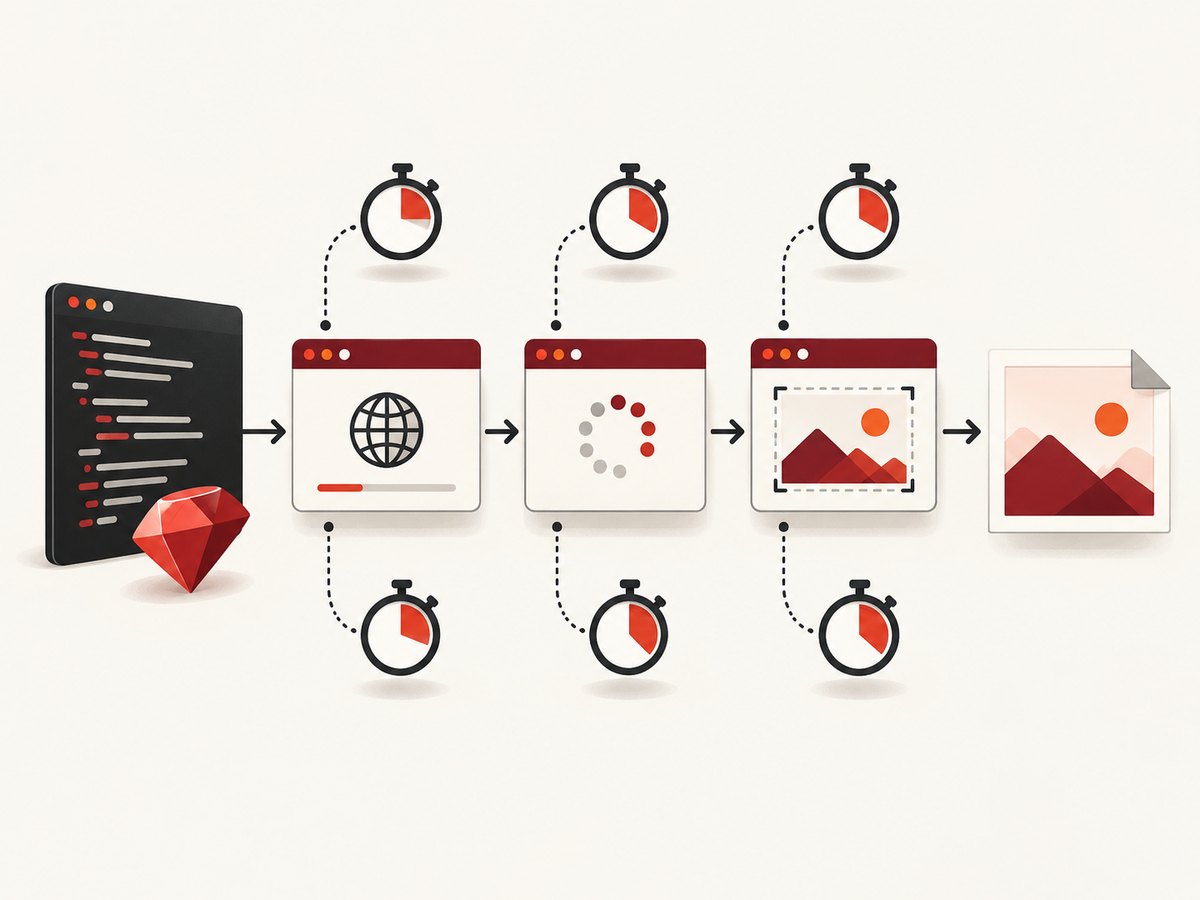
Bound slow screenshot jobs in Ruby by setting the timeout for the operation that is actually waiting: navigation, page readiness, remote WebDriver, or capture.

Set the timeout on the operation that is taking too long. With Ferrum, configure a page command timeout for navigation and page commands, then pass a separate timeout to screenshot if capture itself needs a bound. With Selenium Ruby, use driver.manage.timeouts.page_load for navigation; remote WebDriver communication has a separate HTTP-client timeout. A page-load timeout does not guarantee that an application has finished rendering or that a screenshot has completed.
Ferrum is a Ruby API for controlling Chrome. Its documented quick-start sequence separates navigation from screenshot saving, which is the right mental model for troubleshooting too. The code below sets explicit limits around those distinct stages. Check the Ferrum API for the version pinned in your bundle before relying on version-sensitive options.
1. Identify which timeout you need
A screenshot job is a sequence of operations, not one indivisible request. A slow result can come from the site, an explicit readiness wait, the browser protocol, or a remote driver connection.
| Operation | Ferrum | Selenium Ruby | What it bounds |
|---|---|---|---|
| Navigate to URL | Page command timeout | timeouts.page_load |
Waiting for the navigation command to finish |
| Wait for application state | Command timeout on page operations, or an application-level deadline | timeouts.script for async JavaScript; explicit wait condition separately |
The readiness check, not necessarily navigation |
| Talk to remote WebDriver | Depends on the remote setup | HTTP client open/read timeout | Communication between Ruby and the remote driver |
| Resolve selector or capture image | Command-level timeout where supported by the installed API | Driver command/transport limits apply | Finding target bounds or returning the screenshot result |
Do not assume one setting caps every stage. Selenium documents page-load and asynchronous-script timeouts independently, and its Ruby remote HTTP client has its own read timeout configuration. Ferrum’s page command timeout is used by page operations, while screenshot and PDF callers can take a command-level override. See the Ferrum project documentation, the Ferrum docs, and Selenium’s Ruby timeout API.
2. Ferrum: set a page timeout and a screenshot timeout
Install Ferrum in the project and ensure Chrome or Chromium is available to it. Ferrum’s quick start uses Ferrum::Browser.new, go_to, screenshot, and quit. The example below makes the stages and cleanup explicit. The constructor timeout key can vary by Ferrum version, so confirm the option name and signature against the gem version in Gemfile.lock.
# Gemfile
# gem "ferrum"

require "ferrum"

url = "https://example.com"
browser = Ferrum::Browser.new(timeout: 30)

begin
  page = browser.create_page

  # Bounds navigation and other page commands by the configured page timeout.
  page.go_to(url)

  # Optional: use a page-specific readiness condition, if the site exposes one.
  # This checks for a selector rather than guessing that a fixed sleep is enough.
  page.at_css("main")

  # Capture is a separate operation. Confirm :timeout support in your Ferrum
  # version; screenshot options and command-level overrides are version-sensitive.
  page.screenshot(path: "example.png", timeout: 45)
ensure
  browser.quit
end
The important parts are not the sample numbers; they are the separate boundaries and the ensure cleanup. A 30-second navigation limit and 45-second capture limit are examples, not universal recommendations. Choose limits from the application’s latency budget and measured behavior. If your Ferrum release does not accept timeout: in the constructor or screenshot call, consult its installed API reference and use the supported page timeout and command override syntax.
Ferrum options that affect screenshot timing
- Page command timeout: bounds page operations such as navigation and selector lookup, according to the configured page timeout.
- Command-level timeout: Ferrum documents that screenshot and PDF operations can take an override. Use it when capture has a different budget from navigation.
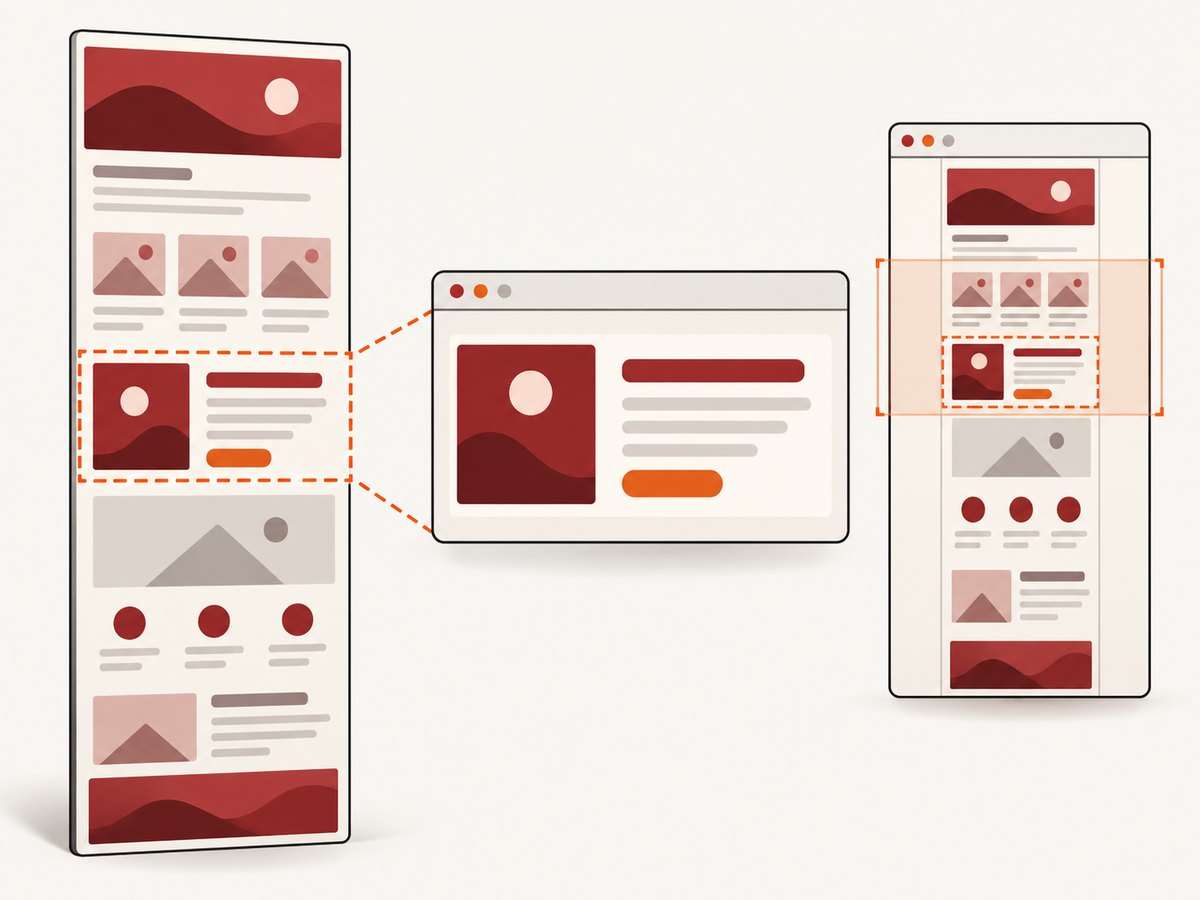
- Selector capture: selecting an element requires resolving its bounds before capture. A missing selector can therefore look like a screenshot hang or timeout.
- Full-page capture: may take longer and produce a larger result than a viewport screenshot. Set an appropriate capture budget.
- Readiness:** ensure the target content is rendered before capture. A completed navigation does not prove that client-side rendering, delayed images, or asynchronous data is ready.
Ferrum supports viewport and full-page capture, selector or area capture, output path and encoding, format, quality, scale, and background options. Those affect the output and sometimes the work required; verify exact argument names in the API for your pinned gem version.
3. Selenium Ruby: bound navigation separately
For Selenium, set page_load before navigating. It is a page navigation timeout, not a total deadline for a full screenshot pipeline.
require "selenium-webdriver"

driver = Selenium::WebDriver.for(:chrome)

begin
  driver.manage.timeouts.page_load = 30
  driver.navigate.to("https://example.com")

  # Add a page-specific readiness check when the page renders asynchronously.
  wait = Selenium::WebDriver::Wait.new(timeout: 10)
  wait.until { driver.find_element(css: "main").displayed? }

  driver.save_screenshot("example.png")
ensure
  driver.quit
end
Selenium’s Ruby API describes page_load as the time to wait for a page load before raising an error. It separately exposes a timeout for asynchronous scripts. If your code uses execute_async_script, configure that timeout for the script operation:
driver.manage.timeouts.script = 15

result = driver.execute_async_script(<<~JS)
  const done = arguments[arguments.length - 1];
  Promise.resolve(window.appReady).then(() => done(true));
JS
Use an application readiness signal that actually exists; window.appReady above is illustrative. If the page has no such signal, wait for a meaningful element or state instead of adding a long arbitrary sleep. A timeout can tell you that the condition did not arrive in time; it cannot make a page ready.
4. Remote Selenium: configure the transport timeout too
When Ruby talks to a remote Selenium server, the WebDriver command travels over HTTP. A page-load timeout and an HTTP read timeout protect different waits. Selenium’s Ruby bindings document configuring the remote HTTP client’s read timeout when building the driver. The exact construction API is version-sensitive; the current API documentation marks some HTTP classes private, so check the version used by your project before adopting this pattern.
require "selenium-webdriver"

http_client = Selenium::WebDriver::Remote::Http::Default.new(
  open_timeout: 10,
  read_timeout: 60
)

driver = Selenium::WebDriver.for(
  :remote,
  url: "http://selenium-host:4444",
  http_client: http_client
)

begin
  driver.manage.timeouts.page_load = 30
  driver.navigate.to("https://example.com")
  driver.save_screenshot("example.png")
ensure
  driver.quit
end
The sample host is a placeholder for your Selenium endpoint. A transport read timeout that is too short can interrupt a valid remote command; one that is too long can leave a worker occupied. Selenium’s Ruby HTTP client documentation describes open and read timeout parameters and notes that the class is private API.
5. Choose readiness conditions and screenshot mode
Timeouts bound waiting; readiness conditions decide when a useful screenshot can be taken. A page may report navigation complete while its frontend is still fetching data or swapping in images. Conversely, waiting for every network request to stop can be a poor fit for a page that keeps analytics or live connections open.
- Pick the state that matters. Examples include a main content element being visible, a known loading indicator disappearing, or an application-provided ready signal.
- Give that state a separate bounded wait. Selenium explicit waits and async script timeouts cover different mechanisms. For Ferrum, use page operations and the timeout behavior supported by your version.
- Capture only after the state is met. Keep the screenshot call separate so logs reveal whether navigation, readiness, selector lookup, or capture failed.
- Match capture mode to the goal. Viewport screenshots are generally smaller operations. Full-page screenshots, selector capture, and high scale may require more browser work or output handling.
- Save to a deterministic path and validate the file. A command returning is not the same as verifying that the intended image was written and can be opened.
Ferrum selector capture resolves the element’s bounds. If capturing a selector, verify that it exists after navigation and is not inside a frame or hidden state your code has not handled. For full-page images, account for long documents and lazy-loaded content: scrolling or application-specific loading may be needed before capture if below-the-fold elements are important.
6. A practical timeout budget
Build an overall job budget from the stages you permit, rather than giving every stage the entire worker deadline. For example, a job might allocate time for browser startup, navigation, readiness, and screenshot retrieval. Leave a small margin for cleanup and result persistence. If each stage can independently consume the whole job budget, the total runtime can greatly exceed the limit you intended.
| Budget component | Question to answer | Operational response |
|---|---|---|
| Browser startup | Did Chrome launch and attach? | Check executable availability, process health, and resource limits. |
| Navigation | Did the page load event complete? | Set Ferrum page command timeout or Selenium page-load timeout. |
| Readiness | Did the useful content appear? | Wait for a meaningful selector/state with its own limit. |
| Capture | Did the browser return image bytes? | Use a supported command timeout where available; watch full-page size and selector resolution. |
| Remote transport | Did Ruby receive the remote driver’s response? | Set the remote HTTP open/read limits appropriate to the environment. |
| Cleanup | Can the browser or driver be closed after failure? | Use ensure; record cleanup failures without hiding the original exception. |
Record elapsed time for each stage and the exception class, URL, browser version, library version, capture mode, and selector. Avoid logging credentials, cookies, or sensitive page contents. This makes it possible to distinguish a slow origin from a browser crash or an undersized transport timeout.
7. Troubleshooting common timeout failures
| Symptom | Likely cause | Fix |
|---|---|---|
| Navigation raises a timeout | Slow server, long redirects, open-ended loading, or a timeout set too low for the page | Confirm the URL and redirects; set the navigation timeout deliberately; where possible, use a readiness condition relevant to the content instead of requiring unrelated activity to finish. |
| Navigation succeeds but screenshot is blank or incomplete | Client rendering or data fetch continues after navigation | Wait for the page’s meaningful content state before capture; verify the selected viewport and URL. |
| Ferrum selector screenshot times out or errors | Selector never appears, matches no element, or its bounds cannot be resolved | Check the selector in the loaded DOM; wait for it explicitly; test a viewport screenshot to isolate selector lookup. |
| Screenshot call exceeds navigation limit | Capture has separate work, especially for full-page or scaled output | Use an appropriate command-level screenshot timeout if supported by your installed Ferrum version; reduce capture complexity if the use case permits. |
| Selenium remote command times out despite page-load setting | Ruby’s HTTP client stopped waiting for the remote response | Review the remote HTTP read timeout separately from page_load; verify server health and network latency. |
| Async script timeout | Callback or promise did not complete within the configured script limit | Make sure every path calls the completion callback, handle rejected promises, and set timeouts.script for this operation. |
| Browser process remains after an exception | Cleanup does not run on the failure path | Wrap work in begin/ensure and call quit or browser.quit. |
| Timeout option raises unknown keyword error | Example syntax does not match installed gem version | Check Gemfile.lock and the API docs for that exact release; Ferrum’s timeout constructor and method signatures can change. |
8. Performance, reliability, and cost considerations
A timeout is a reliability boundary, not a speed optimization. Increasing it can reduce false failures on slow pages, but it also occupies browser slots and workers longer. Decreasing it frees capacity sooner but may reject valid pages. Base values on observed stage durations and the maximum job latency your application can tolerate; the cited APIs do not establish a universal default that fits every driver or site.
- Keep browsers warm where architecture allows: browser startup is separate from page navigation, so measure it separately before deciding where time is being spent.
- Prefer the smallest capture that answers the task: a viewport image usually creates less work and output than an enormous full-page capture. Selector capture narrows the image but adds lookup and bounds resolution.
- Bound concurrency: too many simultaneous browser processes can increase memory pressure and make every capture slower. Use a queue and a concurrency limit based on available resources.
- Retry selectively: retry transient infrastructure failures with a capped attempt count and backoff. Do not automatically repeat deterministic failures such as an invalid selector or unsupported timeout option.
- Make retries safe: use unique output paths or overwrite deliberately, and ensure a retry cannot leave stale screenshots mistaken for fresh output.
- Track total cost: browser compute, worker occupancy, storage, and remote-driver capacity are part of the operational cost even when the Ruby libraries themselves are not priced per screenshot.
For a self-managed browser, you control the browser environment and its resource use, but must keep the browser, driver or protocol connection, queues, and cleanup healthy. When reliability requirements matter, report timeout failures as a distinct outcome rather than silently returning an old or partial image.
9. Or skip the browser setup
If your Ruby job only needs a screenshot artifact, ScreenshotNeo provides a website screenshot API: send one GET request with a URL and receive an image or PDF. Its API supports image formats including PNG, JPEG, and WebP. See the ScreenshotNeo API documentation for parameters and response handling.
require "net/http"
require "uri"

uri = URI("https://api.screenshotneo.com/v1/shot")
uri.query = URI.encode_www_form(
  access_key: ENV.fetch("SCREENSHOTNEO_API_KEY"),
  url: "https://example.com",
  format: "webp"
)

response = Net::HTTP.start(uri.host, uri.port, use_ssl: true, read_timeout: 90) do |http|
  http.get(uri.request_uri)
end

raise "ScreenshotNeo request failed: #{response.code}" unless response.is_a?(Net::HTTPSuccess)
File.binwrite("example.webp", response.body)
Cookie banners, popups, and chat widgets are removed before the shot; bot checks, blank pages, and failed loads are never billed. Its MCP server lets AI agents take screenshots, and 1,000 screenshots a month are free with no card; paid plans start at $5 for 3,000. Create a free ScreenshotNeo account.
10. FAQ
Does setting page-load timeout limit the entire screenshot job?
No. It bounds navigation. Readiness checks, remote HTTP communication, selector lookup, screenshot capture, and file writing can have separate waiting behavior.
Should I use Ferrum or Selenium for a Ruby screenshot script?
Start with the browser stack your project already uses. Ferrum controls Chrome directly through its protocol; Selenium fits projects already using WebDriver or a remote Selenium service. Compare the needed capture mode and timeout layer, and verify APIs against pinned versions.
What timeout value should I choose?
There is no universal value in the cited documentation. Set a per-stage budget based on the page’s observed behavior and your job deadline, then monitor timeout rates and latency.
Can a timeout guarantee a usable screenshot?
No. A timeout only limits how long an operation waits. To improve usefulness, verify a relevant page state before capturing and validate the resulting image.


